


Cracking the QR Code
Introductions


          Nancy
                  VP, Learning
                  Services
Kristen


                                 Who are you?

                  Sr. Learning
                  Designer
Today’s Agenda
• Welcome
   – What are QR codes?
   – How are they used?
• Let’s Play
   – The Search for the Perfect Book
• Lunch
• Tactical Talk
   –   Game debrief
   –   How can QR codes be used in training?
   –   Case study in success
   –   Create your own codes
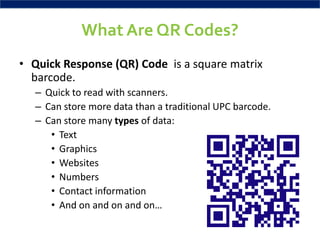
What Are QR Codes?
• Quick Response (QR) Code is a square matrix
  barcode.
  – Quick to read with scanners.
  – Can store more data than a traditional UPC barcode.
  – Can store many types of data:
     • Text
     • Graphics
     • Websites
     • Numbers
     • Contact information
     • And on and on and on…
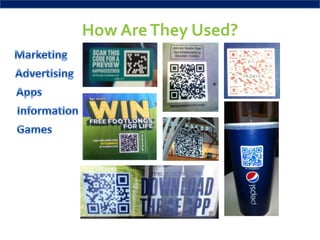
How Are They Used?
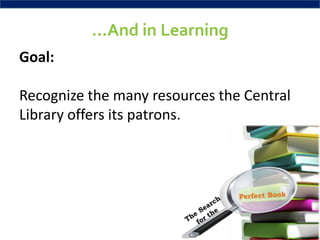
…And in Learning
Goal:

Recognize the many resources the Central
Library offers its patrons.
Today’s Agenda
• Welcome
   – What are QR codes?
   – How are they used?
• Let’s Play
   – The Search for the Perfect Book
• Lunch
• Tactical Talk
   –   Game debrief
   –   How can QR codes be used in training?
   –   Case study in success
   –   Create your own codes
How to Play
• Work with your partner to complete the quiz.
• Solve the clue and find the same color clue at the next
  stop.
• Make sure you have the right number clue – there are 11.
• Follow each clue to the next, until you reach the final
  destination.
• Retrieve the trophy or certificate to win.

 If you need help, ask the BLPer
 on each floor for assistance.
Today’s Agenda
• Welcome
   – What are QR codes?
   – How are they used?
• Let’s Play
   – The Search for the Perfect Book
• Lunch
• Tactical Talk
   –   Game debrief
   –   How can QR codes be used in training?
   –   Case study in success
   –   Create your own codes
Congratulations!
Goal
       Learning Goal                     Game Goal
• Recognize the many              • Locate all clues and
  resources a library offers.       assemble them to win the
                                    scavenger hunt.
Objectives
Learning Objectives       Game Objectives
•Identify common         •Review common
 library resources.       library resources,
•Determine which          collections, and
 resource to use in a     programs.
 given situation.        •Discover the best
•Use library resources    resource that
 to select material.      matches a given
                          need.
                         •Combine resources to
                          select the right library
                          material.
Case Study of Success
• Used in new product training to identify
  circumstances in which to use the product.
• Learners had to sort cards into circumstances when
  the product should be used versus circumstances
  when it was not the best choice.
Your Turn
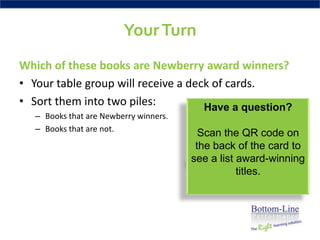
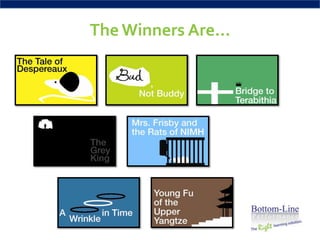
Which of these books are Newberry award winners?
• Your table group will receive a deck of cards.
• Sort them into two piles:          Have a question?
   – Books that are Newberry winners.
   – Books that are not.
                                          Scan the QR code on
                                         the back of the card to
                                        see a list award-winning
                                                   titles.
The Winners Are…
How Else Can We Use
QR Codes in Training?
Some Thoughts…
• The US Army uses codes – users scan the code on
  equipment and are taken to how-to videos and
  manuals.
• The NYPL created a game with codes that lets users
  review artifacts and build a story together.
• Alternate reality games at conferences use codes to
  disseminate clues to players.
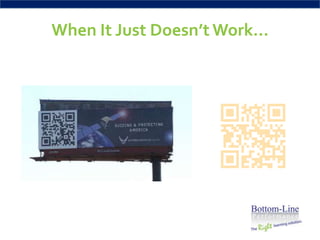
When It Just Doesn’t Work…
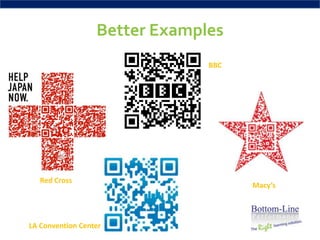
Better Examples
                               BBC


   Red Cross
                                     Macy’s


LA Convention Center
What Do You Want To Make?
• Decide what you need:
  Website – may want to use bit.ly
  Video
  Social Networking site
  Text
  Audio files
  Contact info (Vcard)
  Calendar invite
  Text message
  ...
How Do You Make a Code?
            • Create the content
              (text, website, etc.)
            • Copy the content
              into the QR
              generator:
              – QRstuff.com
              – QRcode.kaywa.com
              – goQR.me
Questions?
Have a Great Day!

Cracking the QR Code- Event Slides

  • 1.
  • 2.
    Introductions Nancy VP, Learning Services Kristen Who are you? Sr. Learning Designer
  • 3.
    Today’s Agenda • Welcome – What are QR codes? – How are they used? • Let’s Play – The Search for the Perfect Book • Lunch • Tactical Talk – Game debrief – How can QR codes be used in training? – Case study in success – Create your own codes
  • 4.
    What Are QRCodes? • Quick Response (QR) Code is a square matrix barcode. – Quick to read with scanners. – Can store more data than a traditional UPC barcode. – Can store many types of data: • Text • Graphics • Websites • Numbers • Contact information • And on and on and on…
  • 5.
  • 6.
    …And in Learning Goal: Recognizethe many resources the Central Library offers its patrons.
  • 7.
    Today’s Agenda • Welcome – What are QR codes? – How are they used? • Let’s Play – The Search for the Perfect Book • Lunch • Tactical Talk – Game debrief – How can QR codes be used in training? – Case study in success – Create your own codes
  • 8.
    How to Play •Work with your partner to complete the quiz. • Solve the clue and find the same color clue at the next stop. • Make sure you have the right number clue – there are 11. • Follow each clue to the next, until you reach the final destination. • Retrieve the trophy or certificate to win. If you need help, ask the BLPer on each floor for assistance.
  • 9.
    Today’s Agenda • Welcome – What are QR codes? – How are they used? • Let’s Play – The Search for the Perfect Book • Lunch • Tactical Talk – Game debrief – How can QR codes be used in training? – Case study in success – Create your own codes
  • 10.
  • 11.
    Goal Learning Goal Game Goal • Recognize the many • Locate all clues and resources a library offers. assemble them to win the scavenger hunt.
  • 12.
    Objectives Learning Objectives Game Objectives •Identify common •Review common library resources. library resources, •Determine which collections, and resource to use in a programs. given situation. •Discover the best •Use library resources resource that to select material. matches a given need. •Combine resources to select the right library material.
  • 13.
    Case Study ofSuccess • Used in new product training to identify circumstances in which to use the product. • Learners had to sort cards into circumstances when the product should be used versus circumstances when it was not the best choice.
  • 14.
    Your Turn Which ofthese books are Newberry award winners? • Your table group will receive a deck of cards. • Sort them into two piles: Have a question? – Books that are Newberry winners. – Books that are not. Scan the QR code on the back of the card to see a list award-winning titles.
  • 15.
  • 16.
    How Else CanWe Use QR Codes in Training?
  • 17.
    Some Thoughts… • TheUS Army uses codes – users scan the code on equipment and are taken to how-to videos and manuals. • The NYPL created a game with codes that lets users review artifacts and build a story together. • Alternate reality games at conferences use codes to disseminate clues to players.
  • 18.
    When It JustDoesn’t Work…
  • 19.
    Better Examples BBC Red Cross Macy’s LA Convention Center
  • 20.
    What Do YouWant To Make? • Decide what you need: Website – may want to use bit.ly Video Social Networking site Text Audio files Contact info (Vcard) Calendar invite Text message ...
  • 21.
    How Do YouMake a Code? • Create the content (text, website, etc.) • Copy the content into the QR generator: – QRstuff.com – QRcode.kaywa.com – goQR.me
  • 22.
  • 23.