N1QL : COUCHBASE 5.5 FEATURES
Couchbase Query & Indexing Team
AGENDA
02
03
N1QL & GSI Features in Spark (5.0)
N1QL & GSI Features in Vulcan (5.5)
01 N1QL Overview for newbees
1 N1QL: OVERVIEW
4
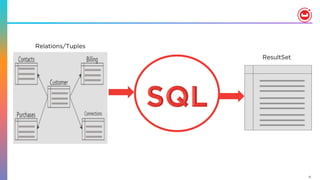
ResultSet
Relations/Tuples
5
{
"Name" : "Jane Smith",
"DOB" : "1990-01-30",
"Billing" : [
{
"type" : "visa",
"cardnum" :
"5827-2842-2847-3909",
"expiry" : "2019-03"
},
{
"type" : "master",
"cardnum" :
"6274-2842-2847-3909",
"expiry" : "2019-03"
}
],
"Connections" : [
{
"CustId" : "XYZ987",
"Name" : "Joe Smith"
},
{
"CustId" : "PQR823",
"Name" : "Dylan Smith"
}
{
"CustId" : "PQR823",
"Name" : "Dylan Smith"
}
],
"Purchases" : [
{ "id":12, item: "mac", "amt":
2823.52 }
{ "id":19, item: "ipad2", "amt":
623.52 }
]
}
LoyaltyInfo
Results
Orders
CUSTOMER
•  NoSQL systems provide specialized APIs
•  Key-Value get and set
•  Each task requires custom built program
•  Should test & maintain it
6
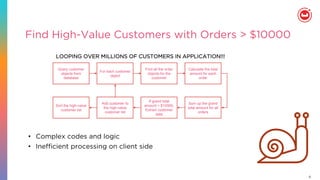
Find High-Value Customers with Orders > $10000
Query customer
objects from
database
•  Complex codes and logic
•  Inefficient processing on client side
For each customer
object
Find all the order
objects for the
customer
Calculate the total
amount for each
order
Sum up the grand
total amount for all
orders
If grand total
amount > $10000,
Extract customer
data
Add customer to
the high-value
customer list
Sort the high-value
customer list
LOOPING OVER MILLIONS OF CUSTOMERS IN APPLICATION!!!
7
{
"Name" : "Jane Smith",
"DOB" : "1990-01-30",
"Billing" : [
{
"type" : "visa",
"cardnum" :
"5827-2842-2847-3909",
"expiry" : "2019-03"
},
{
"type" : "master",
"cardnum" :
"6274-2842-2847-3909",
"expiry" : "2019-03"
}
],
"Connections" : [
{
"CustId" : "XYZ987",
"Name" : "Joe Smith"
},
{
"CustId" : "PQR823",
"Name" : "Dylan Smith"
}
{
"CustId" : "PQR823",
"Name" : "Dylan Smith"
}
],
"Purchases" : [
{ "id":12, item: "mac", "amt": 2823.52 }
{ "id":19, item: "ipad2", "amt": 623.52 }
]
}
LoyaltyInfo
ResultDocuments
Orders
CUSTOMER
8
N1QL = SQL + JSON
Give developers and enterprises an
expressive, powerful, and complete
language for querying, transforming, and
manipulating JSON data.
9
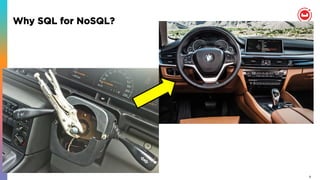
Why SQL for NoSQL?
10
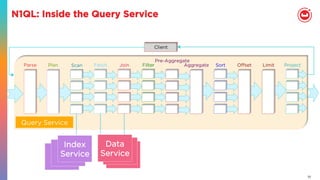
N1QL: Inside the Query Service
Client
FetchParse Plan Join Filter
Pre-Aggregate
Offset Limit ProjectSortAggregateScan
Query Service
Index
Service
Data
Service
11
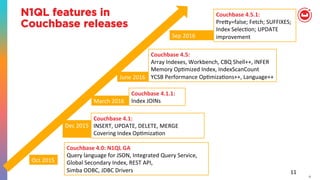
11	
Couchbase	4.0:	N1QL	GA	
Query	language	for	JSON,	Integrated	Query	Service,	
Global	Secondary	Index,	REST	API,	
Simba	ODBC,	JDBC	Drivers	
Couchbase	4.1:	
INSERT,	UPDATE,	DELETE,	MERGE	
Covering	Index	OpJmizaJon	
Couchbase	4.1.1:		
Index	JOINs	
Couchbase	4.5:		
Array	Indexes,	Workbench,	CBQ	Shell++,	INFER	
Memory	OpJmized	Index,	IndexScanCount	
YCSB	Performance	OpJmizaJons++,	Language++	
Couchbase	4.5.1:		
PreRy=false;	Fetch;	SUFFIXES;	
Index	SelecJon;	UPDATE	
improvement	
Oct	2015	
Dec	2015	
March	2016	
June	2016	
Sep	2016	
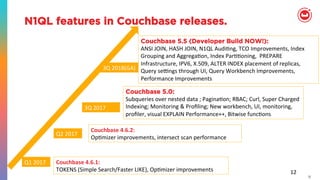
N1QL features in
Couchbase releases
12
N1QL features in Couchbase releases.
12	
Couchbase	4.6.1:	
TOKENS	(Simple	Search/Faster	LIKE),	OpJmizer	improvements	
Couchbase 5.0:
Subqueries	over	nested	data	;	PaginaJon;	RBAC;	Curl,	Super	Charged	
Indexing;	Monitoring	&	Profiling;	New	workbench,	UI,	monitoring,	
profiler,	visual	EXPLAIN	Performance++,	Bitwise	funcJons	
Q1	2017	
3Q	2017		
Couchbase	4.6.2:	
OpJmizer	improvements,	intersect	scan	performance	
Q2	2017	
Couchbase 5.5 (Developer Build NOW!):
ANSI	JOIN,	HASH	JOIN,	N1QL	AudiJng,	TCO	Improvements,	Index	
Grouping	and	AggregaJon,	Index	ParJJoning,		PREPARE	
Infrastructure,	IPV6,	X.509,	ALTER	INDEX	placement	of	replicas,		
Query	sehngs	through	UI,	Query	Workbench	Improvements,	
Performance	Improvements	
3Q	2018(GA)
2 N1QL: FEATURES IN 5.0
14
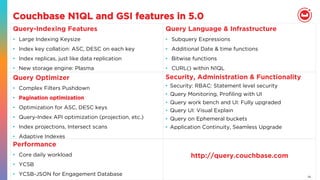
Couchbase N1QL and GSI features in 5.0
Query-Indexing Features
•  Large Indexing Keysize
•  Index key collation: ASC, DESC on each key
•  Index replicas, just like data replication
•  New storage engine: Plasma
Query Language & Infrastructure
•  Subquery Expressions
•  Additional Date & time functions
•  Bitwise functions
•  CURL() within N1QL
Query Optimizer
•  Complex Filters Pushdown
•  Pagination optimization
•  Optimization for ASC, DESC keys
•  Query-Index API optimization (projection, etc.)
•  Index projections, Intersect scans
•  Adaptive Indexes
Security, Administration & Functionality
•  Security: RBAC: Statement level security
•  Query Monitoring, Profiling with UI
•  Query work bench and UI: Fully upgraded
•  Query UI: Visual Explain
•  Query on Ephemeral buckets
•  Application Continuity, Seamless Upgrade
Performance
•  Core daily workload
•  YCSB
•  YCSB-JSON for Engagement Database
http://query.couchbase.com
3 FEATURES IN VULCAN(5.5)
16
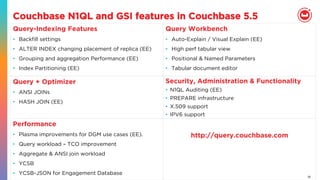
Couchbase N1QL and GSI features in Couchbase 5.5
Query-Indexing Features
•  Backfill settings
•  ALTER INDEX changing placement of replica (EE)
•  Grouping and aggregation Performance (EE)
•  Index Partitioning (EE)
Query Workbench
•  Auto-Explain / Visual Explain (EE)
•  High perf tabular view
•  Positional & Named Parameters
•  Tabular document editor
Query + Optimizer
•  ANSI JOINs
•  HASH JOIN (EE)
Security, Administration & Functionality
•  N1QL Auditing (EE)
•  PREPARE infrastructure
•  X.509 support
•  IPV6 support
Performance
•  Plasma improvements for DGM use cases (EE).
•  Query workload – TCO improvement
•  Aggregate & ANSI join workload
•  YCSB
•  YCSB-JSON for Engagement Database
http://query.couchbase.com
17
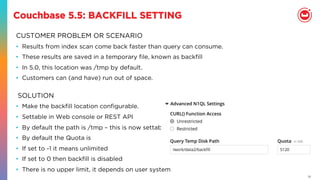
Couchbase 5.5: BACKFILL SETTING
CUSTOMER PROBLEM OR SCENARIO
•  Results from index scan come back faster than query can consume.
•  These results are saved in a temporary file, known as backfill
•  In 5.0, this location was /tmp by default.
•  Customers can (and have) run out of space.
•  Make the backfill location configurable.
•  Settable in Web console or REST API
•  By default the path is /tmp – this is now settable
•  By default the Quota is
•  If set to -1 it means unlimited
•  If set to 0 then backfill is disabled
•  There is no upper limit, it depends on user system
SOLUTION
18
Couchbase 5.5: ALTER INDEX
CUSTOMER PROBLEM OR SCENARIO
•  An imbalance occurs due to a particular index growing faster than expected and
is needed on a different node.
•  An imbalance occurs due to a cluster of indexes being dropped on a single
node.
•  A machine is scheduled for removal, so its indexes need to move off its current
node.
•  The automated process of rebalancing does not give the expected results.
SOLUTION
Alter Index support to change the placement of an existing index or replica among different GSI
nodes.
For example, if a node fails and you need to move it from node 172.23.130.24 to node
172.23.130.25
ALTER INDEX `travel-sample`.idx1 WITH {"action":"move","nodes": ["172.23.120.25:8091"]}
19
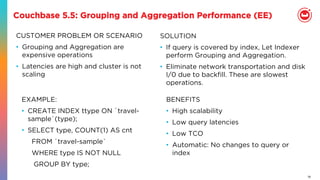
Couchbase 5.5: Grouping and Aggregation Performance (EE)
CUSTOMER PROBLEM OR SCENARIO
•  Grouping and Aggregation are
expensive operations
•  Latencies are high and cluster is not
scaling
BENEFITS
•  High scalability
•  Low query latencies
•  Low TCO
•  Automatic: No changes to query or
index
SOLUTION
•  If query is covered by index, Let Indexer
perform Grouping and Aggregation.
•  Eliminate network transportation and disk
I/0 due to backfill. These are slowest
operations.
EXAMPLE:
•  CREATE INDEX ttype ON `travel-
sample`(type);
•  SELECT type, COUNT(1) AS cnt
FROM `travel-sample`
WHERE type IS NOT NULL
GROUP BY type;
20
Couchbase 5.5: Index Partitioning
Manageability: Scale out GSI Index
create index route on bucket(airline, flight, source_airport, destination_airport)
partition by hash(airline)
•  Scale out partitions as cluster size grows
•  Partition key must be immutable -- meta().id, immutable secondary key (e.g.
airline)
Performance: Partition Elimination
Select flight from bucket where airline is not missing and source_airport = “SFO”
•  Scatter-gather across all partitions
Select flight from bucket where airline in [“UA”, “AA”] and source_airport = “SFO”
•  Partition Elimination when predicate contains partition key : Only scan the
partitions specified in predicate for faster range query response
Performance: Parallelize Aggregate Scan
Select count(flight) from bucket where airline is not missing group by
source_airport, destination_airport
•  Ability to parallelize scan on aggregate query across partitions
21
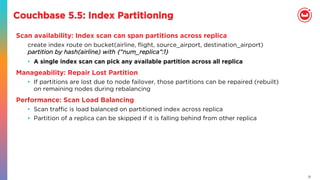
Couchbase 5.5: Index Partitioning
Scan availability: Index scan can span partitions across replica
create index route on bucket(airline, flight, source_airport, destination_airport)
partition by hash(airline) with {“num_replica”:1}
•  A single index scan can pick any available partition across all replica
Manageability: Repair Lost Partition
•  If partitions are lost due to node failover, those partitions can be repaired (rebuilt)
on remaining nodes during rebalancing
Performance: Scan Load Balancing
•  Scan traffic is load balanced on partitioned index across replica
•  Partition of a replica can be skipped if it is falling behind from other replica
22
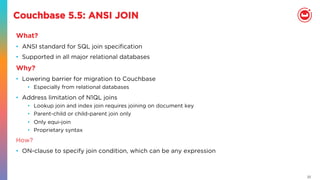
Couchbase 5.5: ANSI JOIN
What?
•  ANSI standard for SQL join specification
•  Supported in all major relational databases
Why?
•  Lowering barrier for migration to Couchbase
•  Especially from relational databases
•  Address limitation of N1QL joins
•  Lookup join and index join requires joining on document key
•  Parent-child or child-parent join only
•  Only equi-join
•  Proprietary syntax
How?
•  ON-clause to specify join condition, which can be any expression
23
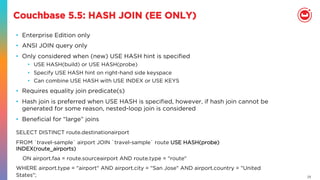
Couchbase 5.5: HASH JOIN (EE ONLY)
•  Enterprise Edition only
•  ANSI JOIN query only
•  Only considered when (new) USE HASH hint is specified
•  USE HASH(build) or USE HASH(probe)
•  Specify USE HASH hint on right-hand side keyspace
•  Can combine USE HASH with USE INDEX or USE KEYS
•  Requires equality join predicate(s)
•  Hash join is preferred when USE HASH is specified, however, if hash join cannot be
generated for some reason, nested-loop join is considered
•  Beneficial for “large” joins
SELECT DISTINCT route.destinationairport
FROM `travel-sample` airport JOIN `travel-sample` route USE HASH(probe)
INDEX(route_airports)
    ON airport.faa = route.sourceairport AND route.type = "route"
WHERE airport.type = "airport" AND airport.city = "San Jose" AND airport.country = "United
States";
24
Couchbase 5.5: Query Workbench Improvements
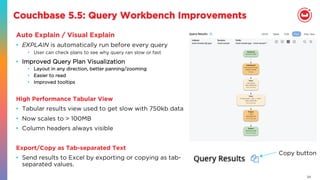
Auto Explain / Visual Explain
•  EXPLAIN is automatically run before every query
•  User can check plans to see why query ran slow or fast
•  Improved Query Plan Visualization
•  Layout in any direction, better panning/zooming
•  Easier to read
•  Improved tooltips
High Performance Tabular View
•  Tabular results view used to get slow with 750kb data
•  Now scales to > 100MB
•  Column headers always visible
Export/Copy as Tab-separated Text
•  Send results to Excel by exporting or copying as tab-
separated values.
Copy button
25
Couchbase 5.5: Query Workbench Improvements
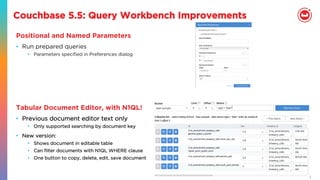
Positional and Named Parameters
•  Run prepared queries
•  Parameters specified in Preferences dialog
Tabular Document Editor, with N1QL!
•  Previous document editor text only
•  Only supported searching by document key
•  New version:
•  Shows document in editable table
•  Can filter documents with N1QL WHERE clause
•  One button to copy, delete, edit, save document
26
Couchbase 5.5: N1QL Auditing
•  Problem: no idea who is doing what in the system.
•  Solution: N1QL auditing
•  Auditing available for all statement types
•  SELECT, INSERT, UPDATE, …
•  Auditing also available for all API endpoints of query engine.
•  /admin/stats, /admin/config, /admin/prepareds, …
•  Configurable from UI
•  Security/Audit tab
•  Selectable
•  Choose what query types to audit
•  Whitelist of trusted users who will not be audited
•  Cost varies depending on query type and how much to audit
•  Worst case: many small queries, everything audited (approx 20% throughput loss)
27
Vulcan Features : Prepared Statement
•  Prepared statements now automatically distributed across
N1QL nodes
•  Both in push and pull configuration
•  N1QL service monitors resource usage prior of execution
•  Statements silently prepared again if indexes or keyspaces change
•  …and automatically distributed to other nodes if reprepared
28
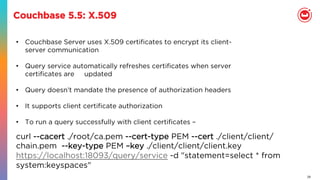
Couchbase 5.5: X.509
•  Couchbase Server uses X.509 certificates to encrypt its client-
server communication
•  Query service automatically refreshes certificates when server
certificates are updated
•  Query doesn’t mandate the presence of authorization headers
•  It supports client certificate authorization
•  To run a query successfully with client certificates –
curl --cacert ./root/ca.pem --cert-type PEM --cert ./client/client/
chain.pem --key-type PEM –key ./client/client/client.key 
https://localhost:18093/query/service -d "statement=select * from
system:keyspaces"
29
Couchbase 5.5: IPv6
•  Make query IPv6 compliant.
•  Server passes in --ipv6 to query which takes the value true or false. This
determines the mode in which the query service needs to operate. The
default value is false (IPv4).
•  IPv6 equivalents of 127.0.0.1 and 0.0.0.0 is ‘::1’ and ‘::’ respectively.
•  Construction of URLs
•  If we are using hostnames or fully qualified domain names there will be
no difference.
•  For constructing URLs with raw IPv6 addresses –
•  the IPv6 address must be enclosed within ‘[‘ and ‘]’ brackets.  When we
construct urls using localhost for example. For example:
http://[::1]:8091/pools/default
•  CBQ shell also supports connection to IPV6 addresses.
30
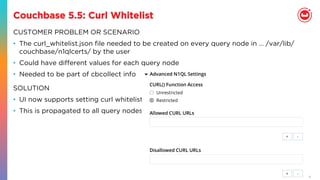
Couchbase 5.5: Curl Whitelist
CUSTOMER PROBLEM OR SCENARIO
•  The curl_whitelist.json file needed to be created on every query node in … /var/lib/
couchbase/n1qlcerts/ by the user
•  Could have different values for each query node
•  Needed to be part of cbcollect info
SOLUTION
•  UI now supports setting curl whitelist.
•  This is propagated to all query nodes
31
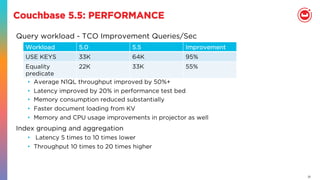
Couchbase 5.5: PERFORMANCE
Query workload - TCO Improvement Queries/Sec
•  Average N1QL throughput improved by 50%+
•  Latency improved by 20% in performance test bed
•  Memory consumption reduced substantially
•  Faster document loading from KV
•  Memory and CPU usage improvements in projector as well
Index grouping and aggregation
•  Latency 5 times to 10 times lower
•  Throughput 10 times to 20 times higher
Workload 5.0 5.5 Improvement
USE KEYS 33K 64K 95%
Equality
predicate
22K 33K 55%
!
DOWNLOAD 5.5 DB BUILD
HTTP://COUCHBASE.COM
READ:
DOCS.COUCHBASE.COM
BLOG.COUCHBASE.COM

Couchbase 5.5: N1QL and Indexing features

  • 1.
    N1QL : COUCHBASE5.5 FEATURES Couchbase Query & Indexing Team
  • 2.
    AGENDA 02 03 N1QL & GSIFeatures in Spark (5.0) N1QL & GSI Features in Vulcan (5.5) 01 N1QL Overview for newbees
  • 3.
  • 4.
  • 5.
    5 { "Name" : "JaneSmith", "DOB" : "1990-01-30", "Billing" : [ { "type" : "visa", "cardnum" : "5827-2842-2847-3909", "expiry" : "2019-03" }, { "type" : "master", "cardnum" : "6274-2842-2847-3909", "expiry" : "2019-03" } ], "Connections" : [ { "CustId" : "XYZ987", "Name" : "Joe Smith" }, { "CustId" : "PQR823", "Name" : "Dylan Smith" } { "CustId" : "PQR823", "Name" : "Dylan Smith" } ], "Purchases" : [ { "id":12, item: "mac", "amt": 2823.52 } { "id":19, item: "ipad2", "amt": 623.52 } ] } LoyaltyInfo Results Orders CUSTOMER •  NoSQL systems provide specialized APIs •  Key-Value get and set •  Each task requires custom built program •  Should test & maintain it
  • 6.
    6 Find High-Value Customerswith Orders > $10000 Query customer objects from database •  Complex codes and logic •  Inefficient processing on client side For each customer object Find all the order objects for the customer Calculate the total amount for each order Sum up the grand total amount for all orders If grand total amount > $10000, Extract customer data Add customer to the high-value customer list Sort the high-value customer list LOOPING OVER MILLIONS OF CUSTOMERS IN APPLICATION!!!
  • 7.
    7 { "Name" : "JaneSmith", "DOB" : "1990-01-30", "Billing" : [ { "type" : "visa", "cardnum" : "5827-2842-2847-3909", "expiry" : "2019-03" }, { "type" : "master", "cardnum" : "6274-2842-2847-3909", "expiry" : "2019-03" } ], "Connections" : [ { "CustId" : "XYZ987", "Name" : "Joe Smith" }, { "CustId" : "PQR823", "Name" : "Dylan Smith" } { "CustId" : "PQR823", "Name" : "Dylan Smith" } ], "Purchases" : [ { "id":12, item: "mac", "amt": 2823.52 } { "id":19, item: "ipad2", "amt": 623.52 } ] } LoyaltyInfo ResultDocuments Orders CUSTOMER
  • 8.
    8 N1QL = SQL+ JSON Give developers and enterprises an expressive, powerful, and complete language for querying, transforming, and manipulating JSON data.
  • 9.
  • 10.
    10 N1QL: Inside theQuery Service Client FetchParse Plan Join Filter Pre-Aggregate Offset Limit ProjectSortAggregateScan Query Service Index Service Data Service
  • 11.
  • 12.
    12 N1QL features inCouchbase releases. 12 Couchbase 4.6.1: TOKENS (Simple Search/Faster LIKE), OpJmizer improvements Couchbase 5.0: Subqueries over nested data ; PaginaJon; RBAC; Curl, Super Charged Indexing; Monitoring & Profiling; New workbench, UI, monitoring, profiler, visual EXPLAIN Performance++, Bitwise funcJons Q1 2017 3Q 2017 Couchbase 4.6.2: OpJmizer improvements, intersect scan performance Q2 2017 Couchbase 5.5 (Developer Build NOW!): ANSI JOIN, HASH JOIN, N1QL AudiJng, TCO Improvements, Index Grouping and AggregaJon, Index ParJJoning, PREPARE Infrastructure, IPV6, X.509, ALTER INDEX placement of replicas, Query sehngs through UI, Query Workbench Improvements, Performance Improvements 3Q 2018(GA)
  • 13.
  • 14.
    14 Couchbase N1QL andGSI features in 5.0 Query-Indexing Features •  Large Indexing Keysize •  Index key collation: ASC, DESC on each key •  Index replicas, just like data replication •  New storage engine: Plasma Query Language & Infrastructure •  Subquery Expressions •  Additional Date & time functions •  Bitwise functions •  CURL() within N1QL Query Optimizer •  Complex Filters Pushdown •  Pagination optimization •  Optimization for ASC, DESC keys •  Query-Index API optimization (projection, etc.) •  Index projections, Intersect scans •  Adaptive Indexes Security, Administration & Functionality •  Security: RBAC: Statement level security •  Query Monitoring, Profiling with UI •  Query work bench and UI: Fully upgraded •  Query UI: Visual Explain •  Query on Ephemeral buckets •  Application Continuity, Seamless Upgrade Performance •  Core daily workload •  YCSB •  YCSB-JSON for Engagement Database http://query.couchbase.com
  • 15.
    3 FEATURES INVULCAN(5.5)
  • 16.
    16 Couchbase N1QL andGSI features in Couchbase 5.5 Query-Indexing Features •  Backfill settings •  ALTER INDEX changing placement of replica (EE) •  Grouping and aggregation Performance (EE) •  Index Partitioning (EE) Query Workbench •  Auto-Explain / Visual Explain (EE) •  High perf tabular view •  Positional & Named Parameters •  Tabular document editor Query + Optimizer •  ANSI JOINs •  HASH JOIN (EE) Security, Administration & Functionality •  N1QL Auditing (EE) •  PREPARE infrastructure •  X.509 support •  IPV6 support Performance •  Plasma improvements for DGM use cases (EE). •  Query workload – TCO improvement •  Aggregate & ANSI join workload •  YCSB •  YCSB-JSON for Engagement Database http://query.couchbase.com
  • 17.
    17 Couchbase 5.5: BACKFILLSETTING CUSTOMER PROBLEM OR SCENARIO •  Results from index scan come back faster than query can consume. •  These results are saved in a temporary file, known as backfill •  In 5.0, this location was /tmp by default. •  Customers can (and have) run out of space. •  Make the backfill location configurable. •  Settable in Web console or REST API •  By default the path is /tmp – this is now settable •  By default the Quota is •  If set to -1 it means unlimited •  If set to 0 then backfill is disabled •  There is no upper limit, it depends on user system SOLUTION
  • 18.
    18 Couchbase 5.5: ALTERINDEX CUSTOMER PROBLEM OR SCENARIO •  An imbalance occurs due to a particular index growing faster than expected and is needed on a different node. •  An imbalance occurs due to a cluster of indexes being dropped on a single node. •  A machine is scheduled for removal, so its indexes need to move off its current node. •  The automated process of rebalancing does not give the expected results. SOLUTION Alter Index support to change the placement of an existing index or replica among different GSI nodes. For example, if a node fails and you need to move it from node 172.23.130.24 to node 172.23.130.25 ALTER INDEX `travel-sample`.idx1 WITH {"action":"move","nodes": ["172.23.120.25:8091"]}
  • 19.
    19 Couchbase 5.5: Groupingand Aggregation Performance (EE) CUSTOMER PROBLEM OR SCENARIO •  Grouping and Aggregation are expensive operations •  Latencies are high and cluster is not scaling BENEFITS •  High scalability •  Low query latencies •  Low TCO •  Automatic: No changes to query or index SOLUTION •  If query is covered by index, Let Indexer perform Grouping and Aggregation. •  Eliminate network transportation and disk I/0 due to backfill. These are slowest operations. EXAMPLE: •  CREATE INDEX ttype ON `travel- sample`(type); •  SELECT type, COUNT(1) AS cnt FROM `travel-sample` WHERE type IS NOT NULL GROUP BY type;
  • 20.
    20 Couchbase 5.5: IndexPartitioning Manageability: Scale out GSI Index create index route on bucket(airline, flight, source_airport, destination_airport) partition by hash(airline) •  Scale out partitions as cluster size grows •  Partition key must be immutable -- meta().id, immutable secondary key (e.g. airline) Performance: Partition Elimination Select flight from bucket where airline is not missing and source_airport = “SFO” •  Scatter-gather across all partitions Select flight from bucket where airline in [“UA”, “AA”] and source_airport = “SFO” •  Partition Elimination when predicate contains partition key : Only scan the partitions specified in predicate for faster range query response Performance: Parallelize Aggregate Scan Select count(flight) from bucket where airline is not missing group by source_airport, destination_airport •  Ability to parallelize scan on aggregate query across partitions
  • 21.
    21 Couchbase 5.5: IndexPartitioning Scan availability: Index scan can span partitions across replica create index route on bucket(airline, flight, source_airport, destination_airport) partition by hash(airline) with {“num_replica”:1} •  A single index scan can pick any available partition across all replica Manageability: Repair Lost Partition •  If partitions are lost due to node failover, those partitions can be repaired (rebuilt) on remaining nodes during rebalancing Performance: Scan Load Balancing •  Scan traffic is load balanced on partitioned index across replica •  Partition of a replica can be skipped if it is falling behind from other replica
  • 22.
    22 Couchbase 5.5: ANSIJOIN What? •  ANSI standard for SQL join specification •  Supported in all major relational databases Why? •  Lowering barrier for migration to Couchbase •  Especially from relational databases •  Address limitation of N1QL joins •  Lookup join and index join requires joining on document key •  Parent-child or child-parent join only •  Only equi-join •  Proprietary syntax How? •  ON-clause to specify join condition, which can be any expression
  • 23.
    23 Couchbase 5.5: HASHJOIN (EE ONLY) •  Enterprise Edition only •  ANSI JOIN query only •  Only considered when (new) USE HASH hint is specified •  USE HASH(build) or USE HASH(probe) •  Specify USE HASH hint on right-hand side keyspace •  Can combine USE HASH with USE INDEX or USE KEYS •  Requires equality join predicate(s) •  Hash join is preferred when USE HASH is specified, however, if hash join cannot be generated for some reason, nested-loop join is considered •  Beneficial for “large” joins SELECT DISTINCT route.destinationairport FROM `travel-sample` airport JOIN `travel-sample` route USE HASH(probe) INDEX(route_airports)     ON airport.faa = route.sourceairport AND route.type = "route" WHERE airport.type = "airport" AND airport.city = "San Jose" AND airport.country = "United States";
  • 24.
    24 Couchbase 5.5: QueryWorkbench Improvements Auto Explain / Visual Explain •  EXPLAIN is automatically run before every query •  User can check plans to see why query ran slow or fast •  Improved Query Plan Visualization •  Layout in any direction, better panning/zooming •  Easier to read •  Improved tooltips High Performance Tabular View •  Tabular results view used to get slow with 750kb data •  Now scales to > 100MB •  Column headers always visible Export/Copy as Tab-separated Text •  Send results to Excel by exporting or copying as tab- separated values. Copy button
  • 25.
    25 Couchbase 5.5: QueryWorkbench Improvements Positional and Named Parameters •  Run prepared queries •  Parameters specified in Preferences dialog Tabular Document Editor, with N1QL! •  Previous document editor text only •  Only supported searching by document key •  New version: •  Shows document in editable table •  Can filter documents with N1QL WHERE clause •  One button to copy, delete, edit, save document
  • 26.
    26 Couchbase 5.5: N1QLAuditing •  Problem: no idea who is doing what in the system. •  Solution: N1QL auditing •  Auditing available for all statement types •  SELECT, INSERT, UPDATE, … •  Auditing also available for all API endpoints of query engine. •  /admin/stats, /admin/config, /admin/prepareds, … •  Configurable from UI •  Security/Audit tab •  Selectable •  Choose what query types to audit •  Whitelist of trusted users who will not be audited •  Cost varies depending on query type and how much to audit •  Worst case: many small queries, everything audited (approx 20% throughput loss)
  • 27.
    27 Vulcan Features :Prepared Statement •  Prepared statements now automatically distributed across N1QL nodes •  Both in push and pull configuration •  N1QL service monitors resource usage prior of execution •  Statements silently prepared again if indexes or keyspaces change •  …and automatically distributed to other nodes if reprepared
  • 28.
    28 Couchbase 5.5: X.509 • Couchbase Server uses X.509 certificates to encrypt its client- server communication •  Query service automatically refreshes certificates when server certificates are updated •  Query doesn’t mandate the presence of authorization headers •  It supports client certificate authorization •  To run a query successfully with client certificates – curl --cacert ./root/ca.pem --cert-type PEM --cert ./client/client/ chain.pem --key-type PEM –key ./client/client/client.key  https://localhost:18093/query/service -d "statement=select * from system:keyspaces"
  • 29.
    29 Couchbase 5.5: IPv6 • Make query IPv6 compliant. •  Server passes in --ipv6 to query which takes the value true or false. This determines the mode in which the query service needs to operate. The default value is false (IPv4). •  IPv6 equivalents of 127.0.0.1 and 0.0.0.0 is ‘::1’ and ‘::’ respectively. •  Construction of URLs •  If we are using hostnames or fully qualified domain names there will be no difference. •  For constructing URLs with raw IPv6 addresses – •  the IPv6 address must be enclosed within ‘[‘ and ‘]’ brackets.  When we construct urls using localhost for example. For example: http://[::1]:8091/pools/default •  CBQ shell also supports connection to IPV6 addresses.
  • 30.
    30 Couchbase 5.5: CurlWhitelist CUSTOMER PROBLEM OR SCENARIO •  The curl_whitelist.json file needed to be created on every query node in … /var/lib/ couchbase/n1qlcerts/ by the user •  Could have different values for each query node •  Needed to be part of cbcollect info SOLUTION •  UI now supports setting curl whitelist. •  This is propagated to all query nodes
  • 31.
    31 Couchbase 5.5: PERFORMANCE Queryworkload - TCO Improvement Queries/Sec •  Average N1QL throughput improved by 50%+ •  Latency improved by 20% in performance test bed •  Memory consumption reduced substantially •  Faster document loading from KV •  Memory and CPU usage improvements in projector as well Index grouping and aggregation •  Latency 5 times to 10 times lower •  Throughput 10 times to 20 times higher Workload 5.0 5.5 Improvement USE KEYS 33K 64K 95% Equality predicate 22K 33K 55%
  • 32.
    ! DOWNLOAD 5.5 DBBUILD HTTP://COUCHBASE.COM READ: DOCS.COUCHBASE.COM BLOG.COUCHBASE.COM