Distributed System
Sanjivani Rural Education Society’s
Sanjivani College of Engineering, Kopargaon-423603
(An Autonomous Institute Affiliated to Savitribai Phule Pune University, Pune)
NAAC ‘A’ Grade Accredited, ISO 9001:2015 Certified
Department of Information Technology
(NBA Accredited)
Dr. R. D. Chintamani
Asst. Prof.
Unit –II
MIDDLEWARE
3
CORBA
Stands for Common Object Request Broker Architecture.
It is a specification for creating distributed objects and
NOT a programming language.
It promotes design of applications as a set of cooperating
objects
Clients are isolated from servers by interface.
CORBA objects run on any platform, can be located
anywhere on the network and can be written in any
language that has IDL mapping.
4
2-19
CORBA
5
CORBAARCHITECTURE
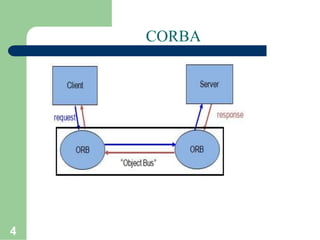
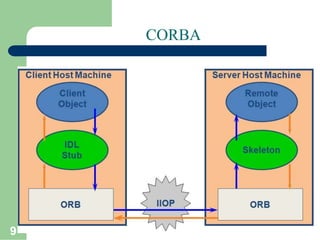
Object Request Broker is an Object Manager in CORBA.
It is present on the client side as well as server side (allows agents
to act as
On client side the ORB is responsible for
– accepting requests for a remote object
– finding implementation of the object
– accepting client-side reference to the remote object(converted to
a language specific form, e.g., a Java stub object)
– routing client method calls through the object reference to the
object implementation.
6
CORBAARCHITECTURE
On server side the ORB
– lets object servers register new objects
– receives requests from the client ORB
– uses object’s skeleton interface to invoke
object’s activation method
– creates reference for new object and sends it
back to client.
Between the ORBs, Internet Inter-ORB Protocol
is used for communication.
7
CORBA
A CORBA (Common Object Request Broker Architecture)
application is
developed using IDL (Interface Definition Language).
• IDL is used to define interfaces and the Java IDL compiler
generates skeletoncode.
CORBA technology is an integral part of the Java platform. It
consists of an Object Request Broker (ORB), APIs for the RMI
programming model, and APIs for the IDL programming model.
The Java CORBA ORB supports both the RMI and IDL
programming models.
• We use IDL programming model in this example.
8
CORBA
IDL is Interface Definition Language which defines protocol to
access objects.
Stub lives on client and pretends to be remote object
Skeleton lives on server , receives requests from stub, talks to true
remote object and delivers response to stub.
9
CORBA
10
JAVA IDL-USING CORBA FROM JAVA
Java – IDL is a technology for distributed objects -- that is, objects
interacting on different platforms across a network.
Translates IDL concepts into Java Language Constructs.
Java IDL supports distributed objects written entirely in the Java
programming language.
Java IDL enables objects to interact regardless of whether they're
written in the Java programming language or another language
such as C, C++.
This is possible because Java IDL is based on the Common Object
Request Brokerage Architecture (CORBA), an industry-standard
distributed objectmodel.
Each language that supports CORBA has its own IDL mapping--
and as its name implies, Java IDL supports the mapping for Java.
11
JAVA IDL-USING CORBA FROM JAVA
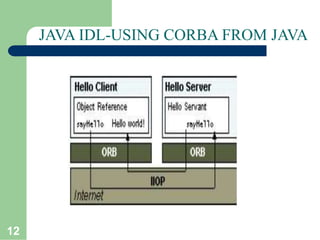
To support interaction between objects in separate programs, Java
IDL provides an Object Request Broker, or ORB.
The ORB is a class library that enables low-level communication
between Java IDL applications and other CORBA-compliant
applications.
On the client side, the application includes a reference for the
remote object. The object reference has a stub method, which is a
stand-in for the method being called remotely.
• The stub is actually wired into the ORB, so that calling it invokes
the ORB's connection capabilities, which forwards the invocation
to the server
12
JAVA IDL-USING CORBA FROM JAVA
13
JAVA IDL-USING CORBA FROM JAVA
On the server side, the ORB uses skeleton code to translate the
remote invocation into a method call on the local object. The
skeleton translates the call and any parameters to their
implementation-specific format and calls the method being
invoked.
When the method returns, the skeleton code transforms results or
errors, and sends them back to the client via the ORBs. Between
the ORBs, communication proceeds by means of IIOP.
14
BUILDING A CORBA DISTRIBUTED APPLICATION
USING JAVA IDL
1.Define the remote interface:
Define the interface for the remote object using Interface Definition
Langauge (IDL).
Use IDL instead of the Java language because the idlj compiler
automatically maps from IDL, generating all Java language stub and
skeleton source files, along with the infrastructure code for connecting to
the ORB.
1.1 Writing the IDL file:
• J2SDK v1.3.0 above provides the Application Programming Interface
(API) and Object Request Broker (ORB) needed to enable CORBA-
based distributed object interaction, as well as the idlj compiler.
• The idlj compiler uses the IDL-to-Java mapping to convert IDL
interface definitions to corresponding Java interfaces, classes, and
methods, which an then be used to implement the client and server code.
15
BUILDING A CORBA DISTRIBUTED APPLICATION
USING JAVA IDL
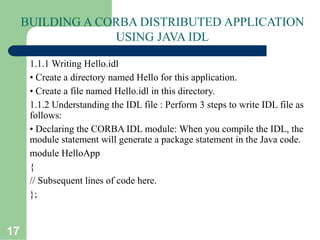
1.1.1 Writing Hello.idl
• Create a directory named Hello for this application.
• Create a file named Hello.idl in this directory.
1.1.2 Understanding the IDL file : Perform 3 steps to write IDL file as
follows:
• Declaring the CORBA IDL module: When you compile the IDL, the
module statement will generate a package statement in the Java code.
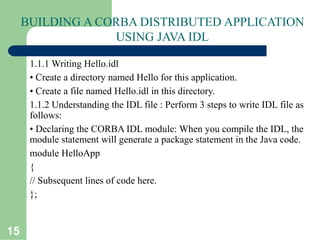
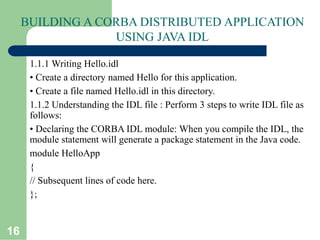
module HelloApp
{
// Subsequent lines of code here.
};
16
BUILDING A CORBA DISTRIBUTED APPLICATION
USING JAVA IDL
1.1.1 Writing Hello.idl
• Create a directory named Hello for this application.
• Create a file named Hello.idl in this directory.
1.1.2 Understanding the IDL file : Perform 3 steps to write IDL file as
follows:
• Declaring the CORBA IDL module: When you compile the IDL, the
module statement will generate a package statement in the Java code.
module HelloApp
{
// Subsequent lines of code here.
};
17
BUILDING A CORBA DISTRIBUTED APPLICATION
USING JAVA IDL
1.1.1 Writing Hello.idl
• Create a directory named Hello for this application.
• Create a file named Hello.idl in this directory.
1.1.2 Understanding the IDL file : Perform 3 steps to write IDL file as
follows:
• Declaring the CORBA IDL module: When you compile the IDL, the
module statement will generate a package statement in the Java code.
module HelloApp
{
// Subsequent lines of code here.
};
18
BUILDING A CORBA DISTRIBUTED APPLICATION
USING JAVA IDL
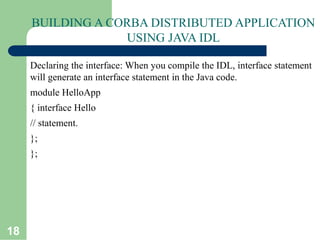
Declaring the interface: When you compile the IDL, interface statement
will generate an interface statement in the Java code.
module HelloApp
{ interface Hello
// statement.
};
};
19
BUILDING A CORBA DISTRIBUTED APPLICATION
USING JAVA IDL
Declaring the interface: When you compile the IDL, interface statement
will generate an interface statement in the Java code.
module HelloApp
{ interface Hello
// statement.
};
};
20
BUILDING A CORBA DISTRIBUTED APPLICATION
USING JAVA IDL
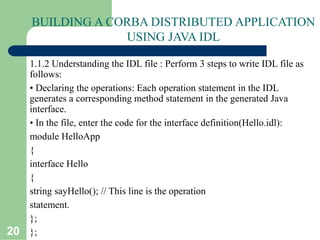
1.1.2 Understanding the IDL file : Perform 3 steps to write IDL file as
follows:
• Declaring the operations: Each operation statement in the IDL
generates a corresponding method statement in the generated Java
interface.
• In the file, enter the code for the interface definition(Hello.idl):
module HelloApp
{
interface Hello
{
string sayHello(); // This line is the operation
statement.
};
};
21
BUILDING A CORBA DISTRIBUTED APPLICATION
USING JAVA IDL
2. Compile the remote interface: When you run the idlj compiler the
interface definition file, it generates the Java version of the interface, as
well as the class code files for the stubs and skeletons that enable your
applications to hook into the ORB.
2.1. Mapping Hello.idl to Java:
The tool idlj reads IDL files and creates the required Java files. The idlj
compiler defaults to generating only the client-side bindings. If you need
both client-side bindings and server-side skeletons, use the -fall
option when running the idlj compiler.
Enter compiler command on command line prompt having path to the
java/bin directory:
•idlj -fall Hello.idl
If you list the contents of the directory, you will see that six files are
22
BUILDING A CORBA DISTRIBUTED APPLICATION
USING JAVA IDL
2.2 Understanding the idlj Compiler Output
• The files generated by the idlj compiler for Hello.idl are:
i.HelloPOA.java : This abstract class is the skeleton, providing basic
CORBA functionality for the server. The server class HelloImpl extends
HelloPOA.
An object adapter is the mechanism that connects a request using an
object reference with the proper code to service that request.
Enter compiler command on command line prompt having path to the
java/bin directory:
ii. _HelloStub.java : This class is the client stub providing CORBA
functionality for the client. It implements the Hello.java interface..
23
BUILDING A CORBA DISTRIBUTED APPLICATION
USING JAVA IDL
iii. Hello.java : This interface contains the Java version of IDL
interface.
The Hello.java interface extends org.omg.CORBA.Object, providing
standard CORBA object functionality.
IV. HelloHelper.java : This class provides additional functionality ,
the narrow() method required to cast CORBA object references to
their proper types. The Helper class is responsible for reading and
writing the data type to CORBA streams. The Holder class uses the
methods in the Helper class for reading and writing.:
V. HelloHolder.java: It provides operations for OutputStream and
InputStream. It provides operations for out and inout arguments,
which CORBA allows, but which do not map easily to Java‘s semantics.
24
BUILDING A CORBA DISTRIBUTED APPLICATION
USING JAVA IDL
VI. HelloOperations.java : This operations interface contains the
single methods SayHello(). The IDL-to-Java mapping puts all of the
operations defined on the IDL interface into this file..
3.Implement the Server: Once you run the idlj compiler, you can use the
skeletons it generates to put together your server application. In addition
to implementing the methods of the remote interface, the server code
includes a mechanism to start the ORB and wait for invocation from a
remote client.
25
BUILDING A CORBA DISTRIBUTED APPLICATION
USING JAVA IDL
3.1 Developing the Hello World Server:
• The example server consists of two classes, the Servant and the
Server. The servant, HelloServant, is the implementation of the
Hello IDL interface; each Hello instance is implemented by a
HelloServant
instance. The servant is a subclass of_HelloImplBase, which is generated
by the idlj compiler from the
example IDL.
• The servant contains one method for each IDL operation, in this
example,
just the sayHello() method. Servant methods are just like ordinary
Java methods; extra code to deal with the ORB, with marshaling
arguments and results, and so on, is provided by the server and the stubs.
26
BUILDING A CORBA DISTRIBUTED APPLICATION
USING JAVA IDL
3.1 Developing the Hello World Server
• The server class has the server's main() method, which:
• Creates an ORB instance.
• Creates a servant instance (the implementation of one CORBA Hello
object) and tells the ORB about it.
•
Gets a CORBA object reference for a naming context in which to
register
the new CORBA object.
• Registers the new object in the naming context under the name "Hello“.
• Waits for invocations of the new object
27
IMPLEMENT THE SERVER
The steps in writing the CORBA transient Server:
3.1.1. Creating HelloServer.java
3.1.2. Understanding HelloServer.java
3.1.3. Compiling the Hello World Server
3.1.1 Creating HelloServer.java: Enter the following code for
HelloServer.java in the text file.
28
IMPLEMENT THE SERVER
The steps in writing the CORBA transient Server:
3.1.1. Creating HelloServer.java
3.1.2. Understanding HelloServer.java
3.1.3. Compiling the Hello World Server
3.1.1 Creating HelloServer.java: Enter the following code for
HelloServer.java in the text file.
29
BUILDING A CORBA DISTRIBUTED APPLICATION
USING JAVA IDL
3.1 Developing the Hello World Server
• The server class has the server's main() method, which:
• Creates an ORB instance.
• Creates a servant instance (the implementation of one CORBA Hello
object) and tells the ORB about it.
•
Gets a CORBA object reference for a naming context in which to
register
the new CORBA object.
• Registers the new object in the naming context under the name "Hello“.
• Waits for invocations of the new object
30
BUILDING A CORBA DISTRIBUTED APPLICATION
USING JAVA IDL
3.1 Developing the Hello World Server:
• The example server consists of two classes, the Servant and the
Server. The servant, HelloServant, is the implementation of the
Hello IDL interface; each Hello instance is implemented by a
HelloServant
instance. The servant is a subclass of_HelloImplBase, which is generated
by the idlj compiler from the
example IDL.
• The servant contains one method for each IDL operation, in this
example,
just the sayHello() method. Servant methods are just like ordinary
Java methods; extra code to deal with the ORB, with marshaling
arguments and results, and so on, is provided by the server and the stubs.

CORBA.ppt

  • 1.
    Distributed System Sanjivani RuralEducation Society’s Sanjivani College of Engineering, Kopargaon-423603 (An Autonomous Institute Affiliated to Savitribai Phule Pune University, Pune) NAAC ‘A’ Grade Accredited, ISO 9001:2015 Certified Department of Information Technology (NBA Accredited) Dr. R. D. Chintamani Asst. Prof.
  • 2.
  • 3.
    3 CORBA Stands for CommonObject Request Broker Architecture. It is a specification for creating distributed objects and NOT a programming language. It promotes design of applications as a set of cooperating objects Clients are isolated from servers by interface. CORBA objects run on any platform, can be located anywhere on the network and can be written in any language that has IDL mapping.
  • 4.
  • 5.
    5 CORBAARCHITECTURE Object Request Brokeris an Object Manager in CORBA. It is present on the client side as well as server side (allows agents to act as On client side the ORB is responsible for – accepting requests for a remote object – finding implementation of the object – accepting client-side reference to the remote object(converted to a language specific form, e.g., a Java stub object) – routing client method calls through the object reference to the object implementation.
  • 6.
    6 CORBAARCHITECTURE On server sidethe ORB – lets object servers register new objects – receives requests from the client ORB – uses object’s skeleton interface to invoke object’s activation method – creates reference for new object and sends it back to client. Between the ORBs, Internet Inter-ORB Protocol is used for communication.
  • 7.
    7 CORBA A CORBA (CommonObject Request Broker Architecture) application is developed using IDL (Interface Definition Language). • IDL is used to define interfaces and the Java IDL compiler generates skeletoncode. CORBA technology is an integral part of the Java platform. It consists of an Object Request Broker (ORB), APIs for the RMI programming model, and APIs for the IDL programming model. The Java CORBA ORB supports both the RMI and IDL programming models. • We use IDL programming model in this example.
  • 8.
    8 CORBA IDL is InterfaceDefinition Language which defines protocol to access objects. Stub lives on client and pretends to be remote object Skeleton lives on server , receives requests from stub, talks to true remote object and delivers response to stub.
  • 9.
  • 10.
    10 JAVA IDL-USING CORBAFROM JAVA Java – IDL is a technology for distributed objects -- that is, objects interacting on different platforms across a network. Translates IDL concepts into Java Language Constructs. Java IDL supports distributed objects written entirely in the Java programming language. Java IDL enables objects to interact regardless of whether they're written in the Java programming language or another language such as C, C++. This is possible because Java IDL is based on the Common Object Request Brokerage Architecture (CORBA), an industry-standard distributed objectmodel. Each language that supports CORBA has its own IDL mapping-- and as its name implies, Java IDL supports the mapping for Java.
  • 11.
    11 JAVA IDL-USING CORBAFROM JAVA To support interaction between objects in separate programs, Java IDL provides an Object Request Broker, or ORB. The ORB is a class library that enables low-level communication between Java IDL applications and other CORBA-compliant applications. On the client side, the application includes a reference for the remote object. The object reference has a stub method, which is a stand-in for the method being called remotely. • The stub is actually wired into the ORB, so that calling it invokes the ORB's connection capabilities, which forwards the invocation to the server
  • 12.
  • 13.
    13 JAVA IDL-USING CORBAFROM JAVA On the server side, the ORB uses skeleton code to translate the remote invocation into a method call on the local object. The skeleton translates the call and any parameters to their implementation-specific format and calls the method being invoked. When the method returns, the skeleton code transforms results or errors, and sends them back to the client via the ORBs. Between the ORBs, communication proceeds by means of IIOP.
  • 14.
    14 BUILDING A CORBADISTRIBUTED APPLICATION USING JAVA IDL 1.Define the remote interface: Define the interface for the remote object using Interface Definition Langauge (IDL). Use IDL instead of the Java language because the idlj compiler automatically maps from IDL, generating all Java language stub and skeleton source files, along with the infrastructure code for connecting to the ORB. 1.1 Writing the IDL file: • J2SDK v1.3.0 above provides the Application Programming Interface (API) and Object Request Broker (ORB) needed to enable CORBA- based distributed object interaction, as well as the idlj compiler. • The idlj compiler uses the IDL-to-Java mapping to convert IDL interface definitions to corresponding Java interfaces, classes, and methods, which an then be used to implement the client and server code.
  • 15.
    15 BUILDING A CORBADISTRIBUTED APPLICATION USING JAVA IDL 1.1.1 Writing Hello.idl • Create a directory named Hello for this application. • Create a file named Hello.idl in this directory. 1.1.2 Understanding the IDL file : Perform 3 steps to write IDL file as follows: • Declaring the CORBA IDL module: When you compile the IDL, the module statement will generate a package statement in the Java code. module HelloApp { // Subsequent lines of code here. };
  • 16.
    16 BUILDING A CORBADISTRIBUTED APPLICATION USING JAVA IDL 1.1.1 Writing Hello.idl • Create a directory named Hello for this application. • Create a file named Hello.idl in this directory. 1.1.2 Understanding the IDL file : Perform 3 steps to write IDL file as follows: • Declaring the CORBA IDL module: When you compile the IDL, the module statement will generate a package statement in the Java code. module HelloApp { // Subsequent lines of code here. };
  • 17.
    17 BUILDING A CORBADISTRIBUTED APPLICATION USING JAVA IDL 1.1.1 Writing Hello.idl • Create a directory named Hello for this application. • Create a file named Hello.idl in this directory. 1.1.2 Understanding the IDL file : Perform 3 steps to write IDL file as follows: • Declaring the CORBA IDL module: When you compile the IDL, the module statement will generate a package statement in the Java code. module HelloApp { // Subsequent lines of code here. };
  • 18.
    18 BUILDING A CORBADISTRIBUTED APPLICATION USING JAVA IDL Declaring the interface: When you compile the IDL, interface statement will generate an interface statement in the Java code. module HelloApp { interface Hello // statement. }; };
  • 19.
    19 BUILDING A CORBADISTRIBUTED APPLICATION USING JAVA IDL Declaring the interface: When you compile the IDL, interface statement will generate an interface statement in the Java code. module HelloApp { interface Hello // statement. }; };
  • 20.
    20 BUILDING A CORBADISTRIBUTED APPLICATION USING JAVA IDL 1.1.2 Understanding the IDL file : Perform 3 steps to write IDL file as follows: • Declaring the operations: Each operation statement in the IDL generates a corresponding method statement in the generated Java interface. • In the file, enter the code for the interface definition(Hello.idl): module HelloApp { interface Hello { string sayHello(); // This line is the operation statement. }; };
  • 21.
    21 BUILDING A CORBADISTRIBUTED APPLICATION USING JAVA IDL 2. Compile the remote interface: When you run the idlj compiler the interface definition file, it generates the Java version of the interface, as well as the class code files for the stubs and skeletons that enable your applications to hook into the ORB. 2.1. Mapping Hello.idl to Java: The tool idlj reads IDL files and creates the required Java files. The idlj compiler defaults to generating only the client-side bindings. If you need both client-side bindings and server-side skeletons, use the -fall option when running the idlj compiler. Enter compiler command on command line prompt having path to the java/bin directory: •idlj -fall Hello.idl If you list the contents of the directory, you will see that six files are
  • 22.
    22 BUILDING A CORBADISTRIBUTED APPLICATION USING JAVA IDL 2.2 Understanding the idlj Compiler Output • The files generated by the idlj compiler for Hello.idl are: i.HelloPOA.java : This abstract class is the skeleton, providing basic CORBA functionality for the server. The server class HelloImpl extends HelloPOA. An object adapter is the mechanism that connects a request using an object reference with the proper code to service that request. Enter compiler command on command line prompt having path to the java/bin directory: ii. _HelloStub.java : This class is the client stub providing CORBA functionality for the client. It implements the Hello.java interface..
  • 23.
    23 BUILDING A CORBADISTRIBUTED APPLICATION USING JAVA IDL iii. Hello.java : This interface contains the Java version of IDL interface. The Hello.java interface extends org.omg.CORBA.Object, providing standard CORBA object functionality. IV. HelloHelper.java : This class provides additional functionality , the narrow() method required to cast CORBA object references to their proper types. The Helper class is responsible for reading and writing the data type to CORBA streams. The Holder class uses the methods in the Helper class for reading and writing.: V. HelloHolder.java: It provides operations for OutputStream and InputStream. It provides operations for out and inout arguments, which CORBA allows, but which do not map easily to Java‘s semantics.
  • 24.
    24 BUILDING A CORBADISTRIBUTED APPLICATION USING JAVA IDL VI. HelloOperations.java : This operations interface contains the single methods SayHello(). The IDL-to-Java mapping puts all of the operations defined on the IDL interface into this file.. 3.Implement the Server: Once you run the idlj compiler, you can use the skeletons it generates to put together your server application. In addition to implementing the methods of the remote interface, the server code includes a mechanism to start the ORB and wait for invocation from a remote client.
  • 25.
    25 BUILDING A CORBADISTRIBUTED APPLICATION USING JAVA IDL 3.1 Developing the Hello World Server: • The example server consists of two classes, the Servant and the Server. The servant, HelloServant, is the implementation of the Hello IDL interface; each Hello instance is implemented by a HelloServant instance. The servant is a subclass of_HelloImplBase, which is generated by the idlj compiler from the example IDL. • The servant contains one method for each IDL operation, in this example, just the sayHello() method. Servant methods are just like ordinary Java methods; extra code to deal with the ORB, with marshaling arguments and results, and so on, is provided by the server and the stubs.
  • 26.
    26 BUILDING A CORBADISTRIBUTED APPLICATION USING JAVA IDL 3.1 Developing the Hello World Server • The server class has the server's main() method, which: • Creates an ORB instance. • Creates a servant instance (the implementation of one CORBA Hello object) and tells the ORB about it. • Gets a CORBA object reference for a naming context in which to register the new CORBA object. • Registers the new object in the naming context under the name "Hello“. • Waits for invocations of the new object
  • 27.
    27 IMPLEMENT THE SERVER Thesteps in writing the CORBA transient Server: 3.1.1. Creating HelloServer.java 3.1.2. Understanding HelloServer.java 3.1.3. Compiling the Hello World Server 3.1.1 Creating HelloServer.java: Enter the following code for HelloServer.java in the text file.
  • 28.
    28 IMPLEMENT THE SERVER Thesteps in writing the CORBA transient Server: 3.1.1. Creating HelloServer.java 3.1.2. Understanding HelloServer.java 3.1.3. Compiling the Hello World Server 3.1.1 Creating HelloServer.java: Enter the following code for HelloServer.java in the text file.
  • 29.
    29 BUILDING A CORBADISTRIBUTED APPLICATION USING JAVA IDL 3.1 Developing the Hello World Server • The server class has the server's main() method, which: • Creates an ORB instance. • Creates a servant instance (the implementation of one CORBA Hello object) and tells the ORB about it. • Gets a CORBA object reference for a naming context in which to register the new CORBA object. • Registers the new object in the naming context under the name "Hello“. • Waits for invocations of the new object
  • 30.
    30 BUILDING A CORBADISTRIBUTED APPLICATION USING JAVA IDL 3.1 Developing the Hello World Server: • The example server consists of two classes, the Servant and the Server. The servant, HelloServant, is the implementation of the Hello IDL interface; each Hello instance is implemented by a HelloServant instance. The servant is a subclass of_HelloImplBase, which is generated by the idlj compiler from the example IDL. • The servant contains one method for each IDL operation, in this example, just the sayHello() method. Servant methods are just like ordinary Java methods; extra code to deal with the ORB, with marshaling arguments and results, and so on, is provided by the server and the stubs.