

Cross-Platform 
Software Design 
Michael Henson 
Professor 
College of Engineering and Information Sciences 
mhenson@devry.edu 
/arachnojava 
@arachnojava 
+MichaelHenson /michaeljhenson 
Arachnojava mhframework.blogspot.com
The Problems 
• Professional developers need to: 
– Reach the maximum number of customers. 
– Keep current with new computing devices. 
• Students need to: 
– Quickly adapt to the technologies that will grab 
the attention of potential employers. 
– Increase the probability that a potential employer 
will be able to evaluate their work. 
• Wouldn’t it be nice if we could develop 
just one product and make it available 
for a variety of computing devices? 
– PC, tablet, smart phone, game console, etc.
One Possible Solution 
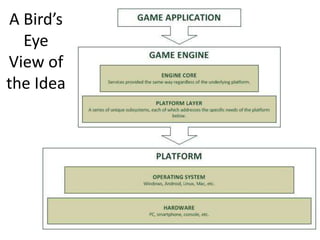
1. Identify parts that are same across platforms. 
– We’ll call this the core functionality. 
2. Encapsulate the parts that differ. 
– We’ll call this the platform layer. 
3. Create an interface to the platform layer that can 
be repeated for all supported platforms. 
4. Make sure the core only talks to the platform 
layer interface and not the actual platform. 
– Then we can swap platforms and the core never 
needs to know!
A Bird’s-Eye 
View of the 
Idea
Proof of Concept: Snow vs. Man 
• Very early prototype built with 
MHFramework game engine which 
implements this design. 
• Play it on my laptop, tablet, or phone. 
• Objective: Prevent the evil snowmen 
from extinguishing your campfire. 
• How to Play: Click (tap) on open spaces 
to place defensive turrets.
Systems That Can 
(or Will) Run My Game 
Android 
Phone 
Android 
Tablet 
OUYA Game 
Console 
M.O.J.O. Game 
Console 
Linux 
Mac OS 
Windows
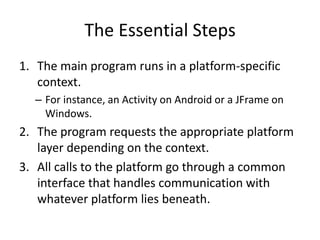
So…How Does It Work? 
1. The main program runs in a platform-specific 
context. 
– For instance, an Activity on Android or a JFrame 
on Windows. 
2. The program requests the appropriate 
platform layer depending on the context. 
3. All calls to the platform go through a 
common interface that handles 
communication with whatever platform lies 
beneath.
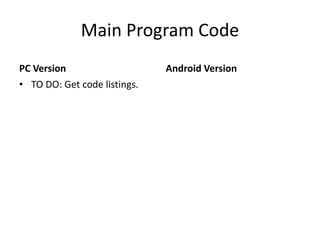
Main Program Code 
Notice the major similarities (and minor differences) between 
the PC and Android launchers for Snow vs. Man. 
PC Version 
public static void main(String[] args) 
{ 
// Create the game's start screen. 
MHScreen startingScreen = new SVMMainMenuScreen(); 
// Configure video settings. 
MHVideoSettings displaySettings = new MHVideoSettings(); 
displaySettings.windowCaption = "Snow Vs. Man"; 
displaySettings.displayWidth = 800; 
displaySettings.displayHeight = 480; 
// Launch the game. 
MHPCPlatform.run(new JFrame(), 
startingScreen, displaySettings); 
} 
Android Version 
protected void onCreate(Bundle savedInstanceState) 
{ 
// Initialize the Android activity. 
super.onCreate(savedInstanceState); 
// Create the game's start screen. 
MHScreen startingScreen = new SVMMainMenuScreen(); 
// Configure video settings. 
MHVideoSettings displaySettings = new MHVideoSettings(); 
displaySettings.windowCaption = "Snow Vs. Man"; 
displaySettings.displayWidth = 800; 
displaySettings.displayHeight = 480; 
// Launch the game. 
MHAndroidPlatform.run(this, 
startingScreen, displaySettings); 
}
A Common Interface For All 
Platforms 
Since every platform interface will have these same 
functions, the game can call them without caring which 
platform is performing the tasks behind the scenes. 
public interface MHPlatformFactory 
{ 
public MHBitmapImage createImage(int width, int height); 
public MHBitmapImage createImage(String filename); 
public MHColor createColor(int r, int g, int b, int a); 
public MHSoundManager getSoundManager(); 
public MHFont createFont(String fontName); 
public MHKeyCodes getKeyCodes(); 
public String getAssetsDirectory(); 
public MHTextFile openTextFile(String filename, Mode mode); 
}
The Technical Stuff 
for Nerds
The Guiding Object-Oriented 
Design Principles 
• Separate the aspects that vary from the aspects that stay 
the same. 
– The platform varies while the game code stays the same. 
• Strive for loosely coupled designs between objects that 
interact. 
– The common interface makes it easy to swap one platform for 
another without affecting the game code. 
• The Principle of Least Knowledge: “Talk only to your 
immediate friends.” 
– Minimizes places where game depends on platform. 
• The Hollywood Principle: “Don’t call us, we’ll call you.” 
– The platform serves the game, never vice versa.
The Design Patterns That 
Make This Possible 
• Façade Pattern 
– Makes the platform easier to use by hiding its complexity. 
• Strategy Pattern 
– The game engine only supports elements of the platform 
on which it is running. Few wasted resources, no 
extraneous conditional logic. 
• Singleton Pattern 
– Ensures single platform layer and provides access to it. 
• Template Method Pattern 
– Allows for the possibility that some functions may be the 
same across platforms while others may differ.
• Adapter Pattern 
– Each platform may have different ways of handling 
graphics, input, audio, etc. Adapter makes them all 
look the same from the game’s point of view. 
• Observer Pattern 
– Allows input handlers to use a generic set of events 
independent of those generated by the platforms. 
• Abstract Factory Pattern 
– Handles the details of creating the correct objects 
(graphics, sounds, etc.) for each platform.
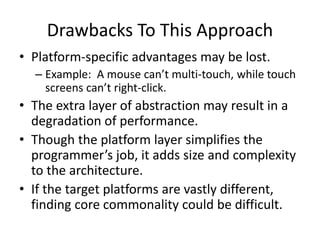
Drawbacks To This Approach 
• Platform-specific advantages may be lost. 
– Example: A mouse cannot multi-touch, while touch 
screens cannot right-click. 
• The extra level of abstraction may degrade 
runtime performance. 
• The platform layer adds unavoidable 
complexity to the software architecture. 
Software development involves trade-offs at every step. We 
must always consider the pros and cons of any solution.
References 
Freeman, E. (2004). Head First design patterns. Sebastopol, CA: 
O'Reilly. 
Gamma, E. (1995). Design patterns: elements of reusable object-oriented 
software. Reading, Mass.: Addison-Wesley. 
Gregory, J. (2009). Game engine architecture. Wellesley, Mass.: A K 
Peters. 
Henson, M. (2013, July 24). Class structure of the platform layer. 
Retrieved June 20, 2014, from 
http://mhframework.blogspot.com/2013/07/class-structure-of-platform- 
layer.html 
Pressman, R. S. (2010). Software engineering: a practitioner's 
approach (7th ed.). Boston, Mass.: McGraw-Hill.

Cross-Platform Software Design

  • 1.
    Cross-Platform Software Design Michael Henson Professor College of Engineering and Information Sciences mhenson@devry.edu /arachnojava @arachnojava +MichaelHenson /michaeljhenson Arachnojava mhframework.blogspot.com
  • 2.
    The Problems •Professional developers need to: – Reach the maximum number of customers. – Keep current with new computing devices. • Students need to: – Quickly adapt to the technologies that will grab the attention of potential employers. – Increase the probability that a potential employer will be able to evaluate their work. • Wouldn’t it be nice if we could develop just one product and make it available for a variety of computing devices? – PC, tablet, smart phone, game console, etc.
  • 3.
    One Possible Solution 1. Identify parts that are same across platforms. – We’ll call this the core functionality. 2. Encapsulate the parts that differ. – We’ll call this the platform layer. 3. Create an interface to the platform layer that can be repeated for all supported platforms. 4. Make sure the core only talks to the platform layer interface and not the actual platform. – Then we can swap platforms and the core never needs to know!
  • 4.
  • 5.
    Proof of Concept:Snow vs. Man • Very early prototype built with MHFramework game engine which implements this design. • Play it on my laptop, tablet, or phone. • Objective: Prevent the evil snowmen from extinguishing your campfire. • How to Play: Click (tap) on open spaces to place defensive turrets.
  • 6.
    Systems That Can (or Will) Run My Game Android Phone Android Tablet OUYA Game Console M.O.J.O. Game Console Linux Mac OS Windows
  • 7.
    So…How Does ItWork? 1. The main program runs in a platform-specific context. – For instance, an Activity on Android or a JFrame on Windows. 2. The program requests the appropriate platform layer depending on the context. 3. All calls to the platform go through a common interface that handles communication with whatever platform lies beneath.
  • 8.
    Main Program Code Notice the major similarities (and minor differences) between the PC and Android launchers for Snow vs. Man. PC Version public static void main(String[] args) { // Create the game's start screen. MHScreen startingScreen = new SVMMainMenuScreen(); // Configure video settings. MHVideoSettings displaySettings = new MHVideoSettings(); displaySettings.windowCaption = "Snow Vs. Man"; displaySettings.displayWidth = 800; displaySettings.displayHeight = 480; // Launch the game. MHPCPlatform.run(new JFrame(), startingScreen, displaySettings); } Android Version protected void onCreate(Bundle savedInstanceState) { // Initialize the Android activity. super.onCreate(savedInstanceState); // Create the game's start screen. MHScreen startingScreen = new SVMMainMenuScreen(); // Configure video settings. MHVideoSettings displaySettings = new MHVideoSettings(); displaySettings.windowCaption = "Snow Vs. Man"; displaySettings.displayWidth = 800; displaySettings.displayHeight = 480; // Launch the game. MHAndroidPlatform.run(this, startingScreen, displaySettings); }
  • 9.
    A Common InterfaceFor All Platforms Since every platform interface will have these same functions, the game can call them without caring which platform is performing the tasks behind the scenes. public interface MHPlatformFactory { public MHBitmapImage createImage(int width, int height); public MHBitmapImage createImage(String filename); public MHColor createColor(int r, int g, int b, int a); public MHSoundManager getSoundManager(); public MHFont createFont(String fontName); public MHKeyCodes getKeyCodes(); public String getAssetsDirectory(); public MHTextFile openTextFile(String filename, Mode mode); }
  • 11.
  • 12.
    The Guiding Object-Oriented Design Principles • Separate the aspects that vary from the aspects that stay the same. – The platform varies while the game code stays the same. • Strive for loosely coupled designs between objects that interact. – The common interface makes it easy to swap one platform for another without affecting the game code. • The Principle of Least Knowledge: “Talk only to your immediate friends.” – Minimizes places where game depends on platform. • The Hollywood Principle: “Don’t call us, we’ll call you.” – The platform serves the game, never vice versa.
  • 13.
    The Design PatternsThat Make This Possible • Façade Pattern – Makes the platform easier to use by hiding its complexity. • Strategy Pattern – The game engine only supports elements of the platform on which it is running. Few wasted resources, no extraneous conditional logic. • Singleton Pattern – Ensures single platform layer and provides access to it. • Template Method Pattern – Allows for the possibility that some functions may be the same across platforms while others may differ.
  • 14.
    • Adapter Pattern – Each platform may have different ways of handling graphics, input, audio, etc. Adapter makes them all look the same from the game’s point of view. • Observer Pattern – Allows input handlers to use a generic set of events independent of those generated by the platforms. • Abstract Factory Pattern – Handles the details of creating the correct objects (graphics, sounds, etc.) for each platform.
  • 15.
    Drawbacks To ThisApproach • Platform-specific advantages may be lost. – Example: A mouse cannot multi-touch, while touch screens cannot right-click. • The extra level of abstraction may degrade runtime performance. • The platform layer adds unavoidable complexity to the software architecture. Software development involves trade-offs at every step. We must always consider the pros and cons of any solution.
  • 16.
    References Freeman, E.(2004). Head First design patterns. Sebastopol, CA: O'Reilly. Gamma, E. (1995). Design patterns: elements of reusable object-oriented software. Reading, Mass.: Addison-Wesley. Gregory, J. (2009). Game engine architecture. Wellesley, Mass.: A K Peters. Henson, M. (2013, July 24). Class structure of the platform layer. Retrieved June 20, 2014, from http://mhframework.blogspot.com/2013/07/class-structure-of-platform- layer.html Pressman, R. S. (2010). Software engineering: a practitioner's approach (7th ed.). Boston, Mass.: McGraw-Hill.

Editor's Notes

  • #11 Consider recreating a cleaner and less physical draft of this diagram. Show that the game code plugs into the MHFramework class. Add colored annotations to point out design patterns in use. Façade – MHPlatform Strategy – MHPlatform Singleton – MHPlatform Template Method – MHGameApplication Abstract Factory – MHPlatformFactory Adapter – MHBitmapImage, MHGraphicsCanvas Observer – MHInputEventHandler
  • #12 Remove the “Continued” note when printing for poster.