Introduction to
Containers on Windows
P R A T I K K H A S N A B I S
A Z U R E C L O U D A R C H I T E C T ( M C S E & M C S D )
@ S O F T V E D A
D D D B Y N I G H T 2 0 1 7
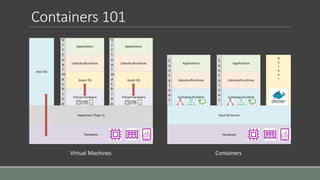
Containers 101
Hardware
Hypervisor (Type 2)
Virtual Hardware Virtual Hardware
Guest OSGuest OS
Libraries/Runtimes Libraries/Runtimes
Applications Applications
V
i
r
t
u
a
l
m
a
c
h
i
n
e
V
i
r
t
u
a
l
m
a
c
h
i
n
e
Host OS
Hardware
Host OS Kernel
Container Runtime
Libraries/Runtimes
Container Runtime
Libraries/Runtimes
C
o
n
t
a
i
n
e
r
C
o
n
t
a
i
n
e
r
Applications Applications
D
o
c
k
e
r
Virtual Machines Containers
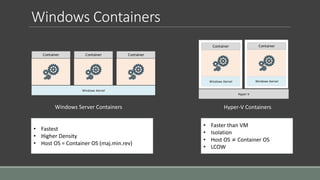
Windows Containers
Windows Kernel
Container Container Container
Windows Server Containers Hyper-V Containers
• Fastest
• Higher Density
• Host OS = Container OS (maj.min.rev)
• Faster than VM
• Isolation
• Host OS ≠ Container OS
• LCOW
Windows Kernel
Container
Windows Kernel
Container
Hyper-V
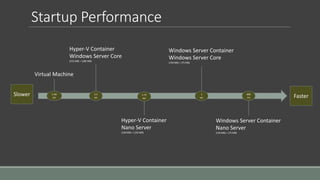
Startup Performance
5-60
sec
3.3
sec
1.75
sec
Virtual Machine
Hyper-V Container
Windows Server Core
(555 MB) + (280 MB)
Hyper-V Container
Nano Server
(340 MB) + (150 MB)
1
sec
Windows Server Container
Windows Server Core
(150 MB) + (75 MB)
Windows Server Container
Nano Server
(120 MB) + (75 MB)
600
ms
Slower Faster
Install Docker on Windows 10
Enable ‘Container’ and ‘Hyper-V’ features
Download and Install, Docker for Windows CE (edge channel)
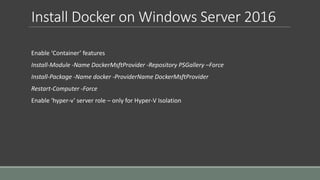
Install Docker on Windows Server 2016
Enable ‘Container’ features
Install-Module -Name DockerMsftProvider -Repository PSGallery –Force
Install-Package -Name docker -ProviderName DockerMsftProvider
Restart-Computer -Force
Enable ‘hyper-v’ server role – only for Hyper-V Isolation
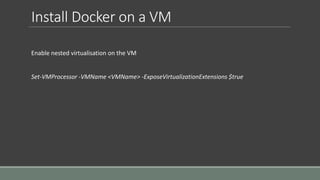
Install Docker on a VM
Enable nested virtualisation on the VM
Set-VMProcessor -VMName <VMName> -ExposeVirtualizationExtensions $true
Demo

Containers on Windows

  • 1.
    Introduction to Containers onWindows P R A T I K K H A S N A B I S A Z U R E C L O U D A R C H I T E C T ( M C S E & M C S D ) @ S O F T V E D A D D D B Y N I G H T 2 0 1 7
  • 2.
    Containers 101 Hardware Hypervisor (Type2) Virtual Hardware Virtual Hardware Guest OSGuest OS Libraries/Runtimes Libraries/Runtimes Applications Applications V i r t u a l m a c h i n e V i r t u a l m a c h i n e Host OS Hardware Host OS Kernel Container Runtime Libraries/Runtimes Container Runtime Libraries/Runtimes C o n t a i n e r C o n t a i n e r Applications Applications D o c k e r Virtual Machines Containers
  • 3.
    Windows Containers Windows Kernel ContainerContainer Container Windows Server Containers Hyper-V Containers • Fastest • Higher Density • Host OS = Container OS (maj.min.rev) • Faster than VM • Isolation • Host OS ≠ Container OS • LCOW Windows Kernel Container Windows Kernel Container Hyper-V
  • 4.
    Startup Performance 5-60 sec 3.3 sec 1.75 sec Virtual Machine Hyper-VContainer Windows Server Core (555 MB) + (280 MB) Hyper-V Container Nano Server (340 MB) + (150 MB) 1 sec Windows Server Container Windows Server Core (150 MB) + (75 MB) Windows Server Container Nano Server (120 MB) + (75 MB) 600 ms Slower Faster
  • 5.
    Install Docker onWindows 10 Enable ‘Container’ and ‘Hyper-V’ features Download and Install, Docker for Windows CE (edge channel)
  • 6.
    Install Docker onWindows Server 2016 Enable ‘Container’ features Install-Module -Name DockerMsftProvider -Repository PSGallery –Force Install-Package -Name docker -ProviderName DockerMsftProvider Restart-Computer -Force Enable ‘hyper-v’ server role – only for Hyper-V Isolation
  • 7.
    Install Docker ona VM Enable nested virtualisation on the VM Set-VMProcessor -VMName <VMName> -ExposeVirtualizationExtensions $true
  • 8.

Editor's Notes

  • #12 https://docs.microsoft.com/en-au/virtualization/windowscontainers/quick-start/quick-start-windows-server