Configuring LIFAfor Remote Communication Using WebArchitecture
Vatsal Shah
Member, IEEE, Student of
Electronics & Comm. Dept., Indus
University, Ahmedabad, Gujarat
vatsalshah2210@gmail.com
Ami Goswami
Student of Electronics & Comm.
Dept., Indus University,
Ahmedabad, Gujarat
vatsalshah2210@gmail.com
Prof. Bhavin Gajjar
Prof. of Electronics &
Communication Dept., Indus
University, Ahmedabad, Gujarat
bhavingajjar@indusuni.ac.in
Abstract:- This paper presents remote transmission
of Temperature parameters to remote Engineer for
analysis and solution using web architecture based on
LIFA. Web services enable the invocation of a method
on a remote target using standard Web-based
protocols. A client sends a request to a remote server,
which processes the request and replies with a
response, which is then interpreted and displayed by
the client application. One relies on this
communication method for everyday activities such as
browsing the Web, checking e-mails, etc. Online data
from the sensors can viewed in graphical form
showing changes with respect to time.
Keywords: LabVIEW, Arduino, Web-based
Control, Temperature Monitor and Control System
I. Introduction
PC based data acquisition, monitoring and control
systems are gaining importance these days. Due to the
flexibility offered by various platforms in practice.
LabVIEW has been used successfully served the
purpose for many years in test and measurement
applications due to the ease of graphical programming
and its wide area of functionality for interfacing
directly to instruments, sensors and actuators [2]. Here
application implementation of temperature monitoring
and control systems using LabVIEW is discussed in
this paper. This system connects temperature sensors
to a computer through Arduino. The LabVIEW
Interface for Arduino (LIFA) allows users to control
sensors and acquire data through an Arduino
microcontroller using the graphical programming
environment LabVIEW. Arduino microcontroller acts
as an I/O engine that interfaces with LabVIEW VIs
through a serial connection.
LabVIEW is a graphical programming language that
uses blocks instead of lines of text to create
applications. LabVIEW has provided communication
tools, including ActiveX, TCP, UDP, and Data Socket.
In this paper, we have mainly utilized TCP and the
related functions. An important and commonly used
web service is the World Wide Web service. The
World Wide Web service is the universe of available
information on internet. The access protocol of
internet is TCP/IP protocol. With TCP/IP
communication can be done over single network or
over internet. The Internet Protocols (IP) contains
addressing information and some control information
for packet routing. TCP provides reliable transmission
of data. [6]
II. System Representation
The following are the components of a Web service:
Server – An application responsible for parsing a
request, executing the appropriate method or action,
and sending a response to the client
Client – An application that sends a request to the
server and waits to receive a response, which is then
interpreted by the client
Standard protocols – Web-based protocols such as
HTTP route data over physical networks from the
client to the appropriate server method and then back
to the client
Network – The physical layer, such as Ethernet or
IEEE 802.11, over which data is transmitted [3]
Figure 1: Request Response Model
The web-based communication between LabVIEW
programs and other programs (including LabVIEW
programs) is usually realized through client-server
architecture. In the client-server model, clients request
services from servers and servers usually wait for
clients to initiate a connection. After the connection
has been setup, the server and the client can transfer
data back and forth using some network protocol.
When the current client closes the connection, the
server will continue to wait for other clients’ request.
A server may serve multiple clients at a time as well.
[5] Any time we click on a link or type in a URL, our
browser (the client) is sending a request to a remote
server, which processes the information and sends a
response. Our browser does not need to know anything
about the server’s infrastructure etc., it just interprets
the response and displays the result to the user.
The remote panels are configured using the following
two steps
1. Enable the Lab VIEW Web Server on the server
machine.
Response
RequestWEB
BROWSER
(client)
LabVIEW
web service
(server)
2. Connect and execute remote panels on the client
machine. [5]
Figure 2: Distributed Applications
LabVIEW web server can create HTML documents
open front panel in web browser. The front panel can
be remotely monitored and controlled through the web
browser using TCP/IP services .This feature greatly
expands the application as several persons sitting at
different locations can simultaneously access the same
front panel.
III. CONFIGURING LABVIEW FOR
REMOTE COMMUNICATION
The default port number for the web server is 8080. In
general, port numbers 49152 through 65535 are
dynamic/private ports recommended for custom
TCP/IP applications. Other options that you can set
include the root directory for the server HTML files,
the timeout for reading by the web server, and log file
enabling to record information pertaining to client
connections.
Figure 3: Screenshot of Web Server Configuration
In web server local debugging enable remote panel
server and tick to allow remote connection while
debugging. From web configuration we change HTTP
port in local debugging window.
Figure 4: Screenshot of Web Service Local Debugging
The next step is to specify a list of VIs that can be
accessed remotely. One can set control time limits for
each VI in the list. This control time limit is very useful
if your VI will be accessed by multiple users. If there
is no control time limit, a single user could monopolize
control of the application, preventing other users from
assuming control.
Figure 5: Screenshot of Configuring VI accessible on Web
The final step is to specify a list of client IP addresses
that are allowed to access the Web Server. Each IP
address may be granted controlling privileges, viewing
only privileges, or denied access.
Figure 6: Screenshot of Configuring Browser Access List
IV. Web Publishing Tool
In Web Publishing Tool select VI and viewing option.
Browse VI and select it with that different viewing
mode is given. For view and control VI select
Embedded. Selected VI will be see in the preview
window.
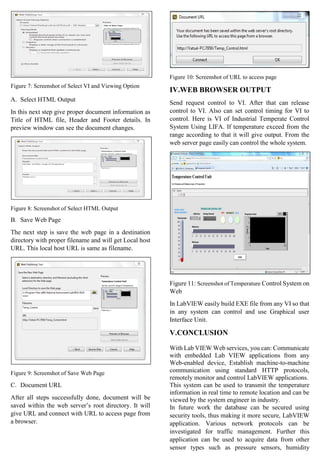
Figure 7: Screenshot of Select VI and Viewing Option
A. Select HTML Output
In this next step give proper document information as
Title of HTML file, Header and Footer details. In
preview window can see the document changes.
Figure 8: Screenshot of Select HTML Output
B. Save Web Page
The next step is save the web page in a destination
directory with proper filename and will get Local host
URL. This local host URL is same as filename.
Figure 9: Screenshot of Save Web Page
C. Document URL
After all steps successfully done, document will be
saved within the web server’s root directory. It will
give URL and connect with URL to access page from
a browser.
Figure 10: Screenshot of URL to access page
IV.WEB BROWSER OUTPUT
Send request control to VI. After that can release
control to VI. Also can set control timing for VI to
control. Here is VI of Industrial Temperate Control
System Using LIFA. If temperature exceed from the
range according to that it will give output. From the
web server page easily can control the whole system.
Figure 11: Screenshot of Temperature Control System on
Web
In LabVIEW easily build EXE file from any VI so that
in any system can control and use Graphical user
Interface Unit.
V.CONCLUSION
With Lab VIEW Web services, you can: Communicate
with embedded Lab VIEW applications from any
Web-enabled device, Establish machine-to-machine
communication using standard HTTP protocols,
remotely monitor and control LabVIEW applications.
This system can be used to transmit the temperature
information in real time to remote location and can be
viewed by the system engineer in industry.
In future work the database can be secured using
security tools, thus making it more secure, LabVIEW
application. Various network protocols can be
investigated for traffic management. Further this
application can be used to acquire data from other
sensor types such as pressure sensors, humidity
sensors, photo sensor, and many more. Sensor quantity
can be displayed and analysed on graphical form.
Also, the remote monitoring feature over LAN can be
added to application for making it more advanced such
as to be accessible from any LAN connected terminal
provided the application software is installed.
REFERENCES
[1] National Instruments Corporation (2010)
“LabVIEW communications VI reference manual
and web services reference manual”. [online]
Available: www.ni.com/pdf/manuals/321526b.pdf
[2] National Instruments Corporation (2006) “Basic
TCP/IP Communication in LabVIEW manual”
[online]
[3] Gupta Sanjay, Joseph John “Virtual
instrumentation using LabVIEW”, Electrical
Engineering Series, Tata McGraw Hill pub. Second
edition India, 2006.
[4] Gary W. Johnson, Richard Jennings, “LabVIEW
Graphical Programming”, 4th ed. McGraw-Hill.
[5] Lei Wu, David Cartes, and Chiang Shih, “Web-
Based Flow Control of a Three-Tank System
SYSTEMICS”, Cybernetics and Informatics,
FAMU-FSU College of Engineering, Florida State
University, Vol. 2, No. 1, pp: 77-82
[6] Li Chengwei, Zhang Limei, Hu Xiaoming (2005).
“The Study on Virtual Medical Instrument based on
LabVIEW”, Proceedings 27th Annual Conference
of the IEEE Engineering in Medicine and Biology,
1st
-4th
Sep, Shanghai. pp: 4072-4075, 2013.
[7] Archana Wasule, Dr.M.S.Panse; “Configuring
Labview for Remote Communication Using Web
Architecture”. International Journal of Engineering
Science and Innovative Technology, Vol. 2, No. 2,
pp: 195-199, 2013.
[8] Prof. Hiren J. Patel, Prof. Robinson P. Paul, Prof.
Ghansyam B. Rathod, “Temperature monitoring
and control system using NI ELVIS and
LabVIEW”, International Journal on Recent and
Innovation Trends in Computing and
Communication, Vol.2, No.7, pp: 1862-1864, 2014.
[9] K P J Pradeep, K Sai Prasad Reddy, D Hanumesh
Kumar, K Nagabhushan Raju, C Nagaraja
“Monitoring of Temperature and Humidity Using
LIFA”, International Journal of IT, Engineering and
Applied Sciences Research, Vol.3, No.6, pp:01-03,
2014.
[10] LM35 Precision Centigrade Temperature
Sensors - Datasheet, National Semiconductor
Corporation, November 2000.

Configuring LIFA for remote communication using web architecture

  • 1.
    Configuring LIFAfor RemoteCommunication Using WebArchitecture Vatsal Shah Member, IEEE, Student of Electronics & Comm. Dept., Indus University, Ahmedabad, Gujarat vatsalshah2210@gmail.com Ami Goswami Student of Electronics & Comm. Dept., Indus University, Ahmedabad, Gujarat vatsalshah2210@gmail.com Prof. Bhavin Gajjar Prof. of Electronics & Communication Dept., Indus University, Ahmedabad, Gujarat bhavingajjar@indusuni.ac.in Abstract:- This paper presents remote transmission of Temperature parameters to remote Engineer for analysis and solution using web architecture based on LIFA. Web services enable the invocation of a method on a remote target using standard Web-based protocols. A client sends a request to a remote server, which processes the request and replies with a response, which is then interpreted and displayed by the client application. One relies on this communication method for everyday activities such as browsing the Web, checking e-mails, etc. Online data from the sensors can viewed in graphical form showing changes with respect to time. Keywords: LabVIEW, Arduino, Web-based Control, Temperature Monitor and Control System I. Introduction PC based data acquisition, monitoring and control systems are gaining importance these days. Due to the flexibility offered by various platforms in practice. LabVIEW has been used successfully served the purpose for many years in test and measurement applications due to the ease of graphical programming and its wide area of functionality for interfacing directly to instruments, sensors and actuators [2]. Here application implementation of temperature monitoring and control systems using LabVIEW is discussed in this paper. This system connects temperature sensors to a computer through Arduino. The LabVIEW Interface for Arduino (LIFA) allows users to control sensors and acquire data through an Arduino microcontroller using the graphical programming environment LabVIEW. Arduino microcontroller acts as an I/O engine that interfaces with LabVIEW VIs through a serial connection. LabVIEW is a graphical programming language that uses blocks instead of lines of text to create applications. LabVIEW has provided communication tools, including ActiveX, TCP, UDP, and Data Socket. In this paper, we have mainly utilized TCP and the related functions. An important and commonly used web service is the World Wide Web service. The World Wide Web service is the universe of available information on internet. The access protocol of internet is TCP/IP protocol. With TCP/IP communication can be done over single network or over internet. The Internet Protocols (IP) contains addressing information and some control information for packet routing. TCP provides reliable transmission of data. [6] II. System Representation The following are the components of a Web service: Server – An application responsible for parsing a request, executing the appropriate method or action, and sending a response to the client Client – An application that sends a request to the server and waits to receive a response, which is then interpreted by the client Standard protocols – Web-based protocols such as HTTP route data over physical networks from the client to the appropriate server method and then back to the client Network – The physical layer, such as Ethernet or IEEE 802.11, over which data is transmitted [3] Figure 1: Request Response Model The web-based communication between LabVIEW programs and other programs (including LabVIEW programs) is usually realized through client-server architecture. In the client-server model, clients request services from servers and servers usually wait for clients to initiate a connection. After the connection has been setup, the server and the client can transfer data back and forth using some network protocol. When the current client closes the connection, the server will continue to wait for other clients’ request. A server may serve multiple clients at a time as well. [5] Any time we click on a link or type in a URL, our browser (the client) is sending a request to a remote server, which processes the information and sends a response. Our browser does not need to know anything about the server’s infrastructure etc., it just interprets the response and displays the result to the user. The remote panels are configured using the following two steps 1. Enable the Lab VIEW Web Server on the server machine. Response RequestWEB BROWSER (client) LabVIEW web service (server)
  • 2.
    2. Connect andexecute remote panels on the client machine. [5] Figure 2: Distributed Applications LabVIEW web server can create HTML documents open front panel in web browser. The front panel can be remotely monitored and controlled through the web browser using TCP/IP services .This feature greatly expands the application as several persons sitting at different locations can simultaneously access the same front panel. III. CONFIGURING LABVIEW FOR REMOTE COMMUNICATION The default port number for the web server is 8080. In general, port numbers 49152 through 65535 are dynamic/private ports recommended for custom TCP/IP applications. Other options that you can set include the root directory for the server HTML files, the timeout for reading by the web server, and log file enabling to record information pertaining to client connections. Figure 3: Screenshot of Web Server Configuration In web server local debugging enable remote panel server and tick to allow remote connection while debugging. From web configuration we change HTTP port in local debugging window. Figure 4: Screenshot of Web Service Local Debugging The next step is to specify a list of VIs that can be accessed remotely. One can set control time limits for each VI in the list. This control time limit is very useful if your VI will be accessed by multiple users. If there is no control time limit, a single user could monopolize control of the application, preventing other users from assuming control. Figure 5: Screenshot of Configuring VI accessible on Web The final step is to specify a list of client IP addresses that are allowed to access the Web Server. Each IP address may be granted controlling privileges, viewing only privileges, or denied access. Figure 6: Screenshot of Configuring Browser Access List IV. Web Publishing Tool In Web Publishing Tool select VI and viewing option. Browse VI and select it with that different viewing mode is given. For view and control VI select Embedded. Selected VI will be see in the preview window.
  • 3.
    Figure 7: Screenshotof Select VI and Viewing Option A. Select HTML Output In this next step give proper document information as Title of HTML file, Header and Footer details. In preview window can see the document changes. Figure 8: Screenshot of Select HTML Output B. Save Web Page The next step is save the web page in a destination directory with proper filename and will get Local host URL. This local host URL is same as filename. Figure 9: Screenshot of Save Web Page C. Document URL After all steps successfully done, document will be saved within the web server’s root directory. It will give URL and connect with URL to access page from a browser. Figure 10: Screenshot of URL to access page IV.WEB BROWSER OUTPUT Send request control to VI. After that can release control to VI. Also can set control timing for VI to control. Here is VI of Industrial Temperate Control System Using LIFA. If temperature exceed from the range according to that it will give output. From the web server page easily can control the whole system. Figure 11: Screenshot of Temperature Control System on Web In LabVIEW easily build EXE file from any VI so that in any system can control and use Graphical user Interface Unit. V.CONCLUSION With Lab VIEW Web services, you can: Communicate with embedded Lab VIEW applications from any Web-enabled device, Establish machine-to-machine communication using standard HTTP protocols, remotely monitor and control LabVIEW applications. This system can be used to transmit the temperature information in real time to remote location and can be viewed by the system engineer in industry. In future work the database can be secured using security tools, thus making it more secure, LabVIEW application. Various network protocols can be investigated for traffic management. Further this application can be used to acquire data from other sensor types such as pressure sensors, humidity
  • 4.
    sensors, photo sensor,and many more. Sensor quantity can be displayed and analysed on graphical form. Also, the remote monitoring feature over LAN can be added to application for making it more advanced such as to be accessible from any LAN connected terminal provided the application software is installed. REFERENCES [1] National Instruments Corporation (2010) “LabVIEW communications VI reference manual and web services reference manual”. [online] Available: www.ni.com/pdf/manuals/321526b.pdf [2] National Instruments Corporation (2006) “Basic TCP/IP Communication in LabVIEW manual” [online] [3] Gupta Sanjay, Joseph John “Virtual instrumentation using LabVIEW”, Electrical Engineering Series, Tata McGraw Hill pub. Second edition India, 2006. [4] Gary W. Johnson, Richard Jennings, “LabVIEW Graphical Programming”, 4th ed. McGraw-Hill. [5] Lei Wu, David Cartes, and Chiang Shih, “Web- Based Flow Control of a Three-Tank System SYSTEMICS”, Cybernetics and Informatics, FAMU-FSU College of Engineering, Florida State University, Vol. 2, No. 1, pp: 77-82 [6] Li Chengwei, Zhang Limei, Hu Xiaoming (2005). “The Study on Virtual Medical Instrument based on LabVIEW”, Proceedings 27th Annual Conference of the IEEE Engineering in Medicine and Biology, 1st -4th Sep, Shanghai. pp: 4072-4075, 2013. [7] Archana Wasule, Dr.M.S.Panse; “Configuring Labview for Remote Communication Using Web Architecture”. International Journal of Engineering Science and Innovative Technology, Vol. 2, No. 2, pp: 195-199, 2013. [8] Prof. Hiren J. Patel, Prof. Robinson P. Paul, Prof. Ghansyam B. Rathod, “Temperature monitoring and control system using NI ELVIS and LabVIEW”, International Journal on Recent and Innovation Trends in Computing and Communication, Vol.2, No.7, pp: 1862-1864, 2014. [9] K P J Pradeep, K Sai Prasad Reddy, D Hanumesh Kumar, K Nagabhushan Raju, C Nagaraja “Monitoring of Temperature and Humidity Using LIFA”, International Journal of IT, Engineering and Applied Sciences Research, Vol.3, No.6, pp:01-03, 2014. [10] LM35 Precision Centigrade Temperature Sensors - Datasheet, National Semiconductor Corporation, November 2000.