WELCOME TO
MULTIMEDIA
TECHNOLOGY TO
FACILITATE
LEARNING


                     JACKSON STATE
                     UNIVERSITY
                     NOVEMBER 4, 2011
                     9:00 AM – 3:00 PM
      Instructor: Miss Roxanne Wright
Agenda for Workshop (Page
1/2)
    Time            Location                        Activity
 9:00 – 9:25       Ball Room A      Registration and materials pick up area.
                                    Participants will pick up name badges
                                    and rolling bags.
 9:30 – 9:55      Lecture Hall C    Participants will watch a short clip of a
                                    lesson implemented using technology to
                                    promote active engagement. Participants
                                    will be given a think pad (note pad) and
                                    instructed to write down any impressions
                                    received, recognizable strategies used,
                                    technologies used, and critical thinking
                                    components promoted by technology
                                    use, if any.
10:00 – 10:55   Technology Room 2   Look at some lesson plans on budgeting
                                    and critique them. Decide which lessons
                                    are amenable for technology use and
                                    student engagement
11:00 – 11:55   Technology Room 2   Explore some online technologies
                                    Develop a tech tool box
12:00 – 1:00         Lunch          Own Your Own
Agenda for Workshop (Page
2/2)
     Time               Location                         Activity
                          After Lunch Schedule
   1:05 – 2:15     Presentation Room      Collaborative Assignment: Take the
                           4              lessons chosen and pair them with
                                          appropriate technologies and
                                          redesign the lesson using the
                                          appropriate technologies.

                                          Create a short PowerPoint that
                                          communicates how the lesson will
                                          implemented using technology. The
                                          ideas are the focal point along with
                                          technology pairing for active student
                                          learning.
   2:15 – 3:00     Presentation Room            Collaborative Assignment:
                           4                  Presentation of Lesson Design
Workshop Closing   Please fill out the online evaluation on line. The web
                   address is http://www.surveyshare.com/s/AQA4JTC
Graphical Organizer of Activities
Objectives and Results
   Objectives
       Create a tech toolbox
       Construct Lesson Plan with multimedia activities
       Critique lesson of other participant for enhancement
       Create presentation of final lesson draft
   Results
       Lesson plan that utilized multimedia to promote active
        learning
   Skills developed
       Choosing Appropriate Tech for lesson activities
       Using tech as an aid to engage, facilitate, evaluate the
        learner.
       Using the wiki to delivery multimedia content
Multimedia Toolbox List

Websites        Gadgets and Ideas
Sample Lesson Plan Format
                     Teacher   Student   Material
                     Guide     Guide     Needed
      Objectives


      Information                        Other
                                         Resources
      Verification
      (Steps to
      check for
      student
      understandin
      g)
      Activity


      Summary                            Additional
                                         Notes
Group Discussions

   Ideas gathered from Lesson Plan Critique
    Activity
Preparing for Live Presentation
   Create a Wiki Page
     Edit the Page
     Power Point
      Presentation
     Power Point to
      Movie Maker
     Uploading to
      Teacher Tube
     Steps to Making the
      presentation live in
      the Wiki
Conclusion
   Please remember to visit
    http://www.surveyshare.com/s/AQA4JTC
    and complete the workshop evaluation.

   Thank you for attending and participating in
    the Using Multimedia to Facilitate Learning
    Workshop.

   Presenter: Miss Roxanne Wright
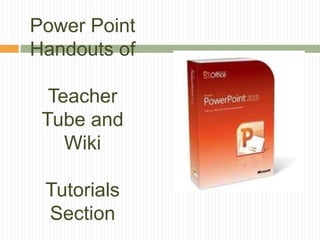
Power Point
Handouts of

  Teacher
 Tube and
    Wiki

 Tutorials
 Section
Creating a Multimedia Lesson
for Peer Review
Using Wikispaces.com

          Created by
     Miss Roxanne Wright
General Information
   Multimedia Formats
     Power Point
     Movie Maker

   Saving Power Point to make Movie
     Asindividual pictures
     Sounds files as separate Files

   Importing to Movie Maker
     http://www.rcs.k12.va.us/glms/ppt2video.pdf
Resource for Using Movie Maker and Power
Point to make a movie
http://www.rcs.k12.va.us/glms/ppt2video.pdf
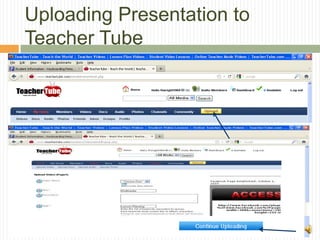
Uploading Presentation to
Teacher Tube
Uploading Presentation to
Teacher Tube
Helpful Tips
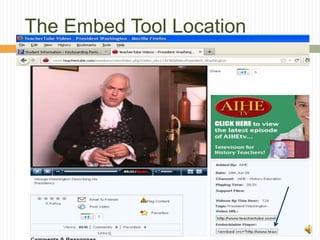
The Embed Tool Location
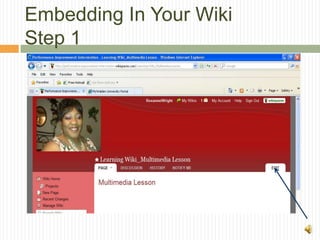
Embedding In Your Wiki
Step 1
Embedding In Your Wiki
Step 2
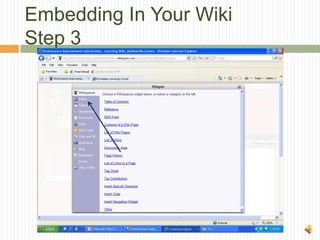
Embedding In Your Wiki
Step 3
Embedding In Your Wiki
Step 4
Choose Video Type Here
Embedding In Your Wiki
Step 5
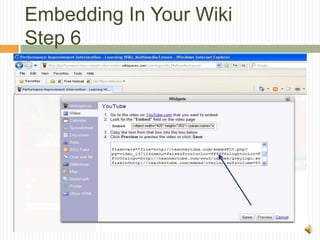
Embedding In Your Wiki
Step 6
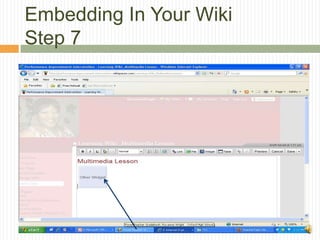
Embedding In Your Wiki
Step 7
Presentation Embedded and
Ready for Viewing

Conf packet1

  • 1.
    WELCOME TO MULTIMEDIA TECHNOLOGY TO FACILITATE LEARNING JACKSON STATE UNIVERSITY NOVEMBER 4, 2011 9:00 AM – 3:00 PM Instructor: Miss Roxanne Wright
  • 3.
    Agenda for Workshop(Page 1/2) Time Location Activity 9:00 – 9:25 Ball Room A Registration and materials pick up area. Participants will pick up name badges and rolling bags. 9:30 – 9:55 Lecture Hall C Participants will watch a short clip of a lesson implemented using technology to promote active engagement. Participants will be given a think pad (note pad) and instructed to write down any impressions received, recognizable strategies used, technologies used, and critical thinking components promoted by technology use, if any. 10:00 – 10:55 Technology Room 2 Look at some lesson plans on budgeting and critique them. Decide which lessons are amenable for technology use and student engagement 11:00 – 11:55 Technology Room 2 Explore some online technologies Develop a tech tool box 12:00 – 1:00 Lunch Own Your Own
  • 4.
    Agenda for Workshop(Page 2/2) Time Location Activity After Lunch Schedule 1:05 – 2:15 Presentation Room Collaborative Assignment: Take the 4 lessons chosen and pair them with appropriate technologies and redesign the lesson using the appropriate technologies. Create a short PowerPoint that communicates how the lesson will implemented using technology. The ideas are the focal point along with technology pairing for active student learning. 2:15 – 3:00 Presentation Room Collaborative Assignment: 4 Presentation of Lesson Design Workshop Closing Please fill out the online evaluation on line. The web address is http://www.surveyshare.com/s/AQA4JTC
  • 5.
  • 6.
    Objectives and Results  Objectives  Create a tech toolbox  Construct Lesson Plan with multimedia activities  Critique lesson of other participant for enhancement  Create presentation of final lesson draft  Results  Lesson plan that utilized multimedia to promote active learning  Skills developed  Choosing Appropriate Tech for lesson activities  Using tech as an aid to engage, facilitate, evaluate the learner.  Using the wiki to delivery multimedia content
  • 7.
  • 8.
    Sample Lesson PlanFormat Teacher Student Material Guide Guide Needed Objectives Information Other Resources Verification (Steps to check for student understandin g) Activity Summary Additional Notes
  • 9.
    Group Discussions  Ideas gathered from Lesson Plan Critique Activity
  • 10.
    Preparing for LivePresentation  Create a Wiki Page  Edit the Page  Power Point Presentation  Power Point to Movie Maker  Uploading to Teacher Tube  Steps to Making the presentation live in the Wiki
  • 11.
    Conclusion  Please remember to visit http://www.surveyshare.com/s/AQA4JTC and complete the workshop evaluation.  Thank you for attending and participating in the Using Multimedia to Facilitate Learning Workshop.  Presenter: Miss Roxanne Wright
  • 12.
    Power Point Handouts of Teacher Tube and Wiki Tutorials Section
  • 13.
    Creating a MultimediaLesson for Peer Review Using Wikispaces.com Created by Miss Roxanne Wright
  • 14.
    General Information  Multimedia Formats  Power Point  Movie Maker  Saving Power Point to make Movie  Asindividual pictures  Sounds files as separate Files  Importing to Movie Maker  http://www.rcs.k12.va.us/glms/ppt2video.pdf
  • 15.
    Resource for UsingMovie Maker and Power Point to make a movie http://www.rcs.k12.va.us/glms/ppt2video.pdf
  • 16.
  • 17.
  • 18.
  • 19.
  • 20.
    Embedding In YourWiki Step 1
  • 21.
    Embedding In YourWiki Step 2
  • 22.
    Embedding In YourWiki Step 3
  • 23.
    Embedding In YourWiki Step 4 Choose Video Type Here
  • 24.
    Embedding In YourWiki Step 5
  • 25.
    Embedding In YourWiki Step 6
  • 26.
    Embedding In YourWiki Step 7
  • 27.

Editor's Notes

  • #4 A schedule design for optional periods of time/objectives.
  • #6 Beginning course details and/or books/materials needed for a class/project.
  • #7 Objectives for instruction and expected results and/or skills developed from learning.
  • #8 Relative vocabulary list.
  • #9 Introductory notes.
  • #10 An opportunity for questions and discussions.
  • #11 A list of procedures and steps, or a lecture slide with media.
  • #12 Conclusion to course, lecture, et al.