NIKHIL KUMAR SINGH
CSE -2ND SHIFT
2nd YEAR
INTRODUCTION
• Source code available
• Open Source license
• OSI (Open Source
Initiative)
• Mozilla , Linux , Android
WHY OPEN SOURCE
• BETTER Software
• Lower Cost
• No Vendor Lock-In
It’s all yours
• Elevate your profile
• Security
• Auditability
• SOURCE CODE
• OSI
• FREE DISTRIBUTION
• COMMUNITY
• COMMITER
• CLOUD COMPUTING
• GPL (General Public License)
• REPOSITORY
• VERSION CONTROL SYSTEM – USE ??
TERMS IN OPEN SOURCE
VERSION CONTROL SYSTEM
• Version control is a system that records changes to a file or set
of files over time so that you can recall specific versions later.
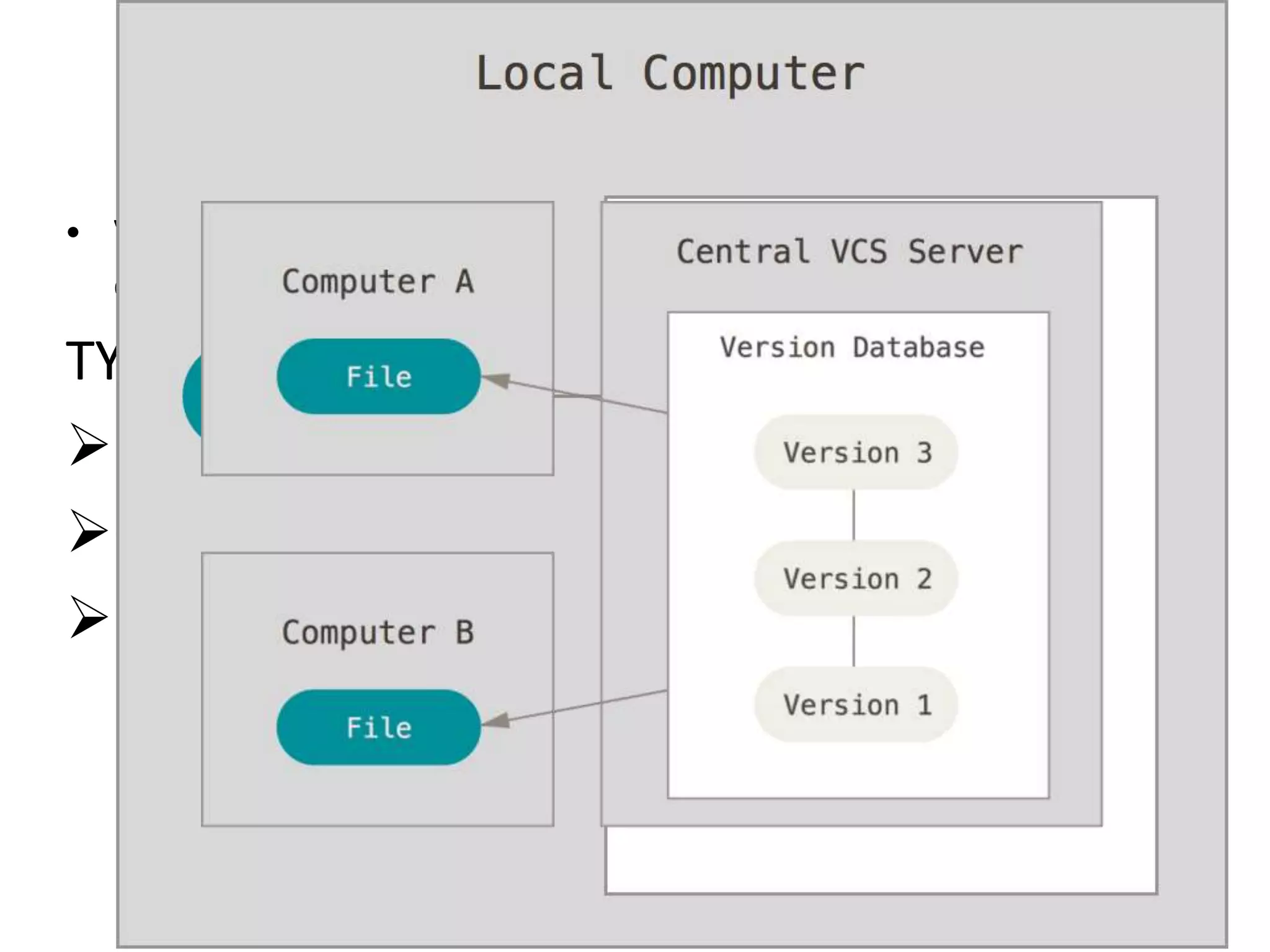
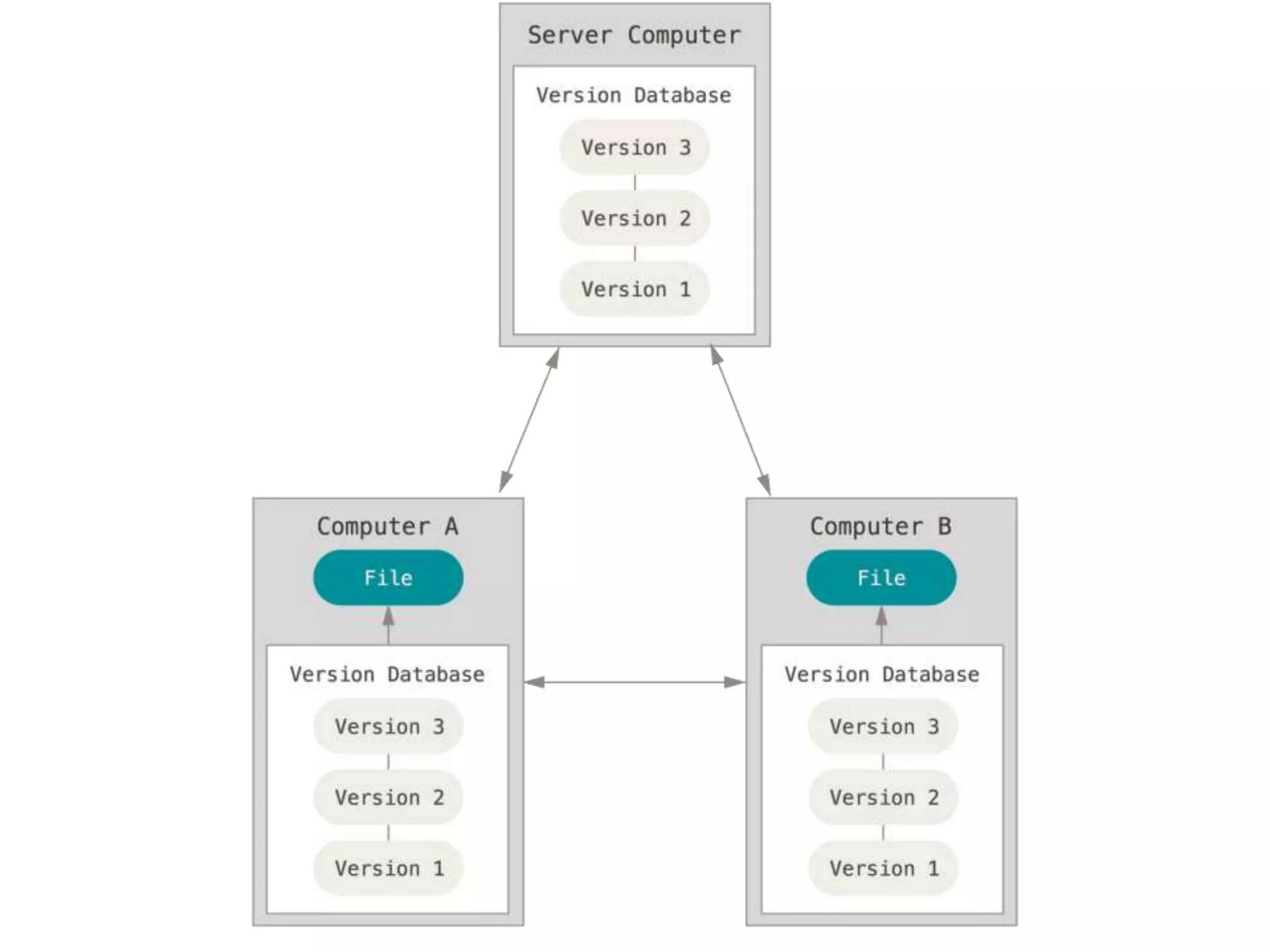
TYPES OF VERSION CONTROL SYSTEMS:-
Local VCS
Centralized VCS
Distributed VCS
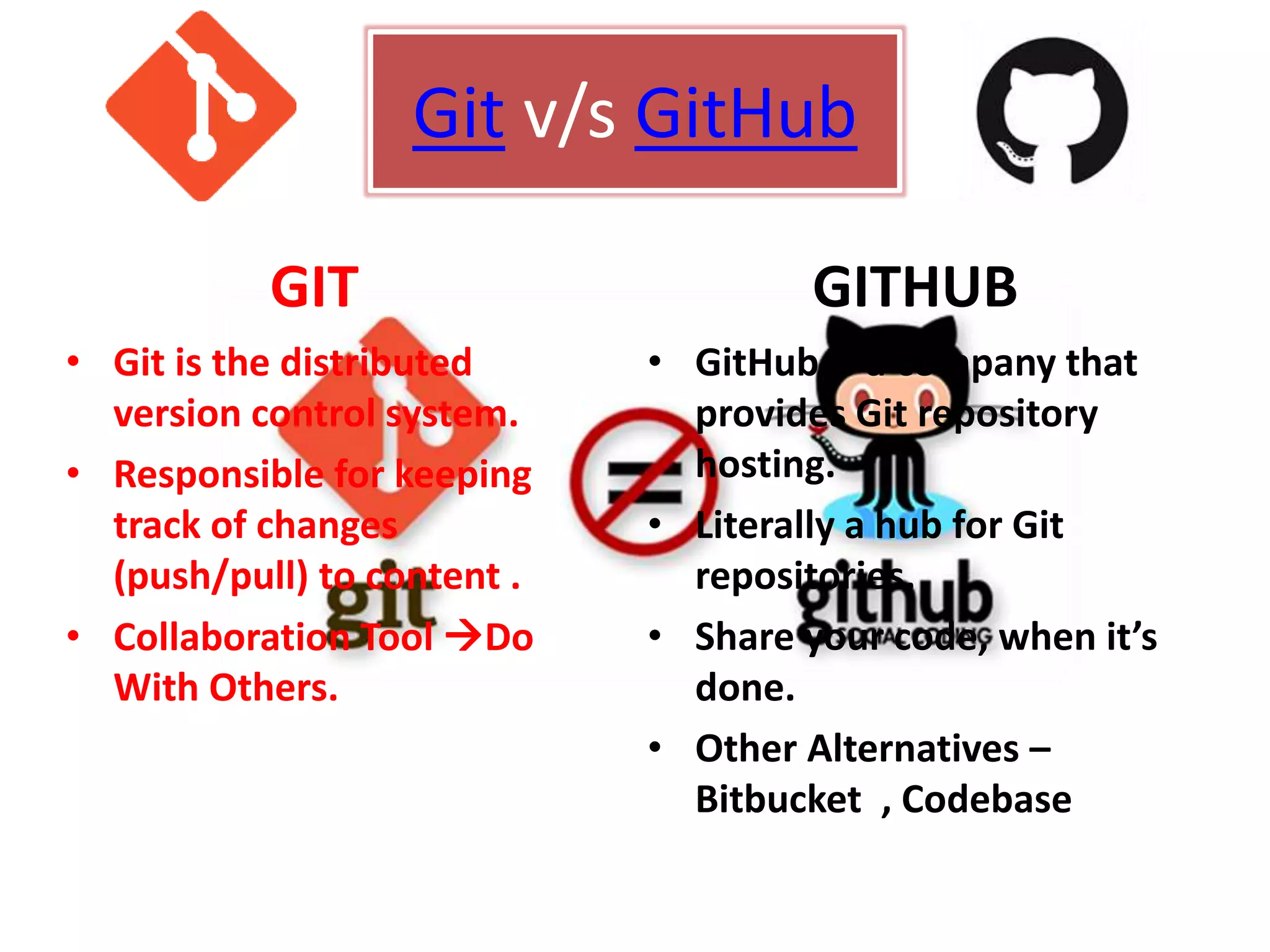
Git v/s GitHub
GIT
• Git is the distributed
version control system.
• Responsible for keeping
track of changes
(push/pull) to content .
• Collaboration Tool Do
With Others.
GITHUB
• GitHub is a company that
provides Git repository
hosting.
• Literally a hub for Git
repositories.
• Share your code, when it’s
done.
• Other Alternatives –
Bitbucket , Codebase
TERMS of Git / GitHub
• Pull
• Pull Request
• Fork
• Push
• Branch
• Commit
• Fetch
• Issue
• Gists
GitHub  JQUERY
GETTING INTO OPEN SOURCE
Choose a project
Raise Issues
Testing
 Start Listening
 Add comments
Fix A Bug (if you can)
Learn And Repeat
THANK YOU

Concepts of Open source

  • 1.
    NIKHIL KUMAR SINGH CSE-2ND SHIFT 2nd YEAR
  • 2.
    INTRODUCTION • Source codeavailable • Open Source license • OSI (Open Source Initiative) • Mozilla , Linux , Android
  • 3.
    WHY OPEN SOURCE •BETTER Software • Lower Cost • No Vendor Lock-In It’s all yours • Elevate your profile • Security • Auditability
  • 4.
    • SOURCE CODE •OSI • FREE DISTRIBUTION • COMMUNITY • COMMITER • CLOUD COMPUTING • GPL (General Public License) • REPOSITORY • VERSION CONTROL SYSTEM – USE ?? TERMS IN OPEN SOURCE
  • 5.
    VERSION CONTROL SYSTEM •Version control is a system that records changes to a file or set of files over time so that you can recall specific versions later. TYPES OF VERSION CONTROL SYSTEMS:- Local VCS Centralized VCS Distributed VCS
  • 7.
    Git v/s GitHub GIT •Git is the distributed version control system. • Responsible for keeping track of changes (push/pull) to content . • Collaboration Tool Do With Others. GITHUB • GitHub is a company that provides Git repository hosting. • Literally a hub for Git repositories. • Share your code, when it’s done. • Other Alternatives – Bitbucket , Codebase
  • 8.
    TERMS of Git/ GitHub • Pull • Pull Request • Fork • Push • Branch • Commit • Fetch • Issue • Gists GitHub  JQUERY
  • 9.
    GETTING INTO OPENSOURCE Choose a project Raise Issues Testing  Start Listening  Add comments Fix A Bug (if you can) Learn And Repeat
  • 10.

Editor's Notes

  • #3 Open-source software (OSS) is computer software with its source code made available with a license in which the copyright holder provides the rights to study, change and distribute the software to anyone and for any purpose.[ An open-source license is a type of license for computer software and other products that allows the source code, blueprint or design to be used, modified and/or shared under defined terms and conditions.[1] This allows end users to review and modify the source code, blueprint or design for their own customization, curiosity or troubleshooting needs. OSI:-Anybody can call their program open source, but this organization maintains compliance and trademark information that the industry at large recognizes in a cooperative effort. In other words, everyone plays nicely with the help of the OSI.
  • #4 How can Netflix charge as little as $8 per month for its service?" Hammond asks. "Because everything is built on open-source software. They focused on content, not building an operating system or a testing framework.“ 9. Cost Between the purchase price of the software itself, the exorbitant cost of mandatory virus protection, support charges, ongoing upgrade expenses and the costs associated with being locked in, proprietary software takes more out of your business than you probably even realize. There are many reasons for people to participate in an open-source project. These include the following: The software being developed helps them to do their work better. They can influence development. They can modify the code to suit their needs. They can interact with and learn from other users. They can be part of a cool project. 7. Auditability With closed source software, you have nothing but the vendor's claims telling you that they're keeping the software secure and adhering to standards, for example. It's basically a leap of faith. The visibility of the code behind open source software, however, means you can see for yourself and be confident.
  • #5 6: Committer Committers are the community's quality control experts. Somebody has to control the process. Committers actually decide what changes, based on community experience, make it into the originally licensed program.  As you can imagine, being a committer is a bit like walking a tightrope. It's a balancing act with the community's good will on one side and the integrity of the source code on the other. The GNU General Public License (GNU GPL or GPL) is the most widely used[5] free software license, which guarantees end users (individuals, organizations, companies) the freedoms to use, study, share (copy), and modify the software. In revision control systems, a repository[1] is an on-disk data structure which stores metadata for a set of files and/or directory structure. Depending on if the version control system in use is distributed (for instance, Git or Mercurial) or centralized (Subversion or Perforce, for example), the whole set of information in the repository may be duplicated on every user's system or may be maintained on a single server. Some of the metadata that a repository contains includes, among other things: Historical record of changes in the repository. A set of commit objects. A set of references to commit objects, called heads. Metadata (metacontent) is defined as the data providing information about one or more aspects of the data, such as: Means of creation of the data Purpose of the data Time and date of creation Creator or author of the data Location on a computer network where the data was created Standards used
  • #6 Local Version Control Systems Many people’s version-control method of choice is to copy files into another directory (perhaps a time-stamped directory, if they’re clever). This approach is very common because it is so simple, but it is also incredibly error prone. It is easy to forget which directory you’re in and accidentally write to the wrong file or copy over files you don’t mean to. Centralized Version Control Systems The next major issue that people encounter is that they need to collaborate with developers on other systems. To deal with this problem, Centralized Version Control Systems (CVCSs) were developed. These systems, such as CVS, Subversion, and Perforce, have a single server that contains all the versioned files, and a number of clients that check out files from that central place. For many years, this has been the standard for version control. This setup offers many advantages, especially over local VCSs. For example, everyone knows to a certain degree what everyone else on the project is doing. Administrators have fine-grained control over who can do what; and it’s far easier to administer a CVCS than it is to deal with local databases on every client. However, this setup also has some serious downsides. The most obvious is the single point of failure that the centralized server represents. If that server goes down for an hour, then during that hour nobody can collaborate at all or save versioned changes to anything they’re working on. If the hard disk the central database is on becomes corrupted, and proper backups haven’t been kept, you lose absolutely everything – the entire history of the project except whatever single snapshots people happen to have on their local machines. Local VCS systems suffer from this same problem – whenever you have the entire history of the project in a single place, you risk losing everything. Distributed Version Control Systems This is where Distributed Version Control Systems (DVCSs) step in. In a DVCS (such as Git, Mercurial, Bazaar or Darcs), clients don’t just check out the latest snapshot of the files: they fully mirror the repository. Thus if any server dies, and these systems were collaborating via it, any of the client repositories can be copied back up to the server to restore it. Every clone is really a full backup of all the data.
  • #8 GitHub is a web-based Git repository hosting service, which offers all of the distributed revision control and source code management (SCM) functionality of Git as well as adding its own features Git 3. Where Git really excels is as a collaboration tool. A place for you to Do It With Others. If you are doing all your coding on your local machine and then just uploading it in one snapshot (aka commit) at the end, you are missing out on a huge amount of value. Git allows you to snapshot/commit incrementally, after each little change you do.  But the larger benefits of commit early/commit often are that other people can see and comment on what you are doing. You are being collaborative and open, and the feedback, suggestions or help you get along the way might just alter the entire course of the project for the greater good. It might well save you a whole bunch of time, help you discover some previously unconsidered potential, or even identify an awesome collaborator who will help you drive your project forward. Opening out your half-baked thoughts sounds scary to some, but we all go through those stages - and those are the times when feedback and engagement is most critical. If you don't want the world to see your project, you can always create a private repo and pull in collaborators by invitation only. Github 4 :- Github is just another place to store identical repos - you could use any Git hosting service. One alternative isBitbucket. This service gives you free private repos (unlike Github), in case you aren't ready to share your work with the world. OPEN GIT AND GITHUB
  • #9 Pull Pull refers to when you are fetching in changes and merging them. For instance, if someone has edited the remote file you're both working on, you'll want to pull in those changes to your local copy so that it's up to date. Pull Request Pull requests are proposed changes to a repository submitted by a user and accepted or rejected by a repository's collaborators.  Fork A fork is a personal copy of another user's repository that lives on your account. Forks allow you to freely make changes to a project without affecting the original. Forks remain attached to the original, allowing you to submit a pull request to the original's author to update with your changes. You can also keep your fork up to date by pulling in updates from the original. Branch A branch is a parallel version of a repository. It is contained within the repository, but does not affect the primary or master branch allowing you to work freely without disrupting the "live" version. When you've made the changes you want to make, you can merge your branch back into the master branch to publish your changes Commit – Revision of an individual change to a file . Fetch Fetching refers to getting the latest changes from an online repository (like GitHub.com) without merging them in. Once these changes are fetched you can compare them to your local branches (the code residing on your local machine). Issue Issues are suggested improvements, tasks or questions related to the repository. Issues can be created by anyone (for public repositories), and are moderated by repository collaborators. Each issue contains its own discussion forum, can be labeled and assigned to a user. Contributor – The one who has a pull request accepted . Gist is a simple way to share snippets and pastes with others. All gists are Git repositories, so they are automatically versioned, forkable and usable from Git.
  • #10 Here are a few great places to look: GitHub Explore: Popular and trending projects. GitHub Stars: Projects starred by other people. GitHub Showcases: A way to discover related repositories. LayerVault News: Front-end and design projects. Create an Issue If you find a bug in a project you’re using (and you don’t know how to fix it), have trouble following the documentation or have a question about the project – create an issue! There’s nothing to it and whatever issue you’re having, you’re likely not the only one, so others will find your issue helpful, too. For more information on how issues work, check out our Issues guide. Issues Pro Tips Check existing issues for your issue. Duplicating an issue is slower for both parties so search through open and closed issues to see if what you’re running into has been addressed already. Be clear about what your problem is: what was the expected outcome, what happened instead? Detail how someone else can recreate the problem. Link to demos recreating the problem on things like JSFiddle or CodePen. Include system details like what the browser, library or operating system you’re using and its version. Paste error output or logs in your issue or in a Gist. If pasting them in the issue, wrap it in three backticks: ``` so that it renders nicely. Start listening 1. Join a mailing list: For many projects, the mailing list is the main conduit of communication about the development of the project. On large projects, there are many mailing lists to choose from. For example, the PostgreSQL project has no fewer than 12 user-oriented lists and six developer lists on its mailing list page. I suggest you follow the main user-oriented list and the core developer list in which to start listening. 2. Follow a blog: Blogs maintained by core developers often give information about what’s coming up in future releases, and what it’s taken to get there. A planet site aggregates news and blog entries from many sources related to the project. If there is a planet site, like planet.gnome.orgor planet.mysql.com, start there. Just search Google for “planet <projectname>.” 3. Join an IRC channel: Many open source projects have dedicated Internet relay chat (IRC) channels where developers and users hang out to discuss problems and development. Check the project’s website for the details of what the channel is called and what IRC network it’s found on.  Add a comment: When you’re digging through the code, you may find some spots that are confusing. Chances are if you were confused, others will be  as well. Document them in the code and submit a patch.