Version Control & GIT
Floating lesson
Yoram Michaeli 21-July-2016
Source-it
•Present what is version control and why
we use it
•Present what is GIT, its basic concept and
what must we know about it in order to
use it
•Present basic GIT flows in practice
Presentation Goals
Source-it
Version Control
Source-it
What is version control?
• Version Control (VC) also known as source control or
revision control
• Version control – management of changes in
documents, computer programs or other collection of
information files
• Revision control is any kind of practice that tracks and
provides control over changes to source code
• Version Control Systems (VCS) – GIT, SVN, ClearCase,
CVS, Perforce
Source-it
Why do we need version control?
• Collaboration
• Work with different versions of the code
• Control the different versions of the software
• Meet legal, security and management requirements
• Track changes of the code and configuration files
Source-it
GIT
Source-it
What is GIT?
• GIT – Free of charge Distributed Version Control System
(DVCS)
• GIT has been created in 2005 by Linus Torvalds for the
development of the Linux Kernel
• Every GIT directory on every computer is a full
repository with complete history and full version-
tracking capabilities
• Every GIT directory is independent of network access
or central server
Source-it
GIT basics
Source-it
GIT basic terms
Synchronization actions (network-related actions)
• Clone – making a copy of a remote repository onto a local directory
• Fetch – synchronize the local repository from the remote repository
• Pull – update the local working directory for the current branch from the remote matching
branch
• Push – update the remote branch with the latest version of the current branch and/or tags on
the local repository
Local work terms (locally without network)
• Add – stage files to be tracked by GIT
• Commit – save local changes into the local repository
• Branch – a repository version pointing to some path in the repository structure
• Checkout – update the local working directory to a certain version of the repository
• Merge – sync. a certain branch of the local repository from another branch or tags or version
Source-it
GIT in practice
Source-it
Common GIT workflows
• Clone a repository
• Synchronize the local repository
• Commit a change
• Create a new branch
• Switch between branches
• Merge from branch to branch
• Pull request
Source-it
Clone a repository
From command line:
git clone git@github.com:yorammi/source-it.git
Source-it
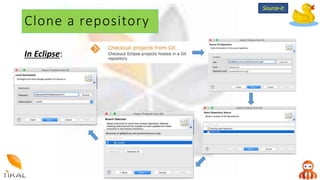
Clone a repository
In Eclipse:
Source-it
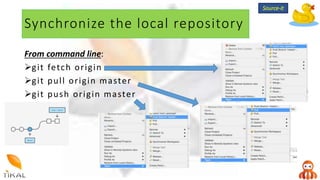
Synchronize the local repository
From command line:
git fetch origin
git pull origin master
git push origin master
Source-it
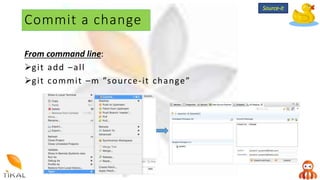
Commit a change
From command line:
git add –all
git commit –m ”source-it change”
Source-it
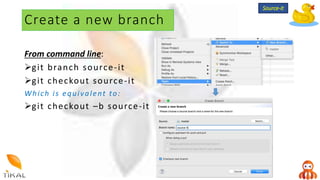
Create a new branch
From command line:
git branch source-it
git checkout source-it
Which is equivalent to:
git checkout –b source-it
Source-it
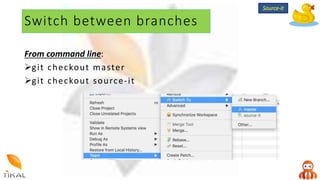
Switch between branches
From command line:
git checkout master
git checkout source-it
Source-it
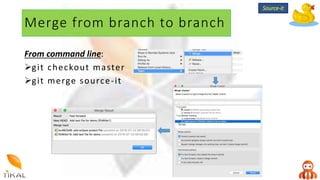
Merge from branch to branch
From command line:
git checkout master
git merge source-it
Source-it
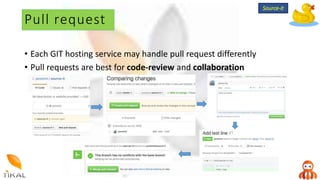
Pull request
• Each GIT hosting service may handle pull request differently
• Pull requests are best for code-review and collaboration
Source-it
What’s next?
Source-it

Source-it Version-contol & GIT - floating-lesson

  • 1.
    Version Control &GIT Floating lesson Yoram Michaeli 21-July-2016 Source-it
  • 2.
    •Present what isversion control and why we use it •Present what is GIT, its basic concept and what must we know about it in order to use it •Present basic GIT flows in practice Presentation Goals Source-it
  • 3.
  • 4.
    What is versioncontrol? • Version Control (VC) also known as source control or revision control • Version control – management of changes in documents, computer programs or other collection of information files • Revision control is any kind of practice that tracks and provides control over changes to source code • Version Control Systems (VCS) – GIT, SVN, ClearCase, CVS, Perforce Source-it
  • 5.
    Why do weneed version control? • Collaboration • Work with different versions of the code • Control the different versions of the software • Meet legal, security and management requirements • Track changes of the code and configuration files Source-it
  • 6.
  • 7.
    What is GIT? •GIT – Free of charge Distributed Version Control System (DVCS) • GIT has been created in 2005 by Linus Torvalds for the development of the Linux Kernel • Every GIT directory on every computer is a full repository with complete history and full version- tracking capabilities • Every GIT directory is independent of network access or central server Source-it
  • 8.
  • 9.
    GIT basic terms Synchronizationactions (network-related actions) • Clone – making a copy of a remote repository onto a local directory • Fetch – synchronize the local repository from the remote repository • Pull – update the local working directory for the current branch from the remote matching branch • Push – update the remote branch with the latest version of the current branch and/or tags on the local repository Local work terms (locally without network) • Add – stage files to be tracked by GIT • Commit – save local changes into the local repository • Branch – a repository version pointing to some path in the repository structure • Checkout – update the local working directory to a certain version of the repository • Merge – sync. a certain branch of the local repository from another branch or tags or version Source-it
  • 10.
  • 11.
    Common GIT workflows •Clone a repository • Synchronize the local repository • Commit a change • Create a new branch • Switch between branches • Merge from branch to branch • Pull request Source-it
  • 12.
    Clone a repository Fromcommand line: git clone git@github.com:yorammi/source-it.git Source-it
  • 13.
    Clone a repository InEclipse: Source-it
  • 14.
    Synchronize the localrepository From command line: git fetch origin git pull origin master git push origin master Source-it
  • 15.
    Commit a change Fromcommand line: git add –all git commit –m ”source-it change” Source-it
  • 16.
    Create a newbranch From command line: git branch source-it git checkout source-it Which is equivalent to: git checkout –b source-it Source-it
  • 17.
    Switch between branches Fromcommand line: git checkout master git checkout source-it Source-it
  • 18.
    Merge from branchto branch From command line: git checkout master git merge source-it Source-it
  • 19.
    Pull request • EachGIT hosting service may handle pull request differently • Pull requests are best for code-review and collaboration Source-it
  • 20.