Concept Mapping
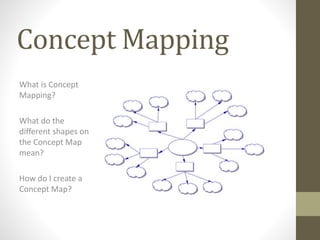
What is Concept
Mapping?
What do the
different shapes on
the Concept Map
mean?
How do I create a
Concept Map?
What is Concept Mapping?
• The purpose of a Concept Map is to visually show the
relationships between topics and ideas.
• Concept Maps are formed around a main topic surrounded by
keywords or short phrases that can be connected to the main
topic.
• A Concept Map is a helpful tool to use because with it you can
organize your ideas into layers based on the importance or
significance of each keyword or concept.
What do the Different Shapes
on a Concept Map mean?
• Concept Maps can
come in many different
shapes and/or colors.
• The shapes and/or
colors indicate a
change in layers.
• The actual shape
and/or color used
doesn’t matter, as long
as all the ideas in a
particular layer use the
same shape and/or
color.
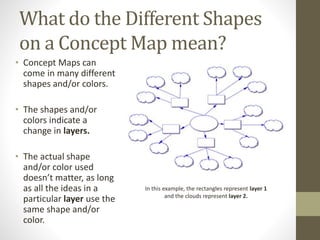
In this example, the rectangles represent layer 1
and the clouds represent layer 2.
How do I Create a Concept Map?
• First, select a main
topic.
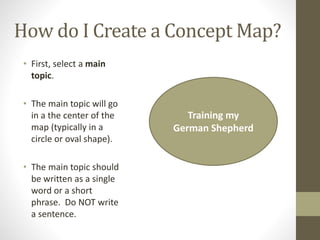
• The main topic will go
in a the center of the
map (typically in a
circle or oval shape).
• The main topic should
be written as a single
word or a short
phrase. Do NOT write
a sentence.
Training my
German Shepherd
How do I Create a Concept Map?
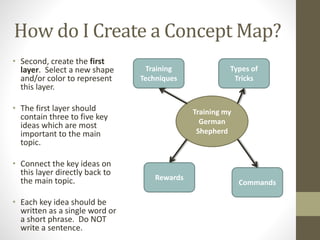
• Second, create the first
layer. Select a new shape
and/or color to represent
this layer.
• The first layer should
contain three to five key
ideas which are most
important to the main
topic.
• Connect the key ideas on
this layer directly back to
the main topic.
• Each key idea should be
written as a single word or
a short phrase. Do NOT
write a sentence.
Training my
German
Shepherd
Training
Techniques
Types of
Tricks
Rewards
Commands
How do I Create a Concept Map?
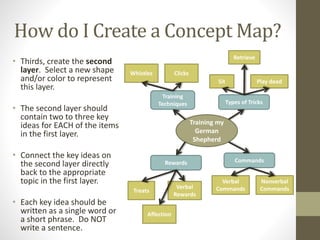
• Thirds, create the second
layer. Select a new shape
and/or color to represent
this layer.
• The second layer should
contain two to three key
ideas for EACH of the items
in the first layer.
• Connect the key ideas on
the second layer directly
back to the appropriate
topic in the first layer.
• Each key idea should be
written as a single word or
a short phrase. Do NOT
write a sentence.
Training my
German
Shepherd
Training
Techniques Types of Tricks
Rewards Commands
Verbal
Commands
Nonverbal
Commands
Sit Play dead
Retrieve
Treats
Verbal
Rewards
Affection
Whistles Clicks

Concept mapping

  • 1.
    Concept Mapping What isConcept Mapping? What do the different shapes on the Concept Map mean? How do I create a Concept Map?
  • 2.
    What is ConceptMapping? • The purpose of a Concept Map is to visually show the relationships between topics and ideas. • Concept Maps are formed around a main topic surrounded by keywords or short phrases that can be connected to the main topic. • A Concept Map is a helpful tool to use because with it you can organize your ideas into layers based on the importance or significance of each keyword or concept.
  • 3.
    What do theDifferent Shapes on a Concept Map mean? • Concept Maps can come in many different shapes and/or colors. • The shapes and/or colors indicate a change in layers. • The actual shape and/or color used doesn’t matter, as long as all the ideas in a particular layer use the same shape and/or color. In this example, the rectangles represent layer 1 and the clouds represent layer 2.
  • 4.
    How do ICreate a Concept Map? • First, select a main topic. • The main topic will go in a the center of the map (typically in a circle or oval shape). • The main topic should be written as a single word or a short phrase. Do NOT write a sentence. Training my German Shepherd
  • 5.
    How do ICreate a Concept Map? • Second, create the first layer. Select a new shape and/or color to represent this layer. • The first layer should contain three to five key ideas which are most important to the main topic. • Connect the key ideas on this layer directly back to the main topic. • Each key idea should be written as a single word or a short phrase. Do NOT write a sentence. Training my German Shepherd Training Techniques Types of Tricks Rewards Commands
  • 6.
    How do ICreate a Concept Map? • Thirds, create the second layer. Select a new shape and/or color to represent this layer. • The second layer should contain two to three key ideas for EACH of the items in the first layer. • Connect the key ideas on the second layer directly back to the appropriate topic in the first layer. • Each key idea should be written as a single word or a short phrase. Do NOT write a sentence. Training my German Shepherd Training Techniques Types of Tricks Rewards Commands Verbal Commands Nonverbal Commands Sit Play dead Retrieve Treats Verbal Rewards Affection Whistles Clicks