Basic computer
organization
Basic computer organization
In this chapter we shall discuss
• computers functioning in broad sense by discussing computer system
organization
• and various types of software
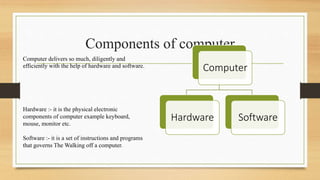
Components of computer
Computer
Hardware Software
Computer delivers so much, diligently and
efficiently with the help of hardware and software.
Hardware :- it is the physical electronic
components of computer example keyboard,
mouse, monitor etc.
Software :- it is a set of instructions and programs
that governs The Walking off a computer.
Do you know how computer works?
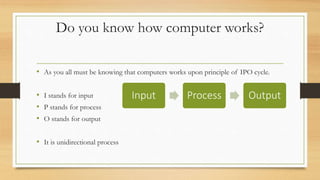
• As you all must be knowing that computers works upon principle of IPO cycle.
• I stands for input
• P stands for process
• O stands for output
• It is unidirectional process
Input Process Output
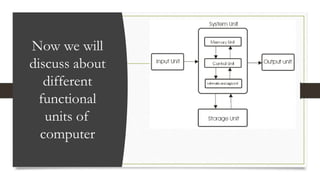
Now we will
discuss about
different
functional
units of
computer
Let's talk about these
functional components of a
computer
Input unit
The input unit is formed by attaching input devices to the computer
like keyboard, mouse, OCR, OMR etc.
An input unit takes the input and convert it into binary form so that
it can be understood by the computer.
The Input unit is comprised of different input devices that take the
input in different forms and pass them in digital form to the CPU.
Output unit
The Output unit is formed by attaching output
devices to the computer like Monitor, Printer,
Speaker etc.
An output unit converts the output into binary
form to human readable form so that it can be
understood by the user.
System Unit or Central Processing Unit
CPU
Control Unit
(CU)
Memory Unit
(MU)
(Register)
Arithmatic and
Logical Unit
(ALU)
CPU
interconnection
ARITHMETIC AND LOGICAL UNIT
• The ALU performs all four Arithmetic operation i.e. =, -, /, *
• And logical operation i.e. <, >, =, <=, >=, !=, == etc.
• the ALU is divided into two units, an arithmetic unit (AU) and a logic unit
(LU).
Control Unit
• The control unit is a component of a computer's central processing unit that
directs the operation of the processor.
• It tells the computer's memory, arithmetic logic unit and input and output
devices how to respond to the instructions that have been sent to the
processor.
• It acts as Traffic Police.
Memory Unit
• Registers are the smallest data holding elements that are built into the
processor itself.
• These are the memory locations that are directly accessible by the processor.
• It may hold an instruction, a storage address or any kind of data such as a bit
sequence or individual characters.
• It is also called as temporary memory of CPU.
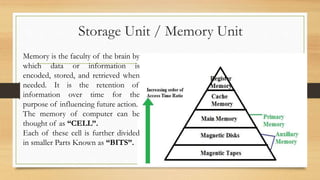
Storage Unit / Memory Unit
Memory is the faculty of the brain by
which data or information is
encoded, stored, and retrieved when
needed. It is the retention of
information over time for the
purpose of influencing future action.
The memory of computer can be
thought of as “CELL”.
Each of these cell is further divided
in smaller Parts Known as “BITS”.
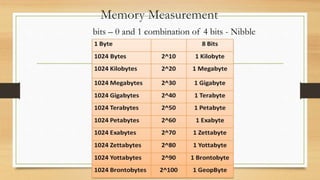
Memory Measurement
bits – 0 and 1 combination of 4 bits - Nibble
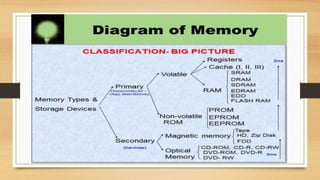
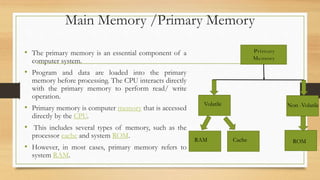
Main Memory /Primary Memory
• The primary memory is an essential component of a
computer system.
• Program and data are loaded into the primary
memory before processing. The CPU interacts directly
with the primary memory to perform read/ write
operation.
• Primary memory is computer memory that is accessed
directly by the CPU.
• This includes several types of memory, such as the
processor cache and system ROM.
• However, in most cases, primary memory refers to
system RAM.
Volatile Non -Volatile
RAM Cache ROM
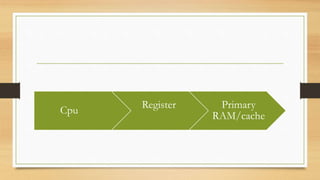
Cpu
Register Primary
RAM/cache
Volatile Primary memory/temporary
• RAM, or random access memory, consists of one or
more memory modules that temporarily store data while a computer is running.
• RAM is volatile memory, meaning it is erased when the power is turned off.
• RAM is volatile i.e. as long as the power is supplied to the computer, it retains the
data in it. But as soon as the power supply is turned off, all the contents of RAM
are wiped out. It is used to store data temporarily while the computer is working.
Whenever the computer is started or a software application is launched, the required
program and data are loaded into RAM for processing. RAM is usually referred to
as main memory and it is faster than the secondary memory or storage devices.
ROM Read Only Memory / Non-Volatile
• ROM is non-volatile, means its contents are not lost even when the power is
turned off.
• It is used as a small but faster permanent storage for the contents which are
rarely changed.
This memory is slower than RAM.
It is used when computer starts Booting it is used for checking BIOS (Basic
Input Output System)
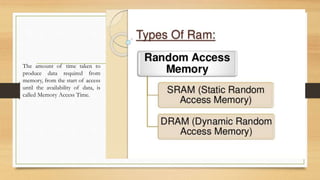
The amount of time taken to
produce data required from
memory, from the start of access
until the availability of data, is
called Memory Access Time.
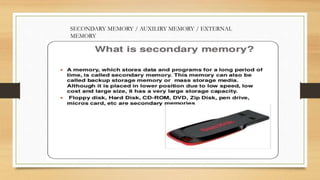
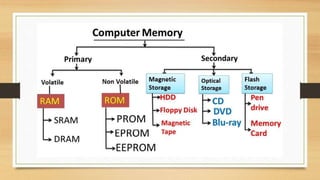
SECONDARY MEMORY / AUXILIRY MEMORY / EXTERNAL
MEMORY
Magnetic storage or magnetic recording is the storage of data on
a magnetized medium. Magnetic storage uses different patterns
of magnetisation in a magnetizable material to store data and is a
form of non-volatile memory. The information is accessed using
one or more read/write heads.
Magnetic Storage
HDD / Hard Disk Drive
A Hard disk drive (HDD), hard disk, hard drive, or fixed
disk[ is an electro-mechanical data storage device that
stores and retrieves digital data using magnetic storage and
one or more rigid rapidly rotating platters coated with
magnetic material. The platters are paired with magnetic
heads, usually arranged on a moving actuator arm, which
read and write data to the platter surfaces.[2] Data is
accessed in a random-access manner, meaning that
individual blocks of data can be stored and retrieved in any
order. HDDs are a type of non-volatile storage, retaining
stored data even when powered off.
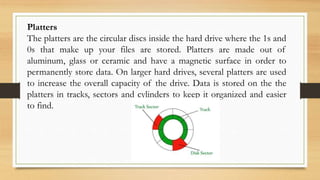
Platters
The platters are the circular discs inside the hard drive where the 1s and
0s that make up your files are stored. Platters are made out of
aluminum, glass or ceramic and have a magnetic surface in order to
permanently store data. On larger hard drives, several platters are used
to increase the overall capacity of the drive. Data is stored on the the
platters in tracks, sectors and cylinders to keep it organized and easier
to find.
The Spindle
The spindle keeps the platters in position and rotates them as
required. The revolutions-per-minute rating determines how fast
data can be written to and read from the hard drive. A typical
internal desktop drive runs at 7,200 RPM, though faster and slower
speeds are available.
The Read/Write Arm
The read/write arm controls the movement of the read/write heads, which do the
actual reading and writing on the disk platters by converting the magnetic surface
into an electric current.
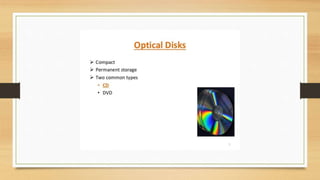
DVD
Stands for "Digital Versatile Disc." A DVD is a type of optical media used for storing
digital data.
It is the same size as a CD, but has a larger storage capacity.
Some DVDs are formatted specifically for video playback, while others may contain
different types of data, such as software programs and computer files.
ch1notes IP.pptx
ch1notes IP.pptx
ch1notes IP.pptx
ch1notes IP.pptx

ch1notes IP.pptx

  • 1.
  • 2.
    Basic computer organization Inthis chapter we shall discuss • computers functioning in broad sense by discussing computer system organization • and various types of software
  • 3.
    Components of computer Computer HardwareSoftware Computer delivers so much, diligently and efficiently with the help of hardware and software. Hardware :- it is the physical electronic components of computer example keyboard, mouse, monitor etc. Software :- it is a set of instructions and programs that governs The Walking off a computer.
  • 4.
    Do you knowhow computer works? • As you all must be knowing that computers works upon principle of IPO cycle. • I stands for input • P stands for process • O stands for output • It is unidirectional process Input Process Output
  • 5.
    Now we will discussabout different functional units of computer
  • 6.
    Let's talk aboutthese functional components of a computer
  • 7.
    Input unit The inputunit is formed by attaching input devices to the computer like keyboard, mouse, OCR, OMR etc. An input unit takes the input and convert it into binary form so that it can be understood by the computer. The Input unit is comprised of different input devices that take the input in different forms and pass them in digital form to the CPU.
  • 8.
    Output unit The Outputunit is formed by attaching output devices to the computer like Monitor, Printer, Speaker etc. An output unit converts the output into binary form to human readable form so that it can be understood by the user.
  • 9.
    System Unit orCentral Processing Unit CPU Control Unit (CU) Memory Unit (MU) (Register) Arithmatic and Logical Unit (ALU) CPU interconnection
  • 10.
    ARITHMETIC AND LOGICALUNIT • The ALU performs all four Arithmetic operation i.e. =, -, /, * • And logical operation i.e. <, >, =, <=, >=, !=, == etc. • the ALU is divided into two units, an arithmetic unit (AU) and a logic unit (LU).
  • 11.
    Control Unit • Thecontrol unit is a component of a computer's central processing unit that directs the operation of the processor. • It tells the computer's memory, arithmetic logic unit and input and output devices how to respond to the instructions that have been sent to the processor. • It acts as Traffic Police.
  • 12.
    Memory Unit • Registersare the smallest data holding elements that are built into the processor itself. • These are the memory locations that are directly accessible by the processor. • It may hold an instruction, a storage address or any kind of data such as a bit sequence or individual characters. • It is also called as temporary memory of CPU.
  • 13.
    Storage Unit /Memory Unit Memory is the faculty of the brain by which data or information is encoded, stored, and retrieved when needed. It is the retention of information over time for the purpose of influencing future action. The memory of computer can be thought of as “CELL”. Each of these cell is further divided in smaller Parts Known as “BITS”.
  • 14.
    Memory Measurement bits –0 and 1 combination of 4 bits - Nibble
  • 16.
    Main Memory /PrimaryMemory • The primary memory is an essential component of a computer system. • Program and data are loaded into the primary memory before processing. The CPU interacts directly with the primary memory to perform read/ write operation. • Primary memory is computer memory that is accessed directly by the CPU. • This includes several types of memory, such as the processor cache and system ROM. • However, in most cases, primary memory refers to system RAM. Volatile Non -Volatile RAM Cache ROM
  • 17.
  • 18.
    Volatile Primary memory/temporary •RAM, or random access memory, consists of one or more memory modules that temporarily store data while a computer is running. • RAM is volatile memory, meaning it is erased when the power is turned off. • RAM is volatile i.e. as long as the power is supplied to the computer, it retains the data in it. But as soon as the power supply is turned off, all the contents of RAM are wiped out. It is used to store data temporarily while the computer is working. Whenever the computer is started or a software application is launched, the required program and data are loaded into RAM for processing. RAM is usually referred to as main memory and it is faster than the secondary memory or storage devices.
  • 19.
    ROM Read OnlyMemory / Non-Volatile • ROM is non-volatile, means its contents are not lost even when the power is turned off. • It is used as a small but faster permanent storage for the contents which are rarely changed. This memory is slower than RAM. It is used when computer starts Booting it is used for checking BIOS (Basic Input Output System)
  • 20.
    The amount oftime taken to produce data required from memory, from the start of access until the availability of data, is called Memory Access Time.
  • 25.
    SECONDARY MEMORY /AUXILIRY MEMORY / EXTERNAL MEMORY
  • 27.
    Magnetic storage ormagnetic recording is the storage of data on a magnetized medium. Magnetic storage uses different patterns of magnetisation in a magnetizable material to store data and is a form of non-volatile memory. The information is accessed using one or more read/write heads. Magnetic Storage
  • 28.
    HDD / HardDisk Drive A Hard disk drive (HDD), hard disk, hard drive, or fixed disk[ is an electro-mechanical data storage device that stores and retrieves digital data using magnetic storage and one or more rigid rapidly rotating platters coated with magnetic material. The platters are paired with magnetic heads, usually arranged on a moving actuator arm, which read and write data to the platter surfaces.[2] Data is accessed in a random-access manner, meaning that individual blocks of data can be stored and retrieved in any order. HDDs are a type of non-volatile storage, retaining stored data even when powered off.
  • 29.
    Platters The platters arethe circular discs inside the hard drive where the 1s and 0s that make up your files are stored. Platters are made out of aluminum, glass or ceramic and have a magnetic surface in order to permanently store data. On larger hard drives, several platters are used to increase the overall capacity of the drive. Data is stored on the the platters in tracks, sectors and cylinders to keep it organized and easier to find.
  • 30.
    The Spindle The spindlekeeps the platters in position and rotates them as required. The revolutions-per-minute rating determines how fast data can be written to and read from the hard drive. A typical internal desktop drive runs at 7,200 RPM, though faster and slower speeds are available.
  • 31.
    The Read/Write Arm Theread/write arm controls the movement of the read/write heads, which do the actual reading and writing on the disk platters by converting the magnetic surface into an electric current.
  • 35.
    DVD Stands for "DigitalVersatile Disc." A DVD is a type of optical media used for storing digital data. It is the same size as a CD, but has a larger storage capacity. Some DVDs are formatted specifically for video playback, while others may contain different types of data, such as software programs and computer files.