OPERATING SYSTEM
AND NETWORK
PROCESSING SYSTEM
Prepared by- your name
here
’’’’’’’’’’’’’’’’’’’’’’’’’’’’’’’’’’’’’’
a) OPEARATING SYSTEM
History of operating system
 A series of development in the computer architecture led to the evolution of operating system
during later 20th century .
 During the 1940’s there were no operating system and assembly language was used to develop
programs that could directly interact with the hardware.
 During the 1950’s more number of people started using the tile computer systems. For example
batch operating system like BKY, CAL and Chios etc.The os developed during this period were
capable of performing only a single task at a time.
 During the 1960’s multi tasking operating system were develop. For example Admiral ,Basic
executive, input output control system, SABRE (Semi-Automatic Business Related
Environment).
 During the 1970’s multi user environment where breakthrough achievement in the history of
operating system. For example DOS/VS,OS/VSI andVMS.
 During the 1980’s operating system were developed including MS DOS.HP-UX and Macintosh
based on graphical user interface.
 During the 1990’s operating systems were developed including MSWidows 95,windows 98
Windows NT etc.
 The first decades of 21st has seen the development of operating system such as MAC OS
WINDOWS 2000.ETC
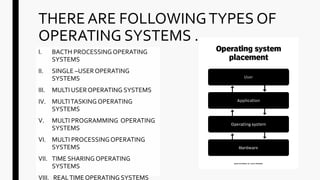
THERE ARE FOLLOWINGTYPES OF
OPERATING SYSTEMS .
I. BACTH PROCESSINGOPERATING
SYSTEMS
II. SINGLE –USEROPERATING
SYSTEMS
III. MULTI USEROPERATING SYSTEMS
IV. MULTITASKING OPERATING
SYSTEMS
V. MULTI PROGRAMMING OPERATING
SYSTEMS
VI. MULTI PROCESSINGOPERATING
SYSTEMS
VII. TIME SHARING OPERATING
SYSTEMS
VIII. REALTIMEOPERATING SYSTEMS
I) BATCH PROCESSING OPERATING
SYSTEM It is also known as off line or sequential or stacked processing
system.
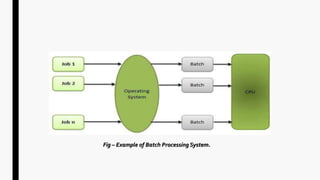
 In this operating system , job of similar natures are batched
together and run as group on computer system.
 It is appropriate for executing large job that need little
interaction.
Fig – Example of Batch Processing System.
These operating system allow you to operate at a time i.e.
DOS.
A single user operating system provides the facilities to be
used on one computer by only one user.
 It is easy to maintain and debug.
These system includes less requests to hardware and
software at a time so they have less chance to damage.
Examples like DOS, windows 3x,Windows 95, 97, 98 etc.
II) SINGLE –USER OPERATING SYSTEMS
iii)MULTI USER OPERATING SYSTEMS
 A multi user operating system is that which handles and controls multiple
users attached to a single computer.
If one computer in the network gets error then other computers not get
affected and that system handle this efficiently.
Resources sharing , multi tasking and background processing are the main
features.
Examples are- UNIX, XENIX etc.
IV) MULTITASKING OPERATING SYSTEMS
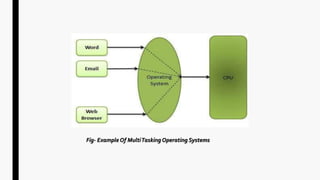
 Executing more than two programs at the
same time.
 It is supported in windows xp,windows7,windows10
Example:-Playing a game while listening
music
Fig- ExampleOf MultiTasking Operating Systems
v) MULTI PROGRAMMING OPERATIN SYSTEMS
 Multiprogramming is a common approach to resources management.
 In multiprogramming system, when one program is waiting for input/output
transfer; there is another program ready to utilize the CPU. So, it is possible for
several jobs to share the time of theCPU.
Example:-A computer running excel and Firefox browser.
VI)MULTI PROCESSING OPERATING
SYSTEMS
Multi-processing refers to the users of two or more
central processing units (CPU)within a single
computer system.
These multiple CPUs are in a close communication
sharing the computer bus, memory and other
peripheral devices.
These system s are referred as tightly coupled
system.
This can entail processing instruction from different
programs or different instructions within the same
program at once.
Two possible approaches to multiprocessing are co-
processing and parallel processing.
VII)TIME SHARING OPERATING SYSTEM
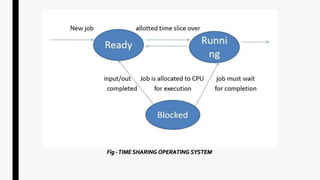
In computing, time-sharing is the
sharing of a computing resource
among many users at the same
time by, means of
multiprogramming and multi-
tasking.
In time sharing OS the many users
can operate computer system
simultaneously.
Fig -TIME SHARING OPERATING SYSTEM
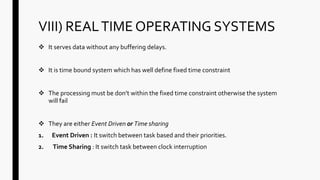
VIII) REALTIME OPERATING SYSTEMS
 It serves data without any buffering delays.
 It is time bound system which has well define fixed time constraint
 The processing must be don’t within the fixed time constraint otherwise the system
will fail
 They are either Event Driven or Time sharing
1. Event Driven : It switch between task based and their priorities.
2. Time Sharing : It switch task between clock interruption
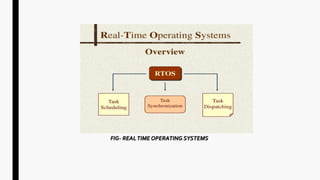
FIG- REALTIME OPERATING SYSTEMS
B) NETWORK PROCESSING SYSTEM
NetworkTopologiesAnd Application
■ Refers to arrangement of computer connected in network through
some physical medium like cable ,optical fibre etc
■ Topology determines the shape of network and communication path
between various computer.
■ It has two aspects
1. Physical topology: It describes physical structures of the cable that
connects network computer .It is also called Physical layer.
2. Logical topology: It describes the path that signals take ad they floe
through the network. It is also called Data linked layer.
There are following types of network
topologies
1. Hierarchical
Topology
2. BusTopology
3. StarTopology
4. RingTopology
5. MeshTopology
6. HybridTopology
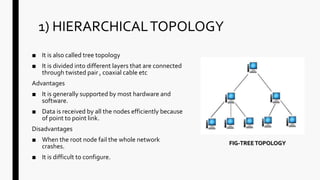
1) HIERARCHICALTOPOLOGY
■ It is also called tree topology
■ It is divided into different layers that are connected
through twisted pair , coaxial cable etc
Advantages
■ It is generally supported by most hardware and
software.
■ Data is received by all the nodes efficiently because
of point to point link.
Disadvantages
■ When the root node fail the whole network
crashes.
■ It is difficult to configure.
FIG-TREETOPOLOGY
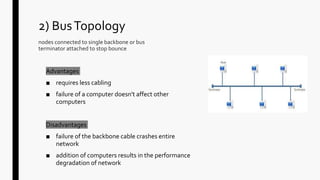
2) BusTopology
nodes connected to single backbone or bus
terminator attached to stop bounce
Advantages
■ requires less cabling
■ failure of a computer doesn't affect other
computers
Disadvantages
■ failure of the backbone cable crashes entire
network
■ addition of computers results in the performance
degradation of network
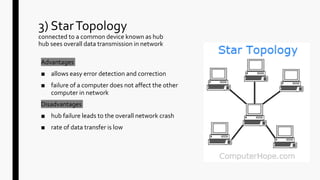
3) StarTopology
connected to a common device known as hub
hub sees overall data transmission in network
Advantages
■ allows easy error detection and correction
■ failure of a computer does not affect the other
computer in network
Disadvantages
■ hub failure leads to the overall network crash
■ rate of data transfer is low
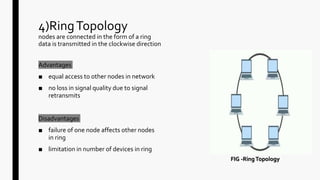
4)RingTopology
nodes are connected in the form of a ring
data is transmitted in the clockwise direction
Advantages
■ equal access to other nodes in network
■ no loss in signal quality due to signal
retransmits
Disadvantages
■ failure of one node affects other nodes
in ring
■ limitation in number of devices in ring
FIG -RingTopology
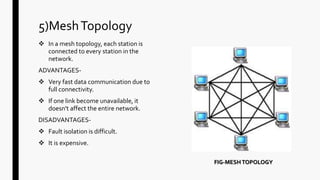
5)MeshTopology
 In a mesh topology, each station is
connected to every station in the
network.
ADVANTAGES-
 Very fast data communication due to
full connectivity.
 If one link become unavailable, it
doesn't affect the entire network.
DISADVANTAGES-
 Fault isolation is difficult.
 It is expensive.
FIG-MESHTOPOLOGY
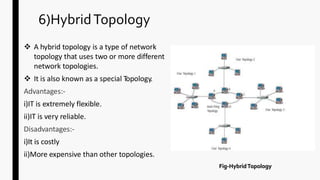
6)HybridTopology
 A hybrid topology is a type of network
topology that uses two or more different
network topologies.
 It is also known as a special Topology.
Advantages:--
ii)IT is extremely flexible.
ii)IT is very reliable.
Disadvantages:--
ii))IItt iiss costly
ii)More expensive than other topologies.
Fig-HybridTopology
ANY QUESTIONS?

Computer operating system and network model

  • 1.
    OPERATING SYSTEM AND NETWORK PROCESSINGSYSTEM Prepared by- your name here ’’’’’’’’’’’’’’’’’’’’’’’’’’’’’’’’’’’’’’
  • 2.
  • 3.
    History of operatingsystem  A series of development in the computer architecture led to the evolution of operating system during later 20th century .  During the 1940’s there were no operating system and assembly language was used to develop programs that could directly interact with the hardware.  During the 1950’s more number of people started using the tile computer systems. For example batch operating system like BKY, CAL and Chios etc.The os developed during this period were capable of performing only a single task at a time.  During the 1960’s multi tasking operating system were develop. For example Admiral ,Basic executive, input output control system, SABRE (Semi-Automatic Business Related Environment).  During the 1970’s multi user environment where breakthrough achievement in the history of operating system. For example DOS/VS,OS/VSI andVMS.  During the 1980’s operating system were developed including MS DOS.HP-UX and Macintosh based on graphical user interface.  During the 1990’s operating systems were developed including MSWidows 95,windows 98 Windows NT etc.  The first decades of 21st has seen the development of operating system such as MAC OS WINDOWS 2000.ETC
  • 4.
    THERE ARE FOLLOWINGTYPESOF OPERATING SYSTEMS . I. BACTH PROCESSINGOPERATING SYSTEMS II. SINGLE –USEROPERATING SYSTEMS III. MULTI USEROPERATING SYSTEMS IV. MULTITASKING OPERATING SYSTEMS V. MULTI PROGRAMMING OPERATING SYSTEMS VI. MULTI PROCESSINGOPERATING SYSTEMS VII. TIME SHARING OPERATING SYSTEMS VIII. REALTIMEOPERATING SYSTEMS
  • 5.
    I) BATCH PROCESSINGOPERATING SYSTEM It is also known as off line or sequential or stacked processing system.  In this operating system , job of similar natures are batched together and run as group on computer system.  It is appropriate for executing large job that need little interaction.
  • 6.
    Fig – Exampleof Batch Processing System.
  • 7.
    These operating systemallow you to operate at a time i.e. DOS. A single user operating system provides the facilities to be used on one computer by only one user.  It is easy to maintain and debug. These system includes less requests to hardware and software at a time so they have less chance to damage. Examples like DOS, windows 3x,Windows 95, 97, 98 etc. II) SINGLE –USER OPERATING SYSTEMS
  • 8.
    iii)MULTI USER OPERATINGSYSTEMS  A multi user operating system is that which handles and controls multiple users attached to a single computer. If one computer in the network gets error then other computers not get affected and that system handle this efficiently. Resources sharing , multi tasking and background processing are the main features. Examples are- UNIX, XENIX etc.
  • 9.
    IV) MULTITASKING OPERATINGSYSTEMS  Executing more than two programs at the same time.  It is supported in windows xp,windows7,windows10 Example:-Playing a game while listening music
  • 10.
    Fig- ExampleOf MultiTaskingOperating Systems
  • 11.
    v) MULTI PROGRAMMINGOPERATIN SYSTEMS  Multiprogramming is a common approach to resources management.  In multiprogramming system, when one program is waiting for input/output transfer; there is another program ready to utilize the CPU. So, it is possible for several jobs to share the time of theCPU. Example:-A computer running excel and Firefox browser.
  • 12.
    VI)MULTI PROCESSING OPERATING SYSTEMS Multi-processingrefers to the users of two or more central processing units (CPU)within a single computer system. These multiple CPUs are in a close communication sharing the computer bus, memory and other peripheral devices. These system s are referred as tightly coupled system. This can entail processing instruction from different programs or different instructions within the same program at once. Two possible approaches to multiprocessing are co- processing and parallel processing.
  • 13.
    VII)TIME SHARING OPERATINGSYSTEM In computing, time-sharing is the sharing of a computing resource among many users at the same time by, means of multiprogramming and multi- tasking. In time sharing OS the many users can operate computer system simultaneously.
  • 14.
    Fig -TIME SHARINGOPERATING SYSTEM
  • 15.
    VIII) REALTIME OPERATINGSYSTEMS  It serves data without any buffering delays.  It is time bound system which has well define fixed time constraint  The processing must be don’t within the fixed time constraint otherwise the system will fail  They are either Event Driven or Time sharing 1. Event Driven : It switch between task based and their priorities. 2. Time Sharing : It switch task between clock interruption
  • 16.
  • 17.
  • 18.
    NetworkTopologiesAnd Application ■ Refersto arrangement of computer connected in network through some physical medium like cable ,optical fibre etc ■ Topology determines the shape of network and communication path between various computer. ■ It has two aspects 1. Physical topology: It describes physical structures of the cable that connects network computer .It is also called Physical layer. 2. Logical topology: It describes the path that signals take ad they floe through the network. It is also called Data linked layer.
  • 19.
    There are followingtypes of network topologies 1. Hierarchical Topology 2. BusTopology 3. StarTopology 4. RingTopology 5. MeshTopology 6. HybridTopology
  • 20.
    1) HIERARCHICALTOPOLOGY ■ Itis also called tree topology ■ It is divided into different layers that are connected through twisted pair , coaxial cable etc Advantages ■ It is generally supported by most hardware and software. ■ Data is received by all the nodes efficiently because of point to point link. Disadvantages ■ When the root node fail the whole network crashes. ■ It is difficult to configure. FIG-TREETOPOLOGY
  • 21.
    2) BusTopology nodes connectedto single backbone or bus terminator attached to stop bounce Advantages ■ requires less cabling ■ failure of a computer doesn't affect other computers Disadvantages ■ failure of the backbone cable crashes entire network ■ addition of computers results in the performance degradation of network
  • 22.
    3) StarTopology connected toa common device known as hub hub sees overall data transmission in network Advantages ■ allows easy error detection and correction ■ failure of a computer does not affect the other computer in network Disadvantages ■ hub failure leads to the overall network crash ■ rate of data transfer is low
  • 23.
    4)RingTopology nodes are connectedin the form of a ring data is transmitted in the clockwise direction Advantages ■ equal access to other nodes in network ■ no loss in signal quality due to signal retransmits Disadvantages ■ failure of one node affects other nodes in ring ■ limitation in number of devices in ring FIG -RingTopology
  • 24.
    5)MeshTopology  In amesh topology, each station is connected to every station in the network. ADVANTAGES-  Very fast data communication due to full connectivity.  If one link become unavailable, it doesn't affect the entire network. DISADVANTAGES-  Fault isolation is difficult.  It is expensive. FIG-MESHTOPOLOGY
  • 25.
    6)HybridTopology  A hybridtopology is a type of network topology that uses two or more different network topologies.  It is also known as a special Topology. Advantages:-- ii)IT is extremely flexible. ii)IT is very reliable. Disadvantages:-- ii))IItt iiss costly ii)More expensive than other topologies. Fig-HybridTopology
  • 27.