Introduction
• Human languagesare known as natural languages.
◦ Unfortunately, computers can not understand natural languages (English, Gujarati, Spanish,..
etc),
◦ as a result we must communicate with computers using computer languages (programming
languages)
• Programming languages can be used to create programs that control the behavior
of a computer and serve any purpose
◦ A programming language is a set of rules that provides a way of telling a computer what
operations to perform.
3.
Introduction
• English isa natural language. It has words, symbols and grammatical rules.
• A programming language also has words, symbols and rules of grammar.
• The grammatical rules are called syntax.
• Each programming language has a different set of syntax rules.
Architecture
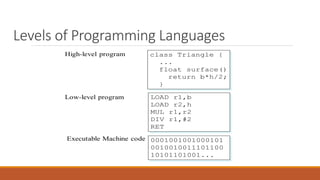
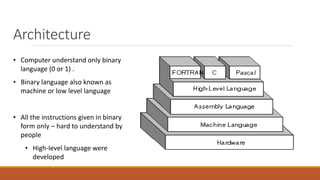
• Computer understandonly binary
language (0 or 1) .
• Binary language also known as
machine or low level language
• All the instructions given in binary
form only – hard to understand by
people
• High-level language were
developed
6.
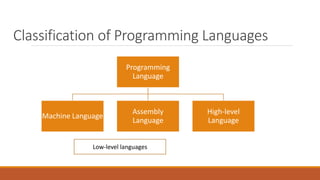
Classification of ProgrammingLanguages
Programming
Language
Machine Language
Assembly
Language
High-level
Language
Low-level languages
7.
Generations of ProgrammingLanguages
• Computer languages has the same history as the computers itself history,
• There are five generations of languages when programming method and techniques
could be developed as far as development in hardware occurred.
8.
First Generation (1GL)– Machine Language
• First-generation language was machine language
◦ the level of instructions and data that the processor is actually given to work on binary numbers
0s and 1s.
• In the 1940s and 1950s, computers were programmed by scientists sitting before control
panels equipped with toggle switches so that they could input instructions as strings of
zeros and ones.
9.
(1GL) – MachineLanguage
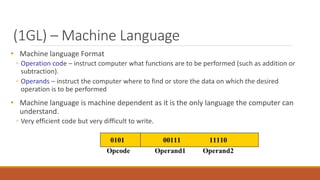
• Machine language Format
◦ Operation code – instruct computer what functions are to be performed (such as addition or
subtraction).
◦ Operands – instruct the computer where to find or store the data on which the desired
operation is to be performed
• Machine language is machine dependent as it is the only language the computer can
understand.
◦ Very efficient code but very difficult to write.
10.
(1GL) – MachineLanguage
• Advantages:
1. Translation Free:
◦ computer can directly execute without the need for conversion
2. High Speed:
◦ Since no conversion is needed, applications developed using machine languages are extremely
fast
11.
(1GL) – MachineLanguage
• Disadvantages:
1. Machine Dependent
◦ Based on computer architecture,
◦ application developed for one type of computer may not run on others
2. Complex Language
◦ Difficult to read and write
3. Error Prone
◦ Since programmer has to remember all the opcode and the memory locations, it is bound to be error
prone
4. Tedious
◦ Programming becomes too complex to modify
12.
Second Generation (2GL)– Assembly Language
• By the late 1950s, this language had become popular.
• Known as Symbolic language
• Assembly language consists of letters of the alphabet.
◦ This makes programming much easier than trying to program a series of zeros and ones.
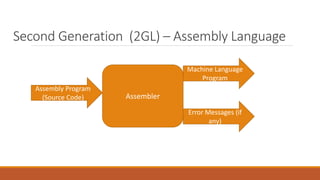
• An assembler converts the assembler language statements into machine language
13.
Second Generation (2GL)– Assembly Language
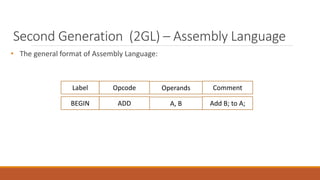
• The general format of Assembly Language:
Opcode
Label Operands Comment
ADD
BEGIN A, B Add B; to A;
14.
Second Generation (2GL)– Assembly Language
Machine Language
Program
Assembly Program
(Source Code) Assembler
Error Messages (if
any)
15.
Second Generation (2GL)– Assembly Language
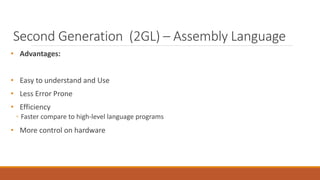
• Advantages:
• Easy to understand and Use
• Less Error Prone
• Efficiency
◦ Faster compare to high-level language programs
• More control on hardware
16.
Second Generation (2GL)– Assembly Language
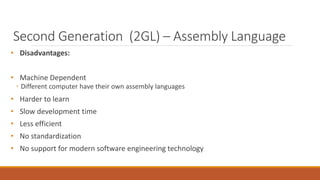
• Disadvantages:
• Machine Dependent
◦ Different computer have their own assembly languages
• Harder to learn
• Slow development time
• Less efficient
• No standardization
• No support for modern software engineering technology
17.
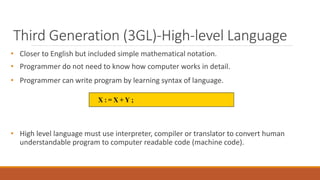
Third Generation (3GL)-High-levelLanguage
• Closer to English but included simple mathematical notation.
• Programmer do not need to know how computer works in detail.
• Programmer can write program by learning syntax of language.
• High level language must use interpreter, compiler or translator to convert human
understandable program to computer readable code (machine code).
18.
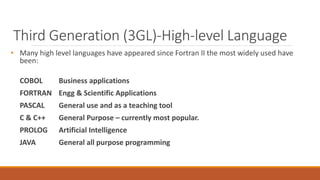
Third Generation (3GL)-High-levelLanguage
• Many high level languages have appeared since Fortran II the most widely used have
been:
COBOL Business applications
FORTRAN Engg & Scientific Applications
PASCAL General use and as a teaching tool
C & C++ General Purpose – currently most popular.
PROLOG Artificial Intelligence
JAVA General all purpose programming
20.
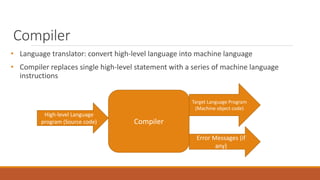
Compiler
• Language translator:convert high-level language into machine language
• Compiler replaces single high-level statement with a series of machine language
instructions
Target Language Program
(Machine object code)
High-level Language
program (Source code) Compiler
Error Messages (if
any)
21.
Compiler
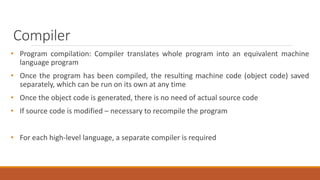
• Program compilation:Compiler translates whole program into an equivalent machine
language program
• Once the program has been compiled, the resulting machine code (object code) saved
separately, which can be run on its own at any time
• Once the object code is generated, there is no need of actual source code
• If source code is modified – necessary to recompile the program
• For each high-level language, a separate compiler is required
22.
Interpreter
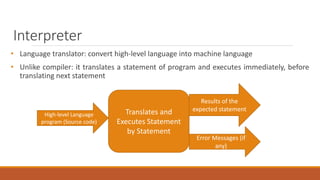
• Language translator:convert high-level language into machine language
• Unlike compiler: it translates a statement of program and executes immediately, before
translating next statement
Results of the
expected statement
High-level Language
program (Source code)
Translates and
Executes Statement
by Statement
Error Messages (if
any)
23.
Linker
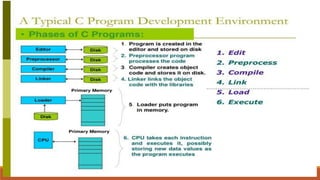
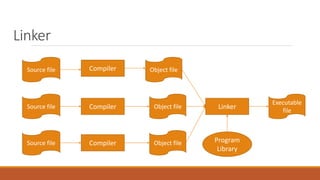
• An applicationusually consists hundreds, thousands or even million of lines of code
• Code divided into logical groups and stored into different modules
◦ So debugging and maintenance becomes easy
◦ Each module can be modified and compiled independently
◦ Linker links several object modules and libraries to form a single program
Loader
• Part ofoperating system that brings an executable file residing on the disk into the
memory and starts running
• Four basic tasks of loader:
1. Allocation: allocates memory space for programs
2. Linking: combines two or more separate object programs and supplies the information needed
to allow references between them
3. Relocation: prepares a program to execute properly from its storage area
4. Loading: place data and machine instructions into the memory
26.
Loader
• Types ofloader:
• Absolute Loader:
◦ Loads the file into memory at the location specified by the beginning portion (header) of file and
then passes control to program
◦ If memory space specified by header is currently in use, execution cannot be processed
◦ User must wait until requested memory becomes free
• Relocating loader:
◦ Loads the program in memory, altering the various addresses as required to ensure correct
referencing
27.
Advantages of High-levelLanguages
• Readability
◦ Easy to read, write and maintain
• Machine independent
• Easy debugging
• Easier to maintain
• Low development cost
• Easy documentation
28.
Disadvantages of High-levelLanguages
• Poor control on hardware
• Less efficient
◦ Process of translation increases the execution time of an application
Fourth Generation (4GL)
•4GLs have simple, English-like rules, commonly used to access databases
• 4GLs are divided into three categories:
1. Query Languages: allow user to retrieve information from databases (ex. SQL)
2. Report Generators: produce customized reports using data stored into database
3. Application Generators: the user writes programs to allow data to be entered into the database
31.
Fourth Generation (4GL)
•Advantage:
◦ User can create an application in a much shorter time for development and debugging than with
other programming languages
• Disadvantage:
◦ Program need more disk space and large memory capacity compared to 3GL program
32.
Fifth Generation Languages(5GL)
• Though no clear definition at present, natural language programs generally can be
interpreted and executed by the computer with no other action by the user than stating
their question.
• User will free from learning any programming language to communicate with computes
• Programmers may simply type the instruction or tell the computer via microphones what
is needs to do
• Limited capabilities at present.