Computer Languages
&
Programming Methodologies
Presented by
Dr Ritu Sachdeva
Assistant Professor, MRIIRS
Natural Languages
• These include the language that people speak in their daily
lives
• These can include:
– English
– Spanish
– German
– French
– Italian
• The idea is to use one’s natural language to give the
computer orders
• This has only limited use today
Computer Languages
A Way
to
Talk
to a Computer!
Computer Languages
The languages which are used to communicate
with a computer are called computer
languages.
Definition of a Computer Language
A computer language is a group of instructions
that are used to create computer programs.
The main goal is to achieve human-computer
interaction.
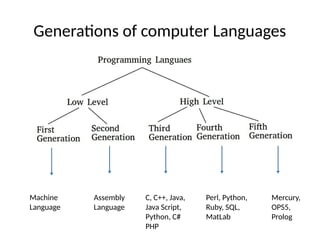
Generations of computer Languages
Machine
Language
Assembly
Language
C, C++, Java,
Java Script,
Python, C#
PHP
Perl, Python,
Ruby, SQL,
MatLab
Mercury,
OPS5,
Prolog
Low level Language
• The first two generations are called low-level languages.
• A Low-level computer language includes only 1’s and
0’s. This language was used in first and second
generation computers. A Low level language is very
easily understood by a computer but hard to
understand for Humans.
• Low level languages are designed to interact with
computer hardware, which are categorized into two
types: Machine level language and Assembly level
language.
Machine Level Language
• Being a low level language, this language is a
first-level of generations.
• Machine language is considered to be the
oldest computer language.
• Machine language is developed by only using
binary numbers i.e., 0 and 1. So, the
instructions or the statements in this language
use a sequence of 0’s and 1’s.
Assembly Language
• Assembly level language in computer programming has evolved
with the advancements in the machine language. Assembly
language uses symbols, which are popularly known as
mnemonics in computer terminology to write the instructions.
So, comparatively writing a program in Assembly language is
more understandable to the Human than Machine Language.
• Being a low level language, this language belongs to the second
level languages
• The Assembly language code will be converted into a Machine
language code with the help of an Assembler so that the
computer can understand the binary converted Assembly
Language.
High Level Language
High Level computer languages are the advanced
development languages in the evolution of computer
languages. These languages are designed to make the
programming easier and less error-free. The rest of the
generations i.e. third, fourth and fifth generations
belong to the high level language
• High level language uses words and commands
along with symbols and numbers.
• The keywords used in High level languages are
similar to English words and can be easily
understood by Humans when compared to a Low
level language.
High-Level Languages
• Developed to improve programmer efficiency from symbolic
languages & to change focus from the computer to the problem
being solved
• They’re portable to different computers
• They still need to be converted to machine languages in a
process called compilation
• Examples include:
– BASIC
– COBOL
– Pascal
– Ada
– C
• Fourth Generation Languages : These are
languages that consist of statements that are
similar to statements in the human language.
These are used mainly in database programming
and scripting. Examples of these languages
include Perl, Python, Ruby, SQL, and
MatLab(MatrixLaboratory).
• Fifth Generation Languages : These are the
programming languages that have visual tools to
develop a program. Examples of fifth-generation
languages include Mercury, OPS5, and Prolog.
Why study programming languages?
 Become a better software engineer
 Understand how to use language features
 Appreciate implementation issues
 Better background for language selection
 Familiar with range of languages
 Understand issues / advantages / disadvantages
 Better able to learn languages
 You might need to know a lot
 Better understanding of implementation issues
 How is “this feature” implemented?
 Why does “this part” run so slowly?
 Better able to design languages
 Those who ignore history are bound to repeat it…
Compiler
VS
Interpreter
Why are there so many programming
languages?
• Easy to use
– Especially for teaching / learning tasks
• Ease of implementation
– Easy to write a compiler / interpreter for
• Good compilers
– Fortran in the 50’s and 60’s
• Economics, patronage
– Cobol and Ada, for example
Building a Program
1. Writing and Editing Programs:
• Use a text Editor to write programs
• When you’re done you save your program to the disk (known as a source file)
and it will be input to the compiler
2. Compiling Programs:
• Translates inf in a source file into machine language
• Made of 2 separate programs: the preprocessor & the translator
• Preprocessor: reads the source code and prepares it for the translator. While
preparing the code it scans for special commands (preprocessor directives)
that tell it to look for special code libraries, make substitution in the code, &
other ways to prepare the code for translation into machine language. The
result of this processing is called the translation unit.
• Translator: converts the translation unit into machine language. This code in
machine language is called the object module
3. Linking Programs:
• A high-level language has many subprograms, some of which are written in the
program & some exist elsewhere and have to be attached to the program (ex:
I/O processes)
• The linker assembles all of these functions into the final executable function.
Program Execution
• Use the Operating System (OS) command (ex.: run) to load the
program into primary memory & execute it.
• Loader: it is an OS program responsible for loading the
program into the memory
• Program reads data for processing either from the user or from
a file
• After the program processes the data it prepares the output to
either the monitor or to a file
• When the program is finished it tells the OS, which removes the
program from memory
Debug
VS
Error
Computer Languages & its genearations.pptx

Computer Languages & its genearations.pptx

  • 1.
    Computer Languages & Programming Methodologies Presentedby Dr Ritu Sachdeva Assistant Professor, MRIIRS
  • 2.
    Natural Languages • Theseinclude the language that people speak in their daily lives • These can include: – English – Spanish – German – French – Italian • The idea is to use one’s natural language to give the computer orders • This has only limited use today
  • 3.
  • 4.
    Computer Languages The languageswhich are used to communicate with a computer are called computer languages.
  • 5.
    Definition of aComputer Language A computer language is a group of instructions that are used to create computer programs. The main goal is to achieve human-computer interaction.
  • 6.
    Generations of computerLanguages Machine Language Assembly Language C, C++, Java, Java Script, Python, C# PHP Perl, Python, Ruby, SQL, MatLab Mercury, OPS5, Prolog
  • 7.
    Low level Language •The first two generations are called low-level languages. • A Low-level computer language includes only 1’s and 0’s. This language was used in first and second generation computers. A Low level language is very easily understood by a computer but hard to understand for Humans. • Low level languages are designed to interact with computer hardware, which are categorized into two types: Machine level language and Assembly level language.
  • 8.
    Machine Level Language •Being a low level language, this language is a first-level of generations. • Machine language is considered to be the oldest computer language. • Machine language is developed by only using binary numbers i.e., 0 and 1. So, the instructions or the statements in this language use a sequence of 0’s and 1’s.
  • 9.
    Assembly Language • Assemblylevel language in computer programming has evolved with the advancements in the machine language. Assembly language uses symbols, which are popularly known as mnemonics in computer terminology to write the instructions. So, comparatively writing a program in Assembly language is more understandable to the Human than Machine Language. • Being a low level language, this language belongs to the second level languages • The Assembly language code will be converted into a Machine language code with the help of an Assembler so that the computer can understand the binary converted Assembly Language.
  • 10.
    High Level Language HighLevel computer languages are the advanced development languages in the evolution of computer languages. These languages are designed to make the programming easier and less error-free. The rest of the generations i.e. third, fourth and fifth generations belong to the high level language • High level language uses words and commands along with symbols and numbers. • The keywords used in High level languages are similar to English words and can be easily understood by Humans when compared to a Low level language.
  • 11.
    High-Level Languages • Developedto improve programmer efficiency from symbolic languages & to change focus from the computer to the problem being solved • They’re portable to different computers • They still need to be converted to machine languages in a process called compilation • Examples include: – BASIC – COBOL – Pascal – Ada – C
  • 12.
    • Fourth GenerationLanguages : These are languages that consist of statements that are similar to statements in the human language. These are used mainly in database programming and scripting. Examples of these languages include Perl, Python, Ruby, SQL, and MatLab(MatrixLaboratory). • Fifth Generation Languages : These are the programming languages that have visual tools to develop a program. Examples of fifth-generation languages include Mercury, OPS5, and Prolog.
  • 13.
    Why study programminglanguages?  Become a better software engineer  Understand how to use language features  Appreciate implementation issues  Better background for language selection  Familiar with range of languages  Understand issues / advantages / disadvantages  Better able to learn languages  You might need to know a lot  Better understanding of implementation issues  How is “this feature” implemented?  Why does “this part” run so slowly?  Better able to design languages  Those who ignore history are bound to repeat it…
  • 14.
  • 15.
    Why are thereso many programming languages? • Easy to use – Especially for teaching / learning tasks • Ease of implementation – Easy to write a compiler / interpreter for • Good compilers – Fortran in the 50’s and 60’s • Economics, patronage – Cobol and Ada, for example
  • 16.
    Building a Program 1.Writing and Editing Programs: • Use a text Editor to write programs • When you’re done you save your program to the disk (known as a source file) and it will be input to the compiler 2. Compiling Programs: • Translates inf in a source file into machine language • Made of 2 separate programs: the preprocessor & the translator • Preprocessor: reads the source code and prepares it for the translator. While preparing the code it scans for special commands (preprocessor directives) that tell it to look for special code libraries, make substitution in the code, & other ways to prepare the code for translation into machine language. The result of this processing is called the translation unit. • Translator: converts the translation unit into machine language. This code in machine language is called the object module 3. Linking Programs: • A high-level language has many subprograms, some of which are written in the program & some exist elsewhere and have to be attached to the program (ex: I/O processes) • The linker assembles all of these functions into the final executable function.
  • 17.
    Program Execution • Usethe Operating System (OS) command (ex.: run) to load the program into primary memory & execute it. • Loader: it is an OS program responsible for loading the program into the memory • Program reads data for processing either from the user or from a file • After the program processes the data it prepares the output to either the monitor or to a file • When the program is finished it tells the OS, which removes the program from memory
  • 18.