Chanderprabhu Jain College of Higher Studies & School of Law
Plot No. OCF, Sector A-8, Narela, New Delhi – 110040
(Affiliated to Guru Gobind Singh Indraprastha University and Approved by Govt of NCT of Delhi & Bar Council of India)
PAPER NAME: COMPUTER GRAPHICS
PAPER CODE: BCA 303
CLASS: BCA Vth Semester
UNIT-I Graphics Display Devices
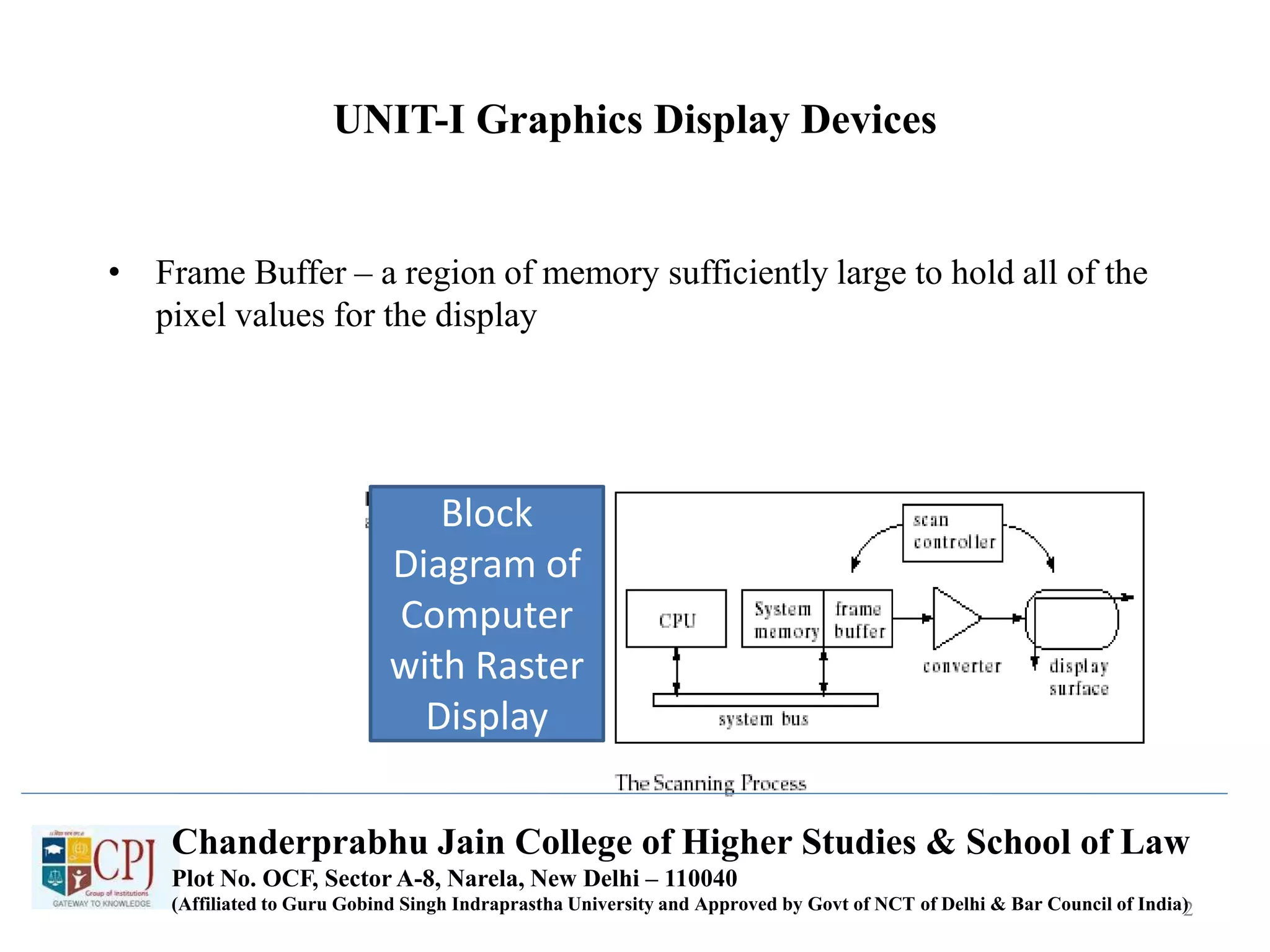
• Frame Buffer – a region of memory sufficiently large to hold all of the
pixel values for the display
2
Chanderprabhu Jain College of Higher Studies & School of Law
Plot No. OCF, Sector A-8, Narela, New Delhi – 110040
(Affiliated to Guru Gobind Singh Indraprastha University and Approved by Govt of NCT of Delhi & Bar Council of India)
Block
Diagram of
Computer
with Raster
Display
Graphics Display Devices - cont
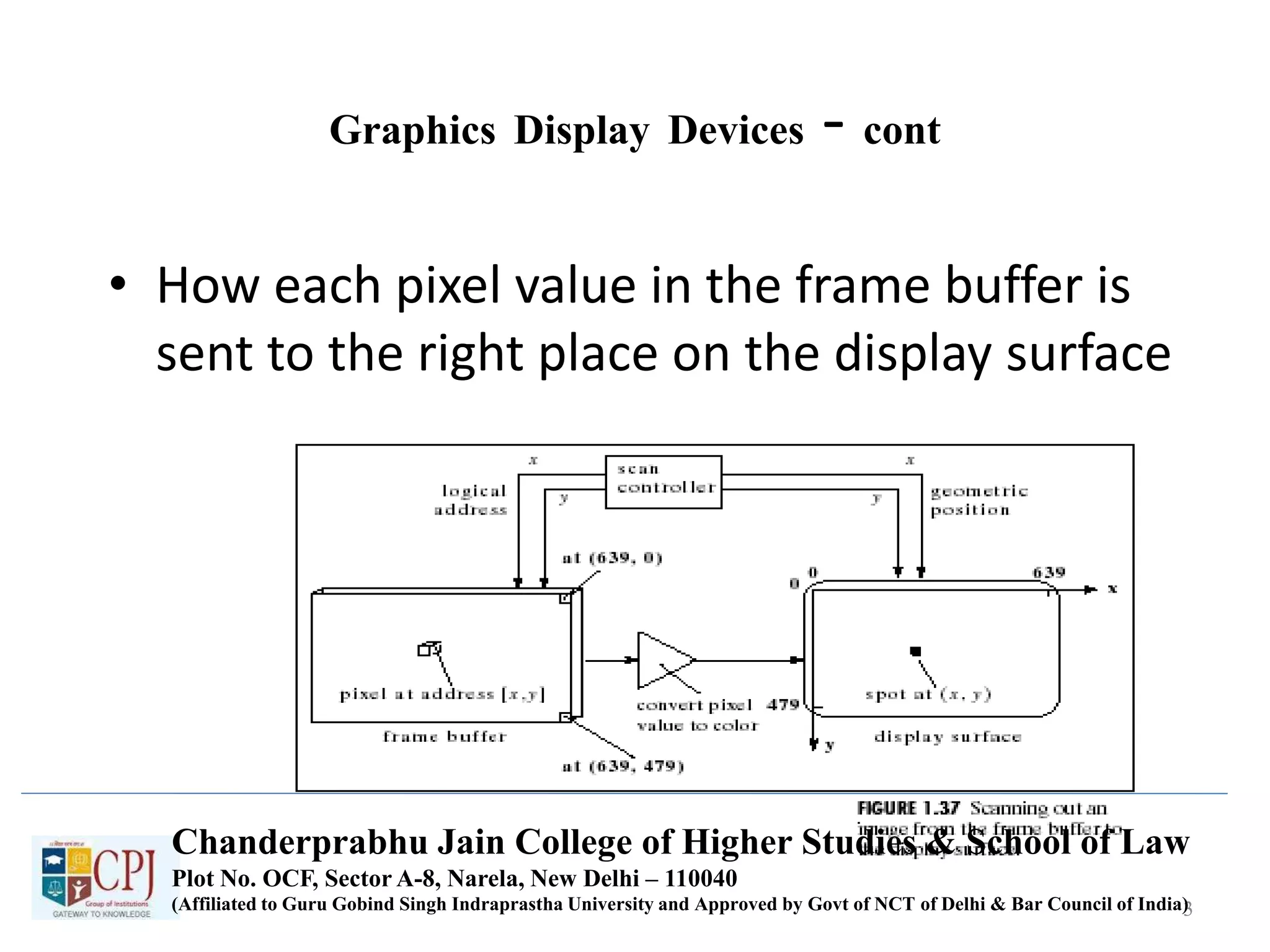
• How each pixel value in the frame buffer is
sent to the right place on the display surface
3
Chanderprabhu Jain College of Higher Studies & School of Law
Plot No. OCF, Sector A-8, Narela, New Delhi – 110040
(Affiliated to Guru Gobind Singh Indraprastha University and Approved by Govt of NCT of Delhi & Bar Council of India)
Graphics Devices – cont
• Each pixel has a 2D address (x,y)
– For each address (x,y) there is a specific memory location
that holds the value of the pixel (I.e. mem[136][252])
– The scan controller sends the logical address (136, 252) to
the frame buffer, which emits the value mem[136][252]
– The value mem[136][252] is converted to a corresponding
intensity or color in the conversion circuit, and that
intensity or color is sent to the proper physical position,
(136, 252), on the display surface
4
Chanderprabhu Jain College of Higher Studies & School of Law
Plot No. OCF, Sector A-8, Narela, New Delhi – 110040
(Affiliated to Guru Gobind Singh Indraprastha University and Approved by Govt of NCT of Delhi & Bar Council of India)
Graphics Devices – cont
• Each pixel has a 2D address (x,y)
– For each address (x,y) there is a specific memory location
that holds the value of the pixel (I.e. mem[136][252])
– The scan controller sends the logical address (136, 252) to
the frame buffer, which emits the value mem[136][252]
– The value mem[136][252] is converted to a corresponding
intensity or color in the conversion circuit, and that
intensity or color is sent to the proper physical position,
(136, 252), on the display surface
5
Chanderprabhu Jain College of Higher Studies & School of Law
Plot No. OCF, Sector A-8, Narela, New Delhi – 110040
(Affiliated to Guru Gobind Singh Indraprastha University and Approved by Govt of NCT of Delhi & Bar Council of India)
Graphics Devices – cont
• Each pixel has a 2D address (x,y)
– For each address (x,y) there is a specific memory location
that holds the value of the pixel (I.e. mem[136][252])
– The scan controller sends the logical address (136, 252) to
the frame buffer, which emits the value mem[136][252]
– The value mem[136][252] is converted to a corresponding
intensity or color in the conversion circuit, and that
intensity or color is sent to the proper physical position,
(136, 252), on the display surface
6
Chanderprabhu Jain College of Higher Studies & School of Law
Plot No. OCF, Sector A-8, Narela, New Delhi – 110040
(Affiliated to Guru Gobind Singh Indraprastha University and Approved by Govt of NCT of Delhi & Bar Council of India)
Graphics Devices – cont
• Each pixel has a 2D address (x,y)
– For each address (x,y) there is a specific memory location
that holds the value of the pixel (I.e. mem[136][252])
– The scan controller sends the logical address (136, 252) to
the frame buffer, which emits the value mem[136][252]
– The value mem[136][252] is converted to a corresponding
intensity or color in the conversion circuit, and that
intensity or color is sent to the proper physical position,
(136, 252), on the display surface
7
Chanderprabhu Jain College of Higher Studies & School of Law
Plot No. OCF, Sector A-8, Narela, New Delhi – 110040
(Affiliated to Guru Gobind Singh Indraprastha University and Approved by Govt of NCT of Delhi & Bar Council of India)
Graphics Devices – cont
• Each pixel has a 2D address (x,y)
– For each address (x,y) there is a specific memory location
that holds the value of the pixel (I.e. mem[136][252])
– The scan controller sends the logical address (136, 252) to
the frame buffer, which emits the value mem[136][252]
– The value mem[136][252] is converted to a corresponding
intensity or color in the conversion circuit, and that
intensity or color is sent to the proper physical position,
(136, 252), on the display surface
8
Chanderprabhu Jain College of Higher Studies & School of Law
Plot No. OCF, Sector A-8, Narela, New Delhi – 110040
(Affiliated to Guru Gobind Singh Indraprastha University and Approved by Govt of NCT of Delhi & Bar Council of India)
Scan Converting Lines
• Line Drawing
– Draw a line on a raster screen between 2 points
– What’s wrong with the statement of the problem?
• It does not say anything about which pts are allowed as
end pts
• It does not give a clear meaning to “draw”
• It does not say what constitutes a “line” in the raster
world
• It does not say how to measure the success of the
proposed algorithm
9
Chanderprabhu Jain College of Higher Studies & School of Law
Plot No. OCF, Sector A-8, Narela, New Delhi – 110040
(Affiliated to Guru Gobind Singh Indraprastha University and Approved by Govt of NCT of Delhi & Bar Council of India)
Graphics Devices – cont
• Each pixel has a 2D address (x,y)
– For each address (x,y) there is a specific memory location
that holds the value of the pixel (I.e. mem[136][252])
– The scan controller sends the logical address (136, 252) to
the frame buffer, which emits the value mem[136][252]
– The value mem[136][252] is converted to a corresponding
intensity or color in the conversion circuit, and that
intensity or color is sent to the proper physical position,
(136, 252), on the display surface
10
Chanderprabhu Jain College of Higher Studies & School of Law
Plot No. OCF, Sector A-8, Narela, New Delhi – 110040
(Affiliated to Guru Gobind Singh Indraprastha University and Approved by Govt of NCT of Delhi & Bar Council of India)
Scan Converting Lines - cont
• Problem Statement
– Given 2 points P and Q in the plane, both with
integer coordinates, determine which pixels on a
raster screen should be “on” in order to make a
picture of a unit-width line segment starting at
point P and ending at point Q
11
Chanderprabhu Jain College of Higher Studies & School of Law
Plot No. OCF, Sector A-8, Narela, New Delhi – 110040
(Affiliated to Guru Gobind Singh Indraprastha University and Approved by Govt of NCT of Delhi & Bar Council of India)
Finding the next pixel
• Special Case:
– Horizontal Line:
• Draw pixel P and increment the x coordinate value by one to get
the next pixel.
– Vertical Line:
• Draw the pixel P and increment the y coordinate value by one to
get the next pixel
– Diagonal Line:
• Draw the pixel P and increment both the x and y coordinate values
by one to get the next pixel
– What should we use in the general case?
12
Chanderprabhu Jain College of Higher Studies & School of Law
Plot No. OCF, Sector A-8, Narela, New Delhi – 110040
(Affiliated to Guru Gobind Singh Indraprastha University and Approved by Govt of NCT of Delhi & Bar Council of India)
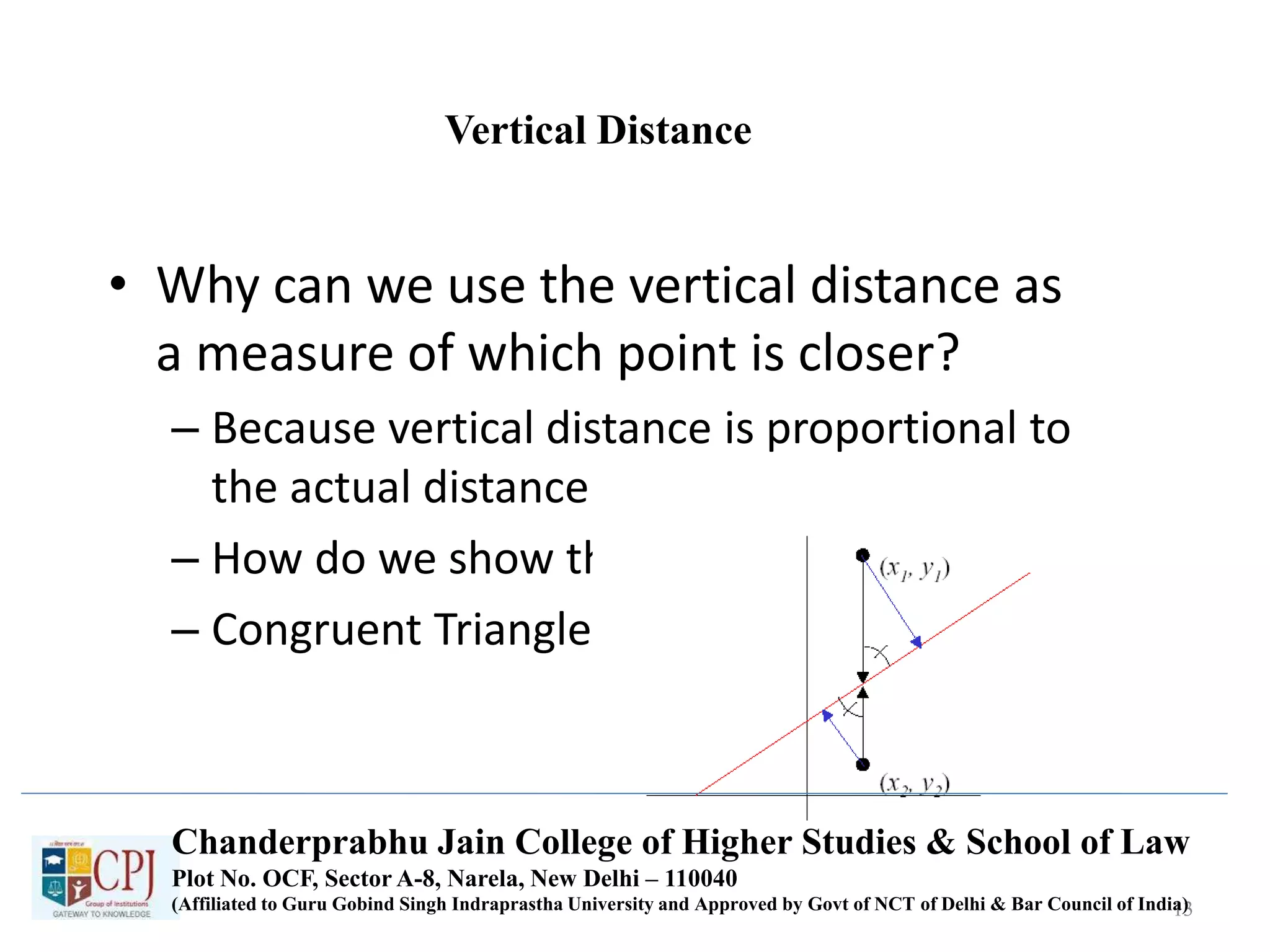
Vertical Distance
• Why can we use the vertical distance as
a measure of which point is closer?
– Because vertical distance is proportional to
the actual distance
– How do we show this?
– Congruent Triangles
13
Chanderprabhu Jain College of Higher Studies & School of Law
Plot No. OCF, Sector A-8, Narela, New Delhi – 110040
(Affiliated to Guru Gobind Singh Indraprastha University and Approved by Govt of NCT of Delhi & Bar Council of India)
Vertical Distance – cont
• By similar triangles we can see that the true
distances to the line (in blue) are directly
proportional to the vertical distances to the
line (in black) for each point.
• Therefore the point with the smaller vertical
distance to the line is the closest to the line
14
Chanderprabhu Jain College of Higher Studies & School of Law
Plot No. OCF, Sector A-8, Narela, New Delhi – 110040
(Affiliated to Guru Gobind Singh Indraprastha University and Approved by Govt of NCT of Delhi & Bar Council of India)
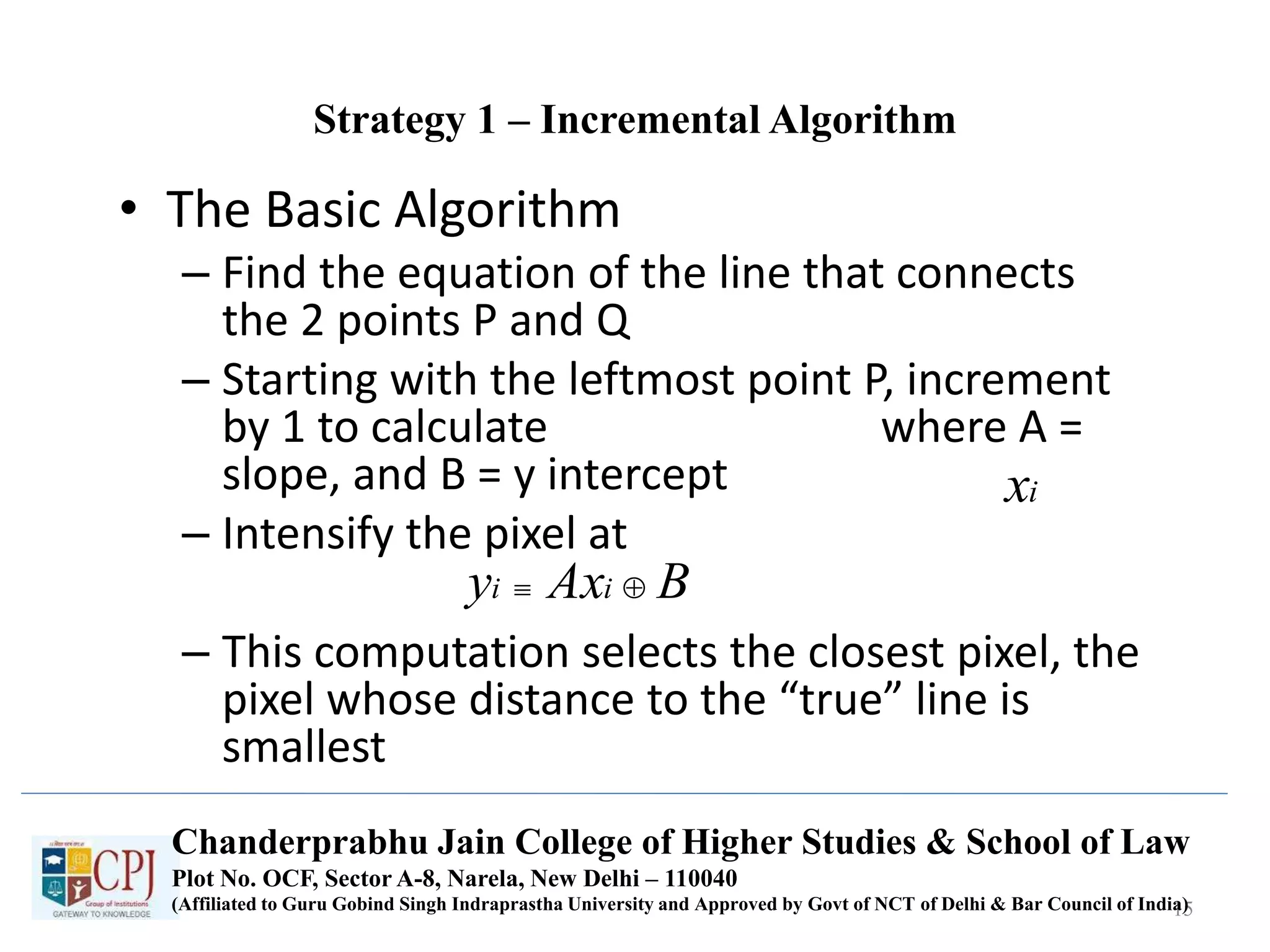
Strategy 1 – Incremental Algorithm
• The Basic Algorithm
– Find the equation of the line that connects
the 2 points P and Q
– Starting with the leftmost point P, increment
by 1 to calculate where A =
slope, and B = y intercept
– Intensify the pixel at
– This computation selects the closest pixel, the
pixel whose distance to the “true” line is
smallest
15
ix
BAxy ii 
Chanderprabhu Jain College of Higher Studies & School of Law
Plot No. OCF, Sector A-8, Narela, New Delhi – 110040
(Affiliated to Guru Gobind Singh Indraprastha University and Approved by Govt of NCT of Delhi & Bar Council of India)
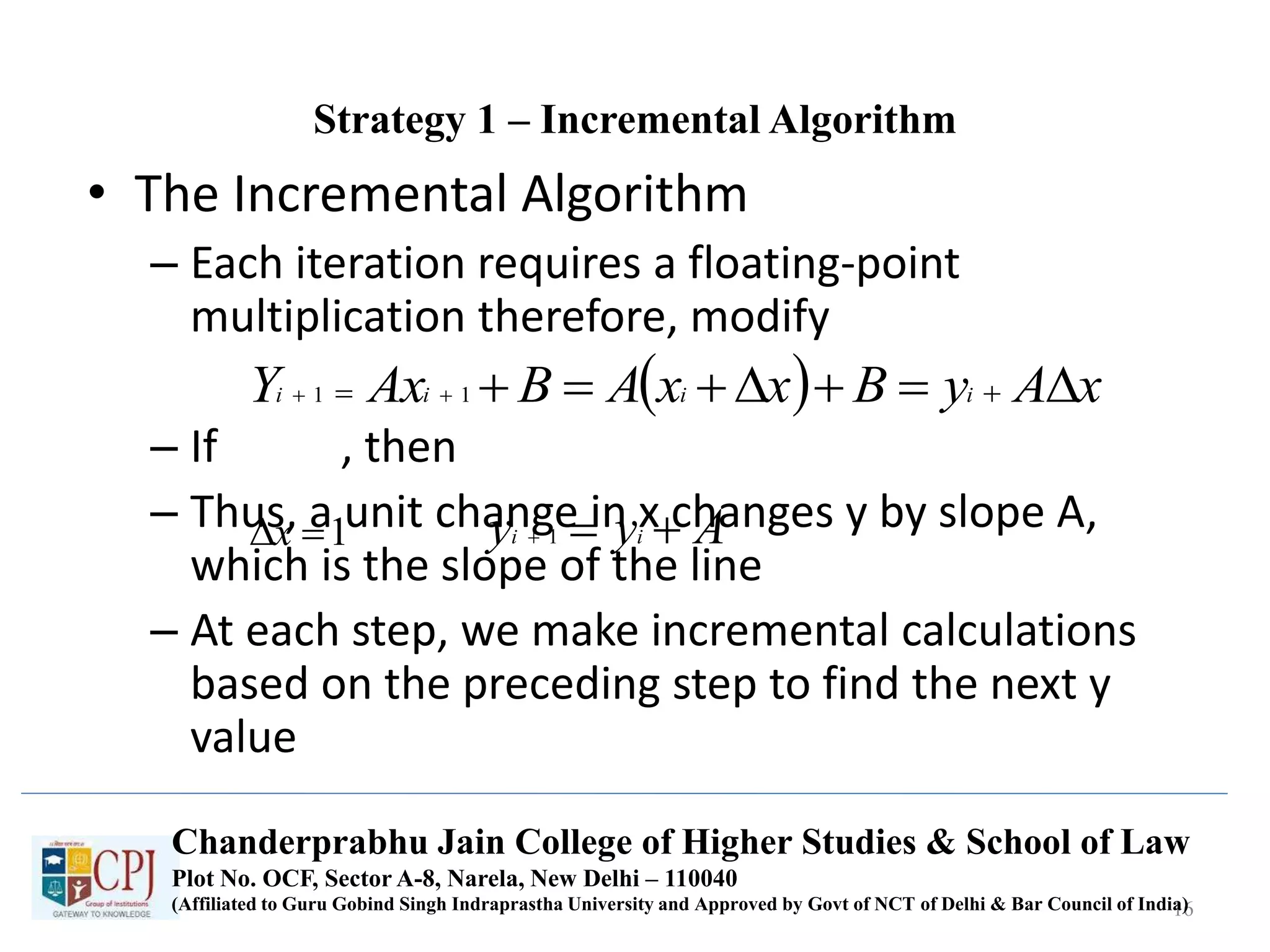
Strategy 1 – Incremental Algorithm
• The Incremental Algorithm
– Each iteration requires a floating-point
multiplication therefore, modify
– If , then
– Thus, a unit change in x changes y by slope A,
which is the slope of the line
– At each step, we make incremental calculations
based on the preceding step to find the next y
value
16
  xAyBxxABAxY iiii    11
1x Ayy ii  1
Chanderprabhu Jain College of Higher Studies & School of Law
Plot No. OCF, Sector A-8, Narela, New Delhi – 110040
(Affiliated to Guru Gobind Singh Indraprastha University and Approved by Govt of NCT of Delhi & Bar Council of India)
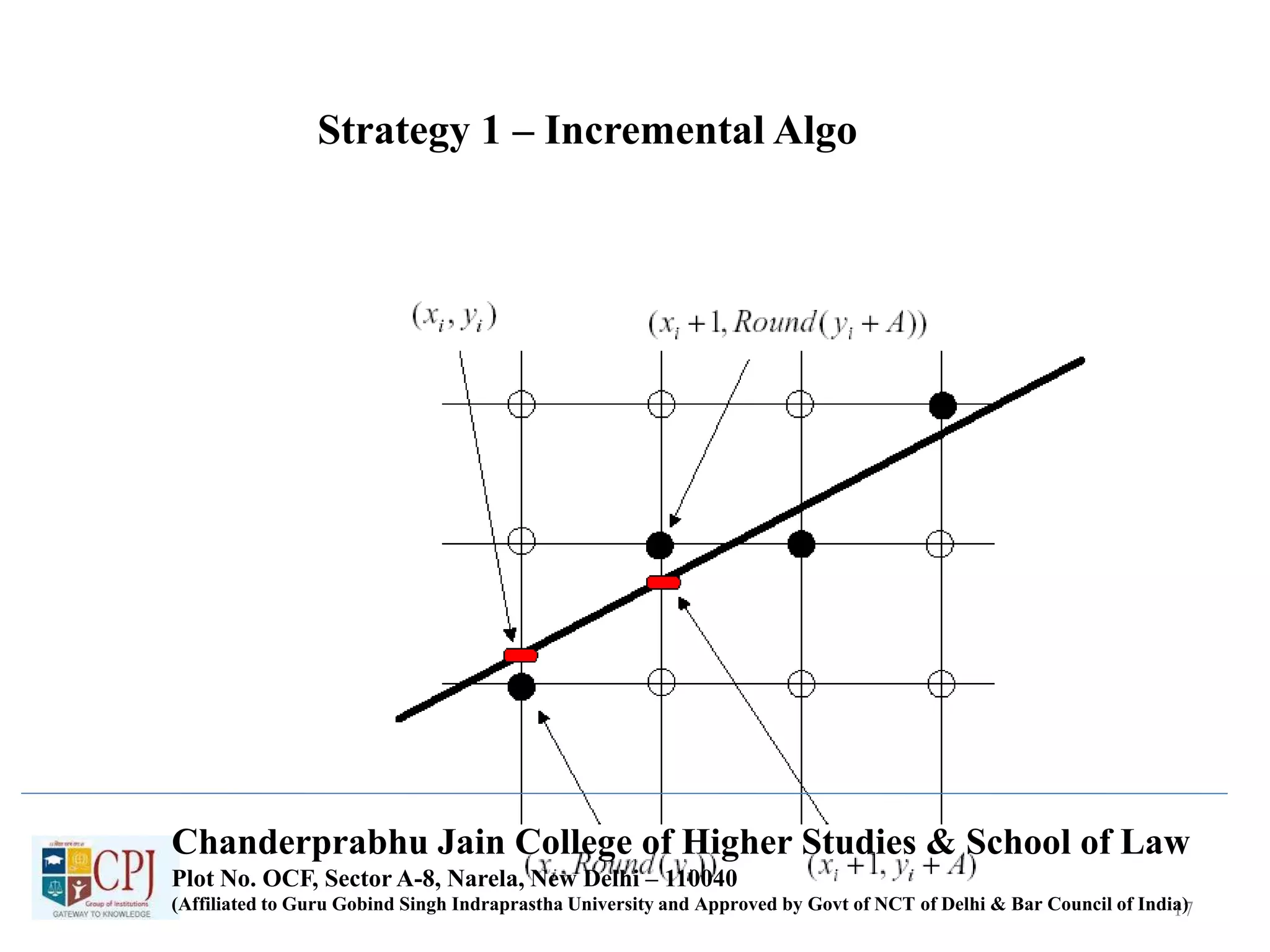
Strategy 1 – Incremental Algo
17
Chanderprabhu Jain College of Higher Studies & School of Law
Plot No. OCF, Sector A-8, Narela, New Delhi – 110040
(Affiliated to Guru Gobind Singh Indraprastha University and Approved by Govt of NCT of Delhi & Bar Council of India)
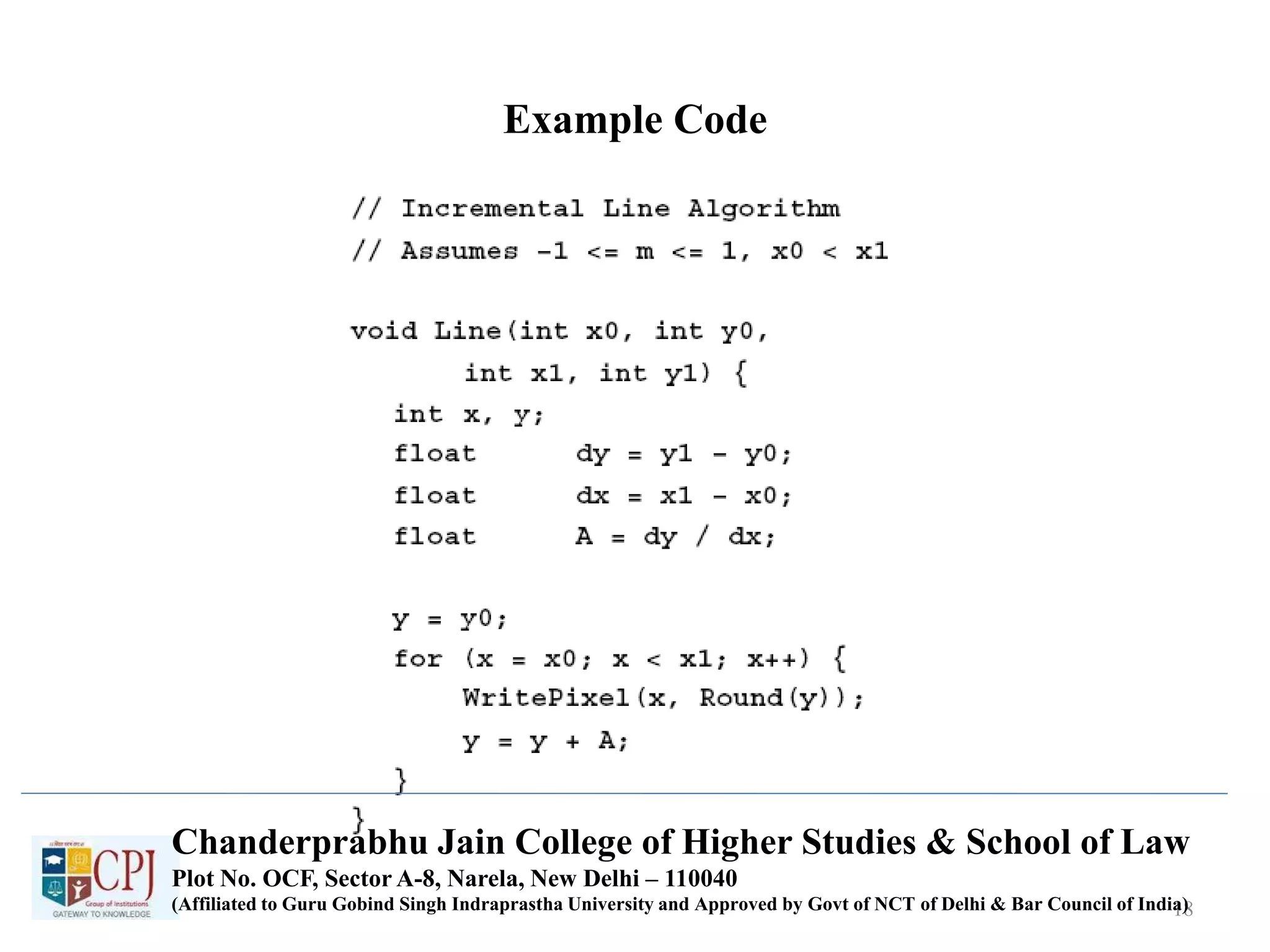
Example Code
18
Chanderprabhu Jain College of Higher Studies & School of Law
Plot No. OCF, Sector A-8, Narela, New Delhi – 110040
(Affiliated to Guru Gobind Singh Indraprastha University and Approved by Govt of NCT of Delhi & Bar Council of India)
Problem with the Incremental Algorithm
• Rounding integers takes time
• Real variables have limited precision, summing
an inexact slope (A) repetitively introduces a
cumulative error buildup
• Variables y and A must be a real or fractional
binary because the slope is a fraction
– Special case needed for vertical lines
19
Chanderprabhu Jain College of Higher Studies & School of Law
Plot No. OCF, Sector A-8, Narela, New Delhi – 110040
(Affiliated to Guru Gobind Singh Indraprastha University and Approved by Govt of NCT of Delhi & Bar Council of India)
Strategy 2 – Midpoint Line Algorithm
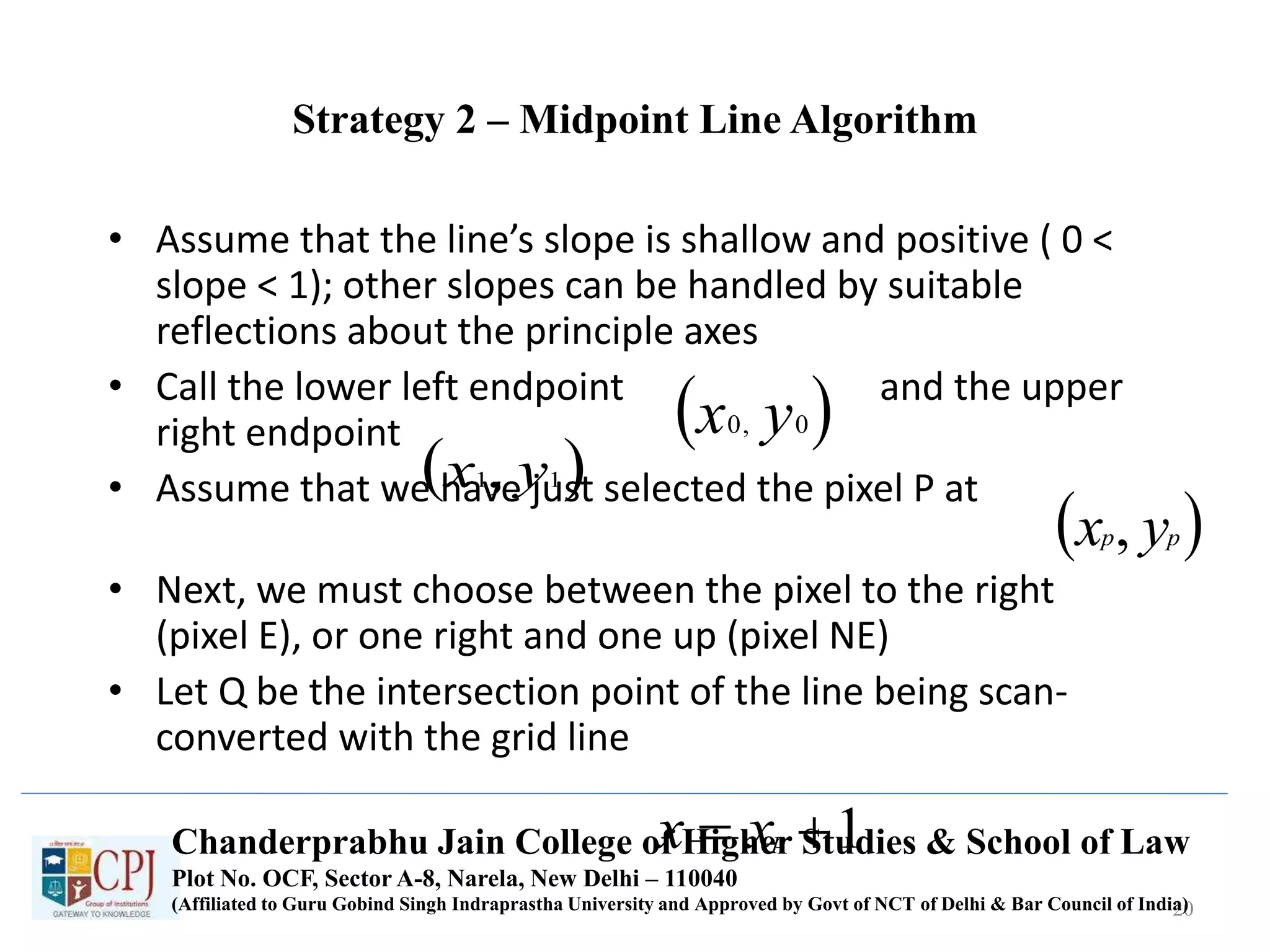
• Assume that the line’s slope is shallow and positive ( 0 <
slope < 1); other slopes can be handled by suitable
reflections about the principle axes
• Call the lower left endpoint and the upper
right endpoint
• Assume that we have just selected the pixel P at
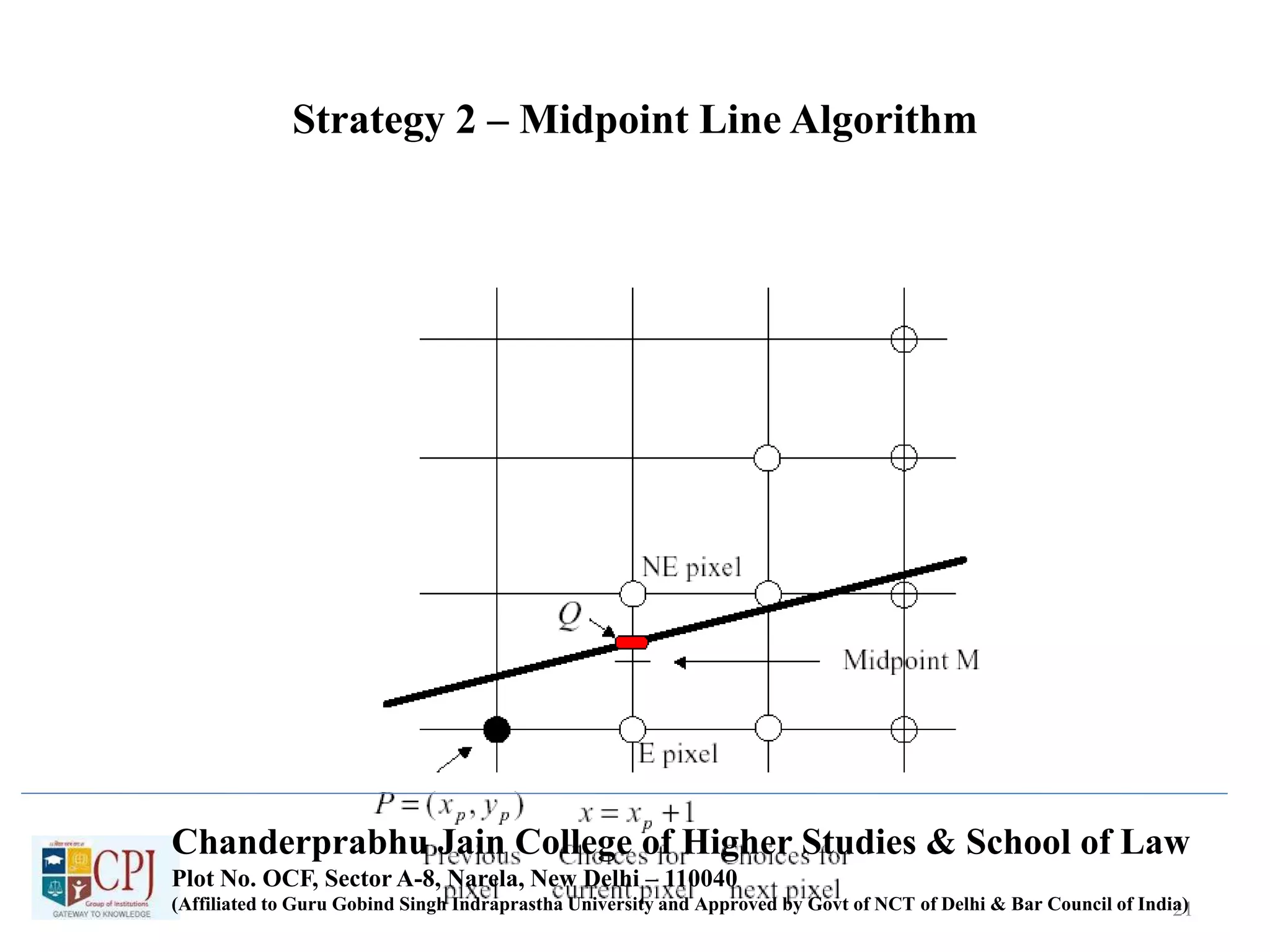
• Next, we must choose between the pixel to the right
(pixel E), or one right and one up (pixel NE)
• Let Q be the intersection point of the line being scan-
converted with the grid line
20
 0,0 yx
 11, yx
 pp yx ,
1 pxxChanderprabhu Jain College of Higher Studies & School of Law
Plot No. OCF, Sector A-8, Narela, New Delhi – 110040
(Affiliated to Guru Gobind Singh Indraprastha University and Approved by Govt of NCT of Delhi & Bar Council of India)
Strategy 2 – Midpoint Line Algorithm
1/1/2000 21
Chanderprabhu Jain College of Higher Studies & School of Law
Plot No. OCF, Sector A-8, Narela, New Delhi – 110040
(Affiliated to Guru Gobind Singh Indraprastha University and Approved by Govt of NCT of Delhi & Bar Council of India)
Strategy 2 – Midpoint Line Algorithm
• The line passes between E and NE
• The point that is closer to the intersection point Q must be
chosen
• Observe on which side of the line the midpoint M lies:
– E is closer to the line if the midpoint lies above the line (I.e. the line
crosses the bottom half)
– NE is closer to the line if the midpoint lies below the line, I.e., the line
crosses the top half
• The error, the vertical distance between the chosen pixel and
the actual line is always <= ½
• The algorithm chooses NE as the next pixel for the line shown
• Now, find a way to calculate on which side of the line the
midpoint lies
22
Chanderprabhu Jain College of Higher Studies & School of Law
Plot No. OCF, Sector A-8, Narela, New Delhi – 110040
(Affiliated to Guru Gobind Singh Indraprastha University and Approved by Govt of NCT of Delhi & Bar Council of India)
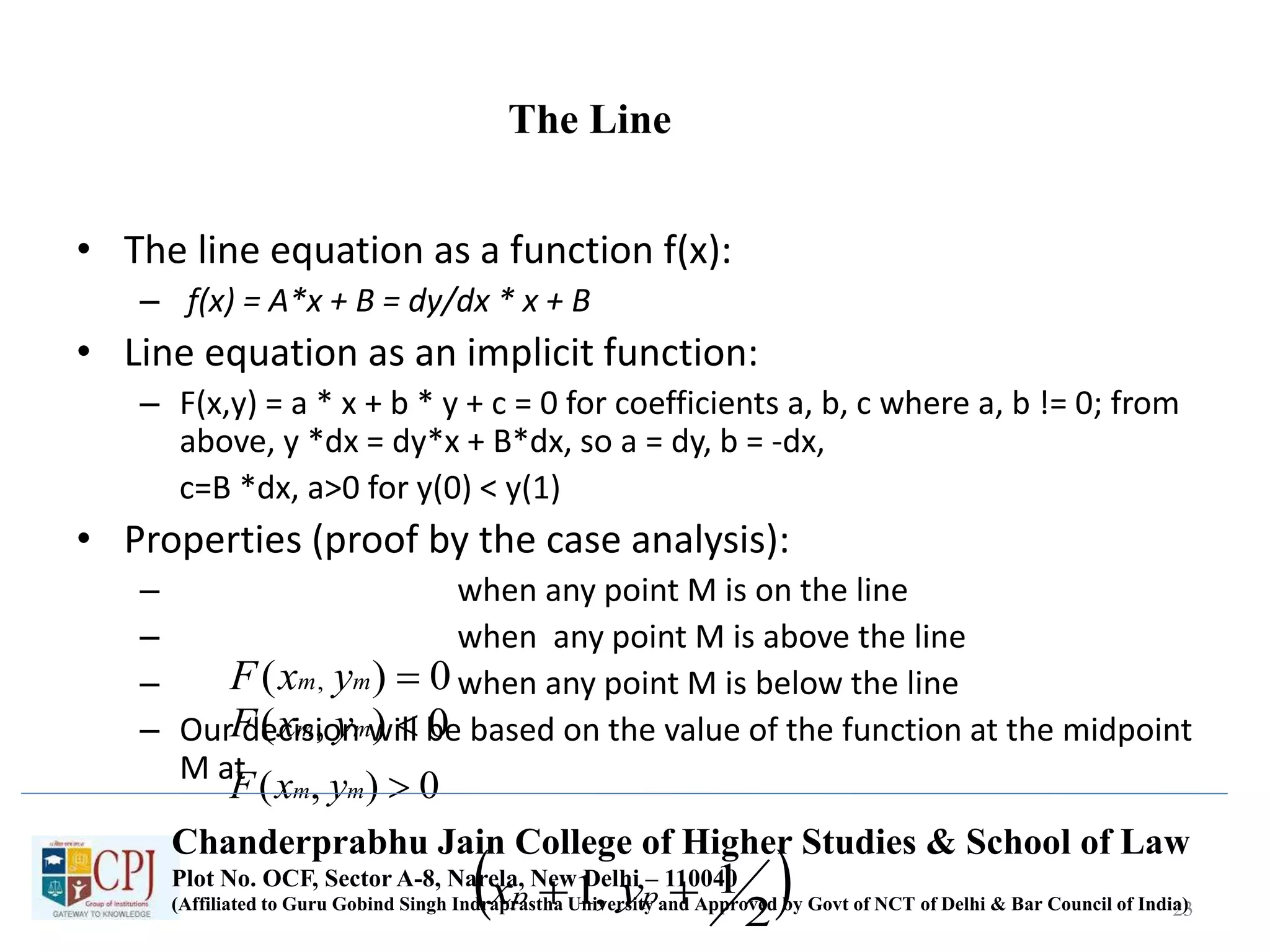
The Line
• The line equation as a function f(x):
– f(x) = A*x + B = dy/dx * x + B
• Line equation as an implicit function:
– F(x,y) = a * x + b * y + c = 0 for coefficients a, b, c where a, b != 0; from
above, y *dx = dy*x + B*dx, so a = dy, b = -dx,
c=B *dx, a>0 for y(0) < y(1)
• Properties (proof by the case analysis):
– when any point M is on the line
– when any point M is above the line
– when any point M is below the line
– Our decision will be based on the value of the function at the midpoint
M at
23
0)( , mm yxF
0),( mm yxF
0),( mm yxF
 2
1,1  pp yx
Chanderprabhu Jain College of Higher Studies & School of Law
Plot No. OCF, Sector A-8, Narela, New Delhi – 110040
(Affiliated to Guru Gobind Singh Indraprastha University and Approved by Govt of NCT of Delhi & Bar Council of India)
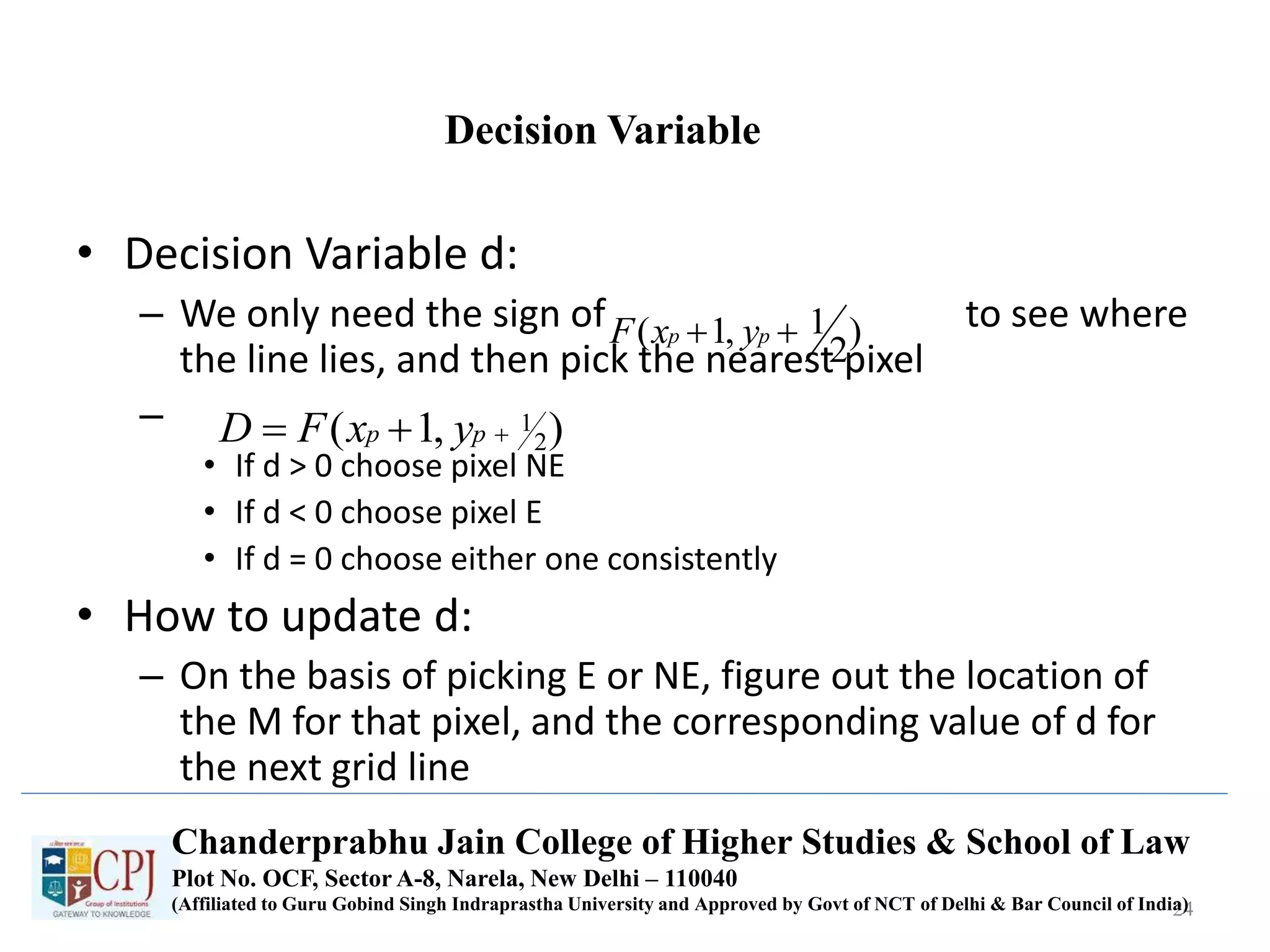
Decision Variable
• Decision Variable d:
– We only need the sign of to see where
the line lies, and then pick the nearest pixel
–
• If d > 0 choose pixel NE
• If d < 0 choose pixel E
• If d = 0 choose either one consistently
• How to update d:
– On the basis of picking E or NE, figure out the location of
the M for that pixel, and the corresponding value of d for
the next grid line
24
)
2
1,1(  pp yxF
),1( 2
1 pp yxFD
Chanderprabhu Jain College of Higher Studies & School of Law
Plot No. OCF, Sector A-8, Narela, New Delhi – 110040
(Affiliated to Guru Gobind Singh Indraprastha University and Approved by Govt of NCT of Delhi & Bar Council of India)
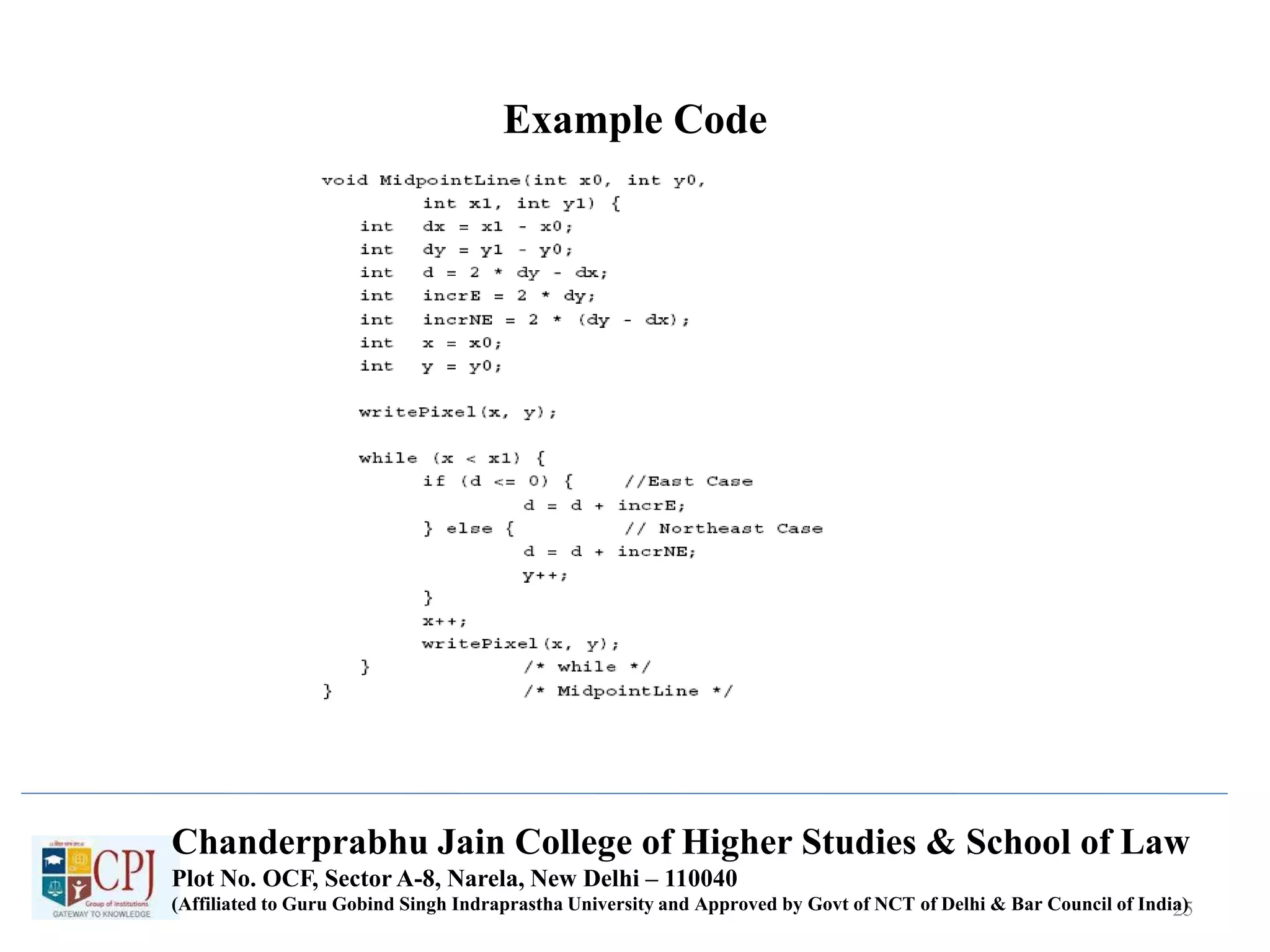
Example Code
25
Chanderprabhu Jain College of Higher Studies & School of Law
Plot No. OCF, Sector A-8, Narela, New Delhi – 110040
(Affiliated to Guru Gobind Singh Indraprastha University and Approved by Govt of NCT of Delhi & Bar Council of India)
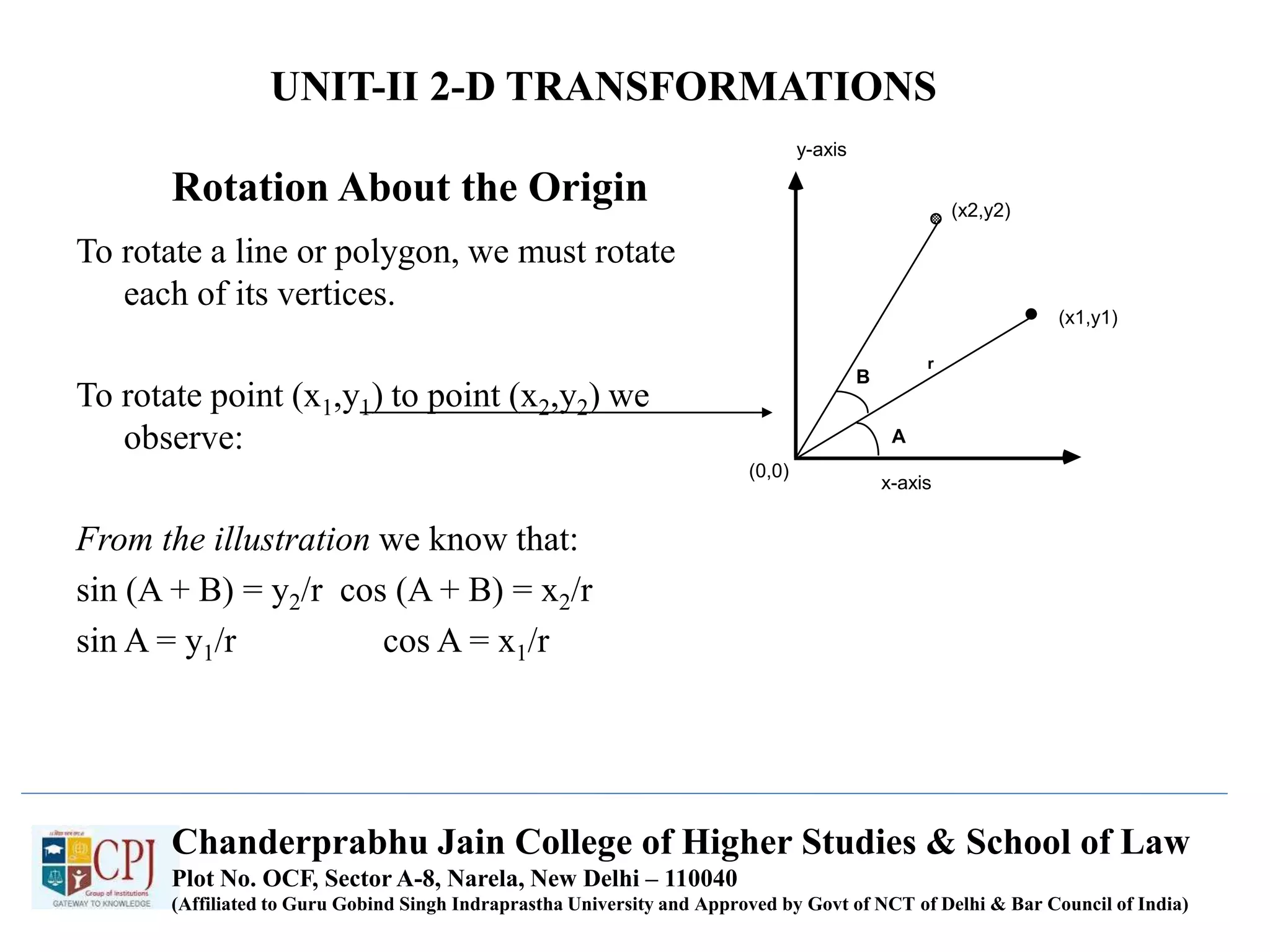
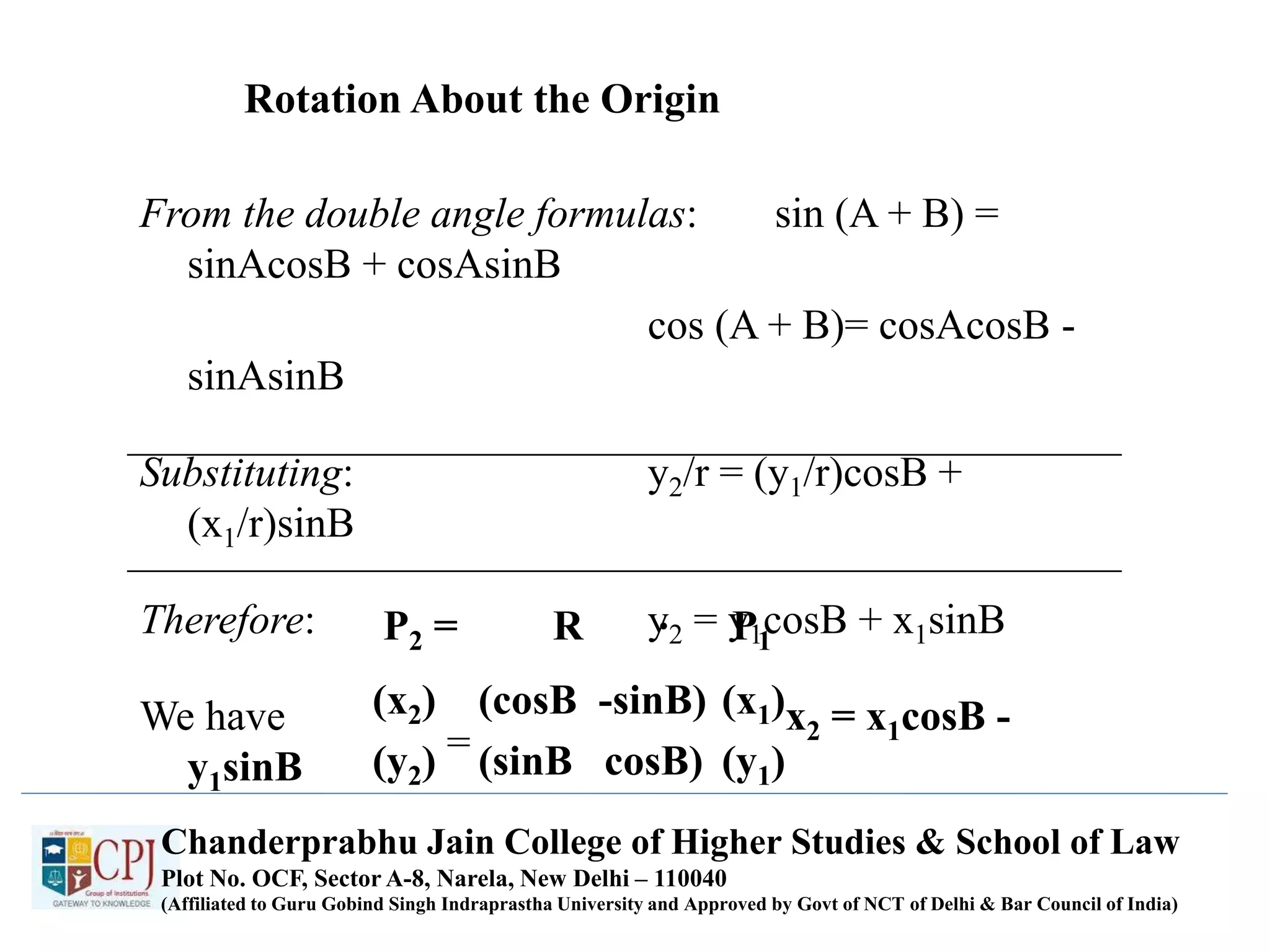
Rotation About the Origin
To rotate a line or polygon, we must rotate
each of its vertices.
To rotate point (x1,y1) to point (x2,y2) we
observe:
From the illustration we know that:
sin (A + B) = y2/r cos (A + B) = x2/r
sin A = y1/r cos A = x1/r
x-axis
(x1,y1)
(x2,y2)
A
B
r
(0,0)
y-axis
Chanderprabhu Jain College of Higher Studies & School of Law
Plot No. OCF, Sector A-8, Narela, New Delhi – 110040
(Affiliated to Guru Gobind Singh Indraprastha University and Approved by Govt of NCT of Delhi & Bar Council of India)
UNIT-II 2-D TRANSFORMATIONS
Rotation About the Origin
From the double angle formulas: sin (A + B) =
sinAcosB + cosAsinB
cos (A + B)= cosAcosB -
sinAsinB
Substituting: y2/r = (y1/r)cosB +
(x1/r)sinB
Therefore: y2 = y1cosB + x1sinB
We have x2 = x1cosB -
y1sinB
P2 = R P1
.
(x1)
(y1)
(cosB -sinB)
(sinB cosB)
(x2)
(y2) =
Chanderprabhu Jain College of Higher Studies & School of Law
Plot No. OCF, Sector A-8, Narela, New Delhi – 110040
(Affiliated to Guru Gobind Singh Indraprastha University and Approved by Govt of NCT of Delhi & Bar Council of India)
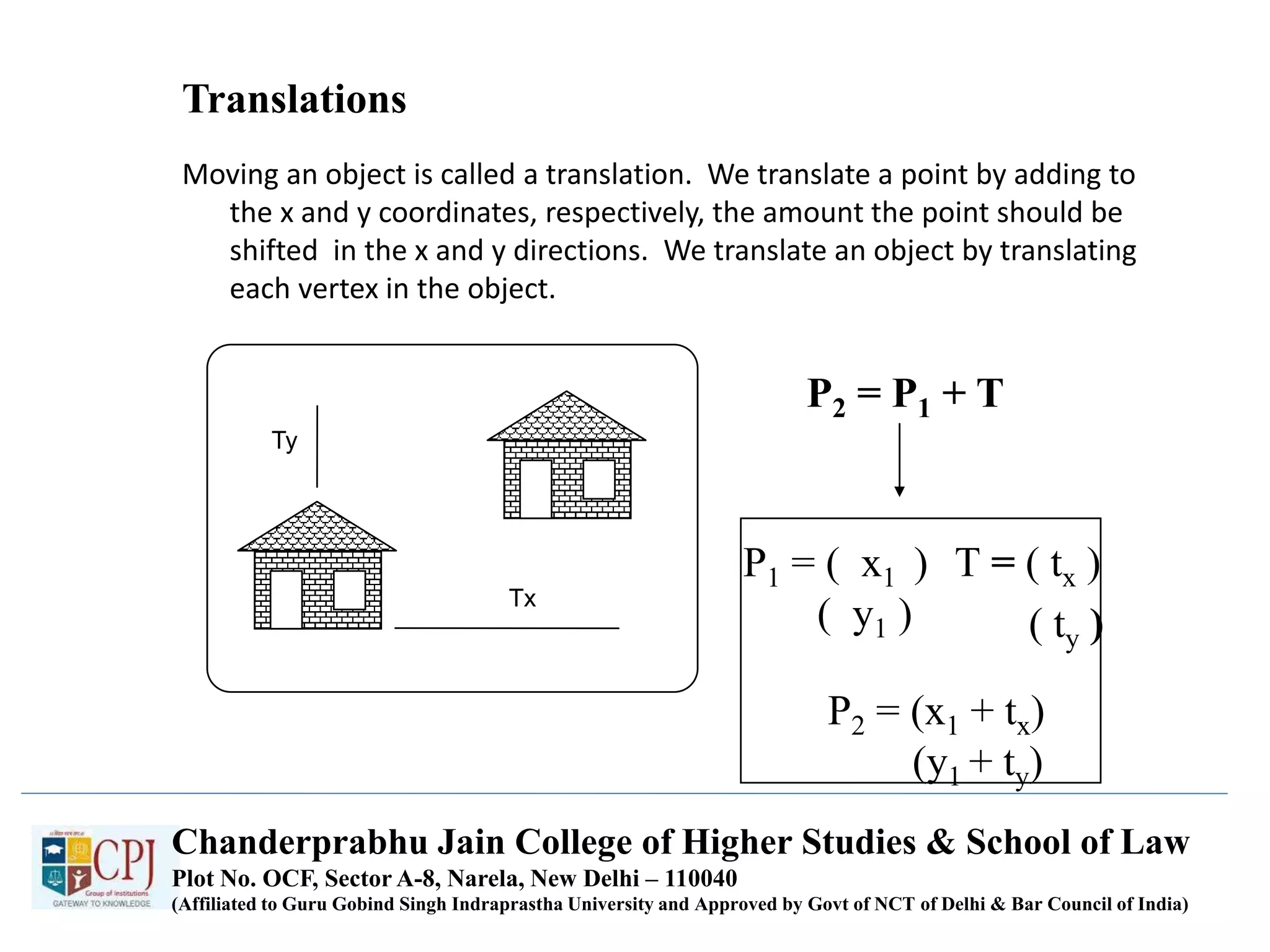
Translations
Moving an object is called a translation. We translate a point by adding to
the x and y coordinates, respectively, the amount the point should be
shifted in the x and y directions. We translate an object by translating
each vertex in the object.
P2 = P1 + T
T = ( tx )
( ty )
P1 = ( x1 )
( y1 )
P2 = (x1 + tx)
(y1 + ty)
Ty
Tx
Chanderprabhu Jain College of Higher Studies & School of Law
Plot No. OCF, Sector A-8, Narela, New Delhi – 110040
(Affiliated to Guru Gobind Singh Indraprastha University and Approved by Govt of NCT of Delhi & Bar Council of India)
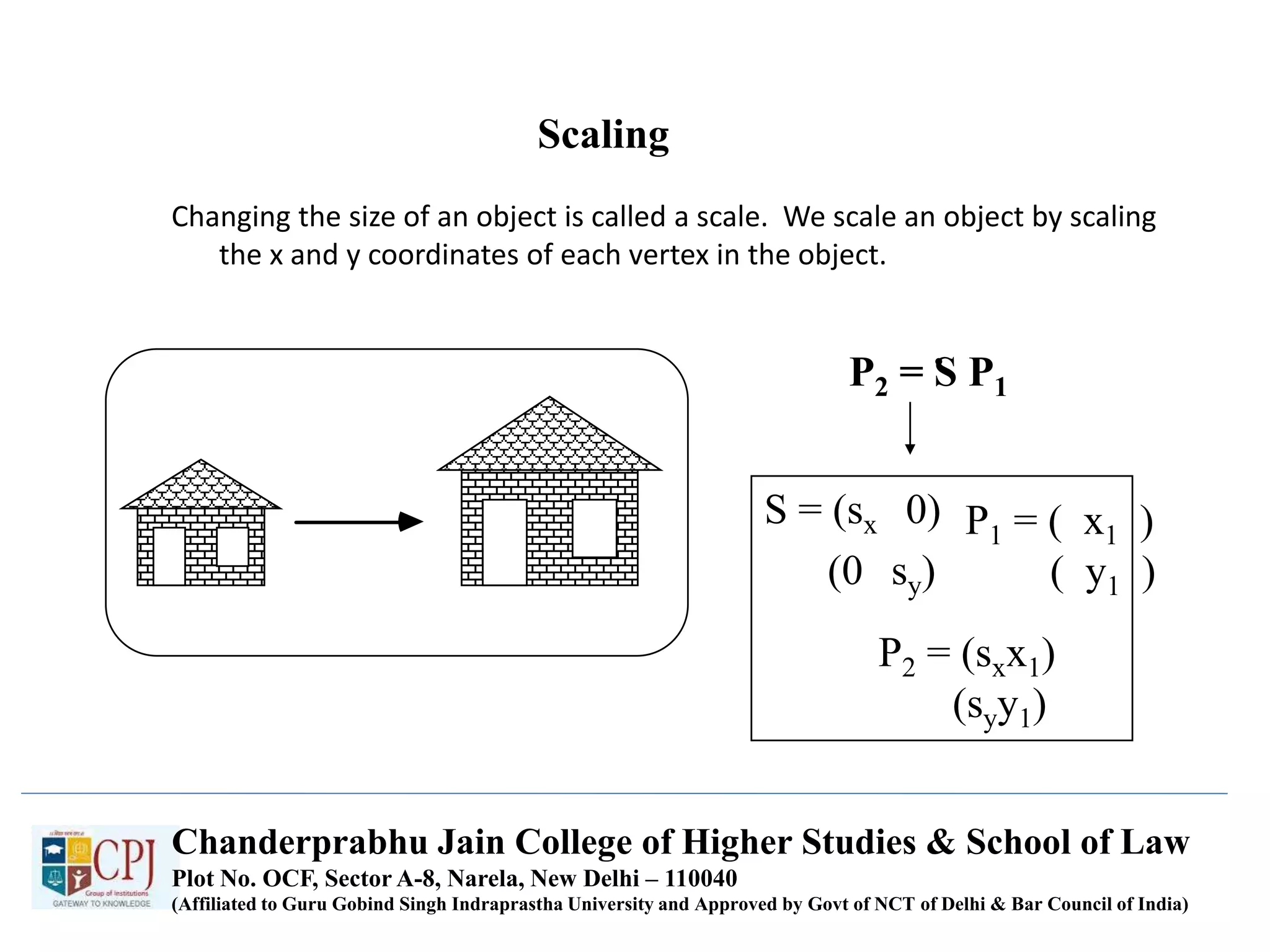
Scaling
Changing the size of an object is called a scale. We scale an object by scaling
the x and y coordinates of each vertex in the object.
P2 = S P1
.
S = (sx 0)
(0 sy)
P1 = ( x1 )
( y1 )
P2 = (sxx1)
(syy1)
Chanderprabhu Jain College of Higher Studies & School of Law
Plot No. OCF, Sector A-8, Narela, New Delhi – 110040
(Affiliated to Guru Gobind Singh Indraprastha University and Approved by Govt of NCT of Delhi & Bar Council of India)
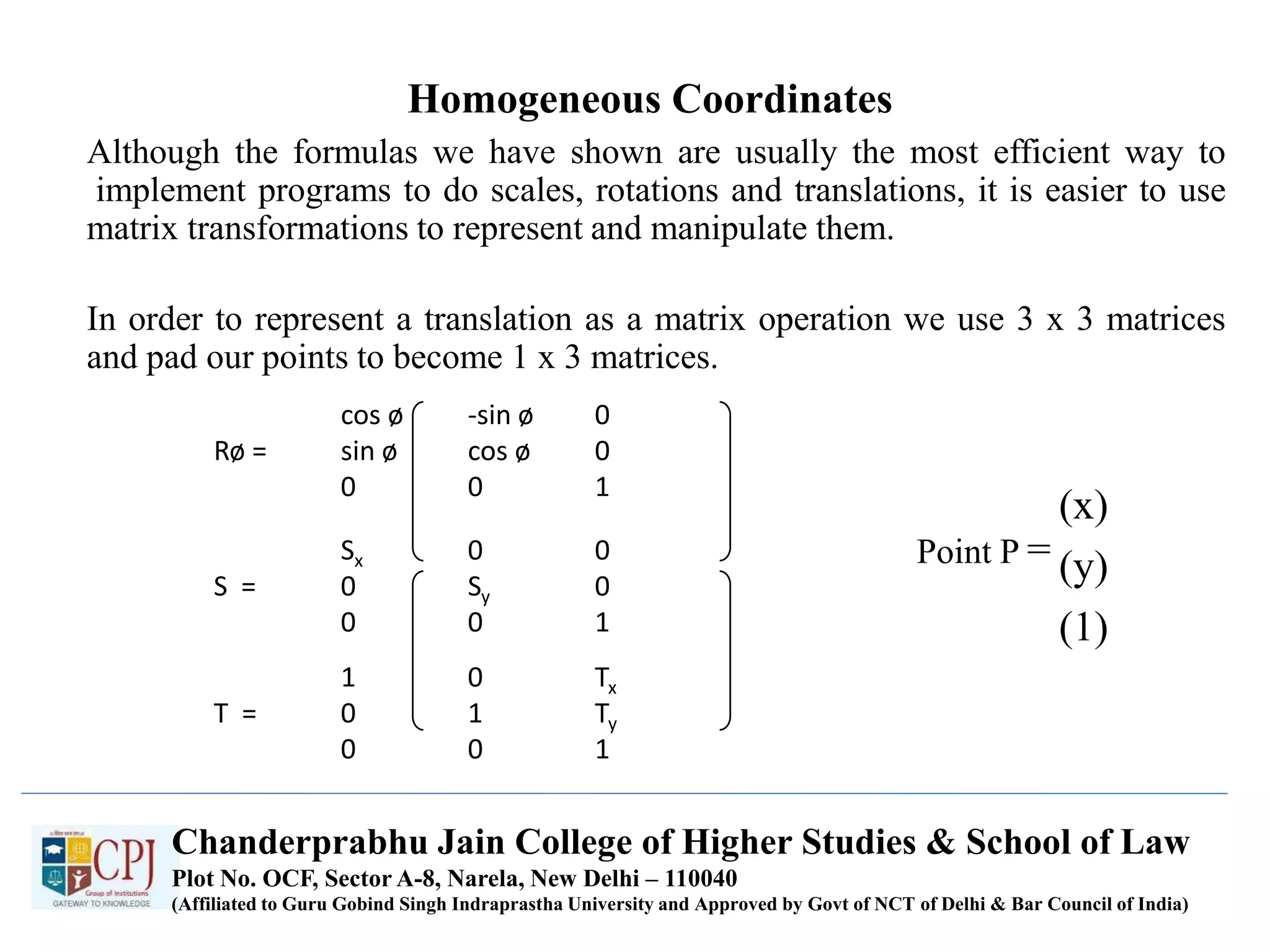
Homogeneous Coordinates
Although the formulas we have shown are usually the most efficient way to
implement programs to do scales, rotations and translations, it is easier to use
matrix transformations to represent and manipulate them.
In order to represent a translation as a matrix operation we use 3 x 3 matrices
and pad our points to become 1 x 3 matrices.
cos ø -sin ø 0
Rø = sin ø cos ø 0
0 0 1
Sx 0 0
S = 0 Sy 0
0 0 1
1 0 Tx
T = 0 1 Ty
0 0 1
Point P =
(x)
(y)
(1)
Chanderprabhu Jain College of Higher Studies & School of Law
Plot No. OCF, Sector A-8, Narela, New Delhi – 110040
(Affiliated to Guru Gobind Singh Indraprastha University and Approved by Govt of NCT of Delhi & Bar Council of India)
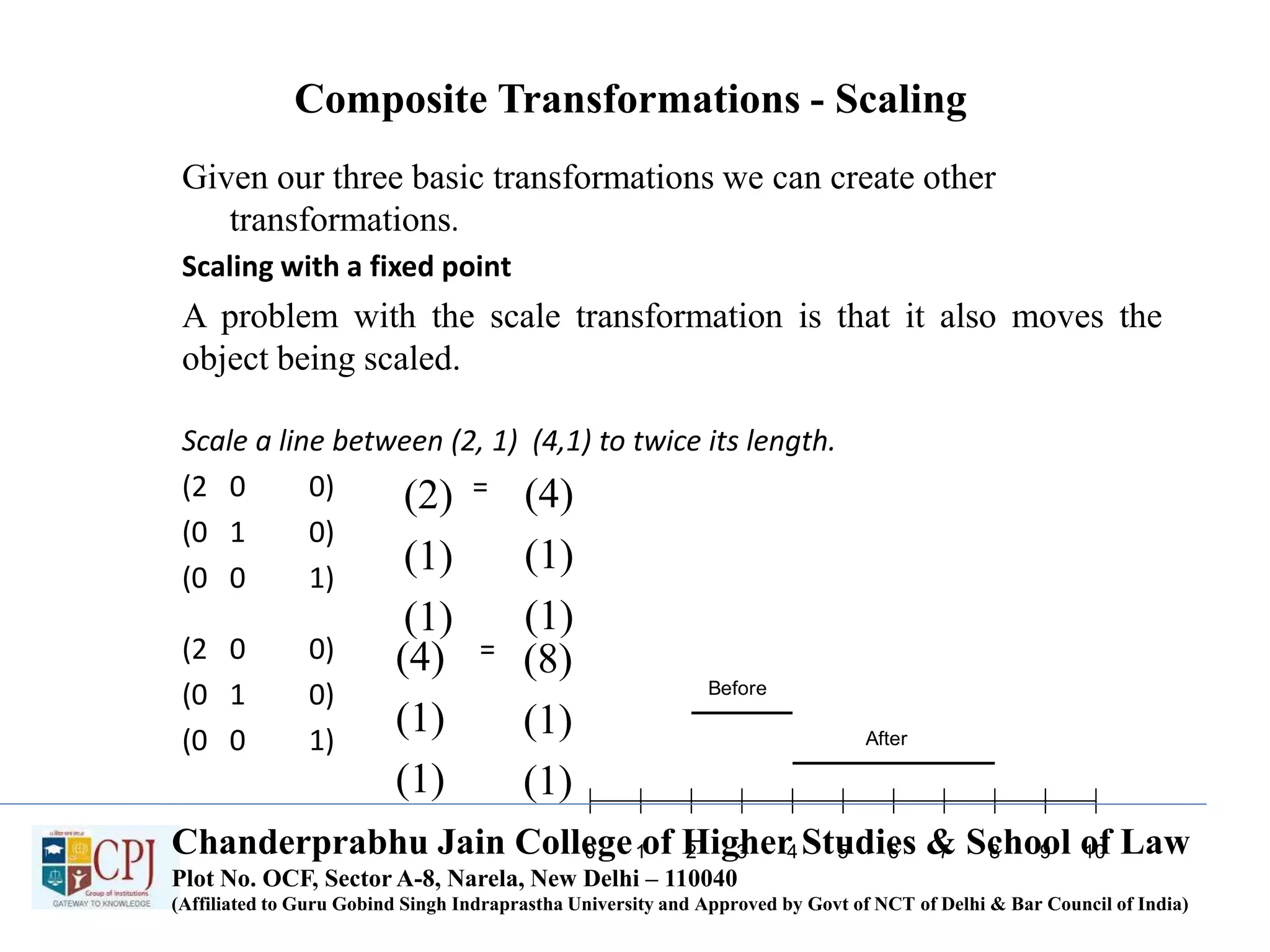
Composite Transformations - Scaling
Given our three basic transformations we can create other
transformations.
Scaling with a fixed point
A problem with the scale transformation is that it also moves the
object being scaled.
Scale a line between (2, 1) (4,1) to twice its length.
(2 0 0) =
(0 1 0)
(0 0 1)
(2 0 0) =
(0 1 0)
(0 0 1)
0 1 2 3 4 5 6 7 8 9 10
Before
After
(2)
(1)
(1)
(4)
(1)
(1)
(4)
(1)
(1)
(8)
(1)
(1)
Chanderprabhu Jain College of Higher Studies & School of Law
Plot No. OCF, Sector A-8, Narela, New Delhi – 110040
(Affiliated to Guru Gobind Singh Indraprastha University and Approved by Govt of NCT of Delhi & Bar Council of India)
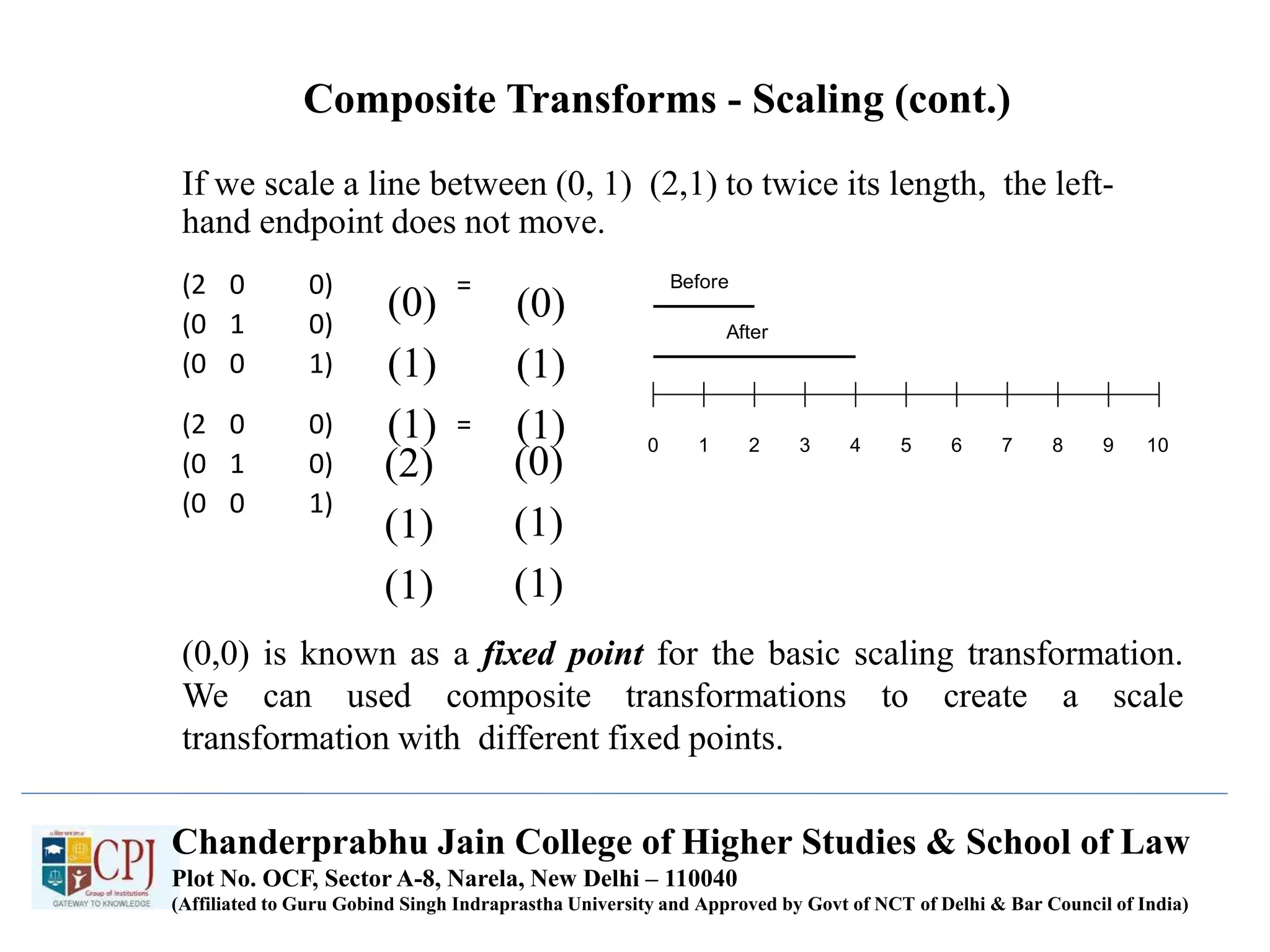
Composite Transforms - Scaling (cont.)
If we scale a line between (0, 1) (2,1) to twice its length, the left-
hand endpoint does not move.
(2 0 0) =
(0 1 0)
(0 0 1)
(2 0 0) =
(0 1 0)
(0 0 1)
(0,0) is known as a fixed point for the basic scaling transformation.
We can used composite transformations to create a scale
transformation with different fixed points.
0 1 2 3 4 5 6 7 8 9 10
Before
After
(0)
(1)
(1)
(0)
(1)
(1)
(2)
(1)
(1)
(0)
(1)
(1)
Chanderprabhu Jain College of Higher Studies & School of Law
Plot No. OCF, Sector A-8, Narela, New Delhi – 110040
(Affiliated to Guru Gobind Singh Indraprastha University and Approved by Govt of NCT of Delhi & Bar Council of India)
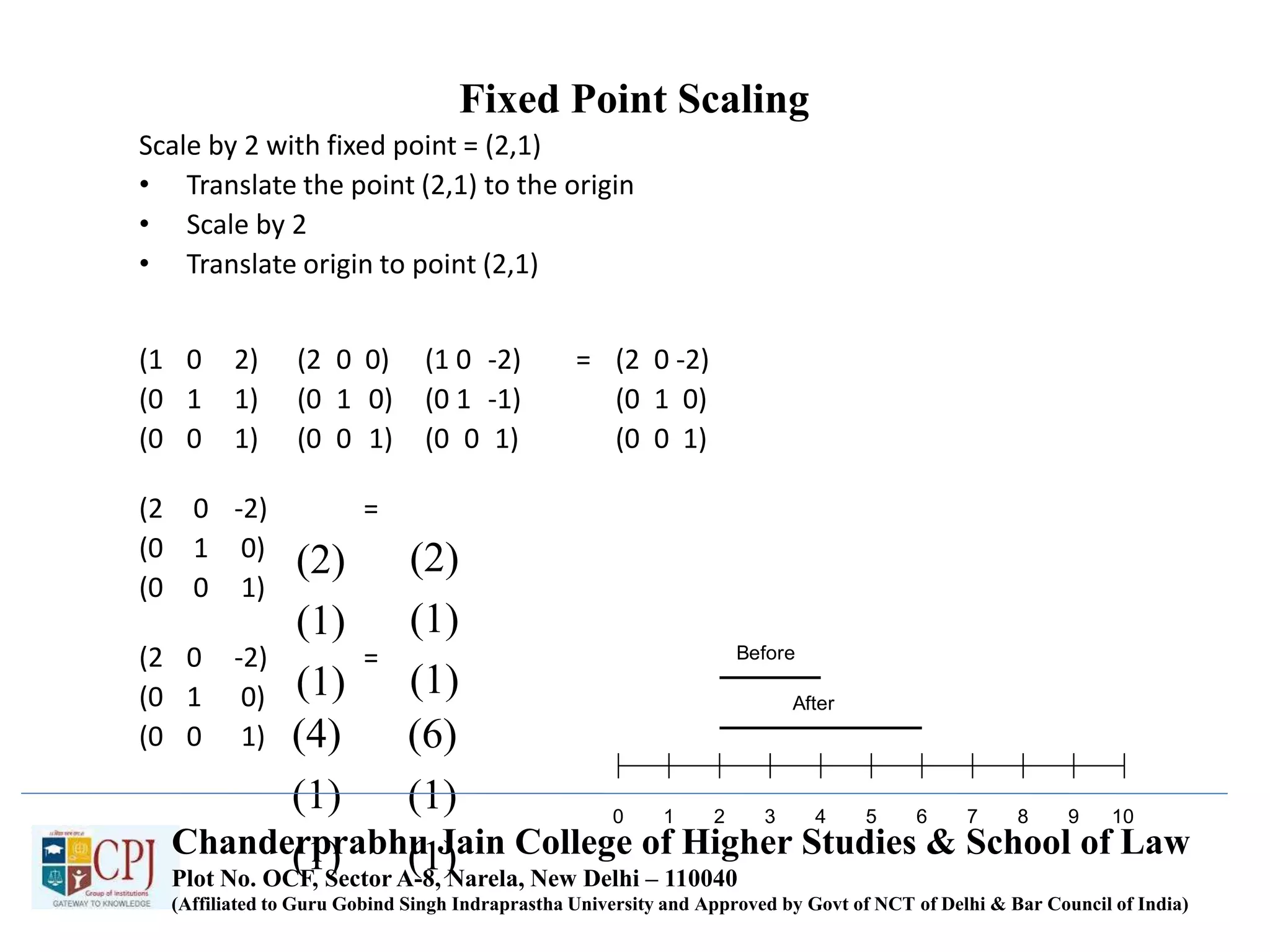
Fixed Point Scaling
Scale by 2 with fixed point = (2,1)
• Translate the point (2,1) to the origin
• Scale by 2
• Translate origin to point (2,1)
(1 0 2) (2 0 0) (1 0 -2) = (2 0 -2)
(0 1 1) (0 1 0) (0 1 -1) (0 1 0)
(0 0 1) (0 0 1) (0 0 1) (0 0 1)
(2 0 -2) =
(0 1 0)
(0 0 1)
(2 0 -2) =
(0 1 0)
(0 0 1)
0 1 2 3 4 5 6 7 8 9 10
Before
After
(2)
(1)
(1)
(2)
(1)
(1)
(4)
(1)
(1)
(6)
(1)
(1)Chanderprabhu Jain College of Higher Studies & School of Law
Plot No. OCF, Sector A-8, Narela, New Delhi – 110040
(Affiliated to Guru Gobind Singh Indraprastha University and Approved by Govt of NCT of Delhi & Bar Council of India)
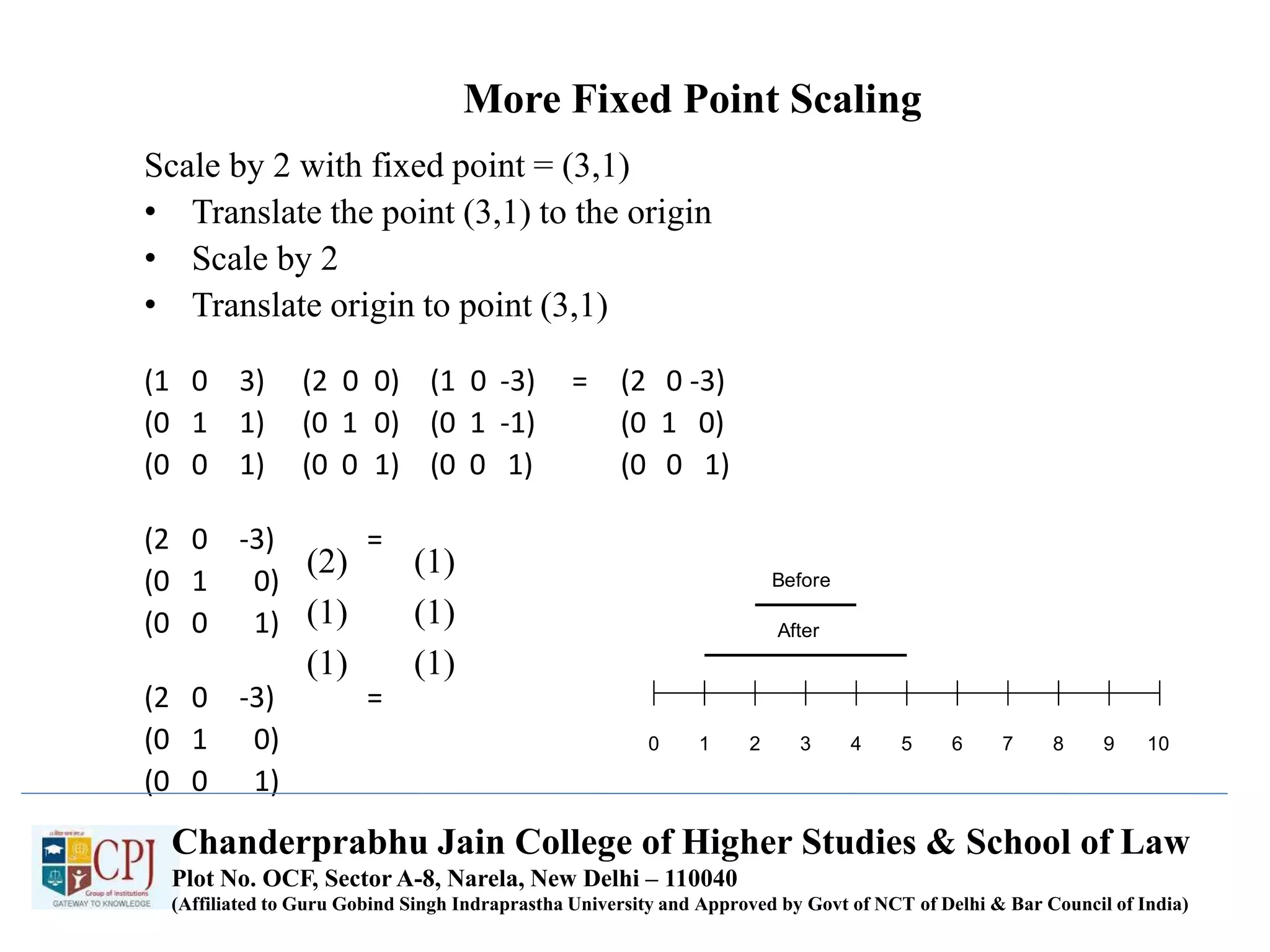
More Fixed Point Scaling
Scale by 2 with fixed point = (3,1)
• Translate the point (3,1) to the origin
• Scale by 2
• Translate origin to point (3,1)
(1 0 3) (2 0 0) (1 0 -3) = (2 0 -3)
(0 1 1) (0 1 0) (0 1 -1) (0 1 0)
(0 0 1) (0 0 1) (0 0 1) (0 0 1)
(2 0 -3) =
(0 1 0)
(0 0 1)
(2 0 -3) =
(0 1 0)
(0 0 1)
0 1 2 3 4 5 6 7 8 9 10
Before
After
(2)
(1)
(1)
(1)
(1)
(1)
Chanderprabhu Jain College of Higher Studies & School of Law
Plot No. OCF, Sector A-8, Narela, New Delhi – 110040
(Affiliated to Guru Gobind Singh Indraprastha University and Approved by Govt of NCT of Delhi & Bar Council of India)
Shears
Original Data y Shear x Shear
1 0 0 1 b 0
a 1 0 0 1 0
0 0 1 0 0 1
GRAPHICS --> x shear --> GRAPHICS
Chanderprabhu Jain College of Higher Studies & School of Law
Plot No. OCF, Sector A-8, Narela, New Delhi – 110040
(Affiliated to Guru Gobind Singh Indraprastha University and Approved by Govt of NCT of Delhi & Bar Council of India)
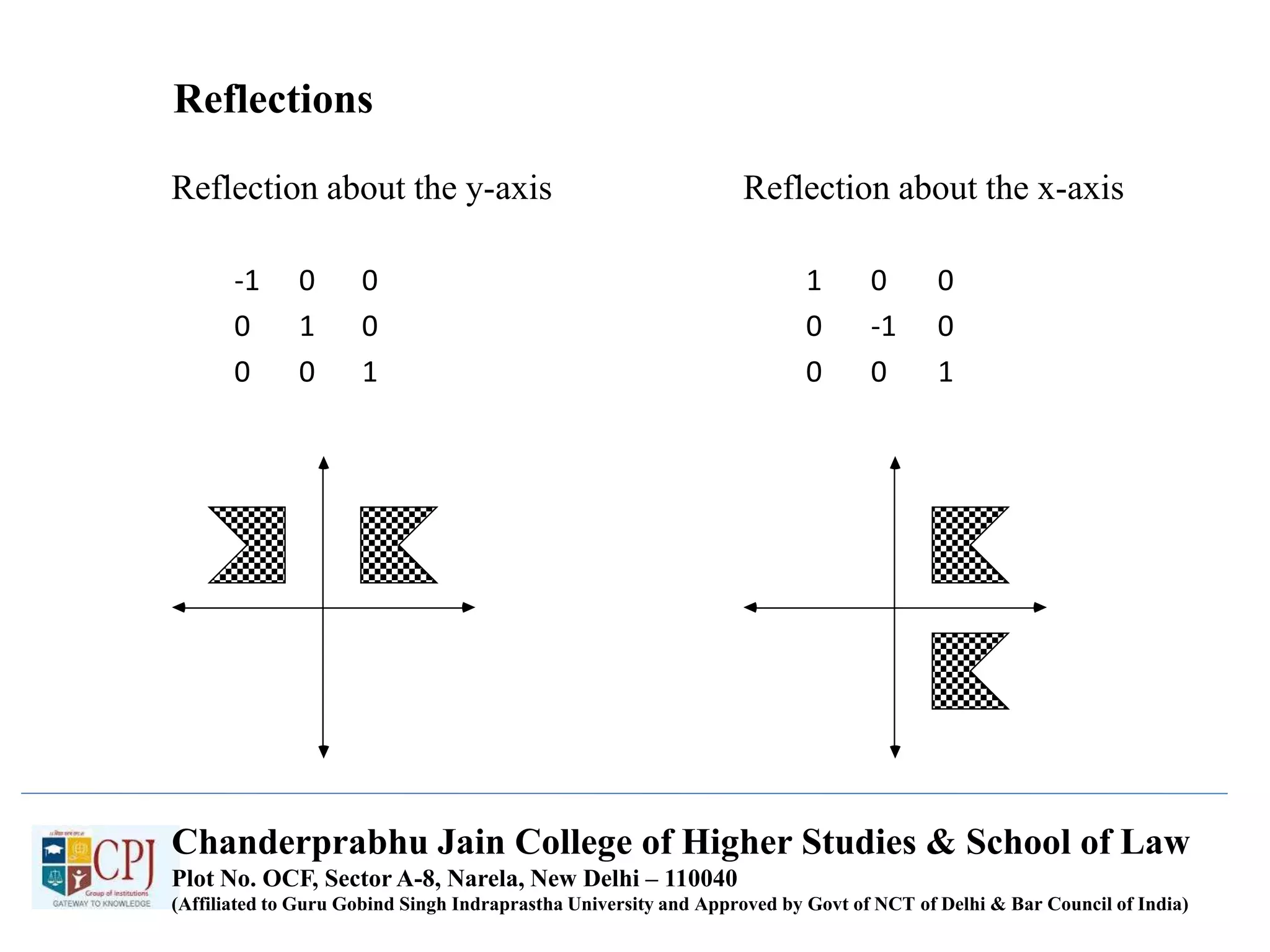
Reflections
Reflection about the y-axis Reflection about the x-axis
-1 0 0 1 0 0
0 1 0 0 -1 0
0 0 1 0 0 1
Chanderprabhu Jain College of Higher Studies & School of Law
Plot No. OCF, Sector A-8, Narela, New Delhi – 110040
(Affiliated to Guru Gobind Singh Indraprastha University and Approved by Govt of NCT of Delhi & Bar Council of India)
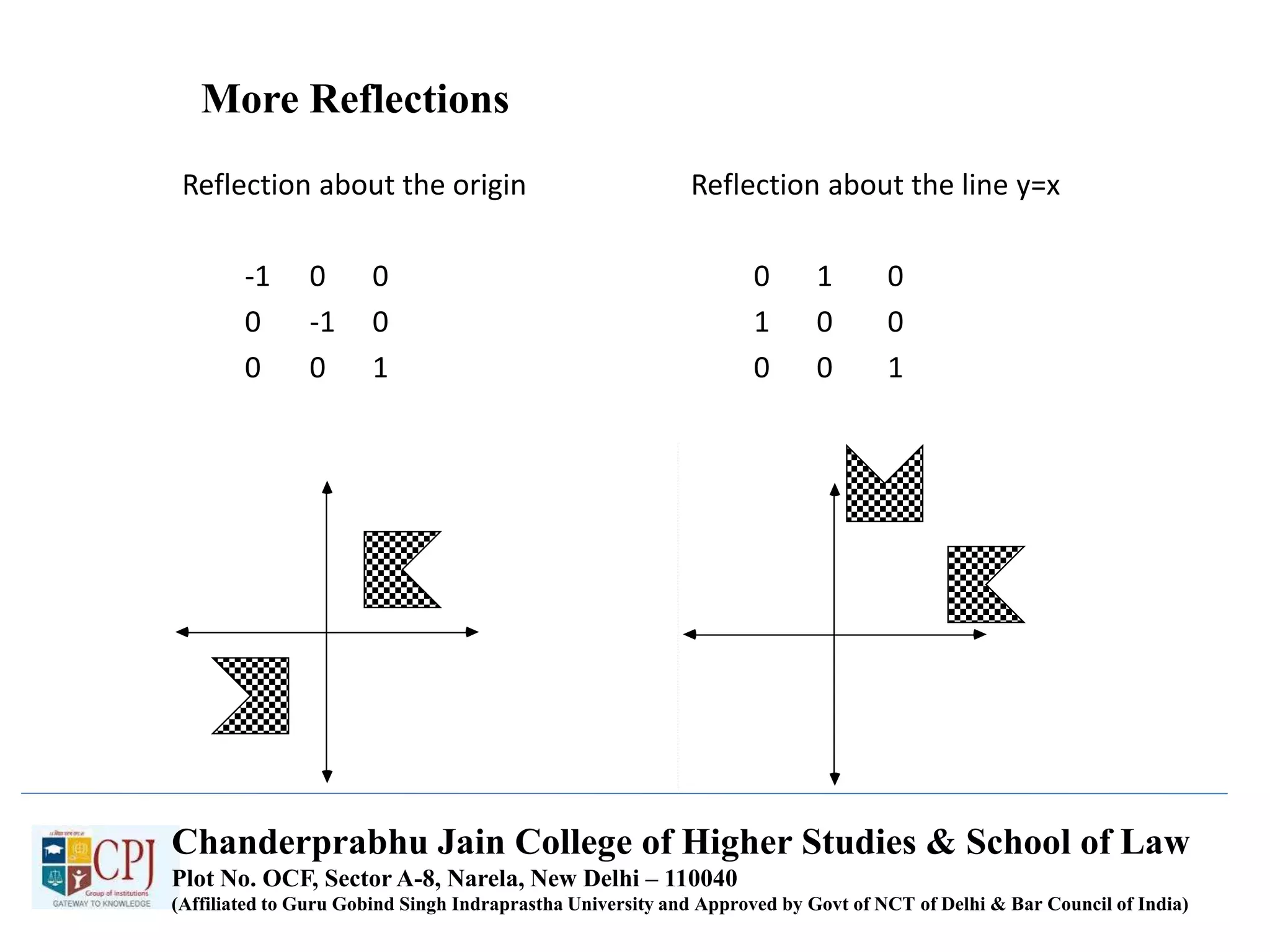
More Reflections
Reflection about the origin Reflection about the line y=x
-1 0 0 0 1 0
0 -1 0 1 0 0
0 0 1 0 0 1
Chanderprabhu Jain College of Higher Studies & School of Law
Plot No. OCF, Sector A-8, Narela, New Delhi – 110040
(Affiliated to Guru Gobind Singh Indraprastha University and Approved by Govt of NCT of Delhi & Bar Council of India)
Chanderprabhu Jain College of Higher Studies & School of Law
Plot No. OCF, Sector A-8, Narela, New Delhi – 110040
(Affiliated to Guru Gobind Singh Indraprastha University and Approved by Govt of NCT of Delhi & Bar Council of India)
UNIT-III
SOLID MODELING
UNIT-III SOLID MODELING
Chanderprabhu Jain College of Higher Studies & School of Law
Plot No. OCF, Sector A-8, Narela, New Delhi – 110040
(Affiliated to Guru Gobind Singh Indraprastha University and Approved by Govt of NCT of Delhi & Bar Council of India)
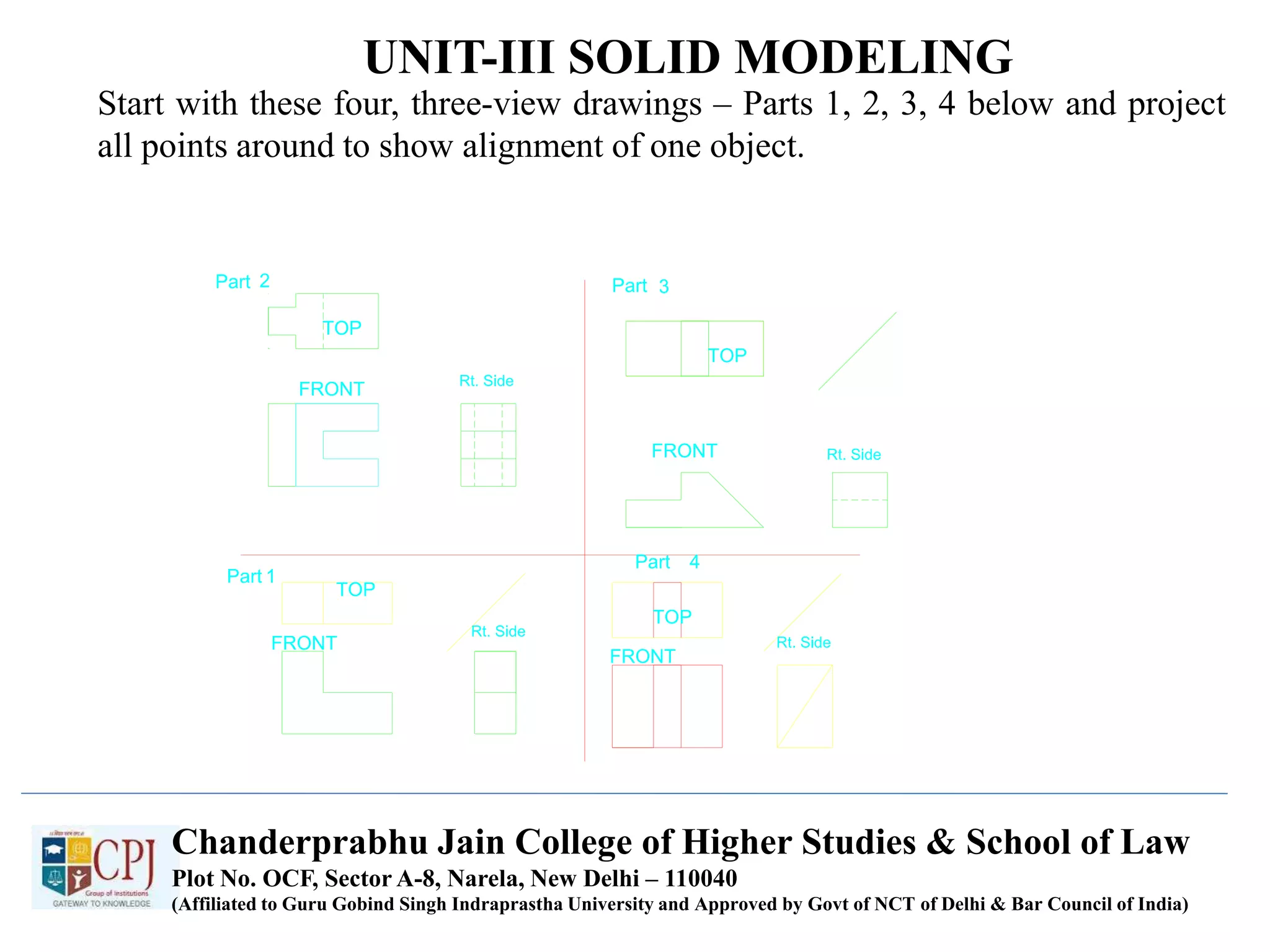
Start with these four, three-view drawings – Parts 1, 2, 3, 4 below and project
all points around to show alignment of one object.
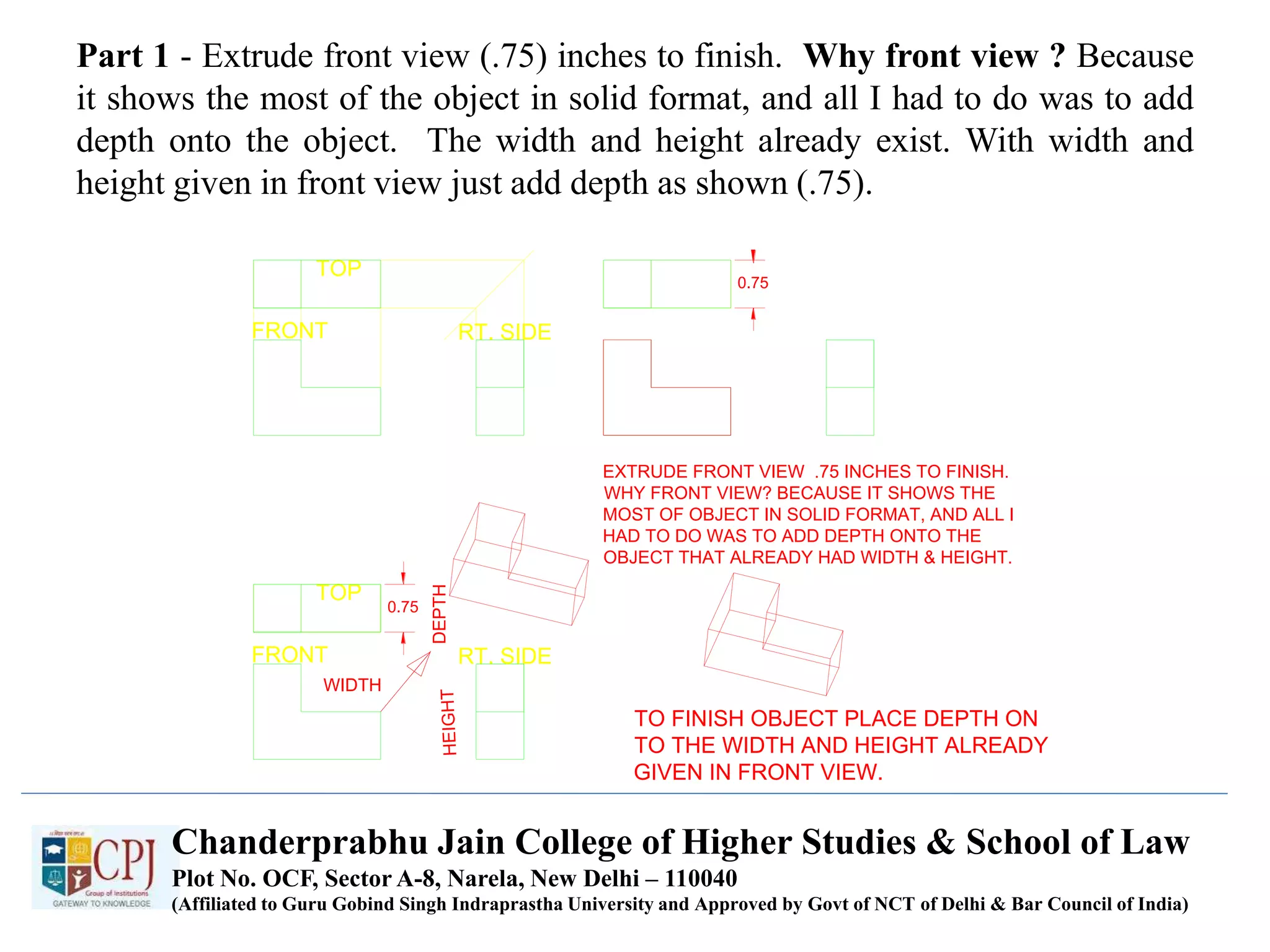
Part 1 - Extrude front view (.75) inches to finish. Why front view ? Because
it shows the most of the object in solid format, and all I had to do was to add
depth onto the object. The width and height already exist. With width and
height given in front view just add depth as shown (.75).
TOP
FRONT RT. SIDE
EXTRUDE FRONT VIEW .75 INCHES TO FINISH.
WHY FRONT VIEW? BECAUSE IT SHOWS THE
MOST OF OBJECT IN SOLID FORMAT, AND ALL I
HAD TO DO WAS TO ADD DEPTH ONTO THE
OBJECT THAT ALREADY HAD WIDTH & HEIGHT.
0.75
0.75
TOP
FRONT RT. SIDE
WIDTH
DEPTH
TO FINISH OBJECT PLACE DEPTH ON
TO THE WIDTH AND HEIGHT ALREADY
GIVEN IN FRONT VIEW.
Chanderprabhu Jain College of Higher Studies & School of Law
Plot No. OCF, Sector A-8, Narela, New Delhi – 110040
(Affiliated to Guru Gobind Singh Indraprastha University and Approved by Govt of NCT of Delhi & Bar Council of India)
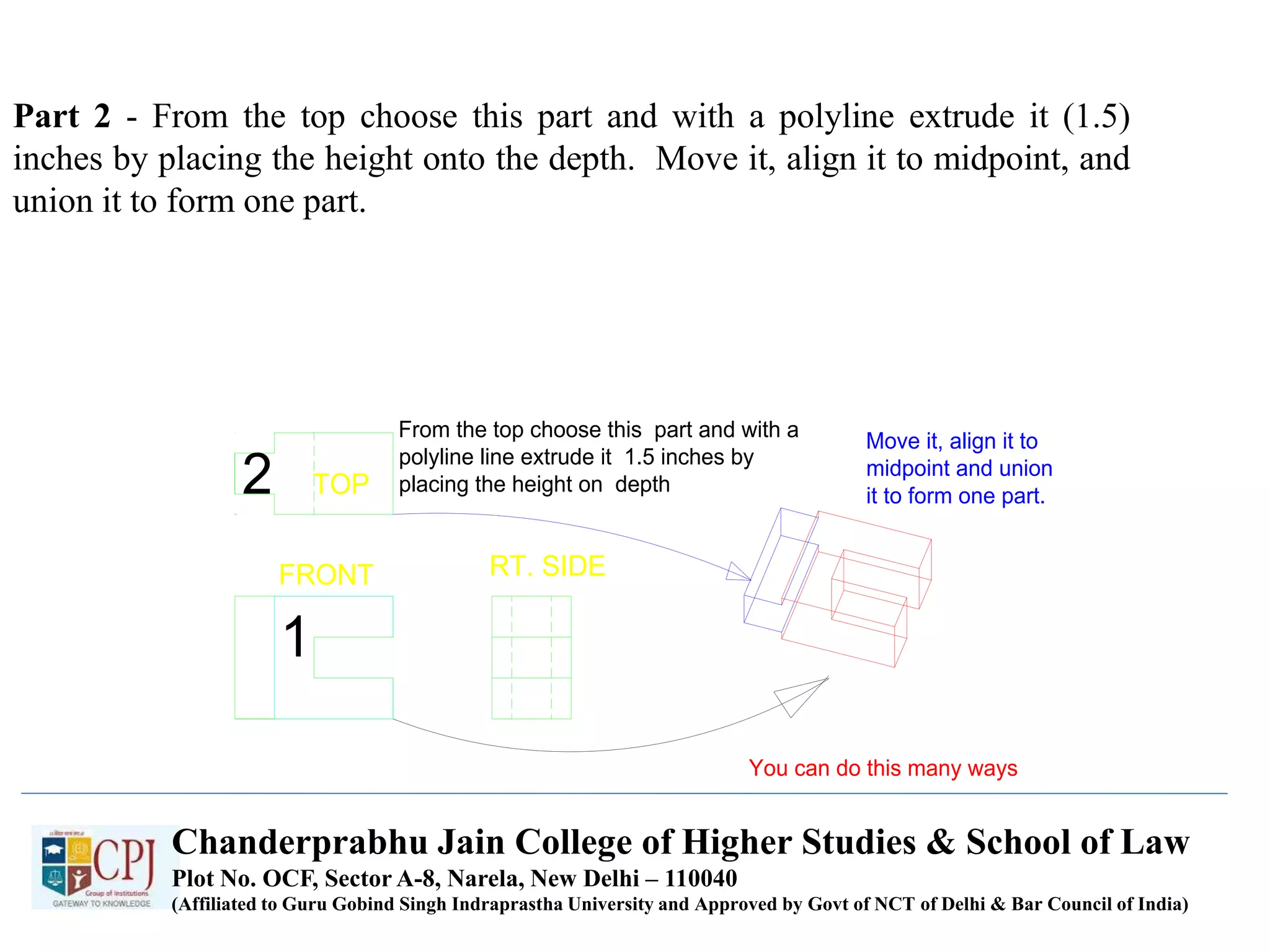
Part 2 - From the top choose this part and with a polyline extrude it (1.5)
inches by placing the height onto the depth. Move it, align it to midpoint, and
union it to form one part.
TOP
FRONT RT. SIDE
1
2
From the top choose this part and with a
polyline line extrude it 1.5 inches by
placing the height on depth
Move it, align it to
midpoint and union
it to form one part.
You can do this many ways
Chanderprabhu Jain College of Higher Studies & School of Law
Plot No. OCF, Sector A-8, Narela, New Delhi – 110040
(Affiliated to Guru Gobind Singh Indraprastha University and Approved by Govt of NCT of Delhi & Bar Council of India)
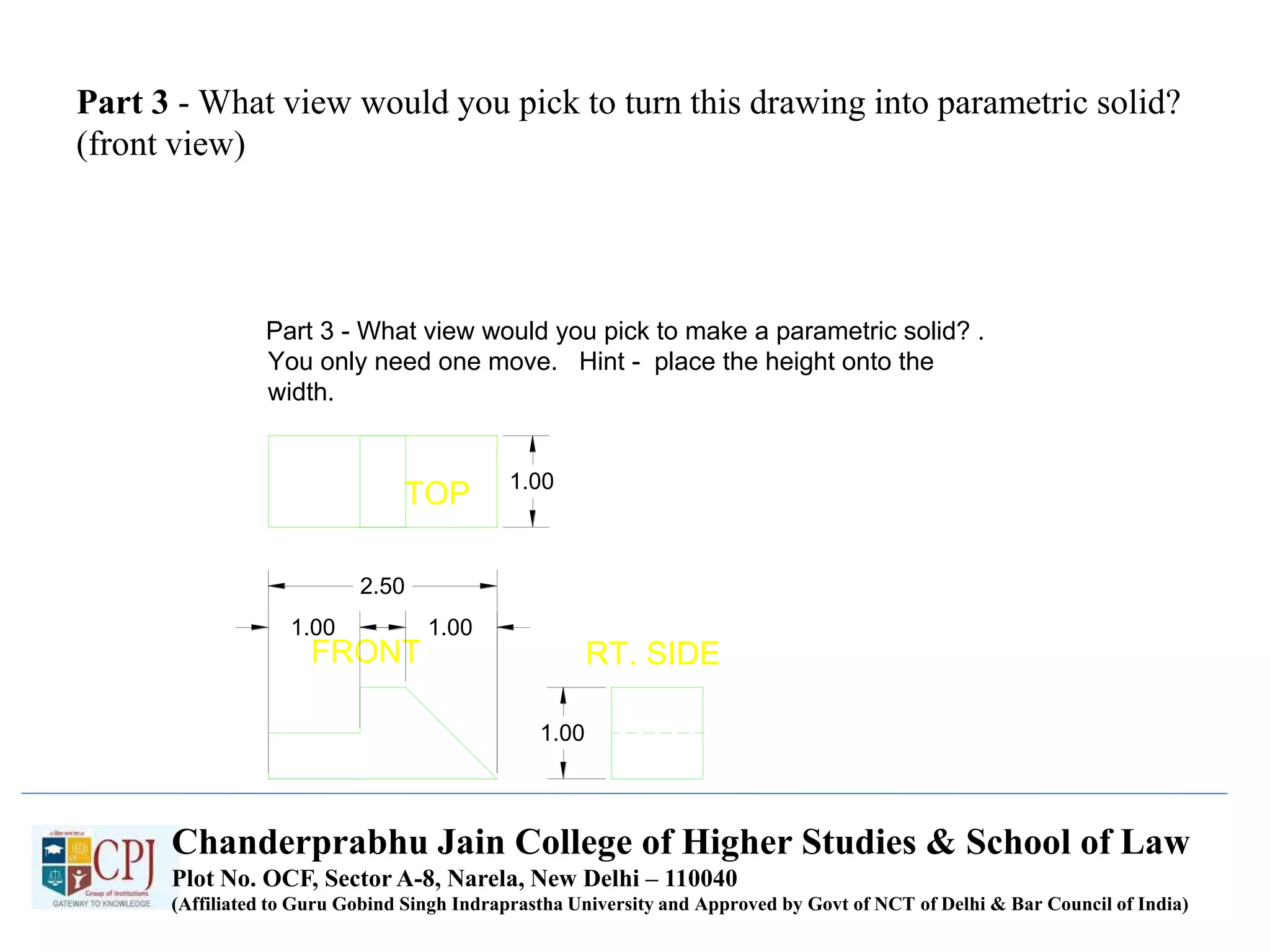
Part 3 - What view would you pick to turn this drawing into parametric solid?
(front view)
TOP
FRONT RT. SIDE
1.00
1.00 1.00
2.50
1.00
Part 3 - What view would you pick to make a parametric solid? .
You only need one move. Hint - place the height onto the
width.
Chanderprabhu Jain College of Higher Studies & School of Law
Plot No. OCF, Sector A-8, Narela, New Delhi – 110040
(Affiliated to Guru Gobind Singh Indraprastha University and Approved by Govt of NCT of Delhi & Bar Council of India)
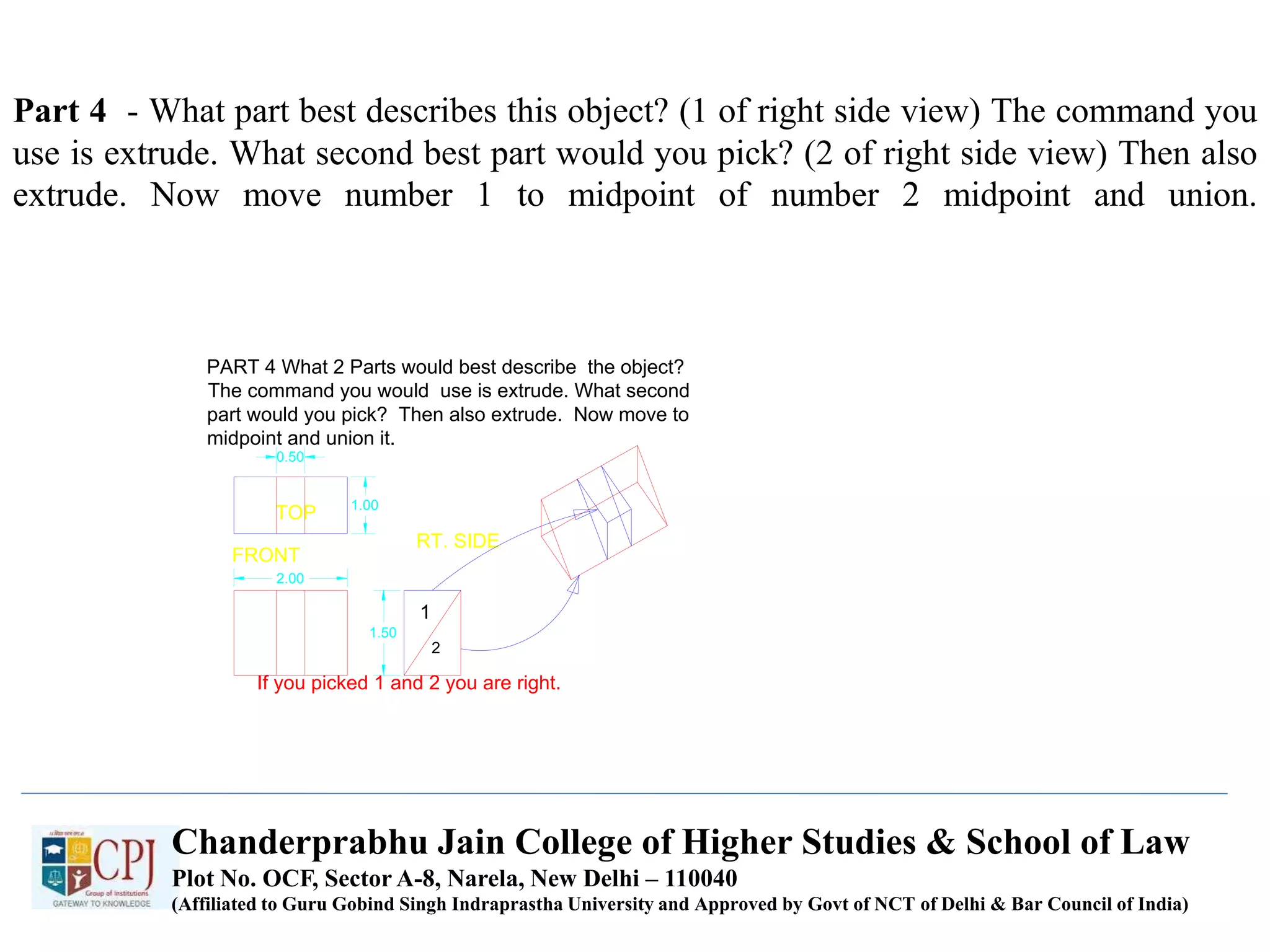
Part 4 - What part best describes this object? (1 of right side view) The command you
use is extrude. What second best part would you pick? (2 of right side view) Then also
extrude. Now move number 1 to midpoint of number 2 midpoint and union.
FRONT
TOP
RT. SIDE
PART 4 What 2 Parts would best describe the object?
The command you would use is extrude. What second
part would you pick? Then also extrude. Now move to
midpoint and union it.
If you picked 1 and 2 you are right.
1
2
0.50
2.00
1.50
1.00
Chanderprabhu Jain College of Higher Studies & School of Law
Plot No. OCF, Sector A-8, Narela, New Delhi – 110040
(Affiliated to Guru Gobind Singh Indraprastha University and Approved by Govt of NCT of Delhi & Bar Council of India)
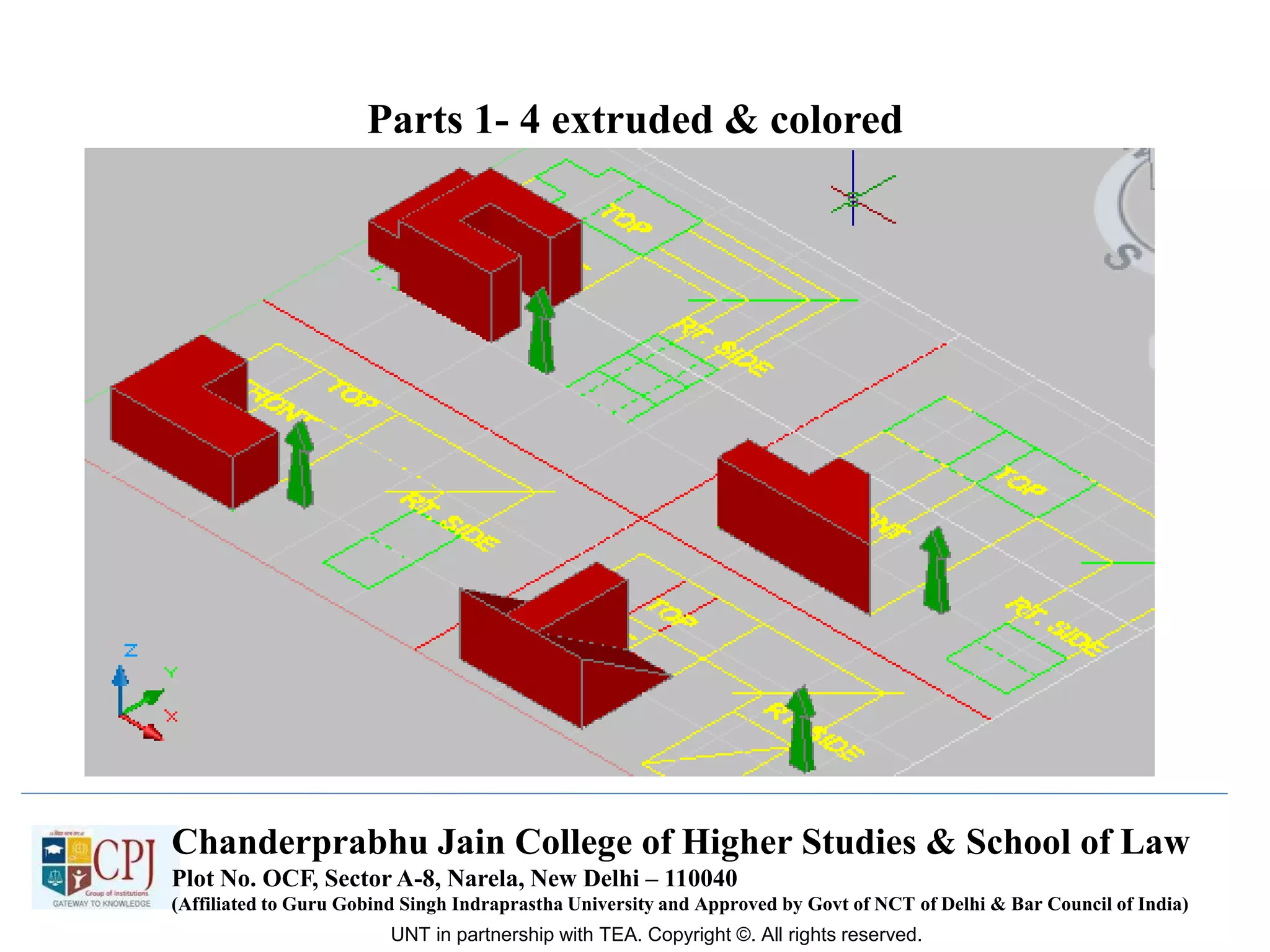
Parts 1- 4 extruded & colored
UNT in partnership with TEA. Copyright ©. All rights reserved.
Chanderprabhu Jain College of Higher Studies & School of Law
Plot No. OCF, Sector A-8, Narela, New Delhi – 110040
(Affiliated to Guru Gobind Singh Indraprastha University and Approved by Govt of NCT of Delhi & Bar Council of India)
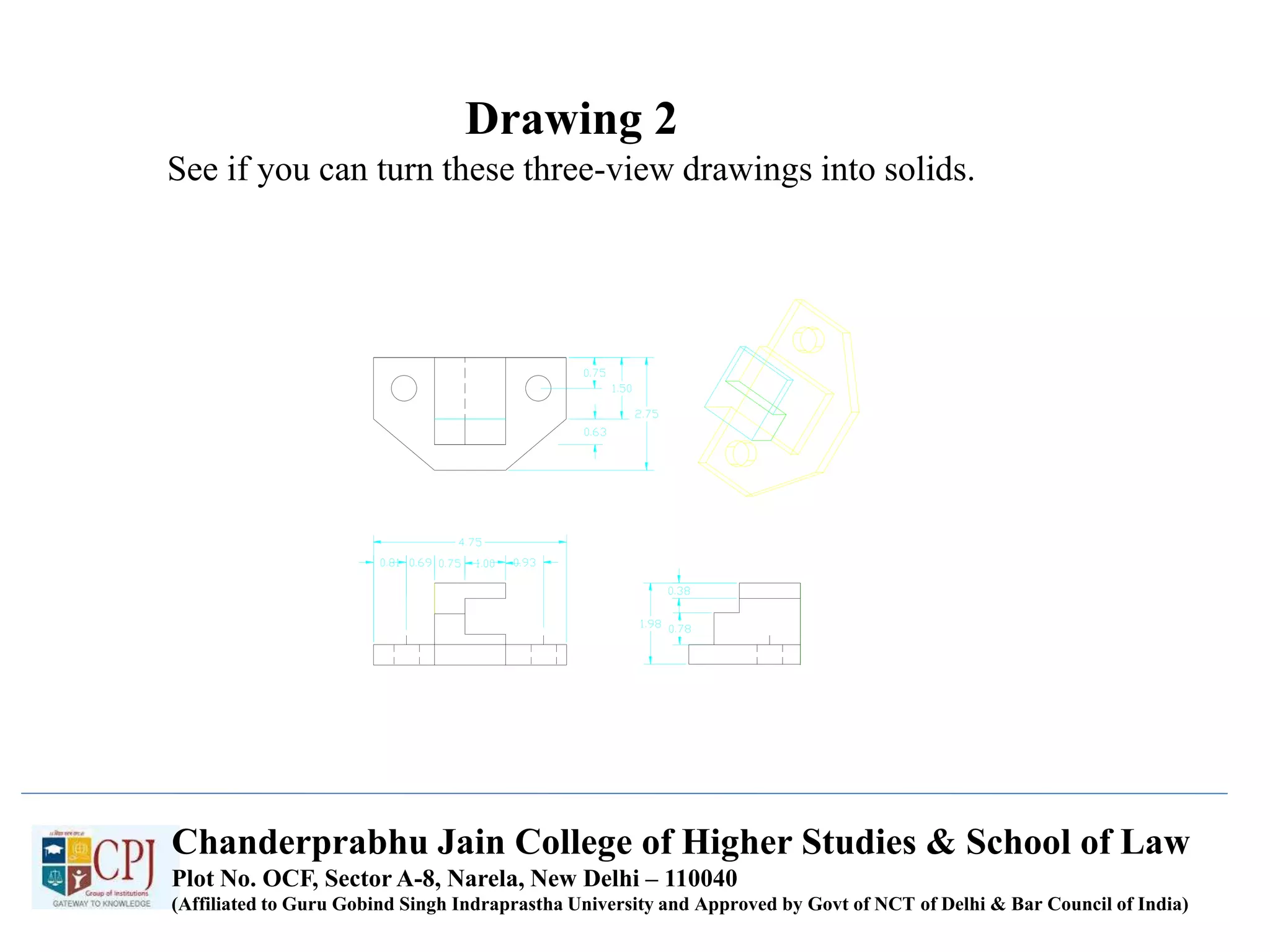
Drawing 2
See if you can turn these three-view drawings into solids.
Chanderprabhu Jain College of Higher Studies & School of Law
Plot No. OCF, Sector A-8, Narela, New Delhi – 110040
(Affiliated to Guru Gobind Singh Indraprastha University and Approved by Govt of NCT of Delhi & Bar Council of India)
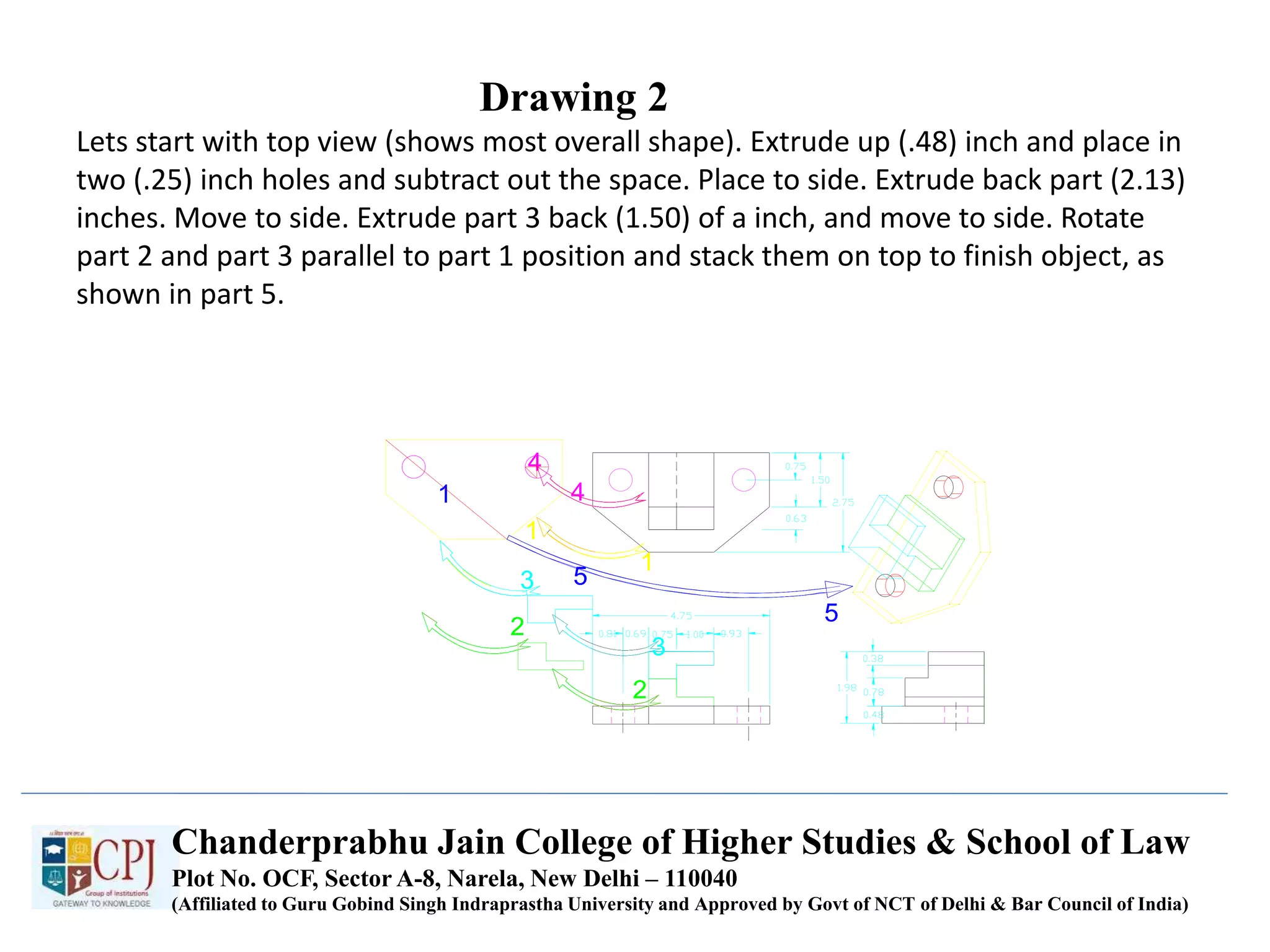
Drawing 2
Lets start with top view (shows most overall shape). Extrude up (.48) inch and place in
two (.25) inch holes and subtract out the space. Place to side. Extrude back part (2.13)
inches. Move to side. Extrude part 3 back (1.50) of a inch, and move to side. Rotate
part 2 and part 3 parallel to part 1 position and stack them on top to finish object, as
shown in part 5.
Chanderprabhu Jain College of Higher Studies & School of Law
Plot No. OCF, Sector A-8, Narela, New Delhi – 110040
(Affiliated to Guru Gobind Singh Indraprastha University and Approved by Govt of NCT of Delhi & Bar Council of India)
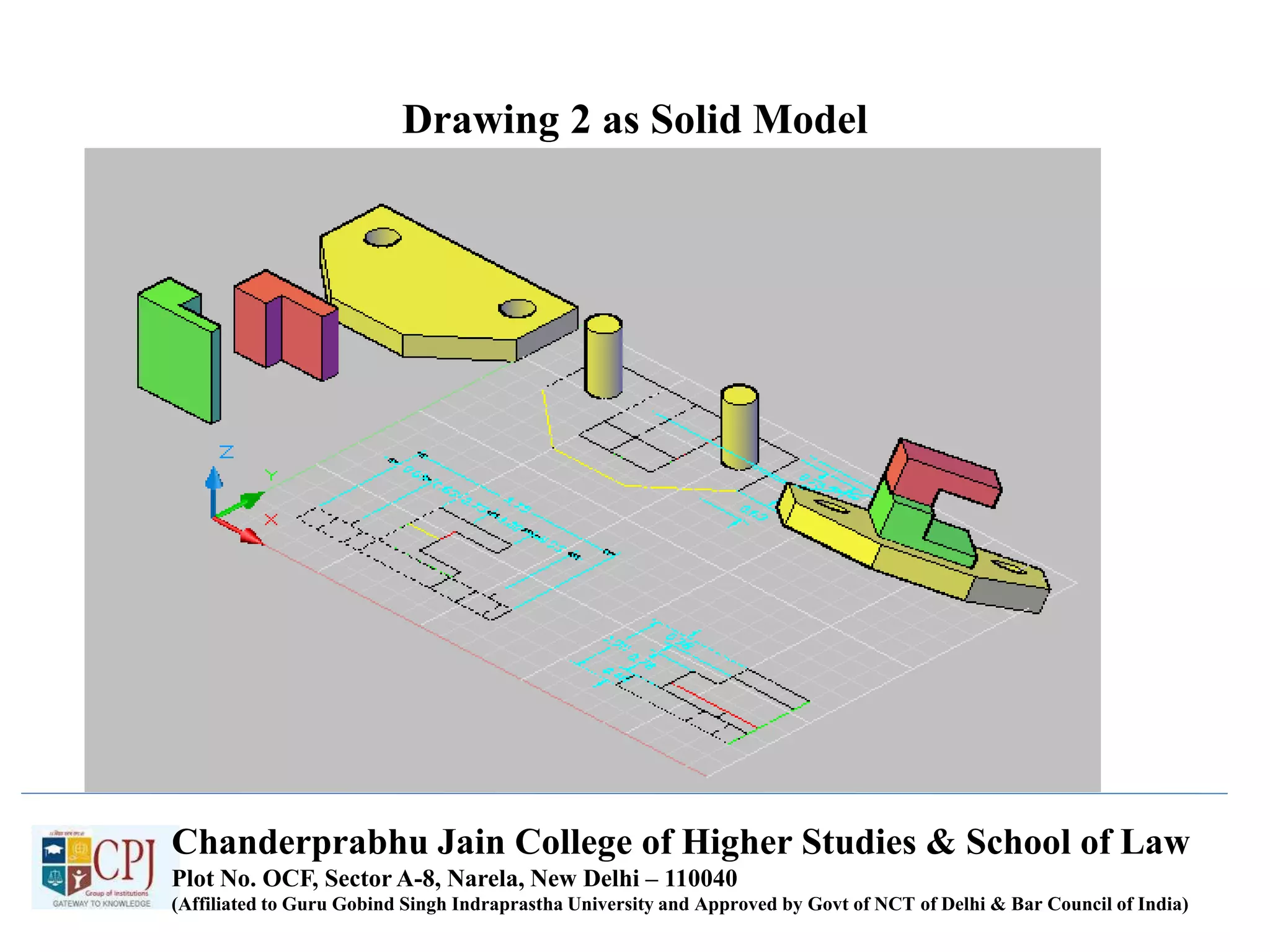
Drawing 2 as Solid Model
Chanderprabhu Jain College of Higher Studies & School of Law
Plot No. OCF, Sector A-8, Narela, New Delhi – 110040
(Affiliated to Guru Gobind Singh Indraprastha University and Approved by Govt of NCT of Delhi & Bar Council of India)
Drawing 3 – three-view
Copy all drawings and insert into CAD,
then shade these to get better picture.
Chanderprabhu Jain College of Higher Studies & School of Law
Plot No. OCF, Sector A-8, Narela, New Delhi – 110040
(Affiliated to Guru Gobind Singh Indraprastha University and Approved by Govt of NCT of Delhi & Bar Council of India)
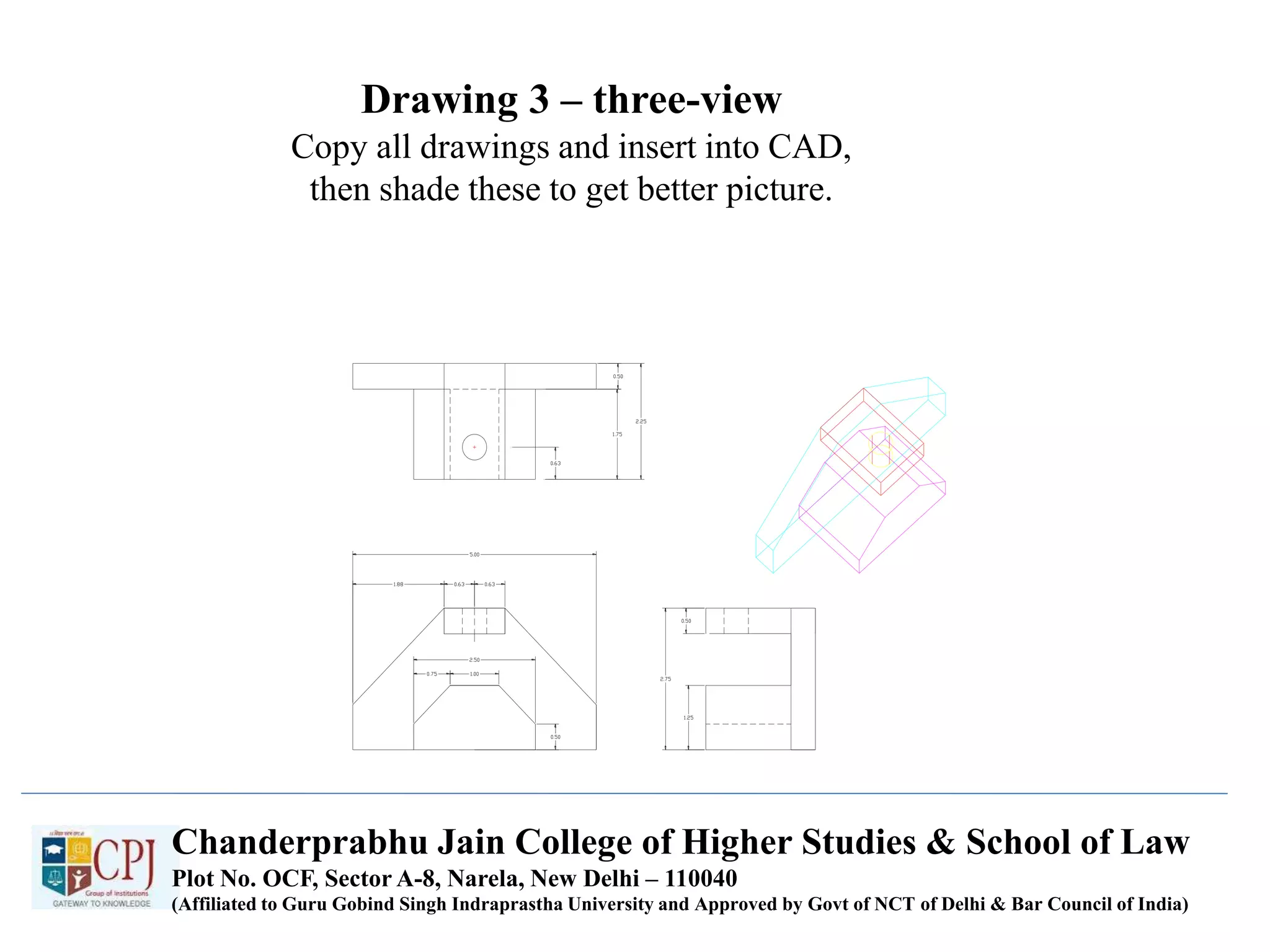
Drawing 3
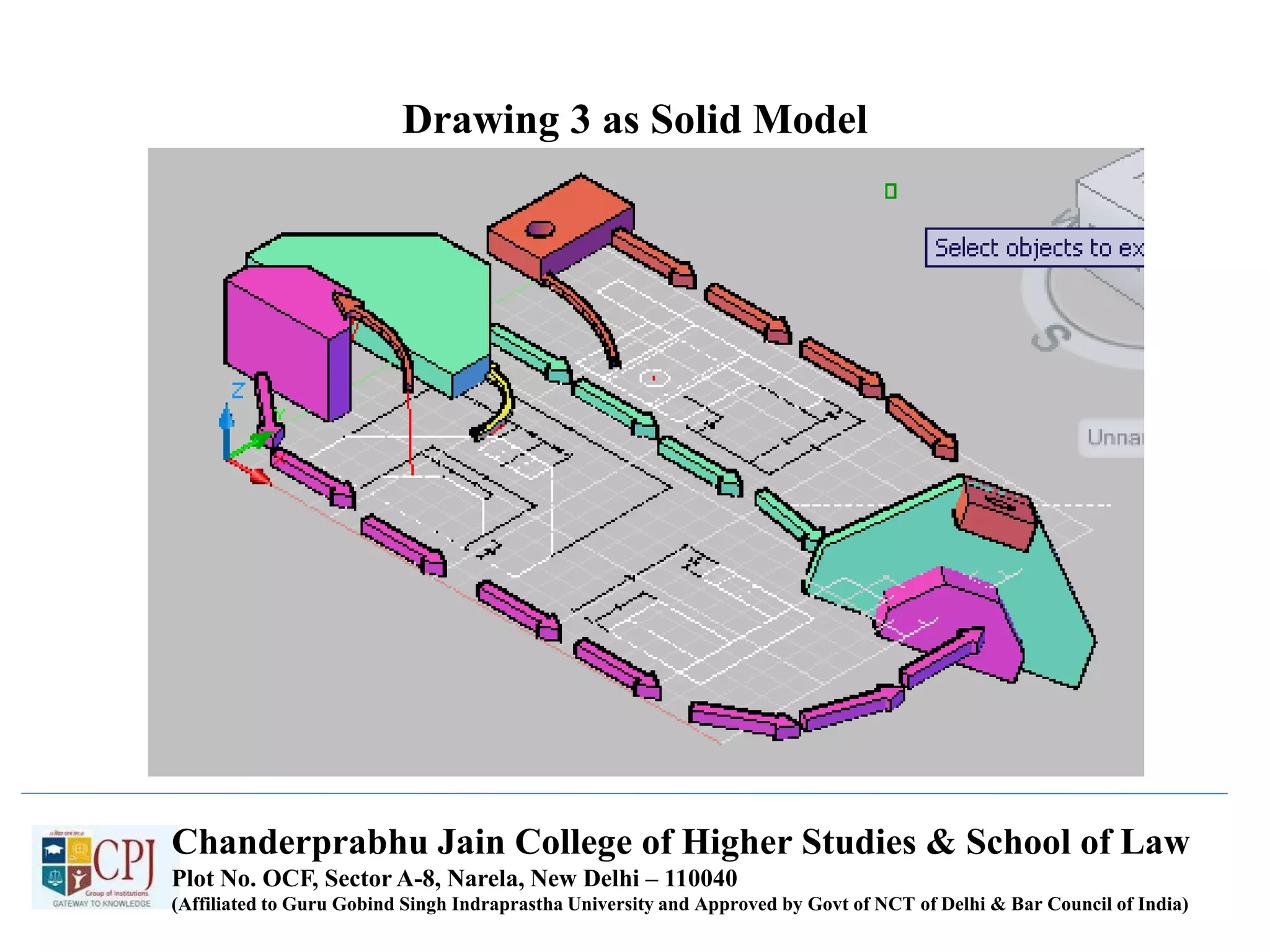
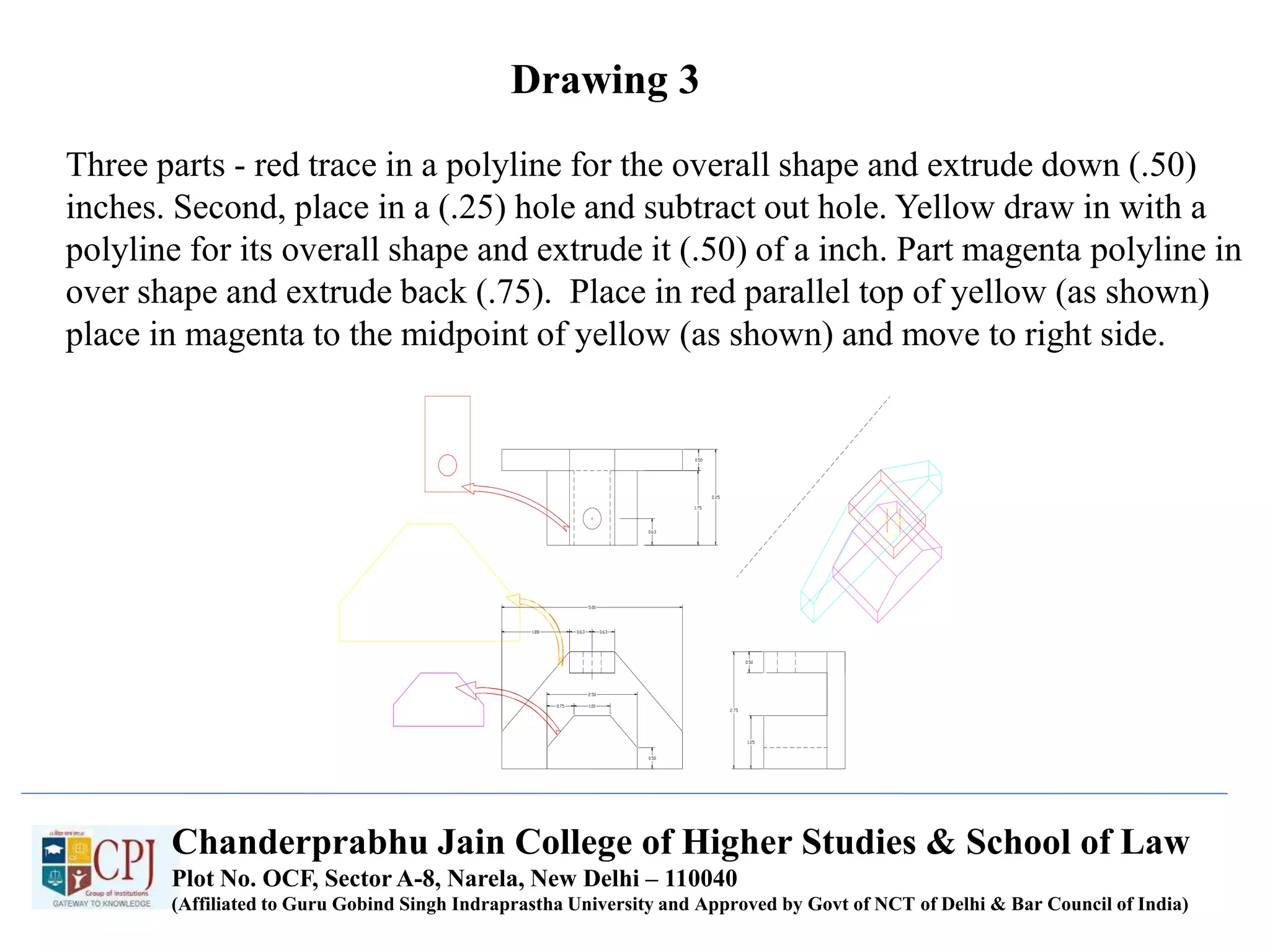
Three parts - red trace in a polyline for the overall shape and extrude down (.50)
inches. Second, place in a (.25) hole and subtract out hole. Yellow draw in with a
polyline for its overall shape and extrude it (.50) of a inch. Part magenta polyline in
over shape and extrude back (.75). Place in red parallel top of yellow (as shown)
place in magenta to the midpoint of yellow (as shown) and move to right side.
Chanderprabhu Jain College of Higher Studies & School of Law
Plot No. OCF, Sector A-8, Narela, New Delhi – 110040
(Affiliated to Guru Gobind Singh Indraprastha University and Approved by Govt of NCT of Delhi & Bar Council of India)
Drawing 3 as Solid Model
Chanderprabhu Jain College of Higher Studies & School of Law
Plot No. OCF, Sector A-8, Narela, New Delhi – 110040
(Affiliated to Guru Gobind Singh Indraprastha University and Approved by Govt of NCT of Delhi & Bar Council of India)
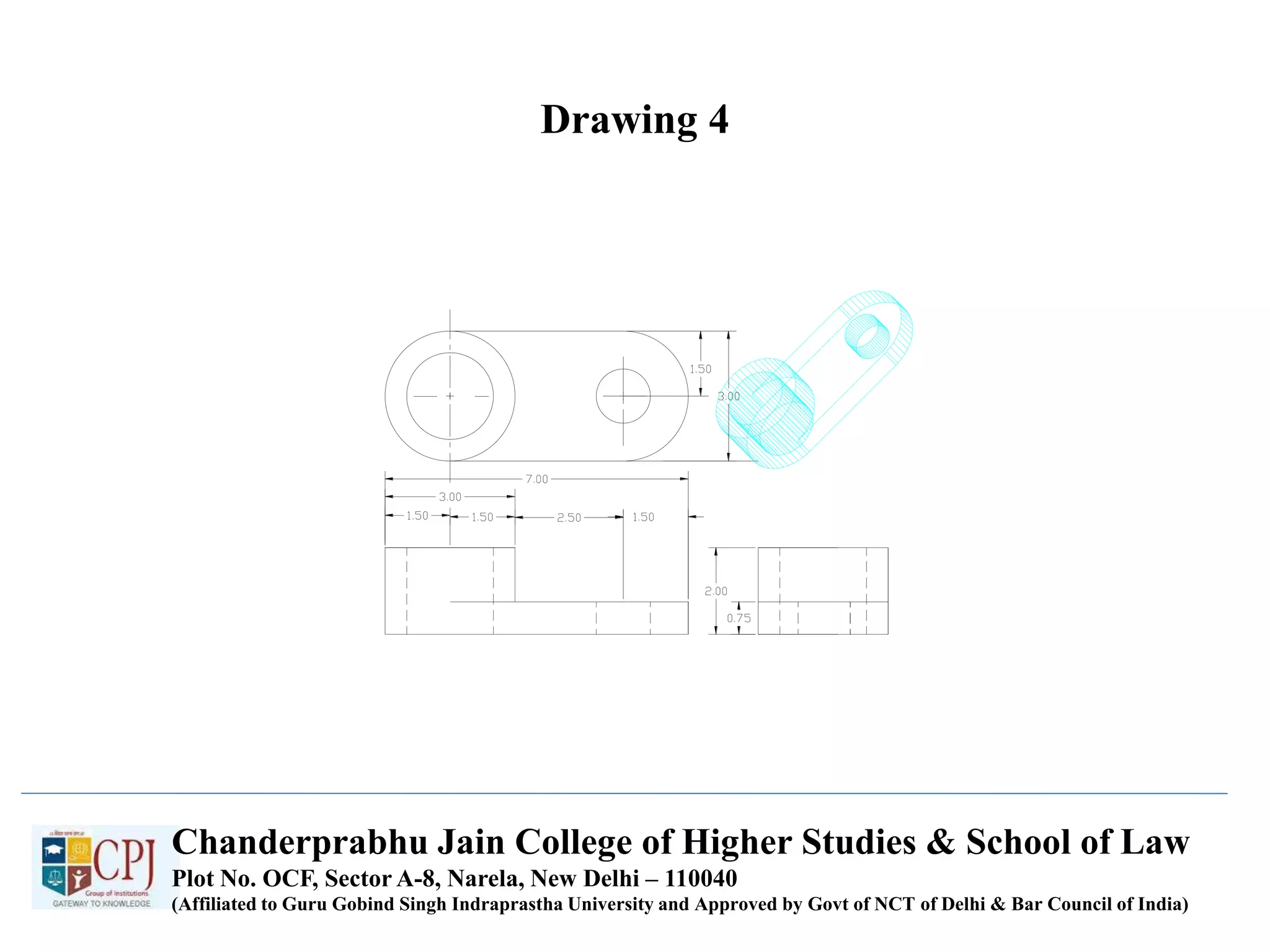
Drawing 4
Chanderprabhu Jain College of Higher Studies & School of Law
Plot No. OCF, Sector A-8, Narela, New Delhi – 110040
(Affiliated to Guru Gobind Singh Indraprastha University and Approved by Govt of NCT of Delhi & Bar Council of India)
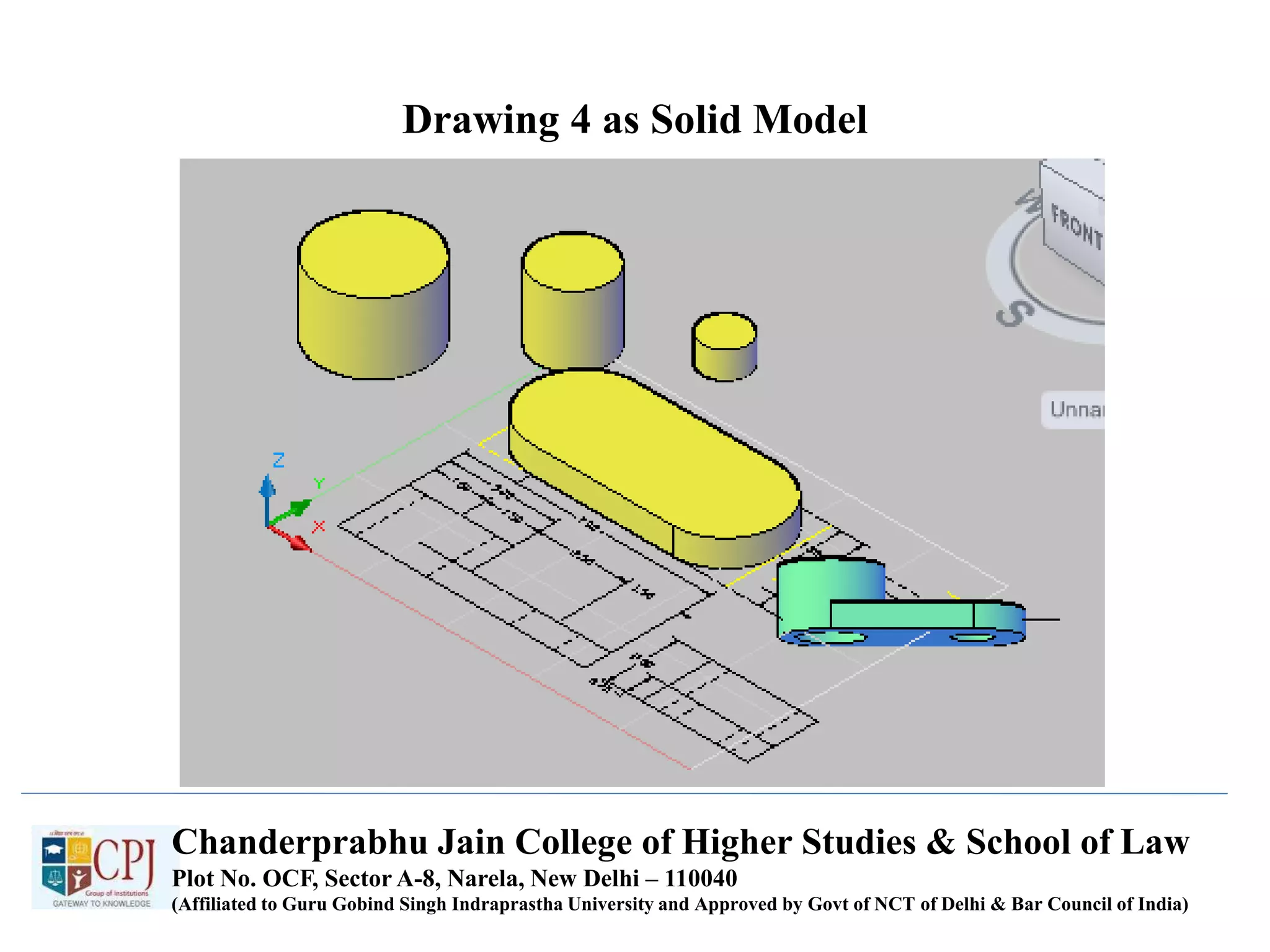
Drawing 4 as Solid Model
Chanderprabhu Jain College of Higher Studies & School of Law
Plot No. OCF, Sector A-8, Narela, New Delhi – 110040
(Affiliated to Guru Gobind Singh Indraprastha University and Approved by Govt of NCT of Delhi & Bar Council of India)
Chanderprabhu Jain College of Higher Studies & School of Law
Plot No. OCF, Sector A-8, Narela, New Delhi – 110040
(Affiliated to Guru Gobind Singh Indraprastha University and Approved by Govt of NCT of Delhi & Bar Council of India)
UNIT-IV
HIDDEN SURFACE
REMOVAL
UNIT-IV HIDDEN SURFACE REMOVAL(Visibility)
• Assumption: All polygons are opaque
• What polygons are visible with respect to your view frustum?
 Outside: View Frustum Clipping
Remove polygons outside of the view volume
For example, Liang-Barsky 3D Clipping
 Inside: Hidden Surface Removal
Backface culling
Polygons facing away from the viewer
Occlusion
Polygons farther away are obscured by closer polygons
Full or partially occluded portions
• Why should we remove these polygons?
Avoid unnecessary expensive operations on these polygons later
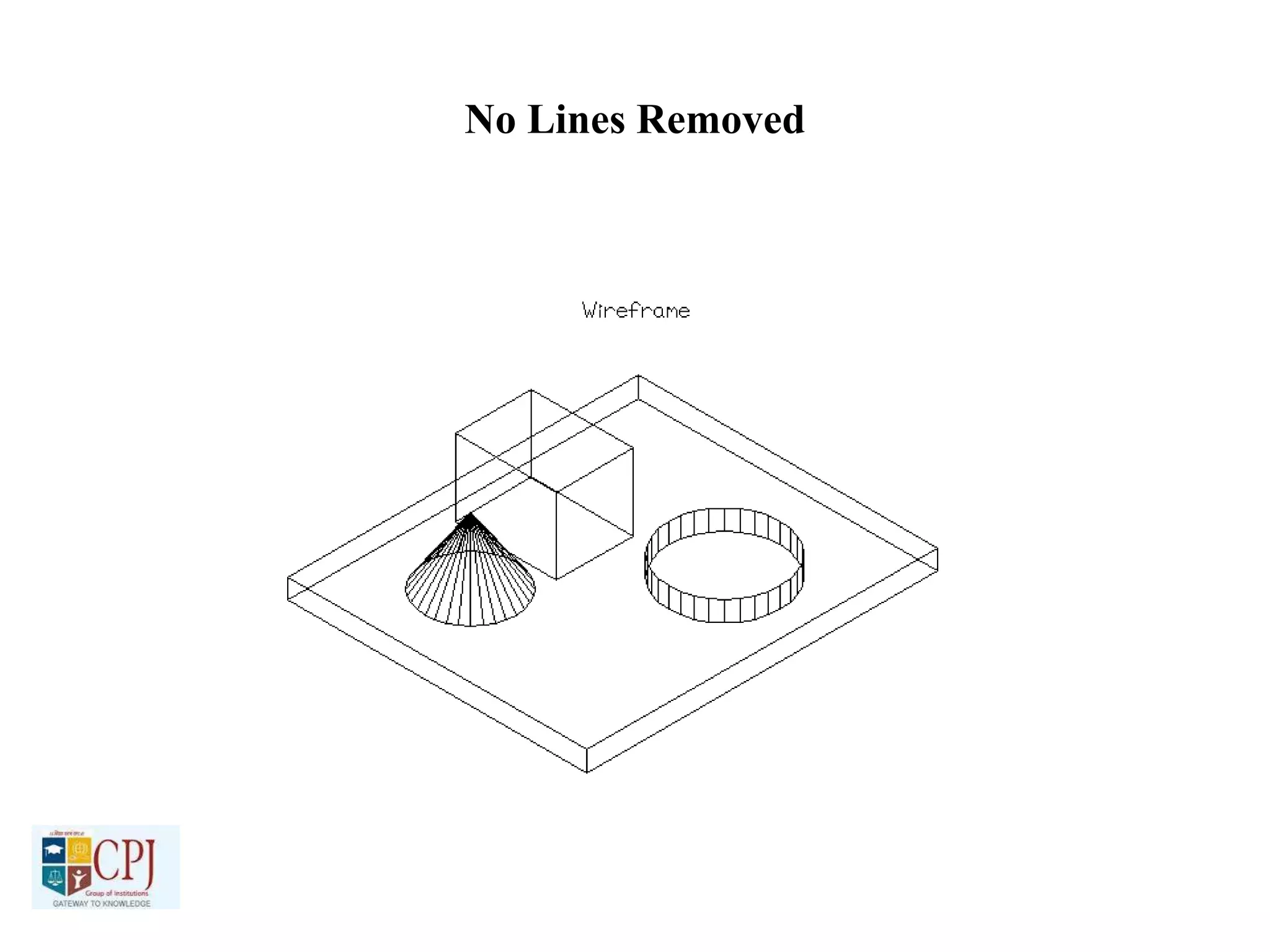
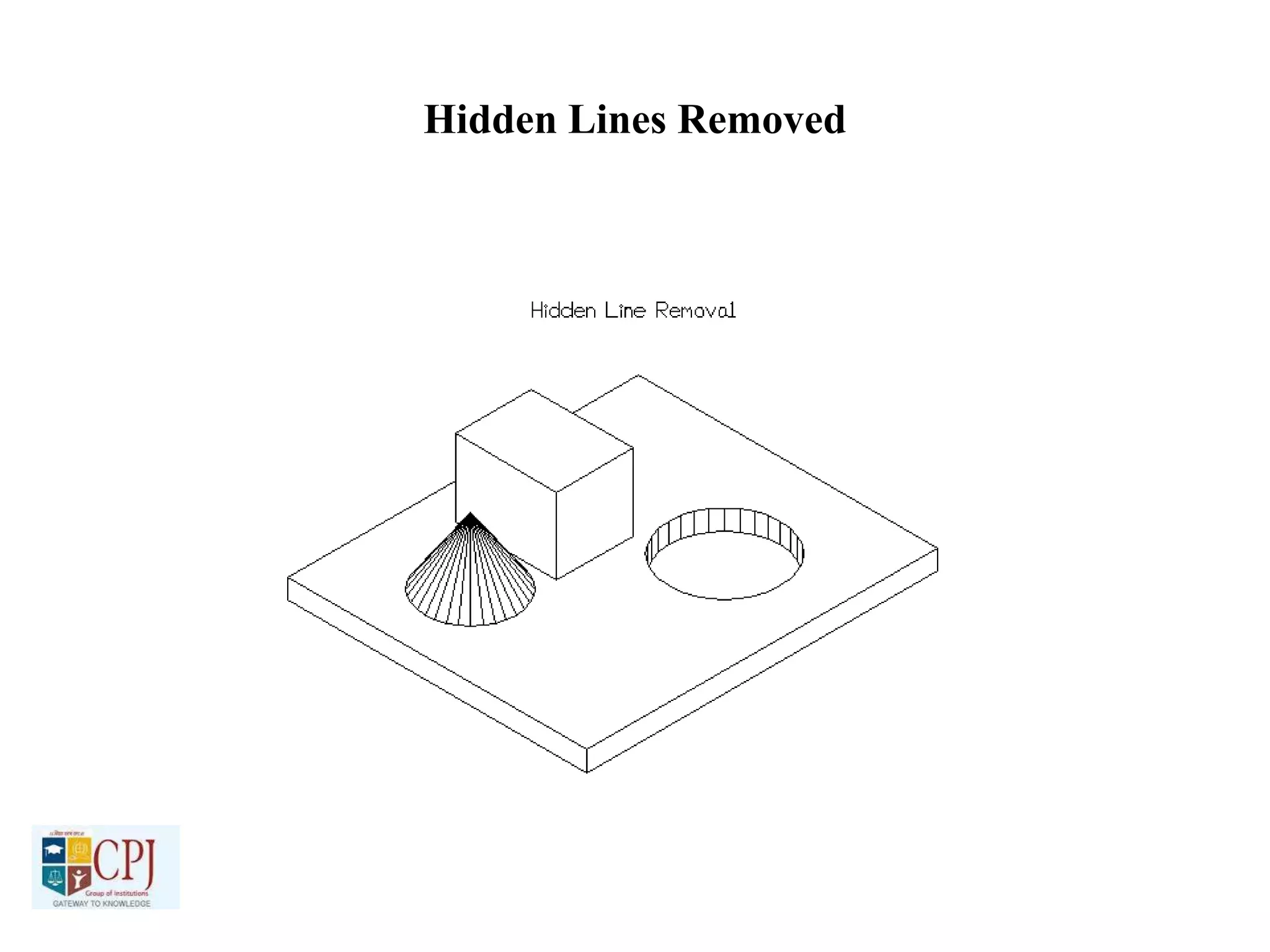
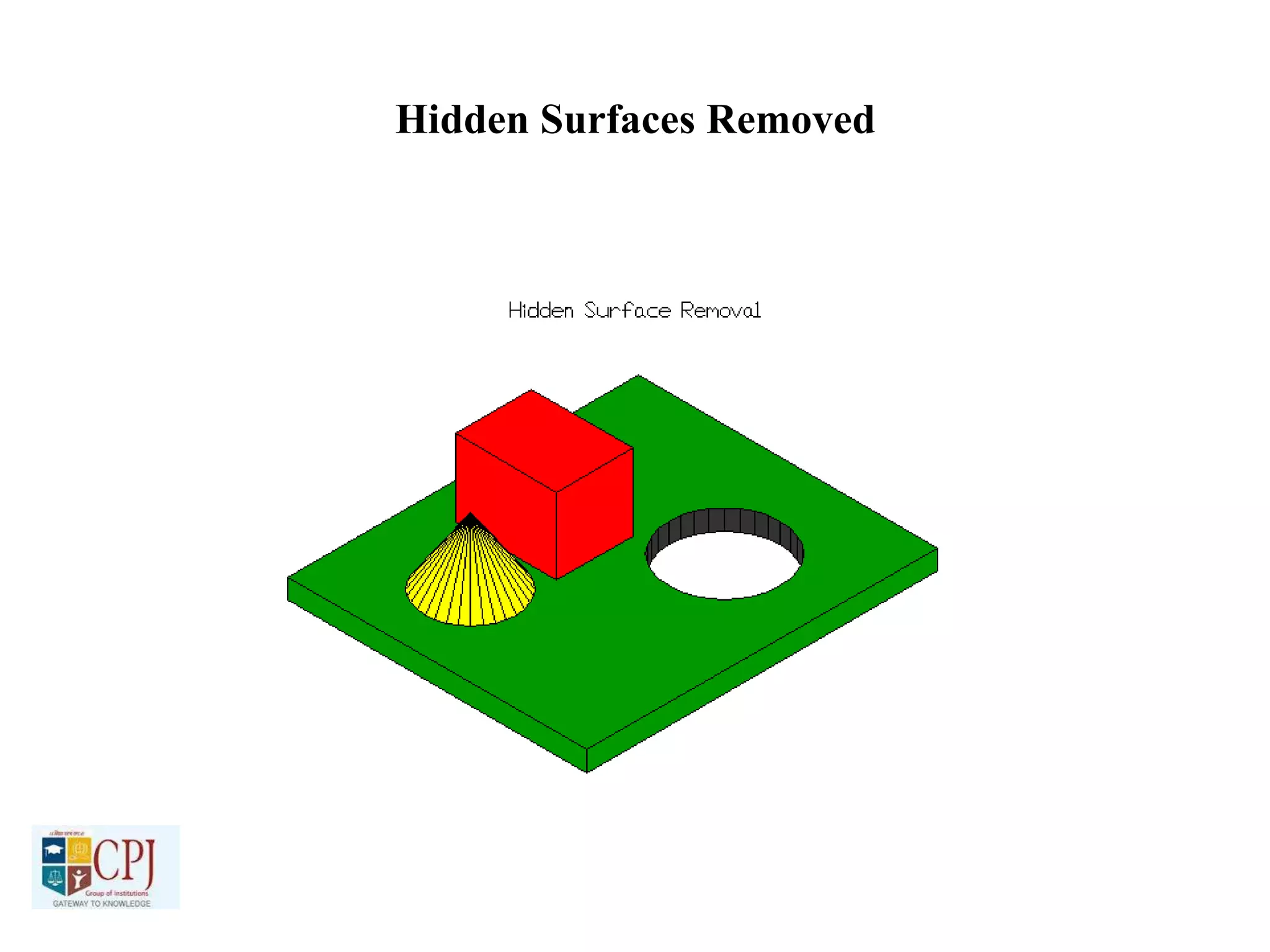
No Lines Removed
Hidden Lines Removed
Hidden Surfaces Removed
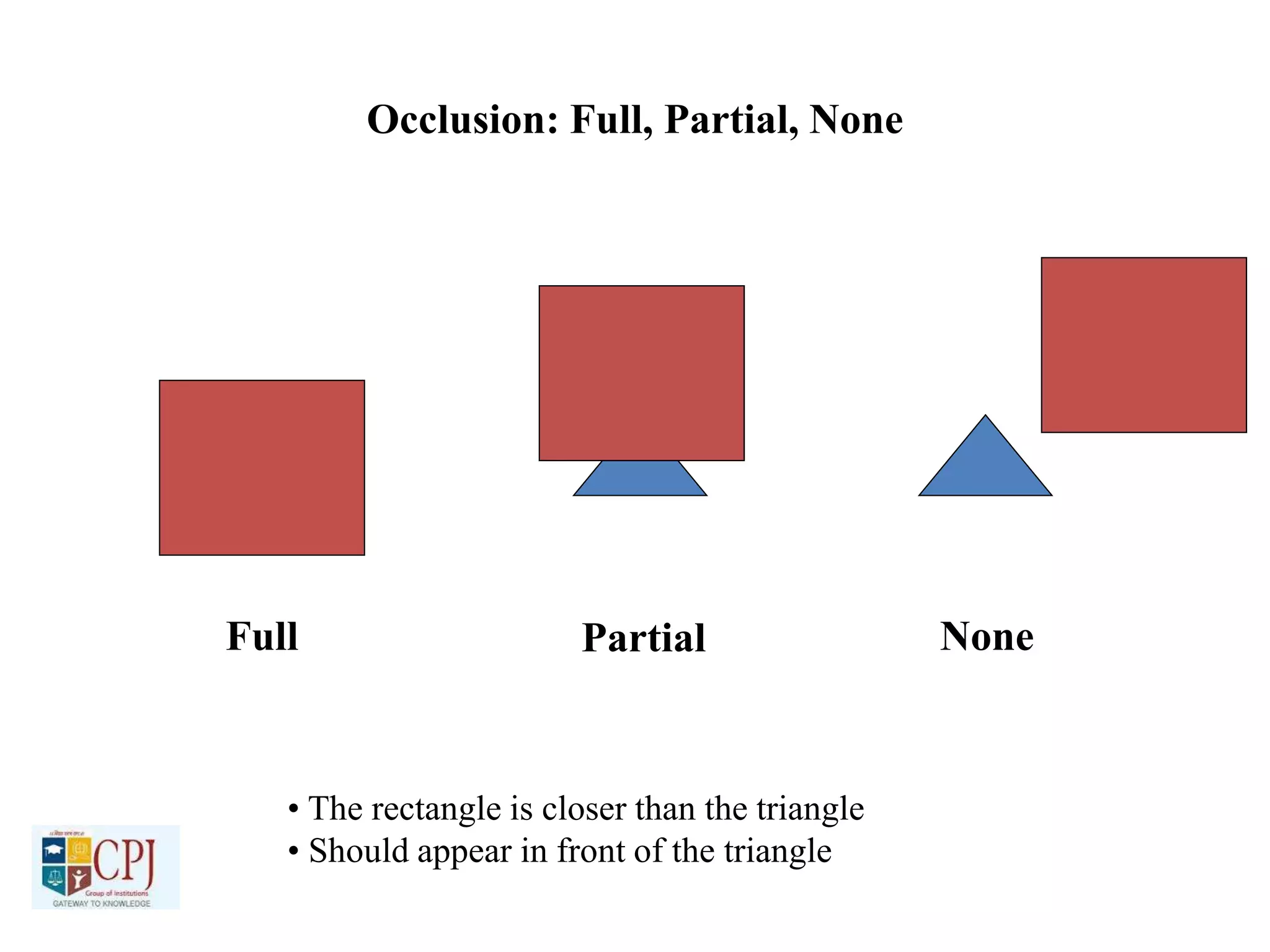
Occlusion: Full, Partial, None
Full Partial None
• The rectangle is closer than the triangle
• Should appear in front of the triangle
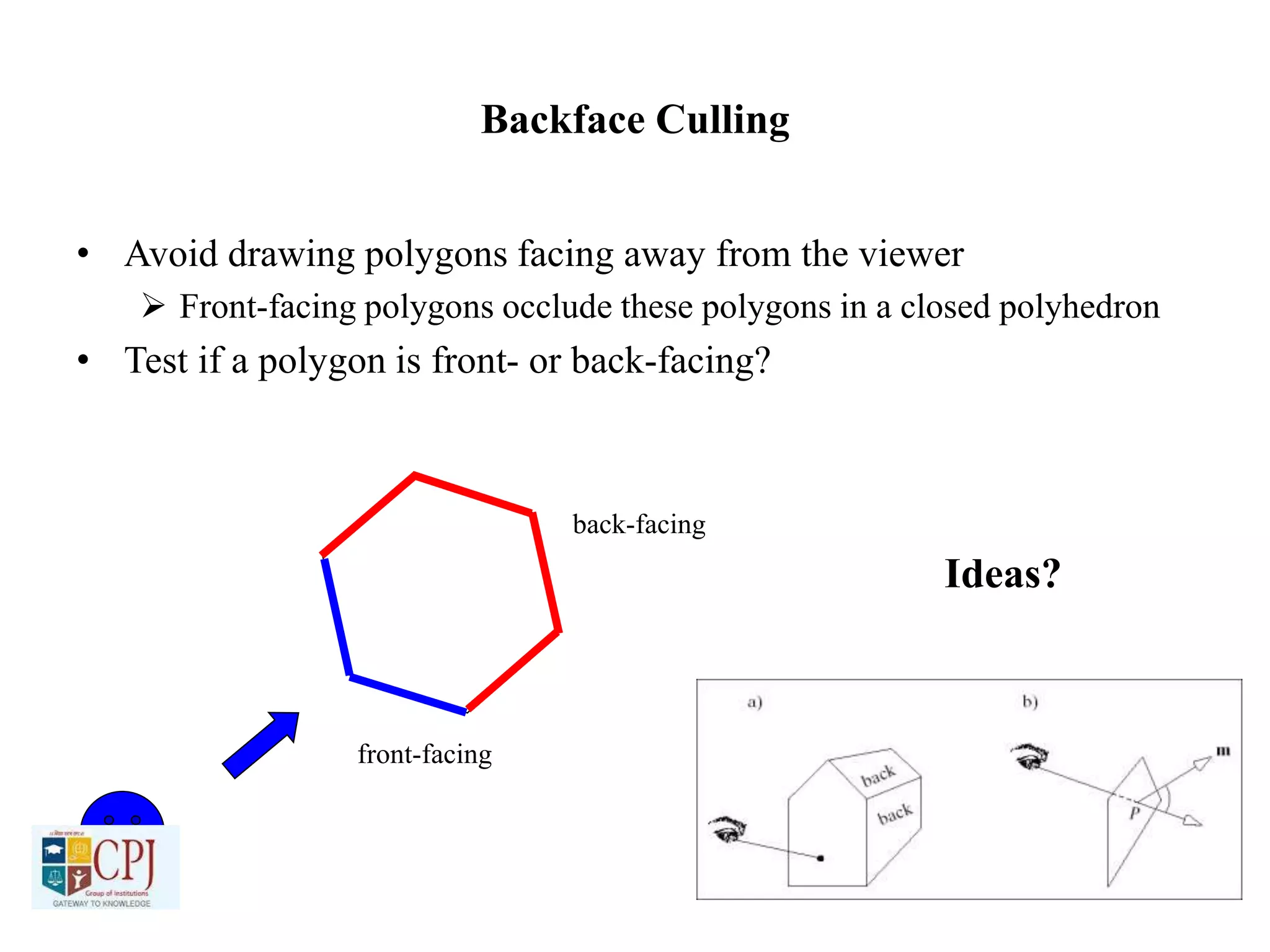
Backface Culling
• Avoid drawing polygons facing away from the viewer
 Front-facing polygons occlude these polygons in a closed polyhedron
• Test if a polygon is front- or back-facing?
front-facing
back-facing
Ideas?
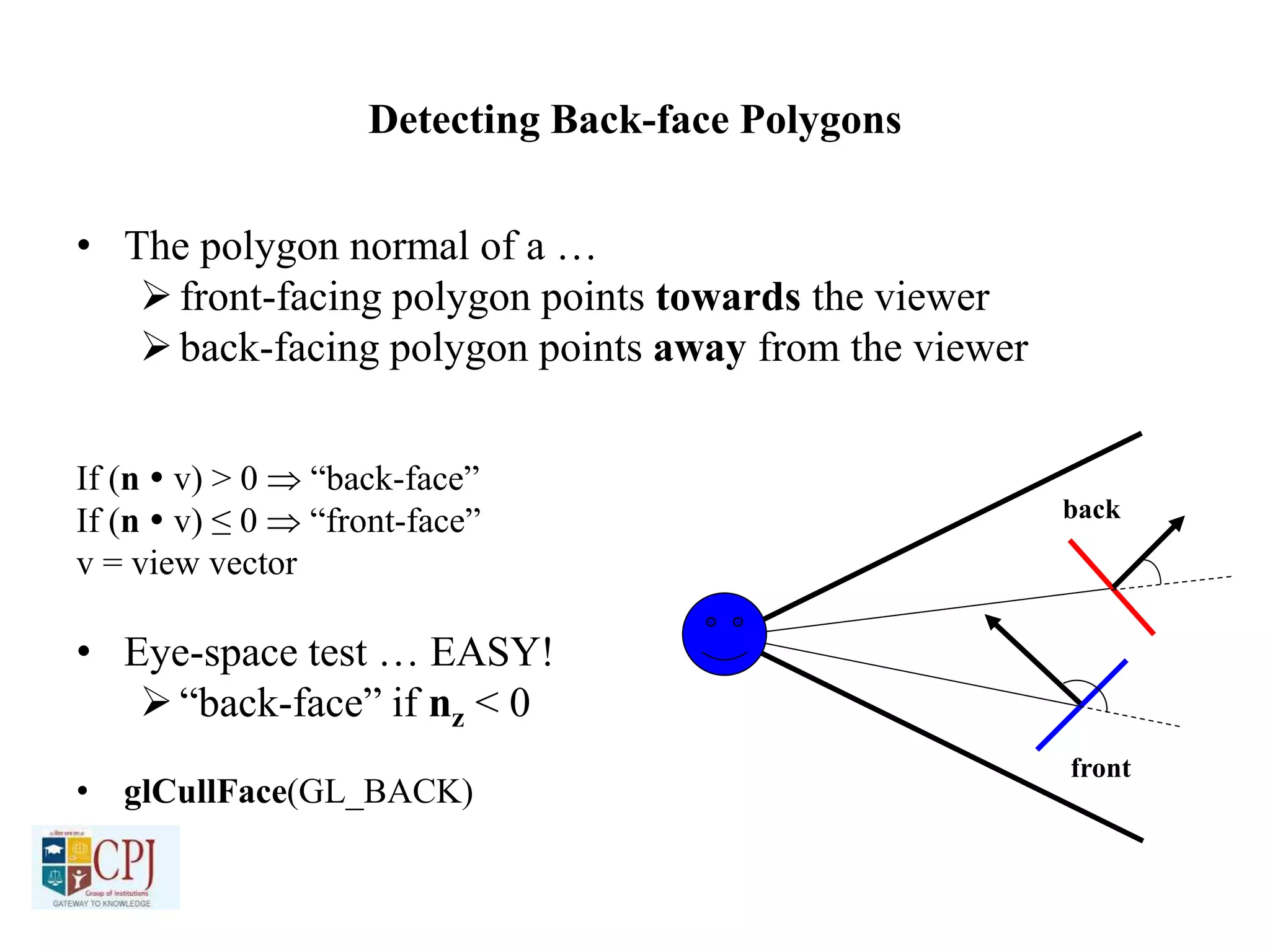
Detecting Back-face Polygons
• The polygon normal of a …
front-facing polygon points towards the viewer
back-facing polygon points away from the viewer
If (n  v) > 0  “back-face”
If (n  v) ≤ 0  “front-face”
v = view vector
• Eye-space test … EASY!
“back-face” if nz < 0
• glCullFace(GL_BACK)
back
front
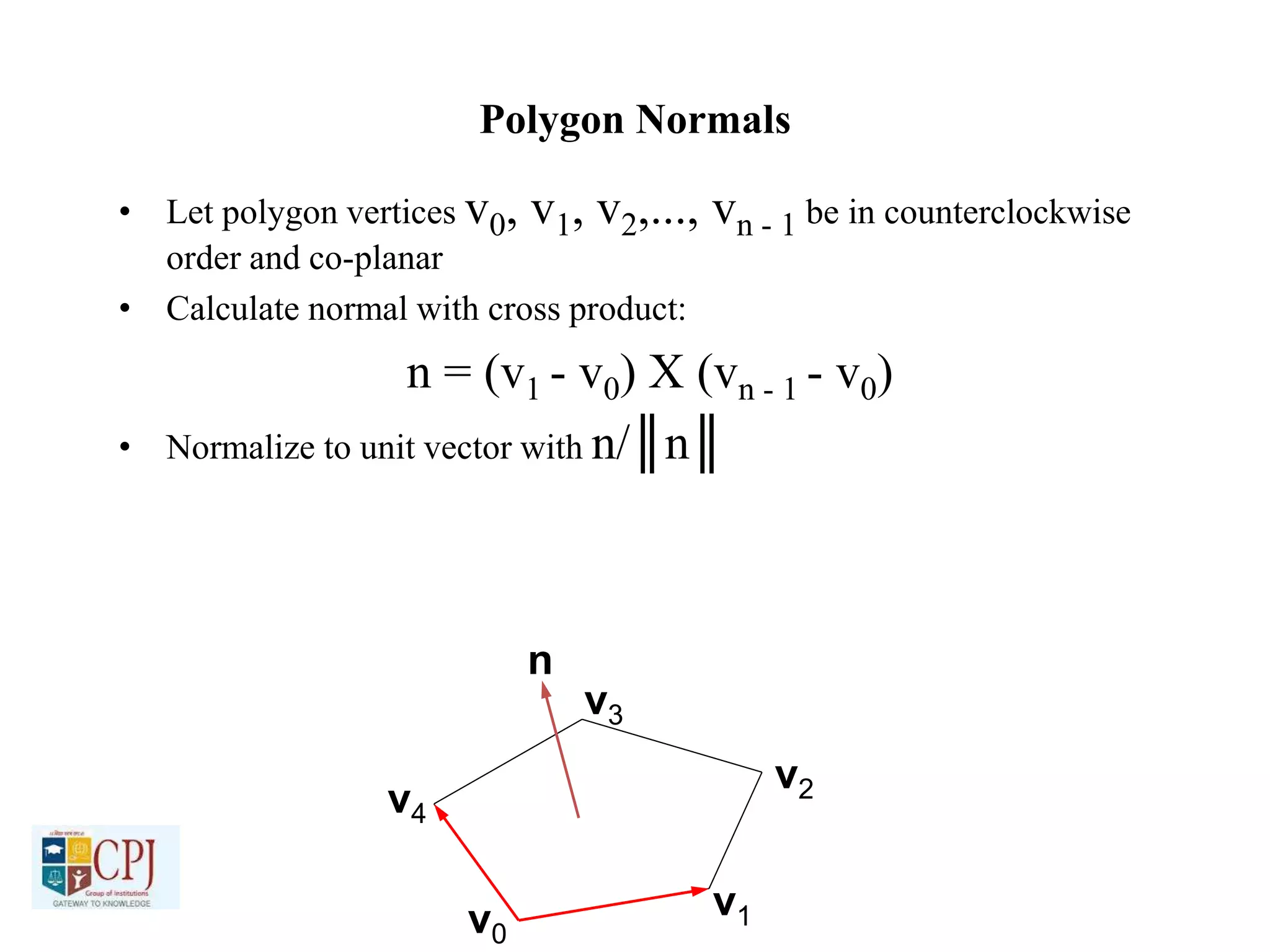
Polygon Normals
• Let polygon vertices v0, v1, v2,..., vn - 1 be in counterclockwise
order and co-planar
• Calculate normal with cross product:
n = (v1 - v0) X (vn - 1 - v0)
• Normalize to unit vector with n/║n║
v0
v1
v2
v3
v4
n
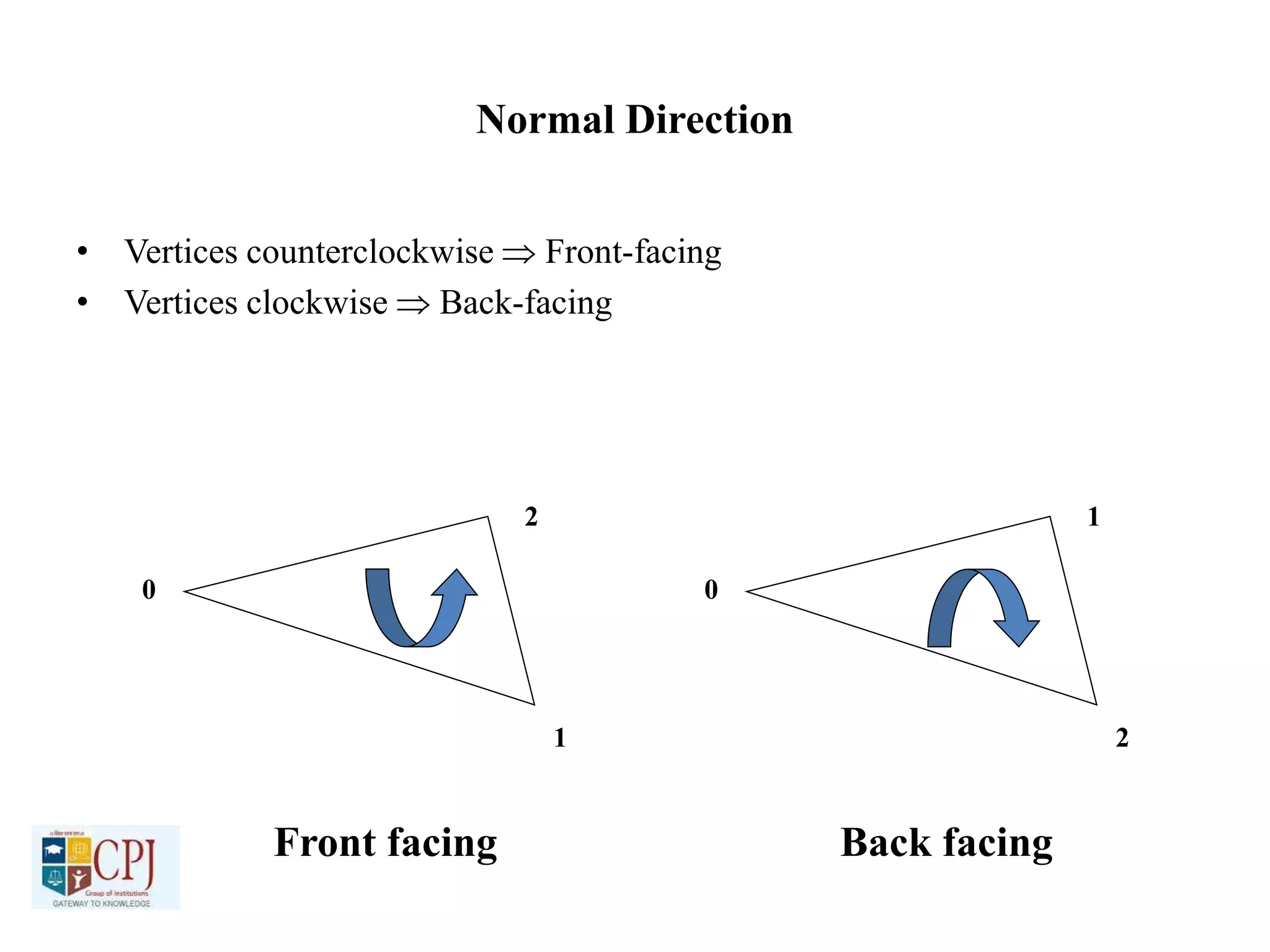
Normal Direction
• Vertices counterclockwise  Front-facing
• Vertices clockwise  Back-facing
0
1
2
0
2
1
Front facing Back facing
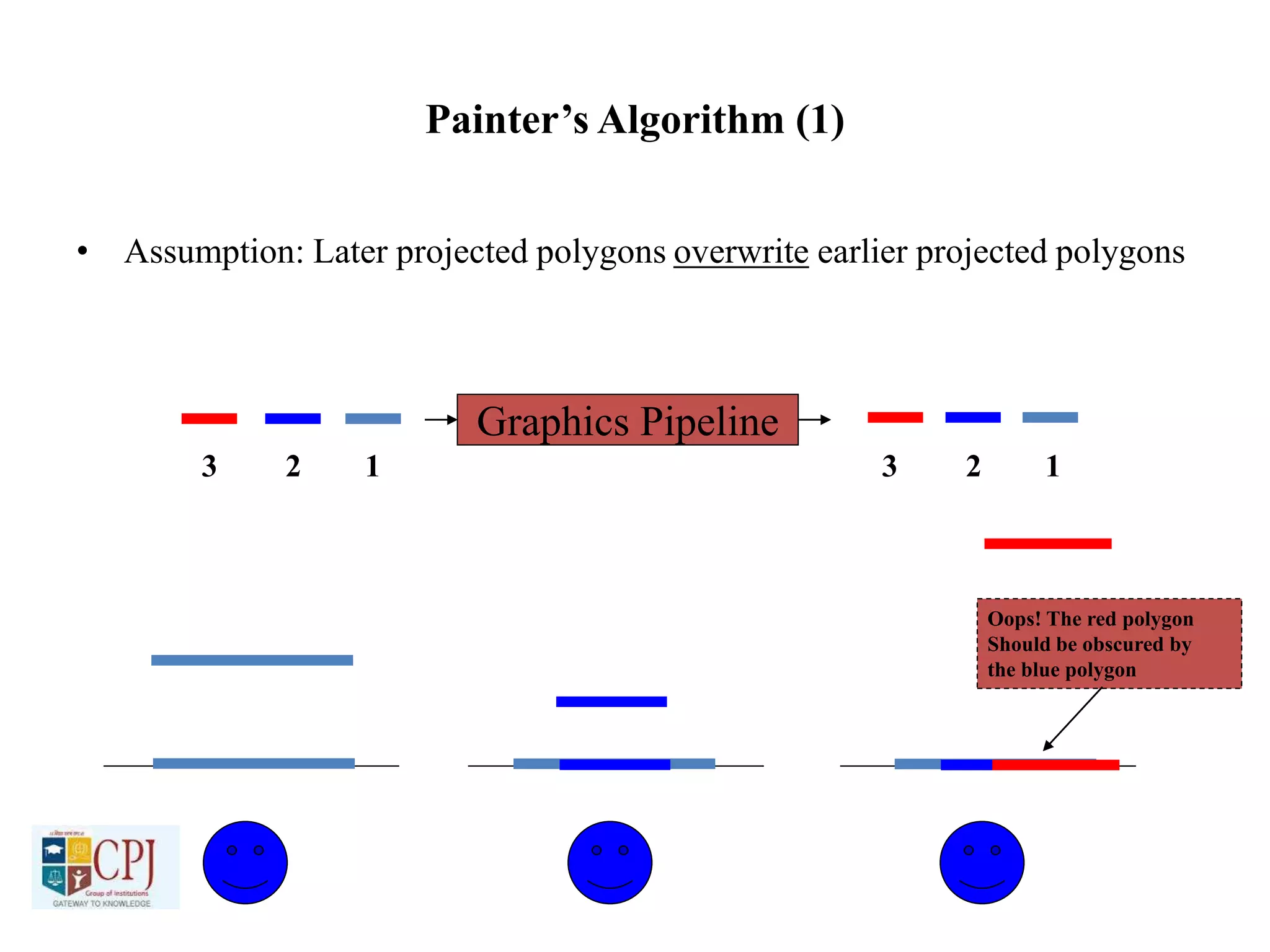
Painter’s Algorithm (1)
• Assumption: Later projected polygons overwrite earlier projected polygons
Graphics Pipeline
1 12 23 3
Oops! The red polygon
Should be obscured by
the blue polygon
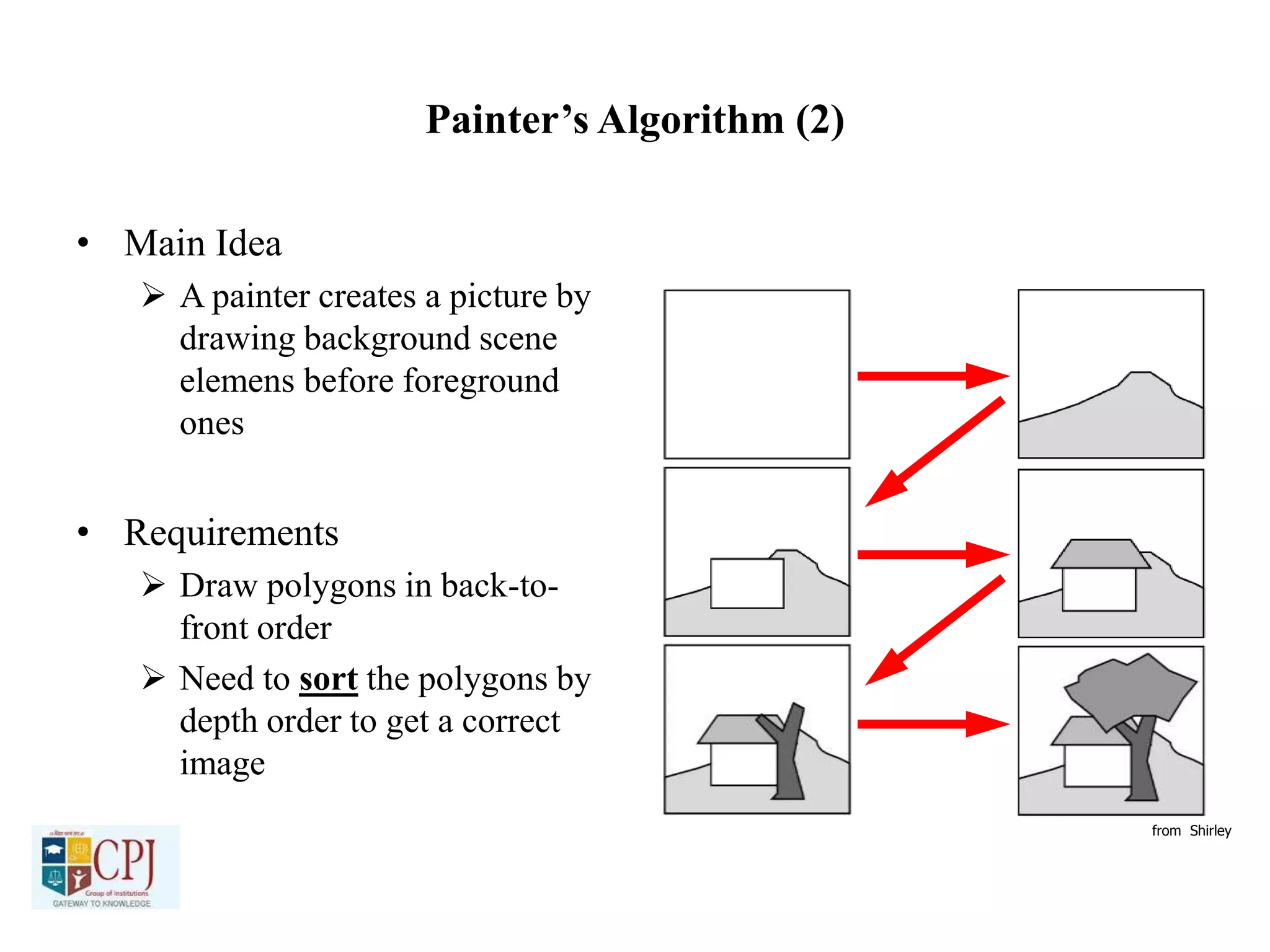
Painter’s Algorithm (2)
• Main Idea
 A painter creates a picture by
drawing background scene
elemens before foreground
ones
• Requirements
 Draw polygons in back-to-
front order
 Need to sort the polygons by
depth order to get a correct
image
from Shirley
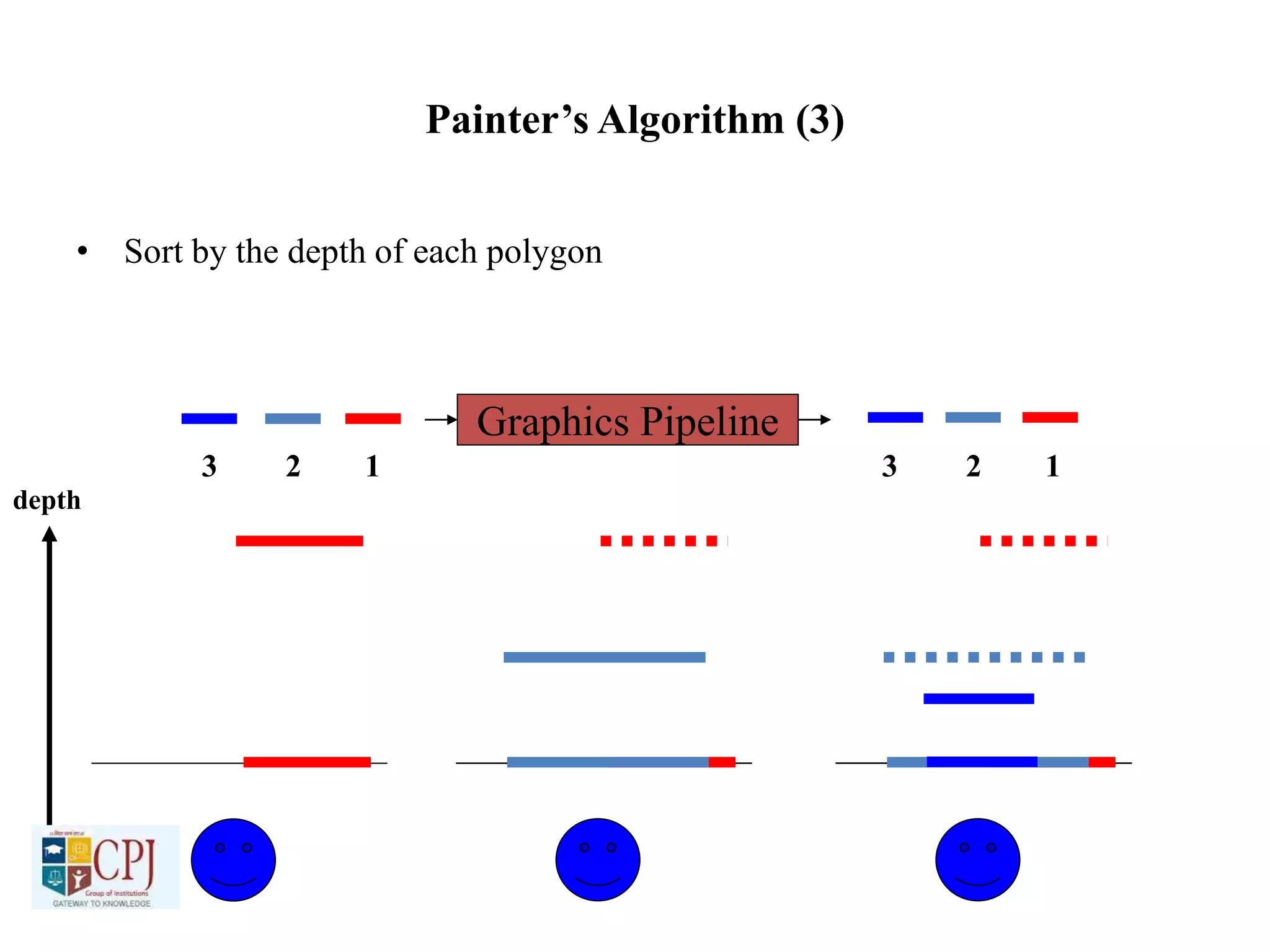
Painter’s Algorithm (3)
• Sort by the depth of each polygon
Graphics Pipeline
1 12 23 3
depth
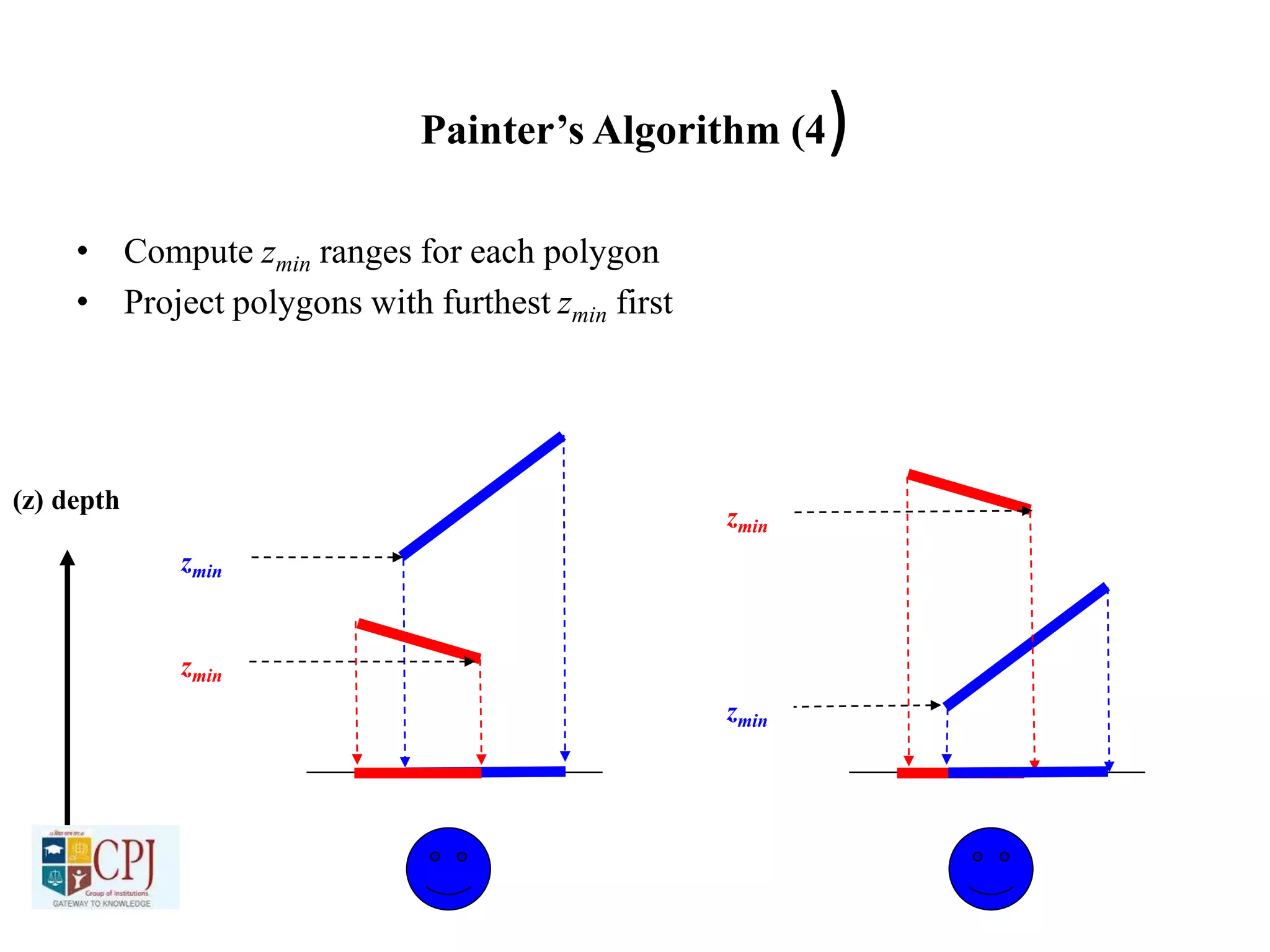
Painter’s Algorithm (4)
• Compute zmin ranges for each polygon
• Project polygons with furthest zmin first
(z) depth
zmin
zmin
zmin
zmin
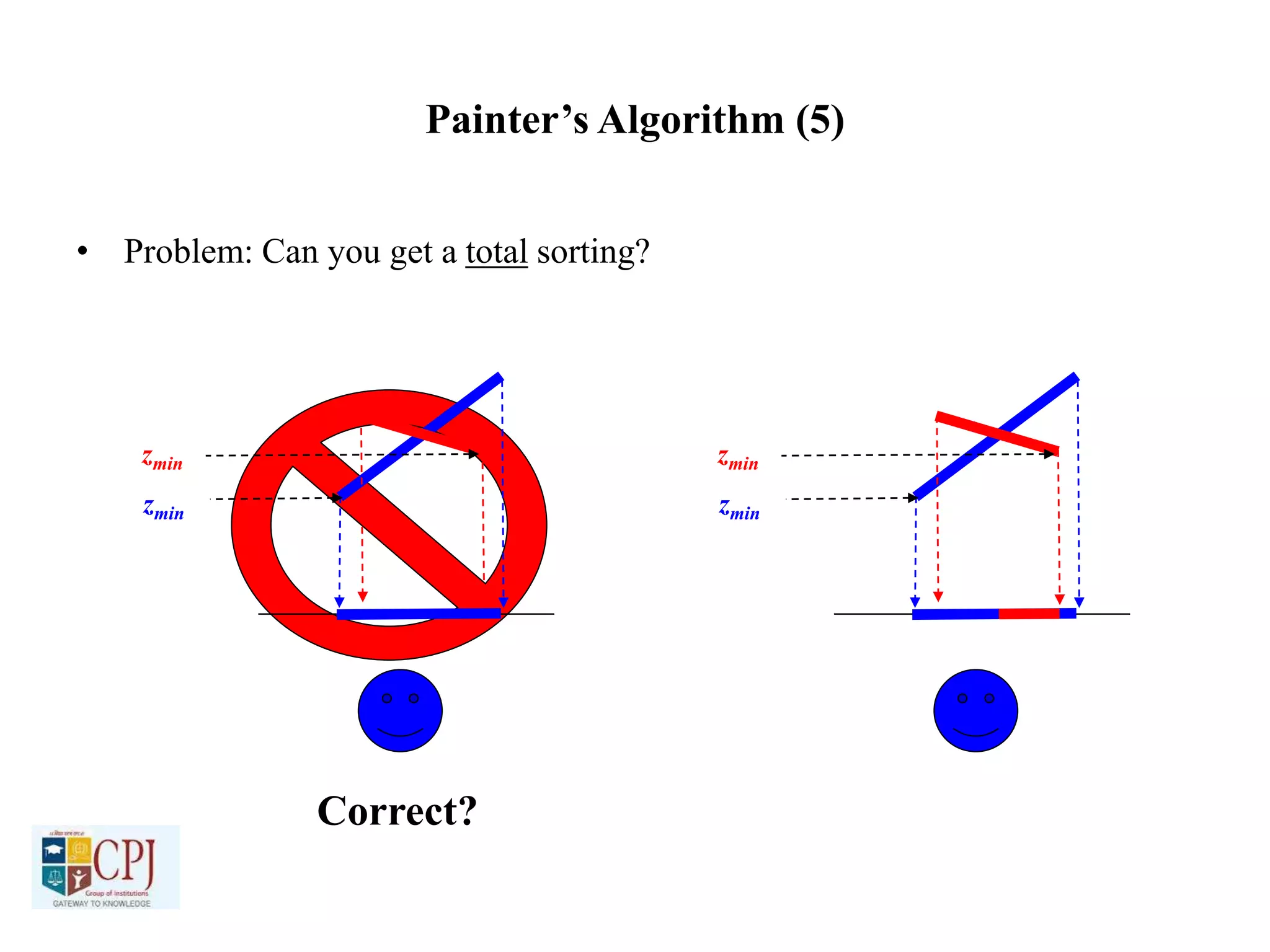
Painter’s Algorithm (5)
• Problem: Can you get a total sorting?
zmin
zmin
zmin
zmin
Correct?
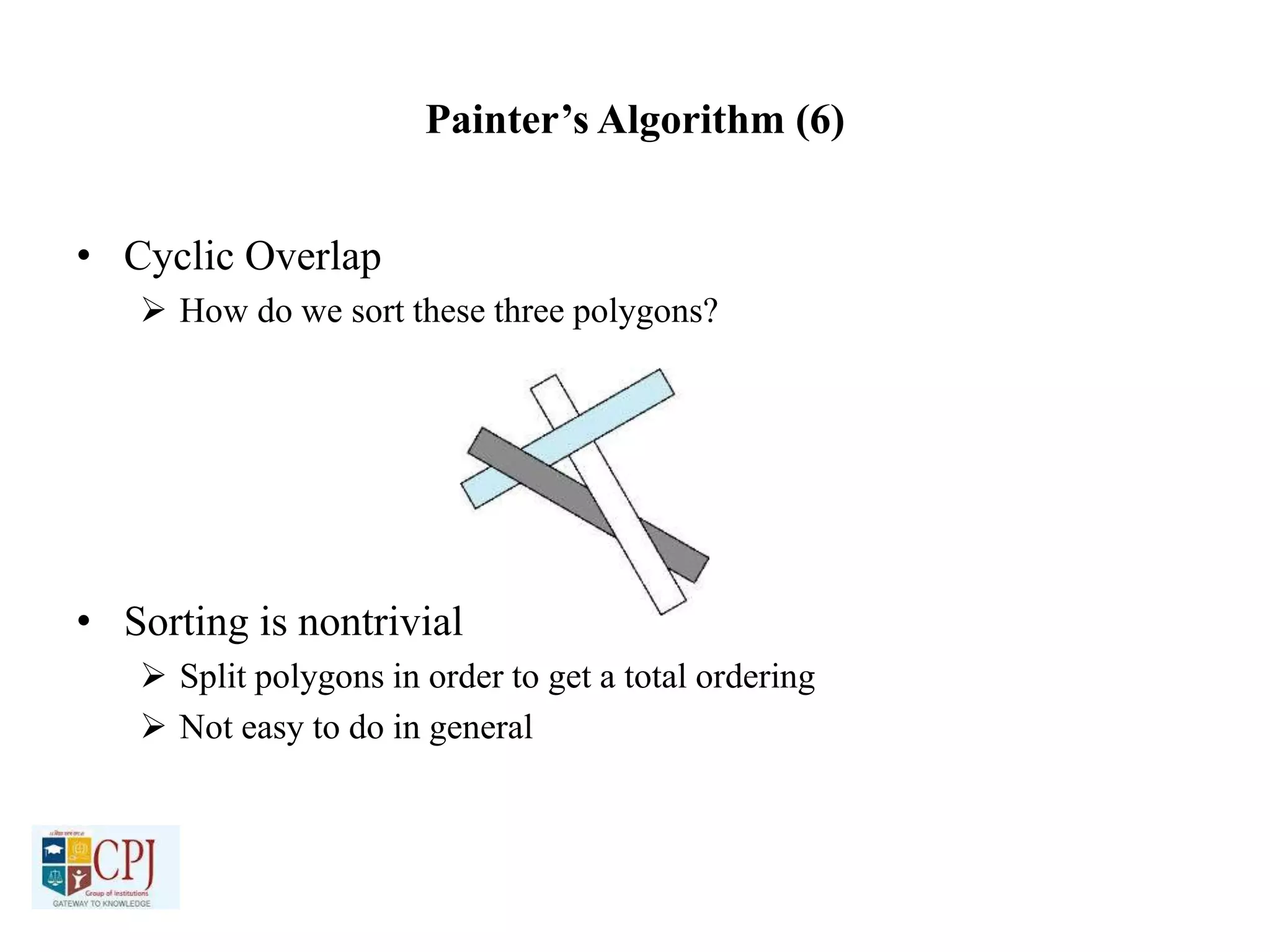
Painter’s Algorithm (6)
• Cyclic Overlap
 How do we sort these three polygons?
• Sorting is nontrivial
 Split polygons in order to get a total ordering
 Not easy to do in general
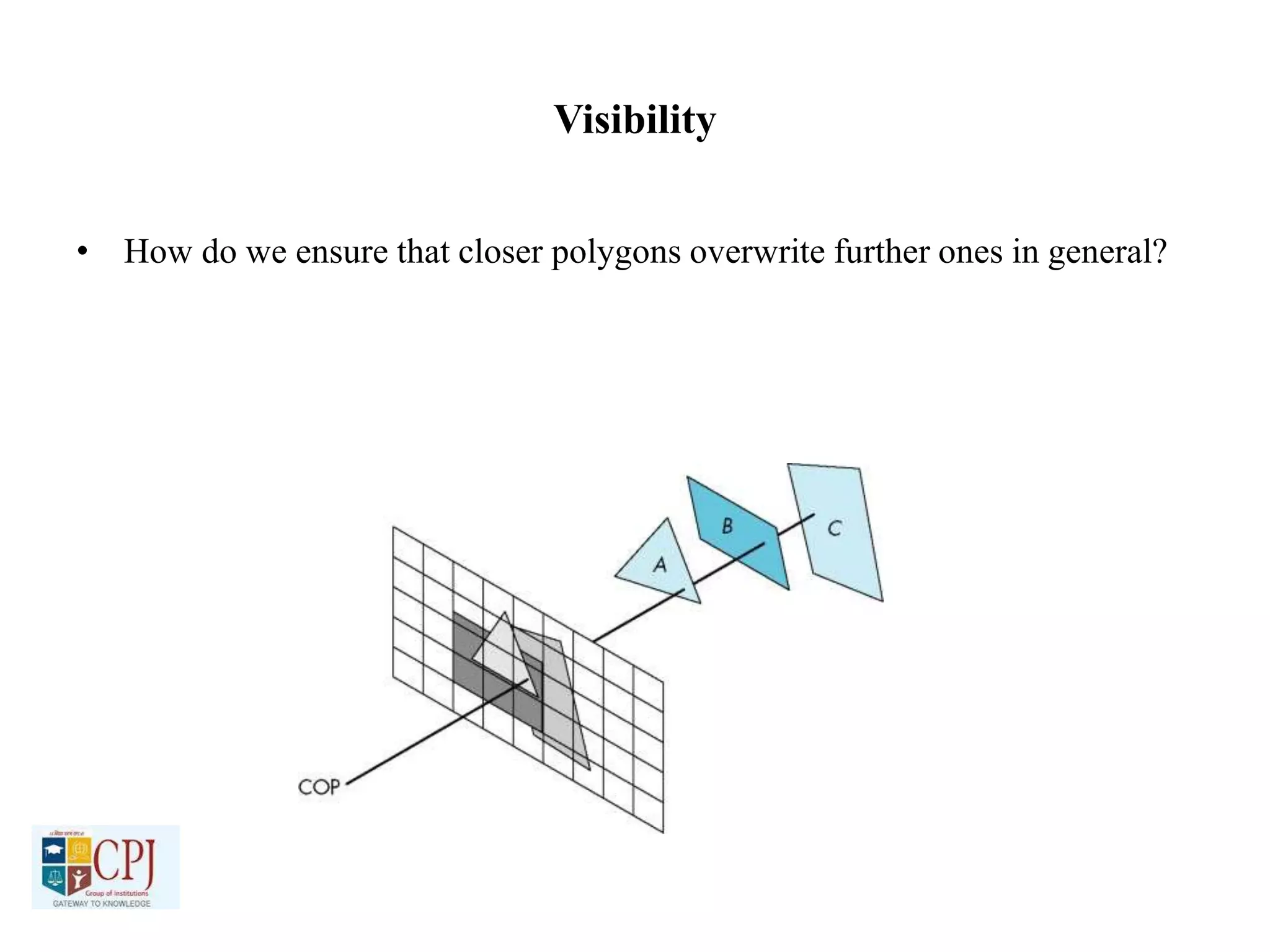
Visibility
• How do we ensure that closer polygons overwrite further ones in general?
Z-Buffer
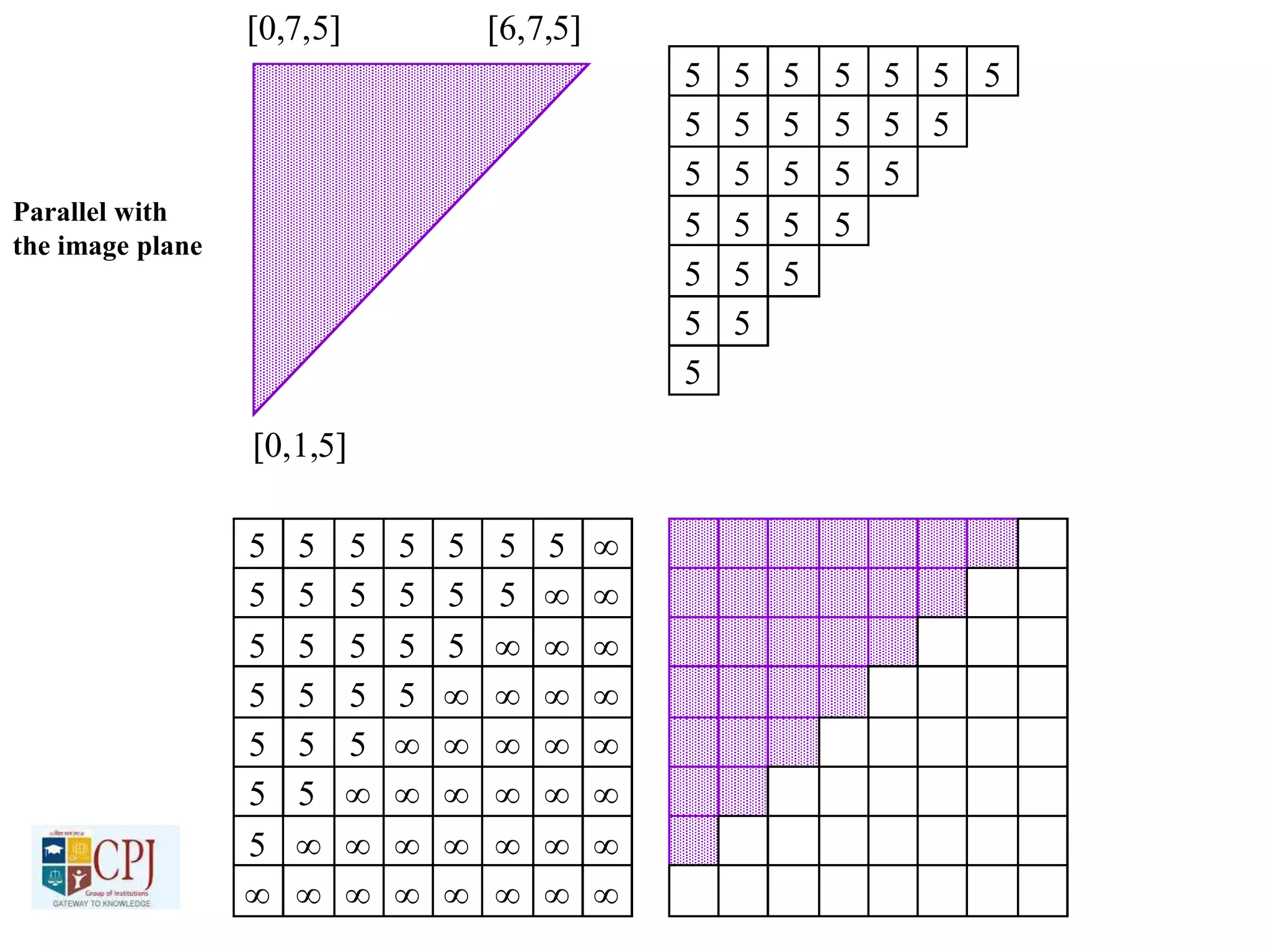
• Depth buffer (Z-Buffer)
A secondary image buffer that holds depth values
Same pixel resolution as the color buffer
Why is it called a Z-Buffer?
After eye space, depth is simply the z-coordinate
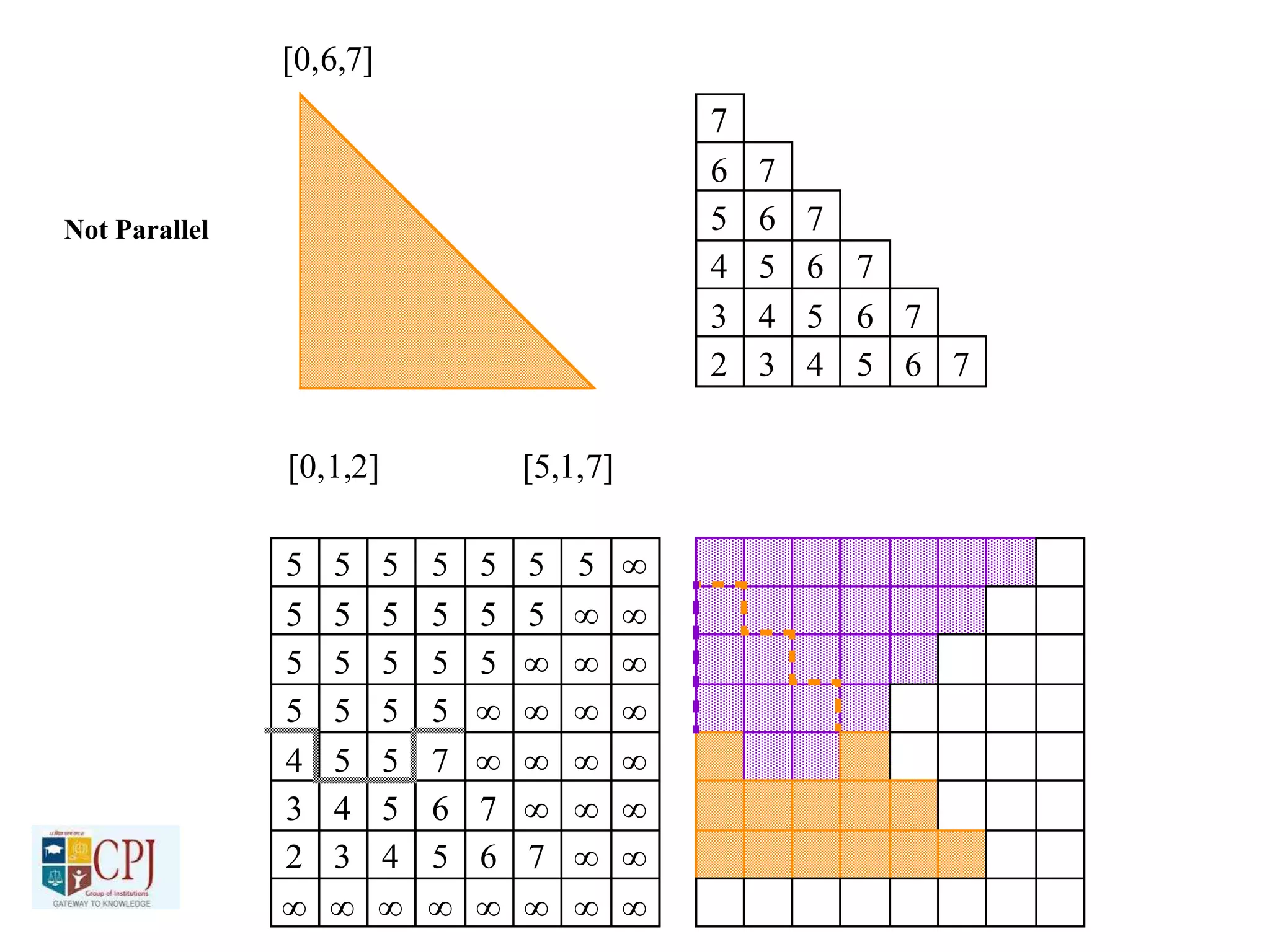
• Sorting is done at the pixel level
Rule: Only draw a polygon at a pixel if it is closer than a
polygon that has already been drawn to this pixel
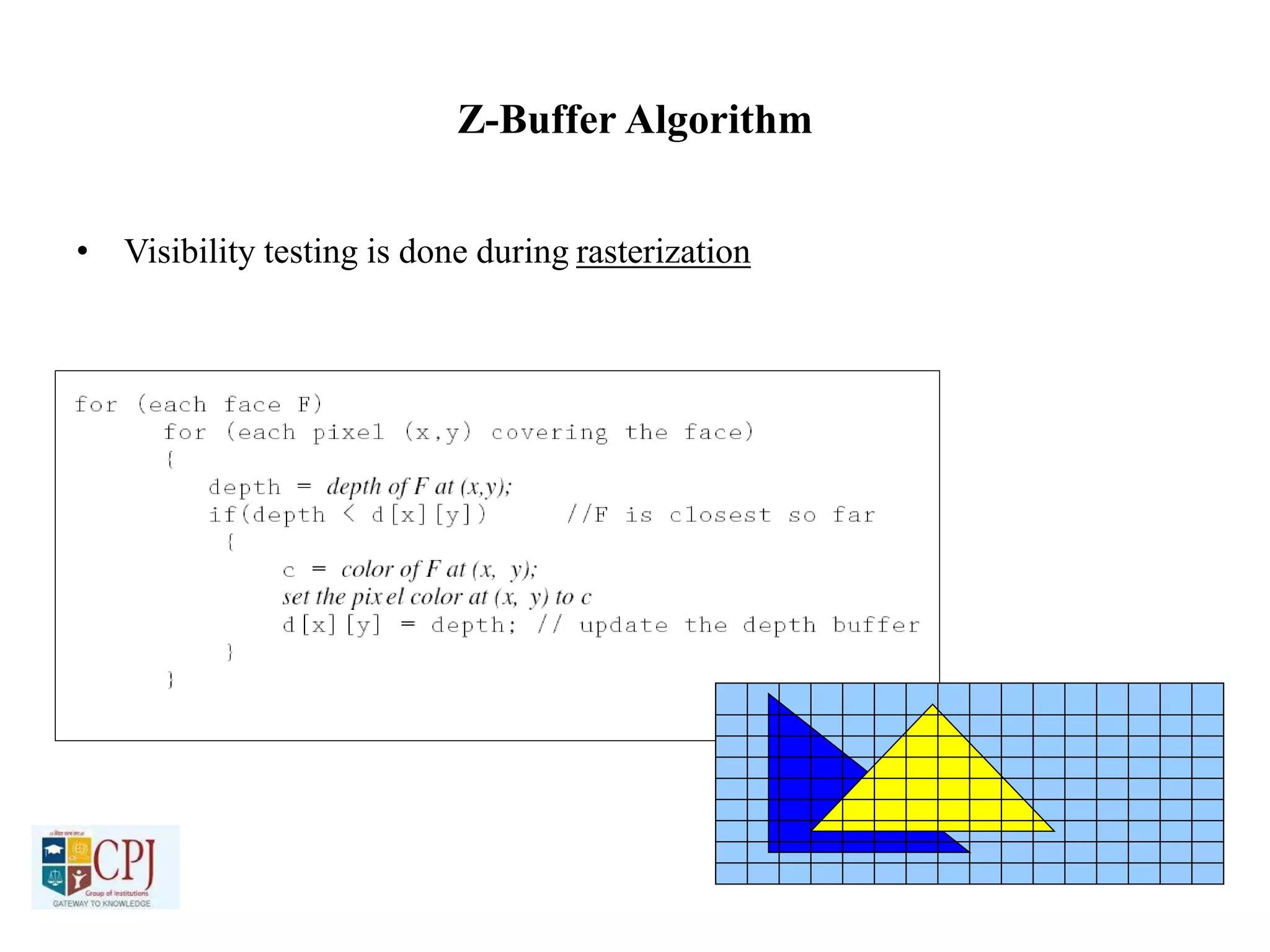
Z-Buffer Algorithm
• Visibility testing is done during rasterization
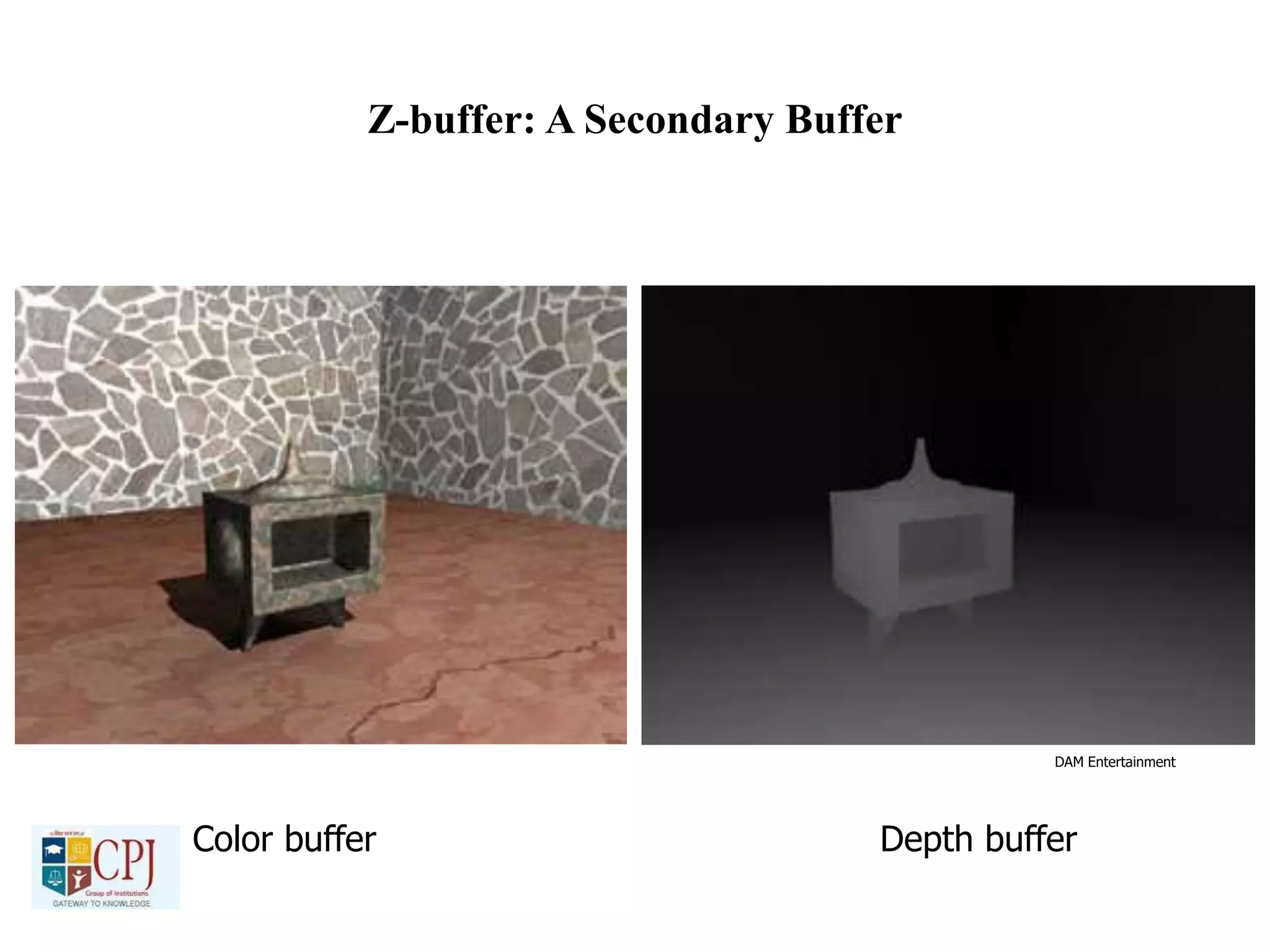
Z-buffer: A Secondary Buffer
DAM Entertainment
Color buffer Depth buffer
Z-Buffer
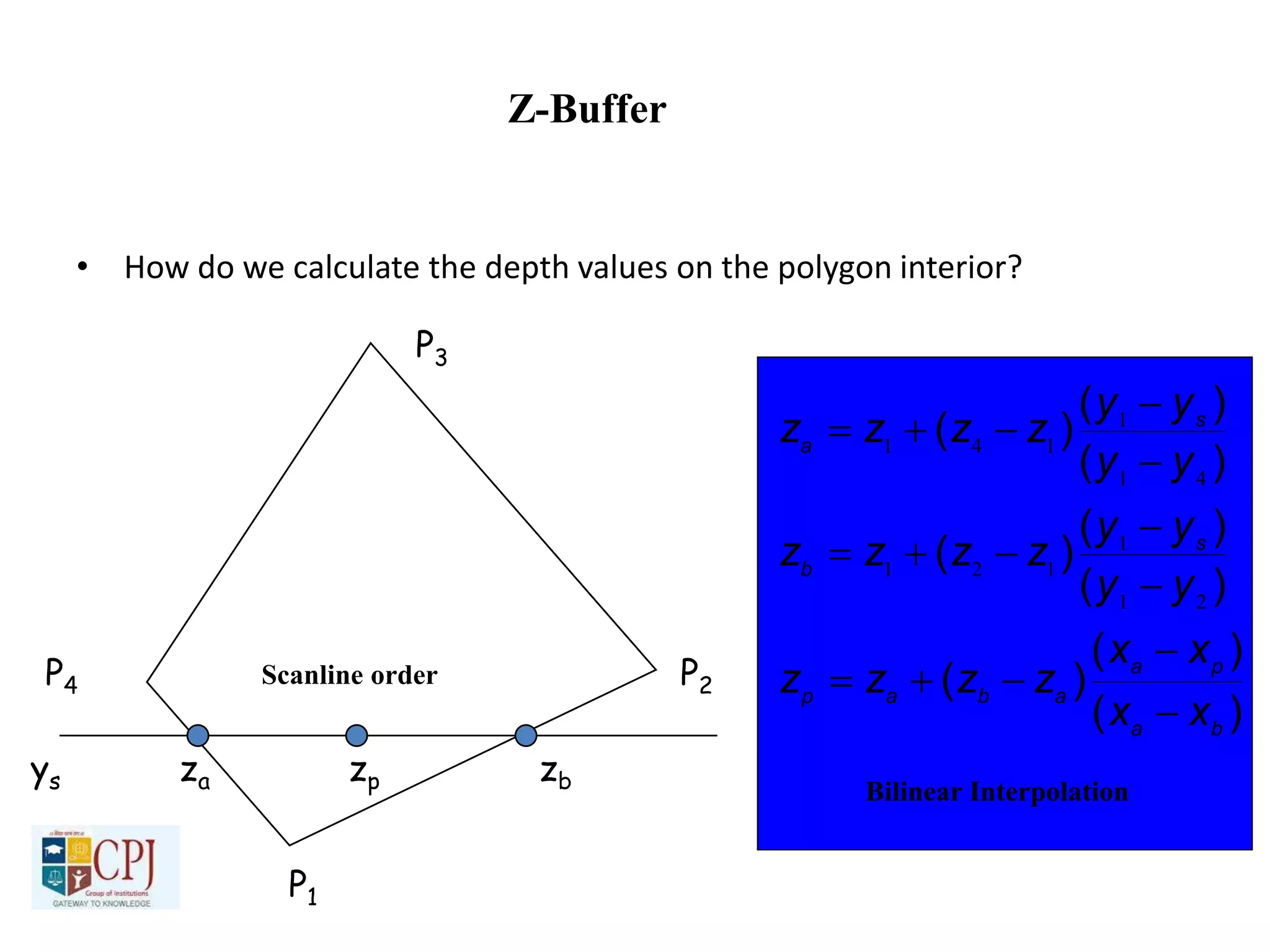
• How do we calculate the depth values on the polygon interior?
P1
P2
P3
P4
ys za zp zb
Scanline order
)(
)(
)(
)(
)(
)(
)(
)(
)(
ba
pa
abap
s
b
s
a
xx
xx
zzzz
yy
yy
zzzz
yy
yy
zzzz









21
1
121
41
1
141
Bilinear Interpolation
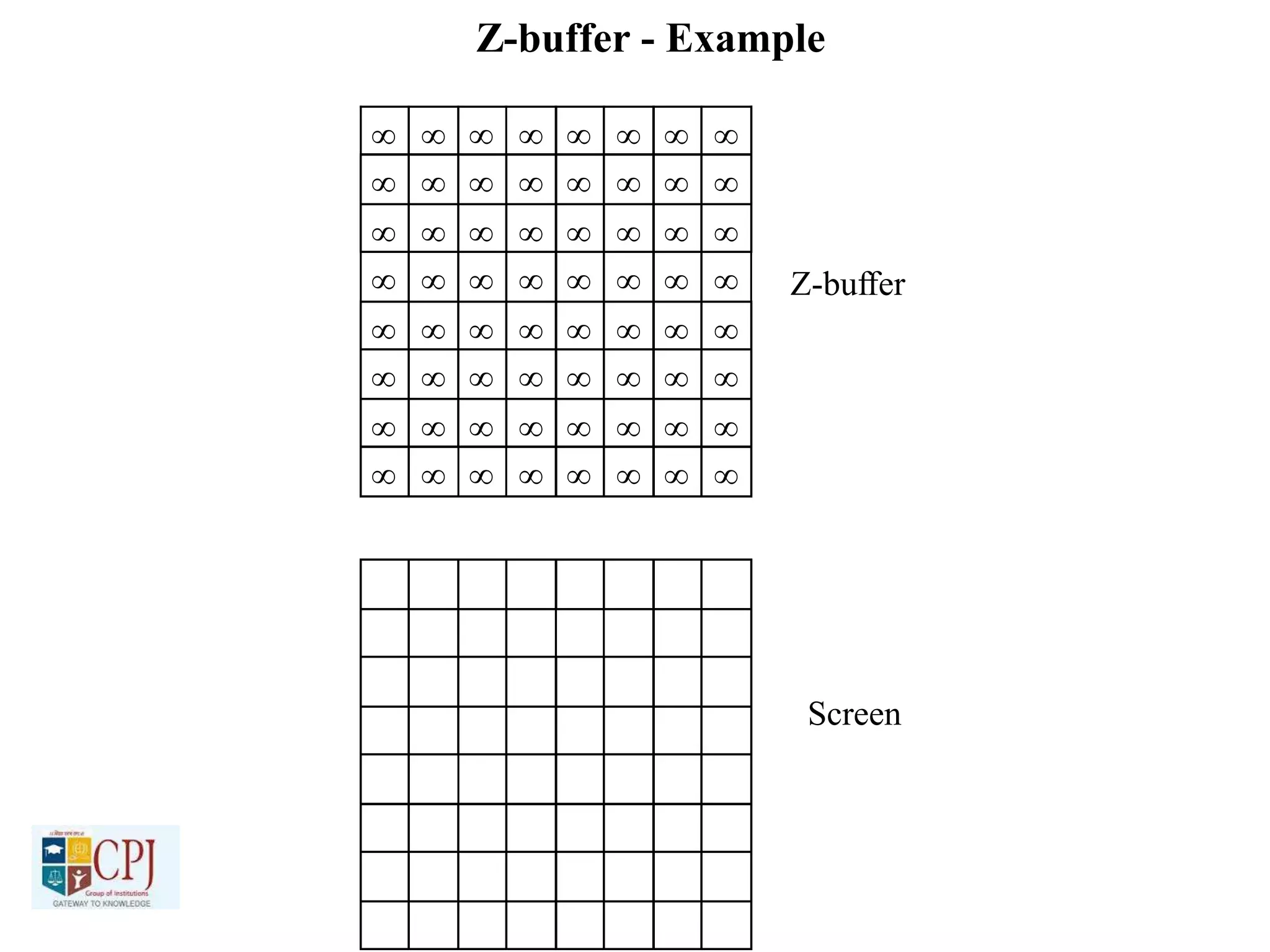
Z-buffer - Example
   
   
   
   
   
   
   
   
   
   
   
   
   
   
   
   
Z-buffer
Screen

 
   
   
   
   
   
   
   
   
   
   
   
   
   
   
   
   
   
   
   
   
  
 

  
 

Parallel with
the image plane



   
   
   
  
 

 

   
   
   
   
   
   
   
   
   
   
   
   
   
   
   
   
Not Parallel
Z-Buffer Algorithm
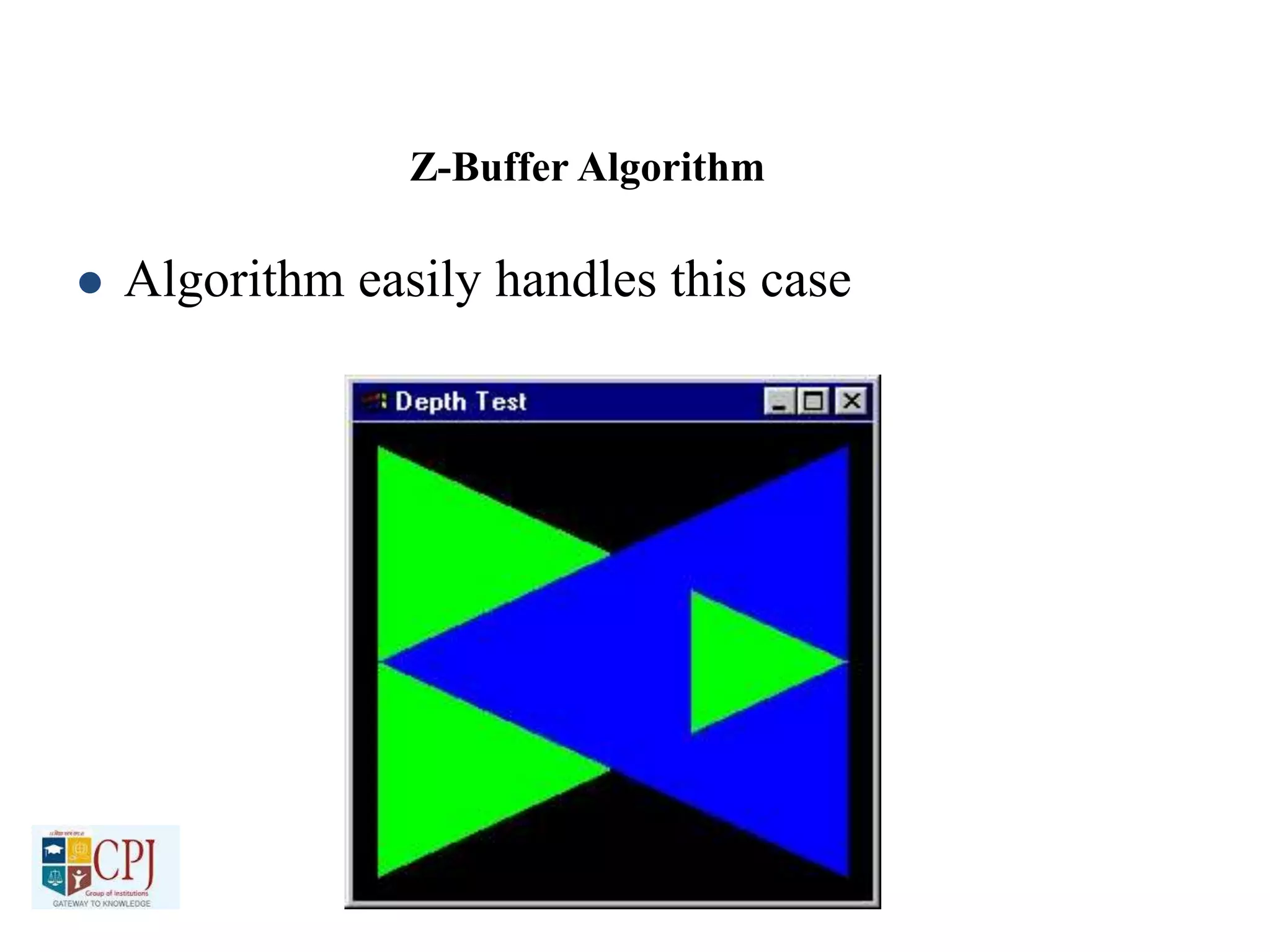
 Algorithm easily handles this case
Z-buffering in OpenGL
• Create depth buffer by setting GLUT_DEPTH flag in
glutInitDisplayMode()or the appropriate flag in the
PIXELFORMATDESCRIPTOR.
• Enable per-pixel depth testing with glEnable(GL_DEPTH_TEST)
• Clear depth buffer by setting GL_DEPTH_BUFFER_BIT in glClear()

Computer Graphics

  • 1.
    Chanderprabhu Jain Collegeof Higher Studies & School of Law Plot No. OCF, Sector A-8, Narela, New Delhi – 110040 (Affiliated to Guru Gobind Singh Indraprastha University and Approved by Govt of NCT of Delhi & Bar Council of India) PAPER NAME: COMPUTER GRAPHICS PAPER CODE: BCA 303 CLASS: BCA Vth Semester
  • 2.
    UNIT-I Graphics DisplayDevices • Frame Buffer – a region of memory sufficiently large to hold all of the pixel values for the display 2 Chanderprabhu Jain College of Higher Studies & School of Law Plot No. OCF, Sector A-8, Narela, New Delhi – 110040 (Affiliated to Guru Gobind Singh Indraprastha University and Approved by Govt of NCT of Delhi & Bar Council of India) Block Diagram of Computer with Raster Display
  • 3.
    Graphics Display Devices- cont • How each pixel value in the frame buffer is sent to the right place on the display surface 3 Chanderprabhu Jain College of Higher Studies & School of Law Plot No. OCF, Sector A-8, Narela, New Delhi – 110040 (Affiliated to Guru Gobind Singh Indraprastha University and Approved by Govt of NCT of Delhi & Bar Council of India)
  • 4.
    Graphics Devices –cont • Each pixel has a 2D address (x,y) – For each address (x,y) there is a specific memory location that holds the value of the pixel (I.e. mem[136][252]) – The scan controller sends the logical address (136, 252) to the frame buffer, which emits the value mem[136][252] – The value mem[136][252] is converted to a corresponding intensity or color in the conversion circuit, and that intensity or color is sent to the proper physical position, (136, 252), on the display surface 4 Chanderprabhu Jain College of Higher Studies & School of Law Plot No. OCF, Sector A-8, Narela, New Delhi – 110040 (Affiliated to Guru Gobind Singh Indraprastha University and Approved by Govt of NCT of Delhi & Bar Council of India)
  • 5.
    Graphics Devices –cont • Each pixel has a 2D address (x,y) – For each address (x,y) there is a specific memory location that holds the value of the pixel (I.e. mem[136][252]) – The scan controller sends the logical address (136, 252) to the frame buffer, which emits the value mem[136][252] – The value mem[136][252] is converted to a corresponding intensity or color in the conversion circuit, and that intensity or color is sent to the proper physical position, (136, 252), on the display surface 5 Chanderprabhu Jain College of Higher Studies & School of Law Plot No. OCF, Sector A-8, Narela, New Delhi – 110040 (Affiliated to Guru Gobind Singh Indraprastha University and Approved by Govt of NCT of Delhi & Bar Council of India)
  • 6.
    Graphics Devices –cont • Each pixel has a 2D address (x,y) – For each address (x,y) there is a specific memory location that holds the value of the pixel (I.e. mem[136][252]) – The scan controller sends the logical address (136, 252) to the frame buffer, which emits the value mem[136][252] – The value mem[136][252] is converted to a corresponding intensity or color in the conversion circuit, and that intensity or color is sent to the proper physical position, (136, 252), on the display surface 6 Chanderprabhu Jain College of Higher Studies & School of Law Plot No. OCF, Sector A-8, Narela, New Delhi – 110040 (Affiliated to Guru Gobind Singh Indraprastha University and Approved by Govt of NCT of Delhi & Bar Council of India)
  • 7.
    Graphics Devices –cont • Each pixel has a 2D address (x,y) – For each address (x,y) there is a specific memory location that holds the value of the pixel (I.e. mem[136][252]) – The scan controller sends the logical address (136, 252) to the frame buffer, which emits the value mem[136][252] – The value mem[136][252] is converted to a corresponding intensity or color in the conversion circuit, and that intensity or color is sent to the proper physical position, (136, 252), on the display surface 7 Chanderprabhu Jain College of Higher Studies & School of Law Plot No. OCF, Sector A-8, Narela, New Delhi – 110040 (Affiliated to Guru Gobind Singh Indraprastha University and Approved by Govt of NCT of Delhi & Bar Council of India)
  • 8.
    Graphics Devices –cont • Each pixel has a 2D address (x,y) – For each address (x,y) there is a specific memory location that holds the value of the pixel (I.e. mem[136][252]) – The scan controller sends the logical address (136, 252) to the frame buffer, which emits the value mem[136][252] – The value mem[136][252] is converted to a corresponding intensity or color in the conversion circuit, and that intensity or color is sent to the proper physical position, (136, 252), on the display surface 8 Chanderprabhu Jain College of Higher Studies & School of Law Plot No. OCF, Sector A-8, Narela, New Delhi – 110040 (Affiliated to Guru Gobind Singh Indraprastha University and Approved by Govt of NCT of Delhi & Bar Council of India)
  • 9.
    Scan Converting Lines •Line Drawing – Draw a line on a raster screen between 2 points – What’s wrong with the statement of the problem? • It does not say anything about which pts are allowed as end pts • It does not give a clear meaning to “draw” • It does not say what constitutes a “line” in the raster world • It does not say how to measure the success of the proposed algorithm 9 Chanderprabhu Jain College of Higher Studies & School of Law Plot No. OCF, Sector A-8, Narela, New Delhi – 110040 (Affiliated to Guru Gobind Singh Indraprastha University and Approved by Govt of NCT of Delhi & Bar Council of India)
  • 10.
    Graphics Devices –cont • Each pixel has a 2D address (x,y) – For each address (x,y) there is a specific memory location that holds the value of the pixel (I.e. mem[136][252]) – The scan controller sends the logical address (136, 252) to the frame buffer, which emits the value mem[136][252] – The value mem[136][252] is converted to a corresponding intensity or color in the conversion circuit, and that intensity or color is sent to the proper physical position, (136, 252), on the display surface 10 Chanderprabhu Jain College of Higher Studies & School of Law Plot No. OCF, Sector A-8, Narela, New Delhi – 110040 (Affiliated to Guru Gobind Singh Indraprastha University and Approved by Govt of NCT of Delhi & Bar Council of India)
  • 11.
    Scan Converting Lines- cont • Problem Statement – Given 2 points P and Q in the plane, both with integer coordinates, determine which pixels on a raster screen should be “on” in order to make a picture of a unit-width line segment starting at point P and ending at point Q 11 Chanderprabhu Jain College of Higher Studies & School of Law Plot No. OCF, Sector A-8, Narela, New Delhi – 110040 (Affiliated to Guru Gobind Singh Indraprastha University and Approved by Govt of NCT of Delhi & Bar Council of India)
  • 12.
    Finding the nextpixel • Special Case: – Horizontal Line: • Draw pixel P and increment the x coordinate value by one to get the next pixel. – Vertical Line: • Draw the pixel P and increment the y coordinate value by one to get the next pixel – Diagonal Line: • Draw the pixel P and increment both the x and y coordinate values by one to get the next pixel – What should we use in the general case? 12 Chanderprabhu Jain College of Higher Studies & School of Law Plot No. OCF, Sector A-8, Narela, New Delhi – 110040 (Affiliated to Guru Gobind Singh Indraprastha University and Approved by Govt of NCT of Delhi & Bar Council of India)
  • 13.
    Vertical Distance • Whycan we use the vertical distance as a measure of which point is closer? – Because vertical distance is proportional to the actual distance – How do we show this? – Congruent Triangles 13 Chanderprabhu Jain College of Higher Studies & School of Law Plot No. OCF, Sector A-8, Narela, New Delhi – 110040 (Affiliated to Guru Gobind Singh Indraprastha University and Approved by Govt of NCT of Delhi & Bar Council of India)
  • 14.
    Vertical Distance –cont • By similar triangles we can see that the true distances to the line (in blue) are directly proportional to the vertical distances to the line (in black) for each point. • Therefore the point with the smaller vertical distance to the line is the closest to the line 14 Chanderprabhu Jain College of Higher Studies & School of Law Plot No. OCF, Sector A-8, Narela, New Delhi – 110040 (Affiliated to Guru Gobind Singh Indraprastha University and Approved by Govt of NCT of Delhi & Bar Council of India)
  • 15.
    Strategy 1 –Incremental Algorithm • The Basic Algorithm – Find the equation of the line that connects the 2 points P and Q – Starting with the leftmost point P, increment by 1 to calculate where A = slope, and B = y intercept – Intensify the pixel at – This computation selects the closest pixel, the pixel whose distance to the “true” line is smallest 15 ix BAxy ii  Chanderprabhu Jain College of Higher Studies & School of Law Plot No. OCF, Sector A-8, Narela, New Delhi – 110040 (Affiliated to Guru Gobind Singh Indraprastha University and Approved by Govt of NCT of Delhi & Bar Council of India)
  • 16.
    Strategy 1 –Incremental Algorithm • The Incremental Algorithm – Each iteration requires a floating-point multiplication therefore, modify – If , then – Thus, a unit change in x changes y by slope A, which is the slope of the line – At each step, we make incremental calculations based on the preceding step to find the next y value 16   xAyBxxABAxY iiii    11 1x Ayy ii  1 Chanderprabhu Jain College of Higher Studies & School of Law Plot No. OCF, Sector A-8, Narela, New Delhi – 110040 (Affiliated to Guru Gobind Singh Indraprastha University and Approved by Govt of NCT of Delhi & Bar Council of India)
  • 17.
    Strategy 1 –Incremental Algo 17 Chanderprabhu Jain College of Higher Studies & School of Law Plot No. OCF, Sector A-8, Narela, New Delhi – 110040 (Affiliated to Guru Gobind Singh Indraprastha University and Approved by Govt of NCT of Delhi & Bar Council of India)
  • 18.
    Example Code 18 Chanderprabhu JainCollege of Higher Studies & School of Law Plot No. OCF, Sector A-8, Narela, New Delhi – 110040 (Affiliated to Guru Gobind Singh Indraprastha University and Approved by Govt of NCT of Delhi & Bar Council of India)
  • 19.
    Problem with theIncremental Algorithm • Rounding integers takes time • Real variables have limited precision, summing an inexact slope (A) repetitively introduces a cumulative error buildup • Variables y and A must be a real or fractional binary because the slope is a fraction – Special case needed for vertical lines 19 Chanderprabhu Jain College of Higher Studies & School of Law Plot No. OCF, Sector A-8, Narela, New Delhi – 110040 (Affiliated to Guru Gobind Singh Indraprastha University and Approved by Govt of NCT of Delhi & Bar Council of India)
  • 20.
    Strategy 2 –Midpoint Line Algorithm • Assume that the line’s slope is shallow and positive ( 0 < slope < 1); other slopes can be handled by suitable reflections about the principle axes • Call the lower left endpoint and the upper right endpoint • Assume that we have just selected the pixel P at • Next, we must choose between the pixel to the right (pixel E), or one right and one up (pixel NE) • Let Q be the intersection point of the line being scan- converted with the grid line 20  0,0 yx  11, yx  pp yx , 1 pxxChanderprabhu Jain College of Higher Studies & School of Law Plot No. OCF, Sector A-8, Narela, New Delhi – 110040 (Affiliated to Guru Gobind Singh Indraprastha University and Approved by Govt of NCT of Delhi & Bar Council of India)
  • 21.
    Strategy 2 –Midpoint Line Algorithm 1/1/2000 21 Chanderprabhu Jain College of Higher Studies & School of Law Plot No. OCF, Sector A-8, Narela, New Delhi – 110040 (Affiliated to Guru Gobind Singh Indraprastha University and Approved by Govt of NCT of Delhi & Bar Council of India)
  • 22.
    Strategy 2 –Midpoint Line Algorithm • The line passes between E and NE • The point that is closer to the intersection point Q must be chosen • Observe on which side of the line the midpoint M lies: – E is closer to the line if the midpoint lies above the line (I.e. the line crosses the bottom half) – NE is closer to the line if the midpoint lies below the line, I.e., the line crosses the top half • The error, the vertical distance between the chosen pixel and the actual line is always <= ½ • The algorithm chooses NE as the next pixel for the line shown • Now, find a way to calculate on which side of the line the midpoint lies 22 Chanderprabhu Jain College of Higher Studies & School of Law Plot No. OCF, Sector A-8, Narela, New Delhi – 110040 (Affiliated to Guru Gobind Singh Indraprastha University and Approved by Govt of NCT of Delhi & Bar Council of India)
  • 23.
    The Line • Theline equation as a function f(x): – f(x) = A*x + B = dy/dx * x + B • Line equation as an implicit function: – F(x,y) = a * x + b * y + c = 0 for coefficients a, b, c where a, b != 0; from above, y *dx = dy*x + B*dx, so a = dy, b = -dx, c=B *dx, a>0 for y(0) < y(1) • Properties (proof by the case analysis): – when any point M is on the line – when any point M is above the line – when any point M is below the line – Our decision will be based on the value of the function at the midpoint M at 23 0)( , mm yxF 0),( mm yxF 0),( mm yxF  2 1,1  pp yx Chanderprabhu Jain College of Higher Studies & School of Law Plot No. OCF, Sector A-8, Narela, New Delhi – 110040 (Affiliated to Guru Gobind Singh Indraprastha University and Approved by Govt of NCT of Delhi & Bar Council of India)
  • 24.
    Decision Variable • DecisionVariable d: – We only need the sign of to see where the line lies, and then pick the nearest pixel – • If d > 0 choose pixel NE • If d < 0 choose pixel E • If d = 0 choose either one consistently • How to update d: – On the basis of picking E or NE, figure out the location of the M for that pixel, and the corresponding value of d for the next grid line 24 ) 2 1,1(  pp yxF ),1( 2 1 pp yxFD Chanderprabhu Jain College of Higher Studies & School of Law Plot No. OCF, Sector A-8, Narela, New Delhi – 110040 (Affiliated to Guru Gobind Singh Indraprastha University and Approved by Govt of NCT of Delhi & Bar Council of India)
  • 25.
    Example Code 25 Chanderprabhu JainCollege of Higher Studies & School of Law Plot No. OCF, Sector A-8, Narela, New Delhi – 110040 (Affiliated to Guru Gobind Singh Indraprastha University and Approved by Govt of NCT of Delhi & Bar Council of India)
  • 26.
    Rotation About theOrigin To rotate a line or polygon, we must rotate each of its vertices. To rotate point (x1,y1) to point (x2,y2) we observe: From the illustration we know that: sin (A + B) = y2/r cos (A + B) = x2/r sin A = y1/r cos A = x1/r x-axis (x1,y1) (x2,y2) A B r (0,0) y-axis Chanderprabhu Jain College of Higher Studies & School of Law Plot No. OCF, Sector A-8, Narela, New Delhi – 110040 (Affiliated to Guru Gobind Singh Indraprastha University and Approved by Govt of NCT of Delhi & Bar Council of India) UNIT-II 2-D TRANSFORMATIONS
  • 27.
    Rotation About theOrigin From the double angle formulas: sin (A + B) = sinAcosB + cosAsinB cos (A + B)= cosAcosB - sinAsinB Substituting: y2/r = (y1/r)cosB + (x1/r)sinB Therefore: y2 = y1cosB + x1sinB We have x2 = x1cosB - y1sinB P2 = R P1 . (x1) (y1) (cosB -sinB) (sinB cosB) (x2) (y2) = Chanderprabhu Jain College of Higher Studies & School of Law Plot No. OCF, Sector A-8, Narela, New Delhi – 110040 (Affiliated to Guru Gobind Singh Indraprastha University and Approved by Govt of NCT of Delhi & Bar Council of India)
  • 28.
    Translations Moving an objectis called a translation. We translate a point by adding to the x and y coordinates, respectively, the amount the point should be shifted in the x and y directions. We translate an object by translating each vertex in the object. P2 = P1 + T T = ( tx ) ( ty ) P1 = ( x1 ) ( y1 ) P2 = (x1 + tx) (y1 + ty) Ty Tx Chanderprabhu Jain College of Higher Studies & School of Law Plot No. OCF, Sector A-8, Narela, New Delhi – 110040 (Affiliated to Guru Gobind Singh Indraprastha University and Approved by Govt of NCT of Delhi & Bar Council of India)
  • 29.
    Scaling Changing the sizeof an object is called a scale. We scale an object by scaling the x and y coordinates of each vertex in the object. P2 = S P1 . S = (sx 0) (0 sy) P1 = ( x1 ) ( y1 ) P2 = (sxx1) (syy1) Chanderprabhu Jain College of Higher Studies & School of Law Plot No. OCF, Sector A-8, Narela, New Delhi – 110040 (Affiliated to Guru Gobind Singh Indraprastha University and Approved by Govt of NCT of Delhi & Bar Council of India)
  • 30.
    Homogeneous Coordinates Although theformulas we have shown are usually the most efficient way to implement programs to do scales, rotations and translations, it is easier to use matrix transformations to represent and manipulate them. In order to represent a translation as a matrix operation we use 3 x 3 matrices and pad our points to become 1 x 3 matrices. cos ø -sin ø 0 Rø = sin ø cos ø 0 0 0 1 Sx 0 0 S = 0 Sy 0 0 0 1 1 0 Tx T = 0 1 Ty 0 0 1 Point P = (x) (y) (1) Chanderprabhu Jain College of Higher Studies & School of Law Plot No. OCF, Sector A-8, Narela, New Delhi – 110040 (Affiliated to Guru Gobind Singh Indraprastha University and Approved by Govt of NCT of Delhi & Bar Council of India)
  • 31.
    Composite Transformations -Scaling Given our three basic transformations we can create other transformations. Scaling with a fixed point A problem with the scale transformation is that it also moves the object being scaled. Scale a line between (2, 1) (4,1) to twice its length. (2 0 0) = (0 1 0) (0 0 1) (2 0 0) = (0 1 0) (0 0 1) 0 1 2 3 4 5 6 7 8 9 10 Before After (2) (1) (1) (4) (1) (1) (4) (1) (1) (8) (1) (1) Chanderprabhu Jain College of Higher Studies & School of Law Plot No. OCF, Sector A-8, Narela, New Delhi – 110040 (Affiliated to Guru Gobind Singh Indraprastha University and Approved by Govt of NCT of Delhi & Bar Council of India)
  • 32.
    Composite Transforms -Scaling (cont.) If we scale a line between (0, 1) (2,1) to twice its length, the left- hand endpoint does not move. (2 0 0) = (0 1 0) (0 0 1) (2 0 0) = (0 1 0) (0 0 1) (0,0) is known as a fixed point for the basic scaling transformation. We can used composite transformations to create a scale transformation with different fixed points. 0 1 2 3 4 5 6 7 8 9 10 Before After (0) (1) (1) (0) (1) (1) (2) (1) (1) (0) (1) (1) Chanderprabhu Jain College of Higher Studies & School of Law Plot No. OCF, Sector A-8, Narela, New Delhi – 110040 (Affiliated to Guru Gobind Singh Indraprastha University and Approved by Govt of NCT of Delhi & Bar Council of India)
  • 33.
    Fixed Point Scaling Scaleby 2 with fixed point = (2,1) • Translate the point (2,1) to the origin • Scale by 2 • Translate origin to point (2,1) (1 0 2) (2 0 0) (1 0 -2) = (2 0 -2) (0 1 1) (0 1 0) (0 1 -1) (0 1 0) (0 0 1) (0 0 1) (0 0 1) (0 0 1) (2 0 -2) = (0 1 0) (0 0 1) (2 0 -2) = (0 1 0) (0 0 1) 0 1 2 3 4 5 6 7 8 9 10 Before After (2) (1) (1) (2) (1) (1) (4) (1) (1) (6) (1) (1)Chanderprabhu Jain College of Higher Studies & School of Law Plot No. OCF, Sector A-8, Narela, New Delhi – 110040 (Affiliated to Guru Gobind Singh Indraprastha University and Approved by Govt of NCT of Delhi & Bar Council of India)
  • 34.
    More Fixed PointScaling Scale by 2 with fixed point = (3,1) • Translate the point (3,1) to the origin • Scale by 2 • Translate origin to point (3,1) (1 0 3) (2 0 0) (1 0 -3) = (2 0 -3) (0 1 1) (0 1 0) (0 1 -1) (0 1 0) (0 0 1) (0 0 1) (0 0 1) (0 0 1) (2 0 -3) = (0 1 0) (0 0 1) (2 0 -3) = (0 1 0) (0 0 1) 0 1 2 3 4 5 6 7 8 9 10 Before After (2) (1) (1) (1) (1) (1) Chanderprabhu Jain College of Higher Studies & School of Law Plot No. OCF, Sector A-8, Narela, New Delhi – 110040 (Affiliated to Guru Gobind Singh Indraprastha University and Approved by Govt of NCT of Delhi & Bar Council of India)
  • 35.
    Shears Original Data yShear x Shear 1 0 0 1 b 0 a 1 0 0 1 0 0 0 1 0 0 1 GRAPHICS --> x shear --> GRAPHICS Chanderprabhu Jain College of Higher Studies & School of Law Plot No. OCF, Sector A-8, Narela, New Delhi – 110040 (Affiliated to Guru Gobind Singh Indraprastha University and Approved by Govt of NCT of Delhi & Bar Council of India)
  • 36.
    Reflections Reflection about they-axis Reflection about the x-axis -1 0 0 1 0 0 0 1 0 0 -1 0 0 0 1 0 0 1 Chanderprabhu Jain College of Higher Studies & School of Law Plot No. OCF, Sector A-8, Narela, New Delhi – 110040 (Affiliated to Guru Gobind Singh Indraprastha University and Approved by Govt of NCT of Delhi & Bar Council of India)
  • 37.
    More Reflections Reflection aboutthe origin Reflection about the line y=x -1 0 0 0 1 0 0 -1 0 1 0 0 0 0 1 0 0 1 Chanderprabhu Jain College of Higher Studies & School of Law Plot No. OCF, Sector A-8, Narela, New Delhi – 110040 (Affiliated to Guru Gobind Singh Indraprastha University and Approved by Govt of NCT of Delhi & Bar Council of India)
  • 38.
    Chanderprabhu Jain Collegeof Higher Studies & School of Law Plot No. OCF, Sector A-8, Narela, New Delhi – 110040 (Affiliated to Guru Gobind Singh Indraprastha University and Approved by Govt of NCT of Delhi & Bar Council of India) UNIT-III SOLID MODELING
  • 39.
    UNIT-III SOLID MODELING ChanderprabhuJain College of Higher Studies & School of Law Plot No. OCF, Sector A-8, Narela, New Delhi – 110040 (Affiliated to Guru Gobind Singh Indraprastha University and Approved by Govt of NCT of Delhi & Bar Council of India) Start with these four, three-view drawings – Parts 1, 2, 3, 4 below and project all points around to show alignment of one object.
  • 40.
    Part 1 -Extrude front view (.75) inches to finish. Why front view ? Because it shows the most of the object in solid format, and all I had to do was to add depth onto the object. The width and height already exist. With width and height given in front view just add depth as shown (.75). TOP FRONT RT. SIDE EXTRUDE FRONT VIEW .75 INCHES TO FINISH. WHY FRONT VIEW? BECAUSE IT SHOWS THE MOST OF OBJECT IN SOLID FORMAT, AND ALL I HAD TO DO WAS TO ADD DEPTH ONTO THE OBJECT THAT ALREADY HAD WIDTH & HEIGHT. 0.75 0.75 TOP FRONT RT. SIDE WIDTH DEPTH TO FINISH OBJECT PLACE DEPTH ON TO THE WIDTH AND HEIGHT ALREADY GIVEN IN FRONT VIEW. Chanderprabhu Jain College of Higher Studies & School of Law Plot No. OCF, Sector A-8, Narela, New Delhi – 110040 (Affiliated to Guru Gobind Singh Indraprastha University and Approved by Govt of NCT of Delhi & Bar Council of India)
  • 41.
    Part 2 -From the top choose this part and with a polyline extrude it (1.5) inches by placing the height onto the depth. Move it, align it to midpoint, and union it to form one part. TOP FRONT RT. SIDE 1 2 From the top choose this part and with a polyline line extrude it 1.5 inches by placing the height on depth Move it, align it to midpoint and union it to form one part. You can do this many ways Chanderprabhu Jain College of Higher Studies & School of Law Plot No. OCF, Sector A-8, Narela, New Delhi – 110040 (Affiliated to Guru Gobind Singh Indraprastha University and Approved by Govt of NCT of Delhi & Bar Council of India)
  • 42.
    Part 3 -What view would you pick to turn this drawing into parametric solid? (front view) TOP FRONT RT. SIDE 1.00 1.00 1.00 2.50 1.00 Part 3 - What view would you pick to make a parametric solid? . You only need one move. Hint - place the height onto the width. Chanderprabhu Jain College of Higher Studies & School of Law Plot No. OCF, Sector A-8, Narela, New Delhi – 110040 (Affiliated to Guru Gobind Singh Indraprastha University and Approved by Govt of NCT of Delhi & Bar Council of India)
  • 43.
    Part 4 -What part best describes this object? (1 of right side view) The command you use is extrude. What second best part would you pick? (2 of right side view) Then also extrude. Now move number 1 to midpoint of number 2 midpoint and union. FRONT TOP RT. SIDE PART 4 What 2 Parts would best describe the object? The command you would use is extrude. What second part would you pick? Then also extrude. Now move to midpoint and union it. If you picked 1 and 2 you are right. 1 2 0.50 2.00 1.50 1.00 Chanderprabhu Jain College of Higher Studies & School of Law Plot No. OCF, Sector A-8, Narela, New Delhi – 110040 (Affiliated to Guru Gobind Singh Indraprastha University and Approved by Govt of NCT of Delhi & Bar Council of India)
  • 44.
    Parts 1- 4extruded & colored UNT in partnership with TEA. Copyright ©. All rights reserved. Chanderprabhu Jain College of Higher Studies & School of Law Plot No. OCF, Sector A-8, Narela, New Delhi – 110040 (Affiliated to Guru Gobind Singh Indraprastha University and Approved by Govt of NCT of Delhi & Bar Council of India)
  • 45.
    Drawing 2 See ifyou can turn these three-view drawings into solids. Chanderprabhu Jain College of Higher Studies & School of Law Plot No. OCF, Sector A-8, Narela, New Delhi – 110040 (Affiliated to Guru Gobind Singh Indraprastha University and Approved by Govt of NCT of Delhi & Bar Council of India)
  • 46.
    Drawing 2 Lets startwith top view (shows most overall shape). Extrude up (.48) inch and place in two (.25) inch holes and subtract out the space. Place to side. Extrude back part (2.13) inches. Move to side. Extrude part 3 back (1.50) of a inch, and move to side. Rotate part 2 and part 3 parallel to part 1 position and stack them on top to finish object, as shown in part 5. Chanderprabhu Jain College of Higher Studies & School of Law Plot No. OCF, Sector A-8, Narela, New Delhi – 110040 (Affiliated to Guru Gobind Singh Indraprastha University and Approved by Govt of NCT of Delhi & Bar Council of India)
  • 47.
    Drawing 2 asSolid Model Chanderprabhu Jain College of Higher Studies & School of Law Plot No. OCF, Sector A-8, Narela, New Delhi – 110040 (Affiliated to Guru Gobind Singh Indraprastha University and Approved by Govt of NCT of Delhi & Bar Council of India)
  • 48.
    Drawing 3 –three-view Copy all drawings and insert into CAD, then shade these to get better picture. Chanderprabhu Jain College of Higher Studies & School of Law Plot No. OCF, Sector A-8, Narela, New Delhi – 110040 (Affiliated to Guru Gobind Singh Indraprastha University and Approved by Govt of NCT of Delhi & Bar Council of India)
  • 49.
    Drawing 3 Three parts- red trace in a polyline for the overall shape and extrude down (.50) inches. Second, place in a (.25) hole and subtract out hole. Yellow draw in with a polyline for its overall shape and extrude it (.50) of a inch. Part magenta polyline in over shape and extrude back (.75). Place in red parallel top of yellow (as shown) place in magenta to the midpoint of yellow (as shown) and move to right side. Chanderprabhu Jain College of Higher Studies & School of Law Plot No. OCF, Sector A-8, Narela, New Delhi – 110040 (Affiliated to Guru Gobind Singh Indraprastha University and Approved by Govt of NCT of Delhi & Bar Council of India)
  • 50.
    Drawing 3 asSolid Model Chanderprabhu Jain College of Higher Studies & School of Law Plot No. OCF, Sector A-8, Narela, New Delhi – 110040 (Affiliated to Guru Gobind Singh Indraprastha University and Approved by Govt of NCT of Delhi & Bar Council of India)
  • 51.
    Drawing 4 Chanderprabhu JainCollege of Higher Studies & School of Law Plot No. OCF, Sector A-8, Narela, New Delhi – 110040 (Affiliated to Guru Gobind Singh Indraprastha University and Approved by Govt of NCT of Delhi & Bar Council of India)
  • 52.
    Drawing 4 asSolid Model Chanderprabhu Jain College of Higher Studies & School of Law Plot No. OCF, Sector A-8, Narela, New Delhi – 110040 (Affiliated to Guru Gobind Singh Indraprastha University and Approved by Govt of NCT of Delhi & Bar Council of India)
  • 53.
    Chanderprabhu Jain Collegeof Higher Studies & School of Law Plot No. OCF, Sector A-8, Narela, New Delhi – 110040 (Affiliated to Guru Gobind Singh Indraprastha University and Approved by Govt of NCT of Delhi & Bar Council of India) UNIT-IV HIDDEN SURFACE REMOVAL
  • 54.
    UNIT-IV HIDDEN SURFACEREMOVAL(Visibility) • Assumption: All polygons are opaque • What polygons are visible with respect to your view frustum?  Outside: View Frustum Clipping Remove polygons outside of the view volume For example, Liang-Barsky 3D Clipping  Inside: Hidden Surface Removal Backface culling Polygons facing away from the viewer Occlusion Polygons farther away are obscured by closer polygons Full or partially occluded portions • Why should we remove these polygons? Avoid unnecessary expensive operations on these polygons later
  • 55.
  • 56.
  • 57.
  • 58.
    Occlusion: Full, Partial,None Full Partial None • The rectangle is closer than the triangle • Should appear in front of the triangle
  • 59.
    Backface Culling • Avoiddrawing polygons facing away from the viewer  Front-facing polygons occlude these polygons in a closed polyhedron • Test if a polygon is front- or back-facing? front-facing back-facing Ideas?
  • 60.
    Detecting Back-face Polygons •The polygon normal of a … front-facing polygon points towards the viewer back-facing polygon points away from the viewer If (n  v) > 0  “back-face” If (n  v) ≤ 0  “front-face” v = view vector • Eye-space test … EASY! “back-face” if nz < 0 • glCullFace(GL_BACK) back front
  • 61.
    Polygon Normals • Letpolygon vertices v0, v1, v2,..., vn - 1 be in counterclockwise order and co-planar • Calculate normal with cross product: n = (v1 - v0) X (vn - 1 - v0) • Normalize to unit vector with n/║n║ v0 v1 v2 v3 v4 n
  • 62.
    Normal Direction • Verticescounterclockwise  Front-facing • Vertices clockwise  Back-facing 0 1 2 0 2 1 Front facing Back facing
  • 63.
    Painter’s Algorithm (1) •Assumption: Later projected polygons overwrite earlier projected polygons Graphics Pipeline 1 12 23 3 Oops! The red polygon Should be obscured by the blue polygon
  • 64.
    Painter’s Algorithm (2) •Main Idea  A painter creates a picture by drawing background scene elemens before foreground ones • Requirements  Draw polygons in back-to- front order  Need to sort the polygons by depth order to get a correct image from Shirley
  • 65.
    Painter’s Algorithm (3) •Sort by the depth of each polygon Graphics Pipeline 1 12 23 3 depth
  • 66.
    Painter’s Algorithm (4) •Compute zmin ranges for each polygon • Project polygons with furthest zmin first (z) depth zmin zmin zmin zmin
  • 67.
    Painter’s Algorithm (5) •Problem: Can you get a total sorting? zmin zmin zmin zmin Correct?
  • 68.
    Painter’s Algorithm (6) •Cyclic Overlap  How do we sort these three polygons? • Sorting is nontrivial  Split polygons in order to get a total ordering  Not easy to do in general
  • 69.
    Visibility • How dowe ensure that closer polygons overwrite further ones in general?
  • 70.
    Z-Buffer • Depth buffer(Z-Buffer) A secondary image buffer that holds depth values Same pixel resolution as the color buffer Why is it called a Z-Buffer? After eye space, depth is simply the z-coordinate • Sorting is done at the pixel level Rule: Only draw a polygon at a pixel if it is closer than a polygon that has already been drawn to this pixel
  • 71.
    Z-Buffer Algorithm • Visibilitytesting is done during rasterization
  • 72.
    Z-buffer: A SecondaryBuffer DAM Entertainment Color buffer Depth buffer
  • 73.
    Z-Buffer • How dowe calculate the depth values on the polygon interior? P1 P2 P3 P4 ys za zp zb Scanline order )( )( )( )( )( )( )( )( )( ba pa abap s b s a xx xx zzzz yy yy zzzz yy yy zzzz          21 1 121 41 1 141 Bilinear Interpolation
  • 74.
    Z-buffer - Example                                                                Z-buffer Screen
  • 75.
                                                                                                  Parallel with the image plane
  • 76.
                                                                                           Not Parallel
  • 77.
    Z-Buffer Algorithm  Algorithmeasily handles this case
  • 78.
    Z-buffering in OpenGL •Create depth buffer by setting GLUT_DEPTH flag in glutInitDisplayMode()or the appropriate flag in the PIXELFORMATDESCRIPTOR. • Enable per-pixel depth testing with glEnable(GL_DEPTH_TEST) • Clear depth buffer by setting GL_DEPTH_BUFFER_BIT in glClear()