Communication
             Skills
                         in Programming


                                          By :
                                          Suhailan bin Dato’ Hj. Safei
                                          Faculty of Informatics

                                          suhailan@unisza.edu.my


suhailan@unisza.edu.my
Communications


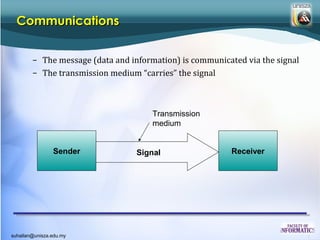
        – The message (data and information) is communicated via the signal
        – The transmission medium “carries” the signal


                                      Transmission
                                      medium


                Sender            Signal                  Receiver


suhailan@unisza.edu.my
Communications in programming


                Sender                       Signal                      Receiver


                Keyboard, Mouse,                                       Notepad, Word, Pdf,
                Pendrive, Harddisk,                                    OS, Browser

                 Hardware             Send keyboard input to notepad    Software


                 Software                   Send pdf to printer         Hardware


                 Software                  Export MsWord to Pdf         Software


suhailan@unisza.edu.my
Types of Programming Communication

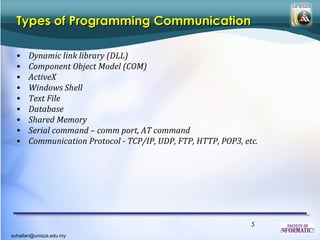
  •   Dynamic link library (DLL)
  •   Component Object Model (COM)
  •   ActiveX
  •   Windows Shell
  •   Text File
  •   Database
  •   Shared Memory
  •   Serial command – comm port, AT command
  •   Communication Protocol - TCP/IP, UDP, FTP, HTTP, POP3, etc.


                                                               5
suhailan@unisza.edu.my
Dynamic Link Library

  • A dynamic-link library (DLL) is a module that contains functions and data
    that can be used by another module (application or DLL).
  • A DLL can define two kinds of functions: exported and internal. The
    exported functions are intended to be called by other modules, as well as
    from within the DLL where they are defined. Internal functions are
    typically intended to be called only from within the DLL where they are
    defined. Although a DLL can export data, its data is generally used only by
    its functions. However, there is nothing to prevent another module from
    reading or writing that address.
  • DLLs provide a way to modularize applications so that their functionality
    can be updated and reused more easily. DLLs also help reduce memory
    overhead when several applications use the same functionality at the
    same time, because although each application receives its own copy of the
    DLL data, the applications share the DLL code.

  Source: http://msdn.microsoft.com/en-us/library/windows/desktop/ms682589%28v=vs.85%29.aspx6

suhailan@unisza.edu.my
Create DLL


 Compile and save this file as “Example.dll”.


  Source : http://en.wikipedia.org/wiki/DLL
                                                7
suhailan@unisza.edu.my
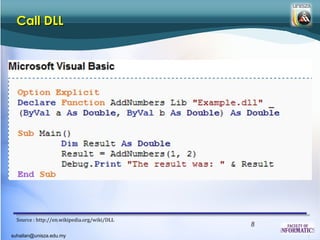
Call DLL


  Source : http://en.wikipedia.org/wiki/DLL
                                              8
suhailan@unisza.edu.my
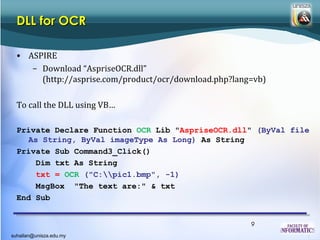
DLL for OCR

  • ASPIRE
     – Download “AspriseOCR.dll”
       (http://asprise.com/product/ocr/download.php?lang=vb)

  To call the DLL using VB…

  Private Declare Function OCR Lib "AspriseOCR.dll" (ByVal file
    As String, ByVal imageType As Long) As String
  Private Sub Command3_Click()
      Dim txt As String
      txt = OCR ("C:pic1.bmp", -1)
      MsgBox "The text are:" & txt
  End Sub


                                                        9
suhailan@unisza.edu.my
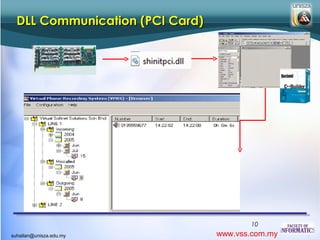
DLL Communication (PCI Card)


                                        10
suhailan@unisza.edu.my           www.vss.com.my
COM

  • Microsoft COM (Component Object Model) technology in the Microsoft
    Windows-family of Operating Systems enables software components to
    communicate. COM is used by developers to create re-usable software
    components, link components together to build applications, and take
    advantage of Windows services. COM objects can be created with a variety
    of programming languages. The family of COM technologies includes
    COM+, Distributed COM (DCOM) and ActiveX® Controls.
  • Microsoft provides COM interfaces for many Windows application
    programming interfaces such as Direct Show, Media Foundation,
    Packaging API, Windows Animation Manager, Windows Portable Devices,
    and Microsoft Active Directory (AD).
  • COM is used in applications such as the Microsoft Office Family of
    products. For example COM OLE technology allows Word documents to
    dynamically link to data in Excel spreadsheets and COM Automation
    allows users to build scripts in their applications to perform repetitive
    tasks or control one application from another.               11
suhailan@unisza.edu.my
COM


                         12
suhailan@unisza.edu.my
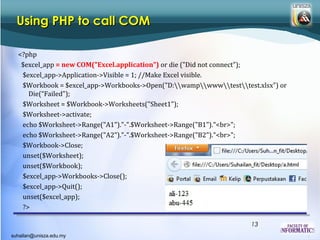
Using PHP to call COM

  <?php
   $excel_app = new COM("Excel.application") or die ("Did not connect");
   $excel_app->Application->Visible = 1; //Make Excel visible.
   $Workbook = $excel_app->Workbooks->Open("D:wampwwwtesttest.xlsx") or
     Die(“Failed");
   $Worksheet = $Workbook->Worksheets("Sheet1");
   $Worksheet->activate;
   echo $Worksheet->Range("A1")."-".$Worksheet->Range("B1")."<br>";
   echo $Worksheet->Range("A2")."-".$Worksheet->Range("B2")."<br>";
   $Workbook->Close;
   unset($Worksheet);
   unset($Workbook);
   $excel_app->Workbooks->Close();
   $excel_app->Quit();
   unset($excel_app);
   ?>

                                                                    13
suhailan@unisza.edu.my
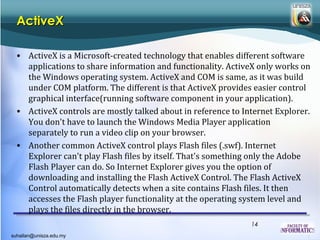
ActiveX

  • ActiveX is a Microsoft-created technology that enables different software
    applications to share information and functionality. ActiveX only works on
    the Windows operating system. ActiveX and COM is same, as it was build
    under COM platform. The different is that ActiveX provides easier control
    graphical interface(running software component in your application).
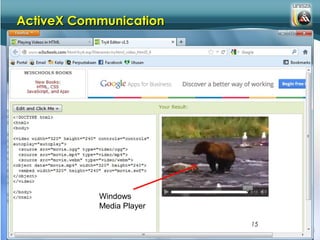
  • ActiveX controls are mostly talked about in reference to Internet Explorer.
    You don't have to launch the Windows Media Player application
    separately to run a video clip on your browser.
  • Another common ActiveX control plays Flash files (.swf). Internet
    Explorer can't play Flash files by itself. That's something only the Adobe
    Flash Player can do. So Internet Explorer gives you the option of
    downloading and installing the Flash ActiveX Control. The Flash ActiveX
    Control automatically detects when a site contains Flash files. It then
    accesses the Flash player functionality at the operating system level and
    plays the files directly in the browser.
                                                               14
suhailan@unisza.edu.my
ActiveX Communication


                         Windows
                         Media Player

                                        15
suhailan@unisza.edu.my
ActiveX Communication

                                                   FITNewsTV application
                                                   - VideoLAN player activeX
                                                   running imported using
                                                   Borland C++ Builder


                      TCppWebBroswer – an             VLC Media Player
                    activeX of Internet Explorer
                                                             16
suhailan@unisza.edu.my
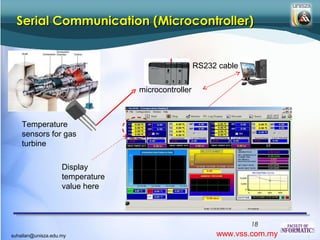
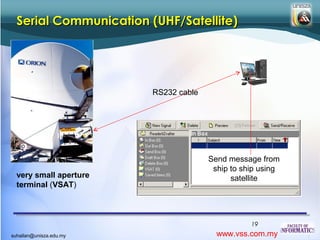
Serial Command

  • Connection to other hardware (computer, modem, printer,
    microcontroller, sensors) can be done using serial cable such as RS232
    (connection up to 15meter).


                                                              17
suhailan@unisza.edu.my
Serial Communication (Microcontroller)


                                                    RS232 cable


                                  microcontroller


    Temperature
    sensors for gas
    turbine

                    Display
                    temperature
                    value here


                                                                  18
suhailan@unisza.edu.my                                   www.vss.com.my
Serial Communication (UHF/Satellite)


                         RS232 cable


                                       Send message from
                                        ship to ship using
  very small aperture                        satellite
  terminal (VSAT)


                                                  19
suhailan@unisza.edu.my                   www.vss.com.my
Serial Communication (AT Command)


                 Water level sensor          AT Command
                                               to Modem
                                              (serial com)

                                  Landline          Display reservoir level
   microcontroller               Telephone
                                 (telekom)
             RS232


  Connected to
  microcontroller at
  site using modem


                                                             20
suhailan@unisza.edu.my                              www.vss.com.my
Windows Shell

  • The Windows UI provides users with access to a wide variety of objects
    necessary for running applications and managing the operating system.
    The most numerous and familiar of these objects are the folders and files
    that reside on computer disk drives.
  • There are also a number of virtual objects that allow the user to perform
    tasks such as sending files to remote printers or accessing the Recycle Bin.
    The Shell organizes these objects into a hierarchical namespace and
    provides users and applications with a consistent and efficient way to
    access and manage objects.
  • Eg.
     – ShellExecute – to execute a window executable file provided with their
        parameters
     – FindWindow – to get the handle of running software’s window/form
     – SetParent– set the window main handle to be controlled from your
        own application
                                                                21
suhailan@unisza.edu.my
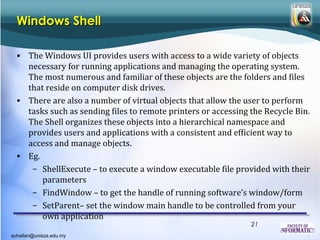
Windows Shell
                         Use windows shell API-
                         FindWindow and SetParent to
                         put YM application in UniSZA
                         Messenger application


                                            22
suhailan@unisza.edu.my
Text file communication

                                   Dump the value
                                   into a network
                                   shared text file
                                                           Our software read value in
                  Sensor software read                     the windLog.txt file via
                  wind log via RS232                       network sharing

WindSensor –
speed/direction


                                                                       Display the wind
                                                                       direction and
                                                                       speed value in a
                                                                       web via graphic


                                                               23
suhailan@unisza.edu.my                                www.vss.com.my
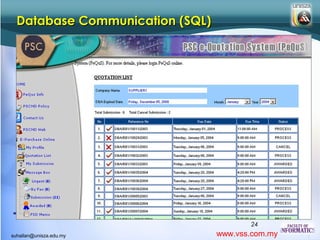
Database Communication (SQL)


                                        24
suhailan@unisza.edu.my           www.vss.com.my
TCP/IP Communication


                                25
suhailan@unisza.edu.my   www.vss.com.my
Enhance your software
  communication skills with
  FACEBOOK…


                          26
suhailan@unisza.edu.my

Communication skills in programming

  • 1.
    Communication Skills in Programming By : Suhailan bin Dato’ Hj. Safei Faculty of Informatics suhailan@unisza.edu.my suhailan@unisza.edu.my
  • 2.
    Communications – The message (data and information) is communicated via the signal – The transmission medium “carries” the signal Transmission medium Sender Signal Receiver suhailan@unisza.edu.my
  • 3.
  • 4.
    Communications in programming Sender Signal Receiver Keyboard, Mouse, Notepad, Word, Pdf, Pendrive, Harddisk, OS, Browser Hardware Send keyboard input to notepad Software Software Send pdf to printer Hardware Software Export MsWord to Pdf Software suhailan@unisza.edu.my
  • 5.
    Types of ProgrammingCommunication • Dynamic link library (DLL) • Component Object Model (COM) • ActiveX • Windows Shell • Text File • Database • Shared Memory • Serial command – comm port, AT command • Communication Protocol - TCP/IP, UDP, FTP, HTTP, POP3, etc. 5 suhailan@unisza.edu.my
  • 6.
    Dynamic Link Library • A dynamic-link library (DLL) is a module that contains functions and data that can be used by another module (application or DLL). • A DLL can define two kinds of functions: exported and internal. The exported functions are intended to be called by other modules, as well as from within the DLL where they are defined. Internal functions are typically intended to be called only from within the DLL where they are defined. Although a DLL can export data, its data is generally used only by its functions. However, there is nothing to prevent another module from reading or writing that address. • DLLs provide a way to modularize applications so that their functionality can be updated and reused more easily. DLLs also help reduce memory overhead when several applications use the same functionality at the same time, because although each application receives its own copy of the DLL data, the applications share the DLL code. Source: http://msdn.microsoft.com/en-us/library/windows/desktop/ms682589%28v=vs.85%29.aspx6 suhailan@unisza.edu.my
  • 7.
    Create DLL Compileand save this file as “Example.dll”. Source : http://en.wikipedia.org/wiki/DLL 7 suhailan@unisza.edu.my
  • 8.
    Call DLL Source : http://en.wikipedia.org/wiki/DLL 8 suhailan@unisza.edu.my
  • 9.
    DLL for OCR • ASPIRE – Download “AspriseOCR.dll” (http://asprise.com/product/ocr/download.php?lang=vb) To call the DLL using VB… Private Declare Function OCR Lib "AspriseOCR.dll" (ByVal file As String, ByVal imageType As Long) As String Private Sub Command3_Click() Dim txt As String txt = OCR ("C:pic1.bmp", -1) MsgBox "The text are:" & txt End Sub 9 suhailan@unisza.edu.my
  • 10.
    DLL Communication (PCICard) 10 suhailan@unisza.edu.my www.vss.com.my
  • 11.
    COM •Microsoft COM (Component Object Model) technology in the Microsoft Windows-family of Operating Systems enables software components to communicate. COM is used by developers to create re-usable software components, link components together to build applications, and take advantage of Windows services. COM objects can be created with a variety of programming languages. The family of COM technologies includes COM+, Distributed COM (DCOM) and ActiveX® Controls. • Microsoft provides COM interfaces for many Windows application programming interfaces such as Direct Show, Media Foundation, Packaging API, Windows Animation Manager, Windows Portable Devices, and Microsoft Active Directory (AD). • COM is used in applications such as the Microsoft Office Family of products. For example COM OLE technology allows Word documents to dynamically link to data in Excel spreadsheets and COM Automation allows users to build scripts in their applications to perform repetitive tasks or control one application from another. 11 suhailan@unisza.edu.my
  • 12.
    COM 12 suhailan@unisza.edu.my
  • 13.
    Using PHP tocall COM <?php $excel_app = new COM("Excel.application") or die ("Did not connect"); $excel_app->Application->Visible = 1; //Make Excel visible. $Workbook = $excel_app->Workbooks->Open("D:wampwwwtesttest.xlsx") or Die(“Failed"); $Worksheet = $Workbook->Worksheets("Sheet1"); $Worksheet->activate; echo $Worksheet->Range("A1")."-".$Worksheet->Range("B1")."<br>"; echo $Worksheet->Range("A2")."-".$Worksheet->Range("B2")."<br>"; $Workbook->Close; unset($Worksheet); unset($Workbook); $excel_app->Workbooks->Close(); $excel_app->Quit(); unset($excel_app); ?> 13 suhailan@unisza.edu.my
  • 14.
    ActiveX •ActiveX is a Microsoft-created technology that enables different software applications to share information and functionality. ActiveX only works on the Windows operating system. ActiveX and COM is same, as it was build under COM platform. The different is that ActiveX provides easier control graphical interface(running software component in your application). • ActiveX controls are mostly talked about in reference to Internet Explorer. You don't have to launch the Windows Media Player application separately to run a video clip on your browser. • Another common ActiveX control plays Flash files (.swf). Internet Explorer can't play Flash files by itself. That's something only the Adobe Flash Player can do. So Internet Explorer gives you the option of downloading and installing the Flash ActiveX Control. The Flash ActiveX Control automatically detects when a site contains Flash files. It then accesses the Flash player functionality at the operating system level and plays the files directly in the browser. 14 suhailan@unisza.edu.my
  • 15.
    ActiveX Communication Windows Media Player 15 suhailan@unisza.edu.my
  • 16.
    ActiveX Communication FITNewsTV application - VideoLAN player activeX running imported using Borland C++ Builder TCppWebBroswer – an VLC Media Player activeX of Internet Explorer 16 suhailan@unisza.edu.my
  • 17.
    Serial Command • Connection to other hardware (computer, modem, printer, microcontroller, sensors) can be done using serial cable such as RS232 (connection up to 15meter). 17 suhailan@unisza.edu.my
  • 18.
    Serial Communication (Microcontroller) RS232 cable microcontroller Temperature sensors for gas turbine Display temperature value here 18 suhailan@unisza.edu.my www.vss.com.my
  • 19.
    Serial Communication (UHF/Satellite) RS232 cable Send message from ship to ship using very small aperture satellite terminal (VSAT) 19 suhailan@unisza.edu.my www.vss.com.my
  • 20.
    Serial Communication (ATCommand) Water level sensor AT Command to Modem (serial com) Landline Display reservoir level microcontroller Telephone (telekom) RS232 Connected to microcontroller at site using modem 20 suhailan@unisza.edu.my www.vss.com.my
  • 21.
    Windows Shell • The Windows UI provides users with access to a wide variety of objects necessary for running applications and managing the operating system. The most numerous and familiar of these objects are the folders and files that reside on computer disk drives. • There are also a number of virtual objects that allow the user to perform tasks such as sending files to remote printers or accessing the Recycle Bin. The Shell organizes these objects into a hierarchical namespace and provides users and applications with a consistent and efficient way to access and manage objects. • Eg. – ShellExecute – to execute a window executable file provided with their parameters – FindWindow – to get the handle of running software’s window/form – SetParent– set the window main handle to be controlled from your own application 21 suhailan@unisza.edu.my
  • 22.
    Windows Shell Use windows shell API- FindWindow and SetParent to put YM application in UniSZA Messenger application 22 suhailan@unisza.edu.my
  • 23.
    Text file communication Dump the value into a network shared text file Our software read value in Sensor software read the windLog.txt file via wind log via RS232 network sharing WindSensor – speed/direction Display the wind direction and speed value in a web via graphic 23 suhailan@unisza.edu.my www.vss.com.my
  • 24.
    Database Communication (SQL) 24 suhailan@unisza.edu.my www.vss.com.my
  • 25.
    TCP/IP Communication 25 suhailan@unisza.edu.my www.vss.com.my
  • 26.
    Enhance your software communication skills with FACEBOOK… 26 suhailan@unisza.edu.my