Define communication portable devices. 
Devices that are used for communication with us and with other devices 
which are also easy to carry around on one’s person. 
Portable communication devices usage 
Personal Digital Assistant (PDA) 
Personal organizer, Internet browsing, 
scheduling appointments, Telephone calls, 
recording addresses and phone calls. 
Smart phones 
Phone calls, Sending and receiving messages, 
internet access, send and receive files and 
images. 
Global Positioning System 
(GPS) 
Allows you to know your position anywhere on 
Earth, the distance travelled and speed. 
Satellite Navigation system 
Determining a vehicle's location via sensors or 
maps and providing suggested directions to 
the vehicle via text or speech. 
Portable DVD players 
Used in cars for passengers to watch movies/ 
videos while on along journey. 
Portable media players 
Downloading music and radio/ television 
programs, Downloading data from the internet 
and Transferring data from a computer to 
another. 
Bluetooth 
Communication between a mobile phone and 
headset, connecting wirelessly to a printer, 
mouse and keyboards, transferring data 
between devices and connecting game 
consoles to their wireless controllers.
Portable communication 
devices 
Advantages Disadvantages 
Personal Digital Assistant 
(PDA) 
-Can be used remote from 
the place of work. 
-Easier to carry than 
laptops. 
-Difficult to enter much 
text. 
-They are about as 
expensive as laptops. 
Mobile phones 
-can be used while 
travelling (portable) 
-send photographs/ videos. 
-Quality of photographs/ 
videos can be poor. 
-Can lose connection. 
- Displays are small 
compared to other devices. 
Global Positioning System 
(GPS) 
-Positioning and distance 
travelled can be achieved 
regardless of the 
surrounding land (Eg: long 
trees) 
-Greater accuracy for 
measuring distances than 
using cars or bicycles. 
-Transmission of data can 
be a little slow at times, 
leading to slight 
inaccuracies. 
-Expensive devices. 
Satellite Navigation 
system 
-Quicker to use than a 
normal road map. 
-They receive up-to-date 
traffic conditions. 
-The display is very small. 
-Unsuitable roads can be 
recommended. 
Portable DVD players 
-They are small and 
compact. 
-They can play music from 
CDs. 
-The screen is low 
resolution and the quality 
of viewing can be poor. 
-Difficult to view (small 
screen). 
Portable media 
players 
-They are compact. 
-They can hold up to 100 
GB of data. 
-They have very small 
screens. 
-earphones that come with 
the player are low quality. 
Bluetooth 
-Can be used for variety of 
applications. 
-It has cheaper hardware 
requirements than Wi-Fi. 
-Consumes less power that 
Wi-Fi. 
-Data transfer rate is 
slower than with Wi-Fi. 
-It covers smaller 
distances than Wi-Fi.

Communication portable devices

  • 1.
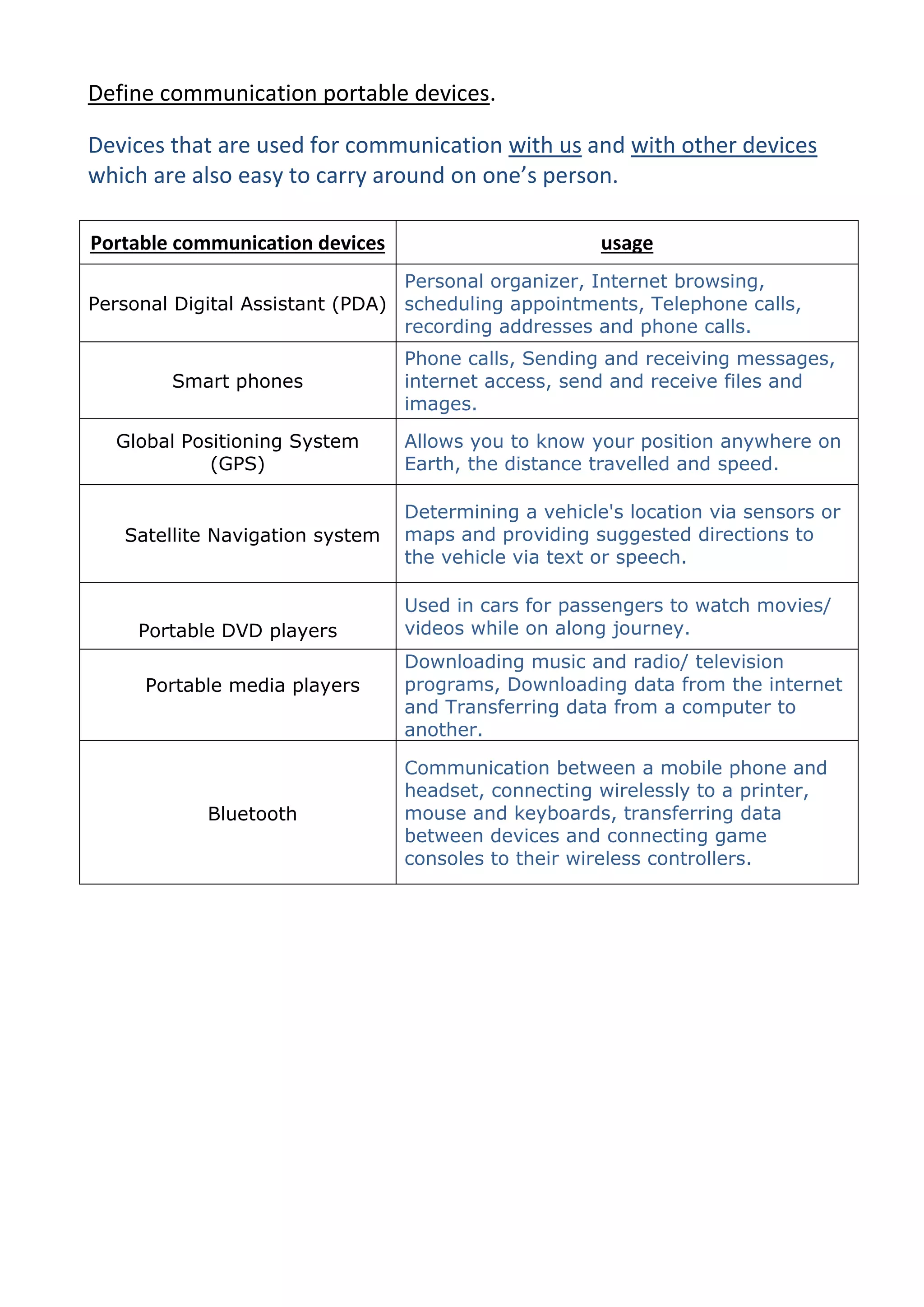
    Define communication portabledevices. Devices that are used for communication with us and with other devices which are also easy to carry around on one’s person. Portable communication devices usage Personal Digital Assistant (PDA) Personal organizer, Internet browsing, scheduling appointments, Telephone calls, recording addresses and phone calls. Smart phones Phone calls, Sending and receiving messages, internet access, send and receive files and images. Global Positioning System (GPS) Allows you to know your position anywhere on Earth, the distance travelled and speed. Satellite Navigation system Determining a vehicle's location via sensors or maps and providing suggested directions to the vehicle via text or speech. Portable DVD players Used in cars for passengers to watch movies/ videos while on along journey. Portable media players Downloading music and radio/ television programs, Downloading data from the internet and Transferring data from a computer to another. Bluetooth Communication between a mobile phone and headset, connecting wirelessly to a printer, mouse and keyboards, transferring data between devices and connecting game consoles to their wireless controllers.
  • 2.
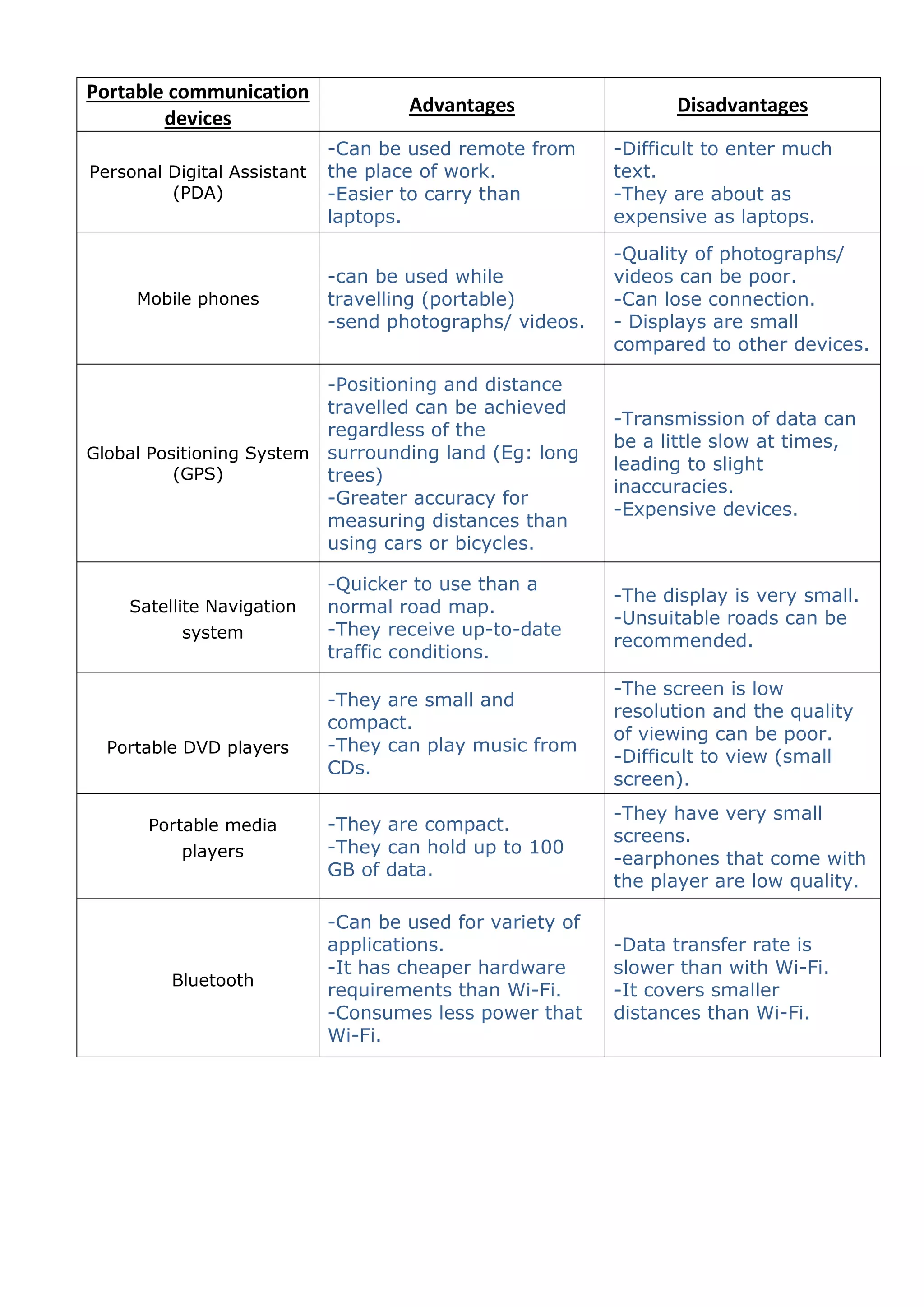
    Portable communication devices Advantages Disadvantages Personal Digital Assistant (PDA) -Can be used remote from the place of work. -Easier to carry than laptops. -Difficult to enter much text. -They are about as expensive as laptops. Mobile phones -can be used while travelling (portable) -send photographs/ videos. -Quality of photographs/ videos can be poor. -Can lose connection. - Displays are small compared to other devices. Global Positioning System (GPS) -Positioning and distance travelled can be achieved regardless of the surrounding land (Eg: long trees) -Greater accuracy for measuring distances than using cars or bicycles. -Transmission of data can be a little slow at times, leading to slight inaccuracies. -Expensive devices. Satellite Navigation system -Quicker to use than a normal road map. -They receive up-to-date traffic conditions. -The display is very small. -Unsuitable roads can be recommended. Portable DVD players -They are small and compact. -They can play music from CDs. -The screen is low resolution and the quality of viewing can be poor. -Difficult to view (small screen). Portable media players -They are compact. -They can hold up to 100 GB of data. -They have very small screens. -earphones that come with the player are low quality. Bluetooth -Can be used for variety of applications. -It has cheaper hardware requirements than Wi-Fi. -Consumes less power that Wi-Fi. -Data transfer rate is slower than with Wi-Fi. -It covers smaller distances than Wi-Fi.