UNIT III MESSAGE ROUTING
TECHNOLOGIES
Circuit switching, packet switching, message
switching. Internet protocols; IPV4, IPV6, ARP,
RARP, ICMP, IGMP, VPN. Network Routing
Algorithms:- Distance vector routing, OSPF,
Dijikstra‘s , Bellaman Ford, Congestion control
algorithms
Network Layer
•The Network layer is responsible for
the source-to-destination delivery of a
packet possible across multiple
networks.
• It converts Frames into packets.
• Switching
• Source-to-Destination delivery of a
packet Logical addressing
• Routing
• Internetworking
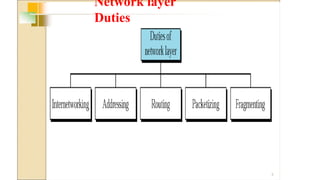
Network layer
Duties
3
Switching
• A network is a set of connected devices(Whenever we
have multiple devices, we have the problem of how to
connect them to make one-to-one communication
possible)
• One solution is to make a point-to-point connection
between each pair of devices (a mesh topology) or
between a central device and every other device (a star
topology).
• These methods, however, are impractical and wasteful
when applied to very large networks.
• The number and length of the links require too much
infrastructure to be cost-efficient, and the majority of
those links would be idle most of the time.
A better solution is SWITCHING
Switching
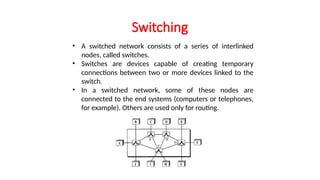
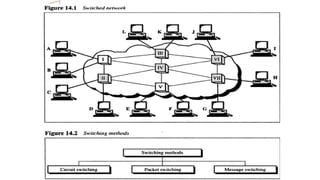
• A switched network consists of a series of interlinked
nodes, called switches.
• Switches are devices capable of creating temporary
connections between two or more devices linked to the
switch.
• In a switched network, some of these nodes are
connected to the end systems (computers or telephones,
for example). Others are used only for routing.
Switching Concepts
Switches are hardware or software devices used
for temporary connection b/w 2 or more
devices linked to the switch in network but not
to each another
Switches are needed to connect multiple devices
for making one-one communication
TYPES:
•
•
•
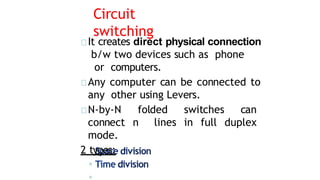
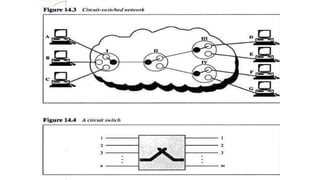
Circuit
switching
It creates direct physical connection
b/w two devices such as phone
or computers.
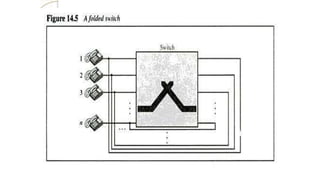
Any computer can be connected to
any other using Levers.
N-by-N folded switches can
connect n lines in full duplex
mode.
2 types:
◦
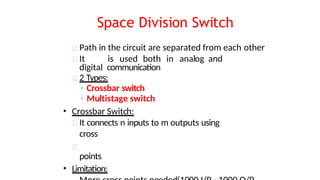
Space Division Switch
Path in the circuit are separated from each other
It is used both in analog and
digital communication
2 Types:
◦ Crossbar switch
◦ Multistage switch
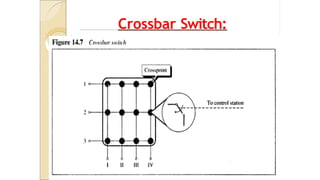
• Crossbar Switch:
It connects n inputs to m outputs using
cross
points
• Limitation:
Crossbar Switch:
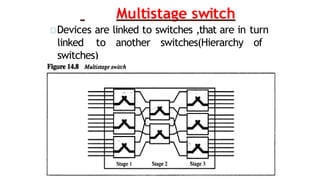
Multistage switch
Devices are linked to switches ,that are in turn
linked to another switches(Hierarchy of
switches)
Blocking:
The reduction in a number of cross
points causes a phenomena called
Blocking.
During heavy traffic one input
cannot be connected to output
because no path available
Time Division Switches
It uses time division multiplexing
2 methods:
Time slot
interchange TDM
bus
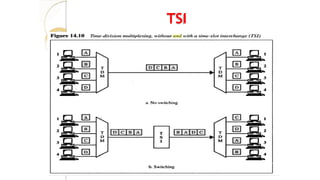
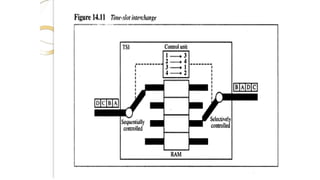
Time slot
interchange:
It changesthe ordering of the slot based on
the desired connection
It uses RAM to store time
slot Ex:
1->3 2->4 3->1 4-
TSI
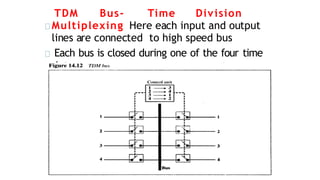
TDM Bus- Time Division
Multiplexing Here each input and output
lines are connected to high speed bus
Each bus is closed during one of the four time
slots
Limitations of Circuit
Switching
• It is specially designed for
voice suitabl
e
communication(telephone).
Not for data communication.
• Once a circuit is
established, it remains
for
duration of the session. It
creates
dialed(temporary)and
leased(Permanent).
• Less data rate because of point
to connection.
poin
t
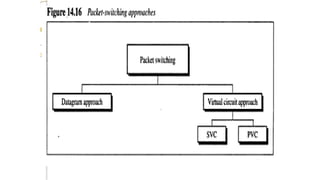
Packet
switching
• Packet switching is better for
data transmission.
• Here data are transmitted through unit
of variable length blocks called packets.
• Longer transmission are
divided multiple packets.
• Packet length is decided by
network.
int
o
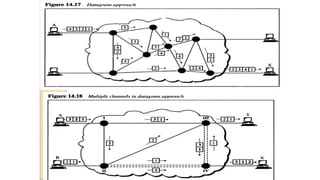
Datagram Approach
• In this approach a message is divided
into multiple packets.
• All packets choose various routes
and reaches the destination.
• Ordering of packets in destination is done
by transport layer
.
DatagramApproach
Virtual Circuit approach
It uses single route to send all packets of
the message
Two formats:
◦ Switched virtual circuit
◦ Permanent virtual circuit
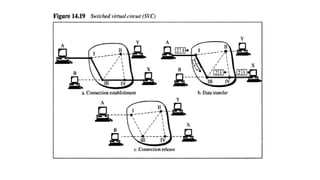
SVC
• Connection is temporary
• Dial-up lines
DuringTransmission.
A connection is established-all
packets proper ACK- Connection is
terminated
are sent –
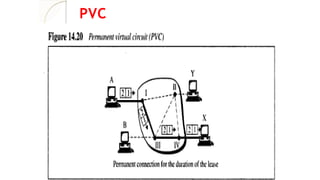
PVC
• Connection is permanent.
• Circuit is dedicated for two users, No one
else can use the line when
communication takes place.
• It always gets the same route.
• Leased lines.
During Transmission.
No connection establishment or termination
PVC
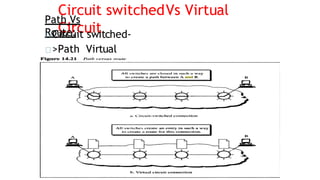
Circuit switchedVs Virtual
Circuit
Path Vs
Route:
Circuit switched-
>Path Virtual
Circuit->route
Message
Switching
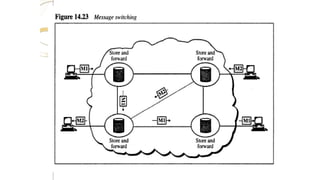
• It uses a mechanism called store and
forward
• Here a message is received and stored
until a appropriate route is free, then
sends along.
• Message switching- uses
secondary storage(Disk)
• Packet switching – uses
primary storage(RAM)
20.32
20-1 INTERNETWORKING
In this section, we discuss internetworking, connecting
networks together to make an internetwork or an
internet.
Need for Network Layer
Internet as a Datagram Network
Internet as a Connectionless Network
Topics discussed in this section:
20.33
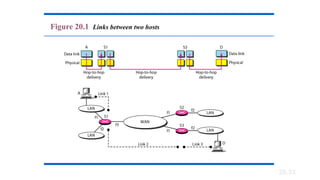
Figure 20.1 Links between two hosts
20.34
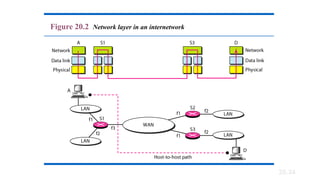
Figure 20.2 Network layer in an internetwork
20.35
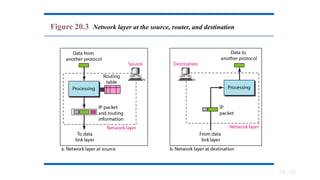
Figure 20.3 Network layer at the source, router, and destination
20.36
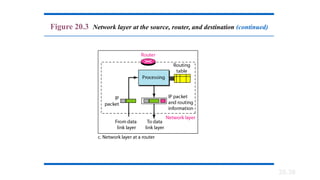
Figure 20.3 Network layer at the source, router, and destination (continued)
20.37
Switching at the network layer in the
Internet uses the datagram approach to
packet switching.
Note
20.38
Communication at the network layer in
the Internet is connectionless.
Note
20.39
20-2 IPv4
The Internet Protocol version 4 (IPv4) is the delivery
mechanism used by the TCP/IP protocols.
Datagram
Fragmentation
Checksum
Options
Topics discussed in this section:
20.40
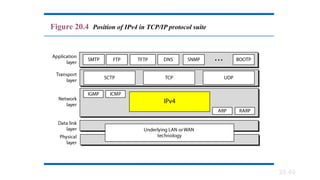
Figure 20.4 Position of IPv4 in TCP/IP protocol suite
20.41
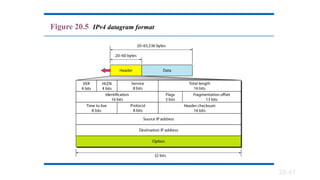
Figure 20.5 IPv4 datagram format
Version (VER). This 4-bit field defines the version of the IPv4
protocol. Currently the version is 4. However, version 6 (or IPng) may
totally replace version 4 in the future
Header length (HLEN). This 4-bit field defines the total
length of the datagram header in 4-byte words. This field is needed
because the length of the header is variable (between 20 and 60 bytes).
When there are no options, the header length is 20 bytes, and the value
of this field is 5 (5 x 4 = 20). When the option field is at its maximum
size, the value of this field is 15 (15 x 4 = 60).
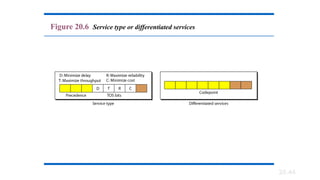
Services. IETF has changed the interpretation and name of this
8-bit field. This field, previously called service type, is now called
differentiated services.
20.42
· Total Length---Specifies the length, in bytes, of the entire IP packet.
· Identification---Contains an integer that identifies the current datagram.
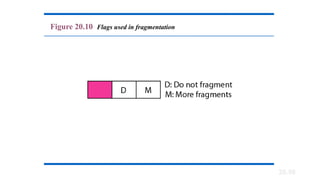
· Flags---The two low-order (least-significant) bits control fragmentation. The low-order bit
specifies whether the packet can be fragmented. The middle bit specifies whether the
packet is the last fragment in a series of fragmented packets. The third or high-order bit is
not used.
· Fragment Offset---Indicates the position of the fragment's data relative to the beginning of
the data in the original datagram.
· Time-to-Live---Maintains a counter that gradually decrements down to zero, at which point
the datagram is discarded. This keeps packets from looping endlessly.
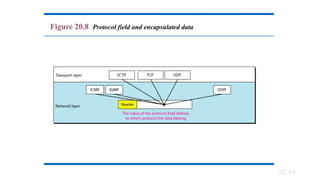
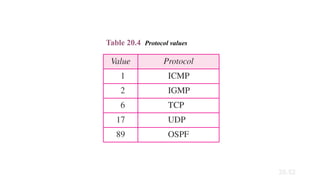
· Protocol---Indicates which upper-layer protocol receives incoming packets after IP processing
is complete.
· Header Checksum---Helps ensure IP header integrity.
· Source Address---Specifies the sending node.
· Destination Address---Specifies the receiving node.
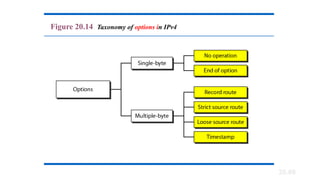
· Options---Allows IP to support various options, such as security.
· Data---Contains upper-layer information.
20.44
Figure 20.6 Service type or differentiated services
20.45
The precedence subfield was part of
version 4, but never used.
Note
20.46
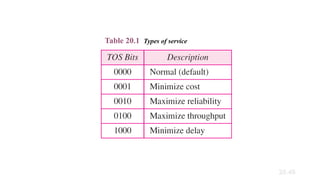
Table 20.1 Types of service
20.47
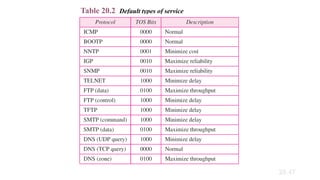
Table 20.2 Default types of service
20.48
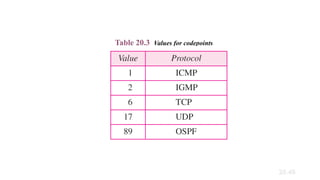
Table 20.3 Values for codepoints
20.49
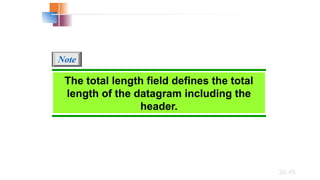
The total length field defines the total
length of the datagram including the
header.
Note
20.50
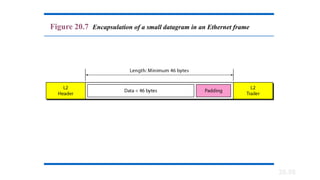
Figure 20.7 Encapsulation of a small datagram in an Ethernet frame
20.51
Figure 20.8 Protocol field and encapsulated data
20.52
Table 20.4 Protocol values
20.53
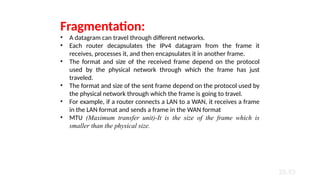
Fragmentation:
• A datagram can travel through different networks.
• Each router decapsulates the IPv4 datagram from the frame it
receives, processes it, and then encapsulates it in another frame.
• The format and size of the received frame depend on the protocol
used by the physical network through which the frame has just
traveled.
• The format and size of the sent frame depend on the protocol used by
the physical network through which the frame is going to travel.
• For example, if a router connects a LAN to a WAN, it receives a frame
in the LAN format and sends a frame in the WAN format
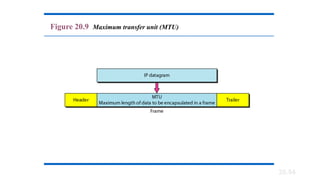
• MTU (Maximum transfer unit)-It is the size of the frame which is
smaller than the physical size.
20.54
Figure 20.9 Maximum transfer unit (MTU)
20.55
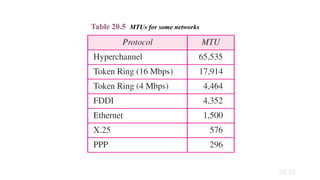
Table 20.5 MTUs for some networks
20.56
Figure 20.10 Flags used in fragmentation
20.57
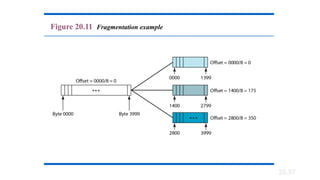
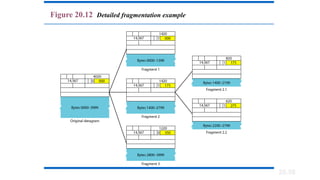
Figure 20.11 Fragmentation example
20.58
Figure 20.12 Detailed fragmentation example
20.59
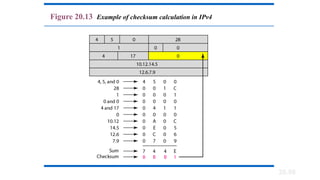
Figure 20.13 Example of checksum calculation in IPv4
20.60
Figure 20.14 Taxonomy of options in IPv4
20.61
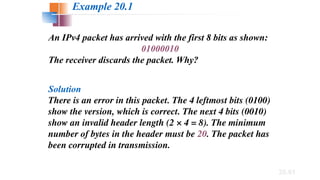
An IPv4 packet has arrived with the first 8 bits as shown:
01000010
The receiver discards the packet. Why?
Solution
There is an error in this packet. The 4 leftmost bits (0100)
show the version, which is correct. The next 4 bits (0010)
show an invalid header length (2 × 4 = 8). The minimum
number of bytes in the header must be 20. The packet has
been corrupted in transmission.
Example 20.1
20.62
In an IPv4 packet, the value of HLEN is 1000 in binary.
How many bytes of options are being carried by this
packet?
Solution
The HLEN value is 8, which means the total number of
bytes in the header is 8 × 4, or 32 bytes. The first 20 bytes
are the base header, the next 12 bytes are the options.
Example 20.2
20.63
In an IPv4 packet, the value of HLEN is 5, and the value
of the total length field is 0x0028. How many bytes of
data are being carried by this packet?
Solution
The HLEN value is 5, which means the total number of
bytes in the header is 5 × 4, or 20 bytes (no options). The
total length is 40 bytes, which means the packet is
carrying 20 bytes of data (40 − 20).
Example 20.3
20.64
An IPv4 packet has arrived with the first few hexadecimal
digits as shown.
0x45000028000100000102 . . .
How many hops can this packet travel before being
dropped? The data belong to what upper-layer protocol?
Solution
To find the time-to-live field, we skip 8 bytes. The time-to-
live field is the ninth byte, which is 01. This means the
packet can travel only one hop. The protocol field is the
next byte (02), which means that the upper-layer protocol
is IGMP.
Example 20.4
19-1 IPv4ADDRESSES
An IPv4 address is a 32-bit address that uniquely and
universally defines the connection of a device (for
example, a computer or a router) to the Internet.
Topics discussed in this section:
Address Space
Notations
Classful Addressing
Classless
Addressing
Network Address
Translation (NAT)
19.
An IPv4 address is 32 bits long.
Note
19.
The IPv4 addresses are unique
and universal.
Note
19.
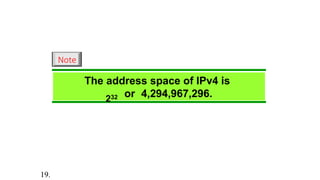
The address space of IPv4 is
232 or 4,294,967,296.
Note
19.
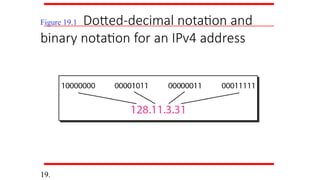
Figure 19.1 Dotted-decimal notation and
binary notation for an IPv4 address
19.
Numbering systems are reviewed in
Appendix B.
Note
19.
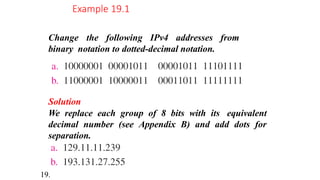
Change the following IPv4 addresses from
binary notation to dotted-decimal notation.
Example 19.1
Solution
We replace each group of 8 bits with its equivalent
decimal number (see Appendix B) and add dots for
separation.
19.
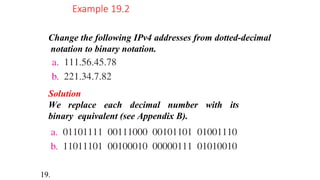
Change the following IPv4 addresses from dotted-decimal
notation to binary notation.
Example 19.2
Solution
We replace each decimal number with its
binary equivalent (see Appendix B).
19.
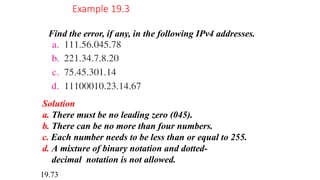
Find the error, if any, in the following IPv4 addresses.
Example 19.3
Solution
a. There must be no leading zero (045).
b. There can be no more than four numbers.
c. Each number needs to be less than or equal to 255.
d. A mixture of binary notation and dotted-
decimal notation is not allowed.
19.73
In classful addressing, the address
space is divided into five classes:
A, B, C, D, and E.
Note
19.74
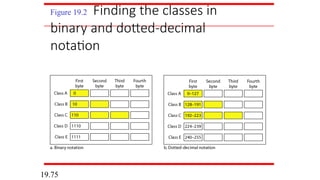
Figure 19.2 Finding the classes in
binary and dotted-decimal
notation
19.75
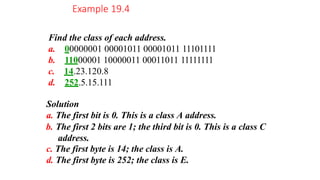
Find the class of each address.
a. 00000001 00001011 00001011 11101111
b. 11000001 10000011 00011011 11111111
c. 14.23.120.8
d. 252.5.15.111
Solution
a. The first bit is 0. This is a class A address.
b. The first 2 bits are 1; the third bit is 0. This is a class C
address.
c. The first byte is 14; the class is A.
d. The first byte is 252; the class is E.
Example 19.4
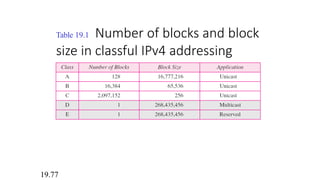
Table 19.1 Number of blocks and block
size in classful IPv4 addressing
19.77
In classful addressing, a large part of
the available addresses were
wasted.
Note
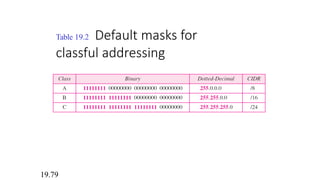
Table 19.2 Default masks for
classful addressing
19.79
Classful addressing, which is almost
obsolete, is replaced with classless
addressing.
Note
19.80
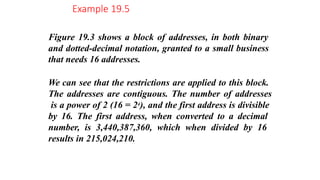
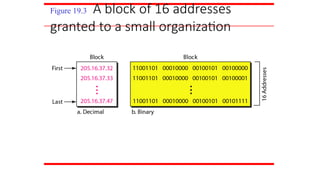
Figure 19.3 shows a block of addresses, in both binary
and dotted-decimal notation, granted to a small business
that needs 16 addresses.
We can see that the restrictions are applied to this block.
The addresses are contiguous. The number of addresses
is a power of 2 (16 = 24), and the first address is divisible
by 16. The first address, when converted to a decimal
number, is 3,440,387,360, which when divided by 16
results in 215,024,210.
Example 19.5
Figure 19.3 A block of 16 addresses
granted to a small organization
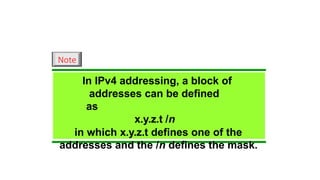
In IPv4 addressing, a block of
addresses can be defined
as
x.y.z.t /n
in which x.y.z.t defines one of the
addresses and the /n defines the mask.
Note
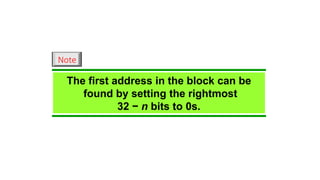
The first address in the block can be
found by setting the rightmost
32 − n bits to 0s.
Note
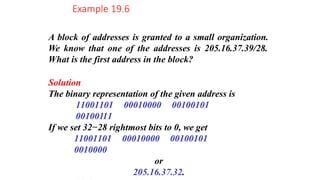
A block of addresses is granted to a small organization.
We know that one of the addresses is 205.16.37.39/28.
What is the first address in the block?
Solution
The binary representation of the given address is
11001101 00010000 00100101
00100111
If we set 32−28 rightmost bits to 0, we get
11001101 00010000 00100101
0010000
or
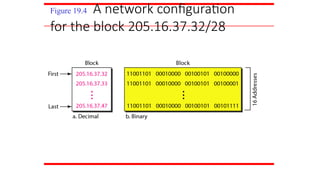
205.16.37.32.
Example 19.6
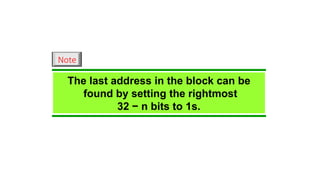
The last address in the block can be
found by setting the rightmost
32 − n bits to 1s.
Note
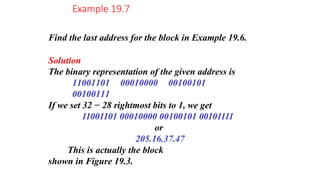
Find the last address for the block in Example 19.6.
Solution
The binary representation of the given address is
11001101 00010000 00100101
00100111
If we set 32 − 28 rightmost bits to 1, we get
11001101 00010000 00100101 00101111
or
205.16.37.47
This is actually the block
shown in Figure 19.3.
Example 19.7
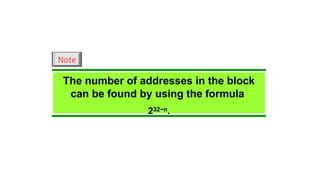
The number of addresses in the block
can be found by using the formula
232−n.
Note
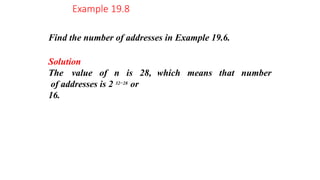
Find the number of addresses in Example 19.6.
Example 19.8
Solution
The value of n is 28,
of addresses is 2 32−28
or
16.
which means that number
Another way to find the first address, the last address, and
the number of addresses is to represent the mask as a 32-
bit binary (or 8-digit hexadecimal) number. This is
particularly useful when we are writing a program to find
these pieces of information. In Example 19.5 the /28 can
be represented as
11111111 11111111 11111111 11110000
(twenty-eight 1s and four 0s).
Find
a. The first address
b. The last address
c. The number of addresses.
Example 19.9
Solution
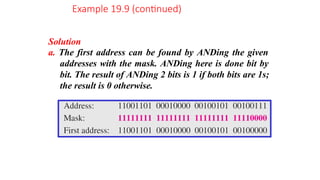
a. The first address can be found by ANDing the given
addresses with the mask. ANDing here is done bit by
bit. The result of ANDing 2 bits is 1 if both bits are 1s;
the result is 0 otherwise.
Example 19.9 (continued)
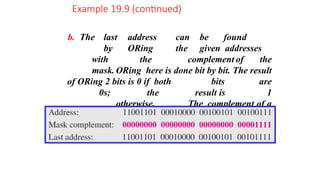
b. The last address can be found
by ORing the given addresses
with the complement of the
mask. ORing here is done bit by bit. The result
of ORing 2 bits is 0 if both bits are
0s; the result is 1
otherwise. The complement of a
number is found by changing each 1
to 0 and each 0 to 1.
Example 19.9 (continued)
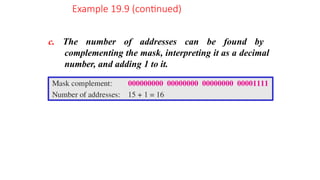
c. The number of addresses can be found by
complementing the mask, interpreting it as a decimal
number, and adding 1 to it.
Example 19.9 (continued)
Figure 19.4 A network configuration
for the block 205.16.37.32/28
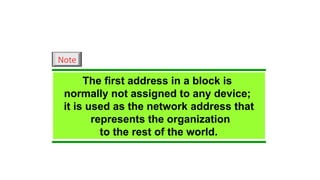
The first address in a block is
normally not assigned to any device;
it is used as the network address that
represents the organization
to the rest of the world.
Note
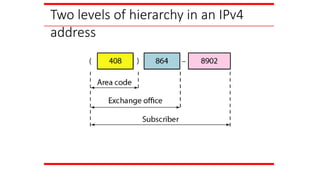
Two levels of hierarchy in an IPv4
address
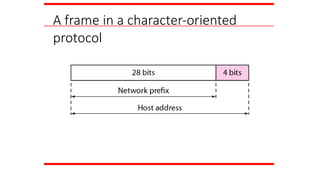
A frame in a character-oriented
protocol
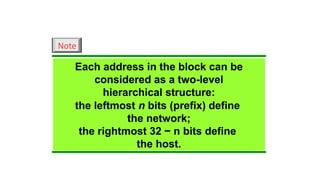
Each address in the block can be
considered as a two-level
hierarchical structure:
the leftmost n bits (prefix) define
the network;
the rightmost 32 − n bits define
the host.
Note
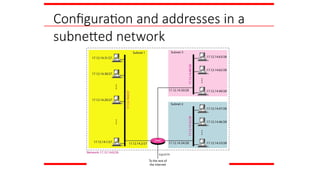
Configuration and addresses in a
subnetted network
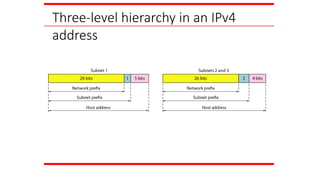
Three-level hierarchy in an IPv4
address
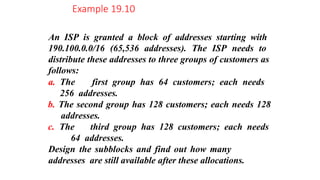
An ISP is granted a block of addresses starting with
190.100.0.0/16 (65,536 addresses). The ISP needs to
distribute these addresses to three groups of customers as
follows:
a. The first group has 64 customers; each needs
256 addresses.
b. The second group has 128 customers; each needs 128
addresses.
c. The third group has 128 customers; each needs
64 addresses.
Design the subblocks and find out how many
addresses are still available after these allocations.
Example 19.10
Solution
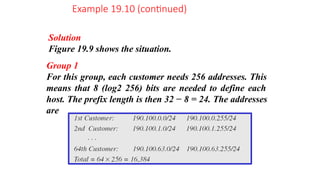
Figure 19.9 shows the situation.
Group 1
For this group, each customer needs 256 addresses. This
means that 8 (log2 256) bits are needed to define each
host. The prefix length is then 32 − 8 = 24. The addresses
are
Example 19.10 (continued)
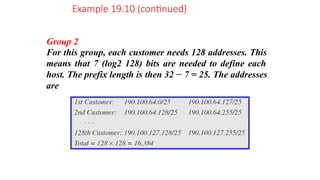
Group 2
For this group, each customer needs 128 addresses. This
means that 7 (log2 128) bits are needed to define each
host. The prefix length is then 32 − 7 = 25. The addresses
are
Example 19.10 (continued)
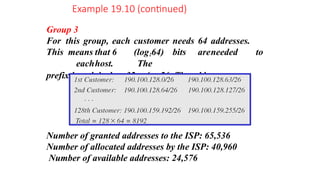
Group 3
For this group, each customer needs 64 addresses.
This means that 6 (log264) bits areneeded to
eachhost. The
prefix length is then 32 − 6 = 26. The addresses are
Number of granted addresses to the ISP: 65,536
Number of allocated addresses by the ISP: 40,960
Number of available addresses: 24,576
The network layer protocol in the TCP/IP protocol suite
is currently IPv4. Although IPv4 is well designed, data
communication has evolved since the inception of IPv4
in the 1970s. IPv4 has some deficiencies that make it
unsuitable for the fast-growing Internet.
Advantages
Packet Format
Extension Headers
Topics discussed in this section:
IPv6
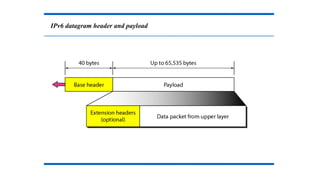
IPv6 datagram header and payload
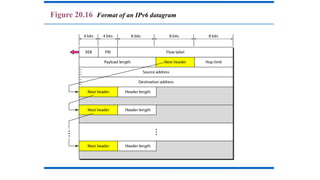
Figure 20.16 Format of an IPv6 datagram
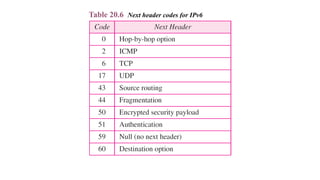
Table 20.6 Next header codes for IPv6
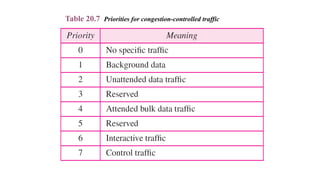
Table 20.7 Priorities for congestion-controlled traffic
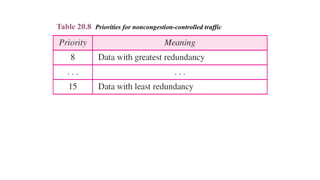
Table 20.8 Priorities for noncongestion-controlled traffic
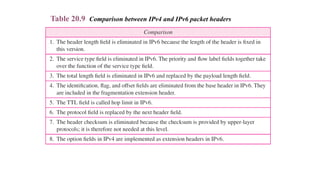
Table 20.9 Comparison between IPv4 and IPv6 packet headers
20.112
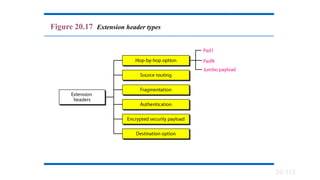
Figure 20.17 Extension header types
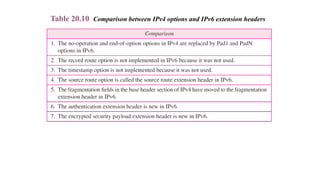
Table 20.10 Comparison between IPv4 options and IPv6 extension headers
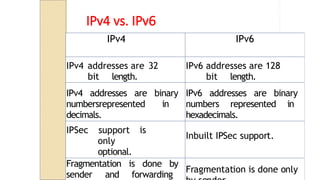
IPv4 vs. IPv6
IPv4 IPv6
IPv4 addresses are 32
bit length.
IPv6 addresses are 128
bit length.
IPv4 addresses are binary
numbersrepresented in
decimals.
IPv6 addresses are binary
numbers represented in
hexadecimals.
IPSec support is
only
optional.
Inbuilt IPSec support.
Fragmentation is done by
sender and forwarding
Fragmentation is done only
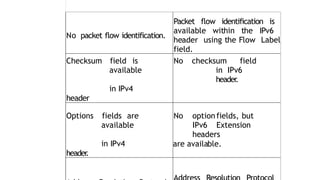
No packet flow identification.
Packet flow identification is
available within the IPv6
header using the Flow Label
field.
Checksum field is
available
in IPv4
header
No checksum field
in IPv6
header
.
Options fields are
available
in IPv4
header
.
No optionfields, but
IPv6 Extension
headers
are available.
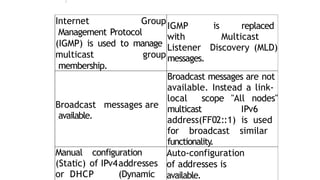
Internet Group
Management Protocol
(IGMP) is used to manage
multicast group
membership.
IGMP is replaced
with Multicast
Listener Discovery (MLD)
messages.
Broadcast messages are
available.
Broadcast messages are not
available. Instead a link-
local scope "All nodes"
multicast IPv6
address(FF02::1) is used
for broadcast similar
functionality.
Manual configuration
(Static) of IPv4addresses
or DHCP (Dynamic
Auto-configuration
of addresses is
available.
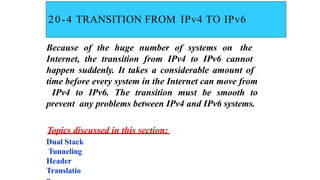
20-4 TRANSITION FROM IPv4 TO IPv6
Because of the huge number of systems on the
Internet, the transition from IPv4 to IPv6 cannot
happen suddenly. It takes a considerable amount of
time before every system in the Internet can move from
IPv4 to IPv6. The transition must be smooth to
prevent any problems between IPv4 and IPv6 systems.
Topics discussed in this section:
Dual Stack
Tunneling
Header
Translatio
•Complete transition from IPv4 to IPv6 might
not be possible because IPv6 is not backward
compatible.
•This results in a situation where either a site is
on IPv6 or it is not.
•It is unlike implementation of other new
technologies where the newer one is backward
compatible so the older system can still work
with the newer version without any additional
changes.
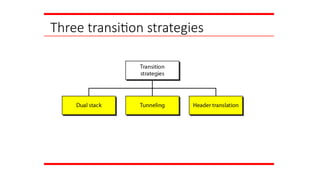
Three transition strategies
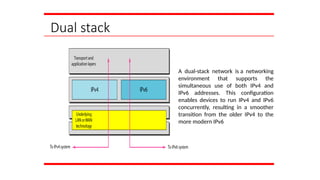
Dual stack
A dual-stack network is a networking
environment that supports the
simultaneous use of both IPv4 and
IPv6 addresses. This configuration
enables devices to run IPv4 and IPv6
concurrently, resulting in a smoother
transition from the older IPv4 to the
more modern IPv6
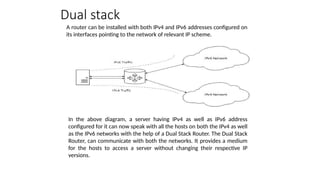
A router can be installed with both IPv4 and IPv6 addresses configured on
its interfaces pointing to the network of relevant IP scheme.
Dual stack
In the above diagram, a server having IPv4 as well as IPv6 address
configured for it can now speak with all the hosts on both the IPv4 as well
as the IPv6 networks with the help of a Dual Stack Router. The Dual Stack
Router, can communicate with both the networks. It provides a medium
for the hosts to access a server without changing their respective IP
versions.
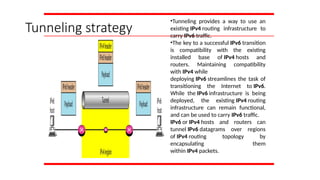
Tunneling strategy
•Tunneling provides a way to use an
existing IPv4 routing infrastructure to
carry IPv6 traffic.
•The key to a successful IPv6 transition
is compatibility with the existing
installed base of IPv4 hosts and
routers. Maintaining compatibility
with IPv4 while
deploying IPv6 streamlines the task of
transitioning the Internet to IPv6.
While the IPv6 infrastructure is being
deployed, the existing IPv4 routing
infrastructure can remain functional,
and can be used to carry IPv6 traffic.
IPv6 or IPv4 hosts and routers can
tunnel IPv6 datagrams over regions
of IPv4 routing topology by
encapsulating them
within IPv4 packets.
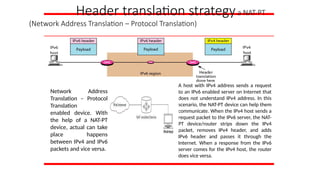
Header translation strategya NAT-PT
(Network Address Translation – Protocol Translation)
Network Address
Translation – Protocol
Translation
enabled device. With
the help of a NAT-PT
device, actual can take
place happens
between IPv4 and IPv6
packets and vice versa.
A host with IPv4 address sends a request
to an IPv6 enabled server on Internet that
does not understand IPv4 address. In this
scenario, the NAT-PT device can help them
communicate. When the IPv4 host sends a
request packet to the IPv6 server, the NAT-
PT device/router strips down the IPv4
packet, removes IPv4 header, and adds
IPv6 header and passes it through the
Internet. When a response from the IPv6
server comes for the IPv4 host, the router
does vice versa.
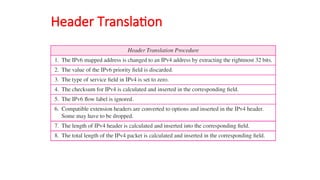
Header Translation
Why IPv6?
Deficiency of IPv4
Address space
exhaustion
New types of service 
Integration
◦ Multicast
◦ Quality of Service
◦ Security
◦ Mobility (MIPv6)
Header and format
Advantages of IPv6 over IPv4
Larger address
space Better
header format
New options
Allowance for extension
Support for resource
allocation Support for more
security Support for
mobility
IPv4 companion protocols (1)
ARP: Address Resolution Protocol
◦ Mapping from IP address to MAC address
ICMP: Internet Control Message
Protocol
◦ Error reporting & Query
IGMP: Internet Group Management
Protocol
◦ Multicast member join/leave
Unicast Routing Protocols (Intra-AS)
◦ Maintaining Unicast Routing Table
◦ E.g. RIP, OSPF (Open Shortest Path
IPv4 companion protocols (2)
Multicast Routing Protocols
◦ Maintaining Multicast Routing Table
◦ E.g. DVMRP, MOSPF, CBT, PIM
Exterior Routing Protocols (Inter-
AS)
◦ E.g. BGP (Border Gateway Protocol)
Quality-of-Service Frameworks
◦ Integrated Service (ISA, IntServ)
◦ Differentiated Service (DiffServ)
21-1 ADDRESS MAPPING
The delivery of a packet to a host or a router requires
two levels of addressing: logical and physical. We need
to be able to map a logical address to its corresponding
physical address and vice versa. This can be done by
using either static or dynamic mapping.
Topics discussed in this section:
Mapping Logical to Physical
Address Mapping Physical to
Logical Address
21.2
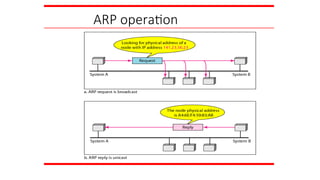
ARP operation
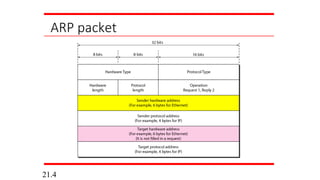
ARP packet
21.4
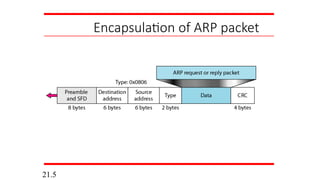
Encapsulation of ARP packet
21.5
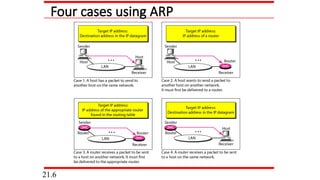
Four cases using ARP
21.6
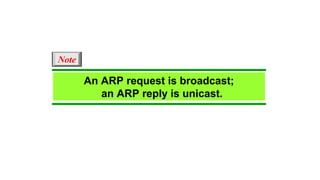
An ARP request is broadcast;
an ARP reply is unicast.
Note
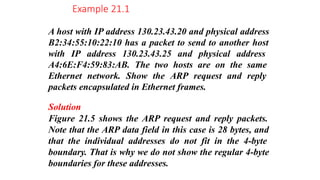
A host with IP address 130.23.43.20 and physical address
B2:34:55:10:22:10 has a packet to send to another host
with IP address 130.23.43.25 and physical address
A4:6E:F4:59:83:AB. The two hosts are on the same
Ethernet network. Show the ARP request and reply
packets encapsulated in Ethernet frames.
Solution
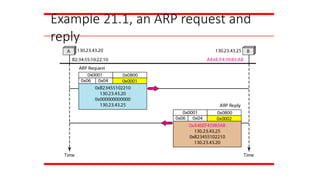
Figure 21.5 shows the ARP request and reply packets.
Note that the ARP data field in this case is 28 bytes, and
that the individual addresses do not fit in the 4-byte
boundary. That is why we do not show the regular 4-byte
boundaries for these addresses.
Example 21.1
Example 21.1, an ARP request and
reply
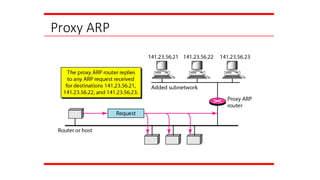
Proxy ARP
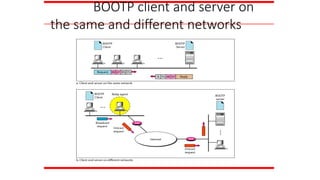
BOOTP client and server on
the same and different networks
DHCP provides static and dynamic
address allocation that can be
manual or automatic.
Note
21-2 ICMP
The IP protocol has no error-reporting or error-
correcting mechanism. The IP protocol also lacks a
mechanism for host and management queries. The
Internet Control Message Protocol (ICMP) has been
designed to compensate for the above two deficiencies.
It is a companion to the IP protocol.
Topics discussed in this section:
Types of Messages
Message Format
Error Reporting and Query
Debugging Tools
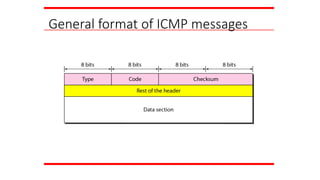
General format of ICMP messages
ICMP always reports error messages to
the original source.
Note
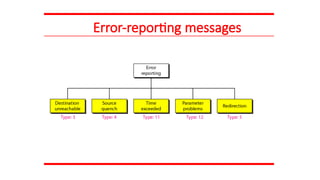
Error-reporting messages
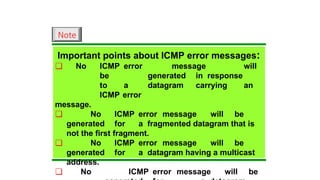
Important points about ICMP error messages:
❏ No ICMP error message will
be generated in response
to a datagram carrying an
ICMP error
message.
❏ No ICMP error message will be
generated for a fragmented datagram that is
not the first fragment.
❏ No ICMP error message will be
generated for a datagram having a multicast
address.
❏ No ICMP error message will be
Note
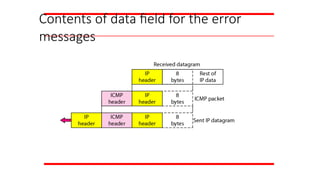
Contents of data field for the error
messages
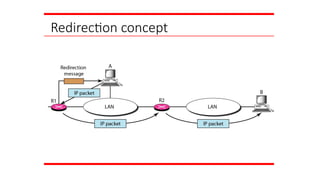
Redirection concept
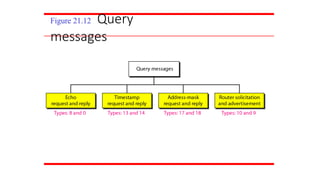
Figure 21.12 Query
messages
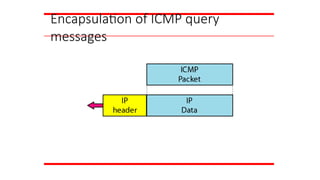
Encapsulation of ICMP query
messages
IGMP
The IP protocol can be involved in two types of
communication: unicasting and multicasting. The
Internet Group Management Protocol (IGMP) is one
of the necessary, but not sufficient, protocols that is
involved in multicasting. IGMP is a companion to the
IP protocol.
Topics discussed in this section:
Group Management
IGMP Messages and IGMP
Operation Encapsulation
Netstat Utility
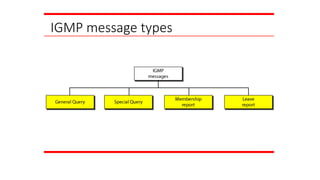
IGMP message types
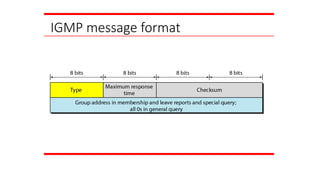
IGMP message format
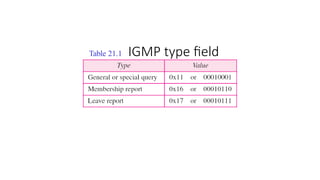
Table 21.1 IGMP type field
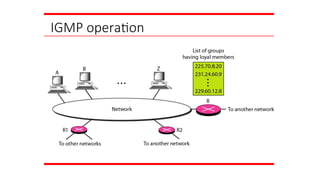
IGMP operation
In IGMP, a membership report is sent
twice, one after the other.
Note
The general query message does not
define a particular group.
Note
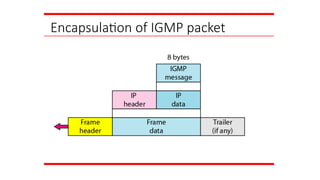
Encapsulation of IGMP packet
The IP packet that carries an IGMP
packet has a value of 1 in its TTL field.
Note
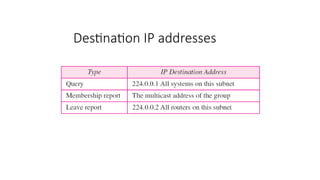
Destination IP addresses
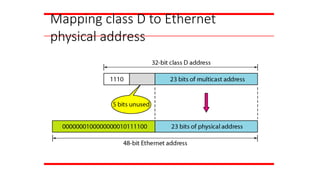
Mapping class D to Ethernet
physical address
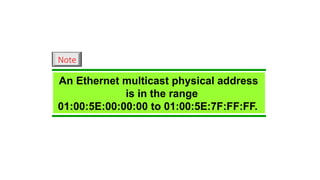
An Ethernet multicast physical address
is in the range
01:00:5E:00:00:00 to 01:00:5E:7F:FF:FF.
Note
21-4 ICMPv6
We discussed IPv6 in Chapter 20. Another protocol
that has been modified in version 6 of the TCP/IP
protocol suite is ICMP (ICMPv6). This new version
follows the same strategy and purposes of version 4.
Topics discussed in this section:
Error Reporting
Query
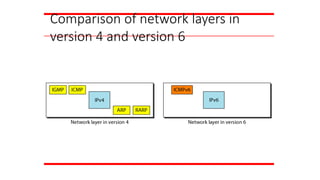
Comparison of network layers in
version 4 and version 6
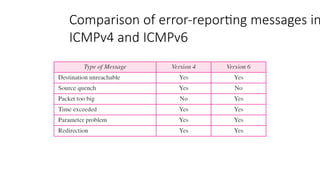
Comparison of error-reporting messages in
ICMPv4 and ICMPv6
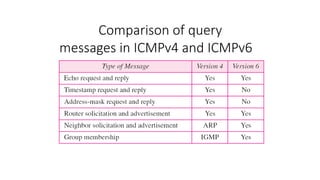
Comparison of query
messages in ICMPv4 and ICMPv6
22-1 DELIVERY
The network layer supervises the handling of the
packets by the underlying physical networks. We
define this handling as the delivery of a packet.
Topics discussed in this section:
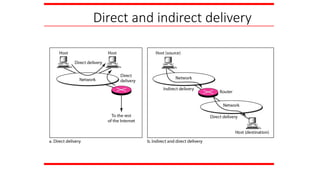
Direct Versus Indirect Delivery
Direct and indirect delivery
FORWARDING
Forwarding means to place the packet in its route to
its destination. Forwarding requires a host or a router
to have a routing table. When a host has a packet to
send or when a router has received a packet to be
forwarded, it looks at this table to find the route to the
final destination.
Topics discussed in this section:
Forwarding Techniques
Forwarding Process
Routing Table
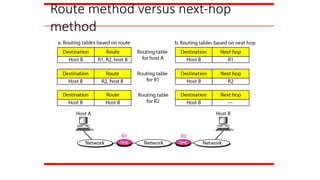
Route method versus next-hop
method
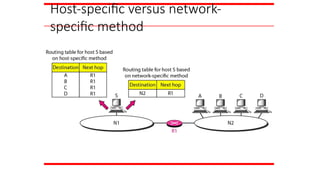
Host-specific versus network-
specific method
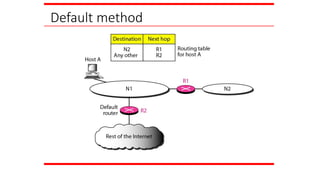
Default method
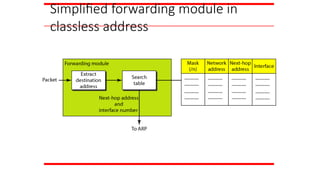
Simplified forwarding module in
classless address
UNICAST ROUTING PROTOCOLS
A routing table can be either static or dynamic. A static
table is one with manual entries. A dynamic table is one
that is updated automatically when there is a change
somewhere in the Internet. A routing protocol is a
combination of rules and procedures that lets routers in
the Internet inform each other of changes.
Optimization
Intra- and Interdomain Routing
Distance Vector Routing and RIP
Link State Routing and OSPF
Path Vector Routing and BGP
Topics discussed in this section:
 Desirable properties of Routing Algorithms:
 Correctness (applicable to all)
 Simplicity (applicable to all)
 Robustness: able to cope up with
 changes in topology, load.
 hardware and software failures
 Stability (hard to achieve)
 Converge to equilibrium
 Fairness (conflicting)
 Optimality (conflicting) see next fig.
Types of Routing Algorithms:
 Non-Adaptive: Static. Routing decisions computed in advance,
off-line and downloaded.
 Adaptive: Dynamic. Adaptive to the changes in topology and
load. Issue here is how to get the information? Locally, From
adjacent routers, from all routers?
Intra- and Interdomain Routing
• Today, an internet can be so large that one routing protocol cannot
handle the task of updating the routing tables of all routers. For this
reason, an internet is divided into autonomous systems.
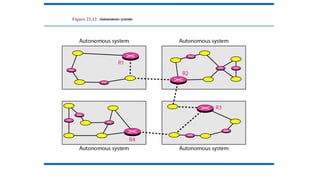
• An autonomous system (AS) is a group of networks and routers
under the authority of a single administration.
• Routing inside an autonomous system is referred to as intradomain
routing.
• Routing between autonomous systems is referred to as interdomain
routing.
Figure 22.12 Autonomous systems
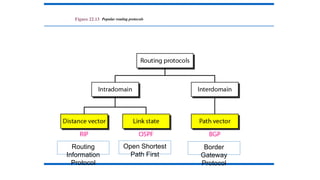
Figure 22.13 Popular routing protocols
Routing
Information
Protocol
Open Shortest
Path First
Border
Gateway
Protocol
Distance Vector Routing:
• So far we have studied Static Routing Algorithms.
• But practically dynamic Routing Algorithms are used.
• Following two are Dynamic Routing Algorithms:
• 1. Distance Vector Routing Algorithm.
• 2. Link State Routing Algorithm.
• Distance Vector Routing Algorithm:
• At each step within a router:
• Get routing tables from neighbours
• Compute distance to neighbours
• Compute new routing table
1. Router transmits its distance vector to each of its neighbors.
2. Each router receives and saves the most recently received distance vector from each of its
neighbors.
3. A router recalculates its distance vector when:
a. It receives a distance vector from a neighbor containing different information than
before.
b. It discovers that a link to a neighbor has gone down (i.e., a topology change).
The DV calculation is based on minimizing the cost to each destination.
The distance vector routing algorithm is sometimes called by other names, the distributed
Bellman-Ford routing algorithm and the Ford-Fulkerson algorithm.
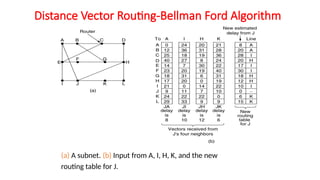
Distance Vector Routing-Bellman Ford Algorithm
(a) A subnet. (b) Input from A, I, H, K, and the new
routing table for J.
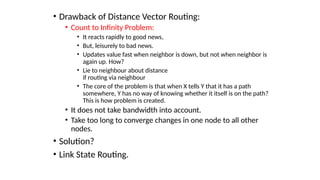
• Drawback of Distance Vector Routing:
• Count to Infinity Problem:
• It reacts rapidly to good news,
• But, leisurely to bad news.
• Updates value fast when neighbor is down, but not when neighbor is
again up. How?
• Lie to neighbour about distance
if routing via neighbour
• The core of the problem is that when X tells Y that it has a path
somewhere, Y has no way of knowing whether it itself is on the path?
This is how problem is created.
• It does not take bandwidth into account.
• Take too long to converge changes in one node to all other
nodes.
• Solution?
• Link State Routing.
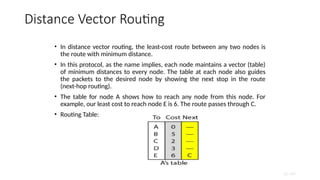
Distance Vector Routing
• In distance vector routing, the least-cost route between any two nodes is
the route with minimum distance.
• In this protocol, as the name implies, each node maintains a vector (table)
of minimum distances to every node. The table at each node also guides
the packets to the desired node by showing the next stop in the route
(next-hop routing).
• The table for node A shows how to reach any node from this node. For
example, our least cost to reach node E is 6. The route passes through C.
• Routing Table:
22.180
22.181
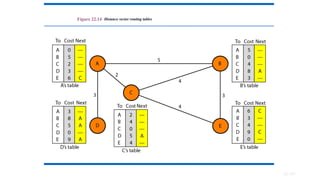
Figure 22.14 Distance vector routing tables
22.182
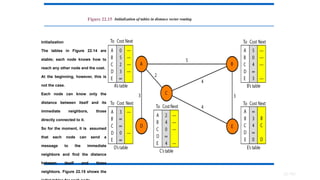
Figure 22.15 Initialization of tables in distance vector routing
Initialization
The tables in Figure 22.14 are
stable; each node knows how to
reach any other node and the cost.
At the beginning, however, this is
not the case.
Each node can know only the
distance between itself and its
immediate neighbors, those
directly connected to it.
So for the moment, it is assumed
that each node can send a
message to the immediate
neighbors and find the distance
between itself and these
neighbors. Figure 22.15 shows the
In distance vector routing, each node shares its routing table with its
immediate neighbors periodically and when there is a change.
Note
22.184
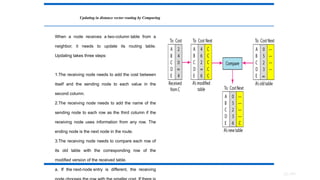
Updating in distance vector routing by Comparing
When a node receives a two-column table from a
neighbor, it needs to update its routing table.
Updating takes three steps:
1.The receiving node needs to add the cost between
itself and the sending node to each value in the
second column.
2.The receiving node needs to add the name of the
sending node to each row as the third column if the
receiving node uses information from any row. The
ending node is the next node in the route.
3.The receiving node needs to compare each row of
its old table with the corresponding row of the
modified version of the received table.
a. If the next-node entry is different, the receiving
• Drawback of Distance Vector Routing:
• Count to Infinity Problem:
• It reacts rapidly to good news,
• But, leisurely to bad news.
• Updates value fast when neighbor is down, but not when
neighbor is again up. How?
• Lie to neighbour about distance
if routing via neighbour
• The core of the problem is that when X tells Y that it has a path
somewhere, Y has no way of knowing whether it itself is on the
path? This is how problem is created.
• It does not take bandwidth into account.
• Take too long to converge changes in one node to all
other nodes.
• Solution?
• Link State Routing.
22.186
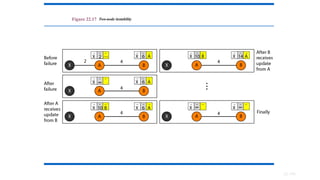
Figure 22.17 Two-node instability
22.187
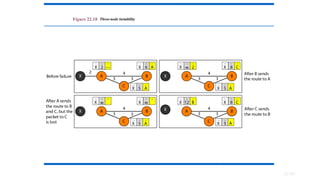
Figure 22.18 Three-node instability
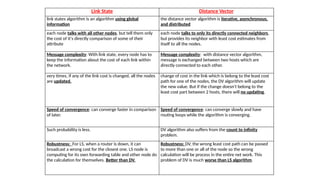
Link State Distance Vector
link states algorithm is an algorithm using global
information
the distance vector algorithm is iterative, asynchronous,
and distributed
each node talks with all other nodes, but tell them only
the cost of it's directly comparison of some of their
attribute
each node talks to only its directly connected neighbors,
but provides its neighbor with least cost estimates from
itself to all the nodes.
Message complexity: With link state, every node has to
keep the information about the cost of each link within
the network.
Message complexity: with distance vector algorithm,
message is exchanged between two hosts which are
directly connected to each other.
very times, if any of the link cost is changed, all the nodes
are updated.
change of cost in the link which is belong to the least cost
path for one of the nodes, the DV algorithm will update
the new value. But if the change doesn't belong to the
least cost part between 2 hosts, there will no updating.
Speed of convergence: can converge faster in comparison
of later.
Speed of convergence: can converge slowly and have
routing loops while the algorithm is converging.
Such probability is less. DV algorithm also suffers from the count to infinity
problem.
Robustness: For LS, when a router is down, it can
broadcast a wrong cost for the closest one. LS node is
computing for its own forwarding table and other node do
the calculation for themselves. Better than DV.
Robustness: DV, the wrong least cost path can be passed
to more than one or all of the node so the wrong
calculation will be process in the entire net work. This
problem of DV is much worse than LS algorithm.
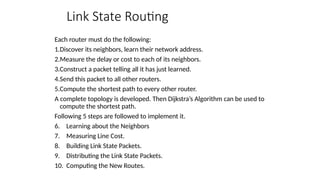
Link State Routing
Each router must do the following:
1.Discover its neighbors, learn their network address.
2.Measure the delay or cost to each of its neighbors.
3.Construct a packet telling all it has just learned.
4.Send this packet to all other routers.
5.Compute the shortest path to every other router.
A complete topology is developed. Then Dijkstra’s Algorithm can be used to
compute the shortest path.
Following 5 steps are followed to implement it.
6. Learning about the Neighbors
7. Measuring Line Cost.
8. Building Link State Packets.
9. Distributing the Link State Packets.
10. Computing the New Routes.
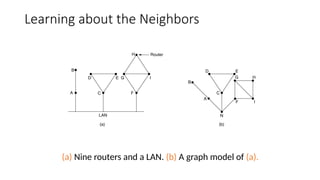
Learning about the Neighbors
(a) Nine routers and a LAN. (b) A graph model of (a).
• Step 1: Learning about the Neighbours:
• Upon boot of router,
• Send HELLO packet on each point-to-point line
• Routers are supposed to send reply with a globally unique name
• Step 2: Measuring the Line Cost:
• Measure round-trip delay using ECHO Packet and wait for its
reply
• Take load into account? Yes. Arguments both ways: when choice is given
to router having same number of hops from S to D.
• Yes! preference for unloaded line as shortest path.
• No! where oscillations are possible.
• Better Solution? Distribute Load over multiple lines.
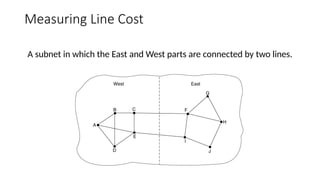
Measuring Line Cost
A subnet in which the East and West parts are connected by two lines.
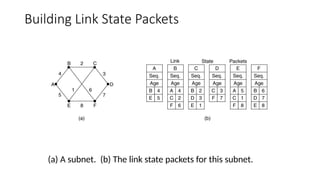
• Step 3: Building Link State Packets:
• Packet containing:
• Identity of sender
• Sequence number + age
• For each neighbour:
• name + distance
• When to build the link state packets?
• Periodically
• when significant events occur
• See next figure.
Building Link State Packets
(a) A subnet. (b) The link state packets for this subnet.
• Step 4: Distributing Link State Packets:
• Distributing link state packets
• Trickiest part of algorithm
• Arrival time for packets different
• How to keep consistent routing tables?
• Basic algorithm
• Flooding +
• Sequence number (in each packet) to limit duplicates.
• Manageable problems
• Wrap around of sequence numbers results to wrong data. Solution? Use 32 bit
sequence number.
• Wrong sequence number used in case of :
• lost in case of crash
• Corrupted data transmitted.
• Solution? include the age of each packet after the sequence number and decrement it once
per second. When the age hits zero, the information from that router is discarded.
• duplicates are discarded
• Old packets are thrown out
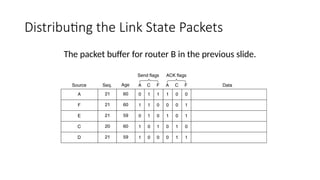
Distributing the Link State Packets
The packet buffer for router B in the previous slide.
Step 5: Computing new routes:
• With a full set of link state packets, a router can:
• Construct the entire subnet graph
• Run Dijkstra’s algorithm to compute the shortest path to each destination
• Problems for large subnets
• Memory to store data
• Compute time for developing these tables.
• Usage:
• IS-IS protocol (Intermediate System, Intermediate System)
• Designed for DECnet(digital equipment corporation network protocol suite), adopted by
ISO(international standardization organization), used still in internet.
• Supports multiple network layer protocols
• OSPF(Open Shortest Path First) protocol used in Internet
• Common features:
• Self-stabilizing method of flooding link state updates
• Concept of a designated router on a LAN
• Method of computing and supporting path splitting and multiple metrics.
Link State Routing
• Previous Distance vector routers use a distributed algorithm to compute
their routing tables, link-state routing uses link-state routers to exchange
messages that allow each router to learn the entire network topology.
Based on this each router is then able to compute its routing table by using
a shortest path computation.
• Features of link state routing protocols –
• Link state packet – A small packet that contains routing information.
• Link state database – A collection information gathered from link state
packet.
• Shortest path first algorithm (Dijkstra algorithm) – A calculation
performed on the database results into shortest path
• Routing table – A list of known paths and interfaces.
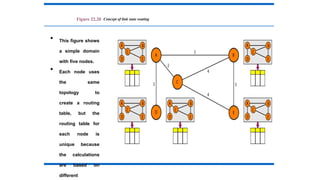
Figure 22.20 Concept of link state routing
• This figure shows
a simple domain
with five nodes.
• Each node uses
the same
topology to
create a routing
table, but the
routing table for
each node is
unique because
the calculations
are based on
different
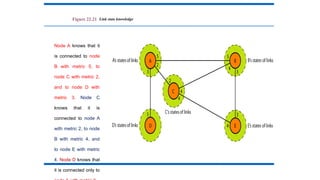
Figure 22.21 Link state knowledge
Node A knows that it
is connected to node
B with metric 5, to
node C with metric 2,
and to node D with
metric 3. Node C
knows that it is
connected to node A
with metric 2, to node
B with metric 4, and
to node E with metric
4. Node D knows that
it is connected only to
Building Routing Tables
Four sets of actions are required to ensure that each node
has the routing table showing the least-cost node to every
other node.
1. Creation of the states of the links by each node, called the
link state packet (LSP).
2. Dissemination of LSPs to every other router, called
flooding, in an efficient and reliable way.
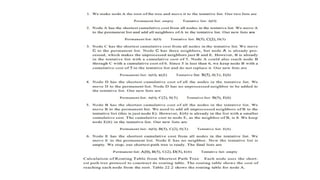
3. Formation of a shortest path tree for each node.
4. Calculation of a routing table based on the shortest path
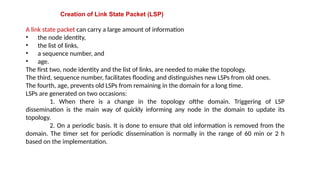
Creation of Link State Packet (LSP)
A link state packet can carry a large amount of information
• the node identity,
• the list of links,
• a sequence number, and
• age.
The first two, node identity and the list of links, are needed to make the topology.
The third, sequence number, facilitates flooding and distinguishes new LSPs from old ones.
The fourth, age, prevents old LSPs from remaining in the domain for a long time.
LSPs are generated on two occasions:
1. When there is a change in the topology ofthe domain. Triggering of LSP
dissemination is the main way of quickly informing any node in the domain to update its
topology.
2. On a periodic basis. It is done to ensure that old information is removed from the
domain. The timer set for periodic dissemination is normally in the range of 60 min or 2 h
based on the implementation.
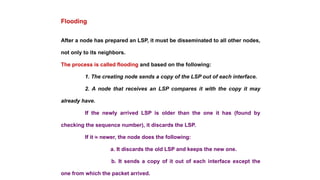
After a node has prepared an LSP, it must be disseminated to all other nodes,
not only to its neighbors.
The process is called flooding and based on the following:
1. The creating node sends a copy of the LSP out of each interface.
2. A node that receives an LSP compares it with the copy it may
already have.
If the newly arrived LSP is older than the one it has (found by
checking the sequence number), it discards the LSP.
If it is newer, the node does the following:
a. It discards the old LSP and keeps the new one.
b. It sends a copy of it out of each interface except the
one from which the packet arrived.
Flooding
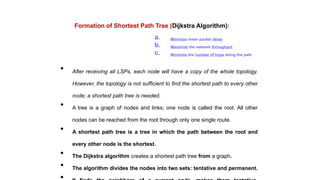
Formation of Shortest Path Tree (Dijkstra Algorithm):
• After receiving all LSPs, each node will have a copy of the whole topology.
However, the topology is not sufficient to find the shortest path to every other
node; a shortest path tree is needed.
• A tree is a graph of nodes and links; one node is called the root. All other
nodes can be reached from the root through only one single route.
• A shortest path tree is a tree in which the path between the root and
every other node is the shortest.
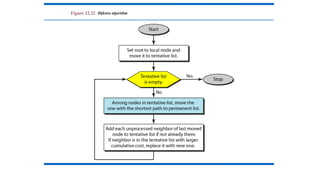
• The Dijkstra algorithm creates a shortest path tree from a graph.
• The algorithm divides the nodes into two sets: tentative and permanent.
a. Minimize mean packet delay
b. Maximize the network throughput
c. Minimize the number of hops along the path
Figure 22.22 Dijkstra algorithm
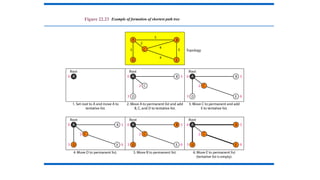
Figure 22.23 Example of formation of shortest path tree
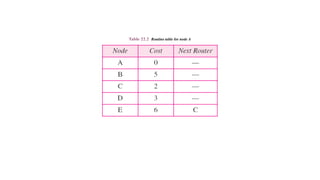
Table 22.2 Routing table for node A
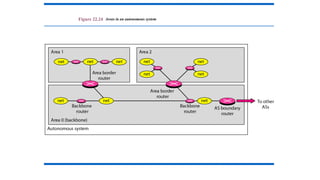
Figure 22.24 Areas in an autonomous system
22.210
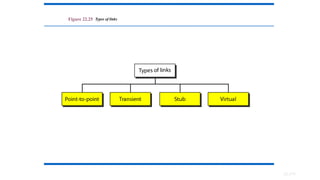
Figure 22.25 Types of links
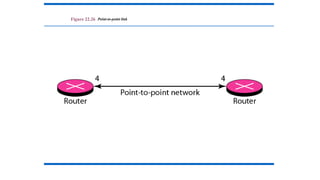
Figure 22.26 Point-to-point link
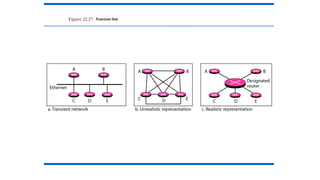
Figure 22.27 Transient link
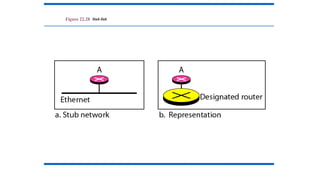
Figure 22.28 Stub link
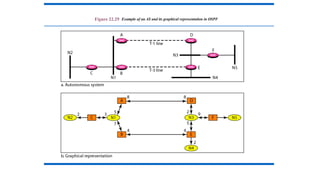
Figure 22.29 Example of an AS and its graphical representation in OSPF
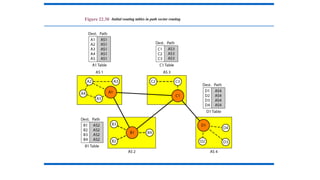
Figure 22.30 Initial routing tables in path vector routing
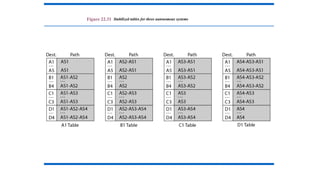
Figure 22.31 Stabilized tables for three autonomous systems
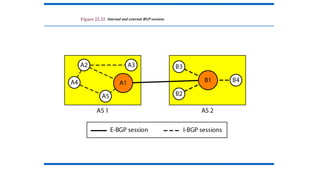
Figure 22.32 Internal and external BGP sessions
24.218
Congestion Control
Copyright © The McGraw-Hill Companies, Inc. Permission required for reproduction or display.
DATA TRAFFIC
The main focus of congestion control and quality of
service is data traffic. In congestion control we try to
avoid traffic congestion. In quality of service, we try to
create an appropriate environment for the traffic. So,
before talking about congestion control and quality of
service, we discuss the data traffic itself.
Traffic Descriptor
Traffic Profiles
Topics discussed in this section:
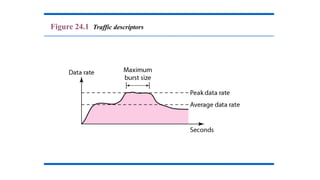
Figure 24.1 Traffic descriptors
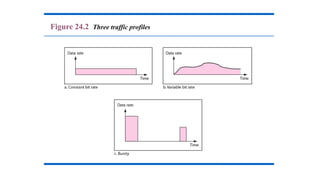
Figure 24.2 Three traffic profiles
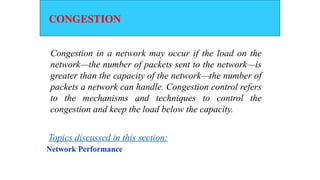
CONGESTION
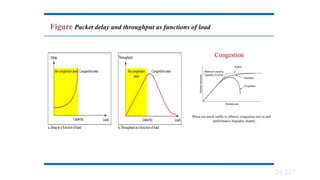
Congestion in a network may occur if the load on the
network—the number of packets sent to the network—is
greater than the capacity of the network—the number of
packets a network can handle. Congestion control refers
to the mechanisms and techniques to control the
congestion and keep the load below the capacity.
Network Performance
Topics discussed in this section:
Congestion Control Introduction:
• When too many packets are present in (a part of) the subnet, performance
degrades. This situation is called congestion.
• As traffic increases too far, the routers are no longer able to cope and they
begin losing packets.
• At very high traffic, performance collapses completely and almost no
packets are delivered.
• Reasons of Congestion:
• Slow Processors.
• High stream of packets sent from one of the sender.
• Insufficient memory.
• High memory of Routers also add to congestion as becomes un manageable and
un accessible. (Nagle, 1987).
• Low bandwidth lines.
• Then what is congestion control? Congestion control has to do with
making sure the subnet is able to carry the offered traffic.
• Congestion control and flow control are often confused but both helps
reduce congestion.
General Principles of Congestion Control
• Three Step approach to apply congestion control:
1.Monitor the system .
• detect when and where congestion occurs.
2.Pass information to where action can be taken.
3.Adjust system operation to correct the problem.
• How to monitor the subnet for congestion.
1) percentage of all packets discarded for lack of buffer space,
2) average queue lengths,
3) number of packets that time out and are retransmitted,
4) average packet delay
5) standard deviation of packet delay (jitter Control).
• Knowledge of congestion will cause the hosts to take appropriate action to reduce the congestion.
• For a scheme to work correctly, the time scale must be adjusted carefully.
• If every time two packets arrive in a row, a router yells STOP and every time a router is idle for 20
µsec, it yells GO, the system will oscillate wildly and never converge.
• Dividing all algorithms into
• open loop or
• closed loop
• They further divide the open loop algorithms into ones that act at the source versus ones that act
at the destination.
• The closed loop algorithms are also divided into two subcategories:
• explicit feedback implicit feedback.
• In explicit feedback algorithms, packets are sent back from the point of congestion to warn
the source.
• In implicit algorithms, the source deduces the existence of congestion by making local
observations, such as the time needed for acknowledgements to come back.
• The presence of congestion means that the load is (temporarily) greater than the resources can
handle.
• Solution?
• increase the resources or
• decrease the load.
• That is not always possible. So we have to apply some congestion prevention policy.
24.226
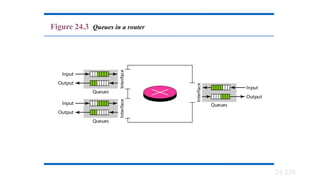
Figure 24.3 Queues in a router
24.227
Figure Packet delay and throughput as functions of load
24.228
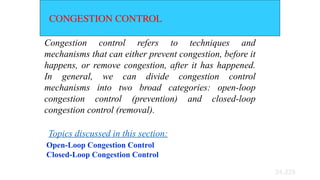
CONGESTION CONTROL
Congestion control refers to techniques and
mechanisms that can either prevent congestion, before it
happens, or remove congestion, after it has happened.
In general, we can divide congestion control
mechanisms into two broad categories: open-loop
congestion control (prevention) and closed-loop
congestion control (removal).
Open-Loop Congestion Control
Closed-Loop Congestion Control
Topics discussed in this section:
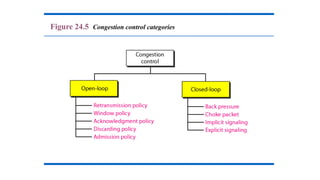
Figure 24.5 Congestion control categories
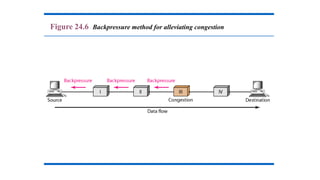
Warning Bit or Backpressure:
• The technique of backpressure refers to a congestion control
mechanism in which a congested node stops receiving data
from the immediate upstream node or nodes.
• This may cause the upstream node or nodes to become
congested, and they, in turn, reject data from their upstream
node or nodes, and so on.
• Backpressure is a node to- node congestion control that starts
with a node and propagates, in the opposite direction of data
flow, to the source.
• The backpressure technique can be applied only to virtual
circuit networks, in which each node knows the upstream node
from which a flow of data is coming.
Warning Bit or Backpressure:
• DECNET(Digital Equipment Corporation to connect mini computers)
architecture signaled the warning state by setting a special bit in the packet's
header.
• The source then cut back on traffic.
• The source monitored the fraction of acknowledgements with the bit set and
adjusted its transmission rate accordingly.
• As long as the warning bits continued to flow in, the source continued to
decrease its transmission rate. When they slowed to a trickle, it increased its
transmission rate.
• Disadvantage: Note that since every router along the path could set the
warning bit, traffic increased only when no router was in trouble.
Figure 24.6 Backpressure method for alleviating congestion
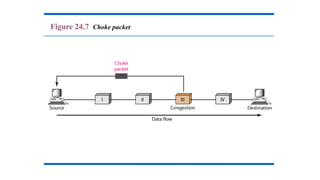
Choke Packets:
• The router sends a choke packet back to the source host, giving it the
destination found on the path.
• The original packet is tagged (a header bit is turned on) so that it will
not generate any more choke packets farther along the path and is
then forwarded in the usual way.
• When the source host gets the choke packet, it is required to reduce
the traffic sent to the specified destination by X percent.
• See next figure, flow starts reducing from step 5.
• Reduction from 25% to 50% to 75% and so on.
• Router maintains threshold. And based on it gives
• Mild Warning
• Stern Warning
• Ultimatum.
• Variation: Use queue length or buffers instead of line utilization as
trigger signal. This will reduce traffic. Chocks also increase traffic.
Figure 24.7 Choke packet
Implicit Signalling In implicit signalling, there is no
communication between the congested node or nodes and the
source. The source guesses that there is congestion somewhere
in the network from other symptoms. For example, when a
source sends several packets and there is no acknowledgment
for a while, one assumption is that the network is congested.
The delay in receiving an acknowledgment is interpreted as
congestion in the network; the source should slow down.
Explicit Signalling The node that experiences congestion can
explicitly send a signal to the source or destination. The
explicit-signalling method, however, is different from the
choke-packet method. In the choke-packet method, a separate
packet is used for this purpose; in the explicit-signalling
method, the signal is included in the packets that carry data.
Explicit signalling can occur in either the forward or the
backward direction. This type of congestion control can be seen
1. Retransmission Policy: It is the policy in which retransmission of
the packets are taken care. If the sender feels that a sent packet is lost or
corrupted, the packet needs to be retransmitted. This transmission may
increase the congestion in the network. To prevent congestion,
retransmission timers must be designed to prevent congestion and also
able to optimize efficiency.
2. Window Policy: The type of window at the sender side may also
affect the congestion. Several packets in the Go-back-n window are
resent, although some packets may be received successfully at the
receiver side. This duplication may increase the congestion in the
network and making it worse. Therefore, Selective repeat window
should be adopted as it sends the specific packet that may have been
lost.
Open Loop Congestion Control
3. Discarding Policy: A good discarding policy adopted by the routers is
that the routers may prevent congestion and at the same time partially
discards the corrupted or less sensitive package and also able to maintain
the quality of a message. In case of audio file transmission, routers can
discard less sensitive packets to prevent congestion and also maintain the
quality of the audio file.
4. Acknowledgment Policy: Since acknowledgement are also the part of
the load in network, the acknowledgment policy imposed by the receiver
may also affect congestion. Several approaches can be used to prevent
congestion related to acknowledgment. The receiver should send
acknowledgement for N packets rather than sending acknowledgement for
a single packet. The receiver should send a acknowledgment only if it has
to send a packet or a timer expires.
5. Admission Policy: In admission policy a mechanism should be used to
prevent congestion. Switches in a flow should first check the resource
requirement of a network flow before transmitting it further. If there is a
chance of a congestion or there is a congestion in the network, router
should deny establishing a virtual network connection to prevent further
congestion.
Open Loop Congestion Control
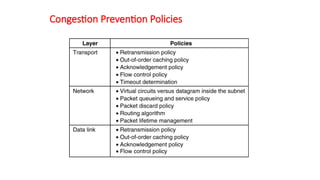
Congestion Prevention Policies
Policies that affect congestion.
5-26

Communication Networks UNIT III Forouzan.pptx

  • 1.
    UNIT III MESSAGEROUTING TECHNOLOGIES Circuit switching, packet switching, message switching. Internet protocols; IPV4, IPV6, ARP, RARP, ICMP, IGMP, VPN. Network Routing Algorithms:- Distance vector routing, OSPF, Dijikstra‘s , Bellaman Ford, Congestion control algorithms
  • 2.
    Network Layer •The Networklayer is responsible for the source-to-destination delivery of a packet possible across multiple networks. • It converts Frames into packets.
  • 3.
    • Switching • Source-to-Destinationdelivery of a packet Logical addressing • Routing • Internetworking
  • 4.
  • 5.
    Switching • A networkis a set of connected devices(Whenever we have multiple devices, we have the problem of how to connect them to make one-to-one communication possible) • One solution is to make a point-to-point connection between each pair of devices (a mesh topology) or between a central device and every other device (a star topology). • These methods, however, are impractical and wasteful when applied to very large networks. • The number and length of the links require too much infrastructure to be cost-efficient, and the majority of those links would be idle most of the time. A better solution is SWITCHING
  • 6.
    Switching • A switchednetwork consists of a series of interlinked nodes, called switches. • Switches are devices capable of creating temporary connections between two or more devices linked to the switch. • In a switched network, some of these nodes are connected to the end systems (computers or telephones, for example). Others are used only for routing.
  • 7.
    Switching Concepts Switches arehardware or software devices used for temporary connection b/w 2 or more devices linked to the switch in network but not to each another Switches are needed to connect multiple devices for making one-one communication TYPES: • • •
  • 9.
    Circuit switching It creates directphysical connection b/w two devices such as phone or computers. Any computer can be connected to any other using Levers. N-by-N folded switches can connect n lines in full duplex mode. 2 types: ◦
  • 12.
    Space Division Switch Pathin the circuit are separated from each other It is used both in analog and digital communication 2 Types: ◦ Crossbar switch ◦ Multistage switch • Crossbar Switch: It connects n inputs to m outputs using cross points • Limitation:
  • 13.
  • 14.
    Multistage switch Devices arelinked to switches ,that are in turn linked to another switches(Hierarchy of switches)
  • 15.
    Blocking: The reduction ina number of cross points causes a phenomena called Blocking. During heavy traffic one input cannot be connected to output because no path available
  • 16.
    Time Division Switches Ituses time division multiplexing 2 methods: Time slot interchange TDM bus Time slot interchange: It changesthe ordering of the slot based on the desired connection It uses RAM to store time slot Ex: 1->3 2->4 3->1 4-
  • 17.
  • 19.
    TDM Bus- TimeDivision Multiplexing Here each input and output lines are connected to high speed bus Each bus is closed during one of the four time slots
  • 20.
    Limitations of Circuit Switching •It is specially designed for voice suitabl e communication(telephone). Not for data communication. • Once a circuit is established, it remains for duration of the session. It creates dialed(temporary)and leased(Permanent). • Less data rate because of point to connection. poin t
  • 21.
    Packet switching • Packet switchingis better for data transmission. • Here data are transmitted through unit of variable length blocks called packets. • Longer transmission are divided multiple packets. • Packet length is decided by network. int o
  • 23.
    Datagram Approach • Inthis approach a message is divided into multiple packets. • All packets choose various routes and reaches the destination. • Ordering of packets in destination is done by transport layer .
  • 24.
  • 25.
    Virtual Circuit approach Ituses single route to send all packets of the message Two formats: ◦ Switched virtual circuit ◦ Permanent virtual circuit SVC • Connection is temporary • Dial-up lines DuringTransmission. A connection is established-all packets proper ACK- Connection is terminated are sent –
  • 27.
    PVC • Connection ispermanent. • Circuit is dedicated for two users, No one else can use the line when communication takes place. • It always gets the same route. • Leased lines. During Transmission. No connection establishment or termination
  • 28.
  • 29.
    Circuit switchedVs Virtual Circuit PathVs Route: Circuit switched- >Path Virtual Circuit->route
  • 30.
    Message Switching • It usesa mechanism called store and forward • Here a message is received and stored until a appropriate route is free, then sends along. • Message switching- uses secondary storage(Disk) • Packet switching – uses primary storage(RAM)
  • 32.
    20.32 20-1 INTERNETWORKING In thissection, we discuss internetworking, connecting networks together to make an internetwork or an internet. Need for Network Layer Internet as a Datagram Network Internet as a Connectionless Network Topics discussed in this section:
  • 33.
    20.33 Figure 20.1 Linksbetween two hosts
  • 34.
    20.34 Figure 20.2 Networklayer in an internetwork
  • 35.
    20.35 Figure 20.3 Networklayer at the source, router, and destination
  • 36.
    20.36 Figure 20.3 Networklayer at the source, router, and destination (continued)
  • 37.
    20.37 Switching at thenetwork layer in the Internet uses the datagram approach to packet switching. Note
  • 38.
    20.38 Communication at thenetwork layer in the Internet is connectionless. Note
  • 39.
    20.39 20-2 IPv4 The InternetProtocol version 4 (IPv4) is the delivery mechanism used by the TCP/IP protocols. Datagram Fragmentation Checksum Options Topics discussed in this section:
  • 40.
    20.40 Figure 20.4 Positionof IPv4 in TCP/IP protocol suite
  • 41.
    20.41 Figure 20.5 IPv4datagram format
  • 42.
    Version (VER). This4-bit field defines the version of the IPv4 protocol. Currently the version is 4. However, version 6 (or IPng) may totally replace version 4 in the future Header length (HLEN). This 4-bit field defines the total length of the datagram header in 4-byte words. This field is needed because the length of the header is variable (between 20 and 60 bytes). When there are no options, the header length is 20 bytes, and the value of this field is 5 (5 x 4 = 20). When the option field is at its maximum size, the value of this field is 15 (15 x 4 = 60). Services. IETF has changed the interpretation and name of this 8-bit field. This field, previously called service type, is now called differentiated services. 20.42
  • 43.
    · Total Length---Specifiesthe length, in bytes, of the entire IP packet. · Identification---Contains an integer that identifies the current datagram. · Flags---The two low-order (least-significant) bits control fragmentation. The low-order bit specifies whether the packet can be fragmented. The middle bit specifies whether the packet is the last fragment in a series of fragmented packets. The third or high-order bit is not used. · Fragment Offset---Indicates the position of the fragment's data relative to the beginning of the data in the original datagram. · Time-to-Live---Maintains a counter that gradually decrements down to zero, at which point the datagram is discarded. This keeps packets from looping endlessly. · Protocol---Indicates which upper-layer protocol receives incoming packets after IP processing is complete. · Header Checksum---Helps ensure IP header integrity. · Source Address---Specifies the sending node. · Destination Address---Specifies the receiving node. · Options---Allows IP to support various options, such as security. · Data---Contains upper-layer information.
  • 44.
    20.44 Figure 20.6 Servicetype or differentiated services
  • 45.
    20.45 The precedence subfieldwas part of version 4, but never used. Note
  • 46.
  • 47.
    20.47 Table 20.2 Defaulttypes of service
  • 48.
  • 49.
    20.49 The total lengthfield defines the total length of the datagram including the header. Note
  • 50.
    20.50 Figure 20.7 Encapsulationof a small datagram in an Ethernet frame
  • 51.
    20.51 Figure 20.8 Protocolfield and encapsulated data
  • 52.
  • 53.
    20.53 Fragmentation: • A datagramcan travel through different networks. • Each router decapsulates the IPv4 datagram from the frame it receives, processes it, and then encapsulates it in another frame. • The format and size of the received frame depend on the protocol used by the physical network through which the frame has just traveled. • The format and size of the sent frame depend on the protocol used by the physical network through which the frame is going to travel. • For example, if a router connects a LAN to a WAN, it receives a frame in the LAN format and sends a frame in the WAN format • MTU (Maximum transfer unit)-It is the size of the frame which is smaller than the physical size.
  • 54.
    20.54 Figure 20.9 Maximumtransfer unit (MTU)
  • 55.
    20.55 Table 20.5 MTUsfor some networks
  • 56.
    20.56 Figure 20.10 Flagsused in fragmentation
  • 57.
  • 58.
    20.58 Figure 20.12 Detailedfragmentation example
  • 59.
    20.59 Figure 20.13 Exampleof checksum calculation in IPv4
  • 60.
    20.60 Figure 20.14 Taxonomyof options in IPv4
  • 61.
    20.61 An IPv4 packethas arrived with the first 8 bits as shown: 01000010 The receiver discards the packet. Why? Solution There is an error in this packet. The 4 leftmost bits (0100) show the version, which is correct. The next 4 bits (0010) show an invalid header length (2 × 4 = 8). The minimum number of bytes in the header must be 20. The packet has been corrupted in transmission. Example 20.1
  • 62.
    20.62 In an IPv4packet, the value of HLEN is 1000 in binary. How many bytes of options are being carried by this packet? Solution The HLEN value is 8, which means the total number of bytes in the header is 8 × 4, or 32 bytes. The first 20 bytes are the base header, the next 12 bytes are the options. Example 20.2
  • 63.
    20.63 In an IPv4packet, the value of HLEN is 5, and the value of the total length field is 0x0028. How many bytes of data are being carried by this packet? Solution The HLEN value is 5, which means the total number of bytes in the header is 5 × 4, or 20 bytes (no options). The total length is 40 bytes, which means the packet is carrying 20 bytes of data (40 − 20). Example 20.3
  • 64.
    20.64 An IPv4 packethas arrived with the first few hexadecimal digits as shown. 0x45000028000100000102 . . . How many hops can this packet travel before being dropped? The data belong to what upper-layer protocol? Solution To find the time-to-live field, we skip 8 bytes. The time-to- live field is the ninth byte, which is 01. This means the packet can travel only one hop. The protocol field is the next byte (02), which means that the upper-layer protocol is IGMP. Example 20.4
  • 65.
    19-1 IPv4ADDRESSES An IPv4address is a 32-bit address that uniquely and universally defines the connection of a device (for example, a computer or a router) to the Internet. Topics discussed in this section: Address Space Notations Classful Addressing Classless Addressing Network Address Translation (NAT) 19.
  • 66.
    An IPv4 addressis 32 bits long. Note 19.
  • 67.
    The IPv4 addressesare unique and universal. Note 19.
  • 68.
    The address spaceof IPv4 is 232 or 4,294,967,296. Note 19.
  • 69.
    Figure 19.1 Dotted-decimalnotation and binary notation for an IPv4 address 19.
  • 70.
    Numbering systems arereviewed in Appendix B. Note 19.
  • 71.
    Change the followingIPv4 addresses from binary notation to dotted-decimal notation. Example 19.1 Solution We replace each group of 8 bits with its equivalent decimal number (see Appendix B) and add dots for separation. 19.
  • 72.
    Change the followingIPv4 addresses from dotted-decimal notation to binary notation. Example 19.2 Solution We replace each decimal number with its binary equivalent (see Appendix B). 19.
  • 73.
    Find the error,if any, in the following IPv4 addresses. Example 19.3 Solution a. There must be no leading zero (045). b. There can be no more than four numbers. c. Each number needs to be less than or equal to 255. d. A mixture of binary notation and dotted- decimal notation is not allowed. 19.73
  • 74.
    In classful addressing,the address space is divided into five classes: A, B, C, D, and E. Note 19.74
  • 75.
    Figure 19.2 Findingthe classes in binary and dotted-decimal notation 19.75
  • 76.
    Find the classof each address. a. 00000001 00001011 00001011 11101111 b. 11000001 10000011 00011011 11111111 c. 14.23.120.8 d. 252.5.15.111 Solution a. The first bit is 0. This is a class A address. b. The first 2 bits are 1; the third bit is 0. This is a class C address. c. The first byte is 14; the class is A. d. The first byte is 252; the class is E. Example 19.4
  • 77.
    Table 19.1 Numberof blocks and block size in classful IPv4 addressing 19.77
  • 78.
    In classful addressing,a large part of the available addresses were wasted. Note
  • 79.
    Table 19.2 Defaultmasks for classful addressing 19.79
  • 80.
    Classful addressing, whichis almost obsolete, is replaced with classless addressing. Note 19.80
  • 81.
    Figure 19.3 showsa block of addresses, in both binary and dotted-decimal notation, granted to a small business that needs 16 addresses. We can see that the restrictions are applied to this block. The addresses are contiguous. The number of addresses is a power of 2 (16 = 24), and the first address is divisible by 16. The first address, when converted to a decimal number, is 3,440,387,360, which when divided by 16 results in 215,024,210. Example 19.5
  • 82.
    Figure 19.3 Ablock of 16 addresses granted to a small organization
  • 83.
    In IPv4 addressing,a block of addresses can be defined as x.y.z.t /n in which x.y.z.t defines one of the addresses and the /n defines the mask. Note
  • 84.
    The first addressin the block can be found by setting the rightmost 32 − n bits to 0s. Note
  • 85.
    A block ofaddresses is granted to a small organization. We know that one of the addresses is 205.16.37.39/28. What is the first address in the block? Solution The binary representation of the given address is 11001101 00010000 00100101 00100111 If we set 32−28 rightmost bits to 0, we get 11001101 00010000 00100101 0010000 or 205.16.37.32. Example 19.6
  • 86.
    The last addressin the block can be found by setting the rightmost 32 − n bits to 1s. Note
  • 87.
    Find the lastaddress for the block in Example 19.6. Solution The binary representation of the given address is 11001101 00010000 00100101 00100111 If we set 32 − 28 rightmost bits to 1, we get 11001101 00010000 00100101 00101111 or 205.16.37.47 This is actually the block shown in Figure 19.3. Example 19.7
  • 88.
    The number ofaddresses in the block can be found by using the formula 232−n. Note
  • 89.
    Find the numberof addresses in Example 19.6. Example 19.8 Solution The value of n is 28, of addresses is 2 32−28 or 16. which means that number
  • 90.
    Another way tofind the first address, the last address, and the number of addresses is to represent the mask as a 32- bit binary (or 8-digit hexadecimal) number. This is particularly useful when we are writing a program to find these pieces of information. In Example 19.5 the /28 can be represented as 11111111 11111111 11111111 11110000 (twenty-eight 1s and four 0s). Find a. The first address b. The last address c. The number of addresses. Example 19.9
  • 91.
    Solution a. The firstaddress can be found by ANDing the given addresses with the mask. ANDing here is done bit by bit. The result of ANDing 2 bits is 1 if both bits are 1s; the result is 0 otherwise. Example 19.9 (continued)
  • 92.
    b. The lastaddress can be found by ORing the given addresses with the complement of the mask. ORing here is done bit by bit. The result of ORing 2 bits is 0 if both bits are 0s; the result is 1 otherwise. The complement of a number is found by changing each 1 to 0 and each 0 to 1. Example 19.9 (continued)
  • 93.
    c. The numberof addresses can be found by complementing the mask, interpreting it as a decimal number, and adding 1 to it. Example 19.9 (continued)
  • 94.
    Figure 19.4 Anetwork configuration for the block 205.16.37.32/28
  • 95.
    The first addressin a block is normally not assigned to any device; it is used as the network address that represents the organization to the rest of the world. Note
  • 96.
    Two levels ofhierarchy in an IPv4 address
  • 97.
    A frame ina character-oriented protocol
  • 98.
    Each address inthe block can be considered as a two-level hierarchical structure: the leftmost n bits (prefix) define the network; the rightmost 32 − n bits define the host. Note
  • 99.
    Configuration and addressesin a subnetted network
  • 100.
    Three-level hierarchy inan IPv4 address
  • 101.
    An ISP isgranted a block of addresses starting with 190.100.0.0/16 (65,536 addresses). The ISP needs to distribute these addresses to three groups of customers as follows: a. The first group has 64 customers; each needs 256 addresses. b. The second group has 128 customers; each needs 128 addresses. c. The third group has 128 customers; each needs 64 addresses. Design the subblocks and find out how many addresses are still available after these allocations. Example 19.10
  • 102.
    Solution Figure 19.9 showsthe situation. Group 1 For this group, each customer needs 256 addresses. This means that 8 (log2 256) bits are needed to define each host. The prefix length is then 32 − 8 = 24. The addresses are Example 19.10 (continued)
  • 103.
    Example 19.10 (continued) Group2 For this group, each customer needs 128 addresses. This means that 7 (log2 128) bits are needed to define each host. The prefix length is then 32 − 7 = 25. The addresses are
  • 104.
    Example 19.10 (continued) Group3 For this group, each customer needs 64 addresses. This means that 6 (log264) bits areneeded to eachhost. The prefix length is then 32 − 6 = 26. The addresses are Number of granted addresses to the ISP: 65,536 Number of allocated addresses by the ISP: 40,960 Number of available addresses: 24,576
  • 105.
    The network layerprotocol in the TCP/IP protocol suite is currently IPv4. Although IPv4 is well designed, data communication has evolved since the inception of IPv4 in the 1970s. IPv4 has some deficiencies that make it unsuitable for the fast-growing Internet. Advantages Packet Format Extension Headers Topics discussed in this section: IPv6
  • 106.
  • 107.
    Figure 20.16 Formatof an IPv6 datagram
  • 108.
    Table 20.6 Nextheader codes for IPv6
  • 109.
    Table 20.7 Prioritiesfor congestion-controlled traffic
  • 110.
    Table 20.8 Prioritiesfor noncongestion-controlled traffic
  • 111.
    Table 20.9 Comparisonbetween IPv4 and IPv6 packet headers
  • 112.
  • 113.
    Table 20.10 Comparisonbetween IPv4 options and IPv6 extension headers
  • 114.
    IPv4 vs. IPv6 IPv4IPv6 IPv4 addresses are 32 bit length. IPv6 addresses are 128 bit length. IPv4 addresses are binary numbersrepresented in decimals. IPv6 addresses are binary numbers represented in hexadecimals. IPSec support is only optional. Inbuilt IPSec support. Fragmentation is done by sender and forwarding Fragmentation is done only
  • 115.
    No packet flowidentification. Packet flow identification is available within the IPv6 header using the Flow Label field. Checksum field is available in IPv4 header No checksum field in IPv6 header . Options fields are available in IPv4 header . No optionfields, but IPv6 Extension headers are available.
  • 116.
    Internet Group Management Protocol (IGMP)is used to manage multicast group membership. IGMP is replaced with Multicast Listener Discovery (MLD) messages. Broadcast messages are available. Broadcast messages are not available. Instead a link- local scope "All nodes" multicast IPv6 address(FF02::1) is used for broadcast similar functionality. Manual configuration (Static) of IPv4addresses or DHCP (Dynamic Auto-configuration of addresses is available.
  • 117.
    20-4 TRANSITION FROMIPv4 TO IPv6 Because of the huge number of systems on the Internet, the transition from IPv4 to IPv6 cannot happen suddenly. It takes a considerable amount of time before every system in the Internet can move from IPv4 to IPv6. The transition must be smooth to prevent any problems between IPv4 and IPv6 systems. Topics discussed in this section: Dual Stack Tunneling Header Translatio
  • 118.
    •Complete transition fromIPv4 to IPv6 might not be possible because IPv6 is not backward compatible. •This results in a situation where either a site is on IPv6 or it is not. •It is unlike implementation of other new technologies where the newer one is backward compatible so the older system can still work with the newer version without any additional changes.
  • 119.
  • 120.
    Dual stack A dual-stacknetwork is a networking environment that supports the simultaneous use of both IPv4 and IPv6 addresses. This configuration enables devices to run IPv4 and IPv6 concurrently, resulting in a smoother transition from the older IPv4 to the more modern IPv6
  • 121.
    A router canbe installed with both IPv4 and IPv6 addresses configured on its interfaces pointing to the network of relevant IP scheme. Dual stack In the above diagram, a server having IPv4 as well as IPv6 address configured for it can now speak with all the hosts on both the IPv4 as well as the IPv6 networks with the help of a Dual Stack Router. The Dual Stack Router, can communicate with both the networks. It provides a medium for the hosts to access a server without changing their respective IP versions.
  • 122.
    Tunneling strategy •Tunneling providesa way to use an existing IPv4 routing infrastructure to carry IPv6 traffic. •The key to a successful IPv6 transition is compatibility with the existing installed base of IPv4 hosts and routers. Maintaining compatibility with IPv4 while deploying IPv6 streamlines the task of transitioning the Internet to IPv6. While the IPv6 infrastructure is being deployed, the existing IPv4 routing infrastructure can remain functional, and can be used to carry IPv6 traffic. IPv6 or IPv4 hosts and routers can tunnel IPv6 datagrams over regions of IPv4 routing topology by encapsulating them within IPv4 packets.
  • 123.
    Header translation strategyaNAT-PT (Network Address Translation – Protocol Translation) Network Address Translation – Protocol Translation enabled device. With the help of a NAT-PT device, actual can take place happens between IPv4 and IPv6 packets and vice versa. A host with IPv4 address sends a request to an IPv6 enabled server on Internet that does not understand IPv4 address. In this scenario, the NAT-PT device can help them communicate. When the IPv4 host sends a request packet to the IPv6 server, the NAT- PT device/router strips down the IPv4 packet, removes IPv4 header, and adds IPv6 header and passes it through the Internet. When a response from the IPv6 server comes for the IPv4 host, the router does vice versa.
  • 124.
  • 125.
    Why IPv6? Deficiency ofIPv4 Address space exhaustion New types of service  Integration ◦ Multicast ◦ Quality of Service ◦ Security ◦ Mobility (MIPv6) Header and format
  • 126.
    Advantages of IPv6over IPv4 Larger address space Better header format New options Allowance for extension Support for resource allocation Support for more security Support for mobility
  • 127.
    IPv4 companion protocols(1) ARP: Address Resolution Protocol ◦ Mapping from IP address to MAC address ICMP: Internet Control Message Protocol ◦ Error reporting & Query IGMP: Internet Group Management Protocol ◦ Multicast member join/leave Unicast Routing Protocols (Intra-AS) ◦ Maintaining Unicast Routing Table ◦ E.g. RIP, OSPF (Open Shortest Path
  • 128.
    IPv4 companion protocols(2) Multicast Routing Protocols ◦ Maintaining Multicast Routing Table ◦ E.g. DVMRP, MOSPF, CBT, PIM Exterior Routing Protocols (Inter- AS) ◦ E.g. BGP (Border Gateway Protocol) Quality-of-Service Frameworks ◦ Integrated Service (ISA, IntServ) ◦ Differentiated Service (DiffServ)
  • 129.
    21-1 ADDRESS MAPPING Thedelivery of a packet to a host or a router requires two levels of addressing: logical and physical. We need to be able to map a logical address to its corresponding physical address and vice versa. This can be done by using either static or dynamic mapping. Topics discussed in this section: Mapping Logical to Physical Address Mapping Physical to Logical Address 21.2
  • 130.
  • 131.
  • 132.
  • 133.
  • 134.
    An ARP requestis broadcast; an ARP reply is unicast. Note
  • 135.
    A host withIP address 130.23.43.20 and physical address B2:34:55:10:22:10 has a packet to send to another host with IP address 130.23.43.25 and physical address A4:6E:F4:59:83:AB. The two hosts are on the same Ethernet network. Show the ARP request and reply packets encapsulated in Ethernet frames. Solution Figure 21.5 shows the ARP request and reply packets. Note that the ARP data field in this case is 28 bytes, and that the individual addresses do not fit in the 4-byte boundary. That is why we do not show the regular 4-byte boundaries for these addresses. Example 21.1
  • 136.
    Example 21.1, anARP request and reply
  • 137.
  • 138.
    BOOTP client andserver on the same and different networks
  • 139.
    DHCP provides staticand dynamic address allocation that can be manual or automatic. Note
  • 140.
    21-2 ICMP The IPprotocol has no error-reporting or error- correcting mechanism. The IP protocol also lacks a mechanism for host and management queries. The Internet Control Message Protocol (ICMP) has been designed to compensate for the above two deficiencies. It is a companion to the IP protocol. Topics discussed in this section: Types of Messages Message Format Error Reporting and Query Debugging Tools
  • 141.
    General format ofICMP messages
  • 142.
    ICMP always reportserror messages to the original source. Note
  • 143.
  • 144.
    Important points aboutICMP error messages: ❏ No ICMP error message will be generated in response to a datagram carrying an ICMP error message. ❏ No ICMP error message will be generated for a fragmented datagram that is not the first fragment. ❏ No ICMP error message will be generated for a datagram having a multicast address. ❏ No ICMP error message will be Note
  • 145.
    Contents of datafield for the error messages
  • 146.
  • 147.
  • 148.
    Encapsulation of ICMPquery messages
  • 149.
    IGMP The IP protocolcan be involved in two types of communication: unicasting and multicasting. The Internet Group Management Protocol (IGMP) is one of the necessary, but not sufficient, protocols that is involved in multicasting. IGMP is a companion to the IP protocol. Topics discussed in this section: Group Management IGMP Messages and IGMP Operation Encapsulation Netstat Utility
  • 150.
  • 151.
  • 152.
    Table 21.1 IGMPtype field
  • 153.
  • 154.
    In IGMP, amembership report is sent twice, one after the other. Note
  • 155.
    The general querymessage does not define a particular group. Note
  • 156.
  • 157.
    The IP packetthat carries an IGMP packet has a value of 1 in its TTL field. Note
  • 158.
  • 159.
    Mapping class Dto Ethernet physical address
  • 160.
    An Ethernet multicastphysical address is in the range 01:00:5E:00:00:00 to 01:00:5E:7F:FF:FF. Note
  • 161.
    21-4 ICMPv6 We discussedIPv6 in Chapter 20. Another protocol that has been modified in version 6 of the TCP/IP protocol suite is ICMP (ICMPv6). This new version follows the same strategy and purposes of version 4. Topics discussed in this section: Error Reporting Query
  • 162.
    Comparison of networklayers in version 4 and version 6
  • 163.
    Comparison of error-reportingmessages in ICMPv4 and ICMPv6
  • 164.
    Comparison of query messagesin ICMPv4 and ICMPv6
  • 165.
    22-1 DELIVERY The networklayer supervises the handling of the packets by the underlying physical networks. We define this handling as the delivery of a packet. Topics discussed in this section: Direct Versus Indirect Delivery
  • 166.
  • 167.
    FORWARDING Forwarding means toplace the packet in its route to its destination. Forwarding requires a host or a router to have a routing table. When a host has a packet to send or when a router has received a packet to be forwarded, it looks at this table to find the route to the final destination. Topics discussed in this section: Forwarding Techniques Forwarding Process Routing Table
  • 168.
    Route method versusnext-hop method
  • 169.
  • 170.
  • 171.
    Simplified forwarding modulein classless address
  • 172.
    UNICAST ROUTING PROTOCOLS Arouting table can be either static or dynamic. A static table is one with manual entries. A dynamic table is one that is updated automatically when there is a change somewhere in the Internet. A routing protocol is a combination of rules and procedures that lets routers in the Internet inform each other of changes. Optimization Intra- and Interdomain Routing Distance Vector Routing and RIP Link State Routing and OSPF Path Vector Routing and BGP Topics discussed in this section:
  • 173.
     Desirable propertiesof Routing Algorithms:  Correctness (applicable to all)  Simplicity (applicable to all)  Robustness: able to cope up with  changes in topology, load.  hardware and software failures  Stability (hard to achieve)  Converge to equilibrium  Fairness (conflicting)  Optimality (conflicting) see next fig. Types of Routing Algorithms:  Non-Adaptive: Static. Routing decisions computed in advance, off-line and downloaded.  Adaptive: Dynamic. Adaptive to the changes in topology and load. Issue here is how to get the information? Locally, From adjacent routers, from all routers?
  • 174.
    Intra- and InterdomainRouting • Today, an internet can be so large that one routing protocol cannot handle the task of updating the routing tables of all routers. For this reason, an internet is divided into autonomous systems. • An autonomous system (AS) is a group of networks and routers under the authority of a single administration. • Routing inside an autonomous system is referred to as intradomain routing. • Routing between autonomous systems is referred to as interdomain routing.
  • 175.
  • 176.
    Figure 22.13 Popularrouting protocols Routing Information Protocol Open Shortest Path First Border Gateway Protocol
  • 177.
    Distance Vector Routing: •So far we have studied Static Routing Algorithms. • But practically dynamic Routing Algorithms are used. • Following two are Dynamic Routing Algorithms: • 1. Distance Vector Routing Algorithm. • 2. Link State Routing Algorithm. • Distance Vector Routing Algorithm: • At each step within a router: • Get routing tables from neighbours • Compute distance to neighbours • Compute new routing table 1. Router transmits its distance vector to each of its neighbors. 2. Each router receives and saves the most recently received distance vector from each of its neighbors. 3. A router recalculates its distance vector when: a. It receives a distance vector from a neighbor containing different information than before. b. It discovers that a link to a neighbor has gone down (i.e., a topology change). The DV calculation is based on minimizing the cost to each destination. The distance vector routing algorithm is sometimes called by other names, the distributed Bellman-Ford routing algorithm and the Ford-Fulkerson algorithm.
  • 178.
    Distance Vector Routing-BellmanFord Algorithm (a) A subnet. (b) Input from A, I, H, K, and the new routing table for J.
  • 179.
    • Drawback ofDistance Vector Routing: • Count to Infinity Problem: • It reacts rapidly to good news, • But, leisurely to bad news. • Updates value fast when neighbor is down, but not when neighbor is again up. How? • Lie to neighbour about distance if routing via neighbour • The core of the problem is that when X tells Y that it has a path somewhere, Y has no way of knowing whether it itself is on the path? This is how problem is created. • It does not take bandwidth into account. • Take too long to converge changes in one node to all other nodes. • Solution? • Link State Routing.
  • 180.
    Distance Vector Routing •In distance vector routing, the least-cost route between any two nodes is the route with minimum distance. • In this protocol, as the name implies, each node maintains a vector (table) of minimum distances to every node. The table at each node also guides the packets to the desired node by showing the next stop in the route (next-hop routing). • The table for node A shows how to reach any node from this node. For example, our least cost to reach node E is 6. The route passes through C. • Routing Table: 22.180
  • 181.
    22.181 Figure 22.14 Distancevector routing tables
  • 182.
    22.182 Figure 22.15 Initializationof tables in distance vector routing Initialization The tables in Figure 22.14 are stable; each node knows how to reach any other node and the cost. At the beginning, however, this is not the case. Each node can know only the distance between itself and its immediate neighbors, those directly connected to it. So for the moment, it is assumed that each node can send a message to the immediate neighbors and find the distance between itself and these neighbors. Figure 22.15 shows the
  • 183.
    In distance vectorrouting, each node shares its routing table with its immediate neighbors periodically and when there is a change. Note
  • 184.
    22.184 Updating in distancevector routing by Comparing When a node receives a two-column table from a neighbor, it needs to update its routing table. Updating takes three steps: 1.The receiving node needs to add the cost between itself and the sending node to each value in the second column. 2.The receiving node needs to add the name of the sending node to each row as the third column if the receiving node uses information from any row. The ending node is the next node in the route. 3.The receiving node needs to compare each row of its old table with the corresponding row of the modified version of the received table. a. If the next-node entry is different, the receiving
  • 185.
    • Drawback ofDistance Vector Routing: • Count to Infinity Problem: • It reacts rapidly to good news, • But, leisurely to bad news. • Updates value fast when neighbor is down, but not when neighbor is again up. How? • Lie to neighbour about distance if routing via neighbour • The core of the problem is that when X tells Y that it has a path somewhere, Y has no way of knowing whether it itself is on the path? This is how problem is created. • It does not take bandwidth into account. • Take too long to converge changes in one node to all other nodes. • Solution? • Link State Routing.
  • 186.
  • 187.
  • 188.
    Link State DistanceVector link states algorithm is an algorithm using global information the distance vector algorithm is iterative, asynchronous, and distributed each node talks with all other nodes, but tell them only the cost of it's directly comparison of some of their attribute each node talks to only its directly connected neighbors, but provides its neighbor with least cost estimates from itself to all the nodes. Message complexity: With link state, every node has to keep the information about the cost of each link within the network. Message complexity: with distance vector algorithm, message is exchanged between two hosts which are directly connected to each other. very times, if any of the link cost is changed, all the nodes are updated. change of cost in the link which is belong to the least cost path for one of the nodes, the DV algorithm will update the new value. But if the change doesn't belong to the least cost part between 2 hosts, there will no updating. Speed of convergence: can converge faster in comparison of later. Speed of convergence: can converge slowly and have routing loops while the algorithm is converging. Such probability is less. DV algorithm also suffers from the count to infinity problem. Robustness: For LS, when a router is down, it can broadcast a wrong cost for the closest one. LS node is computing for its own forwarding table and other node do the calculation for themselves. Better than DV. Robustness: DV, the wrong least cost path can be passed to more than one or all of the node so the wrong calculation will be process in the entire net work. This problem of DV is much worse than LS algorithm.
  • 189.
    Link State Routing Eachrouter must do the following: 1.Discover its neighbors, learn their network address. 2.Measure the delay or cost to each of its neighbors. 3.Construct a packet telling all it has just learned. 4.Send this packet to all other routers. 5.Compute the shortest path to every other router. A complete topology is developed. Then Dijkstra’s Algorithm can be used to compute the shortest path. Following 5 steps are followed to implement it. 6. Learning about the Neighbors 7. Measuring Line Cost. 8. Building Link State Packets. 9. Distributing the Link State Packets. 10. Computing the New Routes.
  • 190.
    Learning about theNeighbors (a) Nine routers and a LAN. (b) A graph model of (a).
  • 191.
    • Step 1:Learning about the Neighbours: • Upon boot of router, • Send HELLO packet on each point-to-point line • Routers are supposed to send reply with a globally unique name • Step 2: Measuring the Line Cost: • Measure round-trip delay using ECHO Packet and wait for its reply • Take load into account? Yes. Arguments both ways: when choice is given to router having same number of hops from S to D. • Yes! preference for unloaded line as shortest path. • No! where oscillations are possible. • Better Solution? Distribute Load over multiple lines.
  • 192.
    Measuring Line Cost Asubnet in which the East and West parts are connected by two lines.
  • 193.
    • Step 3:Building Link State Packets: • Packet containing: • Identity of sender • Sequence number + age • For each neighbour: • name + distance • When to build the link state packets? • Periodically • when significant events occur • See next figure.
  • 194.
    Building Link StatePackets (a) A subnet. (b) The link state packets for this subnet.
  • 195.
    • Step 4:Distributing Link State Packets: • Distributing link state packets • Trickiest part of algorithm • Arrival time for packets different • How to keep consistent routing tables? • Basic algorithm • Flooding + • Sequence number (in each packet) to limit duplicates. • Manageable problems • Wrap around of sequence numbers results to wrong data. Solution? Use 32 bit sequence number. • Wrong sequence number used in case of : • lost in case of crash • Corrupted data transmitted. • Solution? include the age of each packet after the sequence number and decrement it once per second. When the age hits zero, the information from that router is discarded. • duplicates are discarded • Old packets are thrown out
  • 196.
    Distributing the LinkState Packets The packet buffer for router B in the previous slide.
  • 197.
    Step 5: Computingnew routes: • With a full set of link state packets, a router can: • Construct the entire subnet graph • Run Dijkstra’s algorithm to compute the shortest path to each destination • Problems for large subnets • Memory to store data • Compute time for developing these tables. • Usage: • IS-IS protocol (Intermediate System, Intermediate System) • Designed for DECnet(digital equipment corporation network protocol suite), adopted by ISO(international standardization organization), used still in internet. • Supports multiple network layer protocols • OSPF(Open Shortest Path First) protocol used in Internet • Common features: • Self-stabilizing method of flooding link state updates • Concept of a designated router on a LAN • Method of computing and supporting path splitting and multiple metrics.
  • 198.
    Link State Routing •Previous Distance vector routers use a distributed algorithm to compute their routing tables, link-state routing uses link-state routers to exchange messages that allow each router to learn the entire network topology. Based on this each router is then able to compute its routing table by using a shortest path computation. • Features of link state routing protocols – • Link state packet – A small packet that contains routing information. • Link state database – A collection information gathered from link state packet. • Shortest path first algorithm (Dijkstra algorithm) – A calculation performed on the database results into shortest path • Routing table – A list of known paths and interfaces.
  • 199.
    Figure 22.20 Conceptof link state routing • This figure shows a simple domain with five nodes. • Each node uses the same topology to create a routing table, but the routing table for each node is unique because the calculations are based on different
  • 200.
    Figure 22.21 Linkstate knowledge Node A knows that it is connected to node B with metric 5, to node C with metric 2, and to node D with metric 3. Node C knows that it is connected to node A with metric 2, to node B with metric 4, and to node E with metric 4. Node D knows that it is connected only to
  • 201.
    Building Routing Tables Foursets of actions are required to ensure that each node has the routing table showing the least-cost node to every other node. 1. Creation of the states of the links by each node, called the link state packet (LSP). 2. Dissemination of LSPs to every other router, called flooding, in an efficient and reliable way. 3. Formation of a shortest path tree for each node. 4. Calculation of a routing table based on the shortest path
  • 202.
    Creation of LinkState Packet (LSP) A link state packet can carry a large amount of information • the node identity, • the list of links, • a sequence number, and • age. The first two, node identity and the list of links, are needed to make the topology. The third, sequence number, facilitates flooding and distinguishes new LSPs from old ones. The fourth, age, prevents old LSPs from remaining in the domain for a long time. LSPs are generated on two occasions: 1. When there is a change in the topology ofthe domain. Triggering of LSP dissemination is the main way of quickly informing any node in the domain to update its topology. 2. On a periodic basis. It is done to ensure that old information is removed from the domain. The timer set for periodic dissemination is normally in the range of 60 min or 2 h based on the implementation.
  • 203.
    After a nodehas prepared an LSP, it must be disseminated to all other nodes, not only to its neighbors. The process is called flooding and based on the following: 1. The creating node sends a copy of the LSP out of each interface. 2. A node that receives an LSP compares it with the copy it may already have. If the newly arrived LSP is older than the one it has (found by checking the sequence number), it discards the LSP. If it is newer, the node does the following: a. It discards the old LSP and keeps the new one. b. It sends a copy of it out of each interface except the one from which the packet arrived. Flooding
  • 204.
    Formation of ShortestPath Tree (Dijkstra Algorithm): • After receiving all LSPs, each node will have a copy of the whole topology. However, the topology is not sufficient to find the shortest path to every other node; a shortest path tree is needed. • A tree is a graph of nodes and links; one node is called the root. All other nodes can be reached from the root through only one single route. • A shortest path tree is a tree in which the path between the root and every other node is the shortest. • The Dijkstra algorithm creates a shortest path tree from a graph. • The algorithm divides the nodes into two sets: tentative and permanent. a. Minimize mean packet delay b. Maximize the network throughput c. Minimize the number of hops along the path
  • 205.
  • 207.
    Figure 22.23 Exampleof formation of shortest path tree
  • 208.
    Table 22.2 Routingtable for node A
  • 209.
    Figure 22.24 Areasin an autonomous system
  • 210.
  • 211.
  • 212.
  • 213.
  • 214.
    Figure 22.29 Exampleof an AS and its graphical representation in OSPF
  • 215.
    Figure 22.30 Initialrouting tables in path vector routing
  • 216.
    Figure 22.31 Stabilizedtables for three autonomous systems
  • 217.
    Figure 22.32 Internaland external BGP sessions
  • 218.
    24.218 Congestion Control Copyright ©The McGraw-Hill Companies, Inc. Permission required for reproduction or display.
  • 219.
    DATA TRAFFIC The mainfocus of congestion control and quality of service is data traffic. In congestion control we try to avoid traffic congestion. In quality of service, we try to create an appropriate environment for the traffic. So, before talking about congestion control and quality of service, we discuss the data traffic itself. Traffic Descriptor Traffic Profiles Topics discussed in this section:
  • 220.
  • 221.
    Figure 24.2 Threetraffic profiles
  • 222.
    CONGESTION Congestion in anetwork may occur if the load on the network—the number of packets sent to the network—is greater than the capacity of the network—the number of packets a network can handle. Congestion control refers to the mechanisms and techniques to control the congestion and keep the load below the capacity. Network Performance Topics discussed in this section:
  • 223.
    Congestion Control Introduction: •When too many packets are present in (a part of) the subnet, performance degrades. This situation is called congestion. • As traffic increases too far, the routers are no longer able to cope and they begin losing packets. • At very high traffic, performance collapses completely and almost no packets are delivered. • Reasons of Congestion: • Slow Processors. • High stream of packets sent from one of the sender. • Insufficient memory. • High memory of Routers also add to congestion as becomes un manageable and un accessible. (Nagle, 1987). • Low bandwidth lines. • Then what is congestion control? Congestion control has to do with making sure the subnet is able to carry the offered traffic. • Congestion control and flow control are often confused but both helps reduce congestion.
  • 224.
    General Principles ofCongestion Control • Three Step approach to apply congestion control: 1.Monitor the system . • detect when and where congestion occurs. 2.Pass information to where action can be taken. 3.Adjust system operation to correct the problem. • How to monitor the subnet for congestion. 1) percentage of all packets discarded for lack of buffer space, 2) average queue lengths, 3) number of packets that time out and are retransmitted, 4) average packet delay 5) standard deviation of packet delay (jitter Control).
  • 225.
    • Knowledge ofcongestion will cause the hosts to take appropriate action to reduce the congestion. • For a scheme to work correctly, the time scale must be adjusted carefully. • If every time two packets arrive in a row, a router yells STOP and every time a router is idle for 20 µsec, it yells GO, the system will oscillate wildly and never converge. • Dividing all algorithms into • open loop or • closed loop • They further divide the open loop algorithms into ones that act at the source versus ones that act at the destination. • The closed loop algorithms are also divided into two subcategories: • explicit feedback implicit feedback. • In explicit feedback algorithms, packets are sent back from the point of congestion to warn the source. • In implicit algorithms, the source deduces the existence of congestion by making local observations, such as the time needed for acknowledgements to come back. • The presence of congestion means that the load is (temporarily) greater than the resources can handle. • Solution? • increase the resources or • decrease the load. • That is not always possible. So we have to apply some congestion prevention policy.
  • 226.
  • 227.
    24.227 Figure Packet delayand throughput as functions of load
  • 228.
    24.228 CONGESTION CONTROL Congestion controlrefers to techniques and mechanisms that can either prevent congestion, before it happens, or remove congestion, after it has happened. In general, we can divide congestion control mechanisms into two broad categories: open-loop congestion control (prevention) and closed-loop congestion control (removal). Open-Loop Congestion Control Closed-Loop Congestion Control Topics discussed in this section:
  • 229.
    Figure 24.5 Congestioncontrol categories
  • 230.
    Warning Bit orBackpressure: • The technique of backpressure refers to a congestion control mechanism in which a congested node stops receiving data from the immediate upstream node or nodes. • This may cause the upstream node or nodes to become congested, and they, in turn, reject data from their upstream node or nodes, and so on. • Backpressure is a node to- node congestion control that starts with a node and propagates, in the opposite direction of data flow, to the source. • The backpressure technique can be applied only to virtual circuit networks, in which each node knows the upstream node from which a flow of data is coming.
  • 231.
    Warning Bit orBackpressure: • DECNET(Digital Equipment Corporation to connect mini computers) architecture signaled the warning state by setting a special bit in the packet's header. • The source then cut back on traffic. • The source monitored the fraction of acknowledgements with the bit set and adjusted its transmission rate accordingly. • As long as the warning bits continued to flow in, the source continued to decrease its transmission rate. When they slowed to a trickle, it increased its transmission rate. • Disadvantage: Note that since every router along the path could set the warning bit, traffic increased only when no router was in trouble.
  • 232.
    Figure 24.6 Backpressuremethod for alleviating congestion
  • 233.
    Choke Packets: • Therouter sends a choke packet back to the source host, giving it the destination found on the path. • The original packet is tagged (a header bit is turned on) so that it will not generate any more choke packets farther along the path and is then forwarded in the usual way. • When the source host gets the choke packet, it is required to reduce the traffic sent to the specified destination by X percent. • See next figure, flow starts reducing from step 5. • Reduction from 25% to 50% to 75% and so on. • Router maintains threshold. And based on it gives • Mild Warning • Stern Warning • Ultimatum. • Variation: Use queue length or buffers instead of line utilization as trigger signal. This will reduce traffic. Chocks also increase traffic.
  • 234.
  • 235.
    Implicit Signalling Inimplicit signalling, there is no communication between the congested node or nodes and the source. The source guesses that there is congestion somewhere in the network from other symptoms. For example, when a source sends several packets and there is no acknowledgment for a while, one assumption is that the network is congested. The delay in receiving an acknowledgment is interpreted as congestion in the network; the source should slow down. Explicit Signalling The node that experiences congestion can explicitly send a signal to the source or destination. The explicit-signalling method, however, is different from the choke-packet method. In the choke-packet method, a separate packet is used for this purpose; in the explicit-signalling method, the signal is included in the packets that carry data. Explicit signalling can occur in either the forward or the backward direction. This type of congestion control can be seen
  • 236.
    1. Retransmission Policy:It is the policy in which retransmission of the packets are taken care. If the sender feels that a sent packet is lost or corrupted, the packet needs to be retransmitted. This transmission may increase the congestion in the network. To prevent congestion, retransmission timers must be designed to prevent congestion and also able to optimize efficiency. 2. Window Policy: The type of window at the sender side may also affect the congestion. Several packets in the Go-back-n window are resent, although some packets may be received successfully at the receiver side. This duplication may increase the congestion in the network and making it worse. Therefore, Selective repeat window should be adopted as it sends the specific packet that may have been lost. Open Loop Congestion Control
  • 237.
    3. Discarding Policy:A good discarding policy adopted by the routers is that the routers may prevent congestion and at the same time partially discards the corrupted or less sensitive package and also able to maintain the quality of a message. In case of audio file transmission, routers can discard less sensitive packets to prevent congestion and also maintain the quality of the audio file. 4. Acknowledgment Policy: Since acknowledgement are also the part of the load in network, the acknowledgment policy imposed by the receiver may also affect congestion. Several approaches can be used to prevent congestion related to acknowledgment. The receiver should send acknowledgement for N packets rather than sending acknowledgement for a single packet. The receiver should send a acknowledgment only if it has to send a packet or a timer expires. 5. Admission Policy: In admission policy a mechanism should be used to prevent congestion. Switches in a flow should first check the resource requirement of a network flow before transmitting it further. If there is a chance of a congestion or there is a congestion in the network, router should deny establishing a virtual network connection to prevent further congestion. Open Loop Congestion Control
  • 238.
    Congestion Prevention Policies Policiesthat affect congestion. 5-26