Communicating with
GIFs
⚡️talk #NSSpain14
BONO ESTENTE
Why use GIFs?
Why use GIFs?
4 it’s like emoji, but more expressive
Why use GIFs?
4 a picture says a thousand words
4 beats typing
4 humour!
Why use GIFs?
4 you can use the actual gif image
4 iMessage
4 mail
4 warning: gifs tend to be big
Why use GIFs?
4 You can use just a text link
4 You can use them everywhere
"connected"
4 it's text -> fast
4 works great in social media
4 EXCEPTFACEBOOK
Why use GIFs?
4 Also great in work related communication
4 chatrooms (Stack, Hipchat, ...)
4 lovely in commit messages
4 works great for PRs
Why use GIFs?
4 Gifs of cats. Nuff said.
No really, they're great for all
sorts of stuff
How to use GIFS?
4 it has to convey more info than just text
4 you have to be able to reply fast
4 not all answers are good as a gif
4 know when to use gifs
4 Watch out for gifstorms
4 except on friday
Manage your urls
4 use original URL:
4 fast for you (no extra work)
4 fast for viewer (may be cached)
4 linkrot!
Manage your urls
4 Upload image to "managed" storage:
4 dropbox
4 cloudapp
4 S3
4 your-own-domain.io
Size matters
4 Keep on eye on the size of the gif
4 some can be quite large
4 no need for “quality”
4 plain text gifs
4 If you use gifs a lot (in the same group/
context), you can fallback to plain text
4 Just use the name of the gif
*justin gif*
Tools
4 Make your life easier
4 Use the correct tool for you
4 easy to find, easy to copy
Tools - Mac
4 Alfred
4 Boom
4 Gifwit
4 GIFs
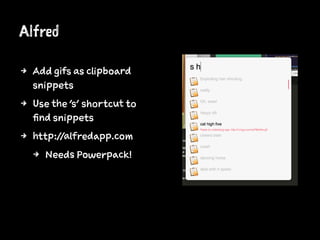
Alfred
4 Add gifs as clipboard
snippets
4 Use the 's' shortcut to
find snippets
4 http://alfredapp.com
4 Needs Powerpack!
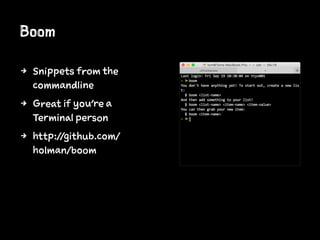
Boom
4 Snippets from the
commandline
4 Great if you're a
Terminal person
4 http://github.com/
holman/boom
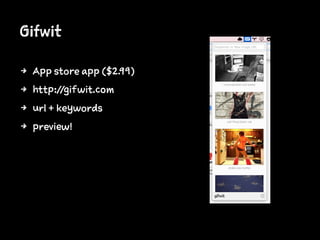
Gifwit
4 App store app ($2.99)
4 http://gifwit.com
4 url + keywords
4 preview!
GIFs
4 Open source app by @orta
4 repository of gifs
4 WIP but definitely useable ;)
Tools - iOS
4 iOS text shortcuts
4 Popkey
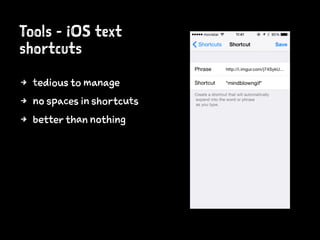
Tools - iOS text
shortcuts
4 tedious to manage
4 no spaces in shortcuts
4 better than nothing
Tools - PopKey
4 Gif keyboard for iOS8
4 http://popkey.co
4 "Coming soon"
Sources
4 Reddit
4 http://reddit.com/r/gifs
4 http://reddit.com/r/michaelbaygifs
4 "Specialized" sites
4 http://replygif.net
4 http://reactiongifs.com
4 http://giphy.com
Sources
4 ALL THE Tumblr BLOGS
4 Google Image Search
4 Search tools - Type - Animated
Make your own!
4 gifme
4 https://github.com/holman/gifme
So easy:
gifme ~/Desktop/*.jpg
You now have a handsome animation at ~/Desktop/animated.gif
Thanks!@inferis ~ http://inferis.org
Communicating with GIFs

Communicating with GIFs

  • 1.
  • 2.
  • 4.
  • 6.
    Why use GIFs? 4it’s like emoji, but more expressive
  • 8.
    Why use GIFs? 4a picture says a thousand words 4 beats typing 4 humour!
  • 10.
    Why use GIFs? 4you can use the actual gif image 4 iMessage 4 mail 4 warning: gifs tend to be big
  • 11.
    Why use GIFs? 4You can use just a text link 4 You can use them everywhere "connected" 4 it's text -> fast 4 works great in social media 4 EXCEPTFACEBOOK
  • 13.
    Why use GIFs? 4Also great in work related communication 4 chatrooms (Stack, Hipchat, ...) 4 lovely in commit messages 4 works great for PRs
  • 16.
    Why use GIFs? 4Gifs of cats. Nuff said.
  • 21.
    No really, they'regreat for all sorts of stuff
  • 29.
    How to useGIFS? 4 it has to convey more info than just text 4 you have to be able to reply fast 4 not all answers are good as a gif 4 know when to use gifs 4 Watch out for gifstorms 4 except on friday
  • 31.
    Manage your urls 4use original URL: 4 fast for you (no extra work) 4 fast for viewer (may be cached) 4 linkrot!
  • 34.
    Manage your urls 4Upload image to "managed" storage: 4 dropbox 4 cloudapp 4 S3 4 your-own-domain.io
  • 36.
    Size matters 4 Keepon eye on the size of the gif 4 some can be quite large 4 no need for “quality” 4 plain text gifs 4 If you use gifs a lot (in the same group/ context), you can fallback to plain text 4 Just use the name of the gif
  • 37.
  • 39.
    Tools 4 Make yourlife easier 4 Use the correct tool for you 4 easy to find, easy to copy
  • 41.
    Tools - Mac 4Alfred 4 Boom 4 Gifwit 4 GIFs
  • 42.
    Alfred 4 Add gifsas clipboard snippets 4 Use the 's' shortcut to find snippets 4 http://alfredapp.com 4 Needs Powerpack!
  • 43.
    Boom 4 Snippets fromthe commandline 4 Great if you're a Terminal person 4 http://github.com/ holman/boom
  • 44.
    Gifwit 4 App storeapp ($2.99) 4 http://gifwit.com 4 url + keywords 4 preview!
  • 45.
    GIFs 4 Open sourceapp by @orta 4 repository of gifs 4 WIP but definitely useable ;)
  • 46.
    Tools - iOS 4iOS text shortcuts 4 Popkey
  • 47.
    Tools - iOStext shortcuts 4 tedious to manage 4 no spaces in shortcuts 4 better than nothing
  • 49.
    Tools - PopKey 4Gif keyboard for iOS8 4 http://popkey.co 4 "Coming soon"
  • 51.
    Sources 4 Reddit 4 http://reddit.com/r/gifs 4http://reddit.com/r/michaelbaygifs 4 "Specialized" sites 4 http://replygif.net 4 http://reactiongifs.com 4 http://giphy.com
  • 52.
    Sources 4 ALL THETumblr BLOGS 4 Google Image Search 4 Search tools - Type - Animated
  • 53.
    Make your own! 4gifme 4 https://github.com/holman/gifme So easy: gifme ~/Desktop/*.jpg You now have a handsome animation at ~/Desktop/animated.gif
  • 55.