Generic Collections 
In our previous article we saw on generics and how we separated the data-type logic from a 
logical code snippet using generics. Taking forward that same logic, means separating collection 
logic i.e (Add, Search, Remove, Clear) from data-type, we will see different types of generic 
collections available in .net. 
We can use generic collections in our code by calling the namespace "using 
System.Collections.Generic". 
Generic Collections helps us to create flexible type-safe, strong type collections at compile time. 
Generic collections helps us to separate the collection logic (Add, Search, Remove, Clear) from 
different data-types available in .net. 
Why Generic Collections 
There are already different types of dotnet collections available in .net like array, arraylist, 
hashtables and specialized collections (string collections, hybrid collections) each of these 
collections have their own strong point and weak point.
For example: 
Arrays are strong types so there are no boxing and unboxing but weak point of this is it of fixed 
length size means it is not flexible. 
Arraylists and Hashtables are flexible in size but they are not strong type collections, we can pass 
any data-type objects to it, means there are lots of boxing and unboxing which means slow in 
performance. 
So by keeping in this mind dotnet development team has brought Generic Collections which 
bridges advantages of both strong type and dynamically resize and at a same time to pass any 
data-type to collections logic. 
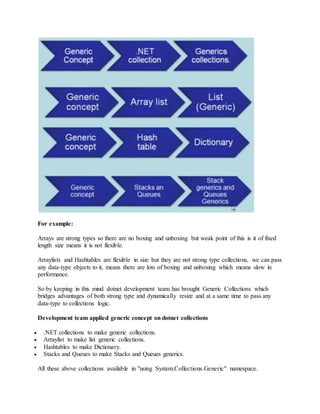
Development team applied generic concept on dotnet collections 
 .NET collections to make generic collections. 
 Arraylist to make list generic collections. 
 Hashtables to make Dictionary. 
 Stacks and Queues to make Stacks and Queues generics. 
All these above collections available in "using System.Collections.Generic" namespace.
Types of Generic Collections 
Generic List Collection 
List collection are strong type index based collection and dynamically resizable and at a same 
time we can pass any data type to a list object. It provides many inbuilt methods to manipulate 
list object. List generic collections is a generic concept applied over Arrays and Arraylist. 
Syntax 
List obj = new List(); 
Where "T" generic parameter you can pass any data-type or custom class object to this 
parameter. 
Example 
using System; 
using System.Collections.Generic; 
using System.Linq; 
using System.Text; 
namespace GenericCollections 
{ 
class Program 
{ 
static void Main(string[] args) 
{ 
List list = new List(); 
list.Add(1); 
list.Add(2); 
list.Add(9); 
foreach (int numbers in list) 
{ 
Console.WriteLine(numbers); 
} 
Console.WriteLine("Count -> {0}",list.Count); 
Console.WriteLine("n------------------------------------------- 
n"); 
List list1 = new List(); 
list1.Add(false); 
list1.Add(true); 
list1.Add(true);
list1.Add(false); 
foreach (bool booleans in list1) 
{ 
Console.WriteLine(booleans); 
} 
Console.WriteLine("Count -> {0}", list1.Count); 
Console.WriteLine("n------------------------------------------- 
n"); 
List list2 = new List(); 
list2.Add("Khadak"); 
list2.Add("Shiv"); 
list2.Add("Shaam"); 
list2.Add("Pradeep Dhuri"); 
foreach (string stringnames in list2) 
{ 
Console.WriteLine(stringnames); 
} 
Console.WriteLine("Count -> {0}", list2.Count); 
Console.WriteLine("n------------------------------------------- 
n"); 
} 
} 
} 
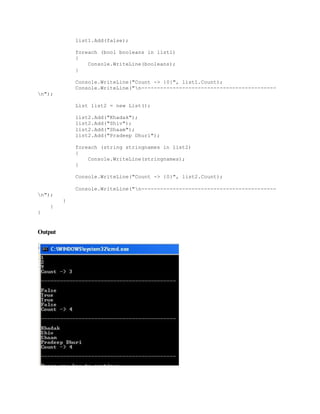
Output
Generic Dictionary in C-sharp 
Dictionary is a generic collections which works on key and value pairs. Both key and value pair 
can have different data-types or same data-types or any custom types (i.e. class objects). 
Dictionary generic collections is a generic concept applied over Hashtable and it provides fast 
lookups with keys to get values. 
Syntax 
Dictionary obj = new List(); 
Dictionary Represents a collection of keys and values. 
Where "TKey" and "TValue" are generic parameters you can pass any data-type or custom class 
object to this parameters. 
using System; 
using System.Collections.Generic; 
using System.Linq; 
using System.Text; 
namespace GenericCollections 
{ 
class Program 
{ 
static void Main(string[] args) 
{ 
Dictionary animaldictionary = new Dictionary(); 
animaldictionary.Add("Tiger", 3); 
animaldictionary.Add("Lion", 2); 
animaldictionary.Add("Panda", 1); 
foreach (KeyValuePair pair in animaldictionary) 
{ 
Console.WriteLine("{0}, {1}", pair.Key, pair.Value); 
} 
Console.WriteLine("n------------------------------------------- 
n"); 
foreach (var pair in animaldictionary) 
{ 
Console.WriteLine("{0}, {1}", pair.Key, pair.Value); 
}
} 
} 
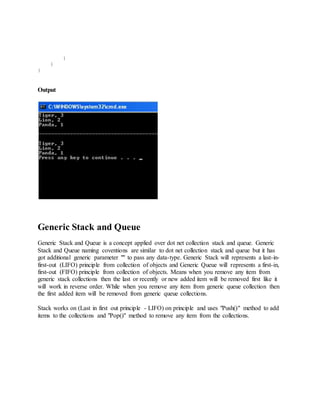
} 
Output 
Generic Stack and Queue 
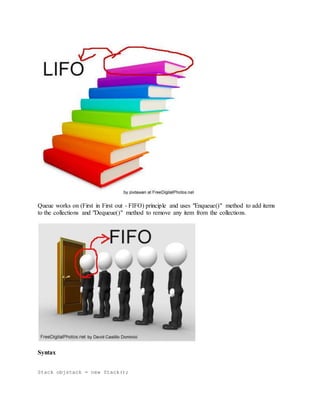
Generic Stack and Queue is a concept applied over dot net collection stack and queue. Generic 
Stack and Queue naming coventions are similar to dot net collection stack and queue but it has 
got additional generic parameter "" to pass any data-type. Generic Stack will represents a last-in-first- 
out (LIFO) principle from collection of objects and Generic Queue will represents a first-in, 
first-out (FIFO) principle from collection of objects. Means when you remove any item from 
generic stack collections then the last or recently or new added item will be removed first like it 
will work in reverse order. While when you remove any item from generic queue collection then 
the first added item will be removed from generic queue collections. 
Stack works on (Last in first out principle - LIFO) on principle and uses "Push()" method to add 
items to the collections and "Pop()" method to remove any item from the collections.
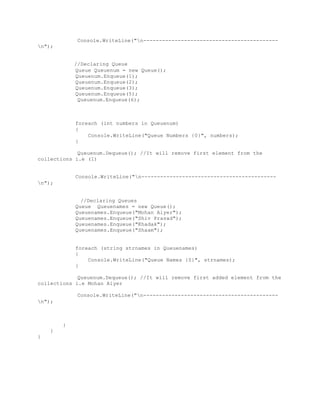
Queue works on (First in First out - FIFO) principle and uses "Enqueue()" method to add items 
to the collections and "Dequeue()" method to remove any item from the collections. 
Syntax 
Stack objstack = new Stack();
Queue objqueue = new Queue (); 
Example 
using System; 
using System.Collections.Generic; 
using System.Linq; 
using System.Text; 
namespace GenericCollections 
{ 
class Program 
{ 
static void Main(string[] args) 
{ 
//Declaring Stack 
Stack stacknum = new Stack(); 
stacknum.Push(1); 
stacknum.Push(2); 
stacknum.Push(3); 
stacknum.Push(5); 
stacknum.Push(6); 
foreach (int numbers in stacknum) 
{ 
Console.WriteLine("Stack Numbers {0}", numbers); 
} 
stacknum.Pop(); //It will remove last/recent added element from 
the collections i.e (6) 
Console.WriteLine("n------------------------------------------- 
n"); 
//Declaring Stack 
Stack stacknames = new Stack(); 
stacknames.Push("Pradeep Dhuri"); 
stacknames.Push("Shiv Prasad"); 
stacknames.Push("Khadak"); 
stacknames.Push("Shaam"); 
foreach (string strnames in stacknames) 
{ 
Console.WriteLine("Stack Names {0}", strnames); 
} 
stacknames.Pop(); //It will remove last element/recent added 
element from the collections i.e. Shaam
Console.WriteLine("n------------------------------------------- 
n"); 
//Declaring Queue 
Queue Queuenum = new Queue(); 
Queuenum.Enqueue(1); 
Queuenum.Enqueue(2); 
Queuenum.Enqueue(3); 
Queuenum.Enqueue(5); 
Queuenum.Enqueue(6); 
foreach (int numbers in Queuenum) 
{ 
Console.WriteLine("Queue Numbers {0}", numbers); 
} 
Queuenum.Dequeue(); //It will remove first element from the 
collections i.e (1) 
Console.WriteLine("n------------------------------------------- 
n"); 
//Declaring Queues 
Queue Queuenames = new Queue(); 
Queuenames.Enqueue("Mohan Aiyer"); 
Queuenames.Enqueue("Shiv Prasad"); 
Queuenames.Enqueue("Khadak"); 
Queuenames.Enqueue("Shaam"); 
foreach (string strnames in Queuenames) 
{ 
Console.WriteLine("Queue Names {0}", strnames); 
} 
Queuenum.Dequeue(); //It will remove first added element from the 
collections i.e Mohan Aiyer 
Console.WriteLine("n------------------------------------------- 
n"); 
} 
} 
}

Collections generic

  • 1.
    Generic Collections Inour previous article we saw on generics and how we separated the data-type logic from a logical code snippet using generics. Taking forward that same logic, means separating collection logic i.e (Add, Search, Remove, Clear) from data-type, we will see different types of generic collections available in .net. We can use generic collections in our code by calling the namespace "using System.Collections.Generic". Generic Collections helps us to create flexible type-safe, strong type collections at compile time. Generic collections helps us to separate the collection logic (Add, Search, Remove, Clear) from different data-types available in .net. Why Generic Collections There are already different types of dotnet collections available in .net like array, arraylist, hashtables and specialized collections (string collections, hybrid collections) each of these collections have their own strong point and weak point.
  • 2.
    For example: Arraysare strong types so there are no boxing and unboxing but weak point of this is it of fixed length size means it is not flexible. Arraylists and Hashtables are flexible in size but they are not strong type collections, we can pass any data-type objects to it, means there are lots of boxing and unboxing which means slow in performance. So by keeping in this mind dotnet development team has brought Generic Collections which bridges advantages of both strong type and dynamically resize and at a same time to pass any data-type to collections logic. Development team applied generic concept on dotnet collections  .NET collections to make generic collections.  Arraylist to make list generic collections.  Hashtables to make Dictionary.  Stacks and Queues to make Stacks and Queues generics. All these above collections available in "using System.Collections.Generic" namespace.
  • 3.
    Types of GenericCollections Generic List Collection List collection are strong type index based collection and dynamically resizable and at a same time we can pass any data type to a list object. It provides many inbuilt methods to manipulate list object. List generic collections is a generic concept applied over Arrays and Arraylist. Syntax List obj = new List(); Where "T" generic parameter you can pass any data-type or custom class object to this parameter. Example using System; using System.Collections.Generic; using System.Linq; using System.Text; namespace GenericCollections { class Program { static void Main(string[] args) { List list = new List(); list.Add(1); list.Add(2); list.Add(9); foreach (int numbers in list) { Console.WriteLine(numbers); } Console.WriteLine("Count -> {0}",list.Count); Console.WriteLine("n------------------------------------------- n"); List list1 = new List(); list1.Add(false); list1.Add(true); list1.Add(true);
  • 4.
    list1.Add(false); foreach (boolbooleans in list1) { Console.WriteLine(booleans); } Console.WriteLine("Count -> {0}", list1.Count); Console.WriteLine("n------------------------------------------- n"); List list2 = new List(); list2.Add("Khadak"); list2.Add("Shiv"); list2.Add("Shaam"); list2.Add("Pradeep Dhuri"); foreach (string stringnames in list2) { Console.WriteLine(stringnames); } Console.WriteLine("Count -> {0}", list2.Count); Console.WriteLine("n------------------------------------------- n"); } } } Output
  • 5.
    Generic Dictionary inC-sharp Dictionary is a generic collections which works on key and value pairs. Both key and value pair can have different data-types or same data-types or any custom types (i.e. class objects). Dictionary generic collections is a generic concept applied over Hashtable and it provides fast lookups with keys to get values. Syntax Dictionary obj = new List(); Dictionary Represents a collection of keys and values. Where "TKey" and "TValue" are generic parameters you can pass any data-type or custom class object to this parameters. using System; using System.Collections.Generic; using System.Linq; using System.Text; namespace GenericCollections { class Program { static void Main(string[] args) { Dictionary animaldictionary = new Dictionary(); animaldictionary.Add("Tiger", 3); animaldictionary.Add("Lion", 2); animaldictionary.Add("Panda", 1); foreach (KeyValuePair pair in animaldictionary) { Console.WriteLine("{0}, {1}", pair.Key, pair.Value); } Console.WriteLine("n------------------------------------------- n"); foreach (var pair in animaldictionary) { Console.WriteLine("{0}, {1}", pair.Key, pair.Value); }
  • 6.
    } } } Output Generic Stack and Queue Generic Stack and Queue is a concept applied over dot net collection stack and queue. Generic Stack and Queue naming coventions are similar to dot net collection stack and queue but it has got additional generic parameter "" to pass any data-type. Generic Stack will represents a last-in-first- out (LIFO) principle from collection of objects and Generic Queue will represents a first-in, first-out (FIFO) principle from collection of objects. Means when you remove any item from generic stack collections then the last or recently or new added item will be removed first like it will work in reverse order. While when you remove any item from generic queue collection then the first added item will be removed from generic queue collections. Stack works on (Last in first out principle - LIFO) on principle and uses "Push()" method to add items to the collections and "Pop()" method to remove any item from the collections.
  • 7.
    Queue works on(First in First out - FIFO) principle and uses "Enqueue()" method to add items to the collections and "Dequeue()" method to remove any item from the collections. Syntax Stack objstack = new Stack();
  • 8.
    Queue objqueue =new Queue (); Example using System; using System.Collections.Generic; using System.Linq; using System.Text; namespace GenericCollections { class Program { static void Main(string[] args) { //Declaring Stack Stack stacknum = new Stack(); stacknum.Push(1); stacknum.Push(2); stacknum.Push(3); stacknum.Push(5); stacknum.Push(6); foreach (int numbers in stacknum) { Console.WriteLine("Stack Numbers {0}", numbers); } stacknum.Pop(); //It will remove last/recent added element from the collections i.e (6) Console.WriteLine("n------------------------------------------- n"); //Declaring Stack Stack stacknames = new Stack(); stacknames.Push("Pradeep Dhuri"); stacknames.Push("Shiv Prasad"); stacknames.Push("Khadak"); stacknames.Push("Shaam"); foreach (string strnames in stacknames) { Console.WriteLine("Stack Names {0}", strnames); } stacknames.Pop(); //It will remove last element/recent added element from the collections i.e. Shaam
  • 9.
    Console.WriteLine("n------------------------------------------- n"); //DeclaringQueue Queue Queuenum = new Queue(); Queuenum.Enqueue(1); Queuenum.Enqueue(2); Queuenum.Enqueue(3); Queuenum.Enqueue(5); Queuenum.Enqueue(6); foreach (int numbers in Queuenum) { Console.WriteLine("Queue Numbers {0}", numbers); } Queuenum.Dequeue(); //It will remove first element from the collections i.e (1) Console.WriteLine("n------------------------------------------- n"); //Declaring Queues Queue Queuenames = new Queue(); Queuenames.Enqueue("Mohan Aiyer"); Queuenames.Enqueue("Shiv Prasad"); Queuenames.Enqueue("Khadak"); Queuenames.Enqueue("Shaam"); foreach (string strnames in Queuenames) { Console.WriteLine("Queue Names {0}", strnames); } Queuenum.Dequeue(); //It will remove first added element from the collections i.e Mohan Aiyer Console.WriteLine("n------------------------------------------- n"); } } }