Collections
• A Collection is a group of items or objects put together
• A Book collection is a number of books grouped or put together on a shelf
• A Collection in programming has similar meaning
• Gathering number of objects together, for example collecting names of all
student in a list
• More formally a Collection in programming is a class that allows
putting objects together
• Collection classes also allow methods to manage the objects within
the collection, such as, addition, removal, search etc.
Saifut
1
Collections
• An Array can be used to group a bunch of objects together
• Disadvantages of using an Array
• Array is fixed size. It cannot grow or shrink
• int[] numbers = new int[100]; // size of the numbers array is fixed to 100
• Programmer has to manage the collection, such as, adding, removing,
searching and moving items within the array etc.
• Collection classes removes the above disadvantages
• To work with Collection classes in C# the following namespaces have
to be included in your project:
• Systems.Collections
• Systems.Collections.Generic
Saifut
2
Collections
• Classes within the System.Collection namespace do not check the type of object
in the collection
• Example of some of these classes are:
• ArrayList, Stack, Queue
• Classes within the System.Collection.Generic namespace check the type of object
in the collection
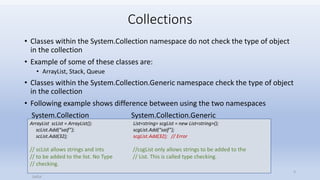
• Following example shows difference between using the two namespaces
System.Collection System.Collection.Generic
Saifut
3
ArrayList scList = ArrayList(); List<string> scgList = new List<string>();
scList.Add(“saif”); scgList.Add(“saif”);
scList.Add(32); scgList.Add(32); // Error
// scList allows strings and ints //csgList only allows strings to be added to the
// to be added to the list. No Type // List. This is called type checking.
// checking.
Collections
• Generic classes enforce type checking.
• When using a Generic class the type of the object is specified as a type parameter
List<string>
• Type parameter appears within the <> brackets
• The type of object in the example above is string. So this list can only store
strings.
• Some of the collections that are part of the System.Collection.Generic
namespace are:
List<T>, LinkedList<T>, Stack<T>, Queue<T>
<T> refers to the type parameter. In the example above T = string.
Saifut
4
Collections
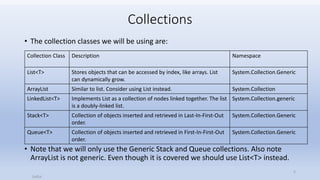
• The collection classes we will be using are:
• Note that we will only use the Generic Stack and Queue collections. Also note
ArrayList is not generic. Even though it is covered we should use List<T> instead.
Saifut
5
Collection Class Description Namespace
List<T> Stores objects that can be accessed by index, like arrays. List
can dynamically grow.
System.Collection.Generic
ArrayList Similar to list. Consider using List instead. System.Collection
LinkedList<T> Implements List as a collection of nodes linked together. The list
is a doubly-linked list.
System.Collection.generic
Stack<T> Collection of objects inserted and retrieved in Last-In-First-Out
order.
System.Collection.Generic
Queue<T> Collection of objects inserted and retrieved in First-In-First-Out
order.
System.Collection.Generic

Collections (1)

  • 1.
    Collections • A Collectionis a group of items or objects put together • A Book collection is a number of books grouped or put together on a shelf • A Collection in programming has similar meaning • Gathering number of objects together, for example collecting names of all student in a list • More formally a Collection in programming is a class that allows putting objects together • Collection classes also allow methods to manage the objects within the collection, such as, addition, removal, search etc. Saifut 1
  • 2.
    Collections • An Arraycan be used to group a bunch of objects together • Disadvantages of using an Array • Array is fixed size. It cannot grow or shrink • int[] numbers = new int[100]; // size of the numbers array is fixed to 100 • Programmer has to manage the collection, such as, adding, removing, searching and moving items within the array etc. • Collection classes removes the above disadvantages • To work with Collection classes in C# the following namespaces have to be included in your project: • Systems.Collections • Systems.Collections.Generic Saifut 2
  • 3.
    Collections • Classes withinthe System.Collection namespace do not check the type of object in the collection • Example of some of these classes are: • ArrayList, Stack, Queue • Classes within the System.Collection.Generic namespace check the type of object in the collection • Following example shows difference between using the two namespaces System.Collection System.Collection.Generic Saifut 3 ArrayList scList = ArrayList(); List<string> scgList = new List<string>(); scList.Add(“saif”); scgList.Add(“saif”); scList.Add(32); scgList.Add(32); // Error // scList allows strings and ints //csgList only allows strings to be added to the // to be added to the list. No Type // List. This is called type checking. // checking.
  • 4.
    Collections • Generic classesenforce type checking. • When using a Generic class the type of the object is specified as a type parameter List<string> • Type parameter appears within the <> brackets • The type of object in the example above is string. So this list can only store strings. • Some of the collections that are part of the System.Collection.Generic namespace are: List<T>, LinkedList<T>, Stack<T>, Queue<T> <T> refers to the type parameter. In the example above T = string. Saifut 4
  • 5.
    Collections • The collectionclasses we will be using are: • Note that we will only use the Generic Stack and Queue collections. Also note ArrayList is not generic. Even though it is covered we should use List<T> instead. Saifut 5 Collection Class Description Namespace List<T> Stores objects that can be accessed by index, like arrays. List can dynamically grow. System.Collection.Generic ArrayList Similar to list. Consider using List instead. System.Collection LinkedList<T> Implements List as a collection of nodes linked together. The list is a doubly-linked list. System.Collection.generic Stack<T> Collection of objects inserted and retrieved in Last-In-First-Out order. System.Collection.Generic Queue<T> Collection of objects inserted and retrieved in First-In-First-Out order. System.Collection.Generic