WELCOME TO
VIBRANT TECHNOLOGIES & COMPUTERS
IBM Cognos 8 BI
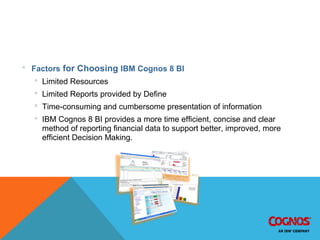
 Factors for Choosing IBM Cognos 8 BI
 Limited Resources
 Limited Reports provided by Define
 Time-consuming and cumbersome presentation of information
 IBM Cognos 8 BI provides a more time efficient, concise and clear
method of reporting financial data to support better, improved, more
efficient Decision Making.
UTSA IBM Cognos 8 BI AFR Reports
Central User - AFR / MFR Report Schedules Completed
Name Type Reference
Tuition and Fee Revenue Schedule C1
E&G Funds Schedule B1
Designated Funds Schedule B2
Auxiliary Funds Schedule B3
Transfers Schedule B13
Exp by Object and Fund Group Schedule C2
Restricted Funds Schedule B4
SRECNA With Variances Exhibit Exhibit B
Expenditure Transparency Report Report
S3 Schedules that support B3 Schedule S3
Monthly Income Statement MFR November 2008
 Estimated Delivery of improved AFR Schedules November 08Estimated Delivery of improved AFR Schedules November 08
Departmental and Central User Reports
Standard Reporting Package Dev and Power User Access
Name
Budget Status – Monthly Financial Report by Unit Hierarchy
Organizational Overview by Fund
Expenditure Detail and Summary Report
12 Month Expenditure Report
Revenue Detail Report
Original Budget Report
Name Auxiliary Revenue
Monthly Financial Report by Fund Athletics
Revenue Analysis University Center
Statutory Tuition Parking and Business Auxiliary Services
Designated Tuition Fees Child Dev Center
E&G Fees Housing
Designated Fees Institute of Texan Cultures
 Departmental Users
 Central Users
 Projected Delivery Date February 2009Projected Delivery Date February 2009
 Projected Delivery DateProjected Delivery Date March 2009March 2009
IBM Cognos 8 BI
 What is Cognos?
Cognos is Business Intelligence software
that enables users to extract data,
analyze it, and then assemble reports.
BI – Business Intelligence
 Business Intelligence (BI)
 BI refers to technologies, applications and practices for the collection,
integration, analysis, and presentation of business information .
 Purpose of BI
 To support better, improved and more efficient Decision Making
 BI Systems Provide
 BI systems provide historical, current, and predictive views of business
operations.,
 BI Systems Information
 Uses data that has been gathered into a data warehouse or data mart.
 BI Software Elements
 Software elements support the use of this information by assisting in
the extraction, analysis, and reporting of information.
IBM Cognos 8 BI Implementation Project
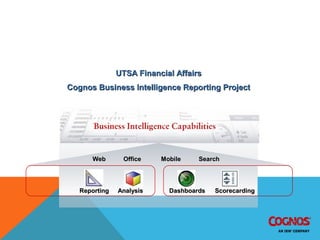
UTSA Financial AffairsUTSA Financial Affairs
Cognos Business Intelligence Reporting ProjectCognos Business Intelligence Reporting Project
ReportingReporting AnalysisAnalysis DashboardsDashboards ScorecardingScorecarding
WebWeb OfficeOffice SearchSearchMobileMobile
IBM Cognos 8 BI Implementation Project & Mission
UTSA Financial AffairsUTSA Financial Affairs
Cognos Business Intelligence Reporting ProjectCognos Business Intelligence Reporting Project
Mission Statement
The mission of this project is to provide on–demand access to
accurate and up-to-date financial reports and related
information for identified UTSA customers using Cognos
Business Intelligence reporting tools.
We will empower financial analysts around the University with tools to
manage the University's resources more efficiently.
IBM Cognos 8 BI Implementation Objectives
 Increase Automation of Financial Business Processes
 Streamline inefficient business processes
 Improve reporting format and analysis
 Improve Worker productivity
 Reduce manual workload through the use of technology
 Provide comprehensive training on software and
 Maintain Data Integrity
 Ensure data conversion is successful and accurate
 Maintain Positioning for Future Initiatives
 Provide information access to allow UTSA to implement a financial
assessment process
 Develop performance measurements to support quality initiatives
IBM Cognos BI Project Phases
 Phase 1 – Project Planning, Acquisition & Migration
 Phase 2 – Central User Reports – AFR / MFR Report
Schedules
 Phase 3 – Standard Reporting Package Development &
Power User access – Begin Financial Assessment Process
 Phase 4 – Central User Ad-hoc Reports
 Phase 5 – Statement of Accounts Report Development
 Phase 6 – Special Purpose Reports
 Phase 7 – Evaluate Delivered Banner Cubes and Automate
Define to Banner Fee Revenue and Accounts Receivable
Reconciliation
IBM 8 Cognos BI Demonstration
 Report using Cognos 8 BI Analysis Studio
 Dimensional Data
 Dimensional Data
 Data Cube
 Dimensionally Modeled Relational Data (DMR)
 Sample Data
 Budget Balance
 Available by unit
 For end of FY 0708
 Points of Emphasis
 Ease of use
 Drillable capability
 Charting options
IBM 8 Cognos BI Report Distribution
 Reports
Scheduled Reports
Reports will be scheduled and run on a periodic basis
Reports can be retrieved by user or received via email
Scheduled Email Distribution
Reports will be scheduled and emailed to recipients as an attachment
IBM 8 Cognos BI Report Distribution
IBM 8 Cognos BI User Access
 Web Application
 No software loaded onto user machines
 Web address provided via Management Reporting website or email
IBM 8 Cognos BI Report User Access
 User Login setup
 Request for Cognos access available via MR website or email
 Users will be setup within Cognos with using existing UTSA Login ID &
Password
CONCLUSION:
IBM COGNOS 8 BI ENABLES BETTER, FASTER DECISIONS
Broad Range of Users
 Simplified role based interfaces
 Targeted content and capabilities
 Flexible and scalable platform
Better Decisions
 Based on accurate, complete information
 Aligned with strategic goals and initiatives
 Based on proven practices
Faster
 Information when users need it
 How they need it
 Where they need it
THANK YOU
k1/4,2nd floor,sec-15/16
market opp to vaidehi
hotel,vashi,navi mumbai
989200173/98929001
03
Cognos 101008

Cognos 101008

  • 1.
  • 2.
    IBM Cognos 8BI  Factors for Choosing IBM Cognos 8 BI  Limited Resources  Limited Reports provided by Define  Time-consuming and cumbersome presentation of information  IBM Cognos 8 BI provides a more time efficient, concise and clear method of reporting financial data to support better, improved, more efficient Decision Making.
  • 3.
    UTSA IBM Cognos8 BI AFR Reports Central User - AFR / MFR Report Schedules Completed Name Type Reference Tuition and Fee Revenue Schedule C1 E&G Funds Schedule B1 Designated Funds Schedule B2 Auxiliary Funds Schedule B3 Transfers Schedule B13 Exp by Object and Fund Group Schedule C2 Restricted Funds Schedule B4 SRECNA With Variances Exhibit Exhibit B Expenditure Transparency Report Report S3 Schedules that support B3 Schedule S3 Monthly Income Statement MFR November 2008  Estimated Delivery of improved AFR Schedules November 08Estimated Delivery of improved AFR Schedules November 08
  • 4.
    Departmental and CentralUser Reports Standard Reporting Package Dev and Power User Access Name Budget Status – Monthly Financial Report by Unit Hierarchy Organizational Overview by Fund Expenditure Detail and Summary Report 12 Month Expenditure Report Revenue Detail Report Original Budget Report Name Auxiliary Revenue Monthly Financial Report by Fund Athletics Revenue Analysis University Center Statutory Tuition Parking and Business Auxiliary Services Designated Tuition Fees Child Dev Center E&G Fees Housing Designated Fees Institute of Texan Cultures  Departmental Users  Central Users  Projected Delivery Date February 2009Projected Delivery Date February 2009  Projected Delivery DateProjected Delivery Date March 2009March 2009
  • 5.
    IBM Cognos 8BI  What is Cognos? Cognos is Business Intelligence software that enables users to extract data, analyze it, and then assemble reports.
  • 6.
    BI – BusinessIntelligence  Business Intelligence (BI)  BI refers to technologies, applications and practices for the collection, integration, analysis, and presentation of business information .  Purpose of BI  To support better, improved and more efficient Decision Making  BI Systems Provide  BI systems provide historical, current, and predictive views of business operations.,  BI Systems Information  Uses data that has been gathered into a data warehouse or data mart.  BI Software Elements  Software elements support the use of this information by assisting in the extraction, analysis, and reporting of information.
  • 7.
    IBM Cognos 8BI Implementation Project UTSA Financial AffairsUTSA Financial Affairs Cognos Business Intelligence Reporting ProjectCognos Business Intelligence Reporting Project ReportingReporting AnalysisAnalysis DashboardsDashboards ScorecardingScorecarding WebWeb OfficeOffice SearchSearchMobileMobile
  • 8.
    IBM Cognos 8BI Implementation Project & Mission UTSA Financial AffairsUTSA Financial Affairs Cognos Business Intelligence Reporting ProjectCognos Business Intelligence Reporting Project Mission Statement The mission of this project is to provide on–demand access to accurate and up-to-date financial reports and related information for identified UTSA customers using Cognos Business Intelligence reporting tools. We will empower financial analysts around the University with tools to manage the University's resources more efficiently.
  • 9.
    IBM Cognos 8BI Implementation Objectives  Increase Automation of Financial Business Processes  Streamline inefficient business processes  Improve reporting format and analysis  Improve Worker productivity  Reduce manual workload through the use of technology  Provide comprehensive training on software and  Maintain Data Integrity  Ensure data conversion is successful and accurate  Maintain Positioning for Future Initiatives  Provide information access to allow UTSA to implement a financial assessment process  Develop performance measurements to support quality initiatives
  • 10.
    IBM Cognos BIProject Phases  Phase 1 – Project Planning, Acquisition & Migration  Phase 2 – Central User Reports – AFR / MFR Report Schedules  Phase 3 – Standard Reporting Package Development & Power User access – Begin Financial Assessment Process  Phase 4 – Central User Ad-hoc Reports  Phase 5 – Statement of Accounts Report Development  Phase 6 – Special Purpose Reports  Phase 7 – Evaluate Delivered Banner Cubes and Automate Define to Banner Fee Revenue and Accounts Receivable Reconciliation
  • 11.
    IBM 8 CognosBI Demonstration  Report using Cognos 8 BI Analysis Studio  Dimensional Data  Dimensional Data  Data Cube  Dimensionally Modeled Relational Data (DMR)  Sample Data  Budget Balance  Available by unit  For end of FY 0708  Points of Emphasis  Ease of use  Drillable capability  Charting options
  • 12.
    IBM 8 CognosBI Report Distribution  Reports Scheduled Reports Reports will be scheduled and run on a periodic basis Reports can be retrieved by user or received via email Scheduled Email Distribution Reports will be scheduled and emailed to recipients as an attachment IBM 8 Cognos BI Report Distribution
  • 13.
    IBM 8 CognosBI User Access  Web Application  No software loaded onto user machines  Web address provided via Management Reporting website or email IBM 8 Cognos BI Report User Access  User Login setup  Request for Cognos access available via MR website or email  Users will be setup within Cognos with using existing UTSA Login ID & Password
  • 14.
    CONCLUSION: IBM COGNOS 8BI ENABLES BETTER, FASTER DECISIONS Broad Range of Users  Simplified role based interfaces  Targeted content and capabilities  Flexible and scalable platform Better Decisions  Based on accurate, complete information  Aligned with strategic goals and initiatives  Based on proven practices Faster  Information when users need it  How they need it  Where they need it
  • 15.
    THANK YOU k1/4,2nd floor,sec-15/16 marketopp to vaidehi hotel,vashi,navi mumbai 989200173/98929001 03