C#.NET EVOLUTION, MAJOR RELEASES
PART 2
VAHID FARAHMANDIAN
C# 5.0
 Released in 2012, along with Visual Studio 2012 and .Net
framework 4.5
 Major features:
 Asynchronous members
 Caller info attributes
C# 5.0 - ASYNCHRONOUS MEMBERS
 The core of async programming are the Task and Task<T> objects
 They are supported by the async and await keywords
 For I/O-bound code, you await an operation which returns a Task
or Task<T> inside of an async method.
 For CPU-bound code, you await an operation which is started on a
background thread with the Task.Run method.
 The await keyword yields control to the caller of the method that
performed await, and it ultimately allows a UI to be responsive or a
service to be elastic.
C# 5.0 - ASYNCHRONOUS MEMBERS
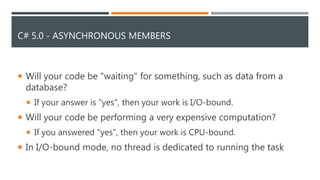
 Will your code be "waiting" for something, such as data from a
database?
 If your answer is "yes", then your work is I/O-bound.
 Will your code be performing a very expensive computation?
 If you answered "yes", then your work is CPU-bound.
 In I/O-bound mode, no thread is dedicated to running the task
C# 5.0 – ASYNCHRONOUS MEMBERS - SAMPLE
static void Main(string[] args)
{
Console.WriteLine("Hi");
ReadUrl();
DoCPUIntensiveWork();
Console.WriteLine("Are You fine?");
Console.ReadKey();
}
static async Task ReadUrl() {
Console.WriteLine(await new HttpClient().GetStringAsync("http://www.google.com")); }
static async Task DoCPUIntensiveWork() {
Console.WriteLine(await Task.Run(() => IntensiveCalculation())); }
static double IntensiveCalculation()
{
double result = 0;
for (int i = 0; i < 500000; i++) { result++; }
return result;
}
C# 5.0 - CALLER INFO ATTRIBUTES
 These attributes help in tracking information about the caller
 There are three types of attributes which are useful in doing so.
 [CallerMemberName] - Sets the information about caller member
name.
 [CallerFilePath] - Sets the information about caller's source code file.
 [CallerLineNumber] - Sets the information about caller's line number.
 this is applicable for default parameters, in which case these
attributes inform compiler to extract caller information and set it
inside the default values of these parameters.
C# 5.0 – CALLER INFO ATTRIBUTES - SAMPLE
static void Main(string[] args)
{
ShowCallerInfo();
Console.ReadKey();
}
public static void ShowCallerInfo(
[CallerMemberName]string callerName = null,
[CallerFilePath] string callerFilePath = null,
[CallerLineNumber] int callerLine = -1)
{
Console.WriteLine("Caller Name: {0}", callerName);
Console.WriteLine("Caller FilePath: {0}", callerFilePath);
Console.WriteLine("Caller Line number: {0}", callerLine);
}
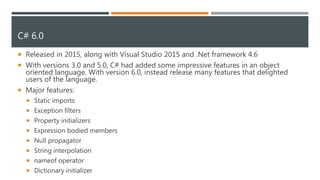
C# 6.0
 Released in 2015, along with Visual Studio 2015 and .Net framework 4.6
 With versions 3.0 and 5.0, C# had added some impressive features in an object
oriented language. With version 6.0, instead release many features that delighted
users of the language.
 Major features:
 Static imports
 Exception filters
 Property initializers
 Expression bodied members
 Null propagator
 String interpolation
 nameof operator
 Dictionary initializer
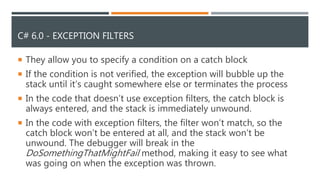
C# 6.0 - EXCEPTION FILTERS
 They allow you to specify a condition on a catch block
 If the condition is not verified, the exception will bubble up the
stack until it’s caught somewhere else or terminates the process
 In the code that doesn’t use exception filters, the catch block is
always entered, and the stack is immediately unwound.
 In the code with exception filters, the filter won’t match, so the
catch block won’t be entered at all, and the stack won’t be
unwound. The debugger will break in the
DoSomethingThatMightFail method, making it easy to see what
was going on when the exception was thrown.
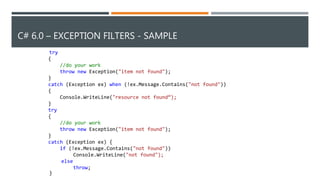
C# 6.0 – EXCEPTION FILTERS - SAMPLE
try
{
//do your work
throw new Exception("item not found");
}
catch (Exception ex) when (!ex.Message.Contains("not found"))
{
Console.WriteLine("resource not found“);
}
try
{
//do your work
throw new Exception("item not found");
}
catch (Exception ex) {
if (!ex.Message.Contains("not found"))
Console.WriteLine("not found");
else
throw;
}
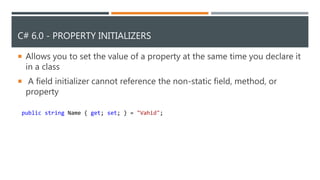
C# 6.0 - PROPERTY INITIALIZERS
 Allows you to set the value of a property at the same time you declare it
in a class
 A field initializer cannot reference the non-static field, method, or
property
public string Name { get; set; } = "Vahid";
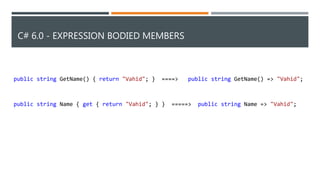
C# 6.0 - EXPRESSION BODIED MEMBERS
public string GetName() { return "Vahid"; } ====> public string GetName() => "Vahid";
public string Name { get { return "Vahid"; } } =====> public string Name => "Vahid";
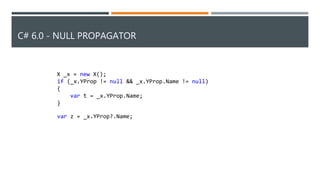
C# 6.0 - NULL PROPAGATOR
X _x = new X();
if (_x.YProp != null && _x.YProp.Name != null)
{
var t = _x.YProp.Name;
}
var z = _x.YProp?.Name;
C# 6.0 - STRING INTERPOLATION
 The $ special character identifies a string literal as an interpolated
string
 An interpolated string looks like a template string that contains
interpolated expressions
string.Format(“{0}.Are you from {1}?","Vahid","Iran") ==> $“{"Vahid"}.Are you from {"Iran"}?"
C# 6.0 - NAMEOF OPERATOR
 There are numerous cases where you would want to have the
name of the property
public int FirstName { get; set; }
static void Main(string[] args)
{
Console.WriteLine(nameof(FirstName));
Console.ReadKey();
}
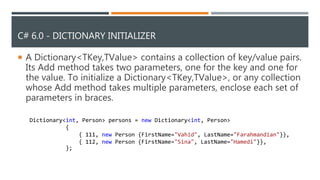
C# 6.0 - DICTIONARY INITIALIZER
 A Dictionary<TKey,TValue> contains a collection of key/value pairs.
Its Add method takes two parameters, one for the key and one for
the value. To initialize a Dictionary<TKey,TValue>, or any collection
whose Add method takes multiple parameters, enclose each set of
parameters in braces.
Dictionary<int, Person> persons = new Dictionary<int, Person>
{
{ 111, new Person {FirstName="Vahid", LastName="Farahmandian"}},
{ 112, new Person {FirstName="Sina", LastName="Hamedi"}},
};
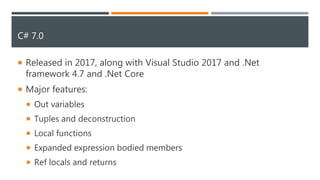
C# 7.0
 Released in 2017, along with Visual Studio 2017 and .Net
framework 4.7 and .Net Core
 Major features:
 Out variables
 Tuples and deconstruction
 Local functions
 Expanded expression bodied members
 Ref locals and returns
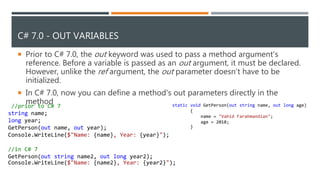
C# 7.0 - OUT VARIABLES
 Prior to C# 7.0, the out keyword was used to pass a method argument's
reference. Before a variable is passed as an out argument, it must be declared.
However, unlike the ref argument, the out parameter doesn’t have to be
initialized.
 In C# 7.0, now you can define a method's out parameters directly in the
method static void GetPerson(out string name, out long age)
{
name = "Vahid Farahmandian";
age = 2018;
}
//prior to C# 7
string name;
long year;
GetPerson(out name, out year);
Console.WriteLine($"Name: {name}, Year: {year}");
//in C# 7
GetPerson(out string name2, out long year2);
Console.WriteLine($"Name: {name2}, Year: {year2}");
C# 7.0 - TUPLE DECONSTRUCTION
 lets you unpackage all the items in a tuple in a single operation
static void Main(string[] args)
{
(string city, int population, double area) = QueryCityData("New York City");
Console.ReadKey();
}
private static (string, int, double) QueryCityData(string name)
{
if (name == "New York City")
return (name, 8175133, 468.48);
return ("", 0, 0);
}
C# 7.0 - LOCAL FUNCTIONS
 you can define local functions inside any method, the constructor
of a class or inside a property
 you might often need to create methods that aren't reused -- you need
them just for modularity
 Before C# 7 was around, you could have achieved this using Func and
Action types with anonymous methods. However, there were a few
challenges. They did not support generics, params and ref and out
parameters.
static void Main(string[] args)
{
int Sum(int x, int y) { return x + y; }
Console.WriteLine(Sum(10, 20));
Console.ReadKey();
}
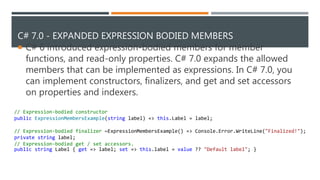
C# 7.0 - EXPANDED EXPRESSION BODIED MEMBERS
 C# 6 introduced expression-bodied members for member
functions, and read-only properties. C# 7.0 expands the allowed
members that can be implemented as expressions. In C# 7.0, you
can implement constructors, finalizers, and get and set accessors
on properties and indexers.
// Expression-bodied constructor
public ExpressionMembersExample(string label) => this.Label = label;
// Expression-bodied finalizer ~ExpressionMembersExample() => Console.Error.WriteLine("Finalized!");
private string label;
// Expression-bodied get / set accessors.
public string Label { get => label; set => this.label = value ?? "Default label"; }
C# 7.0 - REF LOCALS AND RETURNS
 So far ref was only used to be passed as a parameter in a method
however there was no provision to return it and use it later. In C# 7.0,
this constraint has been waived off and now you can return references
as well.
char[] chararray = { 'v', 'a', 'h', 'i', 'd' };
Console.WriteLine($"Before ref replacement: {new string(chararray)}");
ref char charref = ref X.Find('d', chararray); //charref is a ref local
charref = 'Z'; // replaces s with p in the array
Console.WriteLine($"After ref replacement: {new string(chararray)}");
class X
{
public static ref char Find(char value, char[] charArray)
{
for (int i = 0; i < charArray.Length; i++)
if (charArray[i] == value)
return ref charArray[i]; // return the storage location, not the value
throw new IndexOutOfRangeException(value + "not found");
}
}

C#.net evolution part 2

  • 1.
    C#.NET EVOLUTION, MAJORRELEASES PART 2 VAHID FARAHMANDIAN
  • 2.
    C# 5.0  Releasedin 2012, along with Visual Studio 2012 and .Net framework 4.5  Major features:  Asynchronous members  Caller info attributes
  • 3.
    C# 5.0 -ASYNCHRONOUS MEMBERS  The core of async programming are the Task and Task<T> objects  They are supported by the async and await keywords  For I/O-bound code, you await an operation which returns a Task or Task<T> inside of an async method.  For CPU-bound code, you await an operation which is started on a background thread with the Task.Run method.  The await keyword yields control to the caller of the method that performed await, and it ultimately allows a UI to be responsive or a service to be elastic.
  • 4.
    C# 5.0 -ASYNCHRONOUS MEMBERS  Will your code be "waiting" for something, such as data from a database?  If your answer is "yes", then your work is I/O-bound.  Will your code be performing a very expensive computation?  If you answered "yes", then your work is CPU-bound.  In I/O-bound mode, no thread is dedicated to running the task
  • 5.
    C# 5.0 –ASYNCHRONOUS MEMBERS - SAMPLE static void Main(string[] args) { Console.WriteLine("Hi"); ReadUrl(); DoCPUIntensiveWork(); Console.WriteLine("Are You fine?"); Console.ReadKey(); } static async Task ReadUrl() { Console.WriteLine(await new HttpClient().GetStringAsync("http://www.google.com")); } static async Task DoCPUIntensiveWork() { Console.WriteLine(await Task.Run(() => IntensiveCalculation())); } static double IntensiveCalculation() { double result = 0; for (int i = 0; i < 500000; i++) { result++; } return result; }
  • 6.
    C# 5.0 -CALLER INFO ATTRIBUTES  These attributes help in tracking information about the caller  There are three types of attributes which are useful in doing so.  [CallerMemberName] - Sets the information about caller member name.  [CallerFilePath] - Sets the information about caller's source code file.  [CallerLineNumber] - Sets the information about caller's line number.  this is applicable for default parameters, in which case these attributes inform compiler to extract caller information and set it inside the default values of these parameters.
  • 7.
    C# 5.0 –CALLER INFO ATTRIBUTES - SAMPLE static void Main(string[] args) { ShowCallerInfo(); Console.ReadKey(); } public static void ShowCallerInfo( [CallerMemberName]string callerName = null, [CallerFilePath] string callerFilePath = null, [CallerLineNumber] int callerLine = -1) { Console.WriteLine("Caller Name: {0}", callerName); Console.WriteLine("Caller FilePath: {0}", callerFilePath); Console.WriteLine("Caller Line number: {0}", callerLine); }
  • 8.
    C# 6.0  Releasedin 2015, along with Visual Studio 2015 and .Net framework 4.6  With versions 3.0 and 5.0, C# had added some impressive features in an object oriented language. With version 6.0, instead release many features that delighted users of the language.  Major features:  Static imports  Exception filters  Property initializers  Expression bodied members  Null propagator  String interpolation  nameof operator  Dictionary initializer
  • 9.
    C# 6.0 -EXCEPTION FILTERS  They allow you to specify a condition on a catch block  If the condition is not verified, the exception will bubble up the stack until it’s caught somewhere else or terminates the process  In the code that doesn’t use exception filters, the catch block is always entered, and the stack is immediately unwound.  In the code with exception filters, the filter won’t match, so the catch block won’t be entered at all, and the stack won’t be unwound. The debugger will break in the DoSomethingThatMightFail method, making it easy to see what was going on when the exception was thrown.
  • 10.
    C# 6.0 –EXCEPTION FILTERS - SAMPLE try { //do your work throw new Exception("item not found"); } catch (Exception ex) when (!ex.Message.Contains("not found")) { Console.WriteLine("resource not found“); } try { //do your work throw new Exception("item not found"); } catch (Exception ex) { if (!ex.Message.Contains("not found")) Console.WriteLine("not found"); else throw; }
  • 11.
    C# 6.0 -PROPERTY INITIALIZERS  Allows you to set the value of a property at the same time you declare it in a class  A field initializer cannot reference the non-static field, method, or property public string Name { get; set; } = "Vahid";
  • 12.
    C# 6.0 -EXPRESSION BODIED MEMBERS public string GetName() { return "Vahid"; } ====> public string GetName() => "Vahid"; public string Name { get { return "Vahid"; } } =====> public string Name => "Vahid";
  • 13.
    C# 6.0 -NULL PROPAGATOR X _x = new X(); if (_x.YProp != null && _x.YProp.Name != null) { var t = _x.YProp.Name; } var z = _x.YProp?.Name;
  • 14.
    C# 6.0 -STRING INTERPOLATION  The $ special character identifies a string literal as an interpolated string  An interpolated string looks like a template string that contains interpolated expressions string.Format(“{0}.Are you from {1}?","Vahid","Iran") ==> $“{"Vahid"}.Are you from {"Iran"}?"
  • 15.
    C# 6.0 -NAMEOF OPERATOR  There are numerous cases where you would want to have the name of the property public int FirstName { get; set; } static void Main(string[] args) { Console.WriteLine(nameof(FirstName)); Console.ReadKey(); }
  • 16.
    C# 6.0 -DICTIONARY INITIALIZER  A Dictionary<TKey,TValue> contains a collection of key/value pairs. Its Add method takes two parameters, one for the key and one for the value. To initialize a Dictionary<TKey,TValue>, or any collection whose Add method takes multiple parameters, enclose each set of parameters in braces. Dictionary<int, Person> persons = new Dictionary<int, Person> { { 111, new Person {FirstName="Vahid", LastName="Farahmandian"}}, { 112, new Person {FirstName="Sina", LastName="Hamedi"}}, };
  • 17.
    C# 7.0  Releasedin 2017, along with Visual Studio 2017 and .Net framework 4.7 and .Net Core  Major features:  Out variables  Tuples and deconstruction  Local functions  Expanded expression bodied members  Ref locals and returns
  • 18.
    C# 7.0 -OUT VARIABLES  Prior to C# 7.0, the out keyword was used to pass a method argument's reference. Before a variable is passed as an out argument, it must be declared. However, unlike the ref argument, the out parameter doesn’t have to be initialized.  In C# 7.0, now you can define a method's out parameters directly in the method static void GetPerson(out string name, out long age) { name = "Vahid Farahmandian"; age = 2018; } //prior to C# 7 string name; long year; GetPerson(out name, out year); Console.WriteLine($"Name: {name}, Year: {year}"); //in C# 7 GetPerson(out string name2, out long year2); Console.WriteLine($"Name: {name2}, Year: {year2}");
  • 19.
    C# 7.0 -TUPLE DECONSTRUCTION  lets you unpackage all the items in a tuple in a single operation static void Main(string[] args) { (string city, int population, double area) = QueryCityData("New York City"); Console.ReadKey(); } private static (string, int, double) QueryCityData(string name) { if (name == "New York City") return (name, 8175133, 468.48); return ("", 0, 0); }
  • 20.
    C# 7.0 -LOCAL FUNCTIONS  you can define local functions inside any method, the constructor of a class or inside a property  you might often need to create methods that aren't reused -- you need them just for modularity  Before C# 7 was around, you could have achieved this using Func and Action types with anonymous methods. However, there were a few challenges. They did not support generics, params and ref and out parameters. static void Main(string[] args) { int Sum(int x, int y) { return x + y; } Console.WriteLine(Sum(10, 20)); Console.ReadKey(); }
  • 21.
    C# 7.0 -EXPANDED EXPRESSION BODIED MEMBERS  C# 6 introduced expression-bodied members for member functions, and read-only properties. C# 7.0 expands the allowed members that can be implemented as expressions. In C# 7.0, you can implement constructors, finalizers, and get and set accessors on properties and indexers. // Expression-bodied constructor public ExpressionMembersExample(string label) => this.Label = label; // Expression-bodied finalizer ~ExpressionMembersExample() => Console.Error.WriteLine("Finalized!"); private string label; // Expression-bodied get / set accessors. public string Label { get => label; set => this.label = value ?? "Default label"; }
  • 22.
    C# 7.0 -REF LOCALS AND RETURNS  So far ref was only used to be passed as a parameter in a method however there was no provision to return it and use it later. In C# 7.0, this constraint has been waived off and now you can return references as well. char[] chararray = { 'v', 'a', 'h', 'i', 'd' }; Console.WriteLine($"Before ref replacement: {new string(chararray)}"); ref char charref = ref X.Find('d', chararray); //charref is a ref local charref = 'Z'; // replaces s with p in the array Console.WriteLine($"After ref replacement: {new string(chararray)}"); class X { public static ref char Find(char value, char[] charArray) { for (int i = 0; i < charArray.Length; i++) if (charArray[i] == value) return ref charArray[i]; // return the storage location, not the value throw new IndexOutOfRangeException(value + "not found"); } }