C# 7 Development
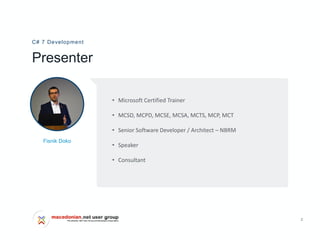
Fisnik Doko
2
Presenter
C# 7 Development
Fisnik Doko
• Microsoft Certified Trainer
• MCSD, MCPD, MCSE, MCSA, MCTS, MCP, MCT
• Senior Software Developer / Architect – NBRM
• Speaker
• Consultant
Agenda
C# Development
C# and versions
.01
.02
C# 7.0, 7.1, 7.2, 7.3
.03
C# 8.0
4
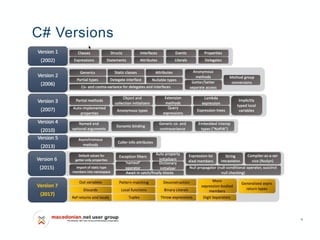
C# Versions
Lorem
5
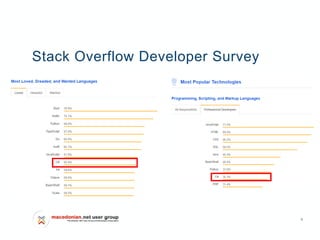
Stack Overflow Developer Survey
6
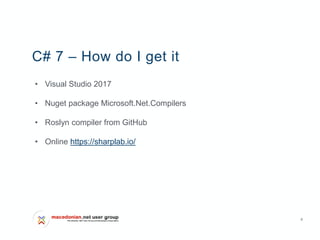
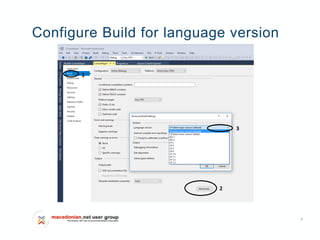
C# 7 – How do I get it
• Visual Studio 2017
• Nuget package Microsoft.Net.Compilers
• Roslyn compiler from GitHub
• Online https://sharplab.io/
7
Configure Build for language version
8
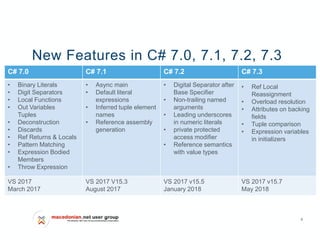
New Features in C# 7.0, 7.1, 7.2, 7.3
C# 7.0 C# 7.1 C# 7.2 C# 7.3
• Binary Literals
• Digit Separators
• Local Functions
• Out Variables
Tuples
• Deconstruction
• Discards
• Ref Returns & Locals
• Pattern Matching
• Expression Bodied
Members
• Throw Expression
• Async main
• Default literal
expressions
• Inferred tuple element
names
• Reference assembly
generation
• Digital Separator after
Base Specifier
• Non-trailing named
arguments
• Leading underscores
in numeric literals
• private protected
access modifier
• Reference semantics
with value types
• Ref Local
Reassignment
• Overload resolution
• Attributes on backing
fields
• Tuple comparison
• Expression variables
in initializers
VS 2017
March 2017
VS 2017 V15.3
August 2017
VS 2017 v15.5
January 2018
VS 2017 v15.7
May 2018
9
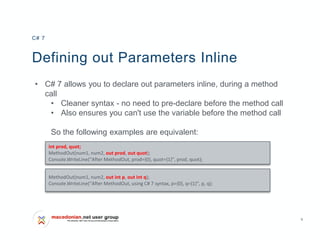
Defining out Parameters Inline
• C# 7 allows you to declare out parameters inline, during a method
call
• Cleaner syntax - no need to pre-declare before the method call
• Also ensures you can't use the variable before the method call
So the following examples are equivalent:
C# 7
int prod, quot;
MethodOut(num1, num2, out prod, out quot);
Console.WriteLine("After MethodOut, prod={0}, quot={1}", prod, quot);
MethodOut(num1, num2, out int p, out int q);
Console.WriteLine("After MethodOut, using C# 7 syntax, p={0}, q={1}", p, q);
10
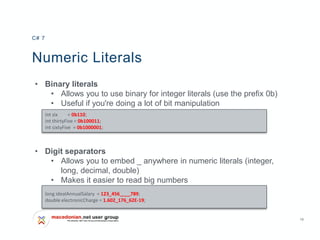
Numeric Literals
• Binary literals
• Allows you to use binary for integer literals (use the prefix 0b)
• Useful if you're doing a lot of bit manipulation
• Digit separators
• Allows you to embed _ anywhere in numeric literals (integer,
long, decimal, double)
• Makes it easier to read big numbers
C# 7
int six = 0b110;
int thirtyFive = 0b100011;
int sixtyFive = 0b1000001;
long idealAnnualSalary = 123_456____789;
double electronicCharge = 1.602_176_62E-19;
11
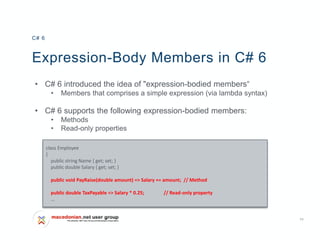
Expression-Body Members in C# 6
• C# 6 introduced the idea of "expression-bodied members“
• Members that comprises a simple expression (via lambda syntax)
• C# 6 supports the following expression-bodied members:
• Methods
• Read-only properties
C# 6
class Employee
{
public string Name { get; set; }
public double Salary { get; set; }
public void PayRaise(double amount) => Salary += amount; // Method
public double TaxPayable => Salary * 0.25; // Read-only property
…
12
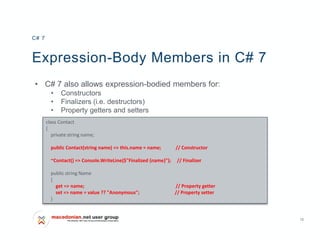
Expression-Body Members in C# 7
• C# 7 also allows expression-bodied members for:
• Constructors
• Finalizers (i.e. destructors)
• Property getters and setters
C# 7
class Contact
{
private string name;
public Contact(string name) => this.name = name; // Constructor
~Contact() => Console.WriteLine($"Finalized {name}"); // Finalizer
public string Name
{
get => name; // Property getter
set => name = value ?? "Anonymous"; // Property setter
}
13
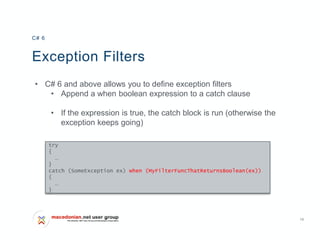
Exception Filters
• C# 6 and above allows you to define exception filters
• Append a when boolean expression to a catch clause
• If the expression is true, the catch block is run (otherwise the
exception keeps going)
C# 6
try
{
…
}
catch (SomeException ex) when (MyFilterFuncThatReturnsBoolean(ex))
{
…
}
14
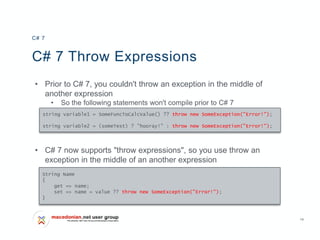
C# 7 Throw Expressions
• Prior to C# 7, you couldn't throw an exception in the middle of
another expression
• So the following statements won't compile prior to C# 7
• C# 7 now supports "throw expressions", so you use throw an
exception in the middle of an another expression
C# 7
string variable1 = SomeFuncToCalcValue() ?? throw new SomeException("Error!");
string variable2 = (someTest) ? "hooray!" : throw new SomeException("Error!");
String Name
{
get => name;
set => name = value ?? throw new SomeException("Error!");
}
15
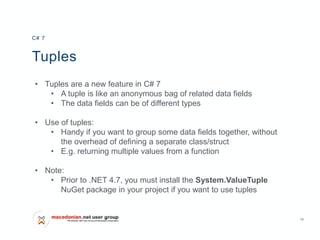
Tuples
• Tuples are a new feature in C# 7
• A tuple is like an anonymous bag of related data fields
• The data fields can be of different types
• Use of tuples:
• Handy if you want to group some data fields together, without
the overhead of defining a separate class/struct
• E.g. returning multiple values from a function
• Note:
• Prior to .NET 4.7, you must install the System.ValueTuple
NuGet package in your project if you want to use tuples
C# 7
16
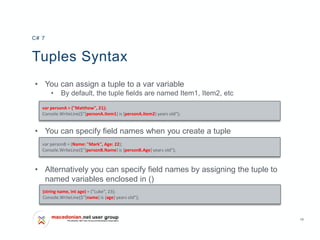
Tuples Syntax
• You can assign a tuple to a var variable
• By default, the tuple fields are named Item1, Item2, etc
• You can specify field names when you create a tuple
• Alternatively you can specify field names by assigning the tuple to
named variables enclosed in ()
C# 7
var personA = ("Matthew", 21);
Console.WriteLine($"{personA.Item1} is {personA.Item2} years old");
var personB = (Name: "Mark", Age: 22);
Console.WriteLine($"{personB.Name} is {personB.Age} years old");
(string name, int age) = ("Luke", 23);
Console.WriteLine($"{name} is {age} years old");
17
Using Tuples in Functions
• A function can return multiple values via a tuple
• Client code can call the function and use the tuple as follows:
• Alternatively, client code can unpick the tuple fields like this:
C# 7
private static (double avg, int count) GetStats(params int[] nums)
{
..
return (sum/i, i);
}
var stats = GetStats(10, 20, 30, 40);
Console.WriteLine($"Average is {stats.avg}, count of items is {stats.count}");
(double a, int n) = GetStats(50, 60, 70, 80);
Console.WriteLine($"Average is {a}, count of items is {n}");
18
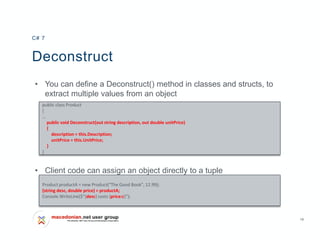
Deconstruct
• You can define a Deconstruct() method in classes and structs, to
extract multiple values from an object
• Client code can assign an object directly to a tuple
C# 7
public class Product
{
…
public void Deconstruct(out string description, out double unitPrice)
{
description = this.Description;
unitPrice = this.UnitPrice;
}
}
Product productA = new Product("The Good Book", 12.99);
(string desc, double price) = productA;
Console.WriteLine($"{desc} costs {price:c}");
19
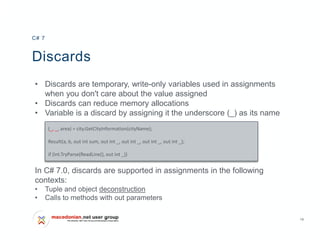
Discards
• Discards are temporary, write-only variables used in assignments
when you don't care about the value assigned
• Discards can reduce memory allocations
• Variable is a discard by assigning it the underscore (_) as its name
In C# 7.0, discards are supported in assignments in the following
contexts:
• Tuple and object deconstruction
• Calls to methods with out parameters
C# 7
(_, _, area) = city.GetCityInformation(cityName);
Result(a, b, out int sum, out int _, out int _, out int _, out int _);
if (int.TryParse(ReadLine(), out int _))
20
Local Functions
• C# 7 allows you to define functions inside other functions
• Local functions may use variables from the enclosing scope
• Have all features of a regular method except that local functions
cannot be static in nature
• Scenario:
• You're implementing function A, and it's starting to get messy
• You can move some complexity into another function B
• You can put function B inside function A, if it's only needed there
• Motivation:
• Reduce the complexity of the class as a whole, also reducing memory
allocation
C# 7
21
Defining ref Return Values
• C# 7 allows a function to return a reference
• Decorate the function return type with ref
• Also decorate all return values with ref
C# 7
static ref double FindMinElem(double[] arr)
{
int minpos = 0;
for (int i = 0; i < arr.Length; i++)
{
if (arr[i] < arr[minpos])
minpos = i;
}
return ref arr[minpos];
}
22
Defining ref Local Variables
• When you call a function that returns a reference…
• If you assign the result to a variable, it just holds a copy
• If you assign the result to a ref variable, it holds a reference
C# 7
double [] array = { 10.5, 3.14, 99.9, 64.1 };
double minElem = FindMinElem(array); // minElem holds a copy of the element value.
Console.WriteLine($"nValue of min element: {minElem}");
minElem = 1.2345; // Modifies local variable, not the array element.
Console.WriteLine($"Value of element [1]: {array[1]}");
double [] array = { 10.5, 3.14, 99.9, 64.1 };
ref double refMinElem = ref FindMinElem(array); // refMinElem refers to element.
Console.WriteLine($"nValue of min element: {refMinElem}");
refMinElem = 1.2345; // Modifies the actual array element now.
Console.WriteLine($"Value of element [1]: {array[1]}");
23
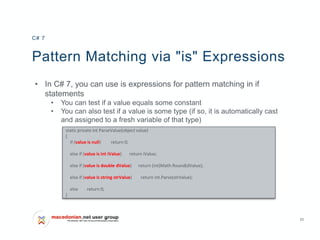
Pattern Matching via "is" Expressions
• In C# 7, you can use is expressions for pattern matching in if
statements
• You can test if a value equals some constant
• You can also test if a value is some type (if so, it is automatically cast
and assigned to a fresh variable of that type)
C# 7
static private int ParseValue(object value)
{
if (value is null) return 0;
else if (value is int iValue) return iValue;
else if (value is double dValue) return (int)Math.Round(dValue);
else if (value is string strValue) return int.Parse(strValue);
else return 0;
}
24
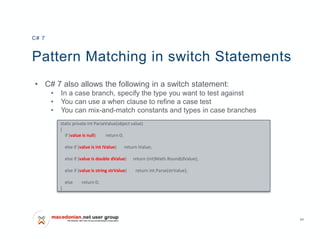
Pattern Matching in switch Statements
• C# 7 also allows the following in a switch statement:
• In a case branch, specify the type you want to test against
• You can use a when clause to refine a case test
• You can mix-and-match constants and types in case branches
C# 7
static private int ParseValue(object value)
{
if (value is null) return 0;
else if (value is int iValue) return iValue;
else if (value is double dValue) return (int)Math.Round(dValue);
else if (value is string strValue) return int.Parse(strValue);
else return 0;
}
25
Generalized async return types
• In C# 7, there is an inbuilt value type ValueTask <T> which can be
used instead of Task<T>
• NuGet package System.Threading.Tasks.Extensions
• Not replace Task, helps to reduce the number of allocation if is
invoked frequently
C# 7
static void Main(string[] args)
{
int x= GetLargestPrimeNumber(20).Result;
.
}
private static async ValueTask<int> GetLargestPrimeNumber(int maxNumber)
{
...
26
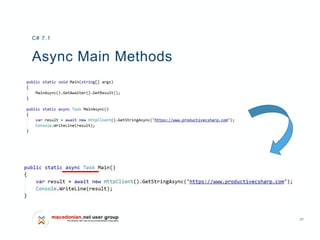
Async Main Methods
• Allow await to be used in an application's Main method by allowing
the entry point to return Task / Task<int> and be marked async
Extends the list of allowed entry points to include:
• static async Task Main()
• static Task Main()
• static async Task<int> Main()
• static Task<int> Main()
• static async Task Main(string[])
• static Task Main(string[])
• static async Task<int> Main(string[])
• static Task<int> Main(string[])
C# 7.1
27
Async Main Methods
C# 7.1
28
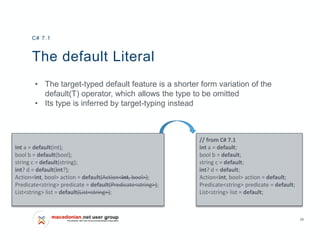
The default Literal
• The target-typed default feature is a shorter form variation of the
default(T) operator, which allows the type to be omitted
• Its type is inferred by target-typing instead
C# 7.1
// from C# 7.1
int a = default;
bool b = default;
string c = default;
int? d = default;
Action<int, bool> action = default;
Predicate<string> predicate = default;
List<string> list = default;
int a = default(int);
bool b = default(bool);
string c = default(string);
int? d = default(int?);
Action<int, bool> action = default(Action<int, bool>);
Predicate<string> predicate = default(Predicate<string>);
List<string> list = default(List<string>);
29
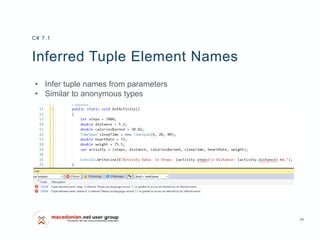
Inferred Tuple Element Names
• Infer tuple names from parameters
• Similar to anonymous types
C# 7.1
30
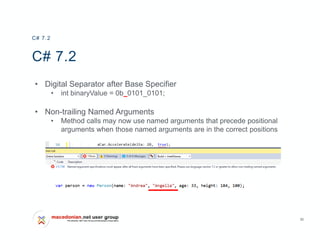
C# 7.2
• Digital Separator after Base Specifier
• int binaryValue = 0b_0101_0101;
• Non-trailing Named Arguments
• Method calls may now use named arguments that precede positional
arguments when those named arguments are in the correct positions
C# 7.2
31
C# 7.2
• Private Protected access modifier
• members will only be visible to
subclasses in the same assembly
• Ref Conditional Expression
C# 7.2
ref var firstItem = ref (emptyArray.Length > 0 ? ref emptyArray[0] : ref nonEmptyArray[0]);
32
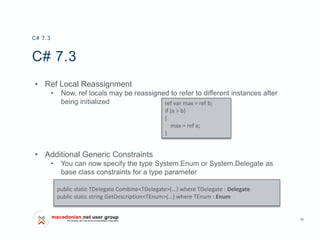
C# 7.3
• Ref Local Reassignment
• Now, ref locals may be reassigned to refer to different instances after
being initialized
• Additional Generic Constraints
• You can now specify the type System.Enum or System.Delegate as
base class constraints for a type parameter
C# 7.3
ref var max = ref b;
if (a > b)
{
max = ref a;
}
public static TDelegate Combine<TDelegate>(...) where TDelegate : Delegate
public static string GetDescription<TEnum>(...) where TEnum : Enum
33
C# 7.3
• Attributes Targeting Fields of Auto-Implemented Properties
• Expression Variables in Initializers
• out variable declarations has been extended to include field initializers,
property initializers, constructor initializers
• Equality Operators for Value Tuples
C# 7.3
[field: NonSerialized]
public double X { get; set; }
34
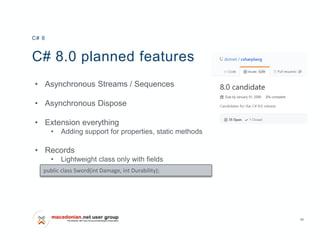
C# 8.0 planned features
• Asynchronous Streams / Sequences
• Asynchronous Dispose
• Extension everything
• Adding support for properties, static methods
• Records
• Lightweight class only with fields
C# 8
public class Sword(int Damage, int Durability);
35
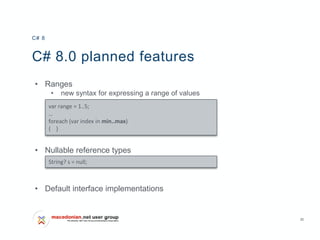
C# 8.0 planned features
• Ranges
• new syntax for expressing a range of values
• Nullable reference types
• Default interface implementations
C# 8
var range = 1..5;
…
foreach (var index in min..max)
{ }
String? s = null;
Thank You
Questions?

C# 7 development

  • 1.
  • 2.
    2 Presenter C# 7 Development FisnikDoko • Microsoft Certified Trainer • MCSD, MCPD, MCSE, MCSA, MCTS, MCP, MCT • Senior Software Developer / Architect – NBRM • Speaker • Consultant
  • 3.
    Agenda C# Development C# andversions .01 .02 C# 7.0, 7.1, 7.2, 7.3 .03 C# 8.0
  • 4.
  • 5.
  • 6.
    6 C# 7 –How do I get it • Visual Studio 2017 • Nuget package Microsoft.Net.Compilers • Roslyn compiler from GitHub • Online https://sharplab.io/
  • 7.
    7 Configure Build forlanguage version
  • 8.
    8 New Features inC# 7.0, 7.1, 7.2, 7.3 C# 7.0 C# 7.1 C# 7.2 C# 7.3 • Binary Literals • Digit Separators • Local Functions • Out Variables Tuples • Deconstruction • Discards • Ref Returns & Locals • Pattern Matching • Expression Bodied Members • Throw Expression • Async main • Default literal expressions • Inferred tuple element names • Reference assembly generation • Digital Separator after Base Specifier • Non-trailing named arguments • Leading underscores in numeric literals • private protected access modifier • Reference semantics with value types • Ref Local Reassignment • Overload resolution • Attributes on backing fields • Tuple comparison • Expression variables in initializers VS 2017 March 2017 VS 2017 V15.3 August 2017 VS 2017 v15.5 January 2018 VS 2017 v15.7 May 2018
  • 9.
    9 Defining out ParametersInline • C# 7 allows you to declare out parameters inline, during a method call • Cleaner syntax - no need to pre-declare before the method call • Also ensures you can't use the variable before the method call So the following examples are equivalent: C# 7 int prod, quot; MethodOut(num1, num2, out prod, out quot); Console.WriteLine("After MethodOut, prod={0}, quot={1}", prod, quot); MethodOut(num1, num2, out int p, out int q); Console.WriteLine("After MethodOut, using C# 7 syntax, p={0}, q={1}", p, q);
  • 10.
    10 Numeric Literals • Binaryliterals • Allows you to use binary for integer literals (use the prefix 0b) • Useful if you're doing a lot of bit manipulation • Digit separators • Allows you to embed _ anywhere in numeric literals (integer, long, decimal, double) • Makes it easier to read big numbers C# 7 int six = 0b110; int thirtyFive = 0b100011; int sixtyFive = 0b1000001; long idealAnnualSalary = 123_456____789; double electronicCharge = 1.602_176_62E-19;
  • 11.
    11 Expression-Body Members inC# 6 • C# 6 introduced the idea of "expression-bodied members“ • Members that comprises a simple expression (via lambda syntax) • C# 6 supports the following expression-bodied members: • Methods • Read-only properties C# 6 class Employee { public string Name { get; set; } public double Salary { get; set; } public void PayRaise(double amount) => Salary += amount; // Method public double TaxPayable => Salary * 0.25; // Read-only property …
  • 12.
    12 Expression-Body Members inC# 7 • C# 7 also allows expression-bodied members for: • Constructors • Finalizers (i.e. destructors) • Property getters and setters C# 7 class Contact { private string name; public Contact(string name) => this.name = name; // Constructor ~Contact() => Console.WriteLine($"Finalized {name}"); // Finalizer public string Name { get => name; // Property getter set => name = value ?? "Anonymous"; // Property setter }
  • 13.
    13 Exception Filters • C#6 and above allows you to define exception filters • Append a when boolean expression to a catch clause • If the expression is true, the catch block is run (otherwise the exception keeps going) C# 6 try { … } catch (SomeException ex) when (MyFilterFuncThatReturnsBoolean(ex)) { … }
  • 14.
    14 C# 7 ThrowExpressions • Prior to C# 7, you couldn't throw an exception in the middle of another expression • So the following statements won't compile prior to C# 7 • C# 7 now supports "throw expressions", so you use throw an exception in the middle of an another expression C# 7 string variable1 = SomeFuncToCalcValue() ?? throw new SomeException("Error!"); string variable2 = (someTest) ? "hooray!" : throw new SomeException("Error!"); String Name { get => name; set => name = value ?? throw new SomeException("Error!"); }
  • 15.
    15 Tuples • Tuples area new feature in C# 7 • A tuple is like an anonymous bag of related data fields • The data fields can be of different types • Use of tuples: • Handy if you want to group some data fields together, without the overhead of defining a separate class/struct • E.g. returning multiple values from a function • Note: • Prior to .NET 4.7, you must install the System.ValueTuple NuGet package in your project if you want to use tuples C# 7
  • 16.
    16 Tuples Syntax • Youcan assign a tuple to a var variable • By default, the tuple fields are named Item1, Item2, etc • You can specify field names when you create a tuple • Alternatively you can specify field names by assigning the tuple to named variables enclosed in () C# 7 var personA = ("Matthew", 21); Console.WriteLine($"{personA.Item1} is {personA.Item2} years old"); var personB = (Name: "Mark", Age: 22); Console.WriteLine($"{personB.Name} is {personB.Age} years old"); (string name, int age) = ("Luke", 23); Console.WriteLine($"{name} is {age} years old");
  • 17.
    17 Using Tuples inFunctions • A function can return multiple values via a tuple • Client code can call the function and use the tuple as follows: • Alternatively, client code can unpick the tuple fields like this: C# 7 private static (double avg, int count) GetStats(params int[] nums) { .. return (sum/i, i); } var stats = GetStats(10, 20, 30, 40); Console.WriteLine($"Average is {stats.avg}, count of items is {stats.count}"); (double a, int n) = GetStats(50, 60, 70, 80); Console.WriteLine($"Average is {a}, count of items is {n}");
  • 18.
    18 Deconstruct • You candefine a Deconstruct() method in classes and structs, to extract multiple values from an object • Client code can assign an object directly to a tuple C# 7 public class Product { … public void Deconstruct(out string description, out double unitPrice) { description = this.Description; unitPrice = this.UnitPrice; } } Product productA = new Product("The Good Book", 12.99); (string desc, double price) = productA; Console.WriteLine($"{desc} costs {price:c}");
  • 19.
    19 Discards • Discards aretemporary, write-only variables used in assignments when you don't care about the value assigned • Discards can reduce memory allocations • Variable is a discard by assigning it the underscore (_) as its name In C# 7.0, discards are supported in assignments in the following contexts: • Tuple and object deconstruction • Calls to methods with out parameters C# 7 (_, _, area) = city.GetCityInformation(cityName); Result(a, b, out int sum, out int _, out int _, out int _, out int _); if (int.TryParse(ReadLine(), out int _))
  • 20.
    20 Local Functions • C#7 allows you to define functions inside other functions • Local functions may use variables from the enclosing scope • Have all features of a regular method except that local functions cannot be static in nature • Scenario: • You're implementing function A, and it's starting to get messy • You can move some complexity into another function B • You can put function B inside function A, if it's only needed there • Motivation: • Reduce the complexity of the class as a whole, also reducing memory allocation C# 7
  • 21.
    21 Defining ref ReturnValues • C# 7 allows a function to return a reference • Decorate the function return type with ref • Also decorate all return values with ref C# 7 static ref double FindMinElem(double[] arr) { int minpos = 0; for (int i = 0; i < arr.Length; i++) { if (arr[i] < arr[minpos]) minpos = i; } return ref arr[minpos]; }
  • 22.
    22 Defining ref LocalVariables • When you call a function that returns a reference… • If you assign the result to a variable, it just holds a copy • If you assign the result to a ref variable, it holds a reference C# 7 double [] array = { 10.5, 3.14, 99.9, 64.1 }; double minElem = FindMinElem(array); // minElem holds a copy of the element value. Console.WriteLine($"nValue of min element: {minElem}"); minElem = 1.2345; // Modifies local variable, not the array element. Console.WriteLine($"Value of element [1]: {array[1]}"); double [] array = { 10.5, 3.14, 99.9, 64.1 }; ref double refMinElem = ref FindMinElem(array); // refMinElem refers to element. Console.WriteLine($"nValue of min element: {refMinElem}"); refMinElem = 1.2345; // Modifies the actual array element now. Console.WriteLine($"Value of element [1]: {array[1]}");
  • 23.
    23 Pattern Matching via"is" Expressions • In C# 7, you can use is expressions for pattern matching in if statements • You can test if a value equals some constant • You can also test if a value is some type (if so, it is automatically cast and assigned to a fresh variable of that type) C# 7 static private int ParseValue(object value) { if (value is null) return 0; else if (value is int iValue) return iValue; else if (value is double dValue) return (int)Math.Round(dValue); else if (value is string strValue) return int.Parse(strValue); else return 0; }
  • 24.
    24 Pattern Matching inswitch Statements • C# 7 also allows the following in a switch statement: • In a case branch, specify the type you want to test against • You can use a when clause to refine a case test • You can mix-and-match constants and types in case branches C# 7 static private int ParseValue(object value) { if (value is null) return 0; else if (value is int iValue) return iValue; else if (value is double dValue) return (int)Math.Round(dValue); else if (value is string strValue) return int.Parse(strValue); else return 0; }
  • 25.
    25 Generalized async returntypes • In C# 7, there is an inbuilt value type ValueTask <T> which can be used instead of Task<T> • NuGet package System.Threading.Tasks.Extensions • Not replace Task, helps to reduce the number of allocation if is invoked frequently C# 7 static void Main(string[] args) { int x= GetLargestPrimeNumber(20).Result; . } private static async ValueTask<int> GetLargestPrimeNumber(int maxNumber) { ...
  • 26.
    26 Async Main Methods •Allow await to be used in an application's Main method by allowing the entry point to return Task / Task<int> and be marked async Extends the list of allowed entry points to include: • static async Task Main() • static Task Main() • static async Task<int> Main() • static Task<int> Main() • static async Task Main(string[]) • static Task Main(string[]) • static async Task<int> Main(string[]) • static Task<int> Main(string[]) C# 7.1
  • 27.
  • 28.
    28 The default Literal •The target-typed default feature is a shorter form variation of the default(T) operator, which allows the type to be omitted • Its type is inferred by target-typing instead C# 7.1 // from C# 7.1 int a = default; bool b = default; string c = default; int? d = default; Action<int, bool> action = default; Predicate<string> predicate = default; List<string> list = default; int a = default(int); bool b = default(bool); string c = default(string); int? d = default(int?); Action<int, bool> action = default(Action<int, bool>); Predicate<string> predicate = default(Predicate<string>); List<string> list = default(List<string>);
  • 29.
    29 Inferred Tuple ElementNames • Infer tuple names from parameters • Similar to anonymous types C# 7.1
  • 30.
    30 C# 7.2 • DigitalSeparator after Base Specifier • int binaryValue = 0b_0101_0101; • Non-trailing Named Arguments • Method calls may now use named arguments that precede positional arguments when those named arguments are in the correct positions C# 7.2
  • 31.
    31 C# 7.2 • PrivateProtected access modifier • members will only be visible to subclasses in the same assembly • Ref Conditional Expression C# 7.2 ref var firstItem = ref (emptyArray.Length > 0 ? ref emptyArray[0] : ref nonEmptyArray[0]);
  • 32.
    32 C# 7.3 • RefLocal Reassignment • Now, ref locals may be reassigned to refer to different instances after being initialized • Additional Generic Constraints • You can now specify the type System.Enum or System.Delegate as base class constraints for a type parameter C# 7.3 ref var max = ref b; if (a > b) { max = ref a; } public static TDelegate Combine<TDelegate>(...) where TDelegate : Delegate public static string GetDescription<TEnum>(...) where TEnum : Enum
  • 33.
    33 C# 7.3 • AttributesTargeting Fields of Auto-Implemented Properties • Expression Variables in Initializers • out variable declarations has been extended to include field initializers, property initializers, constructor initializers • Equality Operators for Value Tuples C# 7.3 [field: NonSerialized] public double X { get; set; }
  • 34.
    34 C# 8.0 plannedfeatures • Asynchronous Streams / Sequences • Asynchronous Dispose • Extension everything • Adding support for properties, static methods • Records • Lightweight class only with fields C# 8 public class Sword(int Damage, int Durability);
  • 35.
    35 C# 8.0 plannedfeatures • Ranges • new syntax for expressing a range of values • Nullable reference types • Default interface implementations C# 8 var range = 1..5; … foreach (var index in min..max) { } String? s = null;
  • 36.