Cloud Storage Revolutionizes
How individuals and organizations handle data
What is Cloud Storage?
In short
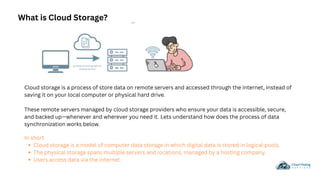
Cloud storage is a model of computer data storage in which digital data is stored in logical pools.
The physical storage spans multiple servers and locations, managed by a hosting company.
Users access data via the internet.
Cloud storage is a process of store data on remote servers and accessed through the internet, instead of
saving it on your local computer or physical hard drive.
These remote servers managed by cloud storage providers who ensure your data is accessible, secure,
and backed up—whenever and wherever you need it. Lets understand how does the process of data
synchronization works below.
How Cloud Storage Works
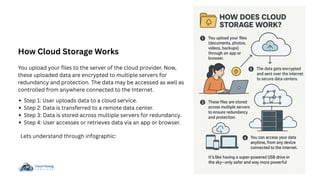
You upload your files to the server of the cloud provider. Now,
these uploaded data are encrypted to multiple servers for
redundancy and protection. The data may be accessed as well as
controlled from anywhere connected to the Internet.
Step 1: User uploads data to a cloud service.
Step 2: Data is transferred to a remote data center.
Step 3: Data is stored across multiple servers for redundancy.
Step 4: User accesses or retrieves data via an app or browser.
Lets understand through infographic:
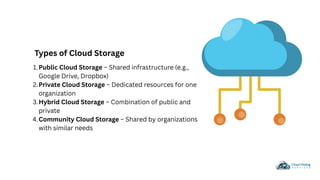
Types of Cloud Storage
Public Cloud Storage – Shared infrastructure (e.g.,
Google Drive, Dropbox)
1.
Private Cloud Storage – Dedicated resources for one
organization
2.
Hybrid Cloud Storage – Combination of public and
private
3.
Community Cloud Storage – Shared by organizations
with similar needs
4.
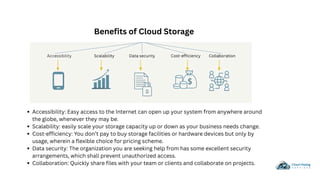
Benefits of Cloud Storage
Accessibility: Easy access to the Internet can open up your system from anywhere around
the globe, whenever they may be.
Scalability: easily scale your storage capacity up or down as your business needs change.
Cost-efficiency: You don’t pay to buy storage facilities or hardware devices but only by
usage, wherein a flexible choice for pricing scheme.
Data security: The organization you are seeking help from has some excellent security
arrangements, which shall prevent unauthorized access.
Collaboration: Quickly share files with your team or clients and collaborate on projects.
Cloud Storage Pricing
Pay-as-you-go.
Subscription-based
Tiered Storage
Check Pricing Plan
There are numerous uses for data storage on cloud. These include:
Data Backup and Recovery: To prevent the loss of data caused by a disaster
or equipment failure.
File Sharing and Collaboration: Share files easily and collaborate with other
people.
Data Archiving: Storage of data over a long time for archiving.
Disaster Recovery: Ensuring business continuity with disaster recovery.
Big Data Analytics: The storing and analytics of large amounts of data to
analyze business performance.
What are the top 5 Common uses of cloud storage?
Challenges & Limitations
Internet dependency
Limited control over data location
Potential for data breaches
Subscription cost over time
Security Considerations
Data encryption (in transit and at rest)
User authentication and access control
Compliance with standards (GDPR, HIPAA)
Regular audits and monitoring
IMPORTANT
Conclusion
A2 Cloud Hosting is the ideal cloud storage solution for startups, offering
exceptional performance, reliability, and value. Our year-round support and
user-friendly dashboard make it easy to monitor everything that matters to you.
Whether you’re a startup or an established business, you have the power to
manage your data and collaborate on exciting projects—all in one place.
For More info : Cloud Enablement Empowers Businesses With On-Demand
Resources
The Evolving Landscape of Cloud Accounting Security
Contact Us
Phone
Email Info@a2cloudhostingservices.com
+91(800) 217-039
Thankyou

Understanding the Future of Data Storage

  • 1.
    Cloud Storage Revolutionizes Howindividuals and organizations handle data
  • 2.
    What is CloudStorage? In short Cloud storage is a model of computer data storage in which digital data is stored in logical pools. The physical storage spans multiple servers and locations, managed by a hosting company. Users access data via the internet. Cloud storage is a process of store data on remote servers and accessed through the internet, instead of saving it on your local computer or physical hard drive. These remote servers managed by cloud storage providers who ensure your data is accessible, secure, and backed up—whenever and wherever you need it. Lets understand how does the process of data synchronization works below.
  • 3.
    How Cloud StorageWorks You upload your files to the server of the cloud provider. Now, these uploaded data are encrypted to multiple servers for redundancy and protection. The data may be accessed as well as controlled from anywhere connected to the Internet. Step 1: User uploads data to a cloud service. Step 2: Data is transferred to a remote data center. Step 3: Data is stored across multiple servers for redundancy. Step 4: User accesses or retrieves data via an app or browser. Lets understand through infographic:
  • 4.
    Types of CloudStorage Public Cloud Storage – Shared infrastructure (e.g., Google Drive, Dropbox) 1. Private Cloud Storage – Dedicated resources for one organization 2. Hybrid Cloud Storage – Combination of public and private 3. Community Cloud Storage – Shared by organizations with similar needs 4.
  • 5.
    Benefits of CloudStorage Accessibility: Easy access to the Internet can open up your system from anywhere around the globe, whenever they may be. Scalability: easily scale your storage capacity up or down as your business needs change. Cost-efficiency: You don’t pay to buy storage facilities or hardware devices but only by usage, wherein a flexible choice for pricing scheme. Data security: The organization you are seeking help from has some excellent security arrangements, which shall prevent unauthorized access. Collaboration: Quickly share files with your team or clients and collaborate on projects.
  • 6.
  • 7.
    There are numeroususes for data storage on cloud. These include: Data Backup and Recovery: To prevent the loss of data caused by a disaster or equipment failure. File Sharing and Collaboration: Share files easily and collaborate with other people. Data Archiving: Storage of data over a long time for archiving. Disaster Recovery: Ensuring business continuity with disaster recovery. Big Data Analytics: The storing and analytics of large amounts of data to analyze business performance. What are the top 5 Common uses of cloud storage?
  • 8.
    Challenges & Limitations Internetdependency Limited control over data location Potential for data breaches Subscription cost over time Security Considerations Data encryption (in transit and at rest) User authentication and access control Compliance with standards (GDPR, HIPAA) Regular audits and monitoring IMPORTANT
  • 10.
    Conclusion A2 Cloud Hostingis the ideal cloud storage solution for startups, offering exceptional performance, reliability, and value. Our year-round support and user-friendly dashboard make it easy to monitor everything that matters to you. Whether you’re a startup or an established business, you have the power to manage your data and collaborate on exciting projects—all in one place. For More info : Cloud Enablement Empowers Businesses With On-Demand Resources The Evolving Landscape of Cloud Accounting Security
  • 11.
  • 12.