2
Cloud computing is internet-based computing in which large
groups of remote servers are networked to allow the centralized
data storage, and online access to computer services or
resources. Clouds can be classified as public, private or hybrid.
Cloud Computing is a general term used to describe a
new class of network based computing that takes place
over the Internet,
Using the Interbasically a step on from Utility Computing a
collection/group of integrated and networked hardware,
software and Internet infrastructure is called a platform.
These platforms hide the complexity and details of the
underlying infrastructure from users and applications by
providing very simple graphical interface or API
(Applications Programming Interface).
What is Cloud Computing?
3
 Cloud computing is an umbrella term used to refer to Internet based
development and services
 Introduction to cloud context
o Technology context: multi-core, virtualization, 64-bit processors,
parallel computing models, big-data storages…
o Cloud models: IaaS (Amazon AWS), PaaS (Microsoft Azure), SaaS
(Google App Engine)
 A number of characteristics define cloud data, applications services
and infrastructure:
o Remotely hosted: Services or data are hosted on remote
infrastructure.
o Ubiquitous: Services or data are available from anywhere.
o Commodified: The result is a utility computing model similar to
traditional that of traditional utilities, like gas and electricity - you
pay for what you would want!
Cloud Summary outline
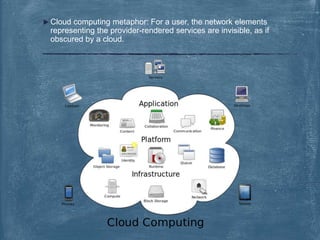
 Cloud computing metaphor: For a user, the network elements
representing the provider-rendered services are invisible, as if
obscured by a cloud.
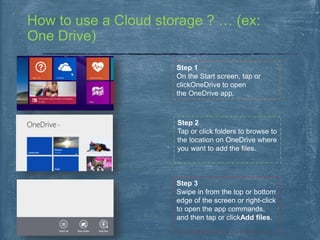
How to use a Cloud storage ? … (ex:
One Drive)
Step 1
On the Start screen, tap or
clickOneDrive to open
the OneDrive app.
Step 2
Tap or click folders to browse to
the location on OneDrive where
you want to add the files.
Step 3
Swipe in from the top or bottom
edge of the screen or right-click
to open the app commands,
and then tap or clickAdd files.
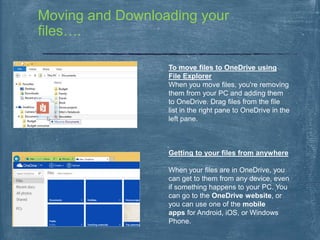
Moving and Downloading your
files….
To move files to OneDrive using
File Explorer
When you move files, you're removing
them from your PC and adding them
to OneDrive. Drag files from the file
list in the right pane to OneDrive in the
left pane.
Getting to your files from anywhere
When your files are in OneDrive, you
can get to them from any device, even
if something happens to your PC. You
can go to the OneDrive website, or
you can use one of the mobile
apps for Android, iOS, or Windows
Phone.
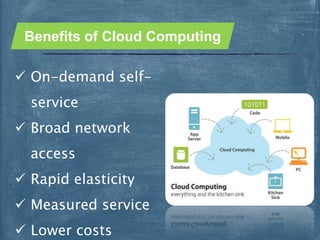
 On-demand self-
service
 Broad network
access
 Rapid elasticity
 Measured service
 Lower costs
Benefits of Cloud Computing
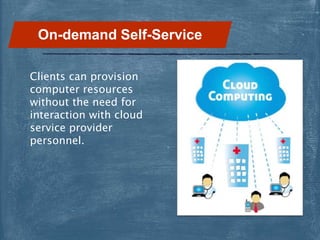
Clients can provision
computer resources
without the need for
interaction with cloud
service provider
personnel.
On-demand Self-Service
THANK’S FOR
WATCHING
Presented by;
HARSH NAVPUTE.

CLOUD COMPUTING PPT

  • 2.
    2 Cloud computing isinternet-based computing in which large groups of remote servers are networked to allow the centralized data storage, and online access to computer services or resources. Clouds can be classified as public, private or hybrid. Cloud Computing is a general term used to describe a new class of network based computing that takes place over the Internet, Using the Interbasically a step on from Utility Computing a collection/group of integrated and networked hardware, software and Internet infrastructure is called a platform. These platforms hide the complexity and details of the underlying infrastructure from users and applications by providing very simple graphical interface or API (Applications Programming Interface). What is Cloud Computing?
  • 3.
    3  Cloud computingis an umbrella term used to refer to Internet based development and services  Introduction to cloud context o Technology context: multi-core, virtualization, 64-bit processors, parallel computing models, big-data storages… o Cloud models: IaaS (Amazon AWS), PaaS (Microsoft Azure), SaaS (Google App Engine)  A number of characteristics define cloud data, applications services and infrastructure: o Remotely hosted: Services or data are hosted on remote infrastructure. o Ubiquitous: Services or data are available from anywhere. o Commodified: The result is a utility computing model similar to traditional that of traditional utilities, like gas and electricity - you pay for what you would want! Cloud Summary outline
  • 4.
     Cloud computingmetaphor: For a user, the network elements representing the provider-rendered services are invisible, as if obscured by a cloud.
  • 5.
    How to usea Cloud storage ? … (ex: One Drive) Step 1 On the Start screen, tap or clickOneDrive to open the OneDrive app. Step 2 Tap or click folders to browse to the location on OneDrive where you want to add the files. Step 3 Swipe in from the top or bottom edge of the screen or right-click to open the app commands, and then tap or clickAdd files.
  • 6.
    Moving and Downloadingyour files…. To move files to OneDrive using File Explorer When you move files, you're removing them from your PC and adding them to OneDrive. Drag files from the file list in the right pane to OneDrive in the left pane. Getting to your files from anywhere When your files are in OneDrive, you can get to them from any device, even if something happens to your PC. You can go to the OneDrive website, or you can use one of the mobile apps for Android, iOS, or Windows Phone.
  • 7.
     On-demand self- service Broad network access  Rapid elasticity  Measured service  Lower costs Benefits of Cloud Computing
  • 8.
    Clients can provision computerresources without the need for interaction with cloud service provider personnel. On-demand Self-Service
  • 9.