CONTENTS
Introduction

Types of cloud computing

Cloud clients

Working of cloud computing

Benefits of Cloud Computing
Risks of Cloud Computing
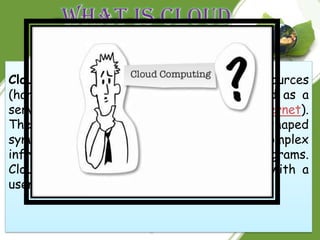
Cloud computing is the use of computing resources
(hardware and software) that are delivered as a
service over a network (typically the Internet).
The name comes from the use of a cloud-shaped
symbol as an abstraction for the complex
infrastructure it contains in system diagrams.
Cloud computing entrusts remote services with a
user's data, software and computation.
Back
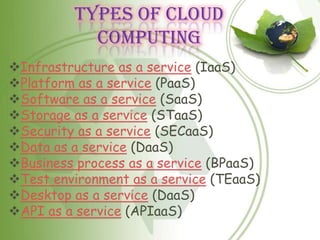
Types of Cloud
           Computing
Infrastructure as a service (IaaS)
Platform as a service (PaaS)
Software as a service (SaaS)
Storage as a service (STaaS)
Security as a service (SECaaS)
Data as a service (DaaS)
Business process as a service (BPaaS)
Test environment as a service (TEaaS)
Desktop as a service (DaaS)
API as a service (APIaaS)
SaaS (Software As A
              Service)

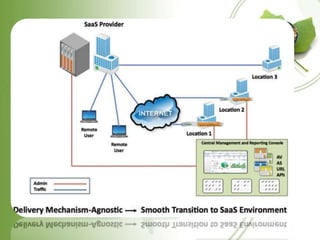
Is the most widely known and widely used form of cloud computing. It
provides all the functions of a sophisticated traditional application
to many customers and of ten thousands of users, but through        a
Web browser, not a “locally -installed” application.

Little or no code is running on the Users local computer and the
applications   are usually   tailored to   fulfill  specific functions.
SaaS eliminates customer worries about application servers, storage,
application development and related, common concerns of it.

Examples are Salesforce.com, Google's Gmail and         Apps, instant
messaging from AOL,   Yahoo and Google, and                VoIP from
Vonage and Skype.
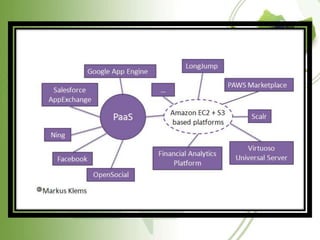
PaaS (Platform as a
           Service)
Delivers virtualized servers on which customers can run
existing applications or develop new ones without having to
worry about maintaining the operating systems, server hardware,
load balancing or computing capacity.

These vendors provide APIs or            development platforms to
create and run           applications in the cloud – e.g. using the
Internet.     Managed Service            providers with application
services provided to IT         departments to monitor systems and
downstream applications such as virus scanning for e-mail       are
frequently included in this category.

Well known providers would include Microsoft's Azure, Sales
force's Force.com, Google Maps, ADP Payroll processing,
and US Postal Service offerings.
IaaS (Infrastructure
             as a Service)

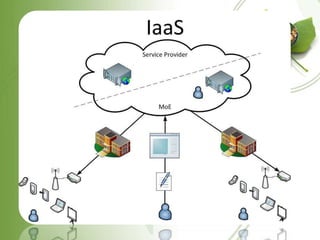
Delivers utility computing capability, typically as raw virtual
servers, on demand that customers configure and manage.      Here
Cloud Computing provides grids or clusters or virtualized servers,
networks, storage and systems software, usually (but not always) in
a multitenant architecture.

IaaS is designed to augment or replace the functions of an entire
data center. This saves cost (time and expense) of capital equipment
deployment but does not reduce cost of                configuration,
integration or management and these tasks must be performed
remotely.
Vendors would include Amazon.com (Elastic Compute Cloud [EC2]
and Simple Storage), IBM and other traditional IT vendors.
STORAGE AS A
         SERVICE(STAAS)
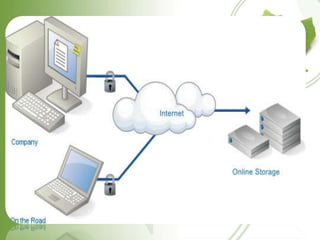
Storage as a service (STaaS) is a business model in
which a large service provider rents space in their
storage infrastructure on a subscription basis. The
economy of scale in the service provider's
infrastructure allows them to provide storage much
more cost effectively than most individuals or
corporations can provide their own storage,
when total cost of ownership is considered.
Storage as a Service is often used to solve offsite
backup challenges.
BUSINESS PROCESS AS A
       SERVICE (BPAAS)

Business process as a service (BPaaS) pronounced [bē-păss] is
an application delivered as a service that is used by business
process service-provider personnel, who are performing activities
on behalf of the service recipient. It's a service that combines
the Business Process Outsourcing (BPO) with theSoftware as a
Service (SaaS) models. BPaaS is a model for businesses
outsource traditional business services. The difference with
BPaaS over BPO is that BPaaS emphases on the end results versus
operational activities. Where typical BPO programs will have the
client focusing on daily operational tasks to deliver the outcome,
BPaaS focuses on service level agreements (SLA) and Key
Performance Indicators (KPI) as the measure of operational
service and success.
TEST ENVIRONMENT AS A
      SERVICE (TEAAS)

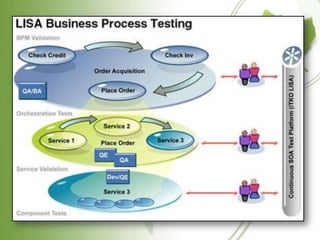
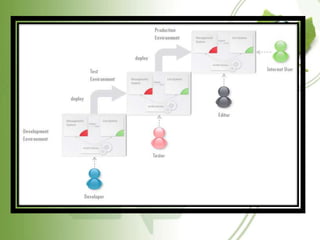
Test Environment as a service (TEaaS,
typically pronounced [teæs]), sometimes
referred to as "on-demand test environment,"
is a test environment delivery model in which
software                and                 its
associated data are hosted centrally (typically
in the (Internet) cloud) and are typically
accessed by users using a thin client, normally
using a web browser over the Internet.
API AS A SERVICE(APLAAS)

API as a service is a service
platform that enables the creation
and hosting of APIs (application
programming interfaces).
These API's normally provide
multiple entry points for API calls
ranging from REST, XML web
services or TCP/IP.
Back
CLOUD CLIENTS
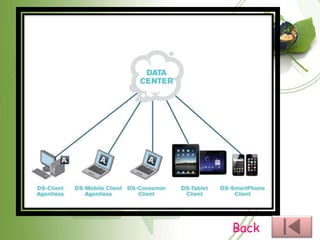
Users access cloud computing using networked client devices, such
as desktop computers, laptops, tablets and smartphones. Some of
these devices - cloud clients - rely on cloud computing for all or a
majority of their applications so as to be essentially useless without
it. Examples are thin clients and the browser-based Chromebook.
Many cloud applications do not require specific software on the
client and instead use a web browser to interact with the cloud
application. With Ajax and HTML5 these Web user interfaces can
achieve a similar or even better look and feel as native applications.
Some cloud applications, however, support specific client software
dedicated to these applications (e.g., virtual desktop clients and
most email clients). Some legacy applications (line of business
applications that until now have been prevalent in thin client
Windows computing) are delivered via a screen-sharing technology.
Back
HOW DOES CLOUD
        COMPUTING WORK?

Cloud computer works by hosting your
information on computers „out there‟ „in
the cloud‟. The cloud is basically a batch
of computers called data centers or
servers that hold your information
(files,images,videos,etc) and can be
located anywhere. You‟re working in a
cloud because you don‟t have to store
software or files on your own computer.
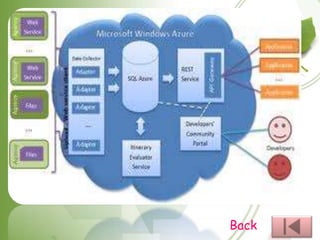
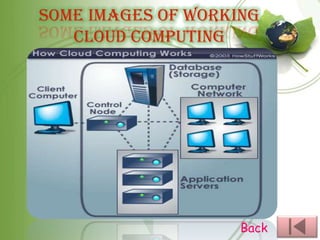
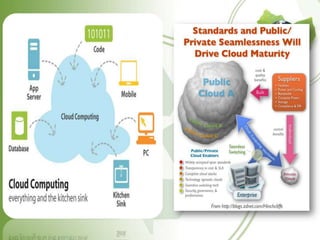
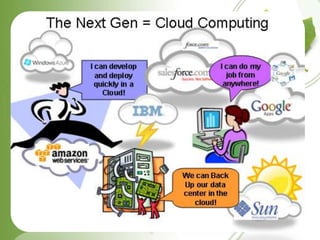
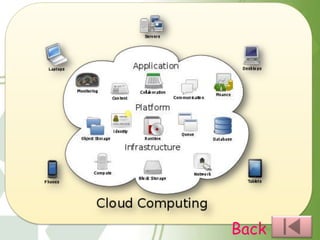
SOME IMAGES OF WORKING
   CLOUD COMPUTING


                    Back
BENEFITS OF CLOUD
             COMPUTING
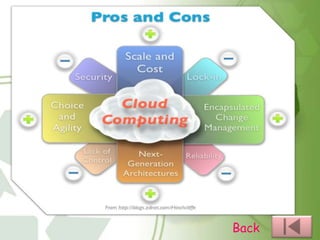
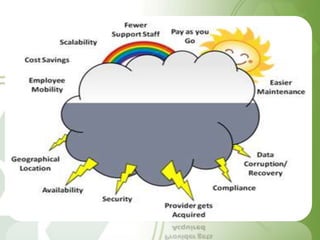
Cloud Computing brings with it many benefits to the end
user. These include:
Access to a huge range of applications without having
to download or install anything
Applications can be accessed from any computer,
anywhere in the world
Users can avoid expenditure on hardware and
software; only using what they need
Companies can share resources in one place
Consumption is billed as a utility with minimal upfront
costs
Scalability via on-demand resources
Back
RISKS OF CLOUD
             COMPUTING
Cloud Computing has many benefits, however there are
also some associated risks with using cloud computing.
These include:
Users do not physically possess storage of their own
data, which leaves the responsibility and control of
data storage with the provider
Users could become dependent upon the cloud
computing provider
With data held externally, business continuity and
disaster recovery are in the hands of the provider
Data migration issues when changing cloud provider
What happens if your cloud provider goes out of
business?
Cloud computing jayanth

Cloud computing jayanth

  • 2.
    CONTENTS Introduction Types of cloudcomputing Cloud clients Working of cloud computing Benefits of Cloud Computing Risks of Cloud Computing
  • 3.
    Cloud computing isthe use of computing resources (hardware and software) that are delivered as a service over a network (typically the Internet). The name comes from the use of a cloud-shaped symbol as an abstraction for the complex infrastructure it contains in system diagrams. Cloud computing entrusts remote services with a user's data, software and computation.
  • 4.
  • 5.
    Types of Cloud Computing Infrastructure as a service (IaaS) Platform as a service (PaaS) Software as a service (SaaS) Storage as a service (STaaS) Security as a service (SECaaS) Data as a service (DaaS) Business process as a service (BPaaS) Test environment as a service (TEaaS) Desktop as a service (DaaS) API as a service (APIaaS)
  • 6.
    SaaS (Software AsA Service) Is the most widely known and widely used form of cloud computing. It provides all the functions of a sophisticated traditional application to many customers and of ten thousands of users, but through a Web browser, not a “locally -installed” application. Little or no code is running on the Users local computer and the applications are usually tailored to fulfill specific functions. SaaS eliminates customer worries about application servers, storage, application development and related, common concerns of it. Examples are Salesforce.com, Google's Gmail and Apps, instant messaging from AOL, Yahoo and Google, and VoIP from Vonage and Skype.
  • 8.
    PaaS (Platform asa Service) Delivers virtualized servers on which customers can run existing applications or develop new ones without having to worry about maintaining the operating systems, server hardware, load balancing or computing capacity. These vendors provide APIs or development platforms to create and run applications in the cloud – e.g. using the Internet. Managed Service providers with application services provided to IT departments to monitor systems and downstream applications such as virus scanning for e-mail are frequently included in this category. Well known providers would include Microsoft's Azure, Sales force's Force.com, Google Maps, ADP Payroll processing, and US Postal Service offerings.
  • 10.
    IaaS (Infrastructure as a Service) Delivers utility computing capability, typically as raw virtual servers, on demand that customers configure and manage. Here Cloud Computing provides grids or clusters or virtualized servers, networks, storage and systems software, usually (but not always) in a multitenant architecture. IaaS is designed to augment or replace the functions of an entire data center. This saves cost (time and expense) of capital equipment deployment but does not reduce cost of configuration, integration or management and these tasks must be performed remotely. Vendors would include Amazon.com (Elastic Compute Cloud [EC2] and Simple Storage), IBM and other traditional IT vendors.
  • 12.
    STORAGE AS A SERVICE(STAAS) Storage as a service (STaaS) is a business model in which a large service provider rents space in their storage infrastructure on a subscription basis. The economy of scale in the service provider's infrastructure allows them to provide storage much more cost effectively than most individuals or corporations can provide their own storage, when total cost of ownership is considered. Storage as a Service is often used to solve offsite backup challenges.
  • 14.
    BUSINESS PROCESS ASA SERVICE (BPAAS) Business process as a service (BPaaS) pronounced [bē-păss] is an application delivered as a service that is used by business process service-provider personnel, who are performing activities on behalf of the service recipient. It's a service that combines the Business Process Outsourcing (BPO) with theSoftware as a Service (SaaS) models. BPaaS is a model for businesses outsource traditional business services. The difference with BPaaS over BPO is that BPaaS emphases on the end results versus operational activities. Where typical BPO programs will have the client focusing on daily operational tasks to deliver the outcome, BPaaS focuses on service level agreements (SLA) and Key Performance Indicators (KPI) as the measure of operational service and success.
  • 16.
    TEST ENVIRONMENT ASA SERVICE (TEAAS) Test Environment as a service (TEaaS, typically pronounced [teæs]), sometimes referred to as "on-demand test environment," is a test environment delivery model in which software and its associated data are hosted centrally (typically in the (Internet) cloud) and are typically accessed by users using a thin client, normally using a web browser over the Internet.
  • 18.
    API AS ASERVICE(APLAAS) API as a service is a service platform that enables the creation and hosting of APIs (application programming interfaces). These API's normally provide multiple entry points for API calls ranging from REST, XML web services or TCP/IP.
  • 19.
  • 20.
    CLOUD CLIENTS Users accesscloud computing using networked client devices, such as desktop computers, laptops, tablets and smartphones. Some of these devices - cloud clients - rely on cloud computing for all or a majority of their applications so as to be essentially useless without it. Examples are thin clients and the browser-based Chromebook. Many cloud applications do not require specific software on the client and instead use a web browser to interact with the cloud application. With Ajax and HTML5 these Web user interfaces can achieve a similar or even better look and feel as native applications. Some cloud applications, however, support specific client software dedicated to these applications (e.g., virtual desktop clients and most email clients). Some legacy applications (line of business applications that until now have been prevalent in thin client Windows computing) are delivered via a screen-sharing technology.
  • 21.
  • 22.
    HOW DOES CLOUD COMPUTING WORK? Cloud computer works by hosting your information on computers „out there‟ „in the cloud‟. The cloud is basically a batch of computers called data centers or servers that hold your information (files,images,videos,etc) and can be located anywhere. You‟re working in a cloud because you don‟t have to store software or files on your own computer.
  • 23.
    SOME IMAGES OFWORKING CLOUD COMPUTING Back
  • 24.
    BENEFITS OF CLOUD COMPUTING Cloud Computing brings with it many benefits to the end user. These include: Access to a huge range of applications without having to download or install anything Applications can be accessed from any computer, anywhere in the world Users can avoid expenditure on hardware and software; only using what they need Companies can share resources in one place Consumption is billed as a utility with minimal upfront costs Scalability via on-demand resources
  • 25.
  • 26.
    RISKS OF CLOUD COMPUTING Cloud Computing has many benefits, however there are also some associated risks with using cloud computing. These include: Users do not physically possess storage of their own data, which leaves the responsibility and control of data storage with the provider Users could become dependent upon the cloud computing provider With data held externally, business continuity and disaster recovery are in the hands of the provider Data migration issues when changing cloud provider What happens if your cloud provider goes out of business?