What Every Business Should Know About The Future Of
Computing


                                              Contrast: CBT
                                                    Jim Beebe
                                    Jim.Beebe@ContrastCBT.Com

                                                  July 23, 2012
What is Cloud Computing? Computer Services as
Utilities.

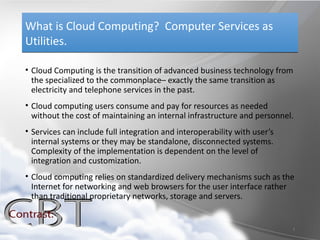
• Cloud Computing is the transition of advanced business technology from
  the specialized to the commonplace– exactly the same transition as
  electricity and telephone services in the past.
• Cloud computing users consume and pay for resources as needed
  without the cost of maintaining an internal infrastructure and personnel.
• Services can include full integration and interoperability with user’s
  internal systems or they may be standalone, disconnected systems.
  Complexity of the implementation is dependent on the level of
  integration and customization.
• Cloud computing relies on standardized delivery mechanisms such as the
  Internet for networking and web browsers for the user interface rather
  than traditional proprietary networks, storage and servers.


                                                                           2
Small And Medium Businesses Now Have the
Opportunity to Leverage Enterprise Business
Technology.
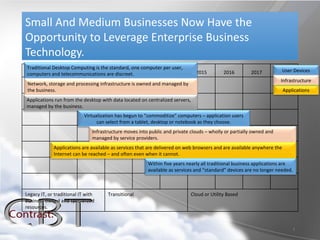
Traditional Desktop Computing is the standard, one computer per user,
computers and telecommunications are2012
 2005         2010       2011           discreet. 2013        2014            2015         2016        2017          2018 Devices
                                                                                                                      User
                                                                                                                     Infrastructure
 Network, storage and processing infrastructure is owned and managed by
 the business.                                                                                                          Applications
Applications run from the desktop with data located on centralized servers,
managed by the business.
                            Virtualization has begun to “commoditize” computers – application users
                                  can select from a tablet, desktop or notebook as they choose.
                               Infrastructure moves into public and private clouds – wholly or partially owned and
                               managed by service providers.
             Applications are available as services that are delivered on web browsers and are available anywhere the
             Internet can be reached – and often even when it cannot.
                                                        Within five years nearly all traditional business applications are
                                                        available as services and “standard” devices are no longer needed.


Legacy IT, or traditional IT with     Transitional                          Cloud or Utility Based
business owned and specialized
resources.


                                                                                                                             3
Cloud Computing is the logical evolution of the Internet. Cheap bandwidth and
large scale server farms combined with the technical complexity of modern
business applications lead to externalization of services in congruence with
convergence of end devices.


 Cloud-based services include:
 •Software as a Service (SaaS): A service provider owns, hosts and manages the
 complete software delivery experience delivered via the Internet to a web
 browser. Delivery models include multi-tenant, dedicated, on-demand or elastic.
 •Infrastructure as a Service (IaaS): A service-based model for provisioning core
 computing servers, storage, and network resources for deployment and execution
 of externally hosted applications. IaaS services may incorporate usage based
 metering, which allows for rapid expansion and contraction of capability.
 •Security as a Service (SecaaS): Delivers traditional information security services,
 such as intrusion detection and mitigation, as a managed service. Security as a
 Service delivery models include fully-managed, specific or on-demand services.
 •Platform as a Service (PaaS): A software development and delivery platform on
 which customers utilize special software development tools and methods to
 manage the software design, development and delivery on a hosted or service
 provider owned system.
Software as a Service (SaaS) is a Technology That Delivers a
Complete Application Directly to the End User via a Web
Browser.
• Examples of SaaS that are available today include many well known web
  applications including Salesforce.Com, Microsoft Office 365, Google Docs, Yahoo Mail,
 Linked-In
• SaaS offers the benefit of immediate access to sophisticated business
  applications in a consistent, high performance and secure manner from
  anywhere Internet access is available
• SaaS delivered applications are accessible via most common platforms
  including Windows, Tablets, Mac and mobile devices.
• Some of the risks associated with SaaS include challenges in the forms of
  compliance, security and reliability. Service Level Agreements and service
  provider security and compliance measures must be clearly understood and
  managed.


                                                                                          5
Infrastructure as a Service (IaaS) Provides Processing, Storage
and Network Infrastructure as a Commodity, Enabling Rapid
and Reliable Deployment of Business Systems With Little
Capital Investment.
• IaaS is agnostic to the processor, storage or networking requirements of the application.
    • Examples of IaaS providers include Amazon.com’s AWS, S3 and CloudFront .
    • Services which provide large scale server environments to thousands of well known applications,
      including many Facebook applications and the LinkedIn service, are commonly hosted on IaaS
      systems.
• Benefits of IaaS include rapid delivery and scaling of systems, very strong security and the
  shifting of risk to a service provider.
    • IaaS provides an inherent advantage by leveraging enterprise systems architecture without the
      investment in privately owned data centers.
    • IaaS is the fastest way to move traditional applications into managed services via “physical to
      virtual” system migration. Additional benefits of IaaS include options for rapid disaster recovery
      and managed administration and security.
• One of the risks in using IaaS is regulatory compliance.
    • A complete understanding of the service level agreements and obligations is necessary before
      entering into an IaaS arrangement. Additional risks include physical security of the hosting service,
      legacy application compatibility and actual delivery of the service in accordance with the agreed
      service level.


                                                                                                              6
Platform as a Service (PaaS) is a Software Development and
Delivery Method Designed Around Cloud Computing That
May Bring Future Benefits
• PaaS delivery methods are relatively new, but there are several large
  providers with offerings.
   • Microsoft (Azure), Amazon (Amazon Web Services), Google (App Engine),
     Joyent and Salesforce.com are major players in the PaaS market.
   • PaaS accounted for approximately 1.5% of software market sales in 2009.
• The key benefits of PaaS include rapid application development in a form
  designed specifically for cloud computing.
   • PaaS software development utilizes traditional development tools and
     languages, but include functionality meant to abstract the various layers of
     software, data and delivery.
   • PaaS development is non-specific to end-user device and PaaS applications
     will work on any supported web browser.


                                                                                    7
Security as a Service (SecaaS) Shifts Security Inspection,
Enforcement, and Management Processes from the
Customer’s Location to the Cloud.
• SecaaS providers include most of the well-know vendors in Information Security.
  Services that have traditionally been offered in-house are now scaling up and
  adding benefits when serviced from the cloud.
   • SecureWorks, McAfee, Symantec and several other security vendors now offer SecaaS.
     Other providers include IBM, WebSense and Barracuda
• SecaaS benefits include clean integration with existing security, simplicity and
  flexibility, allowing service providers to “plug and play” with existing
  infrastructure and provide immediate gains in overall security and reliability of IT
  resources.
   • SecaaS implementations take little time – in some cases it can be started with a simple
     phone call and can be in place in hours.
   • Fewer attacks reach the internal resources, reducing the risk of any security gaps or
     flaws being exploited
   • Secaas can significantly reduce the workload on internal IT staff and centralizes
     reporting and audits for compliance.


                                                                                               8
Emerging Technologies in Cloud Computing Offer
Opportunities

• Specialized services “on-Demand” are emerging.
   • Communications as a Service (CaaS): Hosted VOIP or other communication providers, such
     as Skype, Nortel CaaS.
   • Storage as a Service (STaaS): Rented storage infrastructure – Amazon Storage Cloud (S3)
   • Backup as a Service: Member Firms may consider Backup as a Service through providers
     such as SugarSync, DropBox, ZumoDrive and others, but consideration for compliance and
     security should be given before wide adoption.
   • File Sharing Services: Dropbox, Office Live, Google Apps and other services allow for rapid
     sharing of documents and even collaborative editingl. However, Member Firms should
     consider the potential compliance and audit issues before adoption.
   • Virtual Desktop Services: Service offerings from several new companies promise to deliver a
     completely transparent and portable desktop over the next few years. This is a new
     technology and not mature enough to recommend, but it has the potential to completely
     transform the office and completely commoditize end user desktop hardware.
   • Private/Public Cloud Hybrids allow migration and interoperability between internal and
     external cloud networks. This will allow Cloud users to leverage the storage requirements
     that their applications need without incurring the financial burden of expensive public cloud
     storage.


                                                                                                 9
Implications and Risk Management When Working in the
Cloud

• Expense Management: Understand what you are getting and the cost – it can surprise you!
• Data Security: IT has limited visibility into the physical location of data storage, may be unable to
   impose security policies on remote locations, and has limited ability to monitor applications hosted in
   the cloud.
• Governance and Regulatory Compliance: Controlling the data shared with a cloud service
   provider and the provider’s partners is difficult, especially when combined with requirements for
   compliance with Sarbanes-Oxley, HIPAA, Basel II, and other regulations.
• Service-Level Agreement (SLA) and Performance: IT may lack well-defined, meaningful clauses in
   SLAs with cloud vendors.
• Integration and Interoperability: The lack of standard interfaces and authentication infrastructure
   poses potential interoperability issues between cloud service providers and between the cloud provider
   and the enterprise.
• Bandwidth and Connectivity: One of the most significant constraints of Cloud Computing is the
   reliance on Internet Infrastructure. Member Firms will need to insure adequate bandwidth (speed) and
   reliabiltiy of Internet connections. Redundant connections are recommended for businesses who rely
   heavily on Cloud resources.


                                                                                                             10
Is it for me?


Traditional Business Technology                Cloud Computing
• Large Capital Investment                     • Little to no capital investment
• Specialized Staff and Training               • Leverage specialized staff at provider
• Ongoing maintenance and upgrades               – focus on your business
• Integration and Interoperability – you       • Businesses may need to compromise
  own it, so you control it.                     on interoperability of applications.
• Investment and complexity increases
                                               • Disaster Recovery is generally built-in
  with Disaster Recovery requirements.
• Service Levels are difficult to enforce.     • Service Levels are enforceable.
• Difficult to scale or shrink after initial   • Unlimited scalability to your current
  investment.                                    business needs.


                                                                                       11
Consider Your Options

Contrast: CBT will work with you to evaluate your current and future
business technology requirements. We will help you identify systems
that are good candidates for the Cloudl, and perhaps some that are not
quirte ready. Before you commit to either on-site or cloud based
solutions let us help you find the right path forward.
info@contrastcbt.com

Contrast cbt cloud computing - v.2

  • 1.
    What Every BusinessShould Know About The Future Of Computing Contrast: CBT Jim Beebe Jim.Beebe@ContrastCBT.Com July 23, 2012
  • 2.
    What is CloudComputing? Computer Services as Utilities. • Cloud Computing is the transition of advanced business technology from the specialized to the commonplace– exactly the same transition as electricity and telephone services in the past. • Cloud computing users consume and pay for resources as needed without the cost of maintaining an internal infrastructure and personnel. • Services can include full integration and interoperability with user’s internal systems or they may be standalone, disconnected systems. Complexity of the implementation is dependent on the level of integration and customization. • Cloud computing relies on standardized delivery mechanisms such as the Internet for networking and web browsers for the user interface rather than traditional proprietary networks, storage and servers. 2
  • 3.
    Small And MediumBusinesses Now Have the Opportunity to Leverage Enterprise Business Technology. Traditional Desktop Computing is the standard, one computer per user, computers and telecommunications are2012 2005 2010 2011 discreet. 2013 2014 2015 2016 2017 2018 Devices User Infrastructure Network, storage and processing infrastructure is owned and managed by the business. Applications Applications run from the desktop with data located on centralized servers, managed by the business. Virtualization has begun to “commoditize” computers – application users can select from a tablet, desktop or notebook as they choose. Infrastructure moves into public and private clouds – wholly or partially owned and managed by service providers. Applications are available as services that are delivered on web browsers and are available anywhere the Internet can be reached – and often even when it cannot. Within five years nearly all traditional business applications are available as services and “standard” devices are no longer needed. Legacy IT, or traditional IT with Transitional Cloud or Utility Based business owned and specialized resources. 3
  • 4.
    Cloud Computing isthe logical evolution of the Internet. Cheap bandwidth and large scale server farms combined with the technical complexity of modern business applications lead to externalization of services in congruence with convergence of end devices. Cloud-based services include: •Software as a Service (SaaS): A service provider owns, hosts and manages the complete software delivery experience delivered via the Internet to a web browser. Delivery models include multi-tenant, dedicated, on-demand or elastic. •Infrastructure as a Service (IaaS): A service-based model for provisioning core computing servers, storage, and network resources for deployment and execution of externally hosted applications. IaaS services may incorporate usage based metering, which allows for rapid expansion and contraction of capability. •Security as a Service (SecaaS): Delivers traditional information security services, such as intrusion detection and mitigation, as a managed service. Security as a Service delivery models include fully-managed, specific or on-demand services. •Platform as a Service (PaaS): A software development and delivery platform on which customers utilize special software development tools and methods to manage the software design, development and delivery on a hosted or service provider owned system.
  • 5.
    Software as aService (SaaS) is a Technology That Delivers a Complete Application Directly to the End User via a Web Browser. • Examples of SaaS that are available today include many well known web applications including Salesforce.Com, Microsoft Office 365, Google Docs, Yahoo Mail, Linked-In • SaaS offers the benefit of immediate access to sophisticated business applications in a consistent, high performance and secure manner from anywhere Internet access is available • SaaS delivered applications are accessible via most common platforms including Windows, Tablets, Mac and mobile devices. • Some of the risks associated with SaaS include challenges in the forms of compliance, security and reliability. Service Level Agreements and service provider security and compliance measures must be clearly understood and managed. 5
  • 6.
    Infrastructure as aService (IaaS) Provides Processing, Storage and Network Infrastructure as a Commodity, Enabling Rapid and Reliable Deployment of Business Systems With Little Capital Investment. • IaaS is agnostic to the processor, storage or networking requirements of the application. • Examples of IaaS providers include Amazon.com’s AWS, S3 and CloudFront . • Services which provide large scale server environments to thousands of well known applications, including many Facebook applications and the LinkedIn service, are commonly hosted on IaaS systems. • Benefits of IaaS include rapid delivery and scaling of systems, very strong security and the shifting of risk to a service provider. • IaaS provides an inherent advantage by leveraging enterprise systems architecture without the investment in privately owned data centers. • IaaS is the fastest way to move traditional applications into managed services via “physical to virtual” system migration. Additional benefits of IaaS include options for rapid disaster recovery and managed administration and security. • One of the risks in using IaaS is regulatory compliance. • A complete understanding of the service level agreements and obligations is necessary before entering into an IaaS arrangement. Additional risks include physical security of the hosting service, legacy application compatibility and actual delivery of the service in accordance with the agreed service level. 6
  • 7.
    Platform as aService (PaaS) is a Software Development and Delivery Method Designed Around Cloud Computing That May Bring Future Benefits • PaaS delivery methods are relatively new, but there are several large providers with offerings. • Microsoft (Azure), Amazon (Amazon Web Services), Google (App Engine), Joyent and Salesforce.com are major players in the PaaS market. • PaaS accounted for approximately 1.5% of software market sales in 2009. • The key benefits of PaaS include rapid application development in a form designed specifically for cloud computing. • PaaS software development utilizes traditional development tools and languages, but include functionality meant to abstract the various layers of software, data and delivery. • PaaS development is non-specific to end-user device and PaaS applications will work on any supported web browser. 7
  • 8.
    Security as aService (SecaaS) Shifts Security Inspection, Enforcement, and Management Processes from the Customer’s Location to the Cloud. • SecaaS providers include most of the well-know vendors in Information Security. Services that have traditionally been offered in-house are now scaling up and adding benefits when serviced from the cloud. • SecureWorks, McAfee, Symantec and several other security vendors now offer SecaaS. Other providers include IBM, WebSense and Barracuda • SecaaS benefits include clean integration with existing security, simplicity and flexibility, allowing service providers to “plug and play” with existing infrastructure and provide immediate gains in overall security and reliability of IT resources. • SecaaS implementations take little time – in some cases it can be started with a simple phone call and can be in place in hours. • Fewer attacks reach the internal resources, reducing the risk of any security gaps or flaws being exploited • Secaas can significantly reduce the workload on internal IT staff and centralizes reporting and audits for compliance. 8
  • 9.
    Emerging Technologies inCloud Computing Offer Opportunities • Specialized services “on-Demand” are emerging. • Communications as a Service (CaaS): Hosted VOIP or other communication providers, such as Skype, Nortel CaaS. • Storage as a Service (STaaS): Rented storage infrastructure – Amazon Storage Cloud (S3) • Backup as a Service: Member Firms may consider Backup as a Service through providers such as SugarSync, DropBox, ZumoDrive and others, but consideration for compliance and security should be given before wide adoption. • File Sharing Services: Dropbox, Office Live, Google Apps and other services allow for rapid sharing of documents and even collaborative editingl. However, Member Firms should consider the potential compliance and audit issues before adoption. • Virtual Desktop Services: Service offerings from several new companies promise to deliver a completely transparent and portable desktop over the next few years. This is a new technology and not mature enough to recommend, but it has the potential to completely transform the office and completely commoditize end user desktop hardware. • Private/Public Cloud Hybrids allow migration and interoperability between internal and external cloud networks. This will allow Cloud users to leverage the storage requirements that their applications need without incurring the financial burden of expensive public cloud storage. 9
  • 10.
    Implications and RiskManagement When Working in the Cloud • Expense Management: Understand what you are getting and the cost – it can surprise you! • Data Security: IT has limited visibility into the physical location of data storage, may be unable to impose security policies on remote locations, and has limited ability to monitor applications hosted in the cloud. • Governance and Regulatory Compliance: Controlling the data shared with a cloud service provider and the provider’s partners is difficult, especially when combined with requirements for compliance with Sarbanes-Oxley, HIPAA, Basel II, and other regulations. • Service-Level Agreement (SLA) and Performance: IT may lack well-defined, meaningful clauses in SLAs with cloud vendors. • Integration and Interoperability: The lack of standard interfaces and authentication infrastructure poses potential interoperability issues between cloud service providers and between the cloud provider and the enterprise. • Bandwidth and Connectivity: One of the most significant constraints of Cloud Computing is the reliance on Internet Infrastructure. Member Firms will need to insure adequate bandwidth (speed) and reliabiltiy of Internet connections. Redundant connections are recommended for businesses who rely heavily on Cloud resources. 10
  • 11.
    Is it forme? Traditional Business Technology Cloud Computing • Large Capital Investment • Little to no capital investment • Specialized Staff and Training • Leverage specialized staff at provider • Ongoing maintenance and upgrades – focus on your business • Integration and Interoperability – you • Businesses may need to compromise own it, so you control it. on interoperability of applications. • Investment and complexity increases • Disaster Recovery is generally built-in with Disaster Recovery requirements. • Service Levels are difficult to enforce. • Service Levels are enforceable. • Difficult to scale or shrink after initial • Unlimited scalability to your current investment. business needs. 11
  • 12.
    Consider Your Options Contrast:CBT will work with you to evaluate your current and future business technology requirements. We will help you identify systems that are good candidates for the Cloudl, and perhaps some that are not quirte ready. Before you commit to either on-site or cloud based solutions let us help you find the right path forward. info@contrastcbt.com