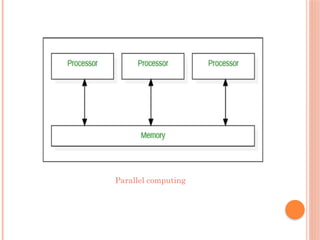
PARALLEL COMPUTING
Definition:Simultaneous execution of multiple
tasks or processes across multiple processors.
Key Idea: Splitting a problem into sub-problems
solved concurrently to increase speed.
Features:
- Requires multiple processors/cores
- Shared or distributed memory models
- Used in scientific simulations, AI training, big
data analytics
Example: Weather forecasting models, GPU
computing
DISTRIBUTED COMPUTING
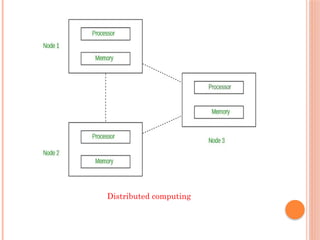
Definition:Components on different computers
work together via a network to achieve a goal.
Key Idea: Tasks divided among multiple
machines connected via network.
Features:
- No central control
- Resources spread across multiple systems
- Communication via message passing
Example: Peer-to-peer systems, multiplayer
games
Cloud computingis a virtualization-based
technology
that allows us to create, configure, and customize
applications via an internet connection.
The cloud technology includes a
development platform,
hard disk,
software application, and
database.
It is a technology that uses remote servers on the
internet to store, manage, and access data online
rather than local drives.
15.
Cloud computingprovides
scalability,
flexibility,
cost-effectiveness, and
security
to individuals and organizations to manage their IT
operations.
Cloud computing works on a Pay-on-Use basis for
individuals and organizations.
16.
Some operationswhich can be performed with
cloud computing are –
Storage, backup, and recovery of data
Delivery of software on demand
Development of new applications and services
Streaming videos and audio
17.
Initial Days– In Client/Server computing
(centralized storage) paradigm all the software
applications, all the data and all the controls are
resided on the server side.
Then after, distributed computing came into
picture, where all the computers are networked
together and share their resources when needed.
in 1961, John MacCharty suggested in a speech that
computing can be sold like a utility, just like a water
or electricity.
In 1999, Salesforce.com started delivering of
applications to users using a simple website. The
applications were delivered to enterprises over the
Internet.
HISTORY
18.
…
In 2002,Amazon started Amazon Web Services,
providing services like storage, computation and
even human intelligence.
In 2009, Google Apps also started to provide
cloud computing enterprise applications.
In 2009, Microsoft launched Windows Azure.
That today, cloud computing has become
mainstream.
Advantages :
It is easier to get backup in cloud.
It allows us easy and quick access stored information
anywhere and anytime.
It allows us to access data via mobile.
It reduces both hardware ad Software cost, and it is
easily maintainable.
Database Security.
Disadvantages :
It requires good internet connection.
User have limited control on the data.
22.
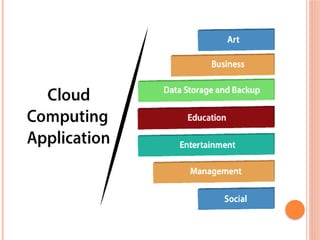
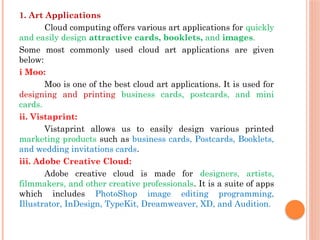
1. Art Applications
Cloudcomputing offers various art applications for quickly
and easily design attractive cards, booklets, and images.
Some most commonly used cloud art applications are given
below:
i Moo:
Moo is one of the best cloud art applications. It is used for
designing and printing business cards, postcards, and mini
cards.
ii. Vistaprint:
Vistaprint allows us to easily design various printed
marketing products such as business cards, Postcards, Booklets,
and wedding invitations cards.
iii. Adobe Creative Cloud:
Adobe creative cloud is made for designers, artists,
filmmakers, and other creative professionals. It is a suite of apps
which includes PhotoShop image editing programming,
Illustrator, InDesign, TypeKit, Dreamweaver, XD, and Audition.
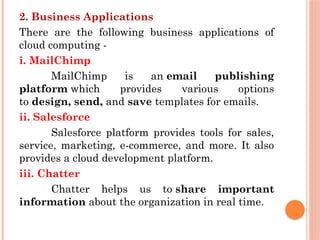
23.
2. Business Applications
Thereare the following business applications of
cloud computing -
i. MailChimp
MailChimp is an email publishing
platform which provides various options
to design, send, and save templates for emails.
ii. Salesforce
Salesforce platform provides tools for sales,
service, marketing, e-commerce, and more. It also
provides a cloud development platform.
iii. Chatter
Chatter helps us to share important
information about the organization in real time.
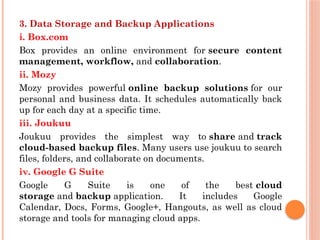
24.
3. Data Storageand Backup Applications
i. Box.com
Box provides an online environment for secure content
management, workflow, and collaboration.
ii. Mozy
Mozy provides powerful online backup solutions for our
personal and business data. It schedules automatically back
up for each day at a specific time.
iii. Joukuu
Joukuu provides the simplest way to share and track
cloud-based backup files. Many users use joukuu to search
files, folders, and collaborate on documents.
iv. Google G Suite
Google G Suite is one of the best cloud
storage and backup application. It includes Google
Calendar, Docs, Forms, Google+, Hangouts, as well as cloud
storage and tools for managing cloud apps.
25.
4. Education Applications
Cloudcomputing in the education sector becomes very popular. It
offers various online distance learning platforms and student
information portals to the students.
i. Google Apps for Education
Google Apps for Education is the most widely used platform for
free web-based email, calendar, documents, and collaborative
study.
ii. Chromebooks for Education
Chromebook for Education is one of the most important Google's
projects. It is designed for the purpose that it enhances education
innovation.
iii. Tablets with Google Play for Education
It allows educators to quickly implement the latest technology
solutions into the classroom and make it available to their
students.
iv. AWS in Education
AWS cloud provides an education-friendly environment to
universities, community colleges, and schools.
26.
5. Entertainment Applications
Entertainmentindustries use a multi-cloud
strategy to interact with the target audience.
i. Online games
It offers various online games that run remotely
from the cloud. The best cloud gaming services are
Shaow, GeForce Now, Vortex, Project xCloud, and
PlayStation Now.
ii. Video Conferencing Apps
It allows us to communicate with our business
partners, friends, and relatives using a cloud-based
video conferencing.
27.
6. Social Applications
i.Facebook
Facebook is a social networking website which allows active
users to share files, photos, videos, status, more to their friends,
relatives, and business partners using the cloud storage system..
ii. Twitter
Twitter is a social networking site. It is
a microblogging system. It allows users to follow high profile
celebrities, friends, relatives, and receive news. It sends and
receives short posts called tweets.
iii. Yammer
Yammer is the best team collaboration tool that allows a team
of employees to chat, share images, documents, and videos.
iv. LinkedIn
LinkedIn is a social network for students, freshers, and
professionals.
28.
TRENDS IN CLOUDCOMPUTING
self-automation,
self-learning,
personalized cloud,
high data security, and
Privacy
Top cloud computing trends are AI and ML,
Kubernetes, Multi and Hybrid cloud solutions,
IoT, Cloud Security, and more.
29.
AI AND ML
Artificial Intelligence and Machine Learning are
two technologies that are closely related to cloud
computing.
AI and ML services are more cost-effective
Large amounts of computational power
and storage space are needed for data
collection and algorithm training.
CC is solution for managing massive volumes of
data to improve tech company productivity.
30.
The keytrends that are likely to emerge in this
area include
increased automation
self-learning capabilities,
greater data security
privacy, and
more personalized cloud experiences.
31.
EDGE COMPUTING
EdgeComputing is one of the biggest trends in
cloud computing. Processing the data whenever it
created, to get real time results.
Here, data is stored, processed at the edge of the
network, and analyzed geographically closer to
its source.
Edge computing has major benefits which include
more privacy, faster data transmission, security,
and increased efficiency.
32.
BLOCKCHAIN
Blockchain isa linked list of blocks containing
records and keeps growing as users add to it.
Cryptography is used to store data in blocks.
It offers excellent security, transparency, and
decentralization.
It can process vast amounts of data and exercise
control over documents economically and
securely.
33.
IOT
IoT isa well-known trend in cloud computing.
It is a technology that maintains connections
between computers, servers, and networks.
It functions as a mediator and ensures successful
communication and assists in data collection
from remote devices.
34.
KUBERNETES
Kubernetes isan extensible, portable, and open-
source platform designed by Google in 2014.
It is mainly used to automate the deployment,
scaling, and operations of the container-based
applications across the cluster of nodes.
It is also designed for managing the services of
containerized apps using different methods
which provide the scalability, predictability, and
high availability.
35.
CLOUD PLATFORM SERVICE
PROVIDERS
Cloud Service providers (CSP) provide various
services such as:
Software as a Service,
Platform as a service,
Infrastructure as a service,
network services,
business applications,
mobile applications, and
infrastructure in the cloud.
The cloud service providers host these services in
a data center, and users can access these services
through cloud provider companies using an
Internet connection.
36.
AMAZON WEB SERVICES(AWS)
AWS (Amazon Web Services) is a secure cloud
service platform provided by Amazon.
It offers various services such as
database storage,
computing power,
content delivery,
Relational Database
Features of AWS
scalable, cost-effective
flexible storage options
security services such as infrastructure security,
data encryption, monitoring & logging, identity &
access control
37.
MICROSOFT AZURE
MicrosoftAzure is also known as Windows
Azure.
It supports various
operating systems,
databases,
programming languages,
frameworks
Allow IT professionals to easily build, deploy, and
manage applications through a worldwide
network.
Features of Microsoft Azure
scalable, flexible, and cost-effective
38.
GOOGLE CLOUD PLATFORM
Google cloud platform is a product of Google.
It consists of a set of physical devices, such as
computers, hard disk drives, and virtual
machines.
Features of Google Cloud
big data services
Networking
scalable and high-performance
serverless services such as Messaging, Data
Warehouse, Database, Compute, Storage, Data
Processing, and Machine learning (ML)
39.
RACKSPACE
Rackspace offerscloud computing services such
as,
hosting web applications,
Cloud Backup,
Cloud Block Storage,
Databases, and
Cloud Servers.
The main aim to designing Rackspace is to easily
manage private and public cloud deployments.
Its data centers operating in the USA, UK, Hong
Kong, and Australia.
40.
IBM CLOUD SERVICES
IBM Cloud is an open-source, faster, and more
reliable platform. It is built with a suite of
advanced data and AI tools. It offers various
services such as Infrastructure as a service,
Software as a service, and platform as a service.
You can access its services like compute power,
cloud data & Analytics, cloud use cases, and
storage networking using internet connection.
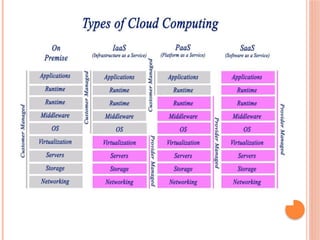
TYPES OF CLOUDCOMPUTING
Deployment Model
Private Cloud
Public Cloud
Hybrid Cloud
Service Model
Infrastructure as a Service [Iaas]
Platform as a Service [PaaS]
Software as a Service [Saas]
IAAS – INFRASTRUCTUREAS A
SERVICE
IaaS is also known as Hardware as a Service
(HaaS).
This service provide infrastructure over internet.
IaaS Cloud Service used by System
Administrators and Network Architectures.
It provides network equipment, storage,
devices, database and web servers.
IaaS delivers infrastructure on an outsource
basis.
45.
ADVANTAGES
Resources arehighly scalable
Cost depends on consumption
Dynamic and Flexible
Automated administrative task
Security
Maintenance
It helps users to avoid the cost and complexity of
purchasing and managing the physical server
IAAS COULD SERVICEPROVIDERS
Amazon Web Services (AWS),
Microsoft Azure,
Google Compute Engine (GCE),
Rackspace, and
Cisco Metacloud.
48.
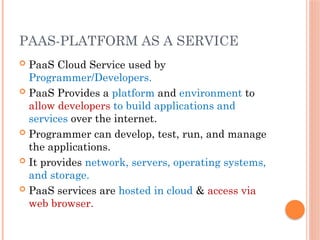
PAAS-PLATFORM AS ASERVICE
PaaS Cloud Service used by
Programmer/Developers.
PaaS Provides a platform and environment to
allow developers to build applications and
services over the internet.
Programmer can develop, test, run, and manage
the applications.
It provides network, servers, operating systems,
and storage.
PaaS services are hosted in cloud & access via
web browser.
49.
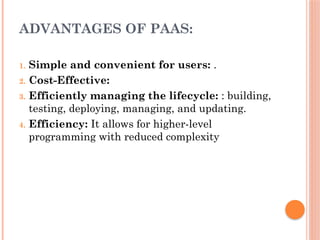
ADVANTAGES OF PAAS:
1.Simple and convenient for users: .
2. Cost-Effective:
3. Efficiently managing the lifecycle: : building,
testing, deploying, managing, and updating.
4. Efficiency: It allows for higher-level
programming with reduced complexity
50.
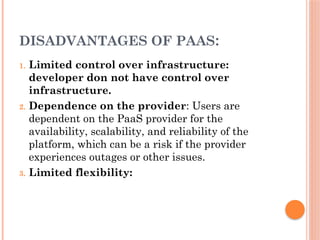
DISADVANTAGES OF PAAS:
1.Limited control over infrastructure:
developer don not have control over
infrastructure.
2. Dependence on the provider: Users are
dependent on the PaaS provider for the
availability, scalability, and reliability of the
platform, which can be a risk if the provider
experiences outages or other issues.
3. Limited flexibility:
51.
PAAS COULD SERVICEPROVIDERS
Amazon Web services Elastic Beanstalk,
Salesforce,
Windows Azure,
Google App Engine,
cloud Bees and
IBM smart cloud.
52.
SAAS – SOFTWAREAS A SERVICE
SaaS also called as
Web-based software,
on-demand software, or
hosted software.
SaaS Cloud Service used by End Users.
Delivering services and applications over the Internet.
Instead of installing and maintaining software &
hardware done by vendors, we simply access it via the
Internet.
SaaS applications can be run directly from a web
browser without any downloads or installations
required.
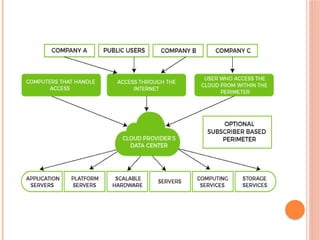
PUBLIC CLOUD
Itis accessible to the public.
Public deployment models are perfect for
organizations with growing and fluctuating
demands.
It also makes a great choice for companies with low-
security concerns.
Cloud service provider provides services like or
networking services, compute virtualization &
storage available on the public internet.
cloud model is owned by the entity that delivers the
cloud services.
Its configuration and deployment are quick and easy,
making it an ideal choice for test environments.
60.
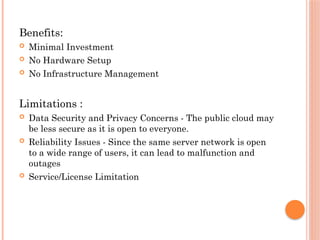
Benefits:
Minimal Investment
No Hardware Setup
No Infrastructure Management
Limitations :
Data Security and Privacy Concerns - The public cloud may
be less secure as it is open to everyone.
Reliability Issues - Since the same server network is open
to a wide range of users, it can lead to malfunction and
outages
Service/License Limitation
61.
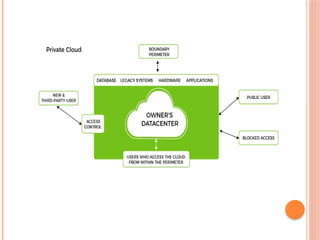
PRIVATE CLOUD
It’sa one-on-one environment for a single user
(customer).
It is also called “internal cloud”.
It refers to the ability to access systems and
services within a given border or organization.
Companies that look for cost efficiency and
greater control over data & resources will find
the private cloud.
Private Cloud will be integrated with your data
center and managed by your IT team.
Alternatively, you can also choose to host it
externally.
63.
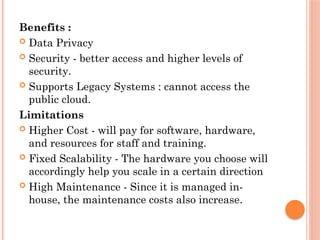
Benefits :
DataPrivacy
Security - better access and higher levels of
security.
Supports Legacy Systems : cannot access the
public cloud.
Limitations
Higher Cost - will pay for software, hardware,
and resources for staff and training.
Fixed Scalability - The hardware you choose will
accordingly help you scale in a certain direction
High Maintenance - Since it is managed in-
house, the maintenance costs also increase.
64.
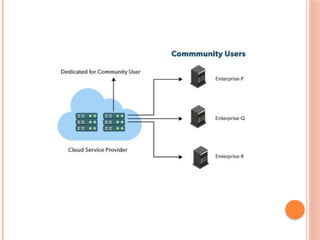
COMMUNITY CLOUD
Thecommunity cloud operates in a way that is
similar to the public cloud.
There's just one difference - it allows access to
only a specific set of users who share common
objectives and use cases.
This type of deployment model of cloud
computing is managed and hosted internally or
by a third-party vendor.
66.
Benefits
Smaller Investment- A community cloud is much
cheaper than the private & public cloud and
provides great performance
Setup Benefits
Limitations
Shared Resources - Due to restricted bandwidth
and storage capacity, community resources often
pose challenges.
Not as Popular
67.
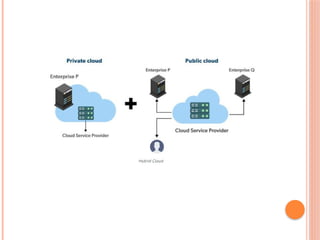
hybrid cloudis a combination of two or more
cloud architectures.
With a hybrid solution, you may host the app in a
safe environment while taking advantage of the
public cloud’s cost savings.
Organizations can move data and applications
between different clouds using a combination of
two or more cloud deployment methods,
depending on their needs.
HYBRID CLOUD
69.
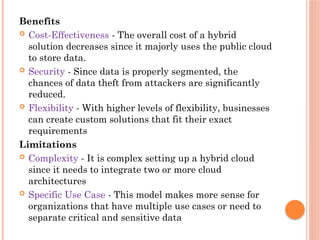
Benefits
Cost-Effectiveness -The overall cost of a hybrid
solution decreases since it majorly uses the public cloud
to store data.
Security - Since data is properly segmented, the
chances of data theft from attackers are significantly
reduced.
Flexibility - With higher levels of flexibility, businesses
can create custom solutions that fit their exact
requirements
Limitations
Complexity - It is complex setting up a hybrid cloud
since it needs to integrate two or more cloud
architectures
Specific Use Case - This model makes more sense for
organizations that have multiple use cases or need to
separate critical and sensitive data
70.
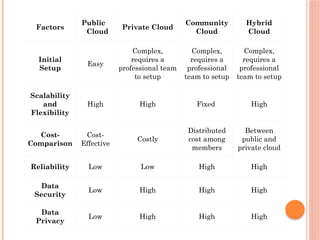
Factors
Public
Cloud
Private Cloud
Community
Cloud
Hybrid
Cloud
Initial
Setup
Easy
Complex,
requires a
professionalteam
to setup
Complex,
requires a
professional
team to setup
Complex,
requires a
professional
team to setup
Scalability
and
Flexibility
High High Fixed High
Cost-
Comparison
Cost-
Effective
Costly
Distributed
cost among
members
Between
public and
private cloud
Reliability Low Low High High
Data
Security
Low High High High
Data
Privacy
Low High High High
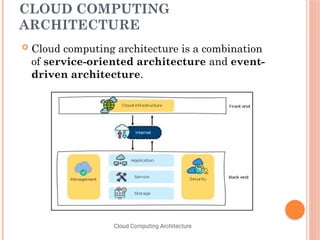
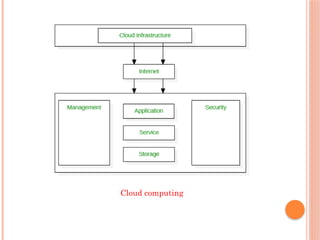
Cloud computingarchitecture is divided into the
following two parts –
Front End
Back End
73.
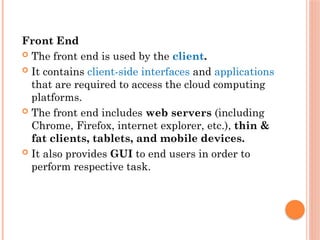
Front End
Thefront end is used by the client.
It contains client-side interfaces and applications
that are required to access the cloud computing
platforms.
The front end includes web servers (including
Chrome, Firefox, internet explorer, etc.), thin &
fat clients, tablets, and mobile devices.
It also provides GUI to end users in order to
perform respective task.
74.
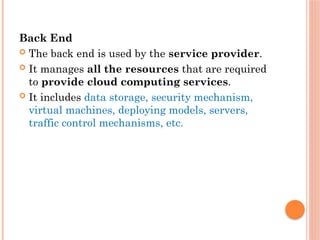
Back End
Theback end is used by the service provider.
It manages all the resources that are required
to provide cloud computing services.
It includes data storage, security mechanism,
virtual machines, deploying models, servers,
traffic control mechanisms, etc.
75.
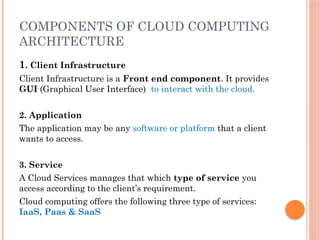
COMPONENTS OF CLOUDCOMPUTING
ARCHITECTURE
1. Client Infrastructure
Client Infrastructure is a Front end component. It provides
GUI (Graphical User Interface) to interact with the cloud.
2. Application
The application may be any software or platform that a client
wants to access.
3. Service
A Cloud Services manages that which type of service you
access according to the client’s requirement.
Cloud computing offers the following three type of services:
IaaS, Paas & SaaS
76.
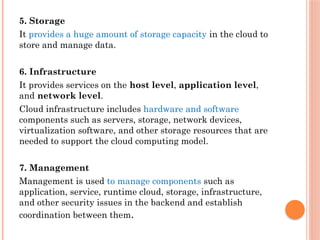
5. Storage
It providesa huge amount of storage capacity in the cloud to
store and manage data.
6. Infrastructure
It provides services on the host level, application level,
and network level.
Cloud infrastructure includes hardware and software
components such as servers, storage, network devices,
virtualization software, and other storage resources that are
needed to support the cloud computing model.
7. Management
Management is used to manage components such as
application, service, runtime cloud, storage, infrastructure,
and other security issues in the backend and establish
coordination between them.
77.
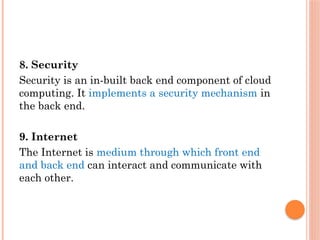
8. Security
Security isan in-built back end component of cloud
computing. It implements a security mechanism in
the back end.
9. Internet
The Internet is medium through which front end
and back end can interact and communicate with
each other.
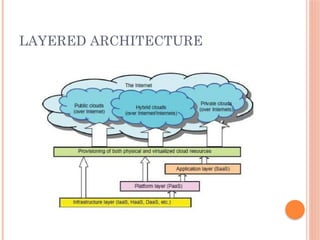
INFRASTRUCTURE LAYER
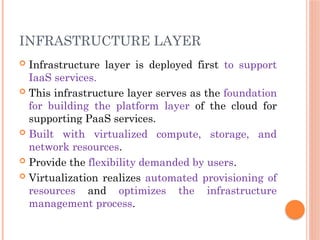
Infrastructurelayer is deployed first to support
IaaS services.
This infrastructure layer serves as the foundation
for building the platform layer of the cloud for
supporting PaaS services.
Built with virtualized compute, storage, and
network resources.
Provide the flexibility demanded by users.
Virtualization realizes automated provisioning of
resources and optimizes the infrastructure
management process.
80.
PLATFORM LAYER
Foundationfor implementing the application layer
for SaaS applications.
The platform layer is for general-purpose and
repeated usage of the collection of software resources.
This layer provides users with an environment to
develop their applications, to test operation flows,
and to monitor execution results and performance.
Virtualized cloud platform serves as a “system
middleware” between the infrastructure and
application layers of the cloud.
The platform should be able to assure users that they
have scalability, dependability, and security
protection
81.
APPLICATION LAYER
Theapplication layer is formed with a collection
of all needed software modules for SaaS
applications.
Service applications in this layer include daily
office management work, such a information
retrieval, document processing, and calendar and
authentication services.
The application layer is generally used by
enterprises in business marketing and sales,
consumer relationship management (CRM),
financial transactions, and supply chain
management.
82.
VIRTUALIZATION
Virtualization isthe "creation of a virtual
version of something,
such as a server, a desktop, a storage device, an
operating system or network resources".
Virtualization is a technique, which allows to
share a single physical instance of a resource or an
application among multiple customers or
organizations.
83.
With thehelp of Virtualization, we can run multiple
resources on the same hardware simultaneously.
Ex: running multiple operating systems on a
single machine but sharing all the hardware
resources.
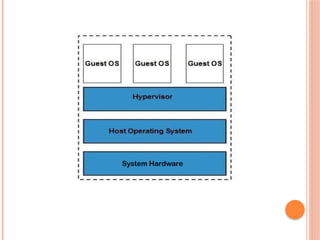
Using Hypervisor software we can have different
virtual system on same hardware.
A Virtual machine provides an environment that is
logically separated from the underlying hardware.
The machine on which the virtual machine is going
to create is known as Host Machine and that
virtual machine is referred as a Guest Machine
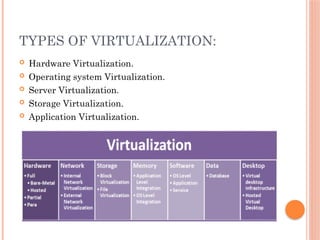
TYPES OF VIRTUALIZATION:
Hardware Virtualization.
Operating system Virtualization.
Server Virtualization.
Storage Virtualization.
Application Virtualization.
86.
HARDWARE VIRTUALIZATION
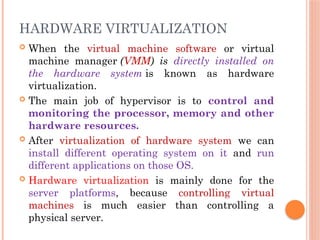
Whenthe virtual machine software or virtual
machine manager (VMM) is directly installed on
the hardware system is known as hardware
virtualization.
The main job of hypervisor is to control and
monitoring the processor, memory and other
hardware resources.
After virtualization of hardware system we can
install different operating system on it and run
different applications on those OS.
Hardware virtualization is mainly done for the
server platforms, because controlling virtual
machines is much easier than controlling a
physical server.
87.
OPERATING SYSTEM
VIRTUALIZATION
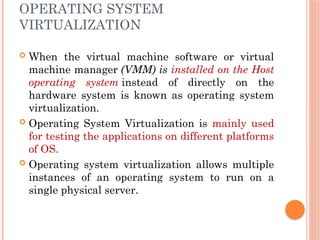
Whenthe virtual machine software or virtual
machine manager (VMM) is installed on the Host
operating system instead of directly on the
hardware system is known as operating system
virtualization.
Operating System Virtualization is mainly used
for testing the applications on different platforms
of OS.
Operating system virtualization allows multiple
instances of an operating system to run on a
single physical server.
88.
SERVER VIRTUALIZATION:
ServerVirtualization is the process of dividing a
physical server into several virtual servers,
called virtual private servers.
Each virtual private server can run
independently.
The concept of Server Virtualization widely used
in the IT infrastructure to minimizes the costs by
increasing the utilization of existing resources.
Each VM runs its own operating system,
applications, and services, and they are isolated
from each other.
89.
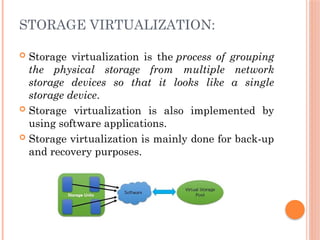
STORAGE VIRTUALIZATION:
Storagevirtualization is the process of grouping
the physical storage from multiple network
storage devices so that it looks like a single
storage device.
Storage virtualization is also implemented by
using software applications.
Storage virtualization is mainly done for back-up
and recovery purposes.
90.
APPLICATION VIRTUALIZATION
Inthis virtualization process, the application
runs without the need of installing it into the
system, as they run on a virtual environment.
Local application virtualization runs on the host
device but runs in a virtual environment, not in
the hardware.
Server-based application virtualization runs only
on the server-side and sends the only interface to
the client system.
Application virtualization, the application is on
the server-side, and it sends some components to
the host device according to the requirement.
91.
FEATURES / CHARACTERISTICS
OFVIRTUALIZATION
Increased Security: The ability to control the execution
of a guest program in a completely transparent manner
opens new possibilities for delivering a secure, controlled
execution environment. All the operations of the guest
programs are generally performed against the virtual
machine, which then translates and applies them to the
host programs.
Managed Execution: In particular, sharing,
aggregation, emulation, and isolation are the most
relevant features.
Sharing: Virtualization allows the creation of a separate
computing environment within the same host.
Aggregation: It is possible to share physical resources
among several guests, but virtualization also allows
aggregation, which is the opposite process.

![TYPES OF CLOUD COMPUTING
Deployment Model
Private Cloud
Public Cloud
Hybrid Cloud
Service Model
Infrastructure as a Service [Iaas]
Platform as a Service [PaaS]
Software as a Service [Saas]](https://image.slidesharecdn.com/cloudcomputing-250820063652-ab651399/85/cloud-computing-introduction-and-architecture-42-320.jpg)
![SERVICE MODEL
Infrastructure as a Service [Iaas]
Platform as a Service [PaaS]
Software as a Service [Saas]](https://image.slidesharecdn.com/cloudcomputing-250820063652-ab651399/85/cloud-computing-introduction-and-architecture-43-320.jpg)