JAIGANESH
 Example: Yahoo email or Gmail etc.
 User don’t need a software or a server .
 User would need is just an internet connection
and you can start sending emails.
The server and email management software is
all on the cloud (internet) and is totally managed
by the cloud service providers.
The analogy is, ‘If you only need milk, would you
buy a cow?
User need to send email (milk) why should a
user buy a Software / Hardware? (cow)
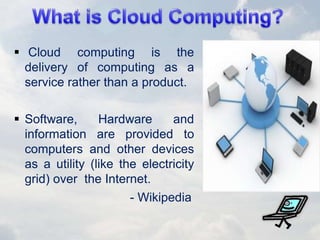
 Cloud computing is the
delivery of computing as a
service rather than a product.
 Software, Hardware and
information are provided to
computers and other devices
as a utility (like the electricity
grid) over the Internet.
- Wikipedia
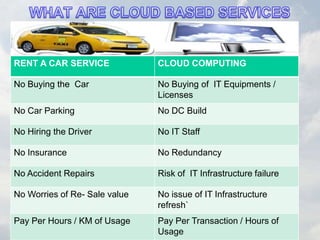
RENT A CAR SERVICE CLOUD COMPUTING
No Buying the Car No Buying of IT Equipments /
Licenses
No Car Parking No DC Build
No Hiring the Driver No IT Staff
No Insurance No Redundancy
No Accident Repairs Risk of IT Infrastructure failure
No Worries of Re- Sale value No issue of IT Infrastructure
refresh`
Pay Per Hours / KM of Usage Pay Per Transaction / Hours of
Usage
 First thought up in the 1960s by John
McCarthy.
 It has been slow to catch on the public
due to slow internet.
 Salesforce.com, 1999, Applications
 Amazon pushed with Web Services and
storage in 2002.
 Google Apps. Provide application
services in 2009.
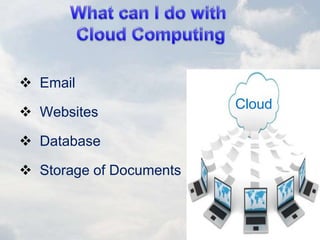
 Email
 Websites
 Database
 Storage of Documents
Cloud
 Accessible from any where & any device
 Cost Reduction
 Unlimited Storage capacity
 Reduced Software maintenance
 Increased Data reliability
 Improved Document format compatibility
 Requires a constant internet connection
 Doesn’t work well with low speed
connection
 Can be slow
 Data stored might not be secure
 Stored data can be lost
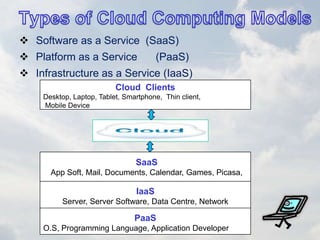
 Software as a Service (SaaS)
 Platform as a Service (PaaS)
 Infrastructure as a Service (IaaS)
Cloud Clients
Desktop, Laptop, Tablet, Smartphone, Thin client,
Mobile Device
SaaS
App Soft, Mail, Documents, Calendar, Games, Picasa,
IaaS
Server, Server Software, Data Centre, Network
PaaS
O.S, Programming Language, Application Developer
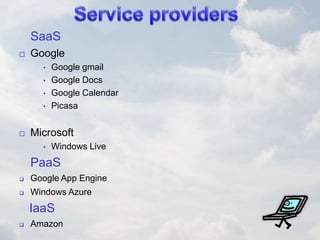
SaaS
 Google
• Google gmail
• Google Docs
• Google Calendar
• Picasa
 Microsoft
• Windows Live
PaaS
 Google App Engine
 Windows Azure
IaaS
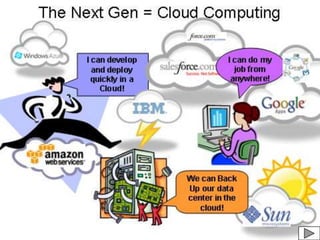
 Amazon
 Public Clouds
 Private Clouds
 Hybrid Clouds
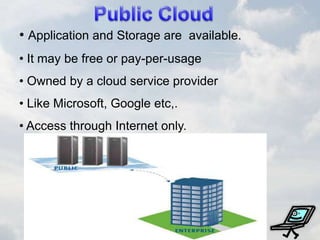
• Application and Storage are available.
• It may be free or pay-per-usage
• Owned by a cloud service provider
• Like Microsoft, Google etc,.
• Access through Internet only.
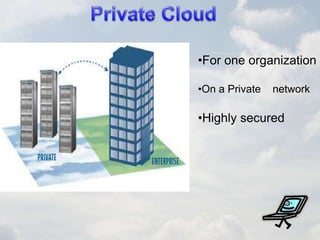
•For one organization
•On a Private network
•Highly secured
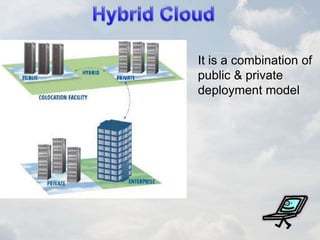
It is a combination of
public & private
deployment model
Cloud computing
Cloud computing
Cloud computing
Cloud computing
Cloud computing

Cloud computing

  • 1.
  • 2.
     Example: Yahooemail or Gmail etc.  User don’t need a software or a server .  User would need is just an internet connection and you can start sending emails. The server and email management software is all on the cloud (internet) and is totally managed by the cloud service providers. The analogy is, ‘If you only need milk, would you buy a cow? User need to send email (milk) why should a user buy a Software / Hardware? (cow)
  • 3.
     Cloud computingis the delivery of computing as a service rather than a product.  Software, Hardware and information are provided to computers and other devices as a utility (like the electricity grid) over the Internet. - Wikipedia
  • 4.
    RENT A CARSERVICE CLOUD COMPUTING No Buying the Car No Buying of IT Equipments / Licenses No Car Parking No DC Build No Hiring the Driver No IT Staff No Insurance No Redundancy No Accident Repairs Risk of IT Infrastructure failure No Worries of Re- Sale value No issue of IT Infrastructure refresh` Pay Per Hours / KM of Usage Pay Per Transaction / Hours of Usage
  • 5.
     First thoughtup in the 1960s by John McCarthy.  It has been slow to catch on the public due to slow internet.  Salesforce.com, 1999, Applications  Amazon pushed with Web Services and storage in 2002.  Google Apps. Provide application services in 2009.
  • 6.
     Email  Websites Database  Storage of Documents Cloud
  • 7.
     Accessible fromany where & any device  Cost Reduction  Unlimited Storage capacity  Reduced Software maintenance  Increased Data reliability  Improved Document format compatibility
  • 8.
     Requires aconstant internet connection  Doesn’t work well with low speed connection  Can be slow  Data stored might not be secure  Stored data can be lost
  • 10.
     Software asa Service (SaaS)  Platform as a Service (PaaS)  Infrastructure as a Service (IaaS) Cloud Clients Desktop, Laptop, Tablet, Smartphone, Thin client, Mobile Device SaaS App Soft, Mail, Documents, Calendar, Games, Picasa, IaaS Server, Server Software, Data Centre, Network PaaS O.S, Programming Language, Application Developer
  • 11.
    SaaS  Google • Googlegmail • Google Docs • Google Calendar • Picasa  Microsoft • Windows Live PaaS  Google App Engine  Windows Azure IaaS  Amazon
  • 12.
     Public Clouds Private Clouds  Hybrid Clouds
  • 13.
    • Application andStorage are available. • It may be free or pay-per-usage • Owned by a cloud service provider • Like Microsoft, Google etc,. • Access through Internet only.
  • 14.
    •For one organization •Ona Private network •Highly secured
  • 15.
    It is acombination of public & private deployment model