Cloud basic informationCloud basic information
Summer project – Aditya Adhikary Class XISummer project – Aditya Adhikary Class XI
Timelines leading to cloud computing -1
• 1950’s – The idea of “utility computing”, people being able
to use computing and software just as they use water or
electricity – just by opening a tap. From a few power plants.
• 1990’s – Networked computers, eventually leading to the
internet. The idea of a “server” that serves content – to a large
number of “dumb” terminals, that only connect to the server.
• 2000’s – Virtualization technologies. The idea that a single
“installed” piece of software (say, MS Word) – could be offered
to a hundred different connected computers. Creating many
virtual instances – and utilizing the spare server CPU capacities
of many passive machines.
• 2004’s – Distributed (grid) computing – using the CPUs of
hundreds and thousands of passive computers. The CERN Large
Hadron Collider, the Human Genome project – all used
thousands (and even millions) of spare computer CPUs.
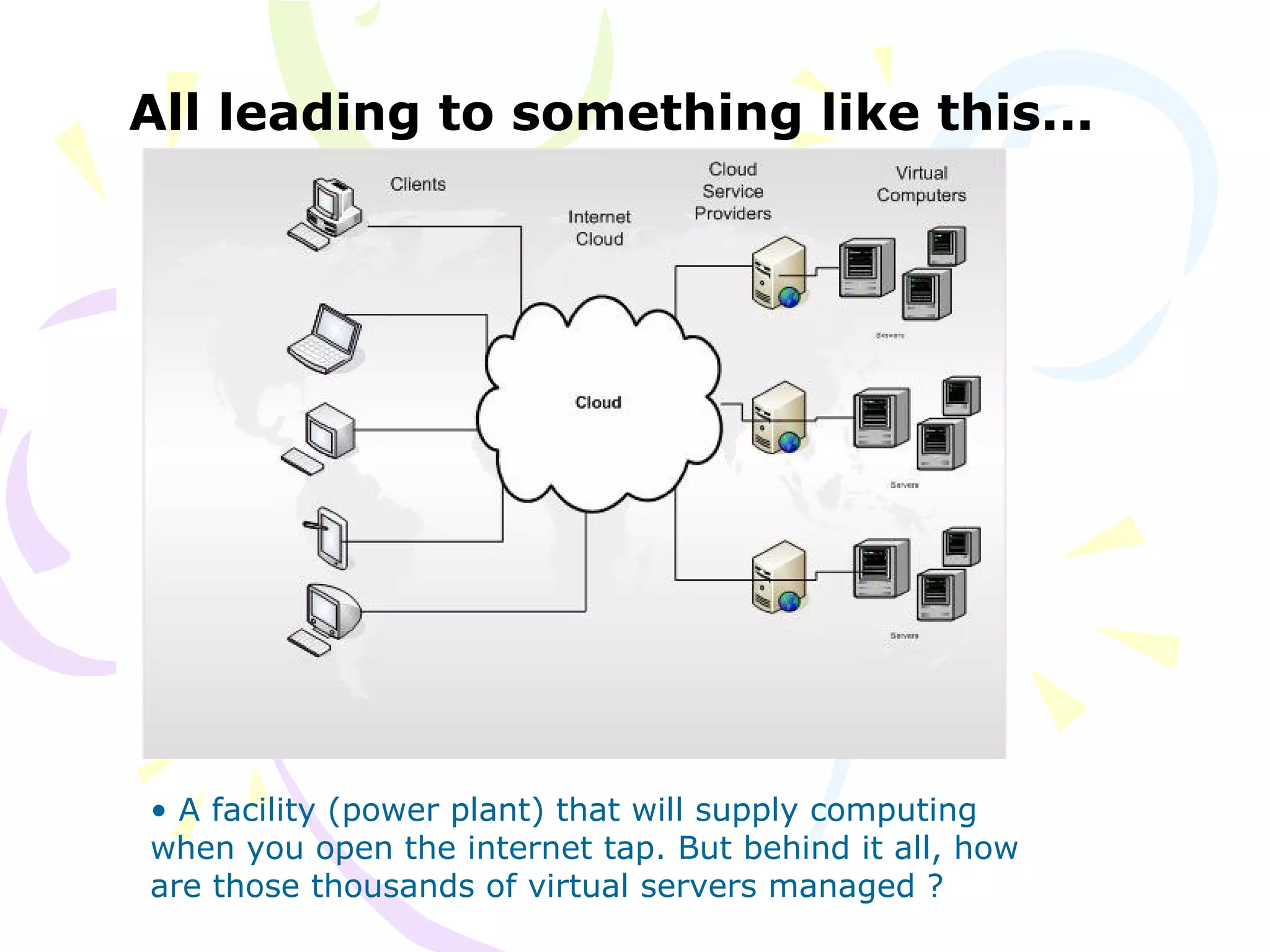
All leading to something like this...
• A facility (power plant) that will supply computing
when you open the internet tap. But behind it all, how
are those thousands of virtual servers managed ?
Timelines leading to cloud computing -2
• 2005’s – The techniques of managing the work (inputs,
outputs) done by so many different computers became publicly
available. In particular, the Map-Reduce algorithm was
extensively used by Google to manage its huge amount of data
across thousands of servers.
• 2007’s – The idea that Services could substitute installed
software started gaining ground. Service-Oriented-
Architectures can be used to represent an installed program
(say, MS Word). For example, Google Docs is, to an user on a
browser, is just a set of service calls.
• 2010’s – Companies started offering Clouds for commercial
use. Using them, one can “buy/hire” many things – someone
may want (a) just some spare CPU capacity, OR (b) a virtual
instance of MS Word OR (c) a school management software.
The definition of cloud
There is no particular definition – since “cloud” is a layman
term or jargon.
The idea is about utilizing the shared resources of a large
number of distributed computers, by connecting to such a
facility over the internet, and using the computing services
offered by paying for only a certain amount of computing.
• If one uses just the spare CPU capacity – that is
Infrastructure – IAAS (infrastructure as a service)
• If one uses just the MS-Windows – that is Platform – PAAS
(platform as a service)
• If one uses a school management system – that is Software
– SAAS – Software as a service
• If one just stores Data – DAAS – Data as a service
• and so on...
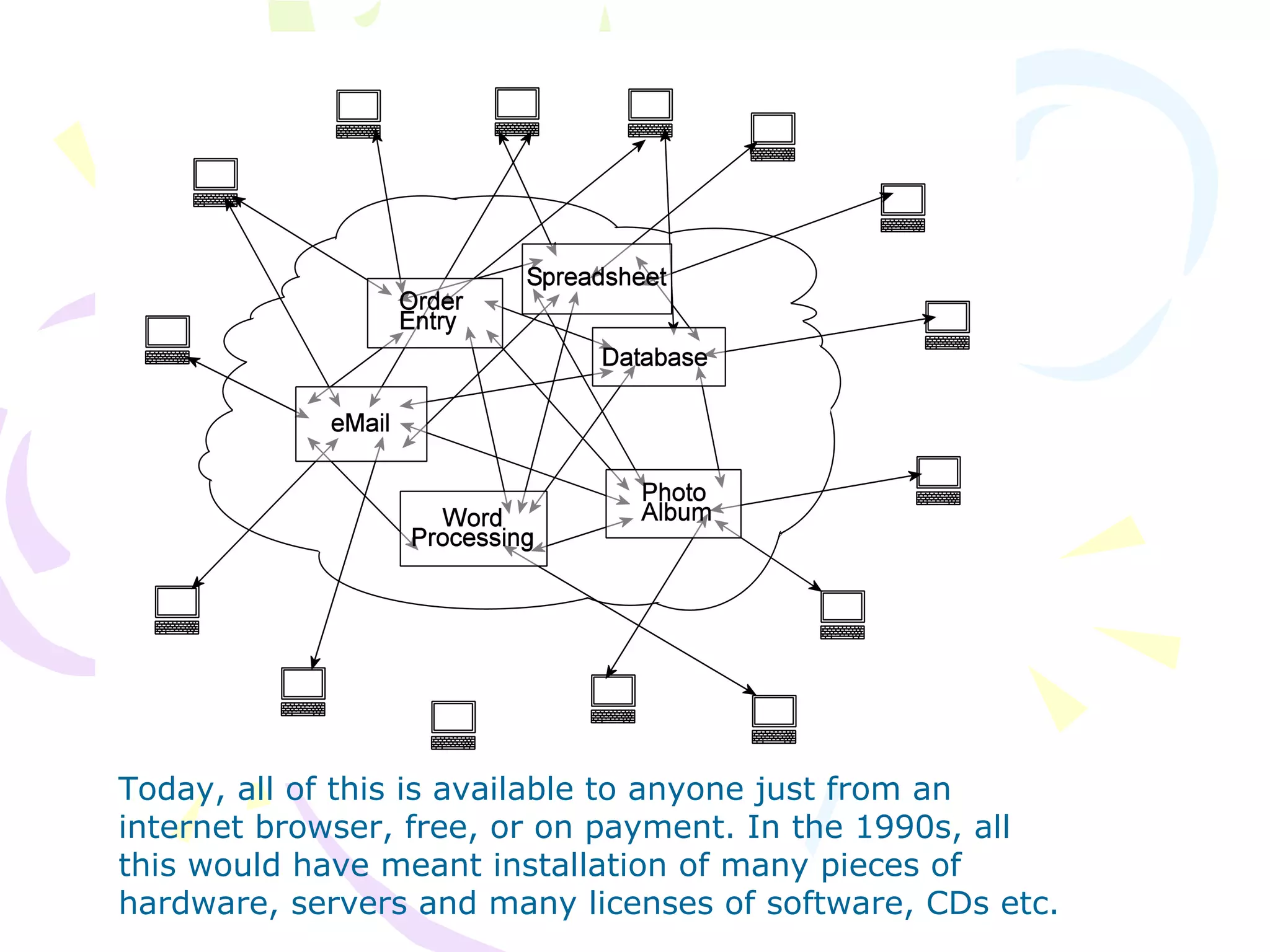
Today, all of this is available to anyone just from an
internet browser, free, or on payment. In the 1990s, all
this would have meant installation of many pieces of
hardware, servers and many licenses of software, CDs etc.
Flickr – photo album
From your viewpoint :
• You do not “install” Flickr on your own computer
• You “connect” to it
• You do not know where it is
• All you know is www.flickr.com
• And you know of some “services” : Save a photo, show
a photo, search for photos.
From Flickr’s viewpoint :
• Your photos are stored anywhere on thousands of servers
• When you ask for Photo1, it will be fetched and sent to you
• There are millions, or even billions of photos
• Thousands, or even millions of users, asking for photos
Flickr computer engineers are
concerned with this...
• Who asked
• For what
• Where is it
• How can it be sent faster
• Health of the network
• More things to serve as a service
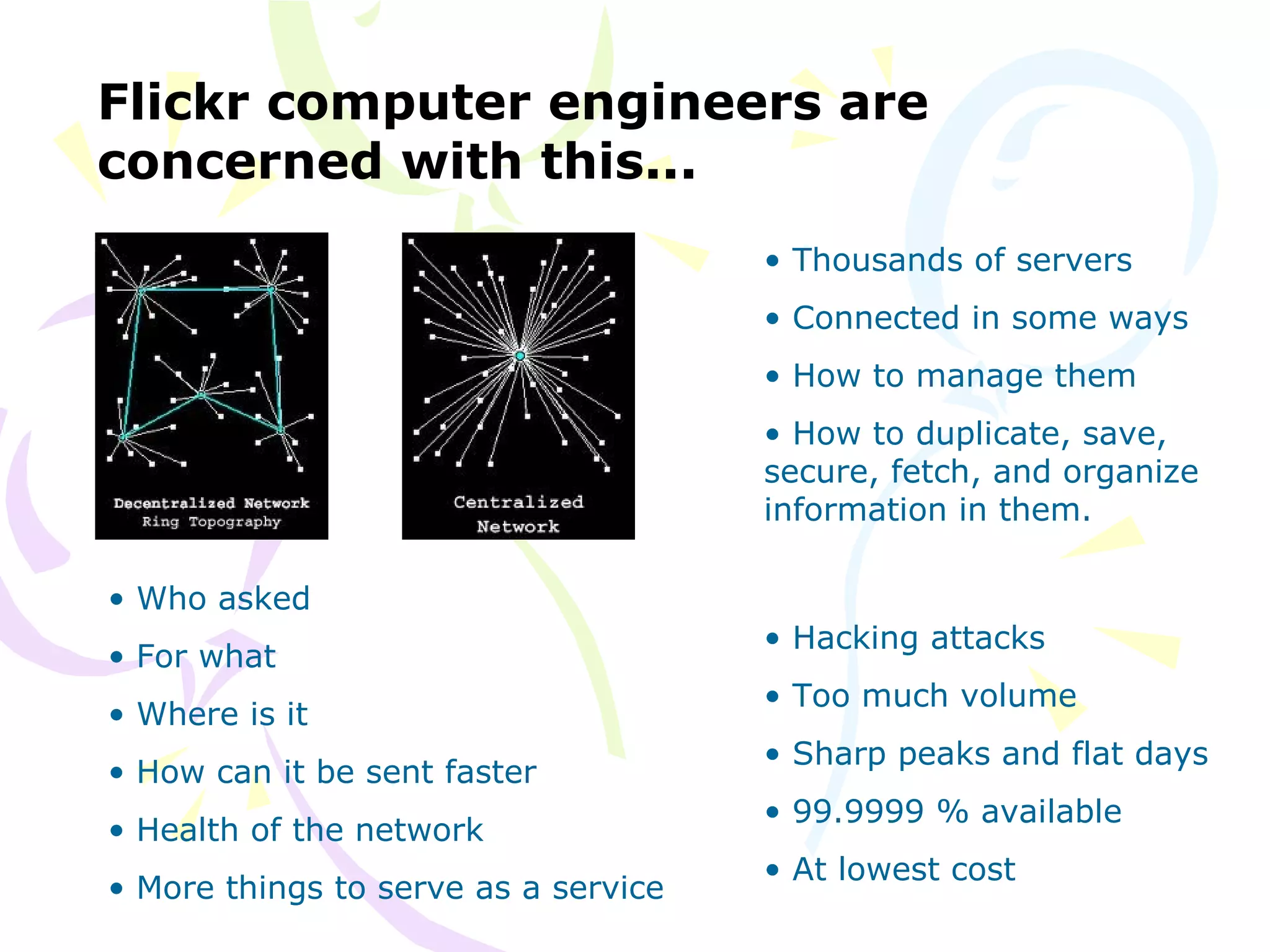
• Thousands of servers
• Connected in some ways
• How to manage them
• How to duplicate, save,
secure, fetch, and organize
information in them.
• Hacking attacks
• Too much volume
• Sharp peaks and flat days
• 99.9999 % available
• At lowest cost
Advantages to you (or a company
that uses the cloud)
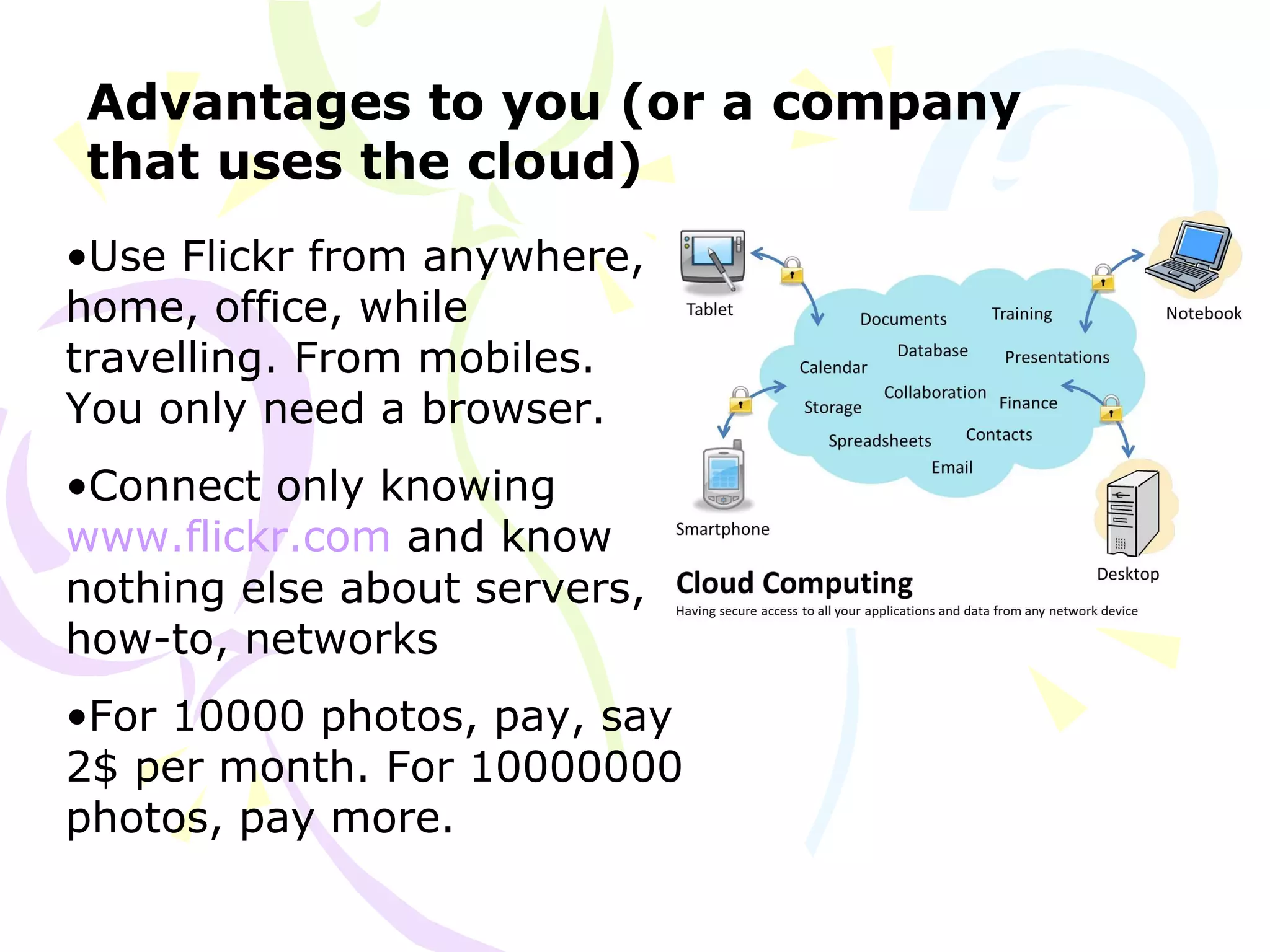
•Use Flickr from anywhere,
home, office, while
travelling. From mobiles.
You only need a browser.
•Connect only knowing
www.flickr.com and know
nothing else about servers,
how-to, networks
•For 10000 photos, pay, say
2$ per month. For 10000000
photos, pay more.
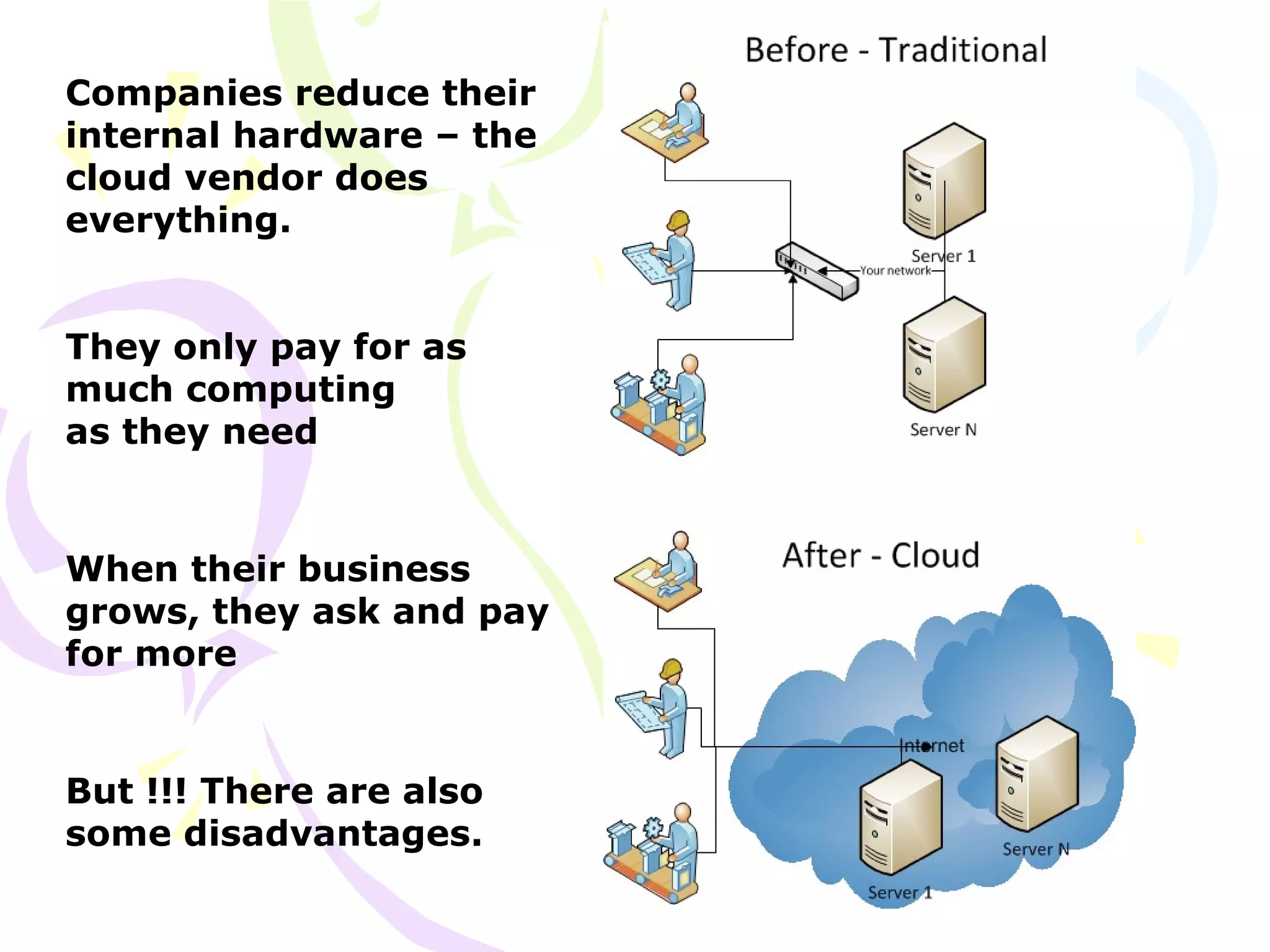
Companies reduce their
internal hardware – the
cloud vendor does
everything.
They only pay for as
much computing
as they need
When their business
grows, they ask and pay
for more
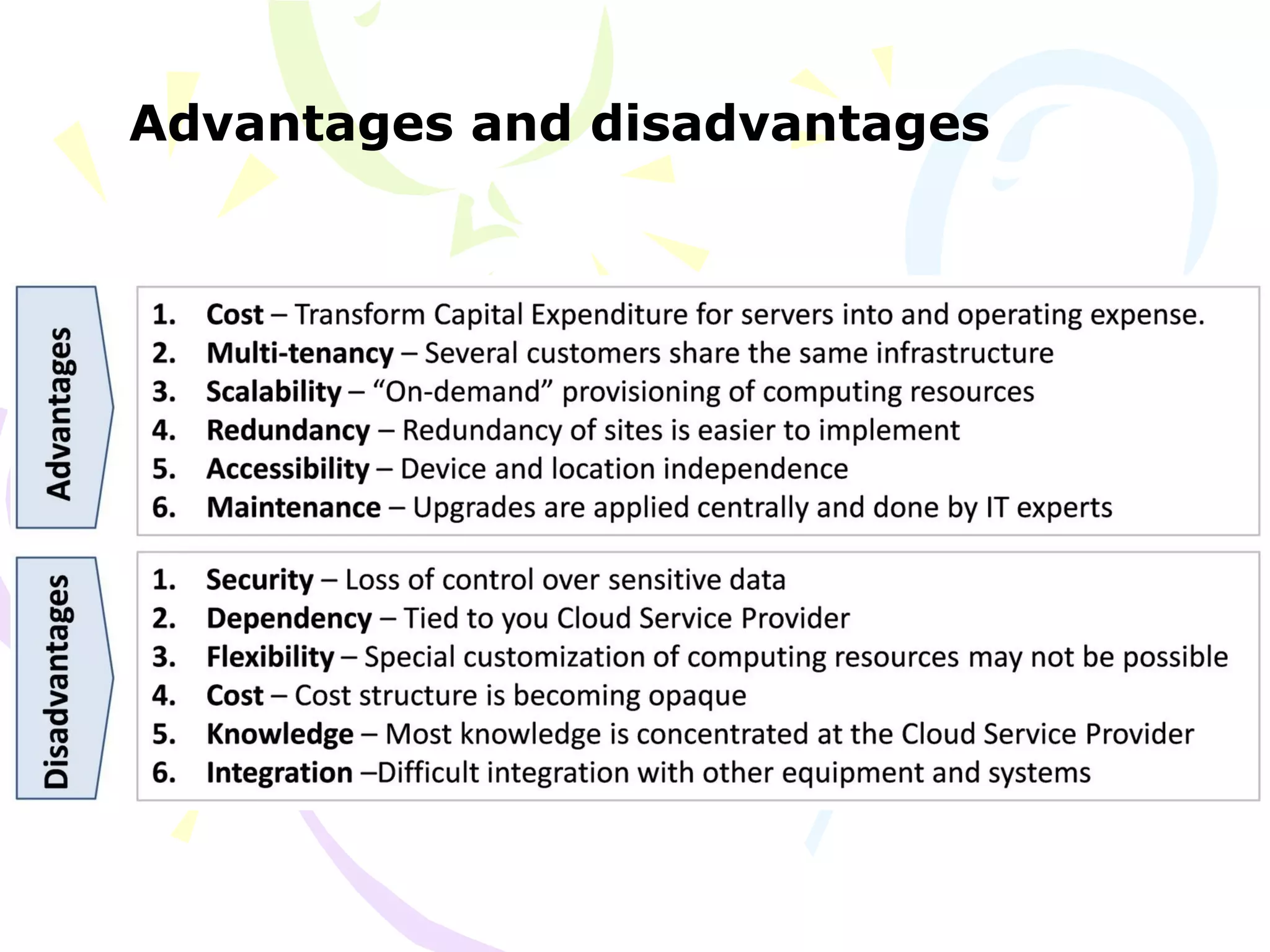
But !!! There are also
some disadvantages.
Advantages and disadvantages
The current state – who are the big
cloud providers ?
Miles to go…
•The cloud story is only beginning. The technology part is
done, the business part is still unfolding.
•There are still many issues – of data security, integration,
vendor-differences, and costs
•The adoption of cloud by companies is slow. Start-up
companies love the cloud – because they can start small
and grow very big – with no hardware purchases at all.
•In reality, the cloud is ready and waiting, but empty of
enough useful applications
•Like all software, early adopters have set up full fledged
applications and late adopters are waiting and watching
•In another 10 years, will we see the end of “installed
software and hardware” ? No IT inside companies ? Will we
only rent software ?
•Only time will tell.
Thank you
For your time and attention.
A
A

Cloud basics

  • 1.
    Cloud basic informationCloudbasic information Summer project – Aditya Adhikary Class XISummer project – Aditya Adhikary Class XI
  • 2.
    Timelines leading tocloud computing -1 • 1950’s – The idea of “utility computing”, people being able to use computing and software just as they use water or electricity – just by opening a tap. From a few power plants. • 1990’s – Networked computers, eventually leading to the internet. The idea of a “server” that serves content – to a large number of “dumb” terminals, that only connect to the server. • 2000’s – Virtualization technologies. The idea that a single “installed” piece of software (say, MS Word) – could be offered to a hundred different connected computers. Creating many virtual instances – and utilizing the spare server CPU capacities of many passive machines. • 2004’s – Distributed (grid) computing – using the CPUs of hundreds and thousands of passive computers. The CERN Large Hadron Collider, the Human Genome project – all used thousands (and even millions) of spare computer CPUs.
  • 3.
    All leading tosomething like this... • A facility (power plant) that will supply computing when you open the internet tap. But behind it all, how are those thousands of virtual servers managed ?
  • 4.
    Timelines leading tocloud computing -2 • 2005’s – The techniques of managing the work (inputs, outputs) done by so many different computers became publicly available. In particular, the Map-Reduce algorithm was extensively used by Google to manage its huge amount of data across thousands of servers. • 2007’s – The idea that Services could substitute installed software started gaining ground. Service-Oriented- Architectures can be used to represent an installed program (say, MS Word). For example, Google Docs is, to an user on a browser, is just a set of service calls. • 2010’s – Companies started offering Clouds for commercial use. Using them, one can “buy/hire” many things – someone may want (a) just some spare CPU capacity, OR (b) a virtual instance of MS Word OR (c) a school management software.
  • 5.
    The definition ofcloud There is no particular definition – since “cloud” is a layman term or jargon. The idea is about utilizing the shared resources of a large number of distributed computers, by connecting to such a facility over the internet, and using the computing services offered by paying for only a certain amount of computing. • If one uses just the spare CPU capacity – that is Infrastructure – IAAS (infrastructure as a service) • If one uses just the MS-Windows – that is Platform – PAAS (platform as a service) • If one uses a school management system – that is Software – SAAS – Software as a service • If one just stores Data – DAAS – Data as a service • and so on...
  • 6.
    Today, all ofthis is available to anyone just from an internet browser, free, or on payment. In the 1990s, all this would have meant installation of many pieces of hardware, servers and many licenses of software, CDs etc.
  • 7.
    Flickr – photoalbum From your viewpoint : • You do not “install” Flickr on your own computer • You “connect” to it • You do not know where it is • All you know is www.flickr.com • And you know of some “services” : Save a photo, show a photo, search for photos. From Flickr’s viewpoint : • Your photos are stored anywhere on thousands of servers • When you ask for Photo1, it will be fetched and sent to you • There are millions, or even billions of photos • Thousands, or even millions of users, asking for photos
  • 8.
    Flickr computer engineersare concerned with this... • Who asked • For what • Where is it • How can it be sent faster • Health of the network • More things to serve as a service • Thousands of servers • Connected in some ways • How to manage them • How to duplicate, save, secure, fetch, and organize information in them. • Hacking attacks • Too much volume • Sharp peaks and flat days • 99.9999 % available • At lowest cost
  • 9.
    Advantages to you(or a company that uses the cloud) •Use Flickr from anywhere, home, office, while travelling. From mobiles. You only need a browser. •Connect only knowing www.flickr.com and know nothing else about servers, how-to, networks •For 10000 photos, pay, say 2$ per month. For 10000000 photos, pay more.
  • 10.
    Companies reduce their internalhardware – the cloud vendor does everything. They only pay for as much computing as they need When their business grows, they ask and pay for more But !!! There are also some disadvantages.
  • 11.
  • 12.
    The current state– who are the big cloud providers ?
  • 13.
    Miles to go… •Thecloud story is only beginning. The technology part is done, the business part is still unfolding. •There are still many issues – of data security, integration, vendor-differences, and costs •The adoption of cloud by companies is slow. Start-up companies love the cloud – because they can start small and grow very big – with no hardware purchases at all. •In reality, the cloud is ready and waiting, but empty of enough useful applications •Like all software, early adopters have set up full fledged applications and late adopters are waiting and watching •In another 10 years, will we see the end of “installed software and hardware” ? No IT inside companies ? Will we only rent software ? •Only time will tell.
  • 14.
    Thank you For yourtime and attention.
  • 15.