NetID Co., LTD
For document management and document security in a cloud/mobile era
Introducing a document centralization solution !
NetID Co., LTD
Document centralization solution
• Why document centralization?
• ClouDoc document centralization
• Special characteristics of ClouDoc
NetID Co., LTD
Why document centralization?
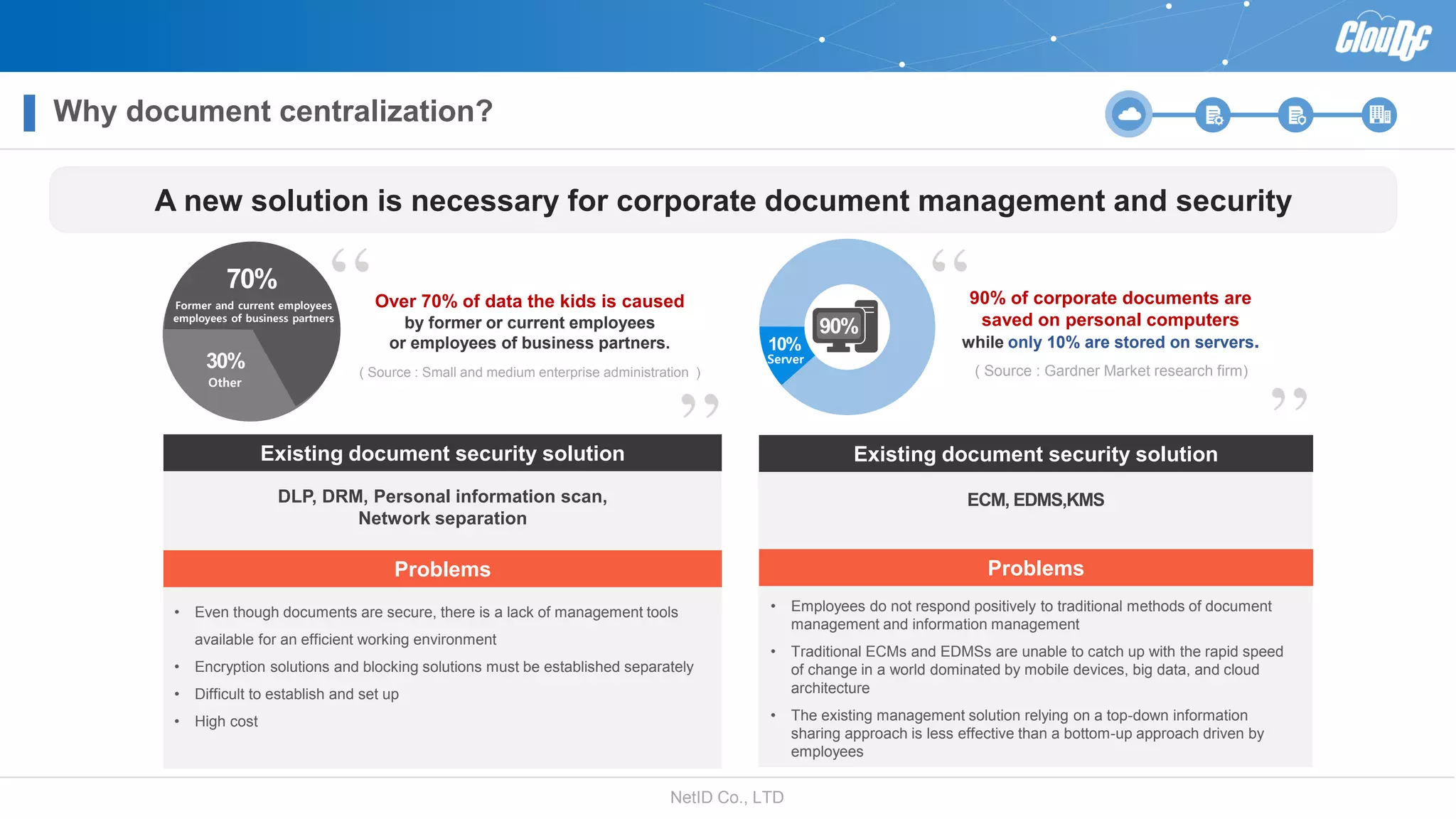
A new solution is necessary for corporate document management and security
Existing document security solution
Problems
• Employees do not respond positively to traditional methods of document
management and information management
• Traditional ECMs and EDMSs are unable to catch up with the rapid speed
of change in a world dominated by mobile devices, big data, and cloud
architecture
• The existing management solution relying on a top-down information
sharing approach is less effective than a bottom-up approach driven by
employees
ECM, EDMS,KMS
?
Existing document security solution
Problems
• Even though documents are secure, there is a lack of management tools
available for an efficient working environment
• Encryption solutions and blocking solutions must be established separately
• Difficult to establish and set up
• High cost
DLP, DRM, Personal information scan,
Network separation
Over 70% of data the kids is caused
by former or current employees
or employees of business partners.
( Source : Small and medium enterprise administration )
70%
Former and current employees
employees of business partners
30%
Other
90% of corporate documents are
saved on personal computers
while only 10% are stored on servers.
( Source : Gardner Market research firm)
10%
Server
90%
NetID Co., LTD
ClouDoc document centralization
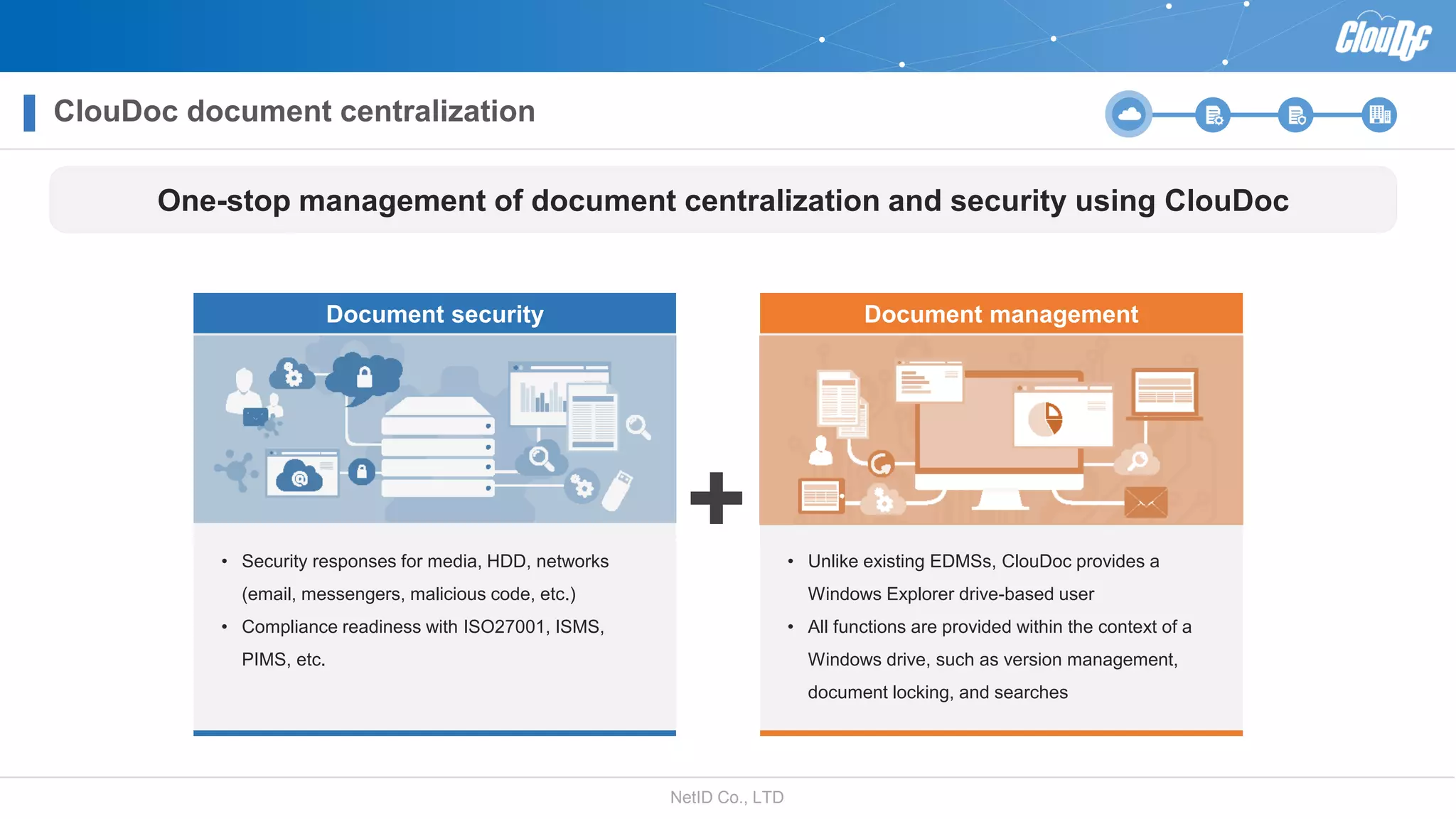
Document security Document management
• Security responses for media, HDD, networks
(email, messengers, malicious code, etc.)
• Compliance readiness with ISO27001, ISMS,
PIMS, etc.
• Unlike existing EDMSs, ClouDoc provides a
Windows Explorer drive-based user
• All functions are provided within the context of a
Windows drive, such as version management,
document locking, and searches
One-stop management of document centralization and security using ClouDoc
NetID Co., LTD
Special characteristics of ClouDoc 1
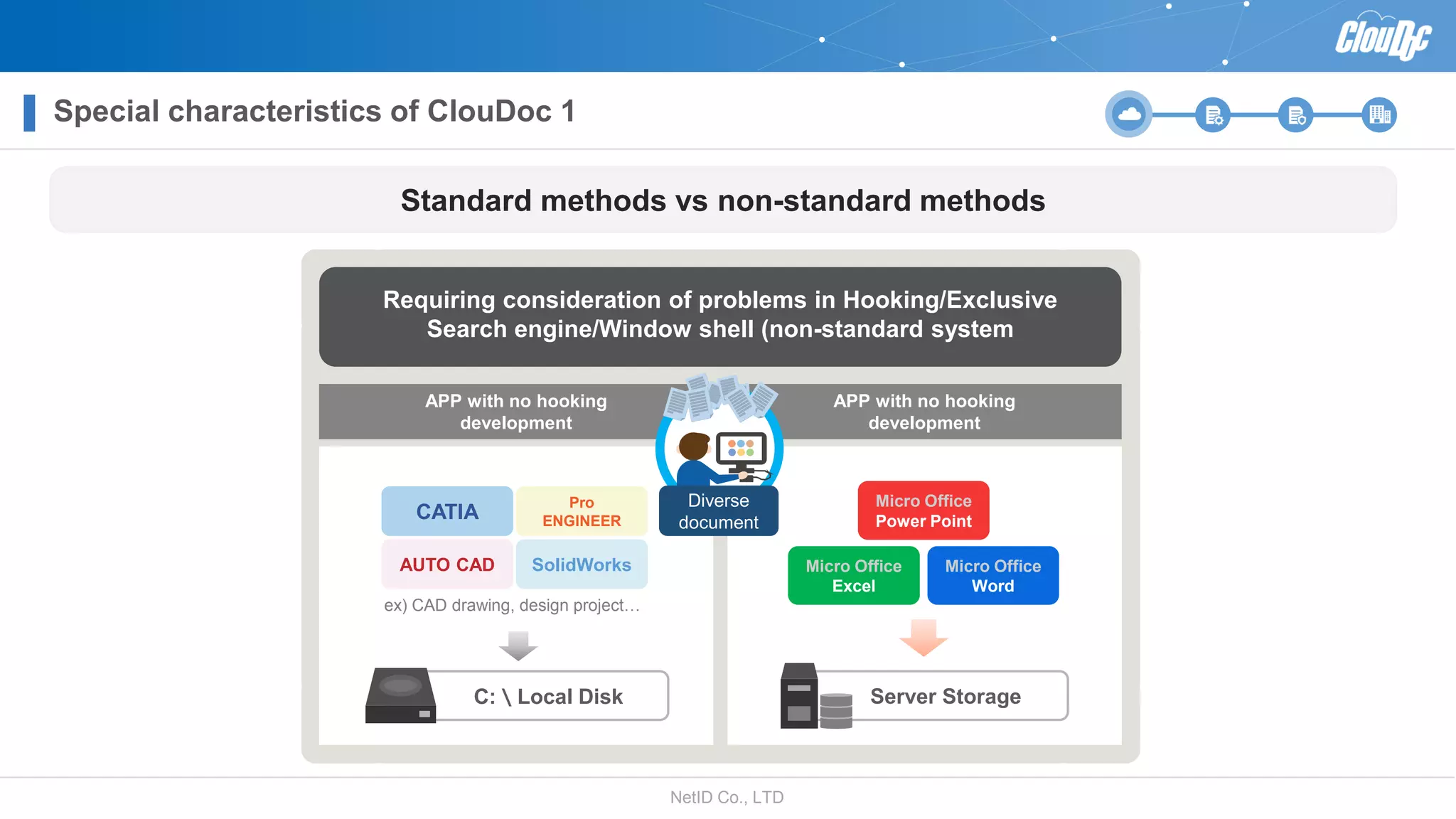
Standard methods vs non-standard methods
Requiring consideration of problems in Hooking/Exclusive
Search engine/Window shell (non-standard system
APP with no hooking
development
APP with no hooking
development
CATIA
Pro
ENGINEER
AUTO CAD SolidWorks
ex) CAD drawing, design project…
C:\Local Disk
Micro Office
Power Point
Micro Office
Excel
Micro Office
Word
Server Storage
Diverse
document
NetID Co., LTD
C:\Local Disk
Powerpoint.exe Powerpt.exe
Special characteristics of ClouDoc 2
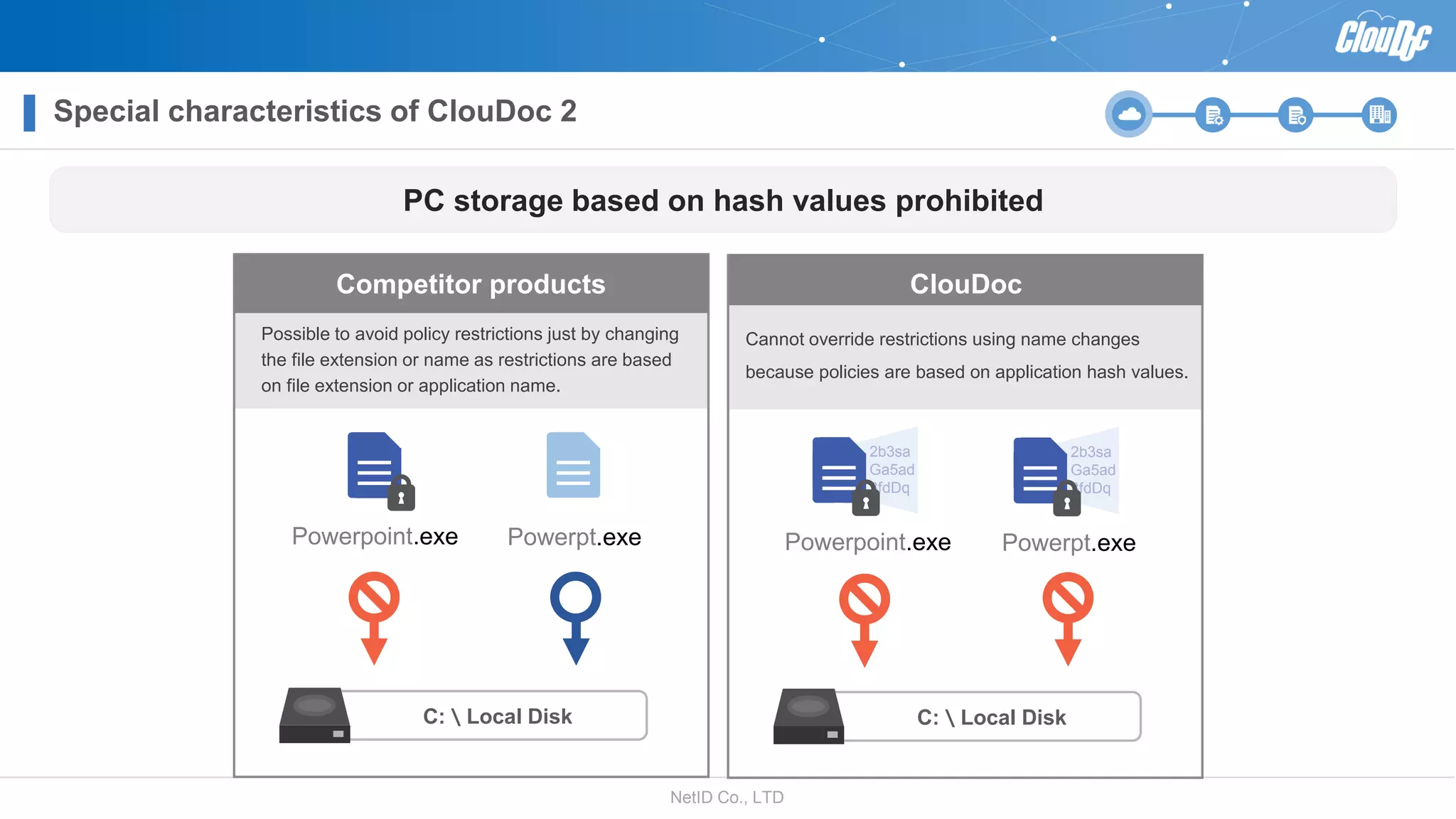
PC storage based on hash values prohibited
Possible to avoid policy restrictions just by changing
the file extension or name as restrictions are based
on file extension or application name.
Cannot override restrictions using name changes
because policies are based on application hash values.
C:\Local Disk
Powerpoint.exe Powerpt.exe
2b3sa
Ga5ad
3fdDq
2b3sa
Ga5ad
3fdDq
Competitor products ClouDoc
NetID Co., LTDNetID Co., LTD
Introducing ClouDoc functions
• Security verification compliance
• Support the enhancement of the mobile work environment
• Additional sales through licenses using a rental system
• Additional public cloud service
NetID Co., LTD
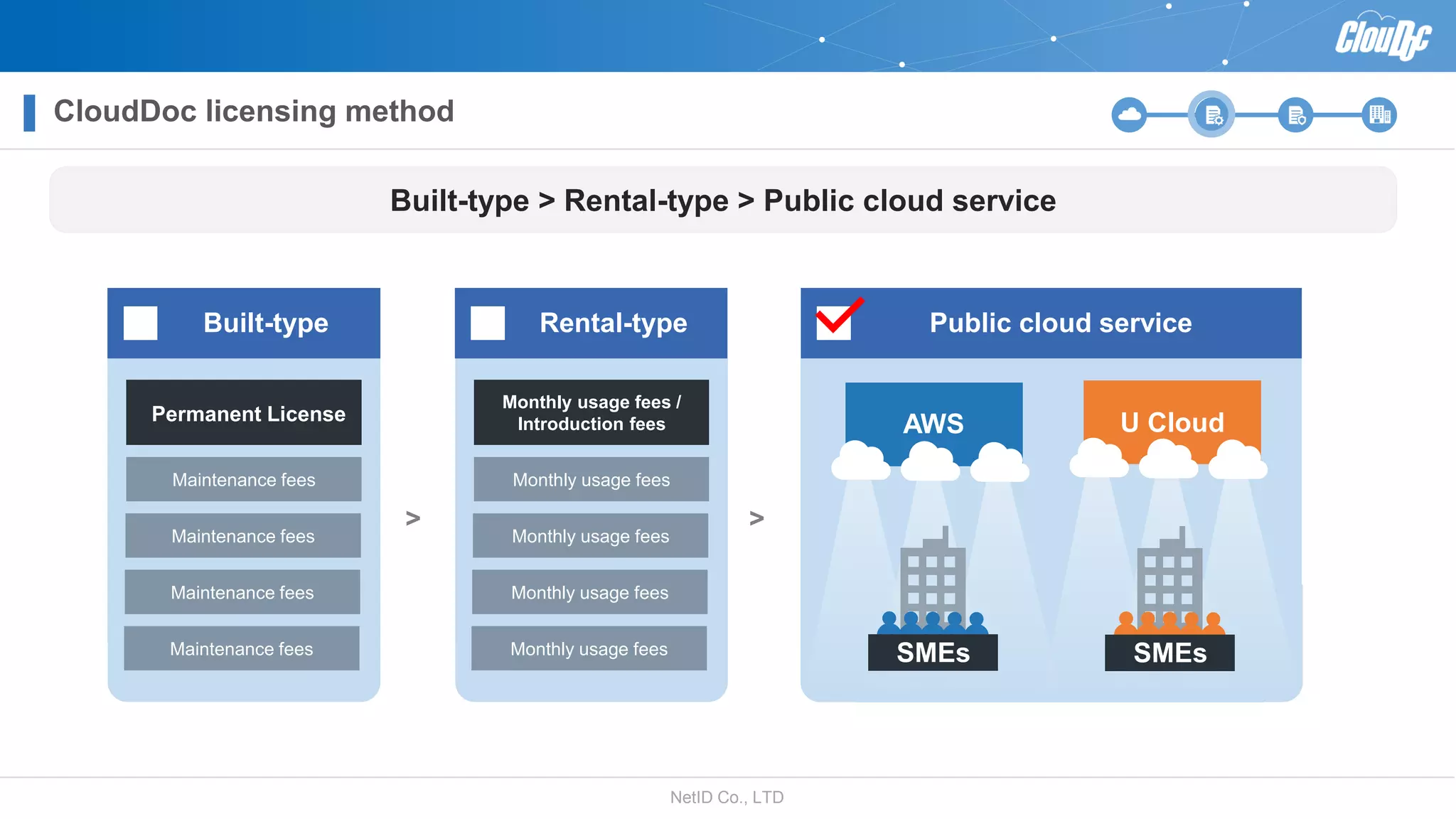
CloudDoc licensing method
Built-type > Rental-type > Public cloud service
Built-type Rental-type Public cloud service
Permanent License
Maintenance fees
Maintenance fees
Maintenance fees
Maintenance fees
>
Monthly usage fees /
Introduction fees
Monthly usage fees
Monthly usage fees
Monthly usage fees
Monthly usage fees
>
AWS U Cloud
SMEs SMEs
NetID Co., LTD
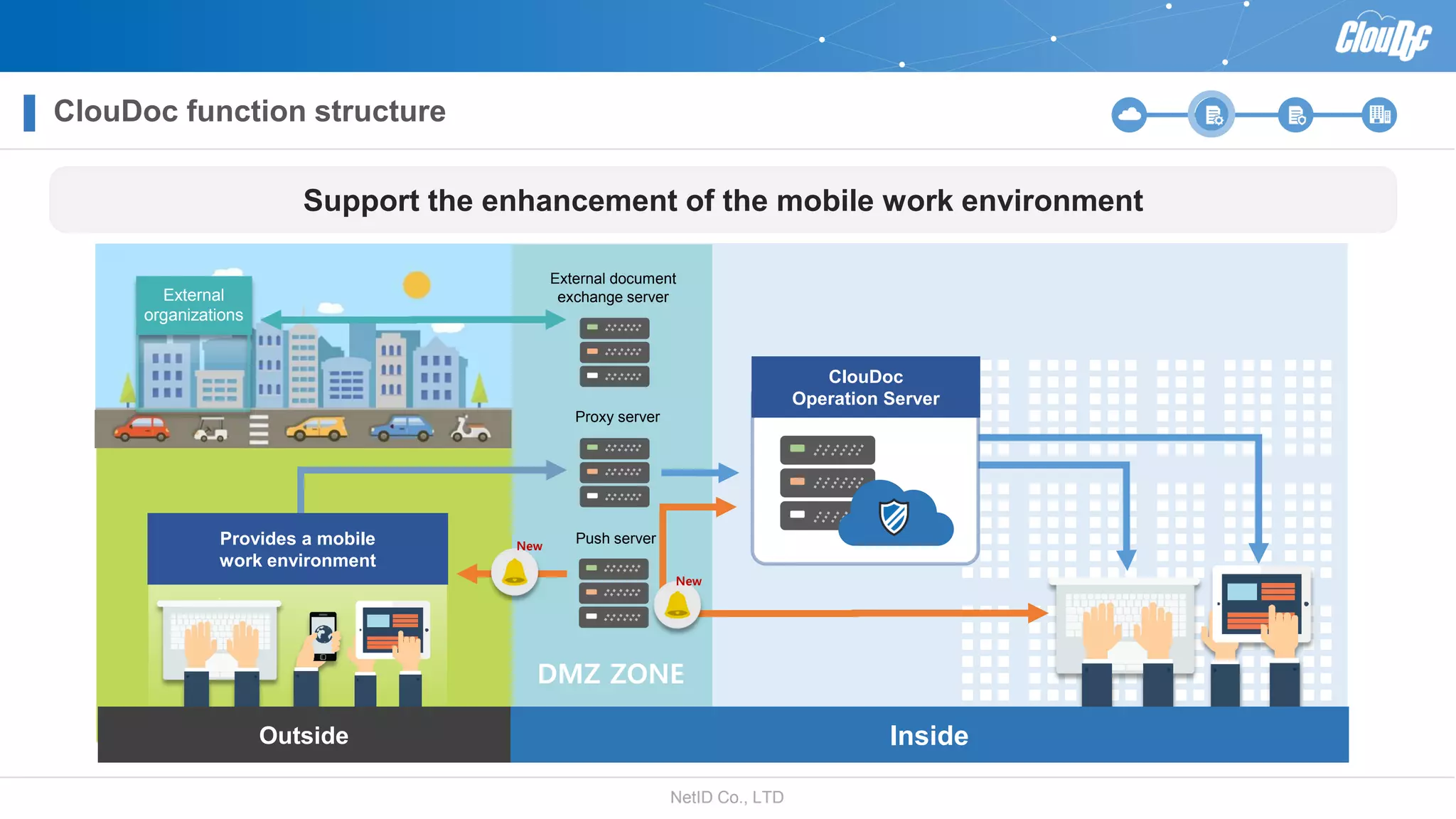
DMZ ZONE
ClouDoc function structure
Support the enhancement of the mobile work environment
Push server
Proxy server
External document
exchange server
Inside
ClouDoc
Operation Server
NewProvides a mobile
work environment
Outside
New
External
organizations
NetID Co., LTD
ClouDoc functions – document management
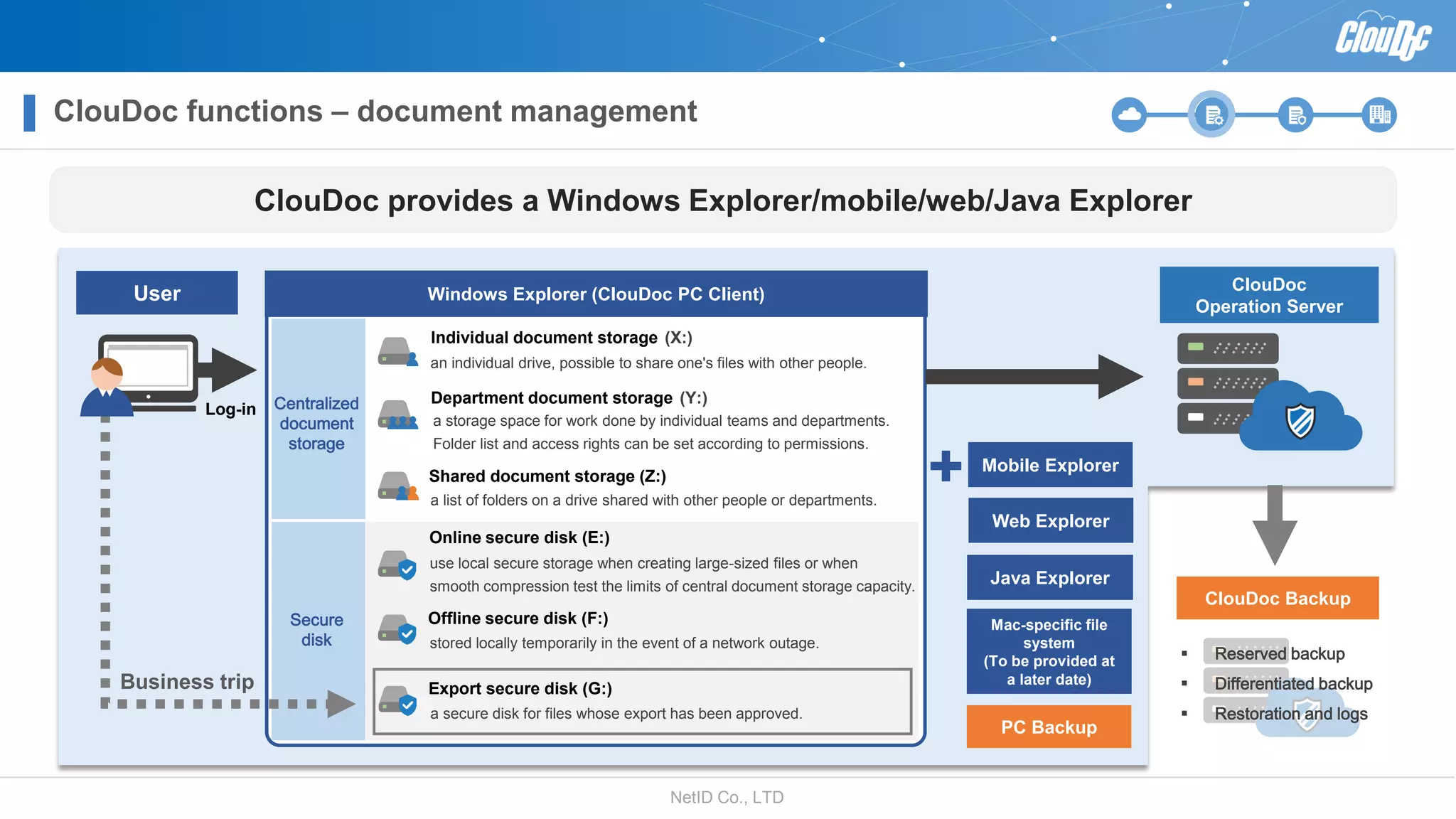
ClouDoc provides a Windows Explorer/mobile/web/Java Explorer
Business trip
Centralized
document
storage
Windows Explorer (ClouDoc PC Client)
Secure
disk
Log-in
ClouDoc
Operation Server
ClouDoc Backup
User
Online secure disk (E:)
use local secure storage when creating large-sized files or when
smooth compression test the limits of central document storage capacity.
Offline secure disk (F:)
stored locally temporarily in the event of a network outage.
Export secure disk (G:)
a secure disk for files whose export has been approved.
Individual document storage (X:)
an individual drive, possible to share one's files with other people.
Shared document storage (Z:)
a list of folders on a drive shared with other people or departments.
Department document storage (Y:)
a storage space for work done by individual teams and departments.
Folder list and access rights can be set according to permissions.
Mobile Explorer
Web Explorer
Java Explorer
Mac-specific file
system
(To be provided at
a later date)
PC Backup
 Reserved backup
 Differentiated backup
 Restoration and logs
NetID Co., LTD
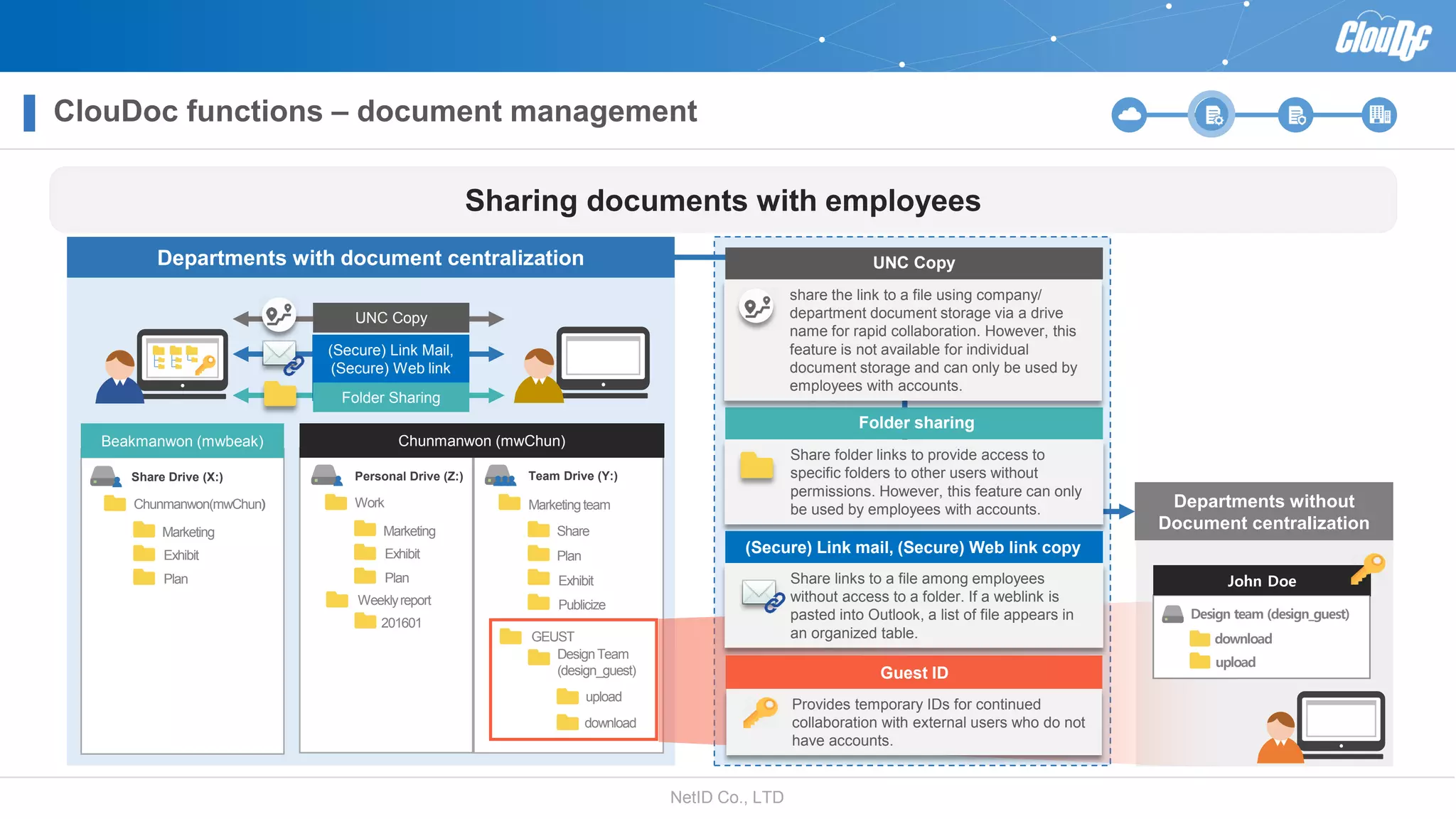
Departments with document centralization
Departments without
Document centralization
Work
Exhibit
Plan
Weeklyreport
Marketing
Personal Drive (Z:)
201601
Marketingteam
Exhibit
GEUST
Share
Plan
Team Drive (Y:)
DesignTeam
(design_guest)
Publicize
Chunmanwon (mwChun)
download
upload
Chunmanwon(mwChun)
Exhibit
Plan
Marketing
Share Drive (X:)
Beakmanwon (mwbeak)
John Doe
Design team (design_guest)
download
upload
(Secure) Link Mail,
(Secure) Web link
copy
UNC Copy
Folder Sharing
Share folder links to provide access to
specific folders to other users without
permissions. However, this feature can only
be used by employees with accounts.
Folder sharing
Provides temporary IDs for continued
collaboration with external users who do not
have accounts.
Guest ID
Share links to a file among employees
without access to a folder. If a weblink is
pasted into Outlook, a list of file appears in
an organized table.
UNC Copy
share the link to a file using company/
department document storage via a drive
name for rapid collaboration. However, this
feature is not available for individual
document storage and can only be used by
employees with accounts.
Sharing documents with employees
(Secure) Link mail, (Secure) Web link copy
ClouDoc functions – document management
NetID Co., LTD
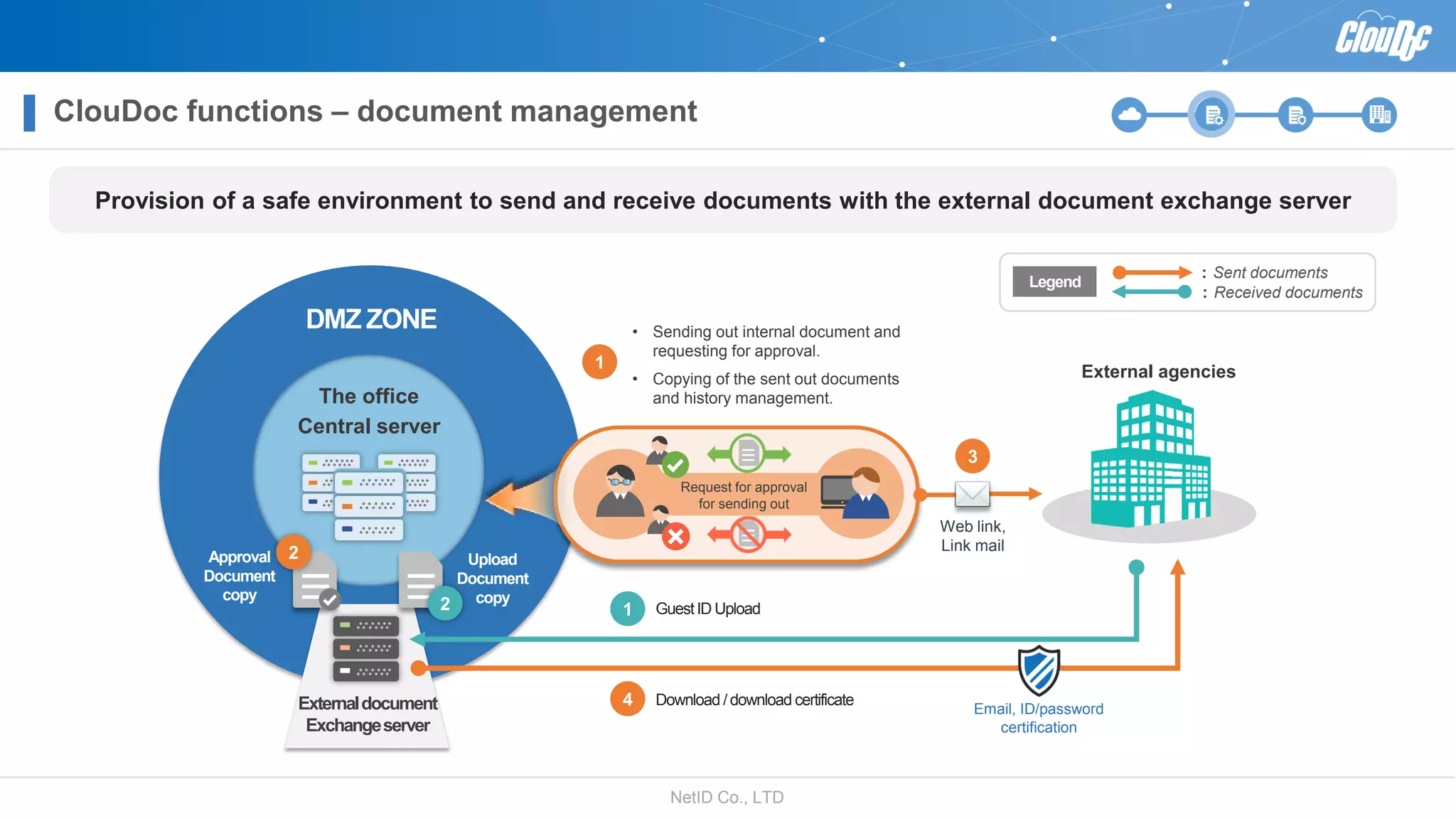
: Sent documents
: Received documents
Legend
The office
Central server
DMZ ZONE
GuestID Upload
Approval
Document
copy
4 Download / download certificate
1
Upload
Document
copy
Request for approval
for sending out
Web link,
Link mail
3
External agencies
Externaldocument
Exchangeserver
2
2
Email, ID/password
certification
• Sending out internal document and
requesting for approval.
• Copying of the sent out documents
and history management.
1
Provision of a safe environment to send and receive documents with the external document exchange server
ClouDoc functions – document management
NetID Co., LTD
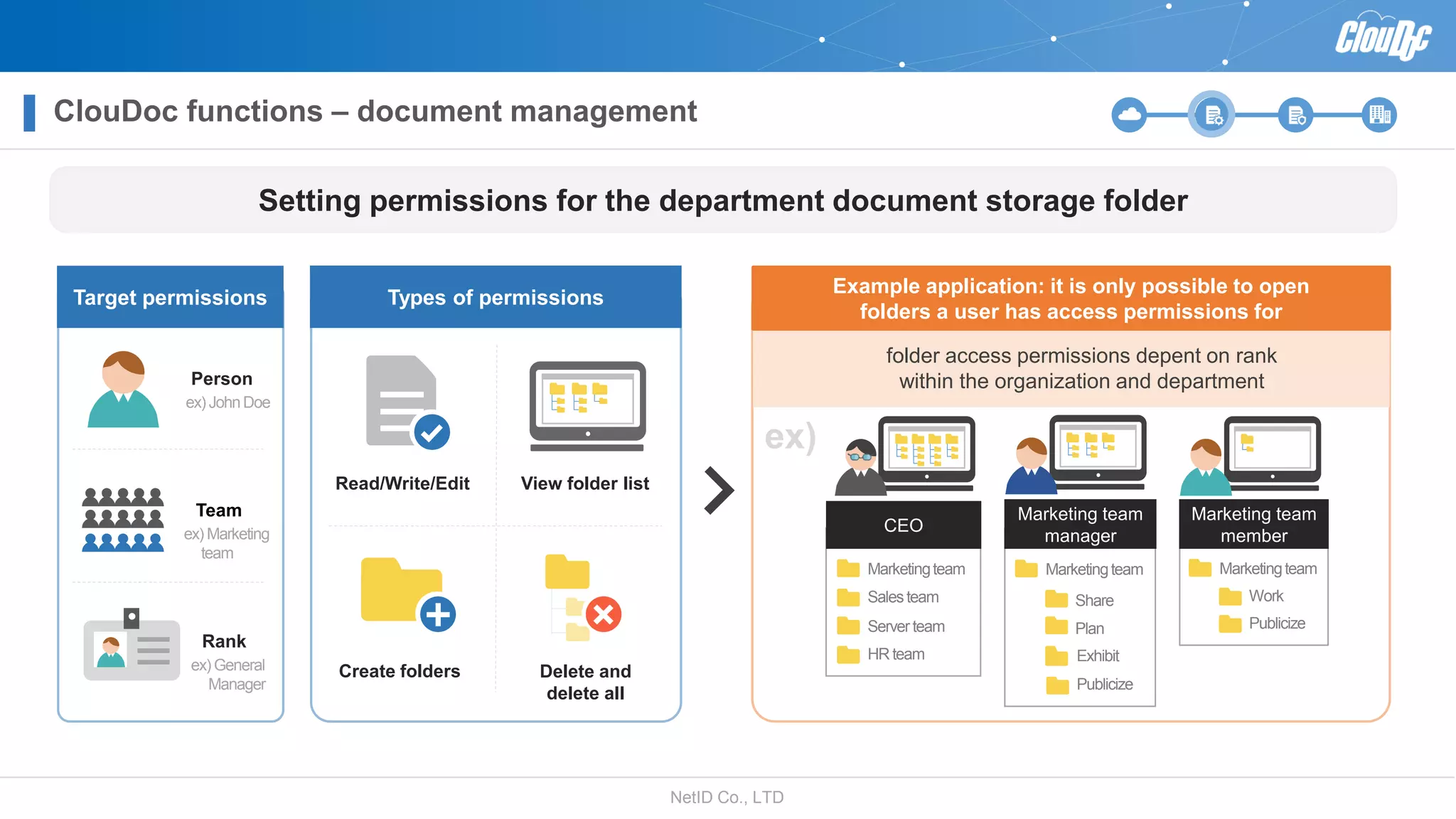
Rank
ex) General
Manager
Target permissions Types of permissions
Read/Write/Edit View folder list
Create folders Delete and
delete all
Example application: it is only possible to open
folders a user has access permissions for
Team
ex) Marketing
team
Person
ex) JohnDoe
folder access permissions depent on rank
within the organization and department
Setting permissions for the department document storage folder
ex)
Marketingteam
Salesteam
Server team
HR team
CEO
Marketing team
manager
Marketingteam
Work
Publicize
Marketing team
member
Marketingteam
Exhibit
Publicize
Share
Plan
ClouDoc functions – document management
NetID Co., LTD
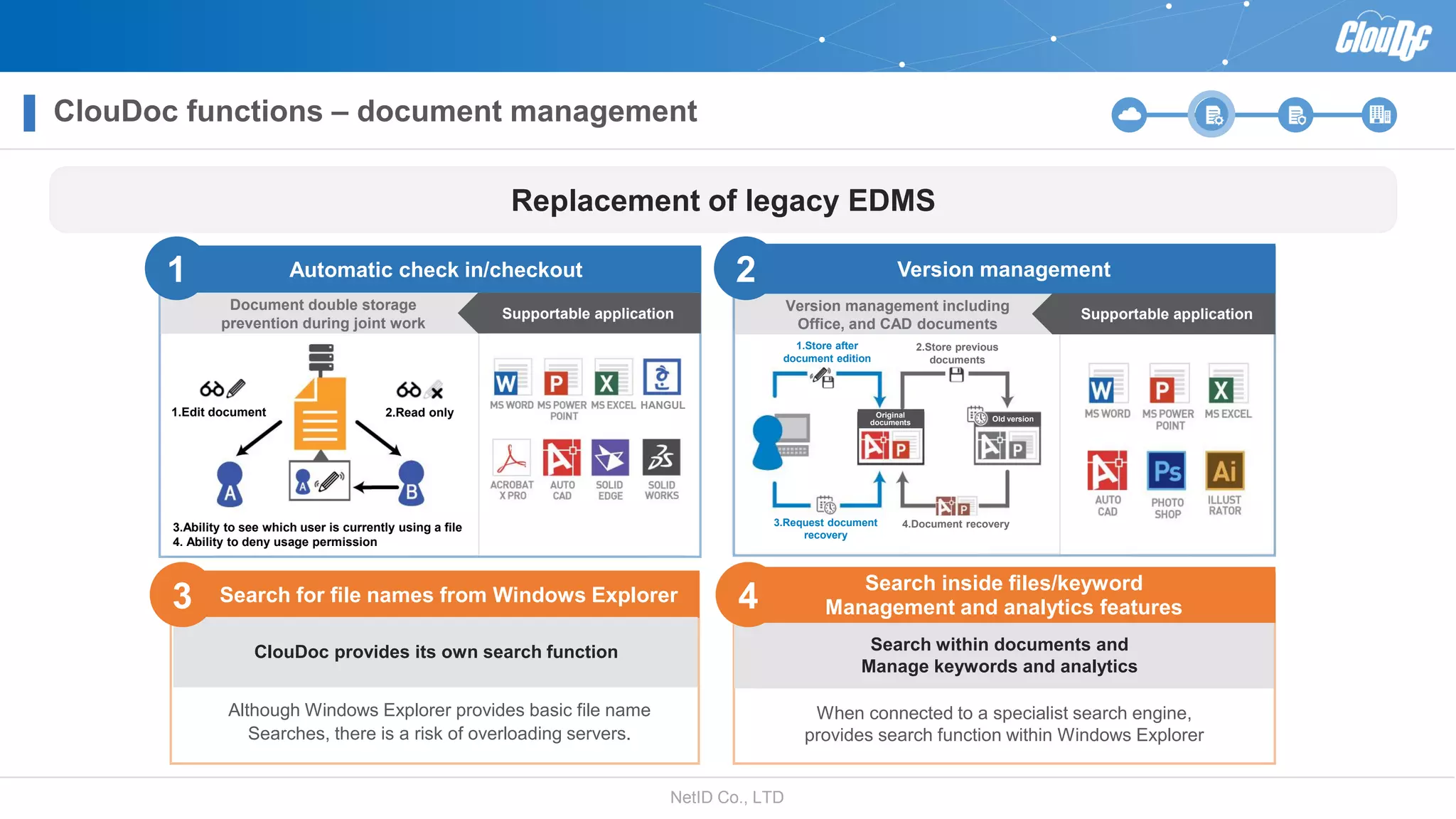
Automatic check in/checkout Version management
When connected to a specialist search engine,
provides search function within Windows Explorer
Search within documents and
Manage keywords and analytics
Search for file names from Windows Explorer
ClouDoc provides its own search function
Although Windows Explorer provides basic file name
Searches, there is a risk of overloading servers.
3
Replacement of legacy EDMS
Document double storage
prevention during joint work
1
Supportable application
1.Edit document 2.Read only
3.Ability to see which user is currently using a file
4. Ability to deny usage permission
Version management including
Office, and CAD documents
Supportable application
2
Search inside files/keyword
Management and analytics features4
HANGUL
1.Store after
document edition
2.Store previous
documents
3.Request document
recovery
4.Document recovery
Original
documents Old version
ClouDoc functions – document management
NetID Co., LTD
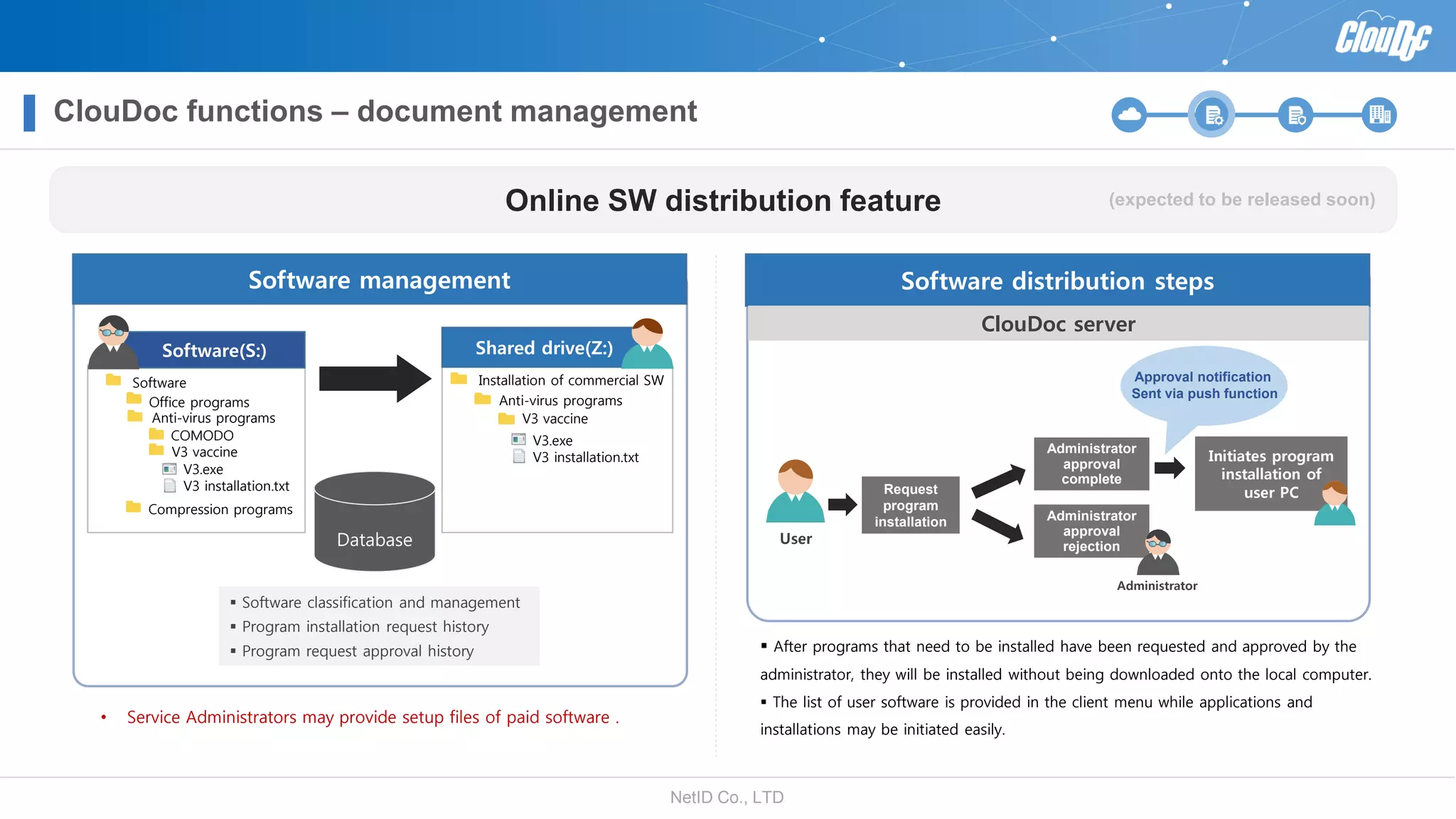
 After programs that need to be installed have been requested and approved by the
administrator, they will be installed without being downloaded onto the local computer.
 The list of user software is provided in the client menu while applications and
installations may be initiated easily.
Software distribution steps
ClouDoc server
Online SW distribution feature
0
 Software classification and management
 Program installation request history
 Program request approval history
Software(S:)
Software
Office programs
Anti-virus programs
Compression programs
COMODO
V3 vaccine
Installation of commercial SW
Anti-virus programs
V3 vaccine
Shared drive(Z:)
Database
Software management
• Service Administrators may provide setup files of paid software .
User
Request
program
installation
Administrator
approval
complete
Administrator
approval
rejection
Initiates program
installation of
user PC
Administrator
(expected to be released soon)
V3.exe
V3 installation.txt
V3.exe
V3 installation.txt
Approval notification
Sent via push function
ClouDoc functions – document management
NetID Co., LTD
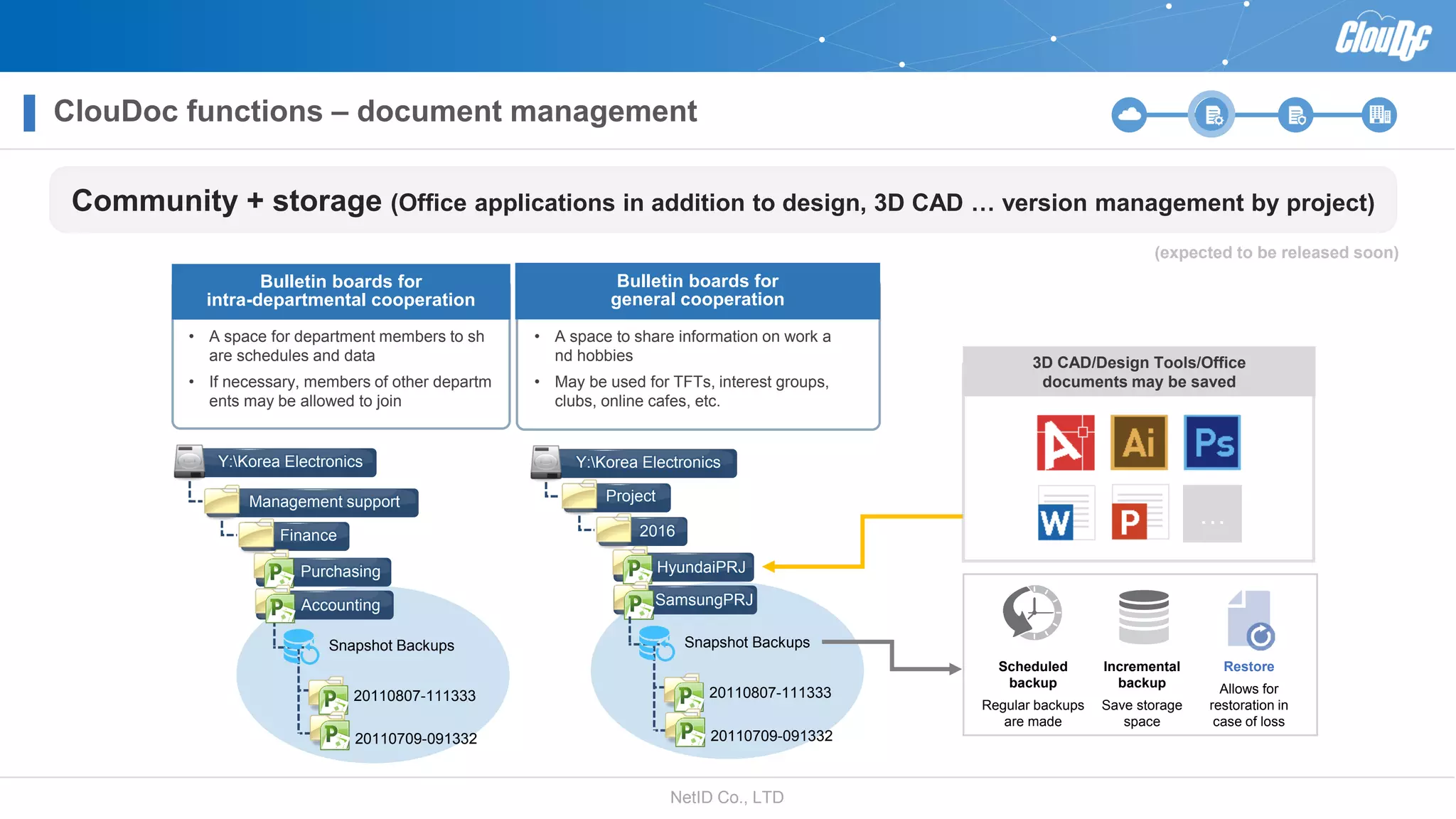
Scheduled
backup
Regular backups
are made
Incremental
backup
Save storage
space
Restore
Allows for
restoration in
case of loss
Bulletin boards for
intra-departmental cooperation
• A space for department members to sh
are schedules and data
• If necessary, members of other departm
ents may be allowed to join
Bulletin boards for
general cooperation
• A space to share information on work a
nd hobbies
• May be used for TFTs, interest groups,
clubs, online cafes, etc.
…
3D CAD/Design Tools/Office
documents may be saved
Community + storage (Office applications in addition to design, 3D CAD … version management by project)
(expected to be released soon)
Purchasing
Accounting
Management support
Finance
Snapshot Backups
20110807-111333
20110709-091332
Y:Korea Electronics
HyundaiPRJ
SamsungPRJ
Project
2016
Snapshot Backups
20110807-111333
20110709-091332
Y:Korea Electronics
ClouDoc functions – document management
NetID Co., LTD
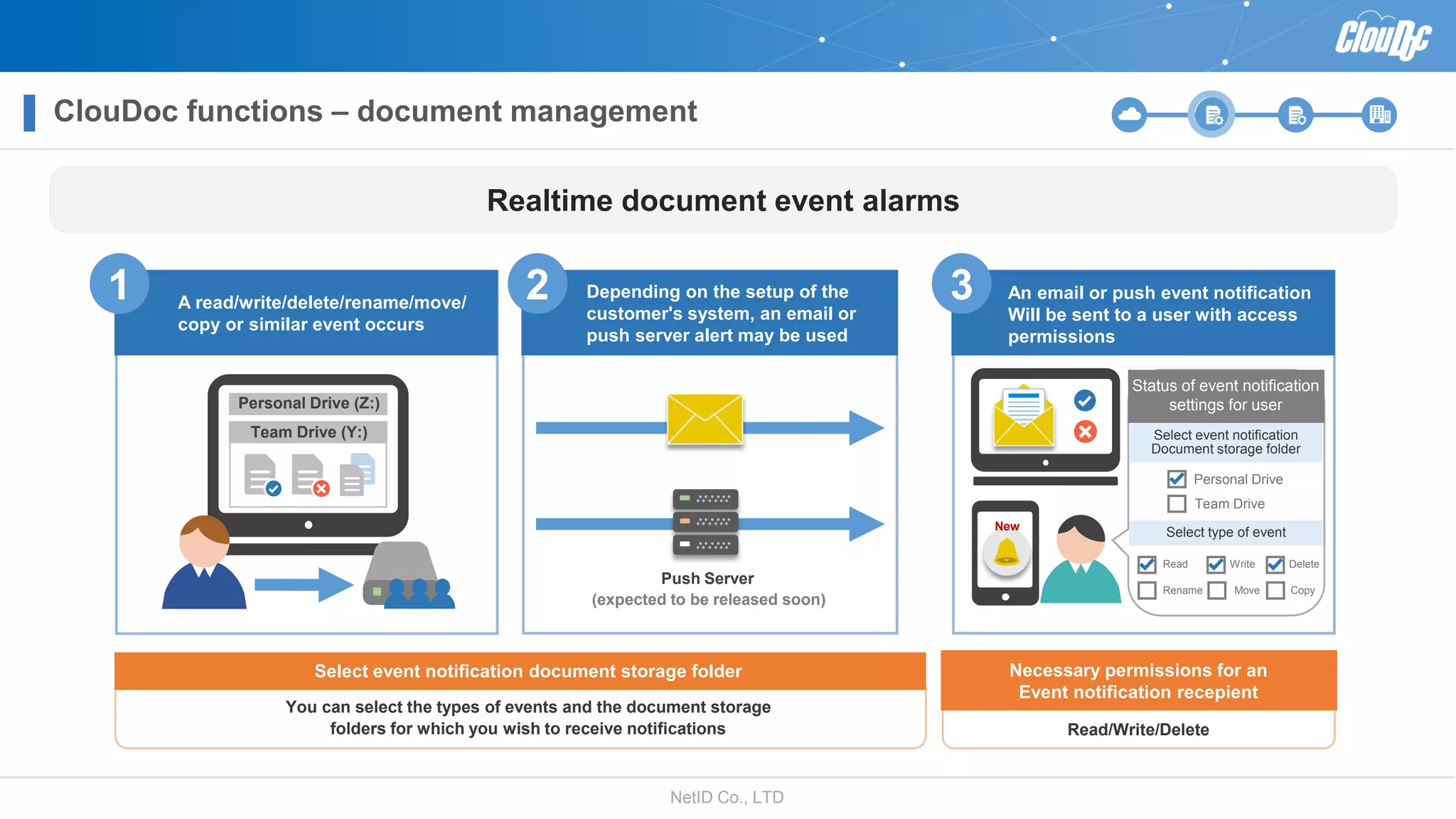
Realtime document event alarms
Necessary permissions for an
Event notification recepient
Read/Write/Delete
Select event notification document storage folder
You can select the types of events and the document storage
folders for which you wish to receive notifications
A read/write/delete/rename/move/
copy or similar event occurs
An email or push event notification
Will be sent to a user with access
permissions
Push Server
Status of event notification
settings for user
Select event notification
Document storage folder
Select type of eventNew
Personal Drive
Team Drive
Read Write Delete
Rename Move Copy
Team Drive (Y:)
Personal Drive (Z:)
1 2 3
(expected to be released soon)
Depending on the setup of the
customer's system, an email or
push server alert may be used
ClouDoc functions – document management
NetID Co., LTD
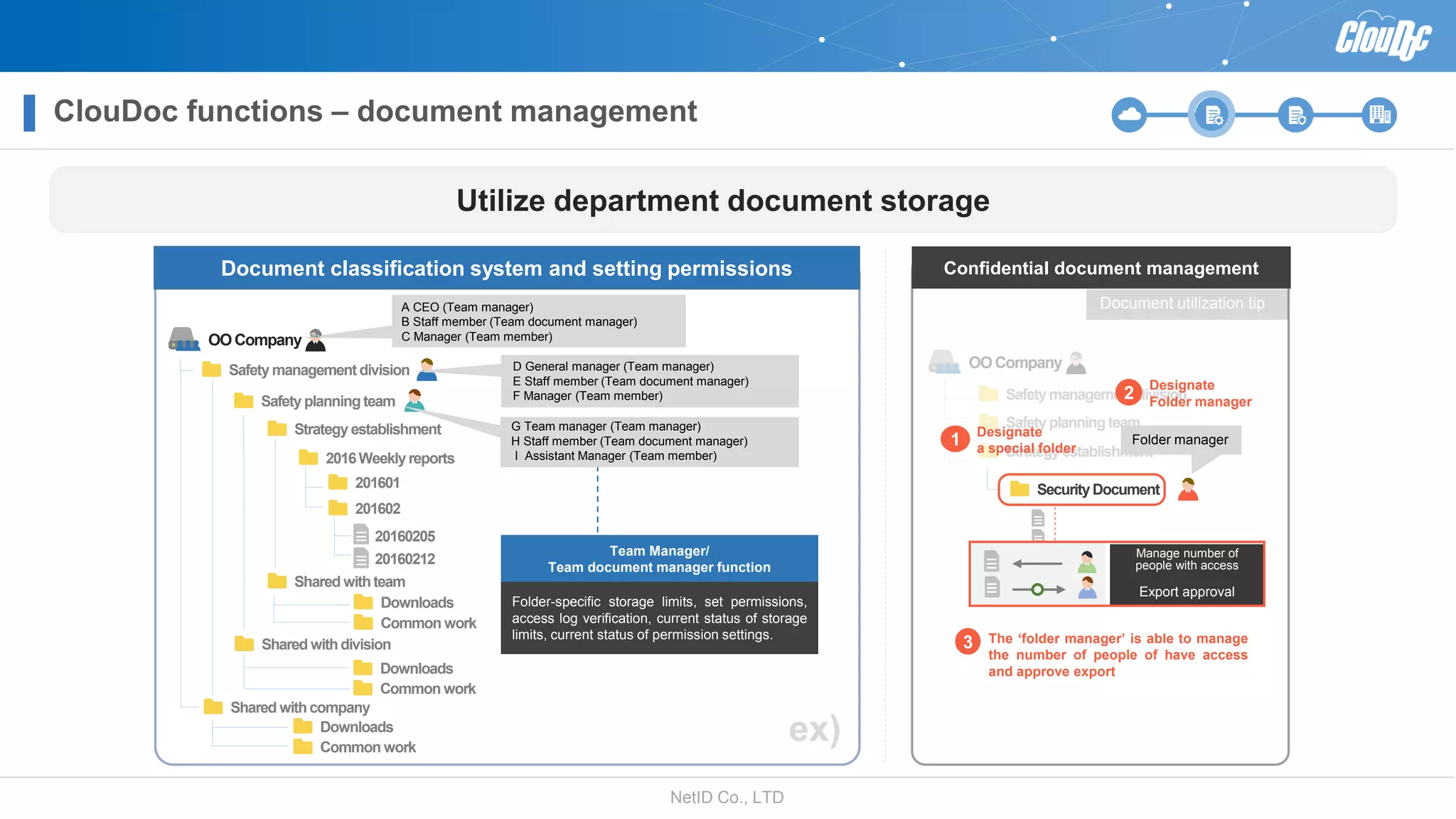
Utilize department document storage
Confidential document management
Safety managementdivision
OOCompany
Safety planning team
Strategy establishment
Security Document
Designate
a special folder
1
The ‘folder manager’ is able to manage
the number of people of have access
and approve export
3
Manage number of
people with access
Export approval
Document utilization tip
0
Document classification system and setting permissions
Safety managementdivision
Safety planning team
Strategy establishment
2016Weekly reports
201601
20160205
20160212
201602
Shared withteam
Shared withdivision
Shared withcompany
ex)
OOCompany
Folder-specific storage limits, set permissions,
access log verification, current status of storage
limits, current status of permission settings.
Team Manager/
Team document manager function
Downloads
Common work
A CEO (Team manager)
B Staff member (Team document manager)
C Manager (Team member)
Downloads
Common work
Downloads
Common work
D General manager (Team manager)
E Staff member (Team document manager)
F Manager (Team member)
G Team manager (Team manager)
H Staff member (Team document manager)
I Assistant Manager (Team member)
Folder manager
Designate
Folder manager
2
ClouDoc functions – document management
NetID Co., LTD
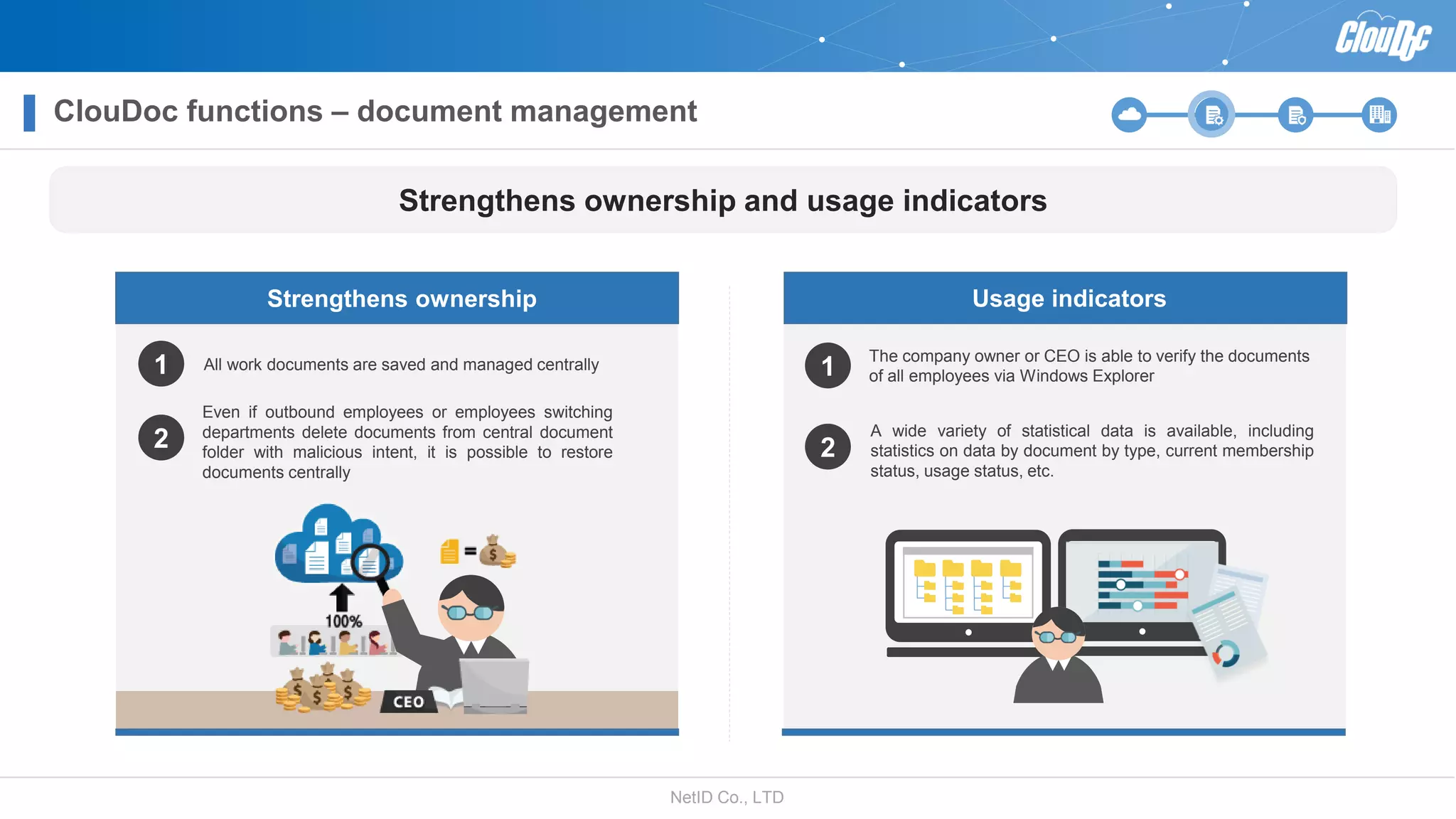
The company owner or CEO is able to verify the documents
of all employees via Windows Explorer
A wide variety of statistical data is available, including
statistics on data by document by type, current membership
status, usage status, etc.
Usage indicators
Strengthens ownership and usage indicators
1
2
Strengthens ownership
All work documents are saved and managed centrally
Even if outbound employees or employees switching
departments delete documents from central document
folder with malicious intent, it is possible to restore
documents centrally
1
2
ClouDoc functions – document management
NetID Co., LTD
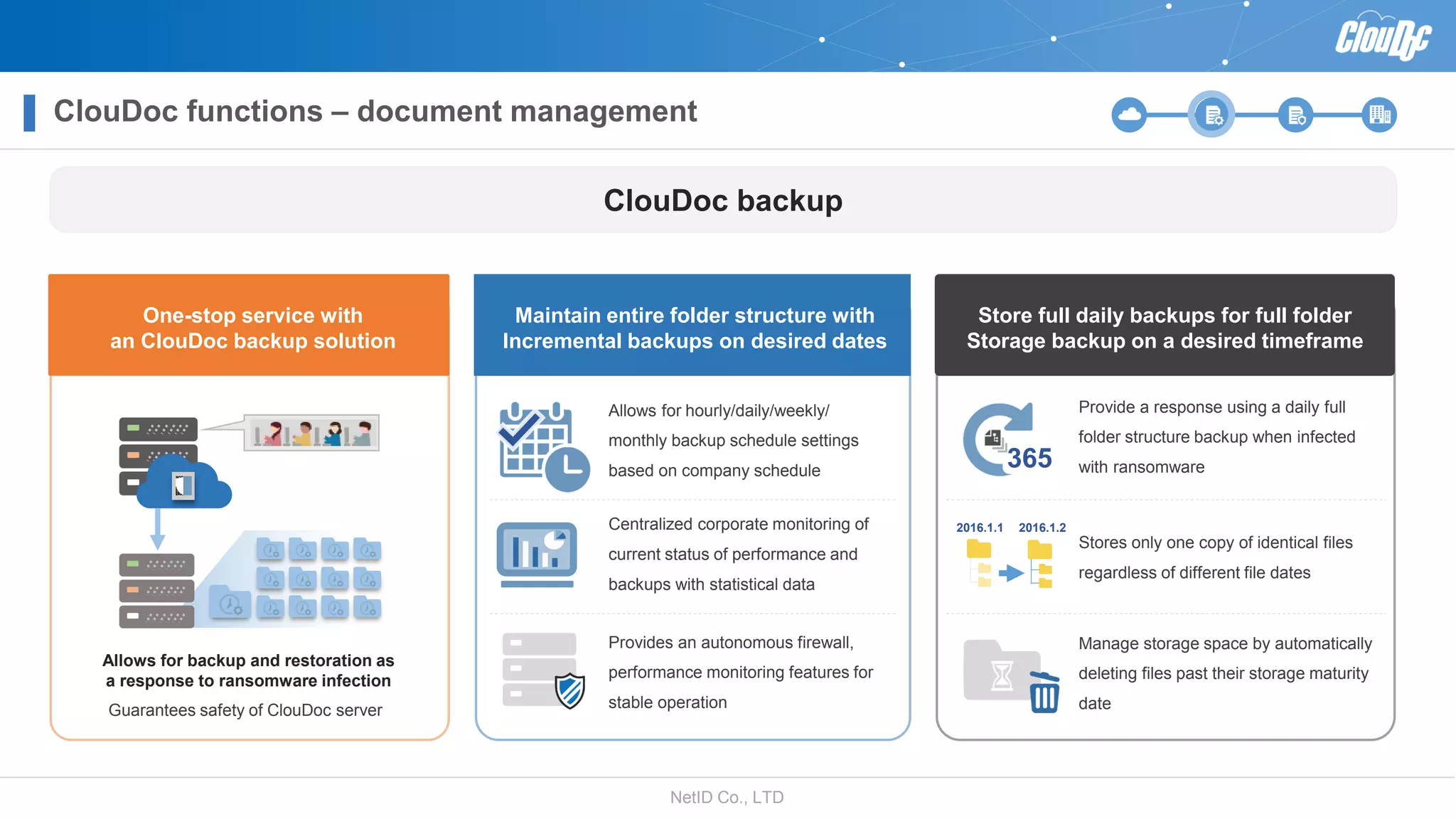
ClouDoc backup
One-stop service with
an ClouDoc backup solution
Store full daily backups for full folder
Storage backup on a desired timeframe
Guarantees safety of ClouDoc server
Maintain entire folder structure with
Incremental backups on desired dates
Allows for hourly/daily/weekly/
monthly backup schedule settings
based on company schedule
Provide a response using a daily full
folder structure backup when infected
with ransomware
2016.1.1 2016.1.2
365
Allows for backup and restoration as
a response to ransomware infection
Centralized corporate monitoring of
current status of performance and
backups with statistical data
Provides an autonomous firewall,
performance monitoring features for
stable operation
Stores only one copy of identical files
regardless of different file dates
Manage storage space by automatically
deleting files past their storage maturity
date
ClouDoc functions – document management
NetID Co., LTD
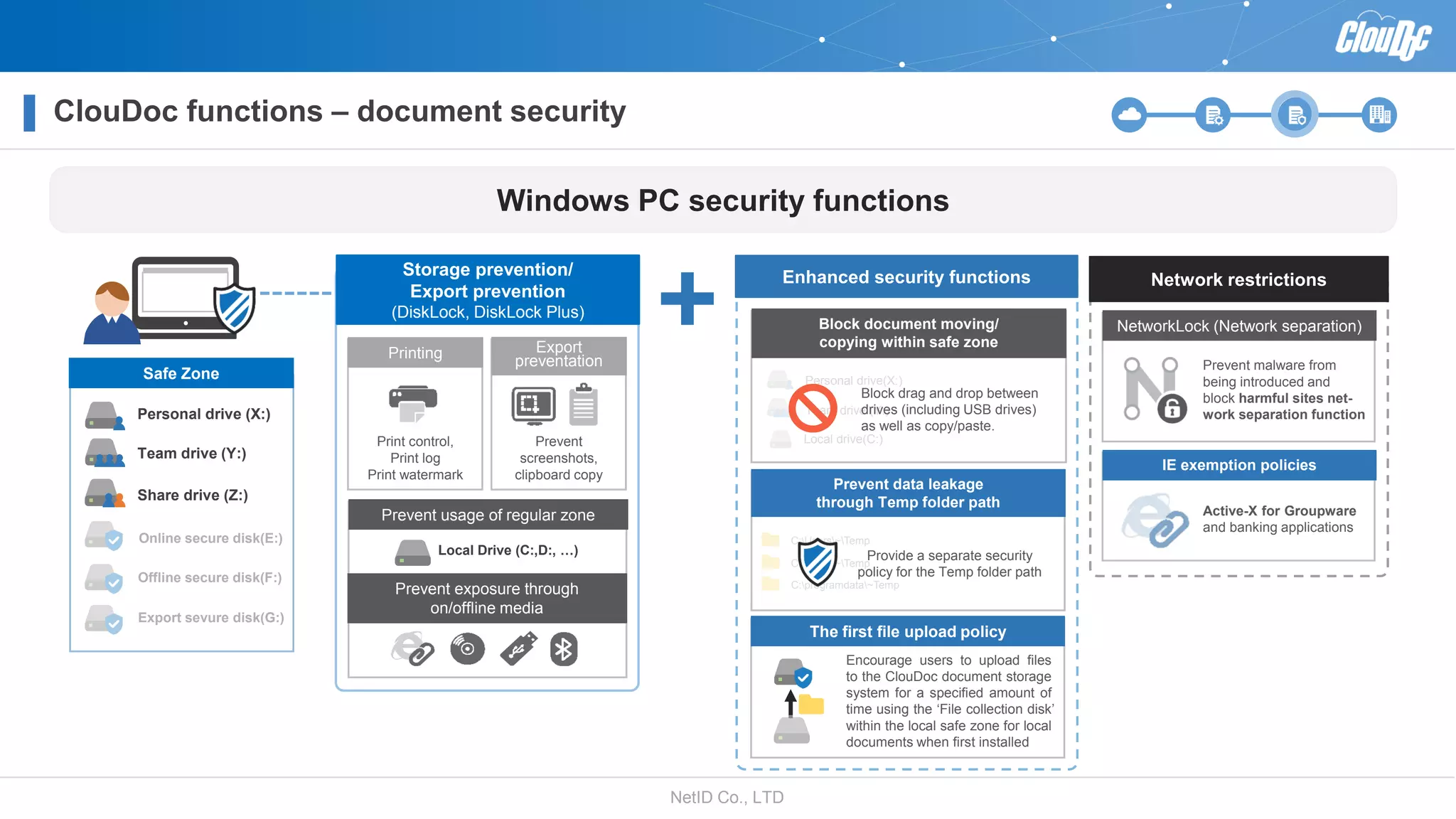
Block document moving/
copying within safe zone
Personal drive(X:)
Team drive (Y:)
Local drive(C:)
C:Users~Temp
C:Users~Temp
C:programdata~Temp
Windows PC security functions
Printing
Print control,
Print log
Print watermark
Storage prevention/
Export prevention
(DiskLock, DiskLock Plus)
Export
preventation
Prevent
screenshots,
clipboard copy
Local Drive (C:,D:, …)
Prevent usage of regular zone
Prevent exposure through
on/offline media
Network restrictions
NetworkLock (Network separation)
Prevent malware from
being introduced and
block harmful sites net-
work separation function
IE exemption policies
Enhanced security functions
Prevent data leakage
through Temp folder path
Block drag and drop between
drives (including USB drives)
as well as copy/paste.
Share drive (Z:)
Personal drive (X:)
Team drive (Y:)
Safe Zone
Online secure disk(E:)
Offline secure disk(F:)
Export sevure disk(G:)
The first file upload policy
Provide a separate security
policy for the Temp folder path
Encourage users to upload files
to the ClouDoc document storage
system for a specified amount of
time using the ‘File collection disk’
within the local safe zone for local
documents when first installed
Active-X for Groupware
and banking applications
ClouDoc functions – document security
NetID Co., LTD
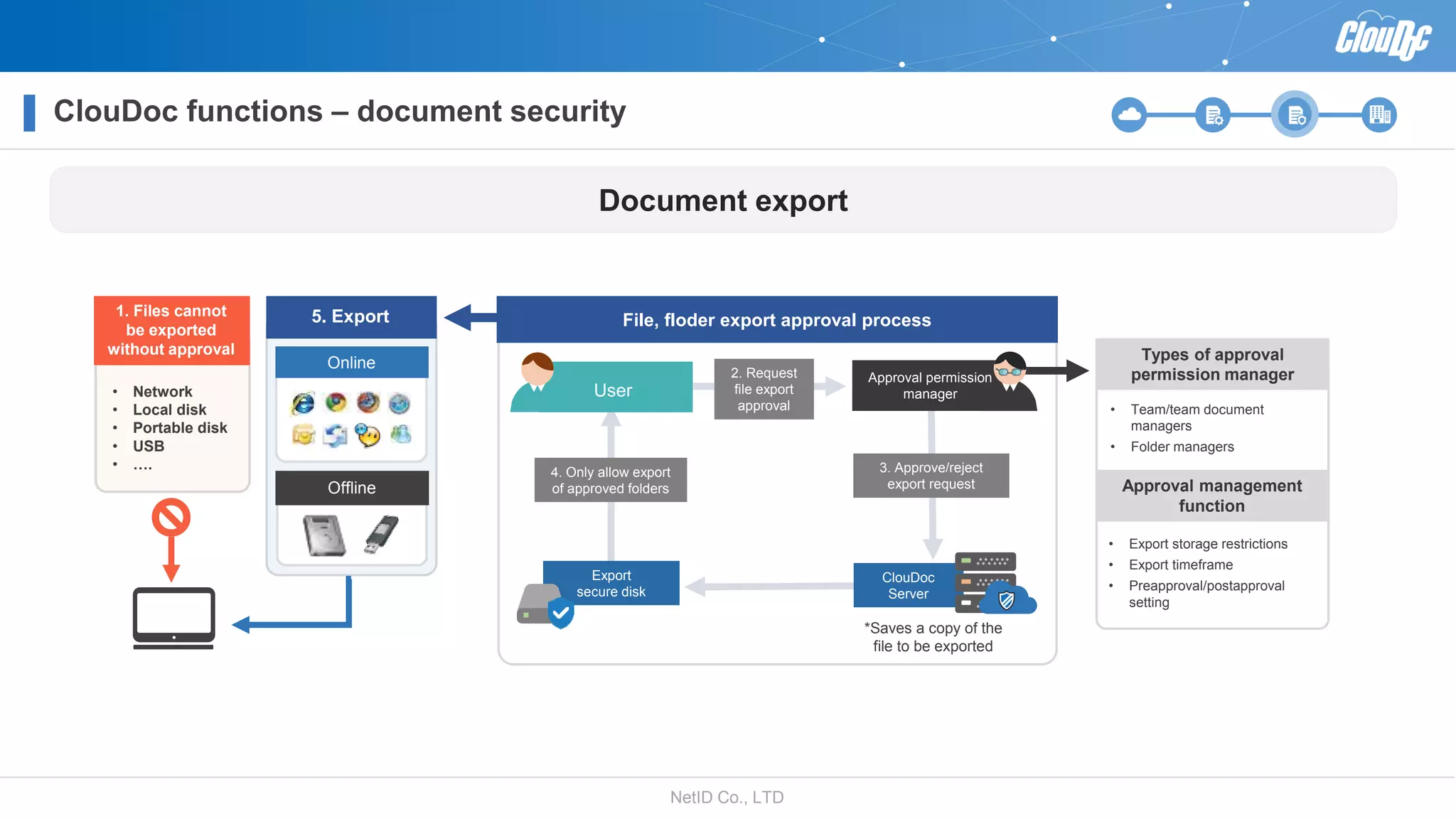
2. Request
file export
approval
3. Approve/reject
export request
*Saves a copy of the
file to be exported
Export
secure disk
4. Only allow export
of approved folders
ClouDoc
Server
File, floder export approval process
• Network
• Local disk
• Portable disk
• USB
• ….
Offline
Online
• Export storage restrictions
• Export timeframe
• Preapproval/postapproval
setting
Types of approval
permission manager
Approval management
function
• Team/team document
managers
• Folder managers
User
Approval permission
manager
Document export
5. Export1. Files cannot
be exported
without approval
ClouDoc functions – document security
NetID Co., LTD
ClouDoc functions – document security
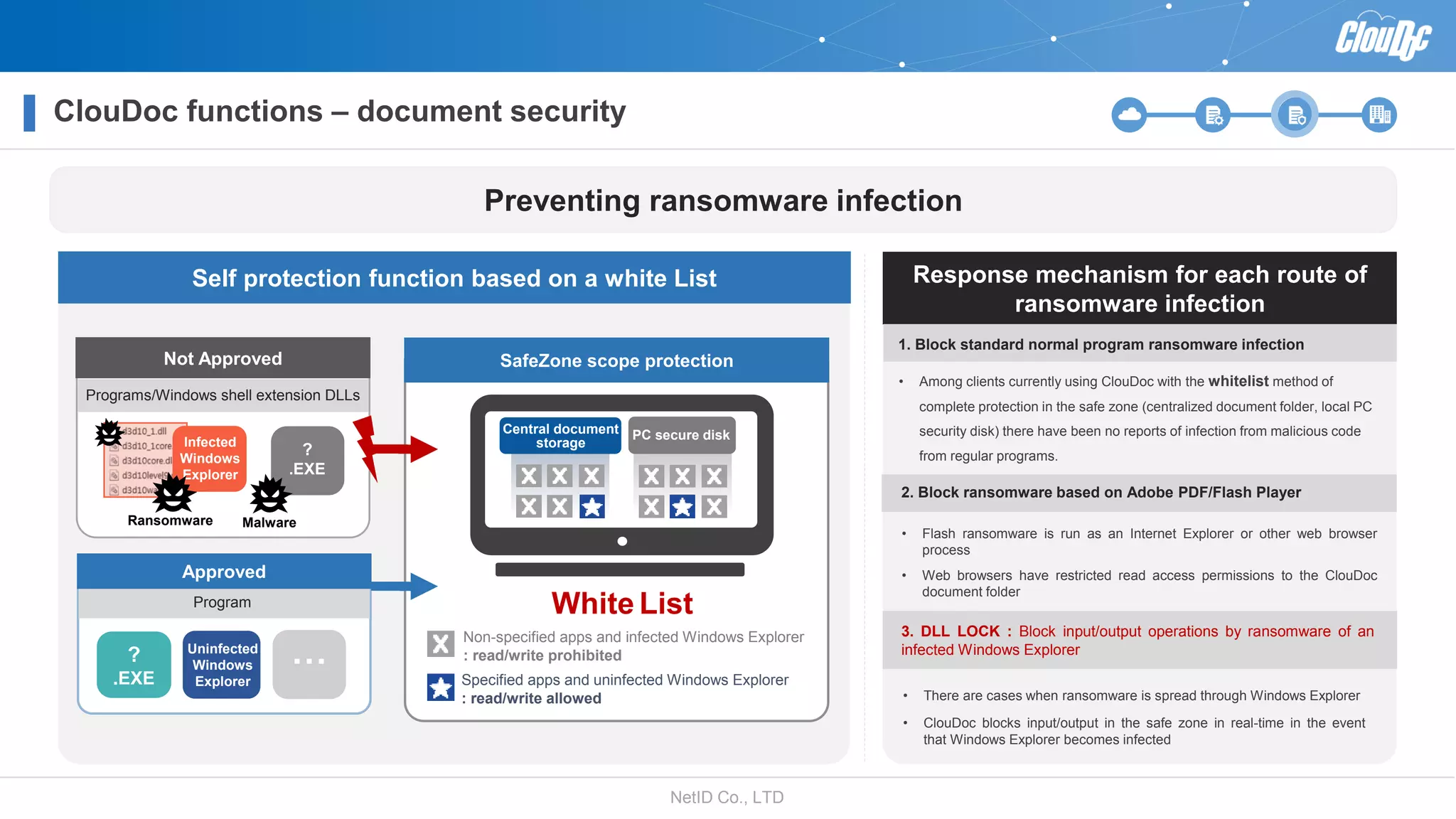
Preventing ransomware infection
Self protection function based on a white List
Not Approved
Specified apps and uninfected Windows Explorer
: read/write allowed
Non-specified apps and infected Windows Explorer
: read/write prohibited
Programs/Windows shell extension DLLs
White List
MalwareRansomware
?
.EXE
SafeZone scope protection
Approved
?
.EXE
Uninfected
Windows
Explorer
…
Program
Infected
Windows
Explorer
Response mechanism for each route of
ransomware infection
• Among clients currently using ClouDoc with the whitelist method of
complete protection in the safe zone (centralized document folder, local PC
security disk) there have been no reports of infection from malicious code
from regular programs.
• Flash ransomware is run as an Internet Explorer or other web browser
process
• Web browsers have restricted read access permissions to the ClouDoc
document folder
• There are cases when ransomware is spread through Windows Explorer
• ClouDoc blocks input/output in the safe zone in real-time in the event
that Windows Explorer becomes infected
1. Block standard normal program ransomware infection
2. Block ransomware based on Adobe PDF/Flash Player
3. DLL LOCK : Block input/output operations by ransomware of an
infected Windows Explorer
PC secure diskCentral document
storage
NetID Co., LTD
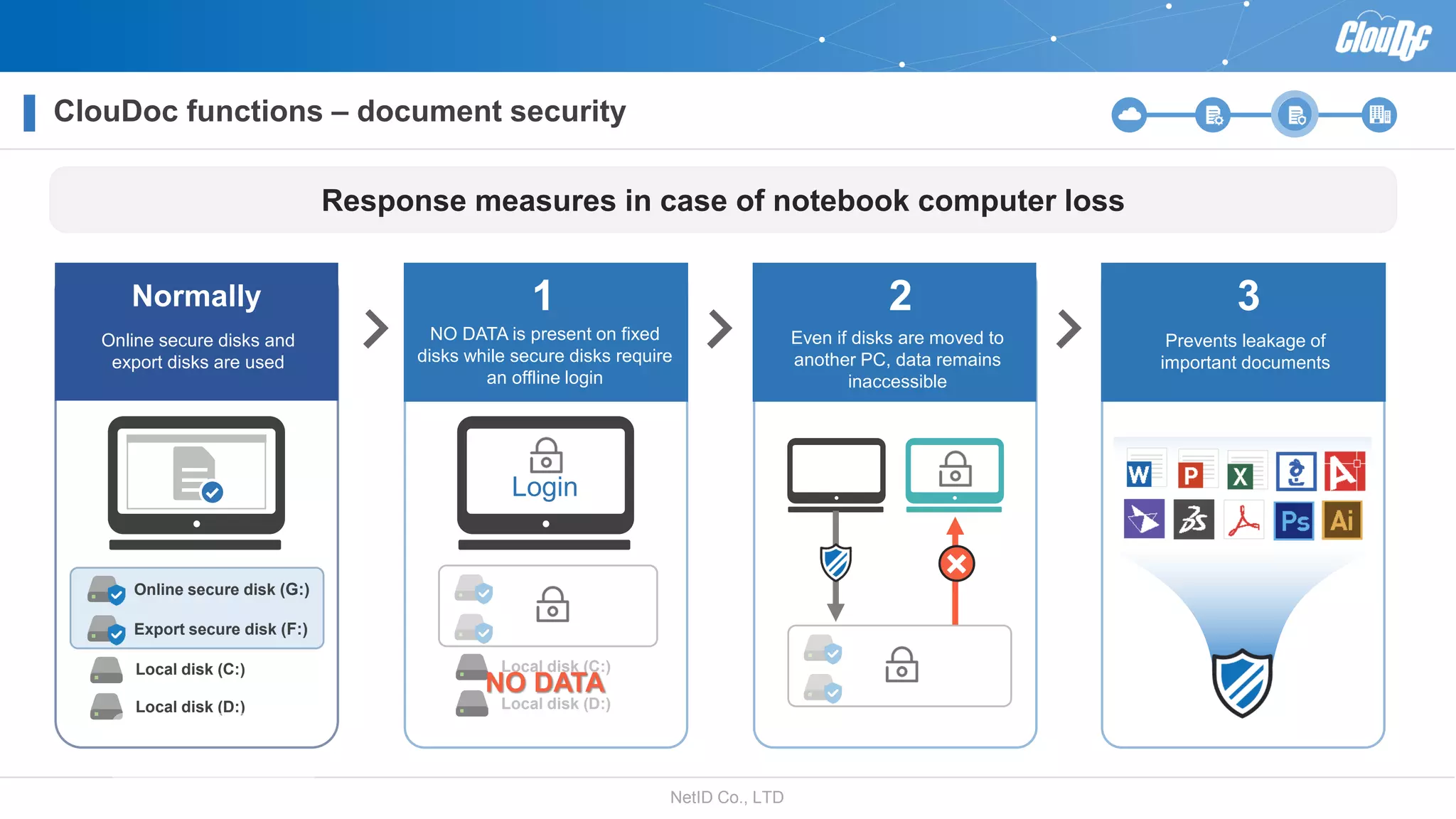
Local disk (C:)
Local disk (D:)
ClouDoc functions – document security
Export secure disk (F:)
Online secure disk (G:)
Local disk (C:)
Local disk (D:)
Online secure disks and
export disks are used
NO DATA is present on fixed
disks while secure disks require
an offline login
Even if disks are moved to
another PC, data remains
inaccessible
Prevents leakage of
important documents
Normally 1 2 3
Login
NO DATA
Response measures in case of notebook computer loss
NetID Co., LTD
ClouDoc functions – document security
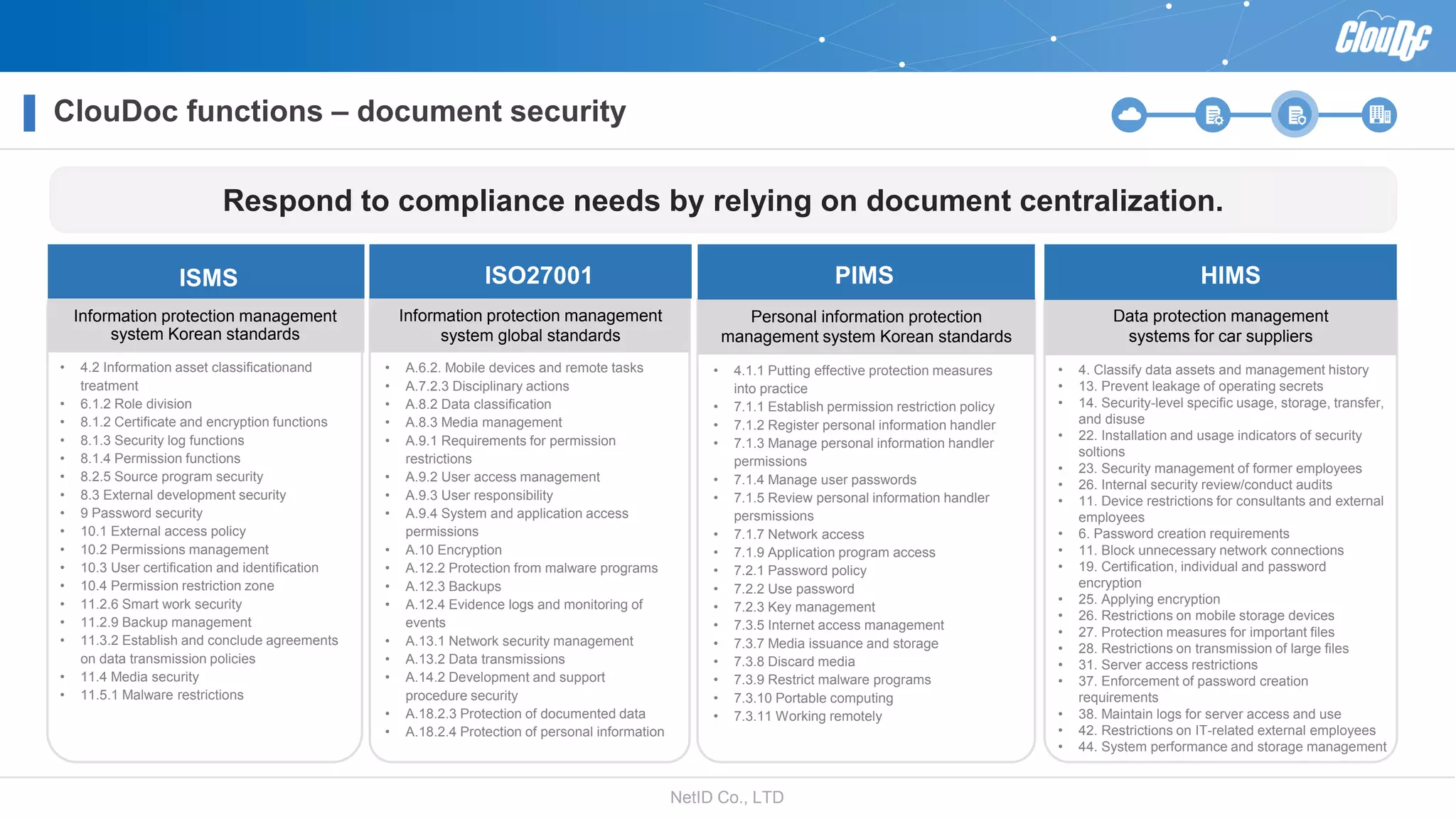
Information protection management
system Korean standards
Information protection management
system global standards
Personal information protection
management system Korean standards
Data protection management
systems for car suppliers
ISMS ISO27001 PIMS HIMS
• 4.2 Information asset classificationand
treatment
• 6.1.2 Role division
• 8.1.2 Certificate and encryption functions
• 8.1.3 Security log functions
• 8.1.4 Permission functions
• 8.2.5 Source program security
• 8.3 External development security
• 9 Password security
• 10.1 External access policy
• 10.2 Permissions management
• 10.3 User certification and identification
• 10.4 Permission restriction zone
• 11.2.6 Smart work security
• 11.2.9 Backup management
• 11.3.2 Establish and conclude agreements
on data transmission policies
• 11.4 Media security
• 11.5.1 Malware restrictions
• A.6.2. Mobile devices and remote tasks
• A.7.2.3 Disciplinary actions
• A.8.2 Data classification
• A.8.3 Media management
• A.9.1 Requirements for permission
restrictions
• A.9.2 User access management
• A.9.3 User responsibility
• A.9.4 System and application access
permissions
• A.10 Encryption
• A.12.2 Protection from malware programs
• A.12.3 Backups
• A.12.4 Evidence logs and monitoring of
events
• A.13.1 Network security management
• A.13.2 Data transmissions
• A.14.2 Development and support
procedure security
• A.18.2.3 Protection of documented data
• A.18.2.4 Protection of personal information
• 4.1.1 Putting effective protection measures
into practice
• 7.1.1 Establish permission restriction policy
• 7.1.2 Register personal information handler
• 7.1.3 Manage personal information handler
permissions
• 7.1.4 Manage user passwords
• 7.1.5 Review personal information handler
persmissions
• 7.1.7 Network access
• 7.1.9 Application program access
• 7.2.1 Password policy
• 7.2.2 Use password
• 7.2.3 Key management
• 7.3.5 Internet access management
• 7.3.7 Media issuance and storage
• 7.3.8 Discard media
• 7.3.9 Restrict malware programs
• 7.3.10 Portable computing
• 7.3.11 Working remotely
• 4. Classify data assets and management history
• 13. Prevent leakage of operating secrets
• 14. Security-level specific usage, storage, transfer,
and disuse
• 22. Installation and usage indicators of security
soltions
• 23. Security management of former employees
• 26. Internal security review/conduct audits
• 11. Device restrictions for consultants and external
employees
• 6. Password creation requirements
• 11. Block unnecessary network connections
• 19. Certification, individual and password
encryption
• 25. Applying encryption
• 26. Restrictions on mobile storage devices
• 27. Protection measures for important files
• 28. Restrictions on transmission of large files
• 31. Server access restrictions
• 37. Enforcement of password creation
requirements
• 38. Maintain logs for server access and use
• 42. Restrictions on IT-related external employees
• 44. System performance and storage management
Respond to compliance needs by relying on document centralization.
NetID Co., LTD
ClouDoc functions – document security
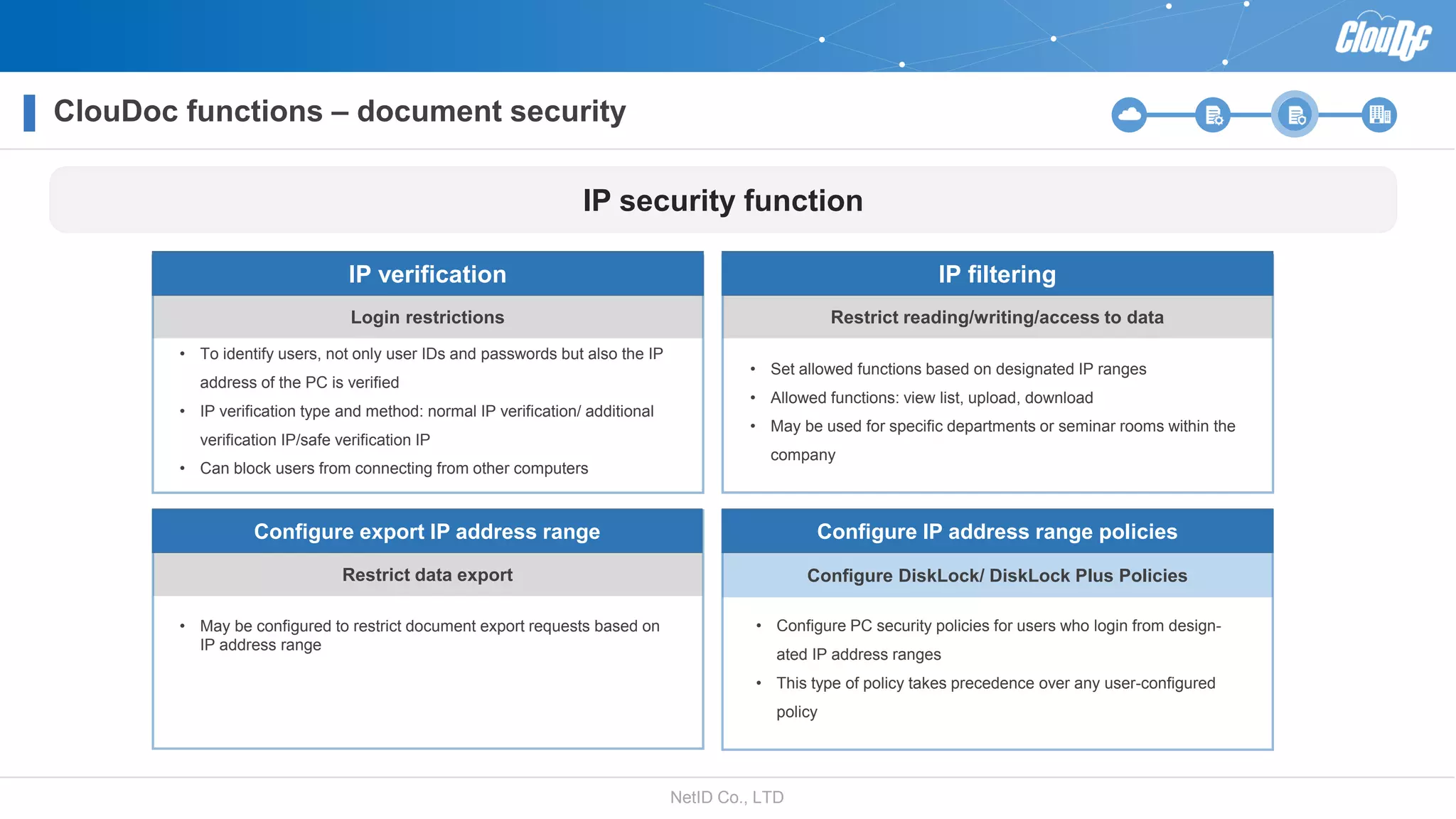
Login restrictions
IP verification
Restrict reading/writing/access to data
IP filtering
• Set allowed functions based on designated IP ranges
• Allowed functions: view list, upload, download
• May be used for specific departments or seminar rooms within the
company
• To identify users, not only user IDs and passwords but also the IP
address of the PC is verified
• IP verification type and method: normal IP verification/ additional
verification IP/safe verification IP
• Can block users from connecting from other computers
Restrict data export
Configure export IP address range
• May be configured to restrict document export requests based on
IP address range
Configure DiskLock/ DiskLock Plus Policies
Configure IP address range policies
• Configure PC security policies for users who login from design-
ated IP address ranges
• This type of policy takes precedence over any user-configured
policy
IP security function
NetID Co., LTD
ClouDoc functions – document security
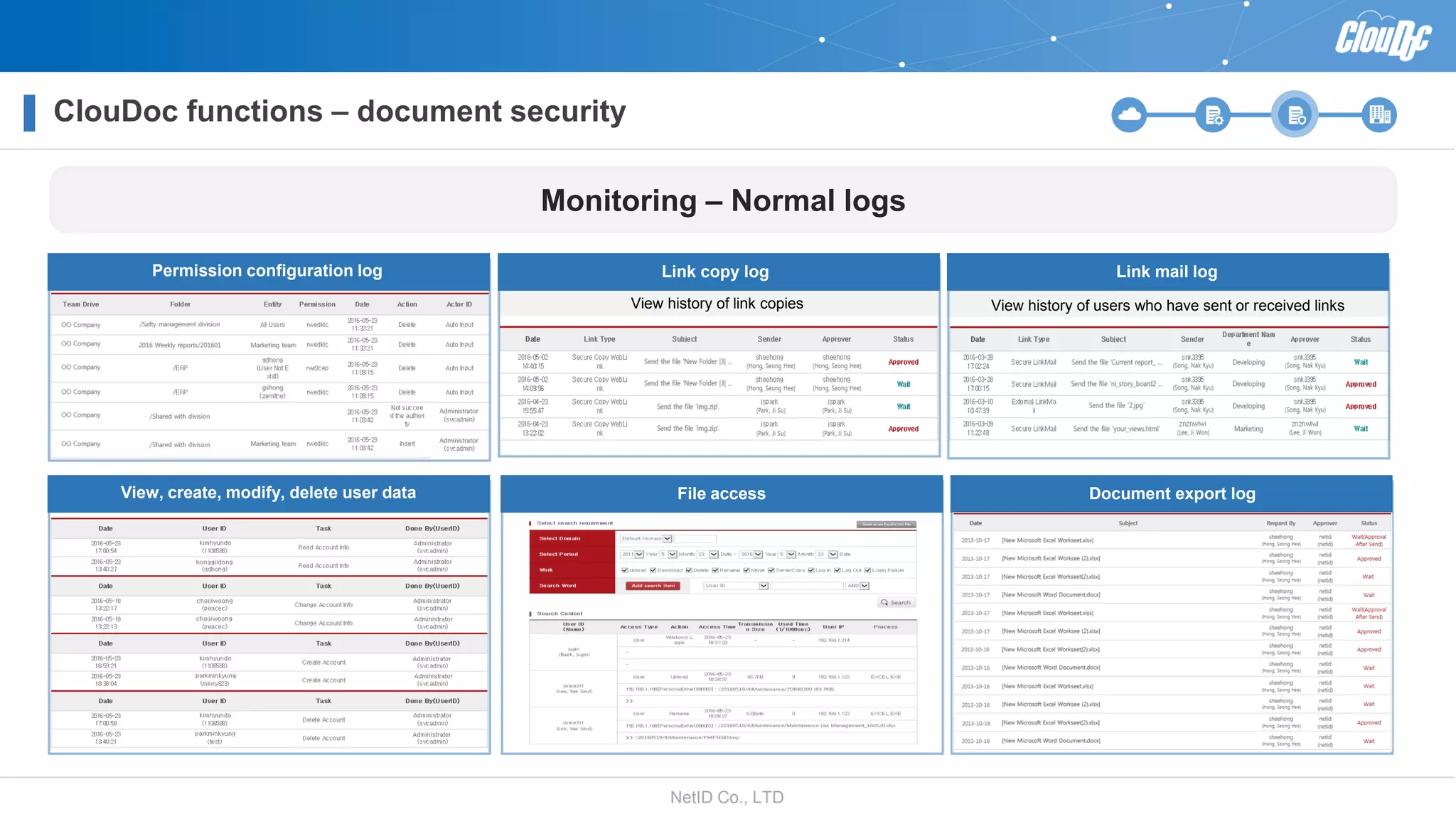
Permission configuration log Link mail log
View history of users who have sent or received links
Link copy log
View history of link copies
View, create, modify, delete user data File access Document export log
Monitoring – Normal logs
NetID Co., LTD
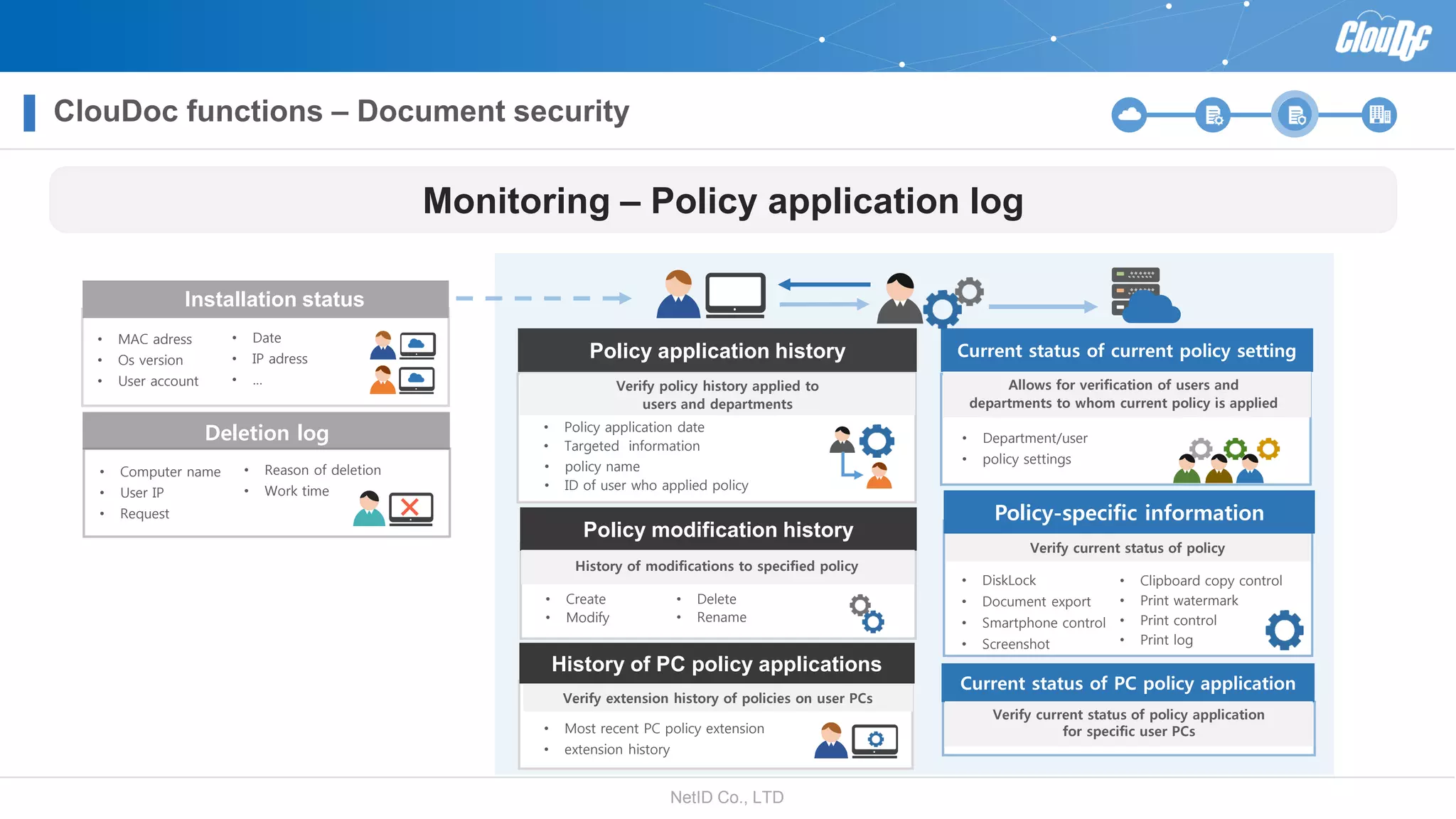
Monitoring – Policy application log
Installation status
• MAC adress
• Os version
• User account
• Date
• IP adress
• …
Deletion log
• Computer name
• User IP
• Request
• Reason of deletion
• Work time
Policy application history
Verify policy history applied to
users and departments
Current status of current policy setting
Allows for verification of users and
departments to whom current policy is applied
• Department/user
• policy settings
History of PC policy applications
Verify extension history of policies on user PCs
• Most recent PC policy extension
• extension history
• Policy application date
• Targeted information
• policy name
• ID of user who applied policy
Policy-specific information
• DiskLock
• Document export
• Smartphone control
• Screenshot
Verify current status of policy
Current status of PC policy application
Verify current status of policy application
for specific user PCs
Policy modification history
History of modifications to specified policy
• Create
• Modify
• Delete
• Rename
ClouDoc functions – Document security
• Clipboard copy control
• Print watermark
• Print control
• Print log
NetID Co., LTD
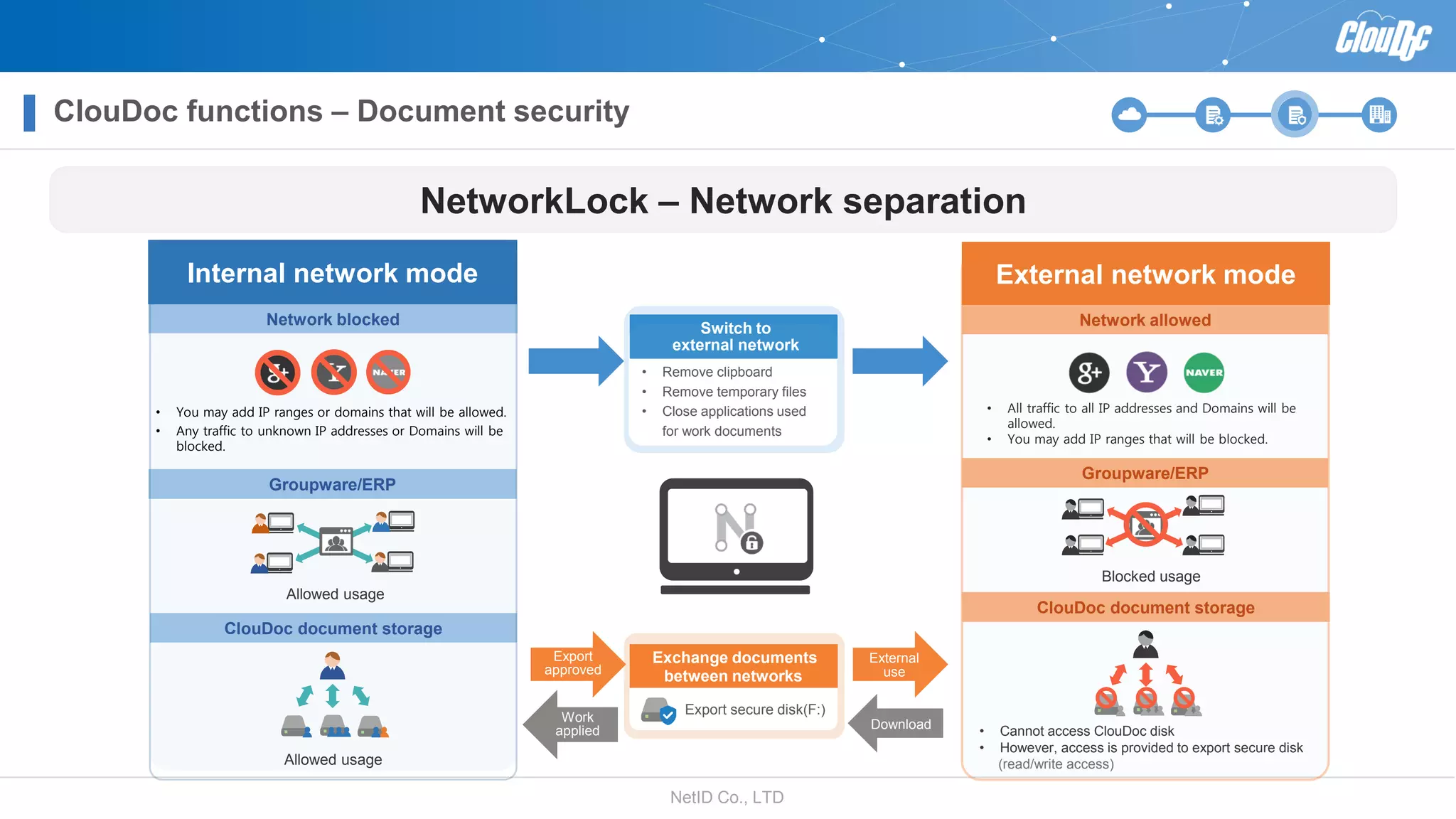
Network blocked
Groupware/ERP
ClouDoc document storage
• You may add IP ranges or domains that will be allowed.
• Any traffic to unknown IP addresses or Domains will be
blocked.
Allowed usage
Internal network mode
Allowed usage
• Cannot access ClouDoc disk
• However, access is provided to export secure disk
(read/write access)
Network allowed
Groupware/ERP
ClouDoc document storage
• All traffic to all IP addresses and Domains will be
allowed.
• You may add IP ranges that will be blocked.
Blocked usage
External network mode
Switch to
external network
• Remove clipboard
• Remove temporary files
• Close applications used
for work documents
Exchange documents
between networks
Export secure disk(F:)
Export
approved
Work
applied Download
NetworkLock – Network separation
ClouDoc functions – Document security
External
use
NetID Co., LTD
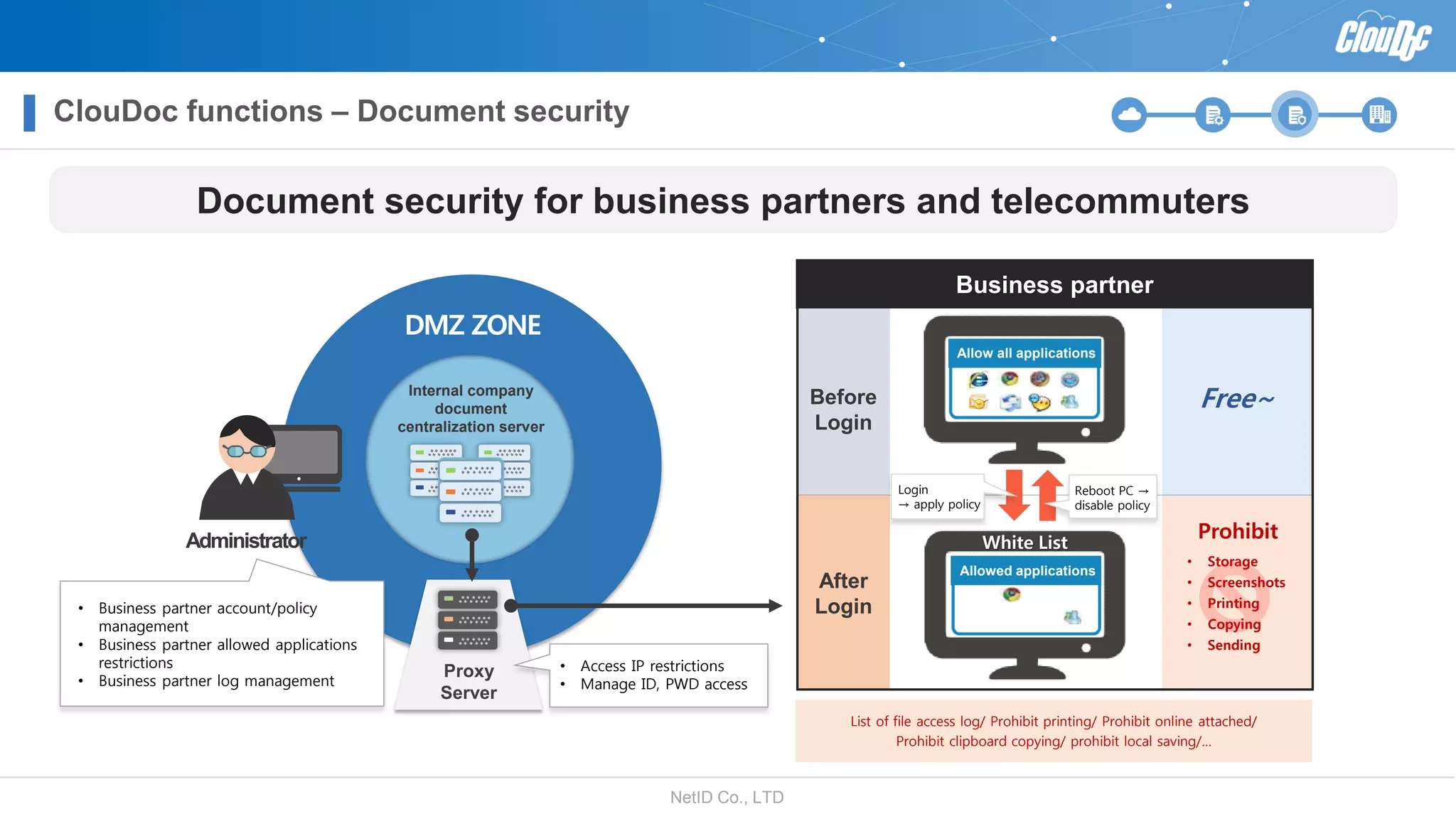
Internal company
document
centralization server
DMZ ZONE
Proxy
Server
Document security for business partners and telecommuters
• Business partner account/policy
management
• Business partner allowed applications
restrictions
• Business partner log management
• Access IP restrictions
• Manage ID, PWD access
Business partner
Before
Login
After
Login
Prohibit
• Storage
• Screenshots
• Printing
• Copying
• Sending
Free~
Allow all applications
Allowed applications
White List
Login
→ apply policy
Reboot PC →
disable policy
List of file access log/ Prohibit printing/ Prohibit online attached/
Prohibit clipboard copying/ prohibit local saving/…
Administrator
ClouDoc functions – Document security
NetID Co., LTD
ClouDoc reference
NetID Co., LTD
ClouDoc reference
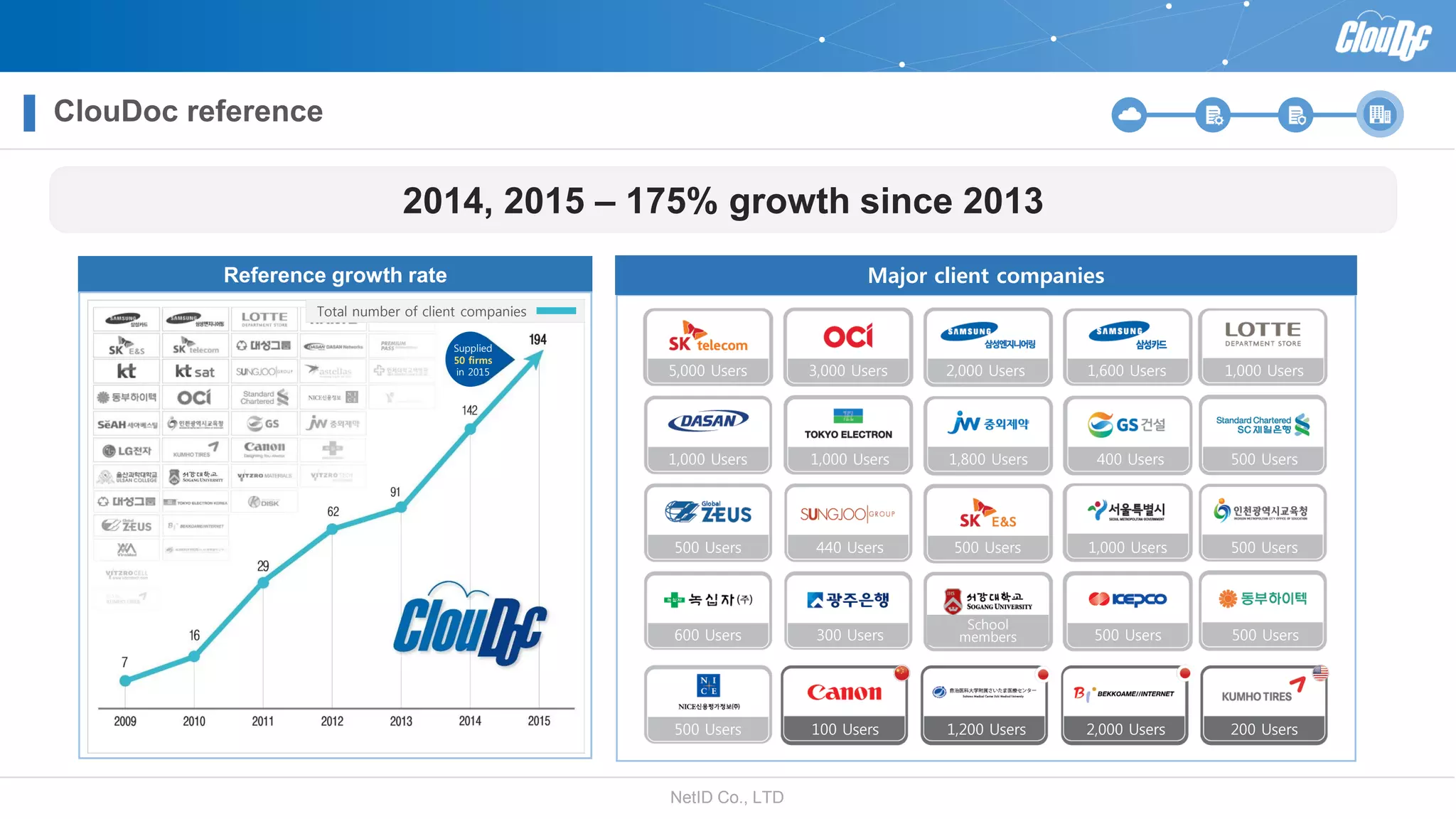
2014, 2015 – 175% growth since 2013
Reference growth rate Major client companies
Total number of client companies
Supplied
50 firms
in 2015 5,000 Users 3,000 Users 2,000 Users 1,600 Users 1,000 Users
1,000 Users 1,000 Users 1,800 Users 400 Users 500 Users
500 Users 440 Users 500 Users 1,000 Users 500 Users
600 Users 300 Users
School
members 500 Users 500 Users
500 Users 100 Users 1,200 Users 2,000 Users 200 Users

Clou doc intro_eng_20160524

  • 1.
    NetID Co., LTD Fordocument management and document security in a cloud/mobile era Introducing a document centralization solution !
  • 2.
    NetID Co., LTD Documentcentralization solution • Why document centralization? • ClouDoc document centralization • Special characteristics of ClouDoc
  • 3.
    NetID Co., LTD Whydocument centralization? A new solution is necessary for corporate document management and security Existing document security solution Problems • Employees do not respond positively to traditional methods of document management and information management • Traditional ECMs and EDMSs are unable to catch up with the rapid speed of change in a world dominated by mobile devices, big data, and cloud architecture • The existing management solution relying on a top-down information sharing approach is less effective than a bottom-up approach driven by employees ECM, EDMS,KMS ? Existing document security solution Problems • Even though documents are secure, there is a lack of management tools available for an efficient working environment • Encryption solutions and blocking solutions must be established separately • Difficult to establish and set up • High cost DLP, DRM, Personal information scan, Network separation Over 70% of data the kids is caused by former or current employees or employees of business partners. ( Source : Small and medium enterprise administration ) 70% Former and current employees employees of business partners 30% Other 90% of corporate documents are saved on personal computers while only 10% are stored on servers. ( Source : Gardner Market research firm) 10% Server 90%
  • 4.
    NetID Co., LTD ClouDocdocument centralization Document security Document management • Security responses for media, HDD, networks (email, messengers, malicious code, etc.) • Compliance readiness with ISO27001, ISMS, PIMS, etc. • Unlike existing EDMSs, ClouDoc provides a Windows Explorer drive-based user • All functions are provided within the context of a Windows drive, such as version management, document locking, and searches One-stop management of document centralization and security using ClouDoc
  • 5.
    NetID Co., LTD Specialcharacteristics of ClouDoc 1 Standard methods vs non-standard methods Requiring consideration of problems in Hooking/Exclusive Search engine/Window shell (non-standard system APP with no hooking development APP with no hooking development CATIA Pro ENGINEER AUTO CAD SolidWorks ex) CAD drawing, design project… C:\Local Disk Micro Office Power Point Micro Office Excel Micro Office Word Server Storage Diverse document
  • 6.
    NetID Co., LTD C:\LocalDisk Powerpoint.exe Powerpt.exe Special characteristics of ClouDoc 2 PC storage based on hash values prohibited Possible to avoid policy restrictions just by changing the file extension or name as restrictions are based on file extension or application name. Cannot override restrictions using name changes because policies are based on application hash values. C:\Local Disk Powerpoint.exe Powerpt.exe 2b3sa Ga5ad 3fdDq 2b3sa Ga5ad 3fdDq Competitor products ClouDoc
  • 7.
    NetID Co., LTDNetIDCo., LTD Introducing ClouDoc functions • Security verification compliance • Support the enhancement of the mobile work environment • Additional sales through licenses using a rental system • Additional public cloud service
  • 8.
    NetID Co., LTD CloudDoclicensing method Built-type > Rental-type > Public cloud service Built-type Rental-type Public cloud service Permanent License Maintenance fees Maintenance fees Maintenance fees Maintenance fees > Monthly usage fees / Introduction fees Monthly usage fees Monthly usage fees Monthly usage fees Monthly usage fees > AWS U Cloud SMEs SMEs
  • 9.
    NetID Co., LTD DMZZONE ClouDoc function structure Support the enhancement of the mobile work environment Push server Proxy server External document exchange server Inside ClouDoc Operation Server NewProvides a mobile work environment Outside New External organizations
  • 10.
    NetID Co., LTD ClouDocfunctions – document management ClouDoc provides a Windows Explorer/mobile/web/Java Explorer Business trip Centralized document storage Windows Explorer (ClouDoc PC Client) Secure disk Log-in ClouDoc Operation Server ClouDoc Backup User Online secure disk (E:) use local secure storage when creating large-sized files or when smooth compression test the limits of central document storage capacity. Offline secure disk (F:) stored locally temporarily in the event of a network outage. Export secure disk (G:) a secure disk for files whose export has been approved. Individual document storage (X:) an individual drive, possible to share one's files with other people. Shared document storage (Z:) a list of folders on a drive shared with other people or departments. Department document storage (Y:) a storage space for work done by individual teams and departments. Folder list and access rights can be set according to permissions. Mobile Explorer Web Explorer Java Explorer Mac-specific file system (To be provided at a later date) PC Backup  Reserved backup  Differentiated backup  Restoration and logs
  • 11.
    NetID Co., LTD Departmentswith document centralization Departments without Document centralization Work Exhibit Plan Weeklyreport Marketing Personal Drive (Z:) 201601 Marketingteam Exhibit GEUST Share Plan Team Drive (Y:) DesignTeam (design_guest) Publicize Chunmanwon (mwChun) download upload Chunmanwon(mwChun) Exhibit Plan Marketing Share Drive (X:) Beakmanwon (mwbeak) John Doe Design team (design_guest) download upload (Secure) Link Mail, (Secure) Web link copy UNC Copy Folder Sharing Share folder links to provide access to specific folders to other users without permissions. However, this feature can only be used by employees with accounts. Folder sharing Provides temporary IDs for continued collaboration with external users who do not have accounts. Guest ID Share links to a file among employees without access to a folder. If a weblink is pasted into Outlook, a list of file appears in an organized table. UNC Copy share the link to a file using company/ department document storage via a drive name for rapid collaboration. However, this feature is not available for individual document storage and can only be used by employees with accounts. Sharing documents with employees (Secure) Link mail, (Secure) Web link copy ClouDoc functions – document management
  • 12.
    NetID Co., LTD :Sent documents : Received documents Legend The office Central server DMZ ZONE GuestID Upload Approval Document copy 4 Download / download certificate 1 Upload Document copy Request for approval for sending out Web link, Link mail 3 External agencies Externaldocument Exchangeserver 2 2 Email, ID/password certification • Sending out internal document and requesting for approval. • Copying of the sent out documents and history management. 1 Provision of a safe environment to send and receive documents with the external document exchange server ClouDoc functions – document management
  • 13.
    NetID Co., LTD Rank ex)General Manager Target permissions Types of permissions Read/Write/Edit View folder list Create folders Delete and delete all Example application: it is only possible to open folders a user has access permissions for Team ex) Marketing team Person ex) JohnDoe folder access permissions depent on rank within the organization and department Setting permissions for the department document storage folder ex) Marketingteam Salesteam Server team HR team CEO Marketing team manager Marketingteam Work Publicize Marketing team member Marketingteam Exhibit Publicize Share Plan ClouDoc functions – document management
  • 14.
    NetID Co., LTD Automaticcheck in/checkout Version management When connected to a specialist search engine, provides search function within Windows Explorer Search within documents and Manage keywords and analytics Search for file names from Windows Explorer ClouDoc provides its own search function Although Windows Explorer provides basic file name Searches, there is a risk of overloading servers. 3 Replacement of legacy EDMS Document double storage prevention during joint work 1 Supportable application 1.Edit document 2.Read only 3.Ability to see which user is currently using a file 4. Ability to deny usage permission Version management including Office, and CAD documents Supportable application 2 Search inside files/keyword Management and analytics features4 HANGUL 1.Store after document edition 2.Store previous documents 3.Request document recovery 4.Document recovery Original documents Old version ClouDoc functions – document management
  • 15.
    NetID Co., LTD After programs that need to be installed have been requested and approved by the administrator, they will be installed without being downloaded onto the local computer.  The list of user software is provided in the client menu while applications and installations may be initiated easily. Software distribution steps ClouDoc server Online SW distribution feature 0  Software classification and management  Program installation request history  Program request approval history Software(S:) Software Office programs Anti-virus programs Compression programs COMODO V3 vaccine Installation of commercial SW Anti-virus programs V3 vaccine Shared drive(Z:) Database Software management • Service Administrators may provide setup files of paid software . User Request program installation Administrator approval complete Administrator approval rejection Initiates program installation of user PC Administrator (expected to be released soon) V3.exe V3 installation.txt V3.exe V3 installation.txt Approval notification Sent via push function ClouDoc functions – document management
  • 16.
    NetID Co., LTD Scheduled backup Regularbackups are made Incremental backup Save storage space Restore Allows for restoration in case of loss Bulletin boards for intra-departmental cooperation • A space for department members to sh are schedules and data • If necessary, members of other departm ents may be allowed to join Bulletin boards for general cooperation • A space to share information on work a nd hobbies • May be used for TFTs, interest groups, clubs, online cafes, etc. … 3D CAD/Design Tools/Office documents may be saved Community + storage (Office applications in addition to design, 3D CAD … version management by project) (expected to be released soon) Purchasing Accounting Management support Finance Snapshot Backups 20110807-111333 20110709-091332 Y:Korea Electronics HyundaiPRJ SamsungPRJ Project 2016 Snapshot Backups 20110807-111333 20110709-091332 Y:Korea Electronics ClouDoc functions – document management
  • 17.
    NetID Co., LTD Realtimedocument event alarms Necessary permissions for an Event notification recepient Read/Write/Delete Select event notification document storage folder You can select the types of events and the document storage folders for which you wish to receive notifications A read/write/delete/rename/move/ copy or similar event occurs An email or push event notification Will be sent to a user with access permissions Push Server Status of event notification settings for user Select event notification Document storage folder Select type of eventNew Personal Drive Team Drive Read Write Delete Rename Move Copy Team Drive (Y:) Personal Drive (Z:) 1 2 3 (expected to be released soon) Depending on the setup of the customer's system, an email or push server alert may be used ClouDoc functions – document management
  • 18.
    NetID Co., LTD Utilizedepartment document storage Confidential document management Safety managementdivision OOCompany Safety planning team Strategy establishment Security Document Designate a special folder 1 The ‘folder manager’ is able to manage the number of people of have access and approve export 3 Manage number of people with access Export approval Document utilization tip 0 Document classification system and setting permissions Safety managementdivision Safety planning team Strategy establishment 2016Weekly reports 201601 20160205 20160212 201602 Shared withteam Shared withdivision Shared withcompany ex) OOCompany Folder-specific storage limits, set permissions, access log verification, current status of storage limits, current status of permission settings. Team Manager/ Team document manager function Downloads Common work A CEO (Team manager) B Staff member (Team document manager) C Manager (Team member) Downloads Common work Downloads Common work D General manager (Team manager) E Staff member (Team document manager) F Manager (Team member) G Team manager (Team manager) H Staff member (Team document manager) I Assistant Manager (Team member) Folder manager Designate Folder manager 2 ClouDoc functions – document management
  • 19.
    NetID Co., LTD Thecompany owner or CEO is able to verify the documents of all employees via Windows Explorer A wide variety of statistical data is available, including statistics on data by document by type, current membership status, usage status, etc. Usage indicators Strengthens ownership and usage indicators 1 2 Strengthens ownership All work documents are saved and managed centrally Even if outbound employees or employees switching departments delete documents from central document folder with malicious intent, it is possible to restore documents centrally 1 2 ClouDoc functions – document management
  • 20.
    NetID Co., LTD ClouDocbackup One-stop service with an ClouDoc backup solution Store full daily backups for full folder Storage backup on a desired timeframe Guarantees safety of ClouDoc server Maintain entire folder structure with Incremental backups on desired dates Allows for hourly/daily/weekly/ monthly backup schedule settings based on company schedule Provide a response using a daily full folder structure backup when infected with ransomware 2016.1.1 2016.1.2 365 Allows for backup and restoration as a response to ransomware infection Centralized corporate monitoring of current status of performance and backups with statistical data Provides an autonomous firewall, performance monitoring features for stable operation Stores only one copy of identical files regardless of different file dates Manage storage space by automatically deleting files past their storage maturity date ClouDoc functions – document management
  • 21.
    NetID Co., LTD Blockdocument moving/ copying within safe zone Personal drive(X:) Team drive (Y:) Local drive(C:) C:Users~Temp C:Users~Temp C:programdata~Temp Windows PC security functions Printing Print control, Print log Print watermark Storage prevention/ Export prevention (DiskLock, DiskLock Plus) Export preventation Prevent screenshots, clipboard copy Local Drive (C:,D:, …) Prevent usage of regular zone Prevent exposure through on/offline media Network restrictions NetworkLock (Network separation) Prevent malware from being introduced and block harmful sites net- work separation function IE exemption policies Enhanced security functions Prevent data leakage through Temp folder path Block drag and drop between drives (including USB drives) as well as copy/paste. Share drive (Z:) Personal drive (X:) Team drive (Y:) Safe Zone Online secure disk(E:) Offline secure disk(F:) Export sevure disk(G:) The first file upload policy Provide a separate security policy for the Temp folder path Encourage users to upload files to the ClouDoc document storage system for a specified amount of time using the ‘File collection disk’ within the local safe zone for local documents when first installed Active-X for Groupware and banking applications ClouDoc functions – document security
  • 22.
    NetID Co., LTD 2.Request file export approval 3. Approve/reject export request *Saves a copy of the file to be exported Export secure disk 4. Only allow export of approved folders ClouDoc Server File, floder export approval process • Network • Local disk • Portable disk • USB • …. Offline Online • Export storage restrictions • Export timeframe • Preapproval/postapproval setting Types of approval permission manager Approval management function • Team/team document managers • Folder managers User Approval permission manager Document export 5. Export1. Files cannot be exported without approval ClouDoc functions – document security
  • 23.
    NetID Co., LTD ClouDocfunctions – document security Preventing ransomware infection Self protection function based on a white List Not Approved Specified apps and uninfected Windows Explorer : read/write allowed Non-specified apps and infected Windows Explorer : read/write prohibited Programs/Windows shell extension DLLs White List MalwareRansomware ? .EXE SafeZone scope protection Approved ? .EXE Uninfected Windows Explorer … Program Infected Windows Explorer Response mechanism for each route of ransomware infection • Among clients currently using ClouDoc with the whitelist method of complete protection in the safe zone (centralized document folder, local PC security disk) there have been no reports of infection from malicious code from regular programs. • Flash ransomware is run as an Internet Explorer or other web browser process • Web browsers have restricted read access permissions to the ClouDoc document folder • There are cases when ransomware is spread through Windows Explorer • ClouDoc blocks input/output in the safe zone in real-time in the event that Windows Explorer becomes infected 1. Block standard normal program ransomware infection 2. Block ransomware based on Adobe PDF/Flash Player 3. DLL LOCK : Block input/output operations by ransomware of an infected Windows Explorer PC secure diskCentral document storage
  • 24.
    NetID Co., LTD Localdisk (C:) Local disk (D:) ClouDoc functions – document security Export secure disk (F:) Online secure disk (G:) Local disk (C:) Local disk (D:) Online secure disks and export disks are used NO DATA is present on fixed disks while secure disks require an offline login Even if disks are moved to another PC, data remains inaccessible Prevents leakage of important documents Normally 1 2 3 Login NO DATA Response measures in case of notebook computer loss
  • 25.
    NetID Co., LTD ClouDocfunctions – document security Information protection management system Korean standards Information protection management system global standards Personal information protection management system Korean standards Data protection management systems for car suppliers ISMS ISO27001 PIMS HIMS • 4.2 Information asset classificationand treatment • 6.1.2 Role division • 8.1.2 Certificate and encryption functions • 8.1.3 Security log functions • 8.1.4 Permission functions • 8.2.5 Source program security • 8.3 External development security • 9 Password security • 10.1 External access policy • 10.2 Permissions management • 10.3 User certification and identification • 10.4 Permission restriction zone • 11.2.6 Smart work security • 11.2.9 Backup management • 11.3.2 Establish and conclude agreements on data transmission policies • 11.4 Media security • 11.5.1 Malware restrictions • A.6.2. Mobile devices and remote tasks • A.7.2.3 Disciplinary actions • A.8.2 Data classification • A.8.3 Media management • A.9.1 Requirements for permission restrictions • A.9.2 User access management • A.9.3 User responsibility • A.9.4 System and application access permissions • A.10 Encryption • A.12.2 Protection from malware programs • A.12.3 Backups • A.12.4 Evidence logs and monitoring of events • A.13.1 Network security management • A.13.2 Data transmissions • A.14.2 Development and support procedure security • A.18.2.3 Protection of documented data • A.18.2.4 Protection of personal information • 4.1.1 Putting effective protection measures into practice • 7.1.1 Establish permission restriction policy • 7.1.2 Register personal information handler • 7.1.3 Manage personal information handler permissions • 7.1.4 Manage user passwords • 7.1.5 Review personal information handler persmissions • 7.1.7 Network access • 7.1.9 Application program access • 7.2.1 Password policy • 7.2.2 Use password • 7.2.3 Key management • 7.3.5 Internet access management • 7.3.7 Media issuance and storage • 7.3.8 Discard media • 7.3.9 Restrict malware programs • 7.3.10 Portable computing • 7.3.11 Working remotely • 4. Classify data assets and management history • 13. Prevent leakage of operating secrets • 14. Security-level specific usage, storage, transfer, and disuse • 22. Installation and usage indicators of security soltions • 23. Security management of former employees • 26. Internal security review/conduct audits • 11. Device restrictions for consultants and external employees • 6. Password creation requirements • 11. Block unnecessary network connections • 19. Certification, individual and password encryption • 25. Applying encryption • 26. Restrictions on mobile storage devices • 27. Protection measures for important files • 28. Restrictions on transmission of large files • 31. Server access restrictions • 37. Enforcement of password creation requirements • 38. Maintain logs for server access and use • 42. Restrictions on IT-related external employees • 44. System performance and storage management Respond to compliance needs by relying on document centralization.
  • 26.
    NetID Co., LTD ClouDocfunctions – document security Login restrictions IP verification Restrict reading/writing/access to data IP filtering • Set allowed functions based on designated IP ranges • Allowed functions: view list, upload, download • May be used for specific departments or seminar rooms within the company • To identify users, not only user IDs and passwords but also the IP address of the PC is verified • IP verification type and method: normal IP verification/ additional verification IP/safe verification IP • Can block users from connecting from other computers Restrict data export Configure export IP address range • May be configured to restrict document export requests based on IP address range Configure DiskLock/ DiskLock Plus Policies Configure IP address range policies • Configure PC security policies for users who login from design- ated IP address ranges • This type of policy takes precedence over any user-configured policy IP security function
  • 27.
    NetID Co., LTD ClouDocfunctions – document security Permission configuration log Link mail log View history of users who have sent or received links Link copy log View history of link copies View, create, modify, delete user data File access Document export log Monitoring – Normal logs
  • 28.
    NetID Co., LTD Monitoring– Policy application log Installation status • MAC adress • Os version • User account • Date • IP adress • … Deletion log • Computer name • User IP • Request • Reason of deletion • Work time Policy application history Verify policy history applied to users and departments Current status of current policy setting Allows for verification of users and departments to whom current policy is applied • Department/user • policy settings History of PC policy applications Verify extension history of policies on user PCs • Most recent PC policy extension • extension history • Policy application date • Targeted information • policy name • ID of user who applied policy Policy-specific information • DiskLock • Document export • Smartphone control • Screenshot Verify current status of policy Current status of PC policy application Verify current status of policy application for specific user PCs Policy modification history History of modifications to specified policy • Create • Modify • Delete • Rename ClouDoc functions – Document security • Clipboard copy control • Print watermark • Print control • Print log
  • 29.
    NetID Co., LTD Networkblocked Groupware/ERP ClouDoc document storage • You may add IP ranges or domains that will be allowed. • Any traffic to unknown IP addresses or Domains will be blocked. Allowed usage Internal network mode Allowed usage • Cannot access ClouDoc disk • However, access is provided to export secure disk (read/write access) Network allowed Groupware/ERP ClouDoc document storage • All traffic to all IP addresses and Domains will be allowed. • You may add IP ranges that will be blocked. Blocked usage External network mode Switch to external network • Remove clipboard • Remove temporary files • Close applications used for work documents Exchange documents between networks Export secure disk(F:) Export approved Work applied Download NetworkLock – Network separation ClouDoc functions – Document security External use
  • 30.
    NetID Co., LTD Internalcompany document centralization server DMZ ZONE Proxy Server Document security for business partners and telecommuters • Business partner account/policy management • Business partner allowed applications restrictions • Business partner log management • Access IP restrictions • Manage ID, PWD access Business partner Before Login After Login Prohibit • Storage • Screenshots • Printing • Copying • Sending Free~ Allow all applications Allowed applications White List Login → apply policy Reboot PC → disable policy List of file access log/ Prohibit printing/ Prohibit online attached/ Prohibit clipboard copying/ prohibit local saving/… Administrator ClouDoc functions – Document security
  • 31.
  • 32.
    NetID Co., LTD ClouDocreference 2014, 2015 – 175% growth since 2013 Reference growth rate Major client companies Total number of client companies Supplied 50 firms in 2015 5,000 Users 3,000 Users 2,000 Users 1,600 Users 1,000 Users 1,000 Users 1,000 Users 1,800 Users 400 Users 500 Users 500 Users 440 Users 500 Users 1,000 Users 500 Users 600 Users 300 Users School members 500 Users 500 Users 500 Users 100 Users 1,200 Users 2,000 Users 200 Users