Get Started with Design Kit
Class D Audio Amplifier
1
Simulations folders
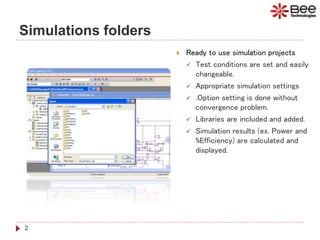
 Ready to use simulation projects
 Test conditions are set and easily
changeable.
 Appropriate simulation settings
 .Option setting is done without
convergence problem.
 Libraries are included and added.
 Simulation results (ex. Power and
%Efficiency) are calculated and
displayed.
2
How the initial condition are set?
 1. Open Project: ...SimulationsStartUpStartUp.opj .
 2. Set initial value of charged-up capacitors (C2, C3, C7, C8, C9, and C10) to be zero (IC=0).
 3. Run the simulation (0-1sec. or until circuit is startup).
3
How the initial condition are set?
4
 4. Read the startup voltages at each capacitor then input as initial condition.
 5. Run the simulation (0-100usec. with maximum time step 10nsec. ).
C9:
IC=12.850
C8: IC=7
C2: IC=7
Class D Startup
@ 0.976second.
C7:
14>IC>(7+2.8)
C10:
IC=15
How to Estimate Design %Efficiency?
5
 1. Open Project: ...SimulationsEfficiencyEfficiency.opj .
 2. Enter test condition parameters: PO=25W, GV=15.85(24dB), RL=4ohm, and fin=1kHz.
 3. Run the simulation from 1 to 3 ms. (about 31kHz output cycles )
Time
1.0ms 1.5ms 2.0ms 2.5ms 3.0ms
1 AVG(W(LOAD)) -(AVG(W(+B))+AVG(W(-B))) 2
-100*AVG(W(LOAD))/(AVG(W(+B))+AVG(W(-B)))
0W
5W
10W
15W
20W
25W
30W
35W
40W
45W
50W
1
0
20
30
40
50
60
70
80
90
100
2
>>
V(OUT)
-20V
0V
20V
SEL>>
How to Estimate Design %Efficiency?
6
 4. Add traces: AVG(W(LOAD)) for PO[W], -(AVG(W(+B))+AVG(W(-B))) for Supply power [W],
and -100*AVG(W(LOAD))/(AVG(W(+B))+AVG(W(-B))) for %Efficiency
Efficiency 
93%
T=1/fin
Supply power
Output power: PO
%Efficiency
VO=15.85VIN
How to Estimate Design %THD?
7
 1. Open Project: ...SimulationsTHDTHD.opj .
 2. Enter test condition parameters: PO=10W, GV=15.85(24dB), RL=4ohm, and fin=1kHz.
How to Estimate Design %THD?
8
 3. THD is calculated by checking the box “Perform Fourier Analysis” in the Output File Options setting.
Center Frequency is 1kHz same as fin and “V(OUT)” is the Output Variable(s).
 4. Run the simulation 0 to 2ms. (maximum time step 140ns. ).
 5. View Output File to see the simulated result THD(%)
How to Estimate Design %THD?
9
V(OUT):
1kHz sine
HARMONIC FREQUENCY FOURIER NORMALIZED PHASE NORMALIZED
NO (HZ) COMPONENT COMPONENT (DEG) PHASE
1 1.00E+03 8.81E+00 1.00E+00 1.78E+02 0.00E+00
2 2.00E+03 2.40E-04 2.73E-05 4.67E+01 -3.10E+02
3 3.00E+03 1.92E-04 2.18E-05 6.34E+01 -4.72E+02
4 4.00E+03 3.94E-04 4.48E-05 -4.48E-01 -7.14E+02
5 5.00E+03 1.20E-04 1.36E-05 5.25E+01 -8.40E+02
6 6.00E+03 4.67E-04 5.30E-05 9.70E+01 -9.73E+02
7 7.00E+03 4.98E-04 5.65E-05 2.47E+01 -1.22E+03
8 8.00E+03 4.41E-04 5.01E-05 -1.05E+02 -1.53E+03
9 9.00E+03 8.78E-04 9.97E-05 1.54E+02 -1.45E+03
TOTAL HARMONIC DISTORTION = 0.01478271 PERCENT
 Please note that the simulated result is only an estimate of %THD and the value is influenced by maximum step size.

Class D Audio Amplifier using PSpice

  • 1.
    Get Started withDesign Kit Class D Audio Amplifier 1
  • 2.
    Simulations folders  Readyto use simulation projects  Test conditions are set and easily changeable.  Appropriate simulation settings  .Option setting is done without convergence problem.  Libraries are included and added.  Simulation results (ex. Power and %Efficiency) are calculated and displayed. 2
  • 3.
    How the initialcondition are set?  1. Open Project: ...SimulationsStartUpStartUp.opj .  2. Set initial value of charged-up capacitors (C2, C3, C7, C8, C9, and C10) to be zero (IC=0).  3. Run the simulation (0-1sec. or until circuit is startup). 3
  • 4.
    How the initialcondition are set? 4  4. Read the startup voltages at each capacitor then input as initial condition.  5. Run the simulation (0-100usec. with maximum time step 10nsec. ). C9: IC=12.850 C8: IC=7 C2: IC=7 Class D Startup @ 0.976second. C7: 14>IC>(7+2.8) C10: IC=15
  • 5.
    How to EstimateDesign %Efficiency? 5  1. Open Project: ...SimulationsEfficiencyEfficiency.opj .  2. Enter test condition parameters: PO=25W, GV=15.85(24dB), RL=4ohm, and fin=1kHz.  3. Run the simulation from 1 to 3 ms. (about 31kHz output cycles )
  • 6.
    Time 1.0ms 1.5ms 2.0ms2.5ms 3.0ms 1 AVG(W(LOAD)) -(AVG(W(+B))+AVG(W(-B))) 2 -100*AVG(W(LOAD))/(AVG(W(+B))+AVG(W(-B))) 0W 5W 10W 15W 20W 25W 30W 35W 40W 45W 50W 1 0 20 30 40 50 60 70 80 90 100 2 >> V(OUT) -20V 0V 20V SEL>> How to Estimate Design %Efficiency? 6  4. Add traces: AVG(W(LOAD)) for PO[W], -(AVG(W(+B))+AVG(W(-B))) for Supply power [W], and -100*AVG(W(LOAD))/(AVG(W(+B))+AVG(W(-B))) for %Efficiency Efficiency  93% T=1/fin Supply power Output power: PO %Efficiency VO=15.85VIN
  • 7.
    How to EstimateDesign %THD? 7  1. Open Project: ...SimulationsTHDTHD.opj .  2. Enter test condition parameters: PO=10W, GV=15.85(24dB), RL=4ohm, and fin=1kHz.
  • 8.
    How to EstimateDesign %THD? 8  3. THD is calculated by checking the box “Perform Fourier Analysis” in the Output File Options setting. Center Frequency is 1kHz same as fin and “V(OUT)” is the Output Variable(s).
  • 9.
     4. Runthe simulation 0 to 2ms. (maximum time step 140ns. ).  5. View Output File to see the simulated result THD(%) How to Estimate Design %THD? 9 V(OUT): 1kHz sine HARMONIC FREQUENCY FOURIER NORMALIZED PHASE NORMALIZED NO (HZ) COMPONENT COMPONENT (DEG) PHASE 1 1.00E+03 8.81E+00 1.00E+00 1.78E+02 0.00E+00 2 2.00E+03 2.40E-04 2.73E-05 4.67E+01 -3.10E+02 3 3.00E+03 1.92E-04 2.18E-05 6.34E+01 -4.72E+02 4 4.00E+03 3.94E-04 4.48E-05 -4.48E-01 -7.14E+02 5 5.00E+03 1.20E-04 1.36E-05 5.25E+01 -8.40E+02 6 6.00E+03 4.67E-04 5.30E-05 9.70E+01 -9.73E+02 7 7.00E+03 4.98E-04 5.65E-05 2.47E+01 -1.22E+03 8 8.00E+03 4.41E-04 5.01E-05 -1.05E+02 -1.53E+03 9 9.00E+03 8.78E-04 9.97E-05 1.54E+02 -1.45E+03 TOTAL HARMONIC DISTORTION = 0.01478271 PERCENT  Please note that the simulated result is only an estimate of %THD and the value is influenced by maximum step size.