Putting it all togetherGD Book, pg. 126-145 (Production process and issues), Photoshop book pg. 160-189 – Work with layers
Key conceptsPrintingPaper choicesFinishing processesElectronic production
Electronic productionFile Naming 	In order to make sure that all users are able to open a file, it is important to save it with the proper extension. It is also important to use a name related to the file. For example, do not name the file “Dog” if it is an image of a cat.
Electronic productionNote 	Most systems provide the file extensions automatically. However, but if you are using an older MAC, it is advisable to check for the file extension.
Electronic productionFile Formats 	You should save an image in the proper format for which it is intended to be used. For example, save an image as an .eps or a .tif file for printing and as a .jpeg or a .gif file for the Web. When in doubt, save a copy of the original before compressing any file.
Electronic productionCollecting for Output 	QuarkXPress or InDesigngather images, fonts, and the document for printing in one place
Electronic productionCollecting for Output 	IllustratorConvert fonts to outlines. Fonts are no longer editable. Also, include all linked images
Electronic productionCollecting for Output 	PhotoshopIf sending flattened files – do not need to send fontsIf sending layered files – send fonts. Especially important if there may be text changes.
Finishing TouchesStock Selection 	2 types of stock: coated and uncoated (pg. 138-139)Paper sends a message – just as design elements do
Finishing TouchesUncoated stock:Not shiny, ink is usually darker when printed on thisCoated stock:Shiny, holds ink well. Looks expensive. Different types of coated stock (matte, satin, and gloss)
Finishing TouchesWhat type of stock would these be printed on?The annual report of Green Peace A lawyer’s letterhead A wedding invitation A flyer for a rock band A data sheet for a high-tech company
Finishing TouchesVarnishes 	Varnishes and Ultra Violet (UV) coatings are sometimes applied to a finished printed piece as a protective coating. 	Example: graphic design book – shiny imagesPhotoshop book – no shiny images
Finishing TouchesDie Cuts/Embossing/Foiling 	Junk mail: see any pieces that have a unique shape? Does it have any metallic elements? Is the logo raised?Die cuts-unique shape. Foiling – highly metallic, like gold foil. Embossing – raised elementsAll very high budget
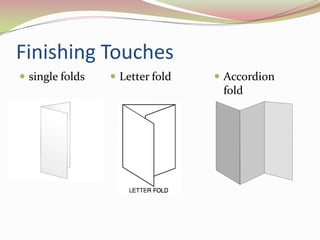
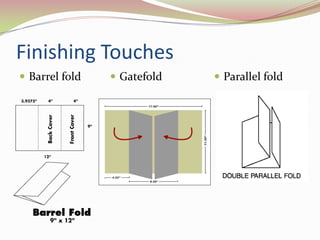
Finishing TouchesFolds 	single folds, letter folds, accordion folds, gatefolds, parallel folds, and barrel or roll folds
Finishing Touchessingle foldsLetter fold
Accordion foldFinishing TouchesBarrel foldGatefold
Parallel foldPrintingMethod of printing needs considered in beginning of design phaseUnderstanding how the customer would like the finished product to look can help the designer in planning steps along the way
PrintingOffset lithography – printing involving plates. For quantities over 1,000Digital printing – no plates, for small quantity and small sized jobsFlexography – printing with rubber plates. Used on specialty items, example: mugsRelief – printing off raised surfaces. Example – letterpressScreen printing – printing from stencils and screens. Example – t-shirts
PrintingVariable data printing – database drivenCustomized direct mail pieces. Variable data is inkjet printed onto offset printed direct mailers
PrintingOne color or mono Two or three colors, which typically utilize spot colors 4C or full color
PrintingGet as much info as possible when starting project how project is going to printFreelance – many times designed in full color, then would need to convert to 1 color and re-designPep boys – sign – trapping off, had to re-print whole run
RecapDifferent types of printing, folding, finishing touches, electronic production
ReadingTeach Yourself Visually Adobe Photoshop CS3 Chapter14, “Save Images,” pp. 284–297 Chapter15, “Print Images,” pp. 300–303
Next class: portfolioSome blank CDs Some glue or tape to affix work into their portfolios A few markers and pens for any labeling Some labels and CD labels, if required Portfolio pieces, both traditional and electronic All projects done through the course period Lab work the student is proud of Design work from other classes Personal workA portfolio case of the student’s choice
AssignmentsCollect and pass back assignmentsDue next week:Project 4, any labs or late projects (final due date for these), supplies for portfolio
LAB: Idea and Image ScrapbookTake out your scrapbook, put on tableNext 15-20 minutes, go around room looking at each other’s scrapbooks.
LAB: Idea and Image ScrapbookRegroupDiscussion of each book, critiqueUse elements and principles of design
LAB: Idea and Image ScrapbookWhich design items stood out? Why? Which items showed good use of the design elements? Which book featured the best example of vector art and which featured the best example of pixel-based art? Were there any outstanding type examples? Were there any items in someone’s scrapbook you wish you had seen before working on one of the projects? Why? Did anyone collect pieces as reminders what not to do?

Class 9 Putting it all together

  • 1.
    Putting it alltogetherGD Book, pg. 126-145 (Production process and issues), Photoshop book pg. 160-189 – Work with layers
  • 2.
    Key conceptsPrintingPaper choicesFinishingprocessesElectronic production
  • 3.
    Electronic productionFile Naming In order to make sure that all users are able to open a file, it is important to save it with the proper extension. It is also important to use a name related to the file. For example, do not name the file “Dog” if it is an image of a cat.
  • 4.
    Electronic productionNote Mostsystems provide the file extensions automatically. However, but if you are using an older MAC, it is advisable to check for the file extension.
  • 5.
    Electronic productionFile Formats You should save an image in the proper format for which it is intended to be used. For example, save an image as an .eps or a .tif file for printing and as a .jpeg or a .gif file for the Web. When in doubt, save a copy of the original before compressing any file.
  • 6.
    Electronic productionCollecting forOutput QuarkXPress or InDesigngather images, fonts, and the document for printing in one place
  • 7.
    Electronic productionCollecting forOutput IllustratorConvert fonts to outlines. Fonts are no longer editable. Also, include all linked images
  • 8.
    Electronic productionCollecting forOutput PhotoshopIf sending flattened files – do not need to send fontsIf sending layered files – send fonts. Especially important if there may be text changes.
  • 9.
    Finishing TouchesStock Selection 2 types of stock: coated and uncoated (pg. 138-139)Paper sends a message – just as design elements do
  • 10.
    Finishing TouchesUncoated stock:Notshiny, ink is usually darker when printed on thisCoated stock:Shiny, holds ink well. Looks expensive. Different types of coated stock (matte, satin, and gloss)
  • 11.
    Finishing TouchesWhat typeof stock would these be printed on?The annual report of Green Peace A lawyer’s letterhead A wedding invitation A flyer for a rock band A data sheet for a high-tech company
  • 12.
    Finishing TouchesVarnishes Varnishesand Ultra Violet (UV) coatings are sometimes applied to a finished printed piece as a protective coating. Example: graphic design book – shiny imagesPhotoshop book – no shiny images
  • 13.
    Finishing TouchesDie Cuts/Embossing/Foiling Junk mail: see any pieces that have a unique shape? Does it have any metallic elements? Is the logo raised?Die cuts-unique shape. Foiling – highly metallic, like gold foil. Embossing – raised elementsAll very high budget
  • 14.
    Finishing TouchesFolds singlefolds, letter folds, accordion folds, gatefolds, parallel folds, and barrel or roll folds
  • 15.
  • 16.
  • 17.
    Parallel foldPrintingMethod ofprinting needs considered in beginning of design phaseUnderstanding how the customer would like the finished product to look can help the designer in planning steps along the way
  • 18.
    PrintingOffset lithography –printing involving plates. For quantities over 1,000Digital printing – no plates, for small quantity and small sized jobsFlexography – printing with rubber plates. Used on specialty items, example: mugsRelief – printing off raised surfaces. Example – letterpressScreen printing – printing from stencils and screens. Example – t-shirts
  • 19.
    PrintingVariable data printing– database drivenCustomized direct mail pieces. Variable data is inkjet printed onto offset printed direct mailers
  • 20.
    PrintingOne color ormono Two or three colors, which typically utilize spot colors 4C or full color
  • 21.
    PrintingGet as muchinfo as possible when starting project how project is going to printFreelance – many times designed in full color, then would need to convert to 1 color and re-designPep boys – sign – trapping off, had to re-print whole run
  • 22.
    RecapDifferent types ofprinting, folding, finishing touches, electronic production
  • 23.
    ReadingTeach Yourself VisuallyAdobe Photoshop CS3 Chapter14, “Save Images,” pp. 284–297 Chapter15, “Print Images,” pp. 300–303
  • 24.
    Next class: portfolioSomeblank CDs Some glue or tape to affix work into their portfolios A few markers and pens for any labeling Some labels and CD labels, if required Portfolio pieces, both traditional and electronic All projects done through the course period Lab work the student is proud of Design work from other classes Personal workA portfolio case of the student’s choice
  • 25.
    AssignmentsCollect and passback assignmentsDue next week:Project 4, any labs or late projects (final due date for these), supplies for portfolio
  • 26.
    LAB: Idea andImage ScrapbookTake out your scrapbook, put on tableNext 15-20 minutes, go around room looking at each other’s scrapbooks.
  • 27.
    LAB: Idea andImage ScrapbookRegroupDiscussion of each book, critiqueUse elements and principles of design
  • 28.
    LAB: Idea andImage ScrapbookWhich design items stood out? Why? Which items showed good use of the design elements? Which book featured the best example of vector art and which featured the best example of pixel-based art? Were there any outstanding type examples? Were there any items in someone’s scrapbook you wish you had seen before working on one of the projects? Why? Did anyone collect pieces as reminders what not to do?