Design ToolsGD Book, pg. 104-125 (tools and technologies), pg 148-163 (web design basics)Photoshop book pg. 78-95 – manipulate selections
Software for layoutsWeb Programs: Dreamweaver, Flash, and Microsoft Visual Studio used to create Web pages. generate Web pages in a standard format such as HTML/XHTML. The Web pages are supported by common browsers.
Software for layoutsArt Programs: Adobe Photoshop and Adobe Illustrator used to create artwork and specialty type treatments. vector-based, but others are pixel-basedused to create artwork that is later used in one of the layout programs.
Software for layoutsWord Processing and Office Programs: Word, Excel, PowerPoint, and Publisher	Microsoft Office is the leading office package. used in offices to perform a variety of business tasks.
TasksFrom the following lists of tasks, what would be the BEST program to do the following:
TasksSend a memo. Create a logo. Write a newsletter. Create a printed ad with text and photos.Record banking transactions. Create a montage. Design a website.Create a disk label for a homemade CD. Create a web banner.
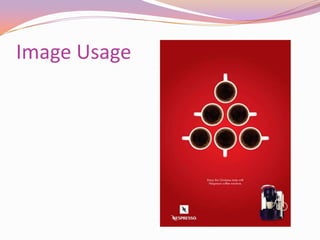
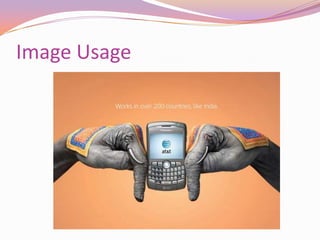
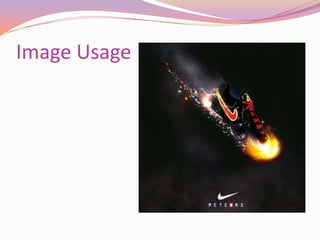
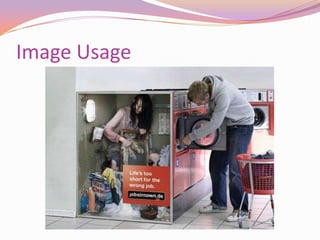
Image UsageThere are different ways to express ideas visually. Image usage is one way to communicate a concept.
Image Usage
Image Usage
Image Usage
Image Usage
Image Usage
Image UseStraight photography as it was shot Unique image cropping, which means to trim an image to highlight an element or suggest an ideaImagery with special effects Photographs versus illustrations Combination of image and type
Image Usage	Students: can you find any examples of different types of photography in your GD book, or I&I scrapbook?Take 5 minutes, pull 1 example . Show to class
CopyrightCopyright issuesFor images that you did not shoot yourself, you will need to pay for them unless they are public domain (check all info about photos used, make sure there are no stipulations, such as not for commercial use)
Image ManipulationSoftware applications such as Adobe Photoshop have layers and drawing painting tools features. With these features, designers can turn a simple image into a complex one. Although this application comes in handy when developing an image to match a concept, it can also be used to falsify images.
Image ManipulationCommonly done to remove things from photos ranging from signs, trees, tattoos, logos on clothingTo see some examples of bad image manipulation, visit:http://www.psdisasters.com/(Photoshop disasters)Be very, very careful doing image manipulation. Must be totally correct, as well as legal issues.
RecapDesign tools: Layout programs, Art programs, Web programs, Word processing programsImagesImage manipulation
Reading AssignmentGraphic Design School: The Principles and Practices of Graphic Design  Unit 6, “Production Process and Issues,” pp. 126–145Teach Yourself Visually Adobe Photoshop CS3 Chapter 8, “Work with Layers,” pp. 160–189
Project 4Magazine Spread (pass out handout)Assigned: class 8Due: class 10
Next classPutting it all togetherDUE: Idea and Image scrapbook, Bring into class for the lab
LABImage manipulation

Class 8 Design tools

  • 1.
    Design ToolsGD Book,pg. 104-125 (tools and technologies), pg 148-163 (web design basics)Photoshop book pg. 78-95 – manipulate selections
  • 2.
    Software for layoutsWebPrograms: Dreamweaver, Flash, and Microsoft Visual Studio used to create Web pages. generate Web pages in a standard format such as HTML/XHTML. The Web pages are supported by common browsers.
  • 3.
    Software for layoutsArtPrograms: Adobe Photoshop and Adobe Illustrator used to create artwork and specialty type treatments. vector-based, but others are pixel-basedused to create artwork that is later used in one of the layout programs.
  • 4.
    Software for layoutsArtPrograms: Adobe Photoshop and Adobe Illustrator used to create artwork and specialty type treatments. vector-based, but others are pixel-basedused to create artwork that is later used in one of the layout programs.
  • 5.
    Software for layoutsWordProcessing and Office Programs: Word, Excel, PowerPoint, and Publisher Microsoft Office is the leading office package. used in offices to perform a variety of business tasks.
  • 6.
    TasksFrom the followinglists of tasks, what would be the BEST program to do the following:
  • 7.
    TasksSend a memo.Create a logo. Write a newsletter. Create a printed ad with text and photos.Record banking transactions. Create a montage. Design a website.Create a disk label for a homemade CD. Create a web banner.
  • 8.
    Image UsageThere aredifferent ways to express ideas visually. Image usage is one way to communicate a concept.
  • 9.
  • 10.
  • 11.
  • 12.
  • 13.
  • 14.
    Image UseStraight photographyas it was shot Unique image cropping, which means to trim an image to highlight an element or suggest an ideaImagery with special effects Photographs versus illustrations Combination of image and type
  • 15.
    Image Usage Students: canyou find any examples of different types of photography in your GD book, or I&I scrapbook?Take 5 minutes, pull 1 example . Show to class
  • 16.
    CopyrightCopyright issuesFor imagesthat you did not shoot yourself, you will need to pay for them unless they are public domain (check all info about photos used, make sure there are no stipulations, such as not for commercial use)
  • 17.
    Image ManipulationSoftware applicationssuch as Adobe Photoshop have layers and drawing painting tools features. With these features, designers can turn a simple image into a complex one. Although this application comes in handy when developing an image to match a concept, it can also be used to falsify images.
  • 18.
    Image ManipulationCommonly doneto remove things from photos ranging from signs, trees, tattoos, logos on clothingTo see some examples of bad image manipulation, visit:http://www.psdisasters.com/(Photoshop disasters)Be very, very careful doing image manipulation. Must be totally correct, as well as legal issues.
  • 19.
    RecapDesign tools: Layoutprograms, Art programs, Web programs, Word processing programsImagesImage manipulation
  • 20.
    Reading AssignmentGraphic DesignSchool: The Principles and Practices of Graphic Design Unit 6, “Production Process and Issues,” pp. 126–145Teach Yourself Visually Adobe Photoshop CS3 Chapter 8, “Work with Layers,” pp. 160–189
  • 21.
    Project 4Magazine Spread(pass out handout)Assigned: class 8Due: class 10
  • 22.
    Next classPutting itall togetherDUE: Idea and Image scrapbook, Bring into class for the lab
  • 23.