Class 12 CBSE Computer Science Investigatory Project
This document summarizes a student project on developing a speed typing application. It includes sections describing the purpose of the project, algorithms used, program code, and outputs. The project aims to help users improve their typing speed and accuracy through a test that tracks time, score, words per minute, and misses. The program code details functions for selecting a topic, displaying typing tests with timed inputs, scoring performance, and storing results in a database.
BONAFIDE CERTIFICATE
External Examiner
Sealof Institution
This is to certify that this bonafide project work
“Speed Typing App” in the subject of Computer
Science has been completed by Nandan Ramesh of
Class XII A in the academic year 2020-2021 and is
submitted for the AISSCE practical examination
conducted by CBSE at PSBB Learning Leadership
Academy, Bangalore.
Internal Examiner
School Principal
WHY THIS PROJECT?
In today’s technologically advancing
world, it has become essential for
everyone to learn how to use
computers and its functions, for even
day-to-day tasks like-
• Writing important Emails
• Online Examinations
• Research papers
• Maintaining Personal Blogs
• Coding / Programming …... and
many more
What’s the most important factor
common in all these tasks is the basic
skill of ‘typing’ on a keyboard. This
may sound simple but when one has
got limited time on hand, learning
how to type not only ‘fast’ but with
good ‘accuracy’, can reduce one’s
workload considerably and even
provide a sense of relief and
completion.
Thus, through this project, I wish to
help in improving one’s typing speed
and accuracy.
• Typing isthe process of writing or inputting text by
pressing keys on a typewriter, computer
keyboard, cell phone, or calculator. It can be
distinguished from other means of text input, such
as handwriting and speech recognition. Text can be
in the form of letters, numbers and other symbols.
• Words per minute (WPM) is a measure of typing
speed, commonly used in recruitment. For the
purposes of WPM measurement a word is
standardized to five characters or keystrokes.
Therefore, "brown" counts as one word, but
"mozzarella" counts as two. The benefits of a
standardized measurement of input speed are that
it enables comparison across language and
hardware boundaries.
• In one study of average computer users, the
average rate for transcription was 33 words per
minute, and 19 words per minute for composition. In
the same study, when the group was divided into
"fast", "moderate" and "slow" groups, the average
speeds were 40 wpm, 35 wpm, and 23 wpm
respectively.
• An average professional typist reaches 50 to 80
wpm, while some positions can require 80 to 95 wpm
(usually the minimum required for dispatch
positions and other typing jobs), and some
advanced typists work at speeds above 120
wpm. Two-finger typists, sometimes also referred to
as "hunt and peck" typists, commonly reach
sustained speeds of about 37 wpm for memorized
text and 27 wpm when copying text, but in bursts
may be able to reach speeds of 60 to 70 wpm.
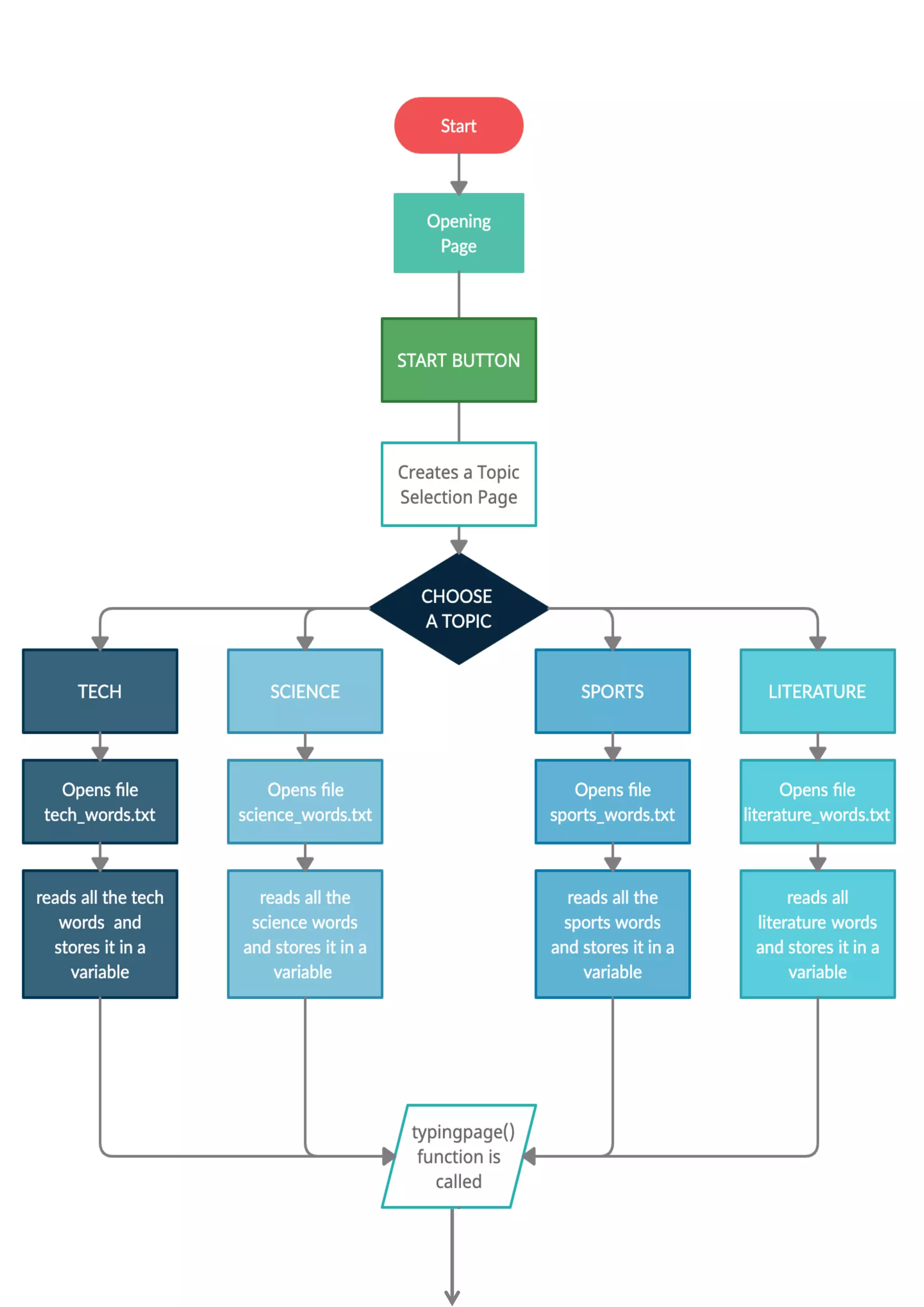
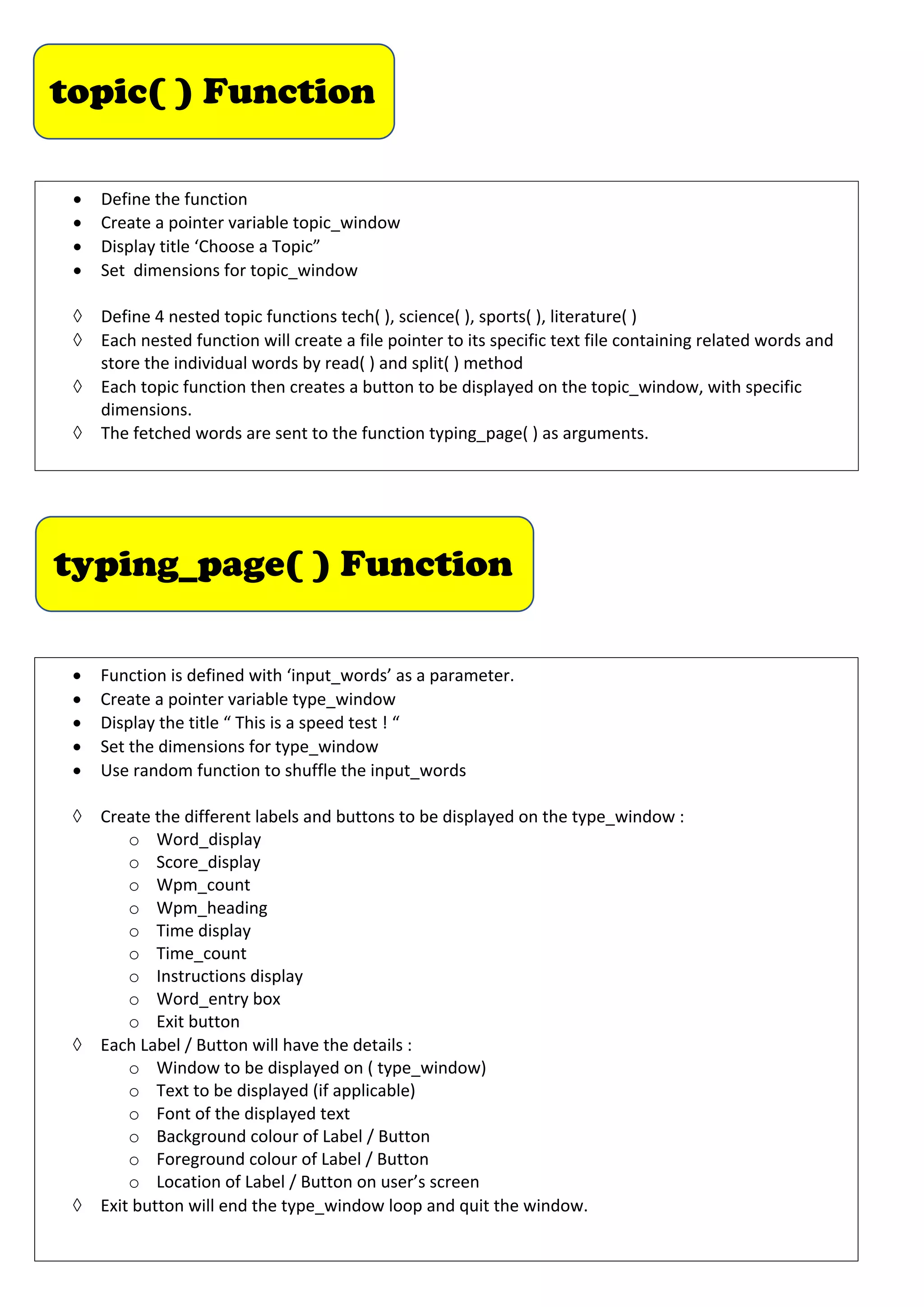
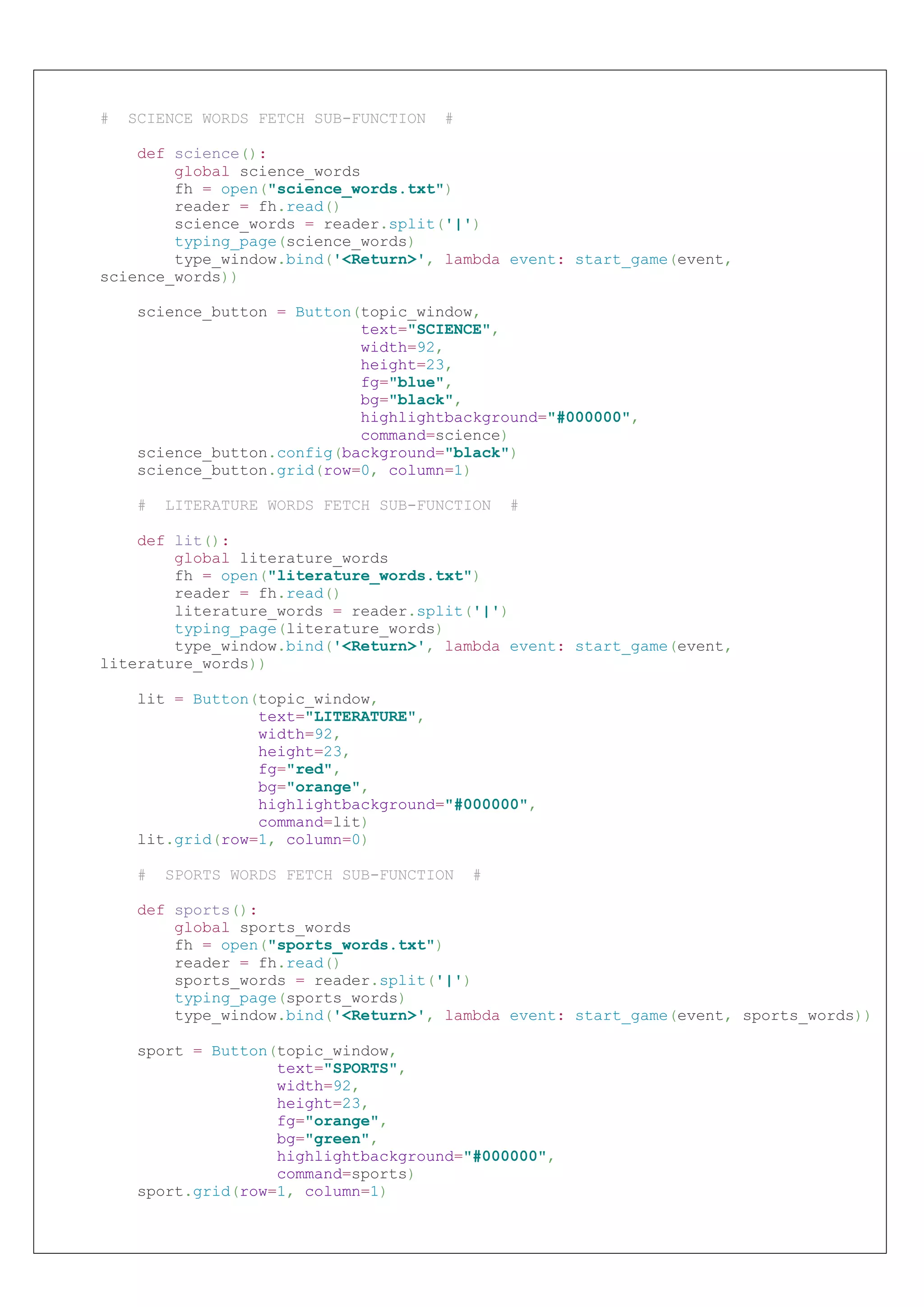
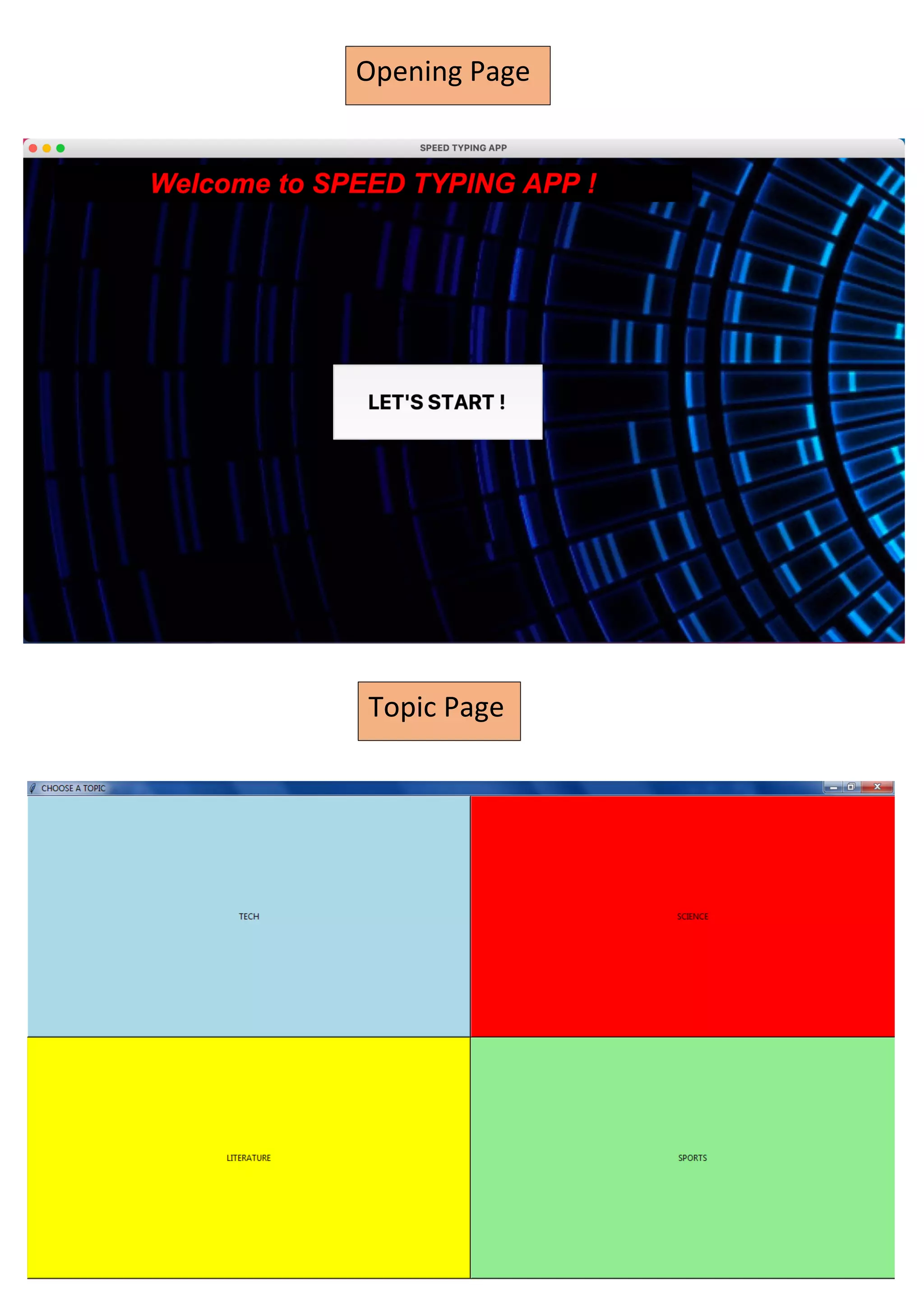
topic( ) Function
•Define the function
• Create a pointer variable topic_window
• Display title ‘Choose a Topic”
• Set dimensions for topic_window
à Define 4 nested topic functions tech( ), science( ), sports( ), literature( )
à Each nested function will create a file pointer to its specific text file containing related words and
store the individual words by read( ) and split( ) method
à Each topic function then creates a button to be displayed on the topic_window, with specific
dimensions.
à The fetched words are sent to the function typing_page( ) as arguments.
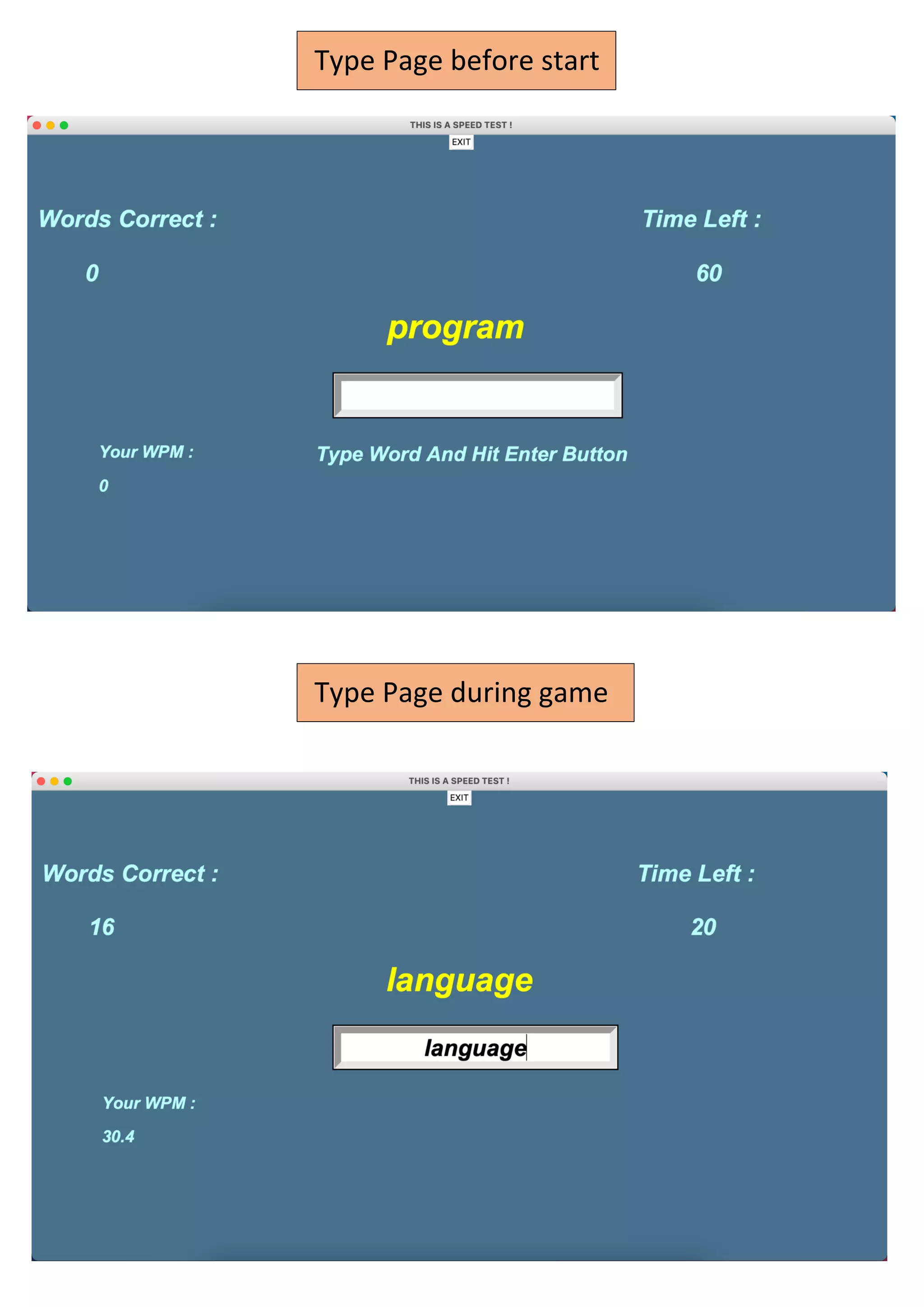
typing_page( ) Function
• Function is defined with ‘input_words’ as a parameter.
• Create a pointer variable type_window
• Display the title “ This is a speed test ! “
• Set the dimensions for type_window
• Use random function to shuffle the input_words
à Create the different labels and buttons to be displayed on the type_window :
o Word_display
o Score_display
o Wpm_count
o Wpm_heading
o Time display
o Time_count
o Instructions display
o Word_entry box
o Exit button
à Each Label / Button will have the details :
o Window to be displayed on ( type_window)
o Text to be displayed (if applicable)
o Font of the displayed text
o Background colour of Label / Button
o Foreground colour of Label / Button
o Location of Label / Button on user’s screen
à Exit button will end the type_window loop and quit the window.
13.
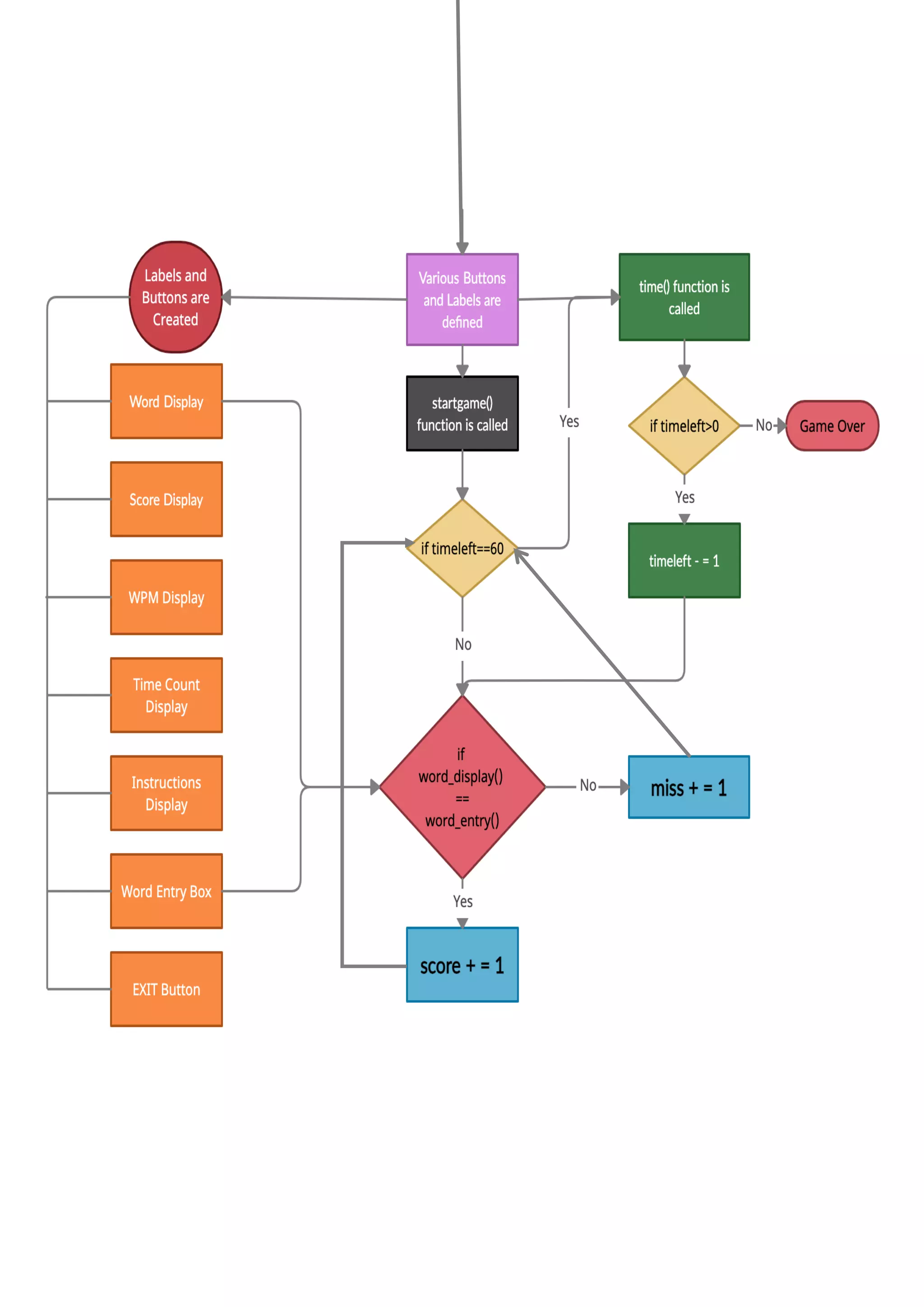
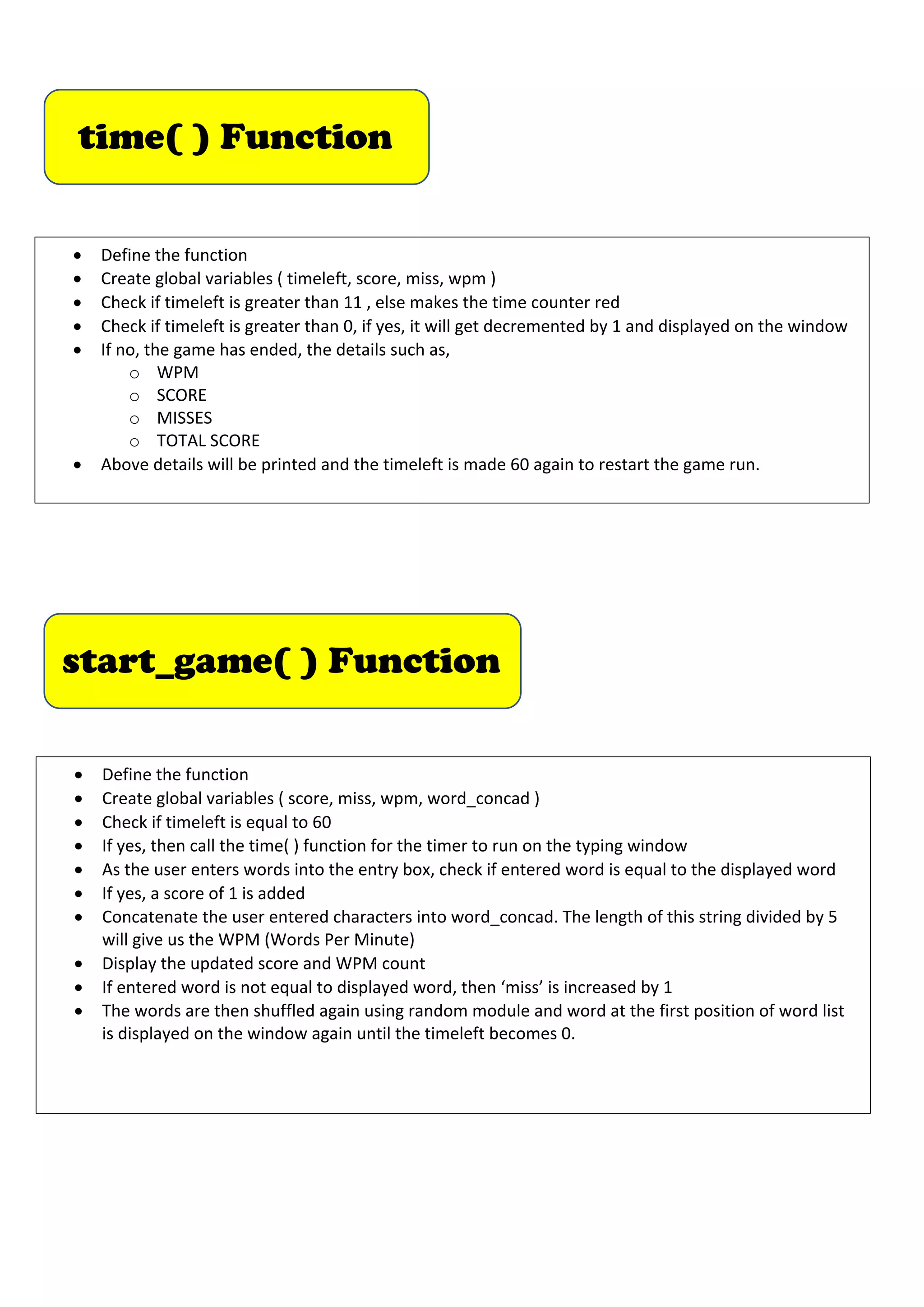
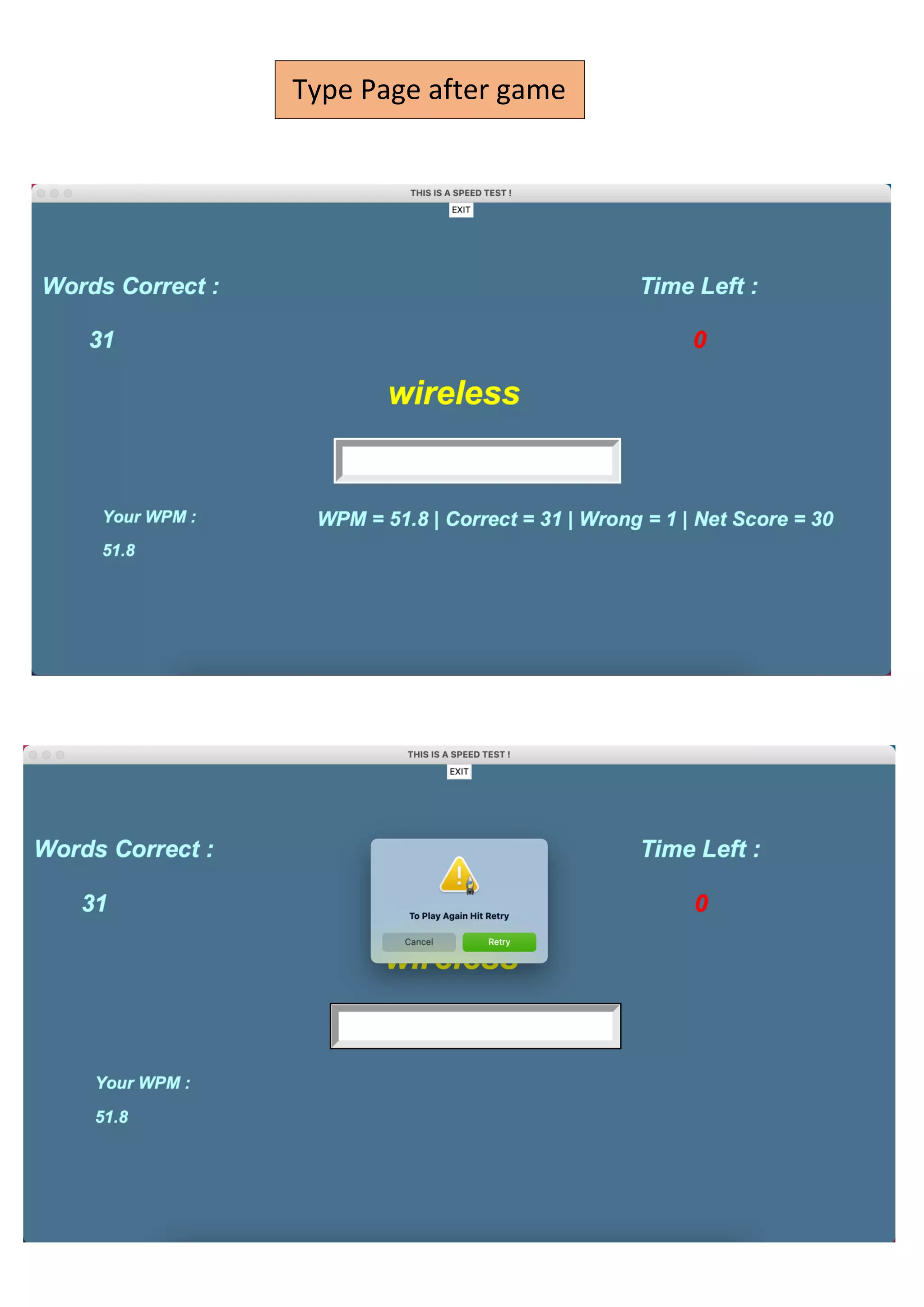
time( ) Function
•Define the function
• Create global variables ( timeleft, score, miss, wpm )
• Check if timeleft is greater than 11 , else makes the time counter red
• Check if timeleft is greater than 0, if yes, it will get decremented by 1 and displayed on the window
• If no, the game has ended, the details such as,
o WPM
o SCORE
o MISSES
o TOTAL SCORE
• Above details will be printed and the timeleft is made 60 again to restart the game run.
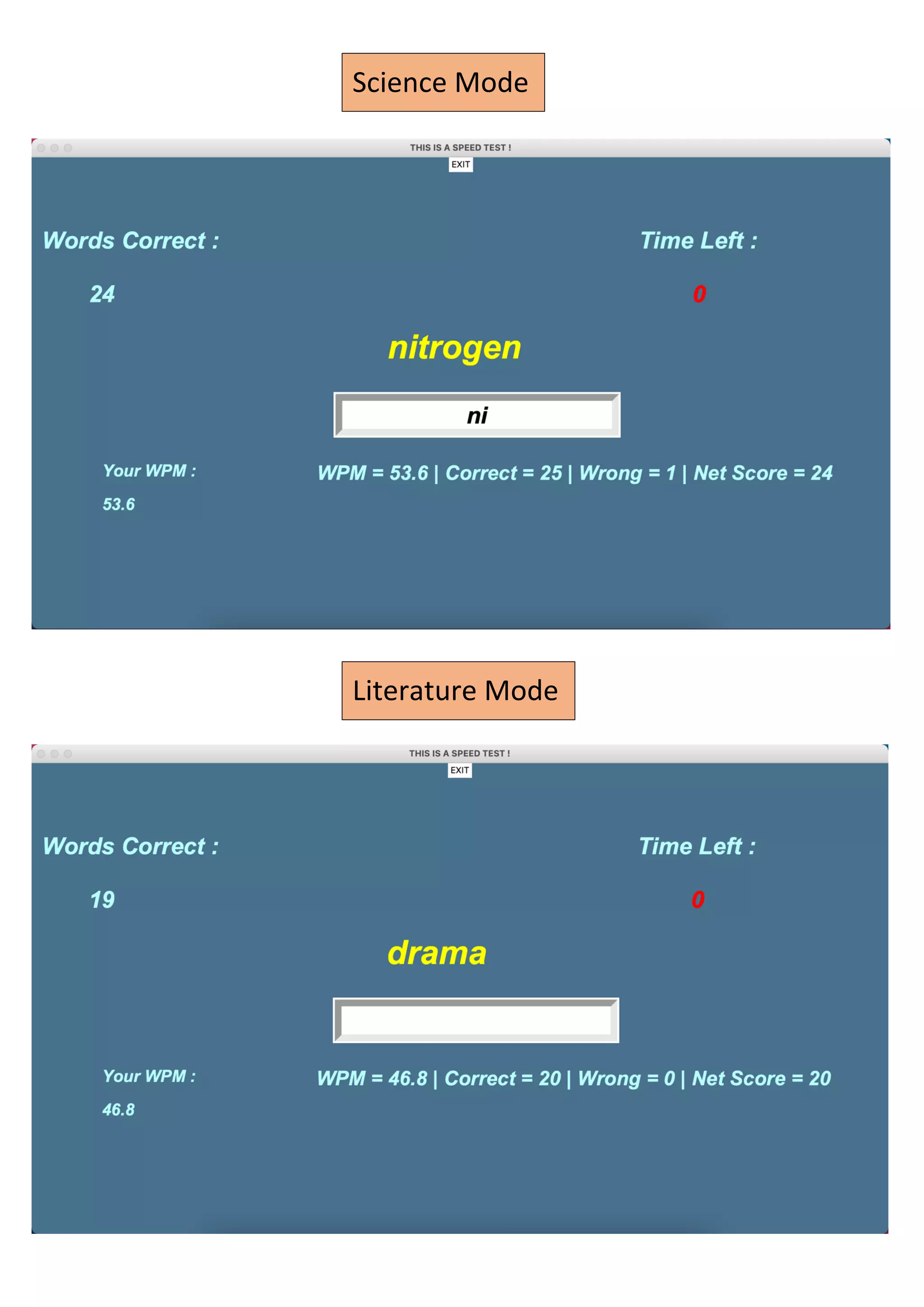
start_game( ) Function
• Define the function
• Create global variables ( score, miss, wpm, word_concad )
• Check if timeleft is equal to 60
• If yes, then call the time( ) function for the timer to run on the typing window
• As the user enters words into the entry box, check if entered word is equal to the displayed word
• If yes, a score of 1 is added
• Concatenate the user entered characters into word_concad. The length of this string divided by 5
will give us the WPM (Words Per Minute)
• Display the updated score and WPM count
• If entered word is not equal to displayed word, then ‘miss’ is increased by 1
• The words are then shuffled again using random module and word at the first position of word list
is displayed on the window again until the timeleft becomes 0.
14.
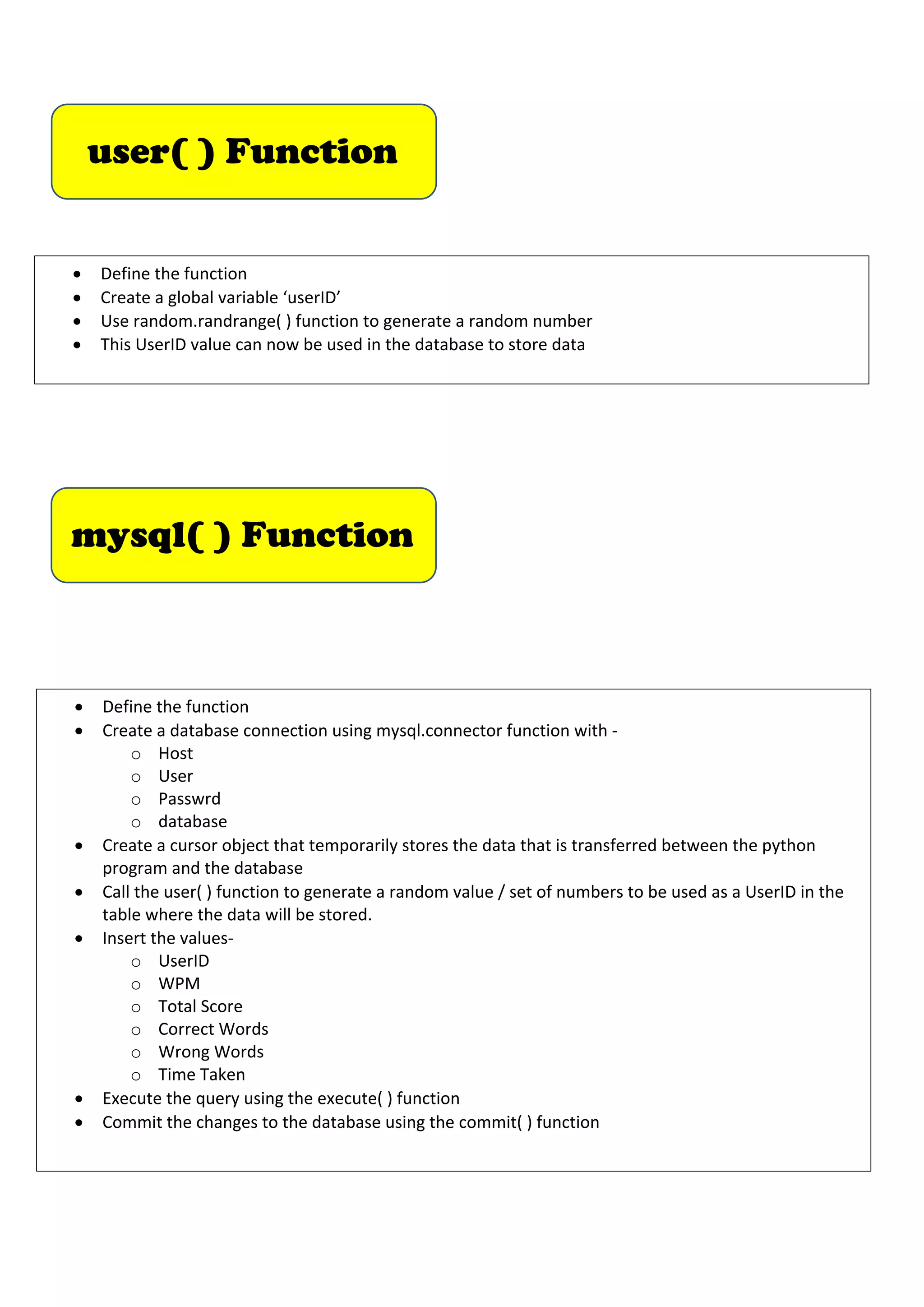
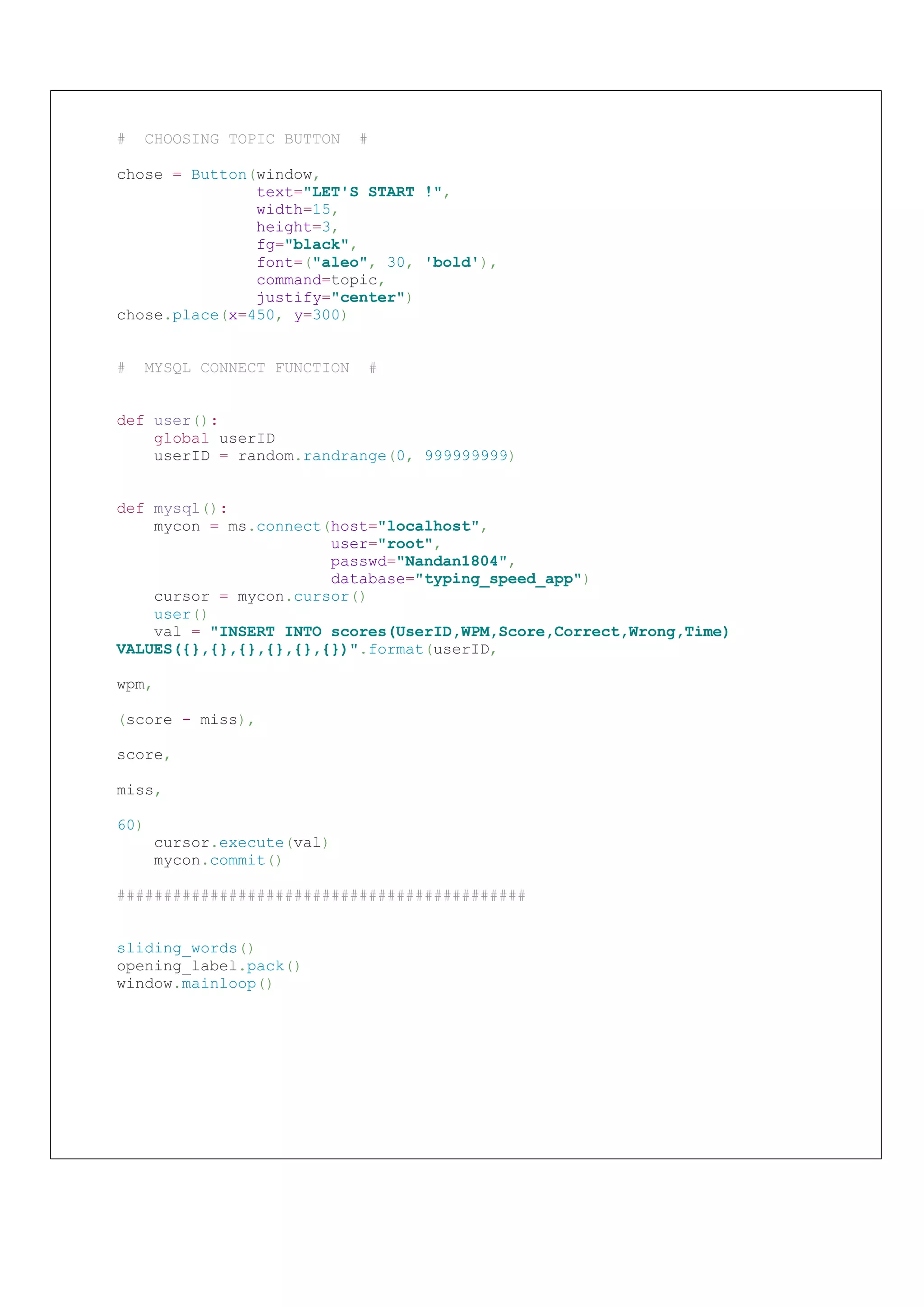
mysql( ) Function
•Define the function
• Create a database connection using mysql.connector function with -
o Host
o User
o Passwrd
o database
• Create a cursor object that temporarily stores the data that is transferred between the python
program and the database
• Call the user( ) function to generate a random value / set of numbers to be used as a UserID in the
table where the data will be stored.
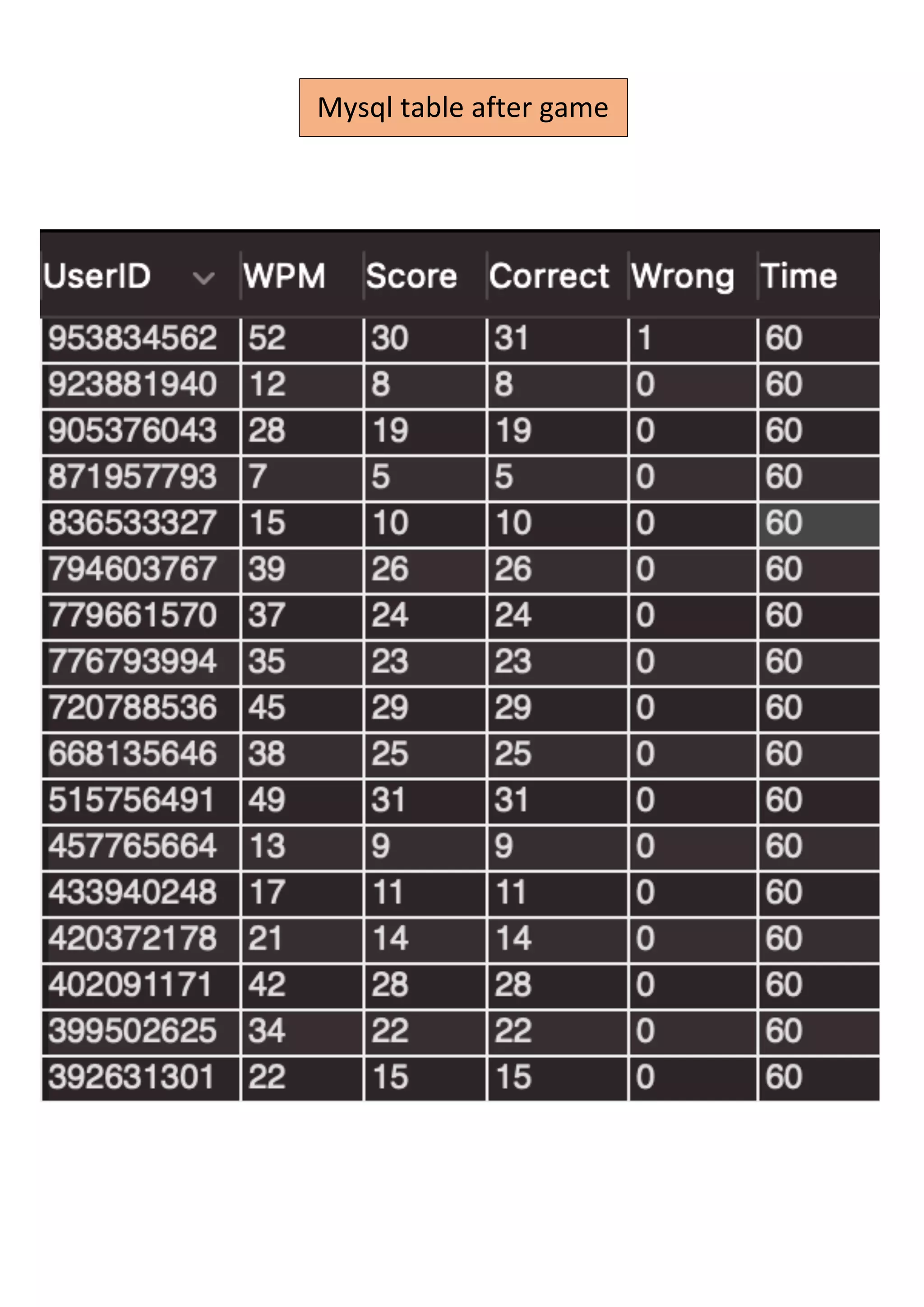
• Insert the values-
o UserID
o WPM
o Total Score
o Correct Words
o Wrong Words
o Time Taken
• Execute the query using the execute( ) function
• Commit the changes to the database using the commit( ) function
user( ) Function
• Define the function
• Create a global variable ‘userID’
• Use random.randrange( ) function to generate a random number
• This UserID value can now be used in the database to store data
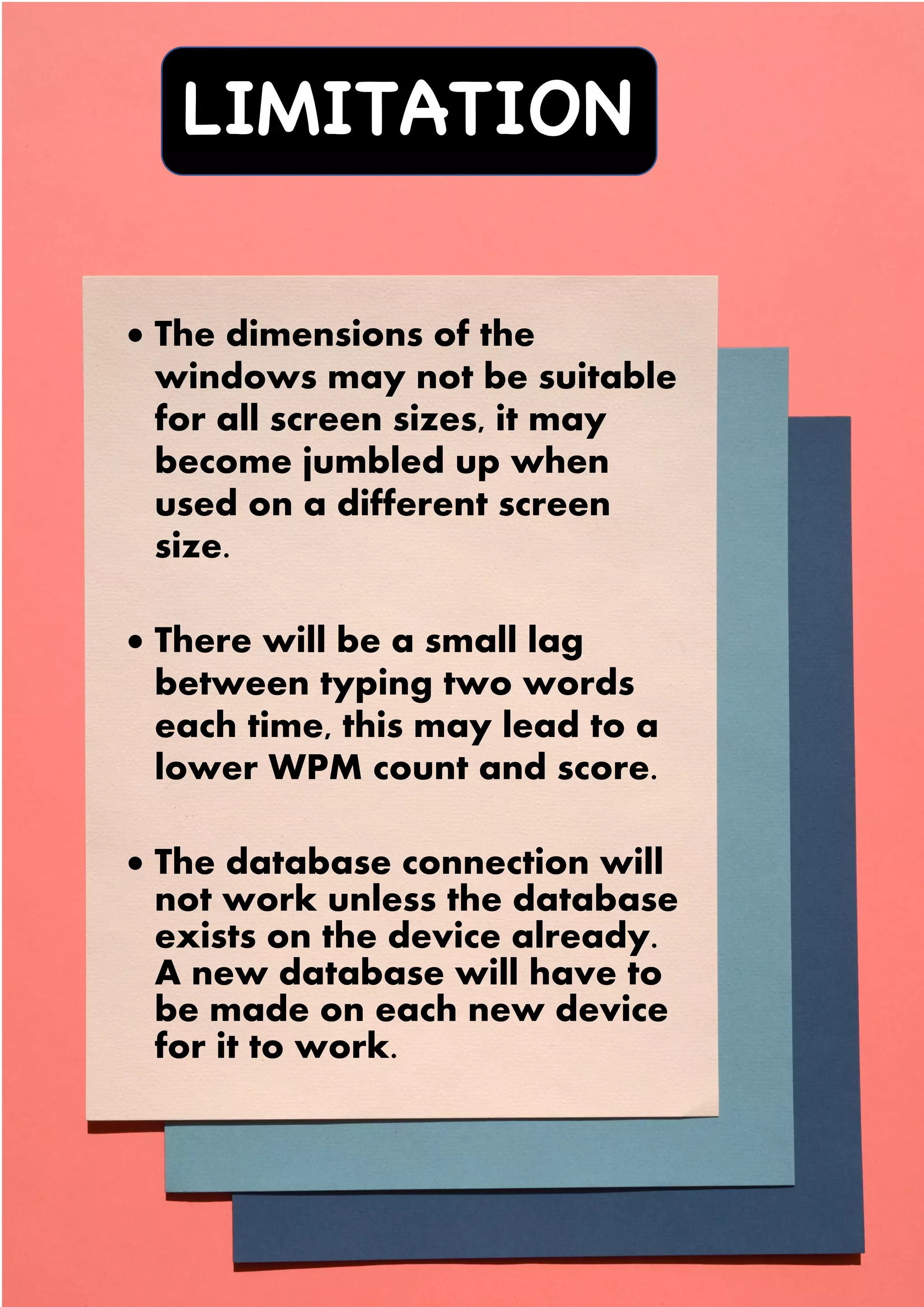
LIMITATION
S
• The dimensionsof the
windows may not be suitable
for all screen sizes, it may
become jumbled up when
used on a different screen
size.
• There will be a small lag
between typing two words
each time, this may lead to a
lower WPM count and score.
• The database connection will
not work unless the database
exists on the device already.
A new database will have to
be made on each new device
for it to work.
29.
SCOPE FOR
IMPROVEMENT
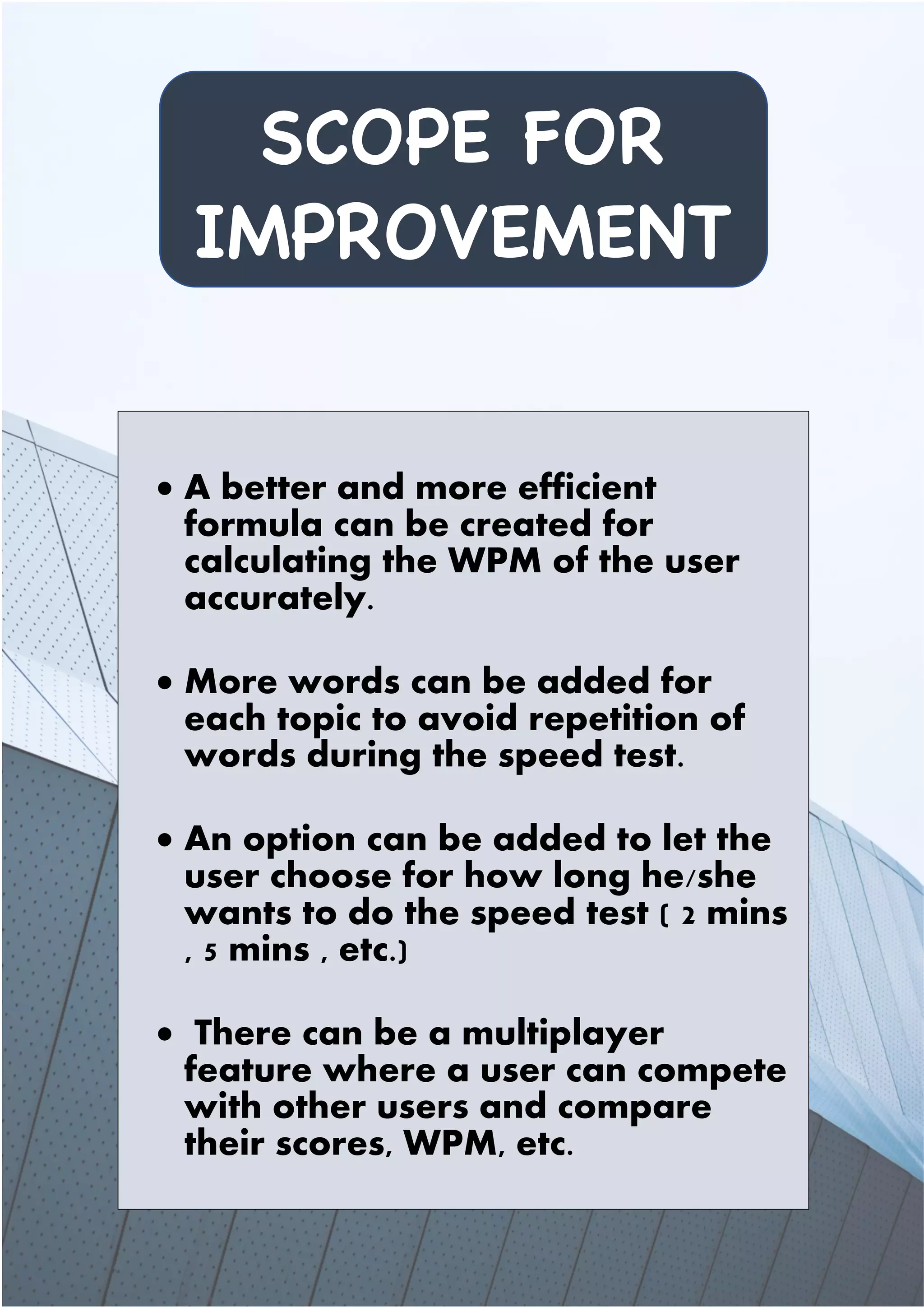
• Abetter and more efficient
formula can be created for
calculating the WPM of the user
accurately.
• More words can be added for
each topic to avoid repetition of
words during the speed test.
• An option can be added to let the
user choose for how long he/she
wants to do the speed test ( 2 mins
, 5 mins , etc.)
• There can be a multiplayer
feature where a user can compete
with other users and compare
their scores, WPM, etc.


![# importing required modules
from tkinter import *
import random
from tkinter import messagebox
import mysql.connector as ms
# GLOBAL VARIABLES #
userID = 0
score = 0
timeleft = 60
count = 0
miss = 0
wpm = 0
words_slide = ''
word_concad = ''
tech_words = []
science_words = []
literature_words = []
sports_words = []
# MAIN FUNCTIONS #
# FUNCTION FOR SELECTING TOPIC #
def topic():
topic_window = Tk()
topic_window.title("CHOOSE A TOPIC")
topic_window.geometry("{0}x{1}+0+0".format(topic_window.winfo_screenwidth(),
topic_window.winfo_screenheight()))
# CREATING VARIOUS TOPIC BUTTONS #
# TECH WORDS FETCH SUB-FUNCTION #
def tech():
global tech_words
fh = open("tech_words.txt")
reader = fh.read()
tech_words = reader.split('|')
typing_page(tech_words)
type_window.bind('<Return>', lambda event: start_game(event, tech_words))
tech = Button(topic_window,
text="TECH",
width=92,
height=23,
fg="green",
bg="navy",
highlightbackground="#000000",
command=tech)
tech.grid(row=0, column=0)
# importing required modules
from tkinter import *
import random
from tkinter import messagebox
import mysql.connector as ms
# GLOBAL VARIABLES #
userID = 0
score = 0
timeleft = 60
count = 0
miss = 0
wpm = 0
words_slide = ''
word_concad = ''
tech_words = []
science_words = []
literature_words = []
sports_words = []
# MAIN FUNCTIONS #
# FUNCTION FOR SELECTING TOPIC #
def topic():
topic_window = Tk()
topic_window.title("CHOOSE A TOPIC")
topic_window.geometry("{0}x{1}+0+0".format(topic_window.winfo_screenwidth(),
topic_window.winfo_screenheight()))
# CREATING VARIOUS TOPIC BUTTONS #
# TECH WORDS FETCH SUB-FUNCTION #
def tech():
global tech_words
fh = open("tech_words.txt")
reader = fh.read()
tech_words = reader.split('|')
typing_page(tech_words)
type_window.bind('<Return>', lambda event: start_game(event, tech_words))
tech = Button(topic_window,
text="TECH",
width=92,
height=23,
fg="green",
bg="navy",
highlightbackground="#000000",
command=tech)
tech.grid(row=0, column=0)](https://image.slidesharecdn.com/finalcomputerproject-211006053101/75/Class-12-CBSE-Computer-Science-Investigatory-Project-16-2048.jpg)
![# TYPING PAGE ALL WIDGETS FUNCTION #
def typing_page(input_words): # input_words refers to type of word-set called
(science,tech,lit,sports)
global type_window
type_window = Tk()
type_window.title("THIS IS A SPEED TEST !")
type_window.geometry("{0}x{1}+0+0".format(type_window.winfo_screenwidth(),
type_window.winfo_screenheight()))
type_window.configure(bg='SkyBlue4')
random.shuffle(input_words)
# WORD FETCHED FROM FILE DISPLAY #
global word_display
word_display = Label(type_window,
text=input_words[0],
font=('arial', 50, 'italic bold'),
bg="SkyBlue4",
fg="yellow")
word_display.place(x=525, y=250)
score_heading = Label(type_window,
text='Words Correct : ',
font=('arial', 35, 'italic bold'),
bg="SkyBlue4",
fg="PaleTurquoise1")
score_heading.place(x=10, y=100)
# WORDS CORRECT COUNT #
global score_display
score_display = Label(type_window,
text=score,
font=('arial', 35, 'italic bold'),
bg="SkyBlue4",
fg="PaleTurquoise1")
score_display.place(x=80, y=180)
# WPM DISPLAY #
wpm_heading = Label(type_window,
text="Your WPM :",
font=('arial', 25, 'italic bold'),
bg="SkyBlue4",
fg="PaleTurquoise1")
wpm_heading.place(x=100, y=450)
global wpm_count
wpm_count = Label(type_window,
text=wpm,
font=('arial', 25, 'italic bold'),
bg="SkyBlue4",
fg="PaleTurquoise1")
wpm_count.place(x=100, y=500)
# TIME COUNTDOWN DISPLAY #
timer = Label(type_window,
text='Time Left :',
font=('arial', 35, 'italic bold'),
bg="SkyBlue4",
fg="PaleTurquoise1")
timer.place(x=900, y=100)
# TYPING PAGE ALL WIDGETS FUNCTION #
def typing_page(input_words):
global type_window
type_window = Tk()
type_window.title("THIS IS A SPEED TEST !")
type_window.geometry("{0}x{1}+0+0".format(type_window.winfo_screenwidth(),
type_window.winfo_screenheight()))
type_window.configure(bg='SkyBlue4')
random.shuffle(input_words)
# WORD FETCHED FROM FILE DISPLAY #
global word_display
word_display = Label(type_window,
text=input_words[0],
font=('arial', 50, 'italic bold'),
bg="SkyBlue4",
fg="yellow")
word_display.place(x=525, y=250)
score_heading = Label(type_window,
text='Words Correct : ',
font=('arial', 35, 'italic bold'),
bg="SkyBlue4",
fg="PaleTurquoise1")
score_heading.place(x=10, y=100)
# WORDS CORRECT COUNT #
global score_display
score_display = Label(type_window,
text=score,
font=('arial', 35, 'italic bold'),
bg="SkyBlue4",
fg="PaleTurquoise1")
score_display.place(x=80, y=180)
# WPM DISPLAY #
wpm_heading = Label(type_window,
text="Your WPM :",
font=('arial', 25, 'italic bold'),
bg="SkyBlue4",
fg="PaleTurquoise1")
wpm_heading.place(x=100, y=450)
global wpm_count
wpm_count = Label(type_window,
text=wpm,
font=('arial', 25, 'italic bold'),
bg="SkyBlue4",
fg="PaleTurquoise1")
wpm_count.place(x=100, y=500)
# TIME COUNTDOWN DISPLAY #
timer = Label(type_window,
text='Time Left :',
font=('arial', 35, 'italic bold'),
bg="SkyBlue4",
fg="PaleTurquoise1")
timer.place(x=900, y=100)](https://image.slidesharecdn.com/finalcomputerproject-211006053101/75/Class-12-CBSE-Computer-Science-Investigatory-Project-18-2048.jpg)
![global time_count
time_count = Label(type_window,
text=timeleft,
font=('arial', 35, 'italic bold'),
bg="SkyBlue4",
fg="PaleTurquoise1")
time_count.place(x=980, y=180)
# STARTING INSTRUCTION #
global instructions
instructions = Label(type_window,
text='Type Word And Hit Enter Button',
font=('arial', 30, 'italic bold'),
bg="SkyBlue4",
fg="PaleTurquoise1")
instructions.place(x=420, y=450)
# WORD ENTRY BOX #
global word_entry
word_entry = Entry(type_window,
font=('arial', 35, 'italic bold'),
bd=10,
justify='center')
word_entry.place(x=450, y=350)
word_entry.focus_set()
# EXIT BUTTON #
exit_button = Button(type_window,
text="EXIT",
command=type_window.quit)
exit_button.pack()
# TIME COUNTDOWN FUNCTION #
def time():
global timeleft, score, miss, wpm
if timeleft >= 11:
pass
else:
time_count.configure(fg='red')
if timeleft > 0:
timeleft -= 1
time_count.configure(text=timeleft)
time_count.after(1000, time)
else:
instructions.configure(
text='WPM = {} | Correct = {} | Wrong = {} | Net Score = {}'.format(wpm,
score,
miss,
score -
miss))
rr = messagebox.askretrycancel('Notification', 'To Play Again Hit Retry')
if rr:
score = 0
timeleft = 60
miss = 0
wpm = 0
time_count.configure(text=timeleft)
word_display.configure(text=words[0])
score_display.configure(text=score)
wpm_count.configure(text=wpm)
global time_count
time_count = Label(type_window,
text=timeleft,
font=('arial', 35, 'italic bold'),
bg="SkyBlue4",
fg="PaleTurquoise1")
time_count.place(x=980, y=180)
# STARTING INSTRUCTION #
global instructions
instructions = Label(type_window,
text='Type Word And Hit Enter Button',
font=('arial', 30, 'italic bold'),
bg="SkyBlue4",
fg="PaleTurquoise1")
instructions.place(x=420, y=450)
# WORD ENTRY BOX #
global word_entry
word_entry = Entry(type_window,
font=('arial', 35, 'italic bold'),
bd=10,
justify='center')
word_entry.place(x=450, y=350)
word_entry.focus_set()
# EXIT BUTTON #
exit_button = Button(type_window,
text="EXIT",
command=type_window.quit)
exit_button.pack()
# TIME COUNTDOWN FUNCTION #
def time():
global timeleft, score, miss, wpm
if timeleft >= 11:
pass
else:
time_count.configure(fg='red')
if timeleft > 0:
timeleft -= 1
time_count.configure(text=timeleft)
time_count.after(1000, time)
else:
instructions.configure(
text='WPM = {} | Correct = {} | Wrong = {} | Net Score = {}'.format(wpm,
score,
miss,
score -
miss))
rr = messagebox.askretrycancel('Notification', 'To Play Again Hit Retry')
if rr:
score = 0
timeleft = 60
miss = 0
wpm = 0
time_count.configure(text=timeleft)
word_display.configure(text=words[0])
score_display.configure(text=score)
wpm_count.configure(text=wpm)](https://image.slidesharecdn.com/finalcomputerproject-211006053101/75/Class-12-CBSE-Computer-Science-Investigatory-Project-19-2048.jpg)
![# START GAME FUNCTION #
def start_game(event,words):
global score, miss, wpm, word_concad
if timeleft == 60:
time()
instructions.configure(text='')
for i in range(len(word_entry.get())):
for j in range(len(word_display['text'])):
if word_entry.get()[i] == word_display['text'][j]:
word_concad += word_entry.get()[i]
wpm = ((len(word_concad) / 5) / 1)
score_display.configure(text=score)
wpm_count.configure(text=wpm)
if word_entry.get() == word_display['text']:
score += 1
else:
miss += 1
random.shuffle(words)
word_display.configure(text=words[0])
word_entry.delete(0, END)
mysql()
# SLIDING LABEL FUNCTION #
def sliding_words():
global count, words_slide
text = 'Welcome to SPEED TYPING APP !!'
if count >= len(text):
count = 0
words_slide = ''
words_slide += text[count]
count += 1
font.configure(text=words_slide)
font.after(100, sliding_words)
# SETTING UP OPENING WINDOW #
window = Tk()
window.title("SPEED TYPING APP")
opening_label = Label(window)
opening_label.img = PhotoImage(file="photo.gif", master=window)
opening_label.config(image=opening_label.img)
window.geometry("{0}x{1}+0+0".format(window.winfo_screenwidth(),
window.winfo_screenheight()))
# FONT LABEL FOR SLIDING TEXT #
font = Label(window,
text='',
font=('arial', 40, 'italic bold'),
bg='black',
fg='red',
width=40)
font.place(x=45, y=10)](https://image.slidesharecdn.com/finalcomputerproject-211006053101/75/Class-12-CBSE-Computer-Science-Investigatory-Project-20-2048.jpg)



![Copy_of_Dynamic_Typing_Speed_Detector[1].pptx](https://cdn.slidesharecdn.com/ss_thumbnails/copyofdynamictypingspeeddetector1-250203181134-5b041396-thumbnail.jpg?width=640&height=640&fit=bounds)
![Copy_of_Dynamic_Typing_Speed_Detector[1].pptx](https://cdn.slidesharecdn.com/ss_thumbnails/copyofdynamictypingspeeddetector1-250203111231-dc7f9268-thumbnail.jpg?width=640&height=640&fit=bounds)


![Vibe Coding vs. Spec-Driven Development [Free Meetup]](https://cdn.slidesharecdn.com/ss_thumbnails/vibecodingvsspecdrivendevelopment-251209105622-43f455e7-thumbnail.jpg?width=640&height=640&fit=bounds)


