Civilized Git Process
Tu Hoang - @hoangngoctu - Mar 2015
Introduction
● It is not Git 101 for git newbies
● I will discuss how to use Git efficiently on project level,
team process, not command level
● These slides will be used as a reference document. So I
am sorry for the exceeding text
“natural” git flow
Git graphs of main branches of some projects with several
senior developers with several years of git experiences
“natural” git flow
● more members → more complex
● very hard to understand git graph
● complex and multi-directional merges
● risks of missing codes and regression
● very time-consuming to troubleshoot of code changes
Reason: developers were asked to use git without a proper
understanding of code versioning
“civilized” git flow
Not perfect (yet) but more civilized, less chaotic!
Ideal “civilized” git graph
Anyone knows a good tool to draw a git graph?
I will draw one on the whiteboard
“civilized” branching
● master: production code
● develop: staging / testing code
● task branches
Note: in small teams or projects we can use one branch
with the role of both master and develop
“civilized” master
● Always moving forward
● Forbidden: git reset, direct commit
● Merge code from branch “develop” after passing all the
tests
● Each merge should be tagged: 1.0, 1.1, 2.0, etc.
● Emergency hotfix: merge code from branch “hotfix”
“civilized” develop
● The delta from last release to next release
● The branch where we merged our task branches to test
● Checkout from the latest commit (tag) of “master”
● Drop after merged to “master”
● Free to reset, drop
● Forbidden: direct commit
● Could be rebuilt anytime by checking-out again and merging all the tasks
for the next release
● Merge task branches with the same base only
“civilized” task branches
● Meant to be used by one developer only
● If there were more than one developers on the same branch, they must
use git pull --rebase
● Start from the latest commit (tag) of “master”
● Merge to “develop” after finishing coding
● Free to commit, reset, squash, push -f, drop, rebase, etc.
● If there are several releases on “master” after the task started, it has to be
rebased to the latest commit (tag) of “master” before merging to “develop”
● Always merge with --no-ff
● Forbidden to merge code from any branches to current task branch
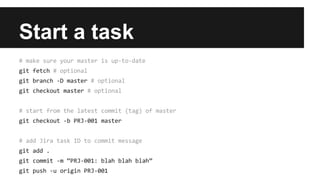
Start a task
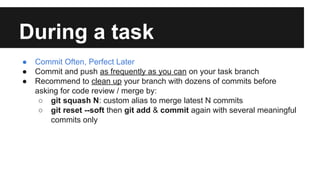
During a task
● Commit Often, Perfect Later
● Commit and push as frequently as you can on your task branch
● Recommend to clean up your branch with dozens of commits before
asking for code review / merge by:
○ git squash N: custom alias to merge latest N commits
○ git reset --soft then git add & commit again with several meaningful
commits only
Merge a task - part 1
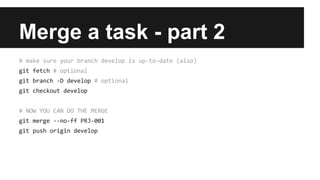
Merge a task - part 2
Fixing bugs on develop
● Suppose:
○ Merged and tested PRJ-001, PRJ-002, PRJ-003
○ Rejected PRJ-002
● Do:
○ Reset and rebuild
● Ideally code should be tested per build, not per task
Room for improvement
I think we could find and employ more tools to make code review and merging
more automatic, less manual
● Git hook
● Pull request
● Gerrit

Civilized Git Process

  • 1.
    Civilized Git Process TuHoang - @hoangngoctu - Mar 2015
  • 2.
    Introduction ● It isnot Git 101 for git newbies ● I will discuss how to use Git efficiently on project level, team process, not command level ● These slides will be used as a reference document. So I am sorry for the exceeding text
  • 3.
    “natural” git flow Gitgraphs of main branches of some projects with several senior developers with several years of git experiences
  • 4.
    “natural” git flow ●more members → more complex ● very hard to understand git graph ● complex and multi-directional merges ● risks of missing codes and regression ● very time-consuming to troubleshoot of code changes Reason: developers were asked to use git without a proper understanding of code versioning
  • 5.
    “civilized” git flow Notperfect (yet) but more civilized, less chaotic!
  • 6.
    Ideal “civilized” gitgraph Anyone knows a good tool to draw a git graph? I will draw one on the whiteboard
  • 7.
    “civilized” branching ● master:production code ● develop: staging / testing code ● task branches Note: in small teams or projects we can use one branch with the role of both master and develop
  • 8.
    “civilized” master ● Alwaysmoving forward ● Forbidden: git reset, direct commit ● Merge code from branch “develop” after passing all the tests ● Each merge should be tagged: 1.0, 1.1, 2.0, etc. ● Emergency hotfix: merge code from branch “hotfix”
  • 9.
    “civilized” develop ● Thedelta from last release to next release ● The branch where we merged our task branches to test ● Checkout from the latest commit (tag) of “master” ● Drop after merged to “master” ● Free to reset, drop ● Forbidden: direct commit ● Could be rebuilt anytime by checking-out again and merging all the tasks for the next release ● Merge task branches with the same base only
  • 10.
    “civilized” task branches ●Meant to be used by one developer only ● If there were more than one developers on the same branch, they must use git pull --rebase ● Start from the latest commit (tag) of “master” ● Merge to “develop” after finishing coding ● Free to commit, reset, squash, push -f, drop, rebase, etc. ● If there are several releases on “master” after the task started, it has to be rebased to the latest commit (tag) of “master” before merging to “develop” ● Always merge with --no-ff ● Forbidden to merge code from any branches to current task branch
  • 11.
  • 12.
    During a task ●Commit Often, Perfect Later ● Commit and push as frequently as you can on your task branch ● Recommend to clean up your branch with dozens of commits before asking for code review / merge by: ○ git squash N: custom alias to merge latest N commits ○ git reset --soft then git add & commit again with several meaningful commits only
  • 13.
    Merge a task- part 1
  • 14.
    Merge a task- part 2
  • 15.
    Fixing bugs ondevelop ● Suppose: ○ Merged and tested PRJ-001, PRJ-002, PRJ-003 ○ Rejected PRJ-002 ● Do: ○ Reset and rebuild ● Ideally code should be tested per build, not per task
  • 16.
    Room for improvement Ithink we could find and employ more tools to make code review and merging more automatic, less manual ● Git hook ● Pull request ● Gerrit