Common practices
and tools
vicente.bolea@gmail.com
Motivation
So far we have covered tools and practices which helps you in
your project in a high level.
However, normally projects integrate tools and practices
when it comes to coding which becomes a integral part of the
project itself.
Scope
1. GNU autotools
2. Design patterns
3. Strategy pattern
Autotools vs. Make
➢ Make let you instruct your compiler how to build your
project for your platform. All the variable are hardcoded.
➢ Autotools does the same thing as Make, however, it also
let you: Forget about dependencies, library building,
different platforms, check for compatibility, build the
actual release package (*.tar.gz) and much more.
Autotools drawbacks
➢ It check compatibility for a useless amount of old
platforms.
➢ It’s bloated.
➢ It’s slow.
➢ It’s hard to learn and you will not expect newbies to
master this tool.
But Autotools is:
➢ Ubiquitous within Linux.
➢ No competitors.
➢ Standard.
➢ Does not require the user to install autotools.
➢ Believe or not, it makes the life easier to the users.
This is how I see
Autotools...
Autotools: user tutorial
Fairly simple:
$ sh autogen.sh
$ sh ./configure --help # Check if there is any relevant opt
$ sh ./configure --prefix /usr/local # for the most cases
# if you are missing a dependency install it by apt, yum ...
$ make [-j #proc] install
Autotools: Developer
tutorial
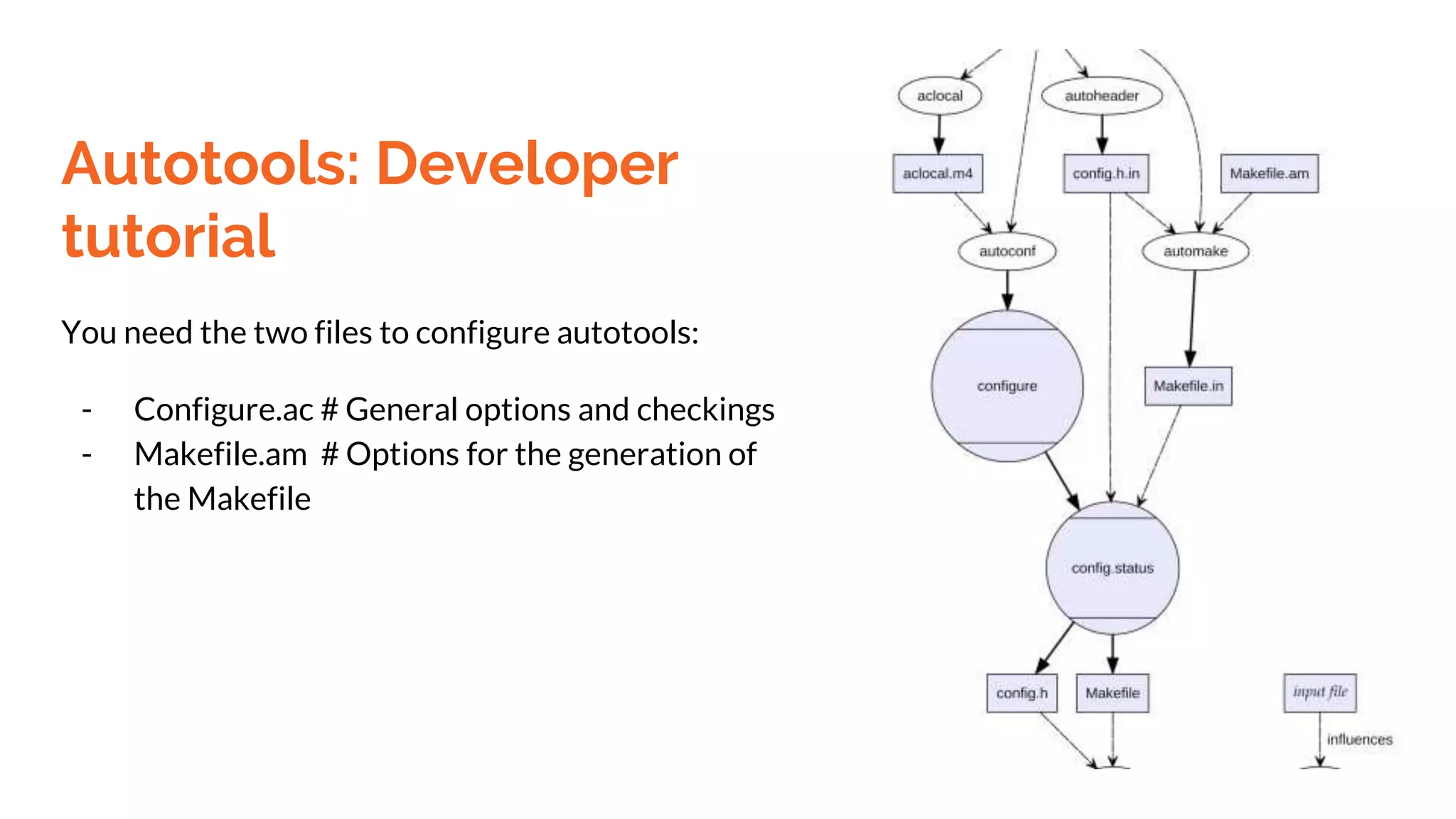
You need the two files to configure autotools:
- Configure.ac # General options and checkings
- Makefile.am # Options for the generation of
the Makefile
Autotools: Developer
tutorial
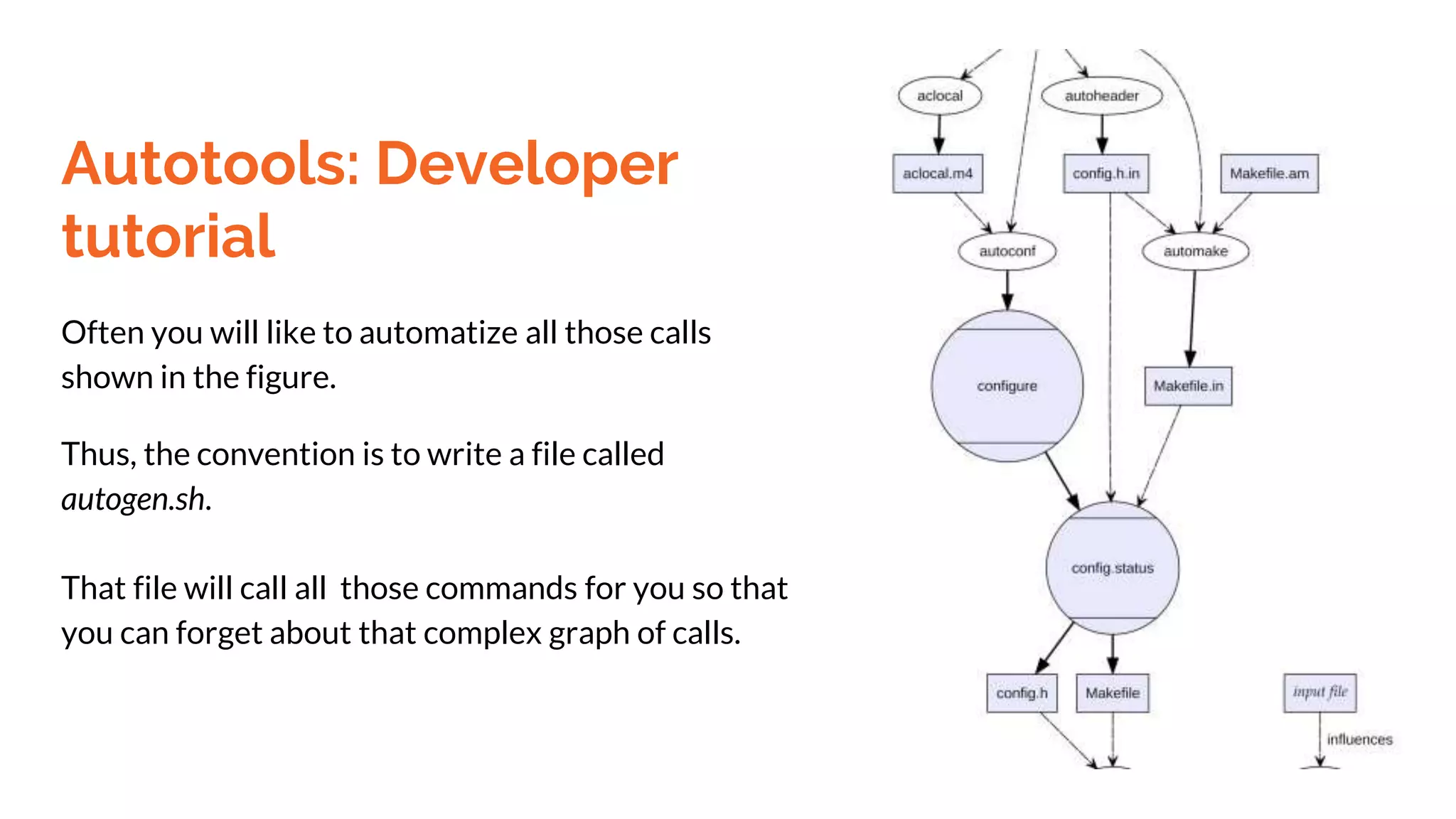
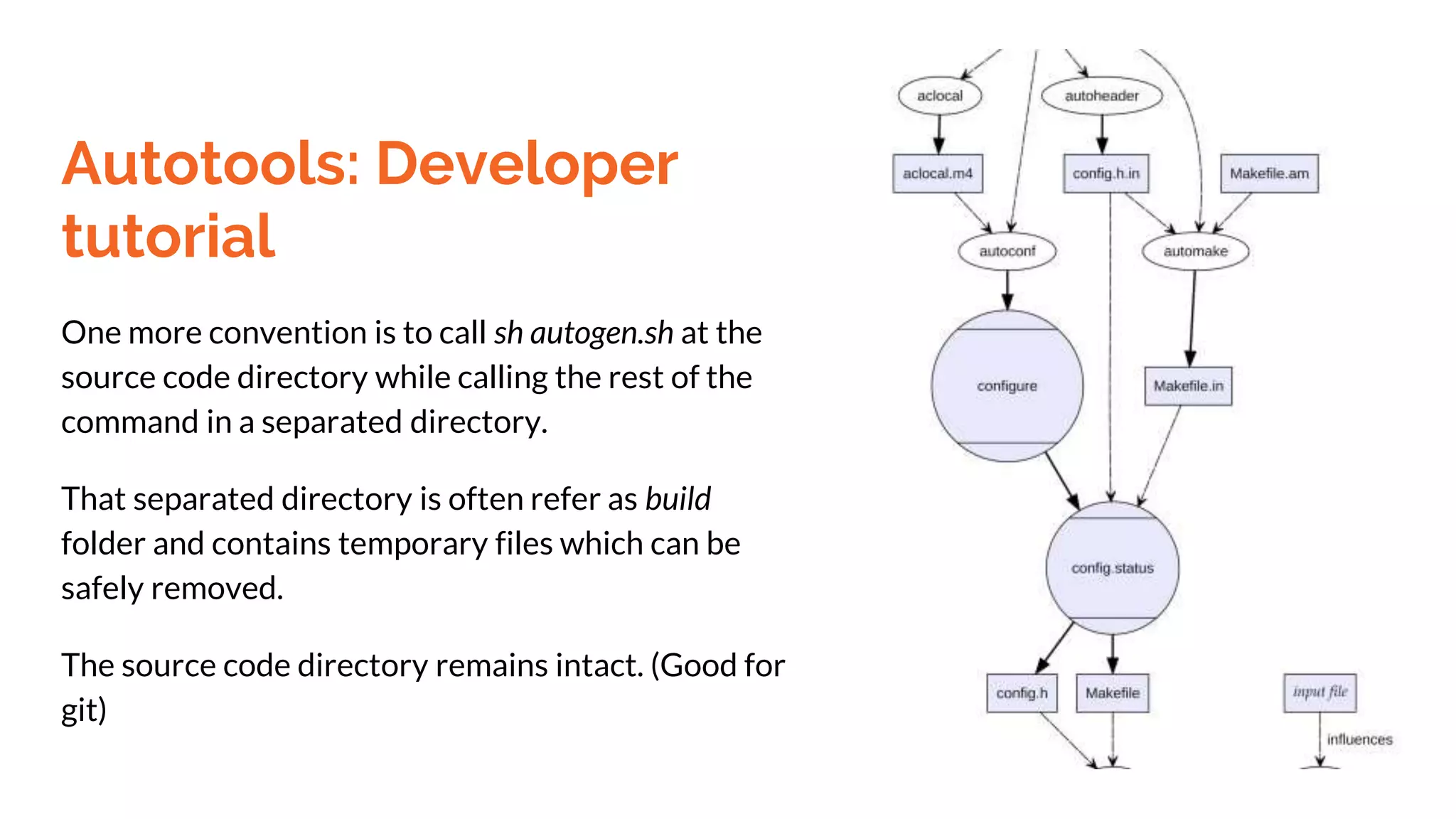
Often you will like to automatize all those calls
shown in the figure.
Thus, the convention is to write a file called
autogen.sh.
That file will call all those commands for you so that
you can forget about that complex graph of calls.
Autotools: Developer
tutorial
One more convention is to call sh autogen.sh at the
source code directory while calling the rest of the
command in a separated directory.
That separated directory is often refer as build
folder and contains temporary files which can be
safely removed.
The source code directory remains intact. (Good for
git)
Design patterns: Motivation
➢ Create a vocabulary among your peers to communicate
faster and more accurately.
➢ Being able to generate a extensible and good class design
for your project.
➢ Gives you a tested solution of your problem.
➢ Easy for other peers to read your code.
I can’t cover all of
the design patterns.
Let’s just focus on
one...
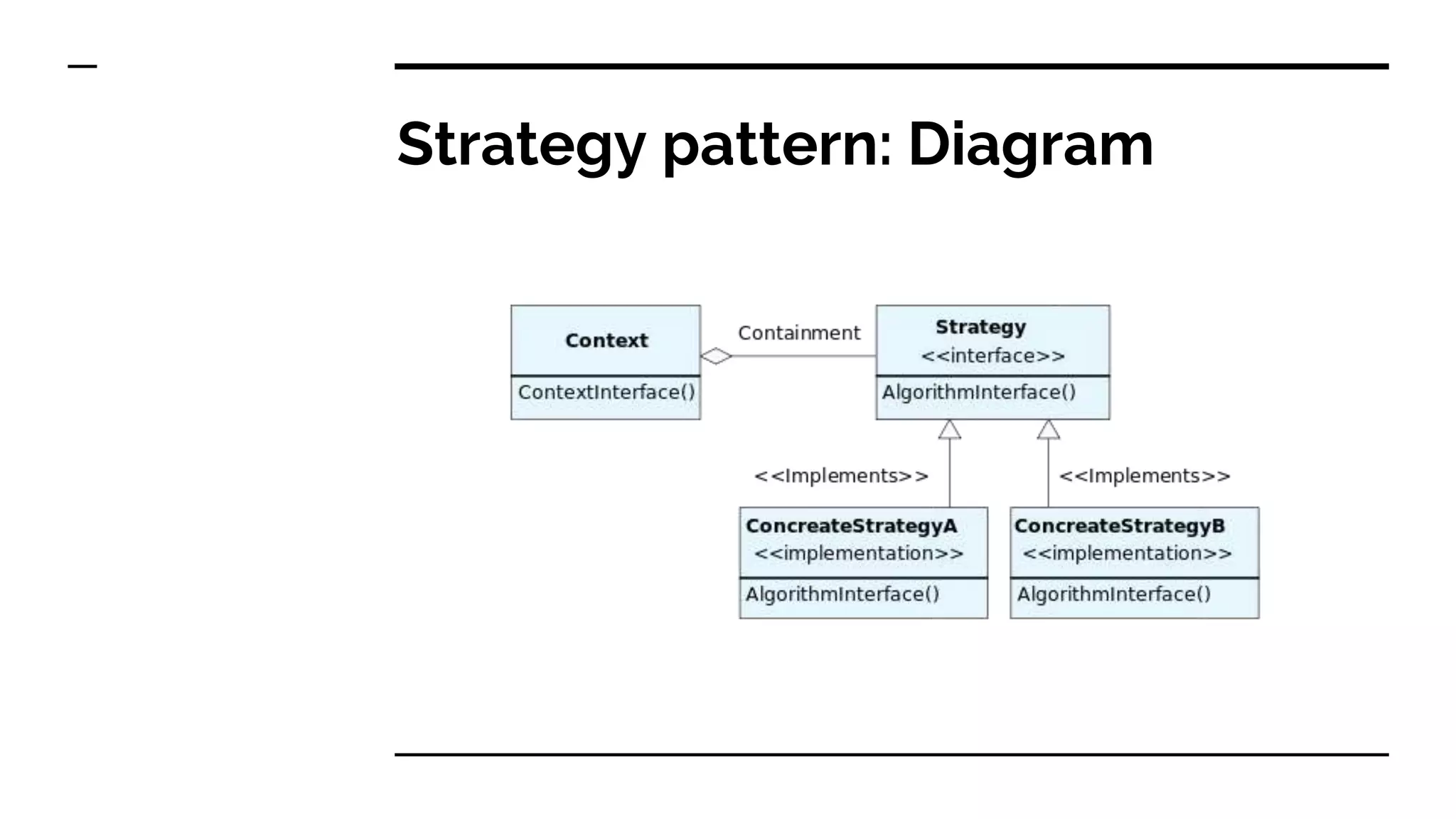
Strategy pattern
Features:
➢ Abstracts a family of algorithms
➢ Encapsulate algorithms (Remove dependencies)
➢ Easy to add new algorithms
Strategy pattern: Diagram
Strategy pattern:
Implementation
The source code is too big for this slide, we can see it in the
following website.
Example
Strategy pattern: Review
As we have seen in the previous example, benefits of strategy
are clear:
➔ Strategy class only has no dependency.
➔ TestBed only depends on Strategy class.
➔ We can add more Strategies without modifying different
classes.
➔ Imagine if you more than 50 different strategies… !
Design pattern: Conclusion
In this mini-tutorial of strategy pattern we can see the
potential benefit of using them.
That is just one of the more than 20 basic design patterns, I
invite you to research and incorporate in your designs.
BONUS:
C++14
shoutout
So far we have used C++98 which is clumsy and
some of its features such as multithreading, lambda
functions and so on are half-cooked. Good new is
that we now have C++14 which allows us to:
● Use lambda functions.
● Multithreading API.
● Auto keyword.
● Move operator.
BONUS: C++14 shoutout
To start using C++14 make sure that your GCC compiler’s version is
higher than 4.9 and compile with the flag -std=c++11.
Also as for your assignments as your TA’s whether is acceptable to use
C++11, 14. Your code will not compile in an old compiler or if they
don’t specified the previously mentioned flags.
Q&A

Autotools, Design Patterns and more

  • 1.
  • 2.
    Motivation So far wehave covered tools and practices which helps you in your project in a high level. However, normally projects integrate tools and practices when it comes to coding which becomes a integral part of the project itself.
  • 3.
    Scope 1. GNU autotools 2.Design patterns 3. Strategy pattern
  • 4.
    Autotools vs. Make ➢Make let you instruct your compiler how to build your project for your platform. All the variable are hardcoded. ➢ Autotools does the same thing as Make, however, it also let you: Forget about dependencies, library building, different platforms, check for compatibility, build the actual release package (*.tar.gz) and much more.
  • 5.
    Autotools drawbacks ➢ Itcheck compatibility for a useless amount of old platforms. ➢ It’s bloated. ➢ It’s slow. ➢ It’s hard to learn and you will not expect newbies to master this tool.
  • 6.
    But Autotools is: ➢Ubiquitous within Linux. ➢ No competitors. ➢ Standard. ➢ Does not require the user to install autotools. ➢ Believe or not, it makes the life easier to the users.
  • 7.
    This is howI see Autotools...
  • 8.
    Autotools: user tutorial Fairlysimple: $ sh autogen.sh $ sh ./configure --help # Check if there is any relevant opt $ sh ./configure --prefix /usr/local # for the most cases # if you are missing a dependency install it by apt, yum ... $ make [-j #proc] install
  • 9.
    Autotools: Developer tutorial You needthe two files to configure autotools: - Configure.ac # General options and checkings - Makefile.am # Options for the generation of the Makefile
  • 10.
    Autotools: Developer tutorial Often youwill like to automatize all those calls shown in the figure. Thus, the convention is to write a file called autogen.sh. That file will call all those commands for you so that you can forget about that complex graph of calls.
  • 11.
    Autotools: Developer tutorial One moreconvention is to call sh autogen.sh at the source code directory while calling the rest of the command in a separated directory. That separated directory is often refer as build folder and contains temporary files which can be safely removed. The source code directory remains intact. (Good for git)
  • 12.
    Design patterns: Motivation ➢Create a vocabulary among your peers to communicate faster and more accurately. ➢ Being able to generate a extensible and good class design for your project. ➢ Gives you a tested solution of your problem. ➢ Easy for other peers to read your code.
  • 13.
    I can’t coverall of the design patterns. Let’s just focus on one...
  • 14.
    Strategy pattern Features: ➢ Abstractsa family of algorithms ➢ Encapsulate algorithms (Remove dependencies) ➢ Easy to add new algorithms
  • 15.
  • 16.
    Strategy pattern: Implementation The sourcecode is too big for this slide, we can see it in the following website. Example
  • 17.
    Strategy pattern: Review Aswe have seen in the previous example, benefits of strategy are clear: ➔ Strategy class only has no dependency. ➔ TestBed only depends on Strategy class. ➔ We can add more Strategies without modifying different classes. ➔ Imagine if you more than 50 different strategies… !
  • 18.
    Design pattern: Conclusion Inthis mini-tutorial of strategy pattern we can see the potential benefit of using them. That is just one of the more than 20 basic design patterns, I invite you to research and incorporate in your designs.
  • 19.
    BONUS: C++14 shoutout So far wehave used C++98 which is clumsy and some of its features such as multithreading, lambda functions and so on are half-cooked. Good new is that we now have C++14 which allows us to: ● Use lambda functions. ● Multithreading API. ● Auto keyword. ● Move operator.
  • 20.
    BONUS: C++14 shoutout Tostart using C++14 make sure that your GCC compiler’s version is higher than 4.9 and compile with the flag -std=c++11. Also as for your assignments as your TA’s whether is acceptable to use C++11, 14. Your code will not compile in an old compiler or if they don’t specified the previously mentioned flags.
  • 21.