München
>> Save My Time Using Scripts
Social Connections V - Zürich
Christoph Stöttner
IBM Software Consultant
1
June 2013
>>
3
1. Administration of IBM Connections
• ISC – Integrated Solution Console
• wsadmin
2. WebSphere Application Server
• Jython
• wsadmin properties
• Useful scripts
3. DB2 – Backup
• Automatic Maintenance
• Useful Selects
4. Little bit more
• Get Root CA
Agenda
>>
4
Who am I?
Christoph Stöttner
IBM Software Consultant
• mailto:cstoettner@fum.de
• IBM Connections since 2.5
• Former Domino / Windows / Linux Admin
• My Blog: http://www.stoeps.de
• Twitter: @stoeps
• more on: http://about.me/stoeps
5
1. IBM Connections Administration
>> IBM Connections Administration
>>
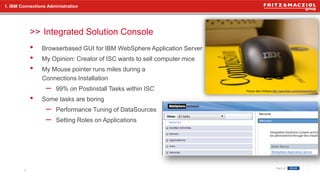
• Browserbased GUI for IBM WebSphere Application Server
• My Opinion: Creator of ISC wants to sell computer mice
• My Mouse pointer runs miles during a
Connections Installation
– 99% on Postinstall Tasks within ISC
• Some tasks are boring
– Performance Tuning of DataSources
– Setting Roles on Applications
1. IBM Connections Administration
Integrated Solution Console
6
Picture: Ben Williams http://www.flickr.com/photos/bodhack/
>>
• Edit LotusConnections-config.xml
wsadmin, CheckIn, CheckOut – Edit XML
7
1. IBM Connections Administration
cd /opt/IBM/WebSphere/AppServer/profiles/Dmgr01/bin
[root@cnxwas1 bin]# ./wsadmin.sh -lang jython -username wasadmin -password password
WASX7209I: Connected to process "dmgr" on node cnxwas1CellManager01 using SOAP
connector; The type of process is: DeploymentManager
WASX7031I: For help, enter: "print Help.help()"
wsadmin>AdminControl.getCell()
'cnxwas1Cell01'
wsadmin>execfile("connectionsConfig.py")
Connections Administration initialized
wsadmin>LCConfigService.checkOutConfig('/tmp','cnxwas1Cell01')
Connections configuration file successfully checked out
wsadmin>># Edit /tmp/LotusConnections-config.xml
wsadmin>>LCConfigService.checkInConfig('/tmp','cnxwas1Cell01')
Loading schema file for validation: /tmp/LotusConnections-config.xsd
Loading schema file for validation: /tmp/service-location.xsd
/tmp/LotusConnections-config.xml is valid
Connections configuration file successfully checked in
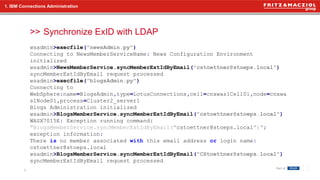
>> Synchronize ExID with LDAP
8
1. IBM Connections Administration
wsadmin>execfile("newsAdmin.py")
Connecting to NewsMemberServiceName: News Configuration Environment
initialized
wsadmin>NewsMemberService.syncMemberExtIdByEmail("cstoettner@stoeps.local")
syncMemberExtIdByEmail request processed
wsadmin>execfile("blogsAdmin.py")
Connecting to
WebSphere:name=BlogsAdmin,type=LotusConnections,cell=cnxwas1Cell01,node=cnxwa
s1Node01,process=Cluster2_server1
Blogs Administration initialized
wsadmin>BlogsMemberService.syncMemberExtIdByEmail("cstoettner@stoeps.local")
WASX7015E: Exception running command:
"BlogsMemberService.syncMemberExtIdByEmail("cstoettner@stoeps.local")";
exception information:
There is no member associated with this email address or login name:
cstoettner@stoeps.local
wsadmin>BlogsMemberService.syncMemberExtIdByEmail("CStoettner@stoeps.local")
syncMemberExtIdByEmail request processed
>>
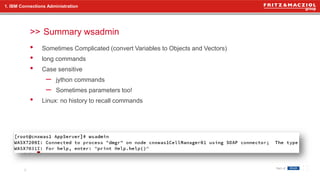
• Sometimes Complicated (convert Variables to Objects and Vectors)
• long commands
• Case sensitive
– jython commands
– Sometimes parameters too!
• Linux: no history to recall commands
Summary wsadmin
9
1. IBM Connections Administration
10
2. IBM WebSphere Application Server Scripting
>> IBM WebSphere Application Server Scripting
>>
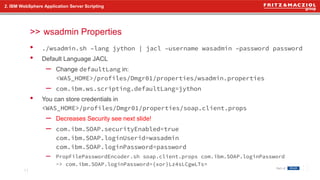
• ./wsadmin.sh –lang jython | jacl –username wasadmin –password password
• Default Language JACL
– Change defaultLang in:
<WAS_HOME>/profiles/Dmgr01/properties/wsadmin.properties
– com.ibm.ws.scripting.defaultLang=jython
• You can store credentials in
<WAS_HOME>/profiles/Dmgr01/properties/soap.client.props
– Decreases Security see next slide!
– com.ibm.SOAP.securityEnabled=true
com.ibm.SOAP.loginUserid=wasadmin
com.ibm.SOAP.loginPassword=password
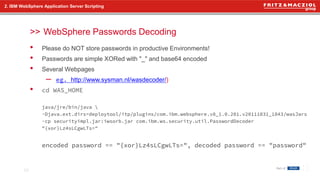
– PropFilePasswordEncoder.sh soap.client.props com.ibm.SOAP.loginPassword
-> com.ibm.SOAP.loginPassword={xor}Lz4sLCgwLTs=
2. IBM WebSphere Application Server Scripting
wsadmin Properties
11
>>
• Please do NOT store passwords in productive Environments!
• Passwords are simple XORed with "_" and base64 encoded
• Several Webpages
– eg. http://www.sysman.nl/wasdecoder/)
• cd WAS_HOME
java/jre/bin/java 
-Djava.ext.dirs=deploytool/itp/plugins/com.ibm.websphere.v8_1.0.201.v20111031_1843/wasJars
-cp securityimpl.jar:iwsorb.jar com.ibm.ws.security.util.PasswordDecoder
"{xor}Lz4sLCgwLTs="
encoded password == "{xor}Lz4sLCgwLTs=", decoded password == "password"
2. IBM WebSphere Application Server Scripting
WebSphere Passwords Decoding
12
>>
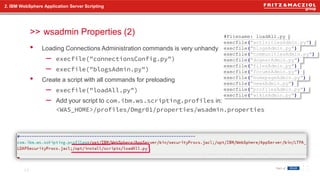
• Loading Connections Administration commands is very unhandy
– execfile("connectionsConfig.py")
– execfile("blogsAdmin.py")
• Create a script with all commands for preloading
– execfile("loadAll.py")
– Add your script to com.ibm.ws.scripting.profiles in:
<WAS_HOME>/profiles/Dmgr01/properties/wsadmin.properties
2. IBM WebSphere Application Server Scripting
wsadmin Properties (2)
13
#Filename: loadAll.py
execfile("activitiesAdmin.py")
execfile("blogsAdmin.py")
execfile("communitiesAdmin.py")
execfile("dogearAdmin.py")
execfile("filesAdmin.py")
execfile("forumsAdmin.py")
execfile("homepageAdmin.py")
execfile("newsAdmin.py")
execfile("profilesAdmin.py")
execfile("wikisAdmin.py")
>>
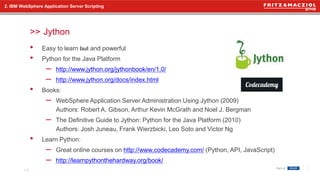
• Easy to learn but and powerful
• Python for the Java Platform
– http://www.jython.org/jythonbook/en/1.0/
– http://www.jython.org/docs/index.html
• Books:
– WebSphere Application Server Administration Using Jython (2009)
Authors: Robert A. Gibson, Arthur Kevin McGrath and Noel J. Bergman
– The Definitive Guide to Jython: Python for the Java Platform (2010)
Authors: Josh Juneau, Frank Wierzbicki, Leo Soto and Victor Ng
• Learn Python:
– Great online courses on http://www.codecademy.com/ (Python, API, JavaScript)
– http://learnpythonthehardway.org/book/
2. IBM WebSphere Application Server Scripting
Jython
14
>>
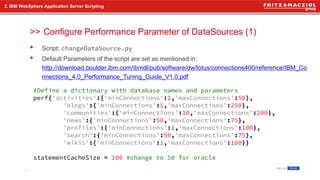
• Script: changeDataSource.py
• Default Parameters of the script are set as mentioned in:
http://download.boulder.ibm.com/ibmdl/pub/software/dw/lotus/connections400/reference/IBM_Co
nnections_4.0_Performance_Tuning_Guide_V1.0.pdf
2. IBM WebSphere Application Server Scripting
Configure Performance Parameter of DataSources (1)
15
#Define a dictionary with database names and parameters
perf{'activities':{'minConnections':1,'maxConnections':50},
'blogs':{'minConnections':1,'maxConnections':250},
'communities':{'minConnections':10,'maxConnections':200},
'news':{'minConnections':50,'maxConnections':75},
'profiles':{'minConnections':1,'maxConnections':100},
'search':{'minConnections':50,'maxConnections':75},
'wikis':{'minConnections':1,'maxConnections':100}}
statementCacheSize = 100 #change to 50 for oracle
>>
• Looping through Dictionary
2. IBM WebSphere Application Server Scripting
Configure Performance Parameter to DataSource (2)
16
for db in perf.keys(): # Looping through databases, first values in dictionary
print 'Change DataSource parameters for: %s' % db.upper()
t1=AdminConfig.getid('/DataSource:' + db + '/')
print ' statementCacheSize: ' + str(statementCacheSize)
print ' minConnections: ' + str(perf[db]['minConnections'])
print ' maxConnections: ' + str(perf[db]['maxConnections'])
AdminConfig.modify(t1,'[[statementCacheSize "' + str(statementCacheSize) + '"]]')
AdminConfig.modify(t1,'[[connectionPool [[minConnections "' + str(perf[db]['minConnections']) +
'"][maxConnections "' + str(perf[db]['maxConnections']) + '"]]]]')
AdminConfig.save()
>>
• Script: memberSyncByEmail.py
• Script reads MAILADDRESS as Parameter
• Call the script:
./wsadmin.sh –lang jython –f "<path>/memberSyncByEmail.py" "cstoettner@stoeps.local"
2. IBM WebSphere Application Server Scripting
Useful Scripts: Trigger MemberService on all Applications
17
MAILADDRESS = sys.argv[0]
print "Syncing MemberService for " + MAILADDRESS
execfile("/opt/install/scripts/memberService.py") #like loadAll.py
ActivitiesMemberService.syncMemberExtIdByEmail(MAILADDRESS)
BlogsMemberService.syncMemberExtIdByEmail(MAILADDRESS)
CommunitiesMemberService.syncMemberExtIdByEmail(MAILADDRESS)
DogearMemberService.syncMemberExtIdByEmail(MAILADDRESS)
FilesMemberService.syncMemberExtIdByEmail(MAILADDRESS)
ForumsMemberService.syncMemberExtIdByEmail(MAILADDRESS)
NewsMemberService.syncMemberExtIdByEmail(MAILADDRESS)
WikisMemberService.syncMemberExtIdByEmail(MAILADDRESS)
>>
• Check Database Connection through wsadmin
• script: checkDataSource.py
• Output:
• ./wsadmin.sh –lang jython –f checkDataSource.py
• within wsadmin: execfile("checkDataSource.py")
2. IBM WebSphere Application Server Scripting
Troubleshooting Database Connection
18
dbs =
['activities','blogs','communities','dogear','files','forum','homepage','metrics','mobile','news','o
auth provider','profiles','search','wikis'] #List of all databases to check
for db in dbs: #loop through databases
ds = AdminConfig.getid('/DataSource:' + db + '/')
print "Check database %s" % db,
print AdminControl.testConnection(ds)
Check database: activities WASX7217I: Connection to provided datasource was successful.
Check database: blogs WASX7217I: Connection to provided datasource was successful.
Check database: communities WASX7217I: Connection to provided datasource was successful.
[...]
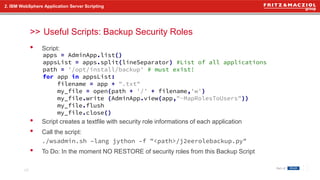
>>
• Script:
• Script creates a textfile with security role informations of each application
• Call the script:
./wsadmin.sh –lang jython –f "<path>/j2eerolebackup.py"
• To Do: In the moment NO RESTORE of security roles from this Backup Script
2. IBM WebSphere Application Server Scripting
Useful Scripts: Backup Security Roles
19
apps = AdminApp.list()
appsList = apps.split(lineSeparator) #List of all applications
path = '/opt/install/backup' # must exist!
for app in appsList:
filename = app + ".txt"
my_file = open(path + '/' + filename,'w')
my_file.write (AdminApp.view(app,"-MapRolesToUsers"))
my_file.flush
my_file.close()
>>
2. IBM WebSphere Application Server Scripting
Useful Scripts: Backup Security Roles - Output
20
MapRolesToUsers: Mapping users to roles
[...]
Role: everyone
Everyone?: Yes
All authenticated?: No
Mapped users:
Mapped groups:
All authenticated in trusted realms?: No
Mapped users access ids:
Mapped groups access ids:
Role: search-admin
Everyone?: No
All authenticated?: No
Mapped users: aconnections
Mapped groups:
All authenticated in trusted realms?: No
Mapped users access ids:
Mapped groups access ids:
>>
• Set Default Security Roles and Restrict Roles to some Administrators:
– http://kbild.ch/2013/05/add-admin-users-to-ibm-connections-security-roles-update-for-4-5/
2. IBM WebSphere Application Server Scripting
Useful scripts on the web
21
connwasadmin='wasadmin'
connadmin='Admin1|Admin2'
connmoderators='Moderator1|Moderator2'
connmetrics='Metrics1|Metrics2'
connmobile='Mobile1|Mobile2'
appName='Activities'
AdminApp.edit(appName, '[-MapRolesToUsers [["person" No Yes "" ""] ["everyone" Yes No ""
""] ["reader" Yes No "" ""] ["metrics-reader" No Yes "" ""] ["search-admin" No No
"'+connwasadmin+'|'+connadmin+'" ""] ["widget-admin" No No "'+connwasadmin+'|'+connadmin+'"
""] ["admin" No No "'+connwasadmin+'|'+connadmin+'" ""] ["bss-provisioning-admin" No No ""
""] ]]')
print "Setting Roles and Users for Activities"
AdminConfig.save()
22
3. IBM DB2 Scripting
>> IBM DB2 Scripting
>>
• Get a list of all databases of an instance
– Linux:
db2 list database directory | grep alias | awk '{print $4}' | sort
– Windows Powershell:
db2 list database directory | where {$_ -match "alias"}| %{
$_.Split('=')[2]; }
• Show active databases:
– db2 list active databases
Useful commands
23
3. IBM DB2 Scripting
>>
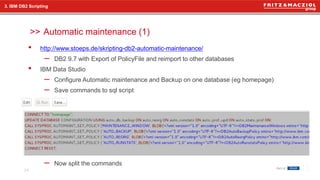
• http://www.stoeps.de/skripting-db2-automatic-maintenance/
– DB2 9.7 with Export of PolicyFile and reimport to other databases
• IBM Data Studio
– Configure Automatic maintenance and Backup on one database (eg homepage)
– Save commands to sql script
– Now split the commands
Automatic maintenance (1)
24
3. IBM DB2 Scripting
>>
• automaint.sql
– copy the update line and the 4 CALL statements
– or download my automaint.sql and change the backup path (GitHub)
• setmaintenance.sh
Automatic maintenance (2)
25
3. IBM DB2 Scripting
#!/bin/bash
databases=$(db2 list database directory | grep alias | awk '{print $4}' | sort)
for database in ${databases[@]}
do
echo $database
db2 "connect to $database"
db2 -tvf automaint.sql
db2 "connect reset"
done
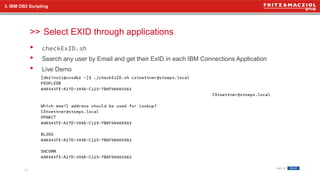
>>
• checkExID.sh
• Search any user by Email and get their ExID in each IBM Connections Application
• Live Demo
3. IBM DB2 Scripting
Select EXID through applications
26
4. Some more
Some more
27
>>
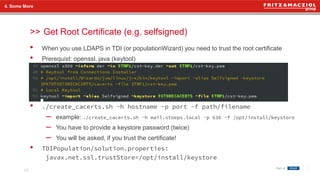
• When you use LDAPS in TDI (or populationWizard) you need to trust the root certificate
• Prerequist: openssl, java (keytool)
• ./create_cacerts.sh -h hostname -p port -f path/filename
– example: ./create_cacerts.sh -h mail.stoeps.local -p 636 -f /opt/install/keystore
– You have to provide a keystore password (twice)
– You will be asked, if you trust the certificate!
• TDIPopulation/solution.properties:
javax.net.ssl.trustStore=/opt/install/keystore
4. Some More
Get Root Certificate (e.g. selfsigned)
28
5. Ressources
Ressources
29
>>
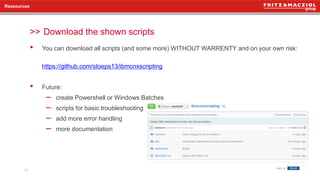
• You can download all scripts (and some more) WITHOUT WARRENTY and on your own risk:
https://github.com/stoeps13/ibmcnxscripting
• Future:
– create Powershell or Windows Batches
– scripts for basic troubleshooting
– add more error handling
– more documentation
Ressources
Download the shown scripts
30
Questions?
31

Christoph Stoettner - Save my time using scripts

  • 1.
    München >> Save MyTime Using Scripts Social Connections V - Zürich Christoph Stöttner IBM Software Consultant 1
  • 2.
  • 3.
    >> 3 1. Administration ofIBM Connections • ISC – Integrated Solution Console • wsadmin 2. WebSphere Application Server • Jython • wsadmin properties • Useful scripts 3. DB2 – Backup • Automatic Maintenance • Useful Selects 4. Little bit more • Get Root CA Agenda
  • 4.
    >> 4 Who am I? ChristophStöttner IBM Software Consultant • mailto:cstoettner@fum.de • IBM Connections since 2.5 • Former Domino / Windows / Linux Admin • My Blog: http://www.stoeps.de • Twitter: @stoeps • more on: http://about.me/stoeps
  • 5.
    5 1. IBM ConnectionsAdministration >> IBM Connections Administration
  • 6.
    >> • Browserbased GUIfor IBM WebSphere Application Server • My Opinion: Creator of ISC wants to sell computer mice • My Mouse pointer runs miles during a Connections Installation – 99% on Postinstall Tasks within ISC • Some tasks are boring – Performance Tuning of DataSources – Setting Roles on Applications 1. IBM Connections Administration Integrated Solution Console 6 Picture: Ben Williams http://www.flickr.com/photos/bodhack/
  • 7.
    >> • Edit LotusConnections-config.xml wsadmin,CheckIn, CheckOut – Edit XML 7 1. IBM Connections Administration cd /opt/IBM/WebSphere/AppServer/profiles/Dmgr01/bin [root@cnxwas1 bin]# ./wsadmin.sh -lang jython -username wasadmin -password password WASX7209I: Connected to process "dmgr" on node cnxwas1CellManager01 using SOAP connector; The type of process is: DeploymentManager WASX7031I: For help, enter: "print Help.help()" wsadmin>AdminControl.getCell() 'cnxwas1Cell01' wsadmin>execfile("connectionsConfig.py") Connections Administration initialized wsadmin>LCConfigService.checkOutConfig('/tmp','cnxwas1Cell01') Connections configuration file successfully checked out wsadmin>># Edit /tmp/LotusConnections-config.xml wsadmin>>LCConfigService.checkInConfig('/tmp','cnxwas1Cell01') Loading schema file for validation: /tmp/LotusConnections-config.xsd Loading schema file for validation: /tmp/service-location.xsd /tmp/LotusConnections-config.xml is valid Connections configuration file successfully checked in
  • 8.
    >> Synchronize ExIDwith LDAP 8 1. IBM Connections Administration wsadmin>execfile("newsAdmin.py") Connecting to NewsMemberServiceName: News Configuration Environment initialized wsadmin>NewsMemberService.syncMemberExtIdByEmail("cstoettner@stoeps.local") syncMemberExtIdByEmail request processed wsadmin>execfile("blogsAdmin.py") Connecting to WebSphere:name=BlogsAdmin,type=LotusConnections,cell=cnxwas1Cell01,node=cnxwa s1Node01,process=Cluster2_server1 Blogs Administration initialized wsadmin>BlogsMemberService.syncMemberExtIdByEmail("cstoettner@stoeps.local") WASX7015E: Exception running command: "BlogsMemberService.syncMemberExtIdByEmail("cstoettner@stoeps.local")"; exception information: There is no member associated with this email address or login name: cstoettner@stoeps.local wsadmin>BlogsMemberService.syncMemberExtIdByEmail("CStoettner@stoeps.local") syncMemberExtIdByEmail request processed
  • 9.
    >> • Sometimes Complicated(convert Variables to Objects and Vectors) • long commands • Case sensitive – jython commands – Sometimes parameters too! • Linux: no history to recall commands Summary wsadmin 9 1. IBM Connections Administration
  • 10.
    10 2. IBM WebSphereApplication Server Scripting >> IBM WebSphere Application Server Scripting
  • 11.
    >> • ./wsadmin.sh –langjython | jacl –username wasadmin –password password • Default Language JACL – Change defaultLang in: <WAS_HOME>/profiles/Dmgr01/properties/wsadmin.properties – com.ibm.ws.scripting.defaultLang=jython • You can store credentials in <WAS_HOME>/profiles/Dmgr01/properties/soap.client.props – Decreases Security see next slide! – com.ibm.SOAP.securityEnabled=true com.ibm.SOAP.loginUserid=wasadmin com.ibm.SOAP.loginPassword=password – PropFilePasswordEncoder.sh soap.client.props com.ibm.SOAP.loginPassword -> com.ibm.SOAP.loginPassword={xor}Lz4sLCgwLTs= 2. IBM WebSphere Application Server Scripting wsadmin Properties 11
  • 12.
    >> • Please doNOT store passwords in productive Environments! • Passwords are simple XORed with "_" and base64 encoded • Several Webpages – eg. http://www.sysman.nl/wasdecoder/) • cd WAS_HOME java/jre/bin/java -Djava.ext.dirs=deploytool/itp/plugins/com.ibm.websphere.v8_1.0.201.v20111031_1843/wasJars -cp securityimpl.jar:iwsorb.jar com.ibm.ws.security.util.PasswordDecoder "{xor}Lz4sLCgwLTs=" encoded password == "{xor}Lz4sLCgwLTs=", decoded password == "password" 2. IBM WebSphere Application Server Scripting WebSphere Passwords Decoding 12
  • 13.
    >> • Loading ConnectionsAdministration commands is very unhandy – execfile("connectionsConfig.py") – execfile("blogsAdmin.py") • Create a script with all commands for preloading – execfile("loadAll.py") – Add your script to com.ibm.ws.scripting.profiles in: <WAS_HOME>/profiles/Dmgr01/properties/wsadmin.properties 2. IBM WebSphere Application Server Scripting wsadmin Properties (2) 13 #Filename: loadAll.py execfile("activitiesAdmin.py") execfile("blogsAdmin.py") execfile("communitiesAdmin.py") execfile("dogearAdmin.py") execfile("filesAdmin.py") execfile("forumsAdmin.py") execfile("homepageAdmin.py") execfile("newsAdmin.py") execfile("profilesAdmin.py") execfile("wikisAdmin.py")
  • 14.
    >> • Easy tolearn but and powerful • Python for the Java Platform – http://www.jython.org/jythonbook/en/1.0/ – http://www.jython.org/docs/index.html • Books: – WebSphere Application Server Administration Using Jython (2009) Authors: Robert A. Gibson, Arthur Kevin McGrath and Noel J. Bergman – The Definitive Guide to Jython: Python for the Java Platform (2010) Authors: Josh Juneau, Frank Wierzbicki, Leo Soto and Victor Ng • Learn Python: – Great online courses on http://www.codecademy.com/ (Python, API, JavaScript) – http://learnpythonthehardway.org/book/ 2. IBM WebSphere Application Server Scripting Jython 14
  • 15.
    >> • Script: changeDataSource.py •Default Parameters of the script are set as mentioned in: http://download.boulder.ibm.com/ibmdl/pub/software/dw/lotus/connections400/reference/IBM_Co nnections_4.0_Performance_Tuning_Guide_V1.0.pdf 2. IBM WebSphere Application Server Scripting Configure Performance Parameter of DataSources (1) 15 #Define a dictionary with database names and parameters perf{'activities':{'minConnections':1,'maxConnections':50}, 'blogs':{'minConnections':1,'maxConnections':250}, 'communities':{'minConnections':10,'maxConnections':200}, 'news':{'minConnections':50,'maxConnections':75}, 'profiles':{'minConnections':1,'maxConnections':100}, 'search':{'minConnections':50,'maxConnections':75}, 'wikis':{'minConnections':1,'maxConnections':100}} statementCacheSize = 100 #change to 50 for oracle
  • 16.
    >> • Looping throughDictionary 2. IBM WebSphere Application Server Scripting Configure Performance Parameter to DataSource (2) 16 for db in perf.keys(): # Looping through databases, first values in dictionary print 'Change DataSource parameters for: %s' % db.upper() t1=AdminConfig.getid('/DataSource:' + db + '/') print ' statementCacheSize: ' + str(statementCacheSize) print ' minConnections: ' + str(perf[db]['minConnections']) print ' maxConnections: ' + str(perf[db]['maxConnections']) AdminConfig.modify(t1,'[[statementCacheSize "' + str(statementCacheSize) + '"]]') AdminConfig.modify(t1,'[[connectionPool [[minConnections "' + str(perf[db]['minConnections']) + '"][maxConnections "' + str(perf[db]['maxConnections']) + '"]]]]') AdminConfig.save()
  • 17.
    >> • Script: memberSyncByEmail.py •Script reads MAILADDRESS as Parameter • Call the script: ./wsadmin.sh –lang jython –f "<path>/memberSyncByEmail.py" "cstoettner@stoeps.local" 2. IBM WebSphere Application Server Scripting Useful Scripts: Trigger MemberService on all Applications 17 MAILADDRESS = sys.argv[0] print "Syncing MemberService for " + MAILADDRESS execfile("/opt/install/scripts/memberService.py") #like loadAll.py ActivitiesMemberService.syncMemberExtIdByEmail(MAILADDRESS) BlogsMemberService.syncMemberExtIdByEmail(MAILADDRESS) CommunitiesMemberService.syncMemberExtIdByEmail(MAILADDRESS) DogearMemberService.syncMemberExtIdByEmail(MAILADDRESS) FilesMemberService.syncMemberExtIdByEmail(MAILADDRESS) ForumsMemberService.syncMemberExtIdByEmail(MAILADDRESS) NewsMemberService.syncMemberExtIdByEmail(MAILADDRESS) WikisMemberService.syncMemberExtIdByEmail(MAILADDRESS)
  • 18.
    >> • Check DatabaseConnection through wsadmin • script: checkDataSource.py • Output: • ./wsadmin.sh –lang jython –f checkDataSource.py • within wsadmin: execfile("checkDataSource.py") 2. IBM WebSphere Application Server Scripting Troubleshooting Database Connection 18 dbs = ['activities','blogs','communities','dogear','files','forum','homepage','metrics','mobile','news','o auth provider','profiles','search','wikis'] #List of all databases to check for db in dbs: #loop through databases ds = AdminConfig.getid('/DataSource:' + db + '/') print "Check database %s" % db, print AdminControl.testConnection(ds) Check database: activities WASX7217I: Connection to provided datasource was successful. Check database: blogs WASX7217I: Connection to provided datasource was successful. Check database: communities WASX7217I: Connection to provided datasource was successful. [...]
  • 19.
    >> • Script: • Scriptcreates a textfile with security role informations of each application • Call the script: ./wsadmin.sh –lang jython –f "<path>/j2eerolebackup.py" • To Do: In the moment NO RESTORE of security roles from this Backup Script 2. IBM WebSphere Application Server Scripting Useful Scripts: Backup Security Roles 19 apps = AdminApp.list() appsList = apps.split(lineSeparator) #List of all applications path = '/opt/install/backup' # must exist! for app in appsList: filename = app + ".txt" my_file = open(path + '/' + filename,'w') my_file.write (AdminApp.view(app,"-MapRolesToUsers")) my_file.flush my_file.close()
  • 20.
    >> 2. IBM WebSphereApplication Server Scripting Useful Scripts: Backup Security Roles - Output 20 MapRolesToUsers: Mapping users to roles [...] Role: everyone Everyone?: Yes All authenticated?: No Mapped users: Mapped groups: All authenticated in trusted realms?: No Mapped users access ids: Mapped groups access ids: Role: search-admin Everyone?: No All authenticated?: No Mapped users: aconnections Mapped groups: All authenticated in trusted realms?: No Mapped users access ids: Mapped groups access ids:
  • 21.
    >> • Set DefaultSecurity Roles and Restrict Roles to some Administrators: – http://kbild.ch/2013/05/add-admin-users-to-ibm-connections-security-roles-update-for-4-5/ 2. IBM WebSphere Application Server Scripting Useful scripts on the web 21 connwasadmin='wasadmin' connadmin='Admin1|Admin2' connmoderators='Moderator1|Moderator2' connmetrics='Metrics1|Metrics2' connmobile='Mobile1|Mobile2' appName='Activities' AdminApp.edit(appName, '[-MapRolesToUsers [["person" No Yes "" ""] ["everyone" Yes No "" ""] ["reader" Yes No "" ""] ["metrics-reader" No Yes "" ""] ["search-admin" No No "'+connwasadmin+'|'+connadmin+'" ""] ["widget-admin" No No "'+connwasadmin+'|'+connadmin+'" ""] ["admin" No No "'+connwasadmin+'|'+connadmin+'" ""] ["bss-provisioning-admin" No No "" ""] ]]') print "Setting Roles and Users for Activities" AdminConfig.save()
  • 22.
    22 3. IBM DB2Scripting >> IBM DB2 Scripting
  • 23.
    >> • Get alist of all databases of an instance – Linux: db2 list database directory | grep alias | awk '{print $4}' | sort – Windows Powershell: db2 list database directory | where {$_ -match "alias"}| %{ $_.Split('=')[2]; } • Show active databases: – db2 list active databases Useful commands 23 3. IBM DB2 Scripting
  • 24.
    >> • http://www.stoeps.de/skripting-db2-automatic-maintenance/ – DB29.7 with Export of PolicyFile and reimport to other databases • IBM Data Studio – Configure Automatic maintenance and Backup on one database (eg homepage) – Save commands to sql script – Now split the commands Automatic maintenance (1) 24 3. IBM DB2 Scripting
  • 25.
    >> • automaint.sql – copythe update line and the 4 CALL statements – or download my automaint.sql and change the backup path (GitHub) • setmaintenance.sh Automatic maintenance (2) 25 3. IBM DB2 Scripting #!/bin/bash databases=$(db2 list database directory | grep alias | awk '{print $4}' | sort) for database in ${databases[@]} do echo $database db2 "connect to $database" db2 -tvf automaint.sql db2 "connect reset" done
  • 26.
    >> • checkExID.sh • Searchany user by Email and get their ExID in each IBM Connections Application • Live Demo 3. IBM DB2 Scripting Select EXID through applications 26
  • 27.
  • 28.
    >> • When youuse LDAPS in TDI (or populationWizard) you need to trust the root certificate • Prerequist: openssl, java (keytool) • ./create_cacerts.sh -h hostname -p port -f path/filename – example: ./create_cacerts.sh -h mail.stoeps.local -p 636 -f /opt/install/keystore – You have to provide a keystore password (twice) – You will be asked, if you trust the certificate! • TDIPopulation/solution.properties: javax.net.ssl.trustStore=/opt/install/keystore 4. Some More Get Root Certificate (e.g. selfsigned) 28
  • 29.
  • 30.
    >> • You candownload all scripts (and some more) WITHOUT WARRENTY and on your own risk: https://github.com/stoeps13/ibmcnxscripting • Future: – create Powershell or Windows Batches – scripts for basic troubleshooting – add more error handling – more documentation Ressources Download the shown scripts 30
  • 31.