Chef Analytics 
CHEF NYC Meetup 
July 2014 
! 
James Casey, Engineering Lead, Chef 
! 
@jamesc_000 james@getchef.com
• Inside the Chef Server, there is valuable information about your 
infrastructure 
• How it is changing 
• Who is changing it 
• Why it was changed 
• When it changed
• It’s hard to get access to this data: 
• Reporting Console 
• Chef Client Report handlers 
• Chef Client Event handlers 
• Mining server-side Nginx logs 
• Server side tools such as orgmapper 
• Scripts accessing Postgres directly
• Chef Analytics solves this by providing 
• Server side consistent event stream 
• A set of useful tools that use this event stream 
• An easy integration point from Chef to external systems 
• Ships as a premium feature of Enterprise Chef 
• Available as part of all Enterprise Chef subscription levels
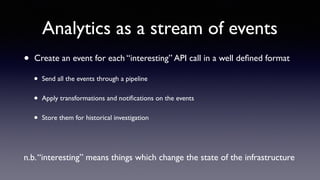
Analytics as a stream of events 
• Create an event for each “interesting” API call in a well defined format 
• Send all the events through a pipeline 
• Apply transformations and notifications on the events 
• Store them for historical investigation 
! 
n.b. “interesting” means things which change the state of the infrastructure
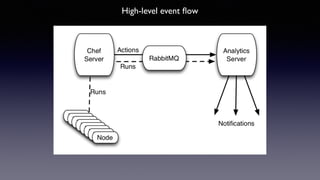
High-level event flow
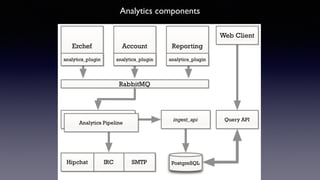
Analytics components
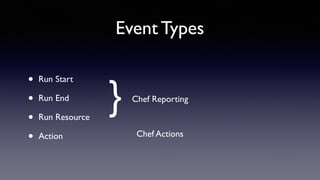
Event Types 
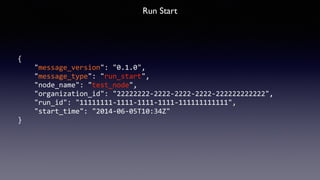
• Run Start 
• Run End 
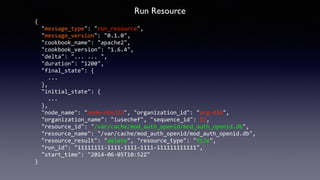
• Run Resource 
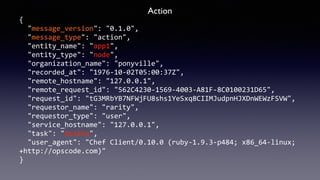
• Action 
} Chef Reporting 
Chef Actions
{ 
"message_version": 
"0.1.0", 
"message_type": 
"run_start", 
"node_name": 
"test_node", 
"organization_id": 
"22222222-­‐2222-­‐2222-­‐2222-­‐222222222222", 
"run_id": 
"11111111-­‐1111-­‐1111-­‐1111-­‐111111111111", 
"start_time": 
"2014-­‐06-­‐05T10:34Z" 
} 
Run Start
Run End 
{ 
"message_type": 
"run_end", 
"message_version": 
"0.1.0", 
"node_name": 
"f-­‐454932", 
"organization_id": 
"org-­‐45667", 
"organization_name": 
"jetsons", 
"run_id": 
"11111111-­‐1111-­‐1111-­‐1111-­‐111111111111", 
"run_list": 
[ 
"role[base]", 
"role[opscode-­‐reporting]" 
], 
"start_time": 
"2014-­‐06-­‐05T10:52Z", 
"end_time": 
"2014-­‐06-­‐05T10:54Z", 
"status": 
"success", 
"total_resource_count": 
4, 
"updated_resource_count": 
2 
}
Run Resource 
{ 
"message_type": 
"run_resource", 
"message_version": 
"0.1.0", 
"cookbook_name": 
"apache2", 
"cookbook_version": 
"1.6.4", 
"delta": 
"... 
... 
", 
"duration": 
"1200", 
"final_state": 
{ 
... 
}, 
"initial_state": 
{ 
... 
}, 
"node_name": 
"node-­‐456322", 
"organization_id": 
"org-­‐456", 
"organization_name": 
"iusechef", 
"sequence_id": 
15, 
"resource_id": 
"/var/cache/mod_auth_openid/mod_auth_openid.db", 
"resource_name": 
"/var/cache/mod_auth_openid/mod_auth_openid.db", 
"resource_result": 
"delete", 
"resource_type": 
"file", 
"run_id": 
"11111111-­‐1111-­‐1111-­‐1111-­‐111111111111", 
"start_time": 
"2014-­‐06-­‐05T10:52Z" 
}
Action 
{ 
"message_version": 
"0.1.0", 
"message_type": 
"action", 
"entity_name": 
"app1", 
"entity_type": 
"node", 
"organization_name": 
"ponyville", 
"recorded_at": 
"1976-­‐10-­‐02T05:00:37Z", 
"remote_hostname": 
"127.0.0.1", 
"remote_request_id": 
"562C4230-­‐1569-­‐4003-­‐A81F-­‐8C0100231D65", 
"request_id": 
"tG3MRbYB7NFWjFU8shs1YeSxq8CIIMJudpnHJXDnWEWzFSVW", 
"requestor_name": 
"rarity", 
"requestor_type": 
"user", 
"service_hostname": 
"127.0.0.1", 
"task": 
"delete", 
"user_agent": 
"Chef 
Client/0.10.0 
(ruby-­‐1.9.3-­‐p484; 
x86_64-­‐linux; 
+http://opscode.com)" 
}
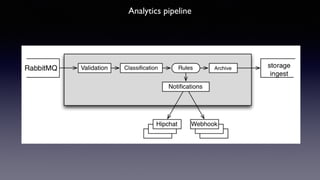
Analytics pipeline
Analytics Use Cases
Visibility 
• What is happening on your Chef server and infrastructure: 
• Run Reporting 
• Chef Actions 
• Notifications 
• Diagnostics 
• What is happened before this node started to fail ?
Compliance/Reporting 
• Reporting on actions, runs and resources 
• Audit capabilities
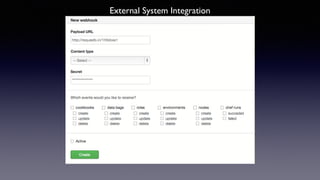
External systems Integration 
• Webhook-based integration 
• Splunk, Sensu, ServiceNow, Datadog 
• Textual notifications for chat systems 
• Hipchat, Slack, IRC 
• SMTP
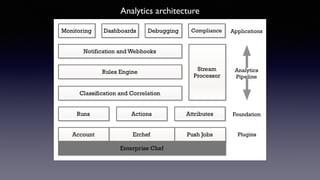
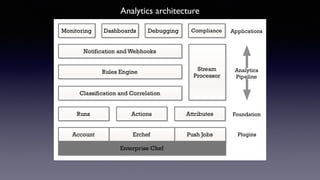
Analytics architecture
What’s shipping now ?
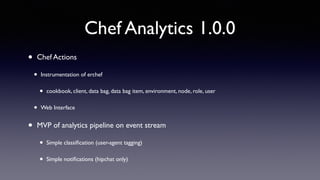
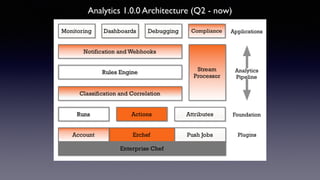
Chef Analytics 1.0.0 
• Chef Actions 
• Instrumentation of erchef 
• cookbook, client, data bag, data bag item, environment, node, role, user 
• Web Interface 
• MVP of analytics pipeline on event stream 
• Simple classification (user-agent tagging) 
• Simple notifications (hipchat only)
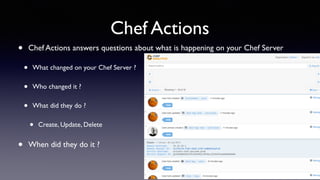
Chef Actions 
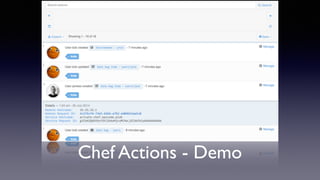
• Chef Actions answers questions about what is happening on your Chef Server 
• What changed on your Chef Server ? 
• Who changed it ? 
• What did they do ? 
• Create, Update, Delete 
• When did they do it ?
Chef Actions 
• Provide a read-only view of what happened 
• Road to audit and compliance reporting 
• Allow administrators to react to events as they happen 
• Enable after the fact investigation 
• “What happened just before nodes started failing runs?” 
• “When did our systems gets patched for Heartbleed?”
Chef Actions - Demo
Analytics architecture
Analytics 1.0.0 Architecture (Q2 - now)
What’s next ?
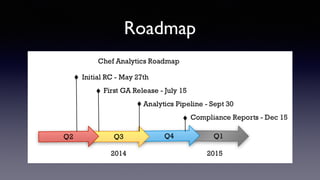
Roadmap
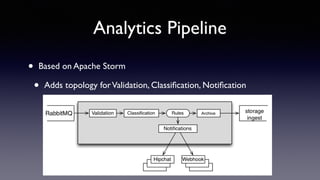
Analytics Pipeline 
• Based on Apache Storm 
• Adds topology for Validation, Classification, Notification
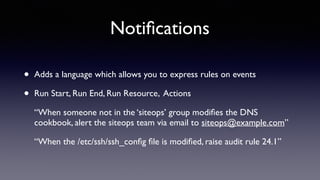
Notifications 
• Adds a language which allows you to express rules on events 
• Run Start, Run End, Run Resource, Actions 
“When someone not in the ‘siteops’ group modifies the DNS 
cookbook, alert the siteops team via email to siteops@example.com” 
“When the /etc/ssh/ssh_config file is modified, raise audit rule 24.1”
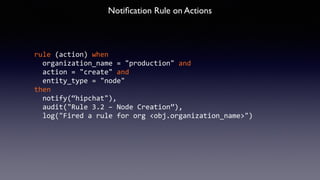
Notification Rule on Actions 
rule 
(action) 
when 
organization_name 
= 
"production" 
and 
action 
= 
"create" 
and 
entity_type 
= 
"node" 
then 
notify(“hipchat"), 
audit("Rule 
3.2 
– 
Node 
Creation”), 
log("Fired 
a 
rule 
for 
org 
<obj.organization_name>")
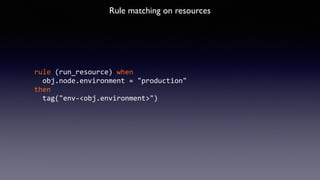
Rule matching on resources 
rule 
(run_resource) 
when 
obj.node.environment 
= 
"production" 
then 
tag("env-­‐<obj.environment>")
External System Integration
Predictive Analytics 
• Root cause analysis 
• Link failing runs with actions that are most likely to cause them 
• “Devops Best Practices” 
• Correlate cookbook quality with infrastructure components 
• Identify areas of improvements for users in a multi tenancy 
deployment
Compliance 
• Build internal controls out of: 
• Cookbook content 
• Notification rules 
• Report definitions 
• Generate regular and ad-hoc reports on sets of controls
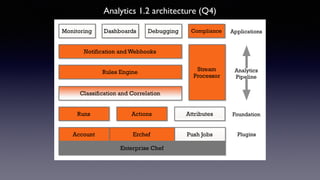
Analytics 1.2 architecture (Q4)
Deployment
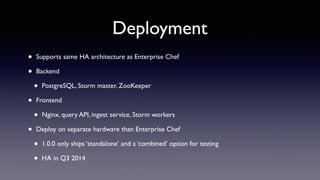
Deployment 
• Supports same HA architecture as Enterprise Chef 
• Backend 
• PostgreSQL, Storm master, ZooKeeper 
• Frontend 
• Nginx, query API, ingest service, Storm workers 
• Deploy on separate hardware than Enterprise Chef 
• 1.0.0 only ships ‘standalone’ and a ‘combined’ option for testing 
• HA in Q3 2014
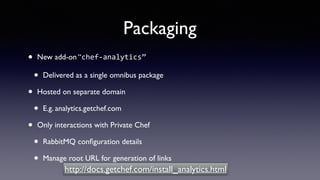
Packaging 
• New add-on “chef-­‐analytics” 
• Delivered as a single omnibus package 
• Hosted on separate domain 
• E.g. analytics.getchef.com 
• Only interactions with Private Chef 
• RabbitMQ configuration details 
• Manage root URL for generation of links 
http://docs.getchef.com/install_analytics.html
Summary
• Chef Analytics 1.0.0 is available now 
• Roadmap of incremental feature development for 2014 
• Try it out, get in contact
Chef Analytics (Chef NYC Meeting - July 2014)

Chef Analytics (Chef NYC Meeting - July 2014)

  • 1.
    Chef Analytics CHEFNYC Meetup July 2014 ! James Casey, Engineering Lead, Chef ! @jamesc_000 james@getchef.com
  • 2.
    • Inside theChef Server, there is valuable information about your infrastructure • How it is changing • Who is changing it • Why it was changed • When it changed
  • 3.
    • It’s hardto get access to this data: • Reporting Console • Chef Client Report handlers • Chef Client Event handlers • Mining server-side Nginx logs • Server side tools such as orgmapper • Scripts accessing Postgres directly
  • 4.
    • Chef Analyticssolves this by providing • Server side consistent event stream • A set of useful tools that use this event stream • An easy integration point from Chef to external systems • Ships as a premium feature of Enterprise Chef • Available as part of all Enterprise Chef subscription levels
  • 5.
    Analytics as astream of events • Create an event for each “interesting” API call in a well defined format • Send all the events through a pipeline • Apply transformations and notifications on the events • Store them for historical investigation ! n.b. “interesting” means things which change the state of the infrastructure
  • 6.
  • 7.
  • 8.
    Event Types •Run Start • Run End • Run Resource • Action } Chef Reporting Chef Actions
  • 9.
    { "message_version": "0.1.0", "message_type": "run_start", "node_name": "test_node", "organization_id": "22222222-­‐2222-­‐2222-­‐2222-­‐222222222222", "run_id": "11111111-­‐1111-­‐1111-­‐1111-­‐111111111111", "start_time": "2014-­‐06-­‐05T10:34Z" } Run Start
  • 10.
    Run End { "message_type": "run_end", "message_version": "0.1.0", "node_name": "f-­‐454932", "organization_id": "org-­‐45667", "organization_name": "jetsons", "run_id": "11111111-­‐1111-­‐1111-­‐1111-­‐111111111111", "run_list": [ "role[base]", "role[opscode-­‐reporting]" ], "start_time": "2014-­‐06-­‐05T10:52Z", "end_time": "2014-­‐06-­‐05T10:54Z", "status": "success", "total_resource_count": 4, "updated_resource_count": 2 }
  • 11.
    Run Resource { "message_type": "run_resource", "message_version": "0.1.0", "cookbook_name": "apache2", "cookbook_version": "1.6.4", "delta": "... ... ", "duration": "1200", "final_state": { ... }, "initial_state": { ... }, "node_name": "node-­‐456322", "organization_id": "org-­‐456", "organization_name": "iusechef", "sequence_id": 15, "resource_id": "/var/cache/mod_auth_openid/mod_auth_openid.db", "resource_name": "/var/cache/mod_auth_openid/mod_auth_openid.db", "resource_result": "delete", "resource_type": "file", "run_id": "11111111-­‐1111-­‐1111-­‐1111-­‐111111111111", "start_time": "2014-­‐06-­‐05T10:52Z" }
  • 12.
    Action { "message_version": "0.1.0", "message_type": "action", "entity_name": "app1", "entity_type": "node", "organization_name": "ponyville", "recorded_at": "1976-­‐10-­‐02T05:00:37Z", "remote_hostname": "127.0.0.1", "remote_request_id": "562C4230-­‐1569-­‐4003-­‐A81F-­‐8C0100231D65", "request_id": "tG3MRbYB7NFWjFU8shs1YeSxq8CIIMJudpnHJXDnWEWzFSVW", "requestor_name": "rarity", "requestor_type": "user", "service_hostname": "127.0.0.1", "task": "delete", "user_agent": "Chef Client/0.10.0 (ruby-­‐1.9.3-­‐p484; x86_64-­‐linux; +http://opscode.com)" }
  • 13.
  • 14.
  • 15.
    Visibility • Whatis happening on your Chef server and infrastructure: • Run Reporting • Chef Actions • Notifications • Diagnostics • What is happened before this node started to fail ?
  • 16.
    Compliance/Reporting • Reportingon actions, runs and resources • Audit capabilities
  • 17.
    External systems Integration • Webhook-based integration • Splunk, Sensu, ServiceNow, Datadog • Textual notifications for chat systems • Hipchat, Slack, IRC • SMTP
  • 18.
  • 19.
  • 20.
    Chef Analytics 1.0.0 • Chef Actions • Instrumentation of erchef • cookbook, client, data bag, data bag item, environment, node, role, user • Web Interface • MVP of analytics pipeline on event stream • Simple classification (user-agent tagging) • Simple notifications (hipchat only)
  • 21.
    Chef Actions •Chef Actions answers questions about what is happening on your Chef Server • What changed on your Chef Server ? • Who changed it ? • What did they do ? • Create, Update, Delete • When did they do it ?
  • 22.
    Chef Actions •Provide a read-only view of what happened • Road to audit and compliance reporting • Allow administrators to react to events as they happen • Enable after the fact investigation • “What happened just before nodes started failing runs?” • “When did our systems gets patched for Heartbleed?”
  • 23.
  • 24.
  • 25.
  • 26.
  • 27.
  • 28.
    Analytics Pipeline •Based on Apache Storm • Adds topology for Validation, Classification, Notification
  • 29.
    Notifications • Addsa language which allows you to express rules on events • Run Start, Run End, Run Resource, Actions “When someone not in the ‘siteops’ group modifies the DNS cookbook, alert the siteops team via email to siteops@example.com” “When the /etc/ssh/ssh_config file is modified, raise audit rule 24.1”
  • 30.
    Notification Rule onActions rule (action) when organization_name = "production" and action = "create" and entity_type = "node" then notify(“hipchat"), audit("Rule 3.2 – Node Creation”), log("Fired a rule for org <obj.organization_name>")
  • 31.
    Rule matching onresources rule (run_resource) when obj.node.environment = "production" then tag("env-­‐<obj.environment>")
  • 32.
  • 33.
    Predictive Analytics •Root cause analysis • Link failing runs with actions that are most likely to cause them • “Devops Best Practices” • Correlate cookbook quality with infrastructure components • Identify areas of improvements for users in a multi tenancy deployment
  • 34.
    Compliance • Buildinternal controls out of: • Cookbook content • Notification rules • Report definitions • Generate regular and ad-hoc reports on sets of controls
  • 35.
  • 36.
  • 37.
    Deployment • Supportssame HA architecture as Enterprise Chef • Backend • PostgreSQL, Storm master, ZooKeeper • Frontend • Nginx, query API, ingest service, Storm workers • Deploy on separate hardware than Enterprise Chef • 1.0.0 only ships ‘standalone’ and a ‘combined’ option for testing • HA in Q3 2014
  • 38.
    Packaging • Newadd-on “chef-­‐analytics” • Delivered as a single omnibus package • Hosted on separate domain • E.g. analytics.getchef.com • Only interactions with Private Chef • RabbitMQ configuration details • Manage root URL for generation of links http://docs.getchef.com/install_analytics.html
  • 39.
  • 40.
    • Chef Analytics1.0.0 is available now • Roadmap of incremental feature development for 2014 • Try it out, get in contact