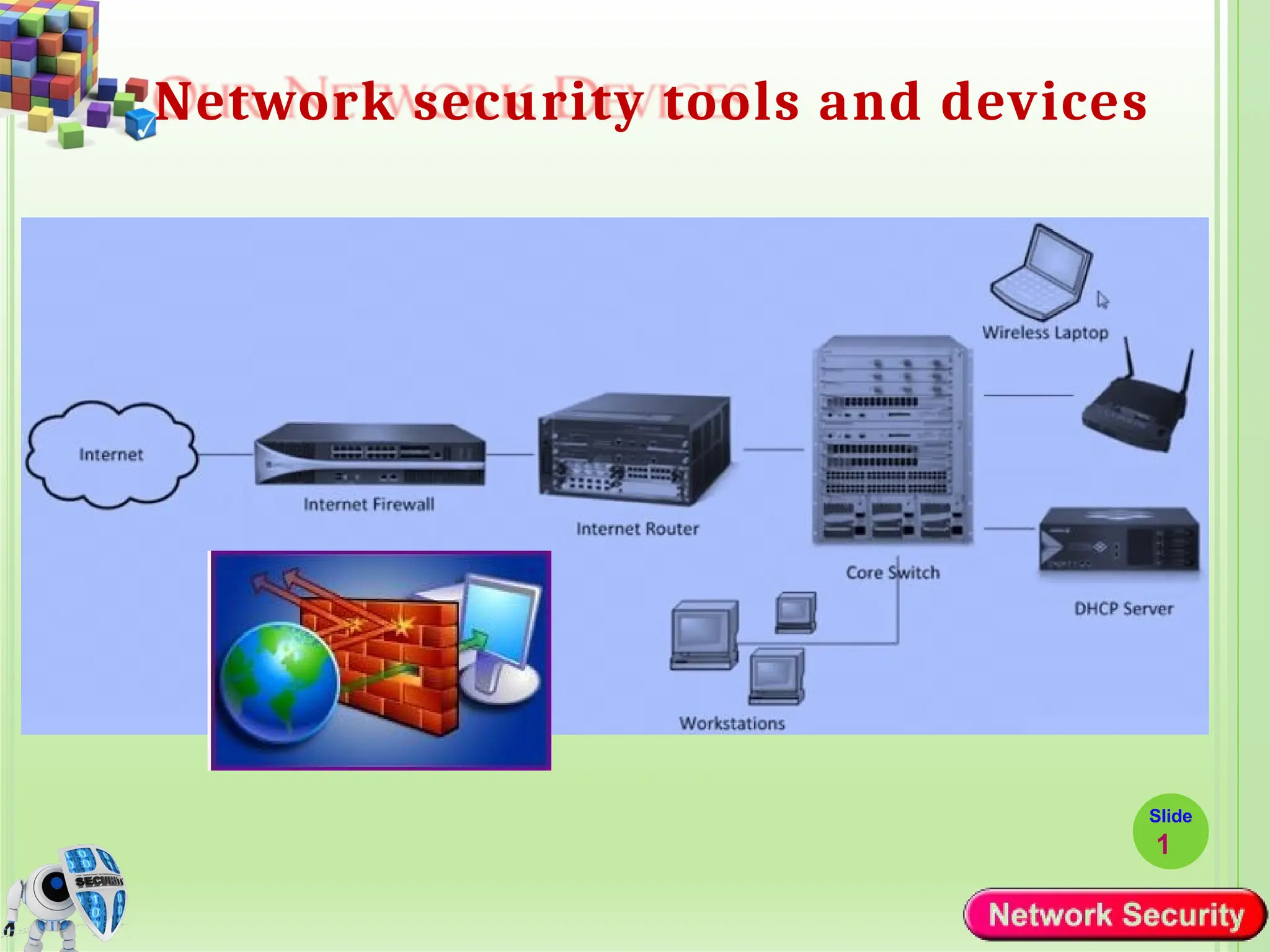
Network security tools and devices
Slide
1
Contd..
Slide
2
 Network security tools and devices play a crucial role in
safeguarding computer networks from unauthorized
access, data breaches, and other security threats.
 These tools and devices are designed to:
 Monitor,
 Detect,
 Prevent, and
 Respond to various types of network attacks and
vulnerabilities.
Firewall
Slide
3
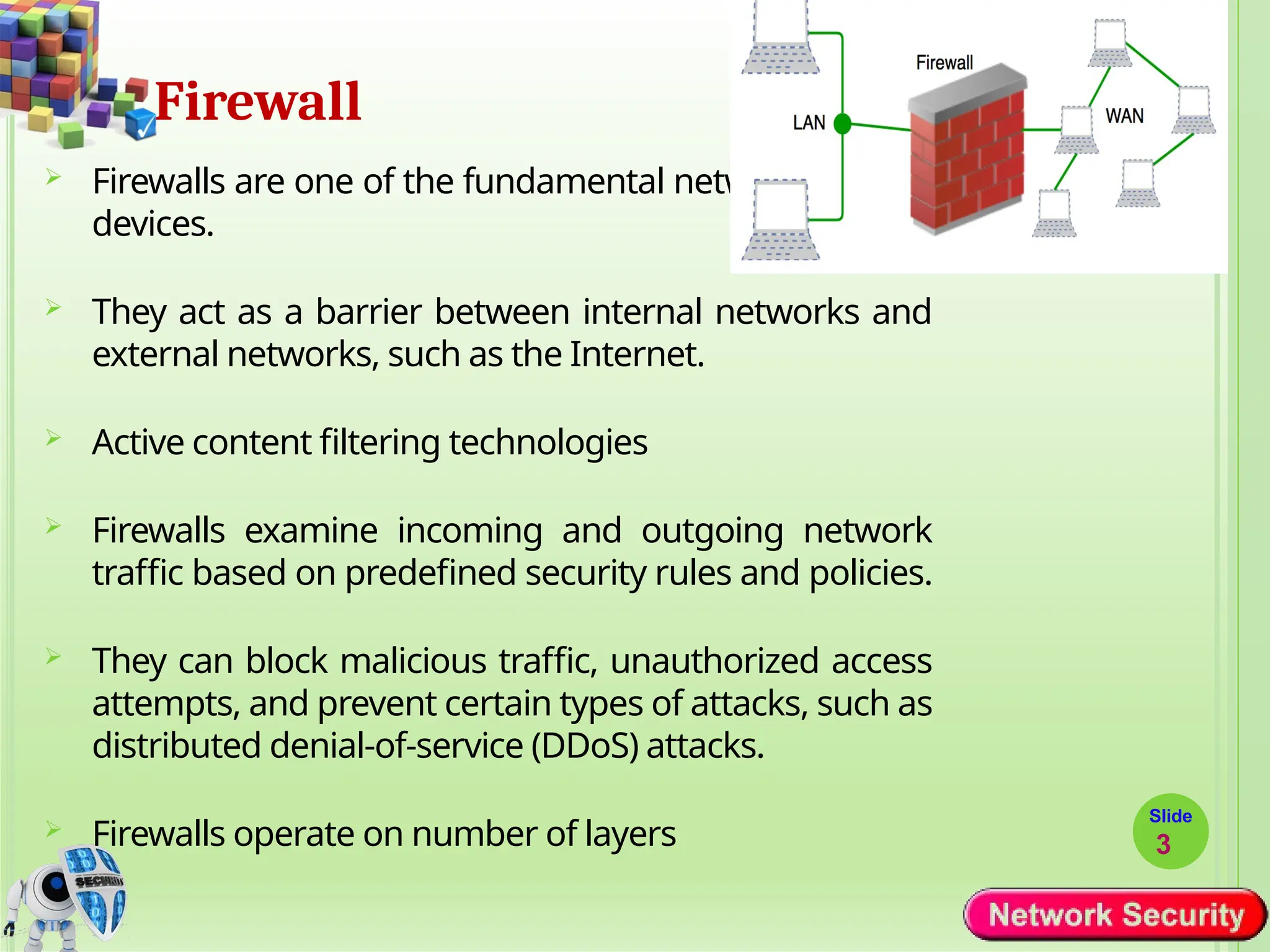
 Firewalls are one of the fundamental network security
devices.
 They act as a barrier between internal networks and
external networks, such as the Internet.
 Active content filtering technologies
 Firewalls examine incoming and outgoing network
traffic based on predefined security rules and policies.
 They can block malicious traffic, unauthorized access
attempts, and prevent certain types of attacks, such as
distributed denial-of-service (DDoS) attacks.
 Firewalls operate on number of layers
8: Network Security 8-4
Firewalls
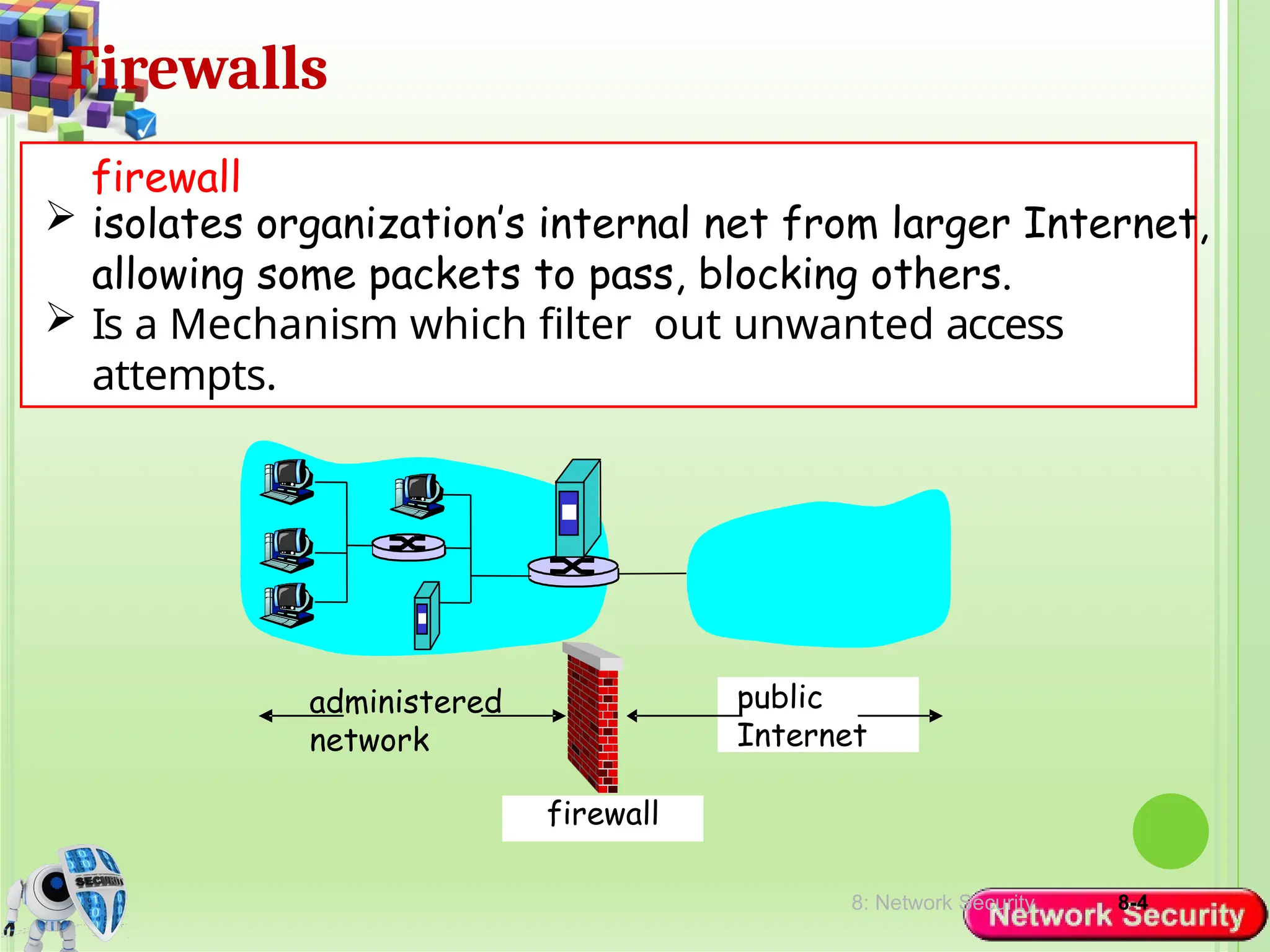
 isolates organization’s internal net from larger Internet,
allowing some packets to pass, blocking others.
 Is a Mechanism which filter out unwanted access
attempts.
firewall
administered
network
public
Internet
firewall
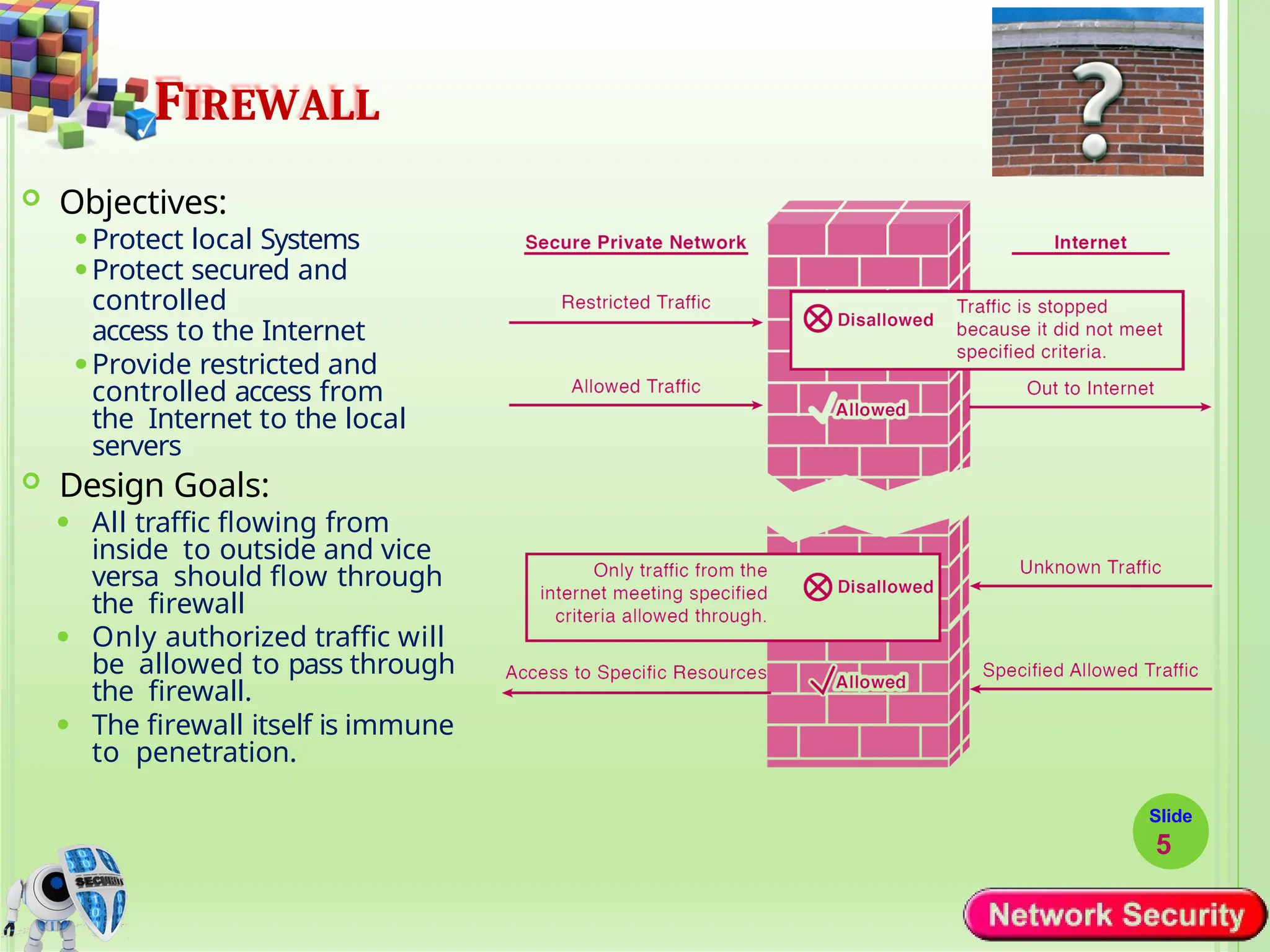
FIREWALL
 Objectives:
⚫Protect local Systems
⚫Protect secured and
controlled
access to the Internet
⚫Provide restricted and
controlled access from
the Internet to the local
servers
 Design Goals:
⚫ All traffic flowing from
inside to outside and vice
versa should flow through
the firewall
⚫ Only authorized traffic will
be allowed to pass through
the firewall.
⚫ The firewall itself is immune
to penetration.
Slide
5
8: Network Security 8-6
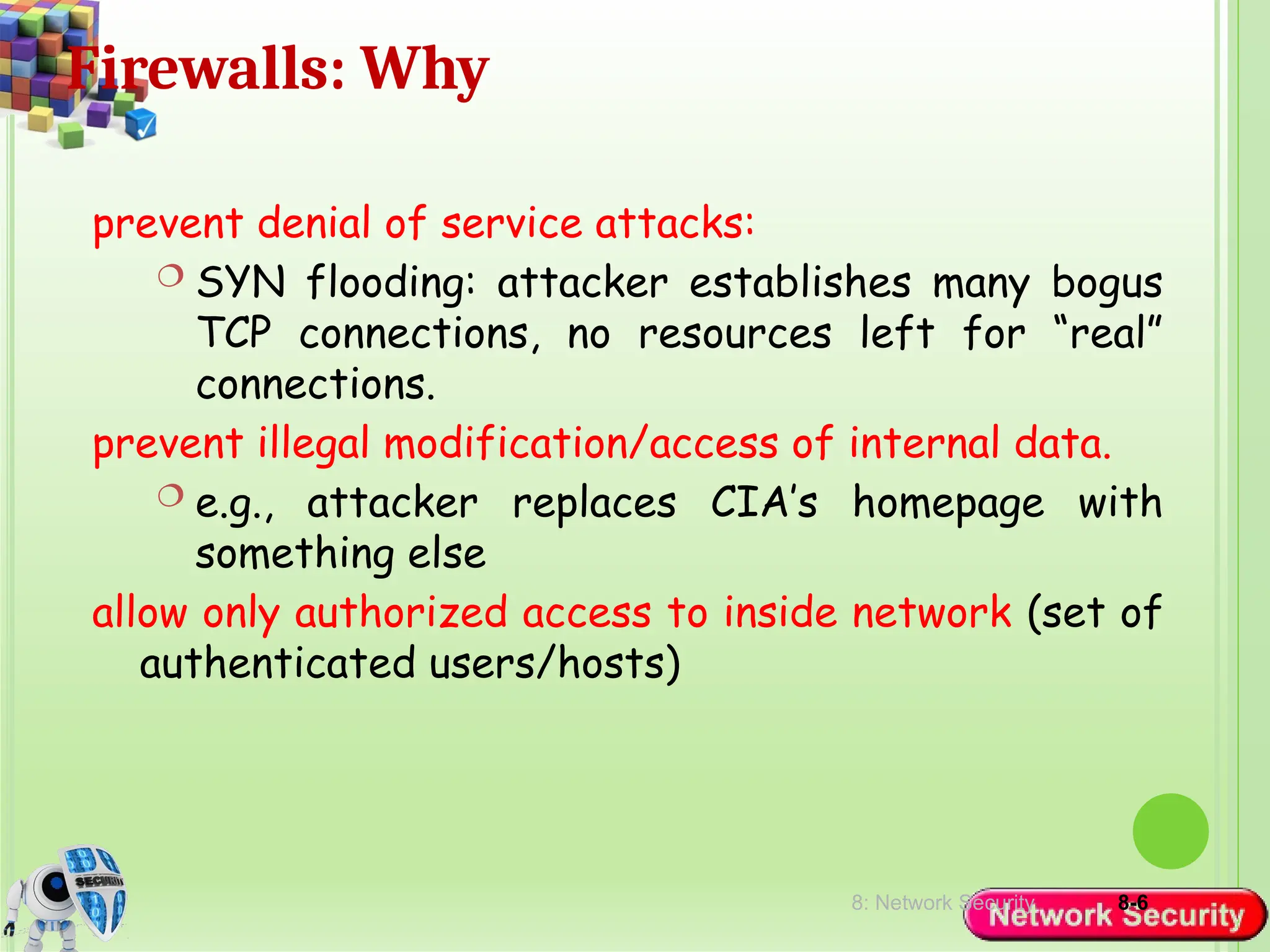
Firewalls: Why
prevent denial of service attacks:
 SYN flooding: attacker establishes many bogus
TCP connections, no resources left for “real”
connections.
prevent illegal modification/access of internal data.
 e.g., attacker replaces CIA’s homepage with
something else
allow only authorized access to inside network (set of
authenticated users/hosts)
TYPES OF FIREWALL
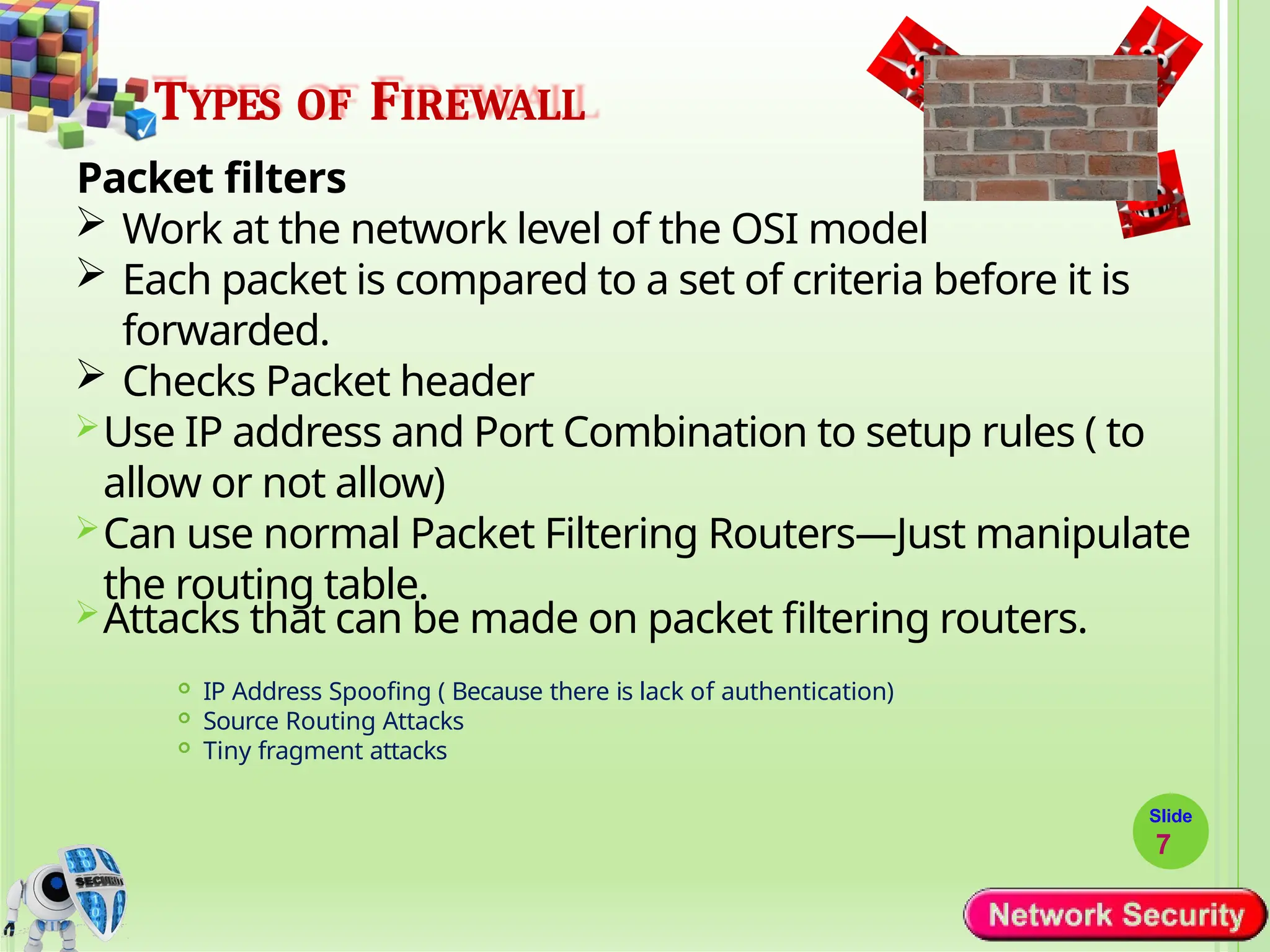
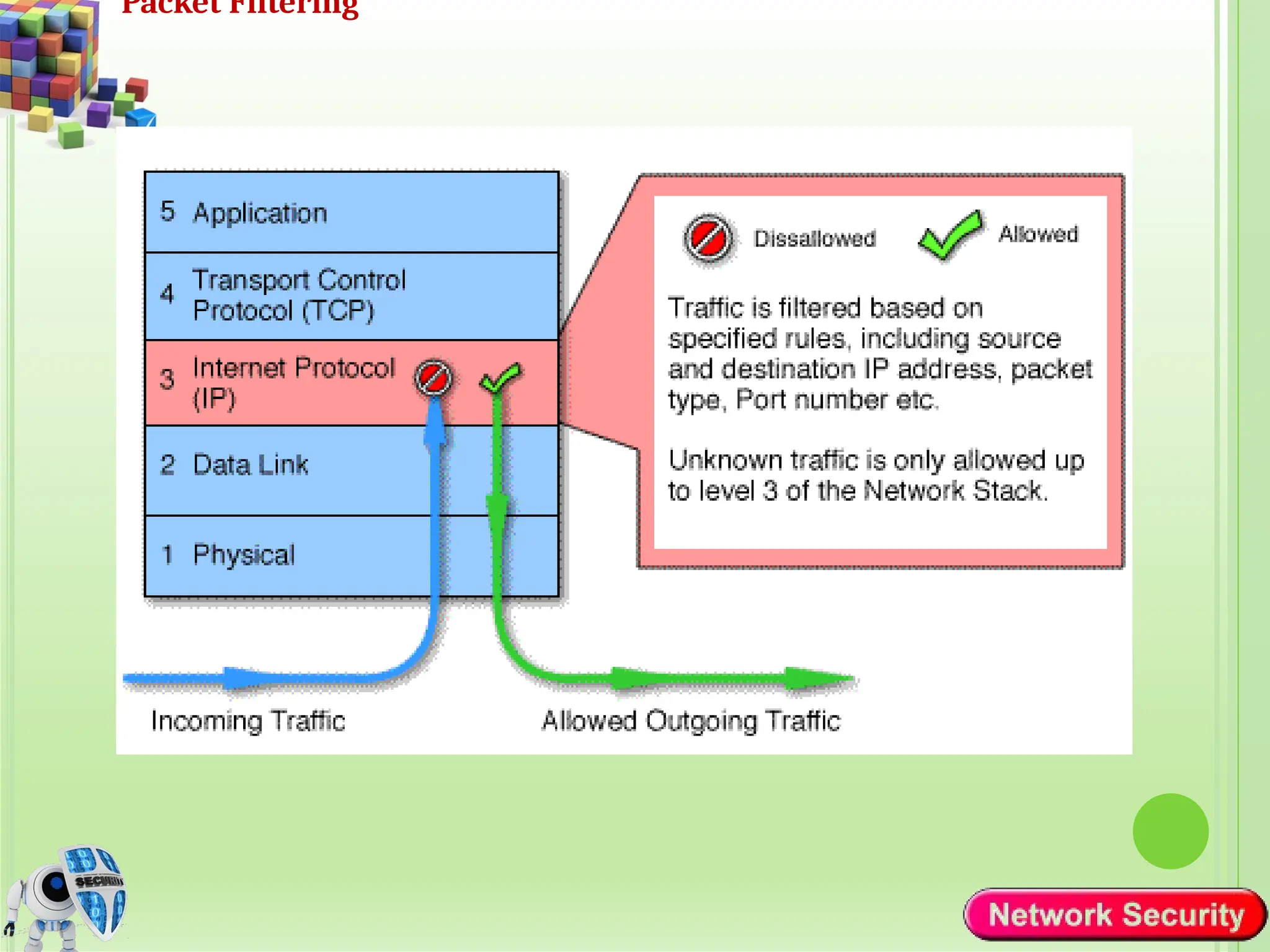
Packet filters
 Work at the network level of the OSI model
 Each packet is compared to a set of criteria before it is
forwarded.
 Checks Packet header
Use IP address and Port Combination to setup rules ( to
allow or not allow)
Can use normal Packet Filtering Routers—Just manipulate
the routing table.
Attacks that can be made on packet filtering routers.
 IP Address Spoofing ( Because there is lack of authentication)
 Source Routing Attacks
 Tiny fragment attacks
Slide
7
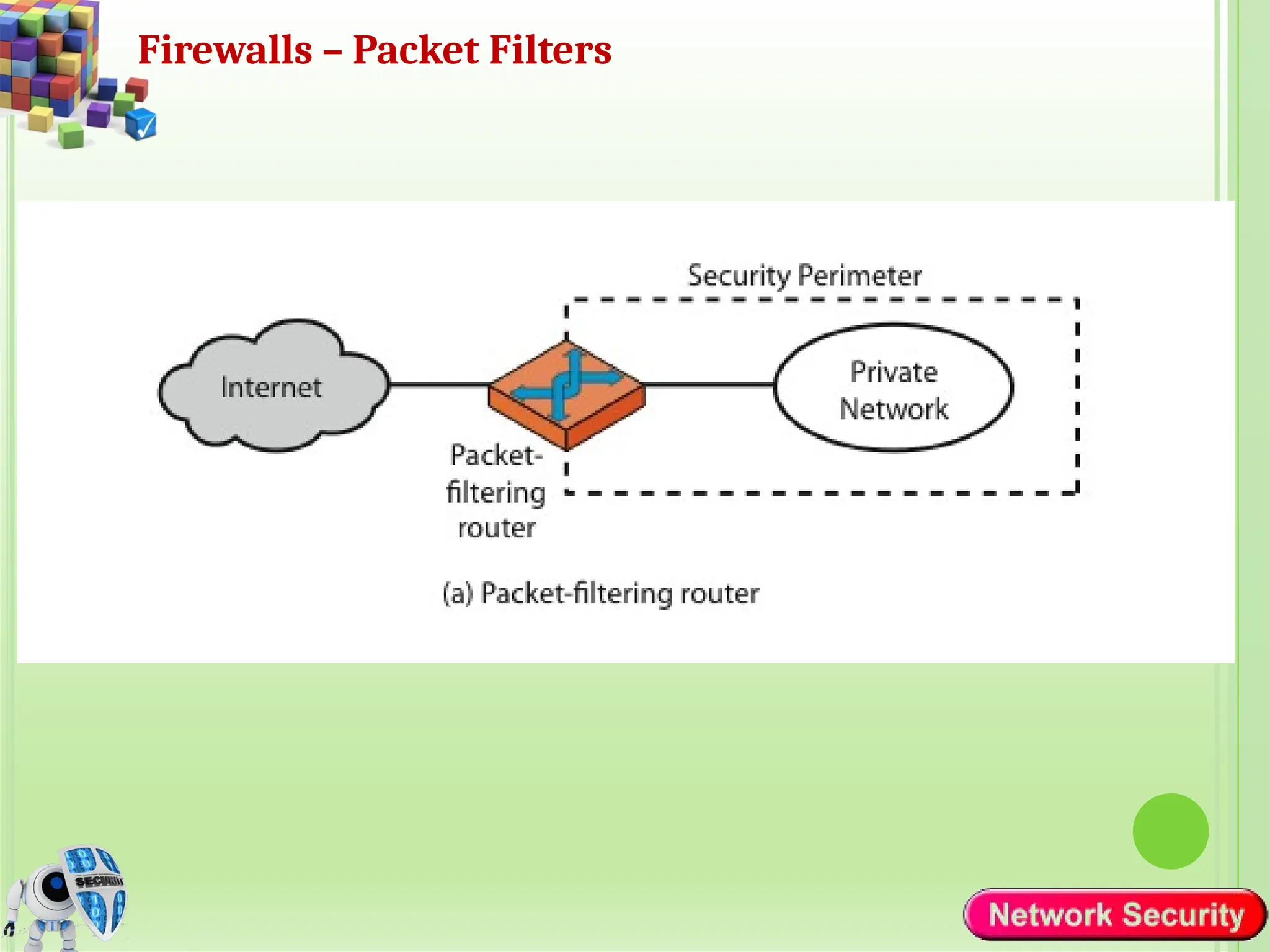
Firewalls – Packet Filters
Packet Filtering
TYPES OF FIREWALL
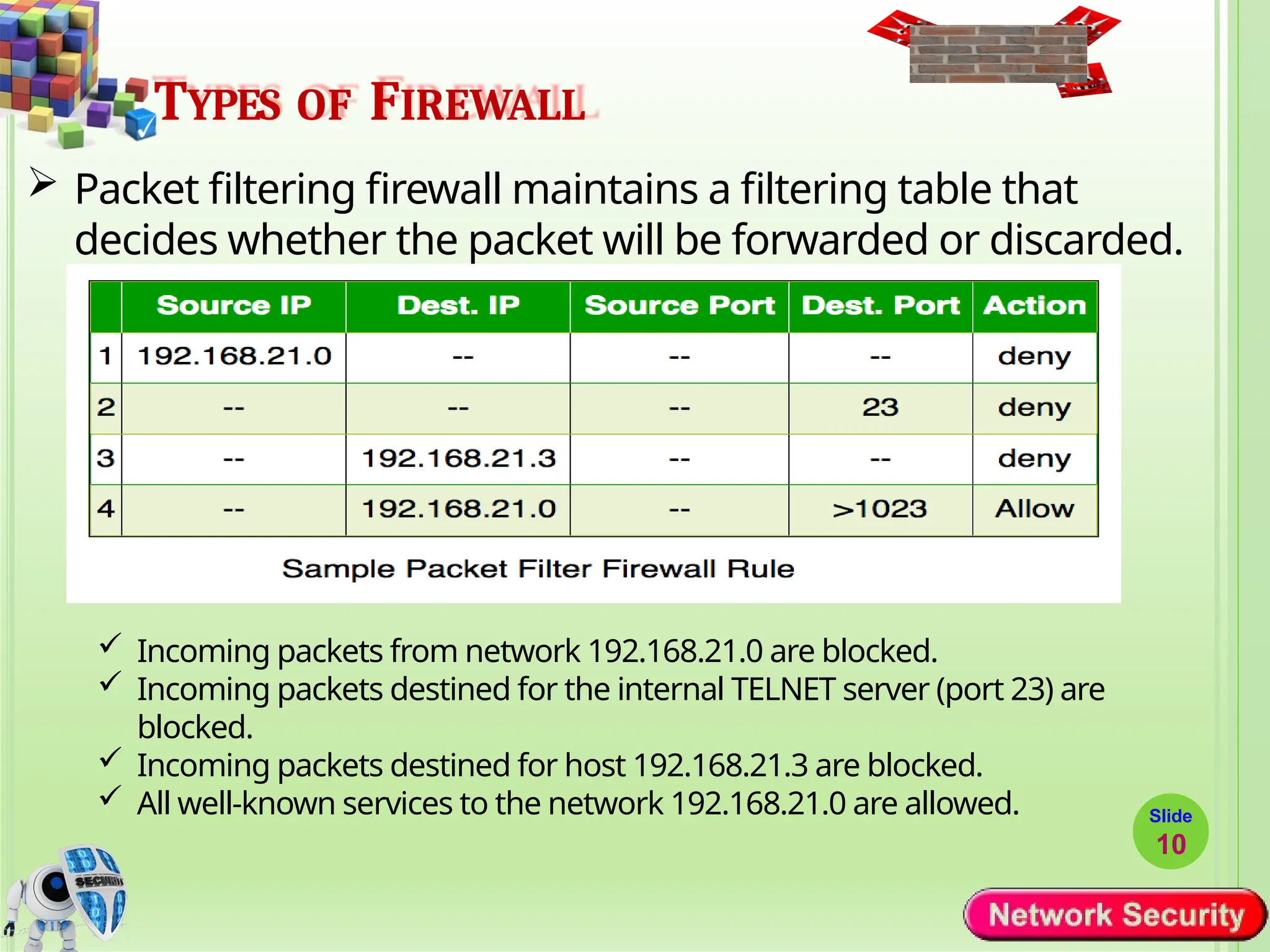
 Packet filtering firewall maintains a filtering table that
decides whether the packet will be forwarded or discarded.
Slide
10
 Incoming packets from network 192.168.21.0 are blocked.
 Incoming packets destined for the internal TELNET server (port 23) are
blocked.
 Incoming packets destined for host 192.168.21.3 are blocked.
 All well-known services to the network 192.168.21.0 are allowed.
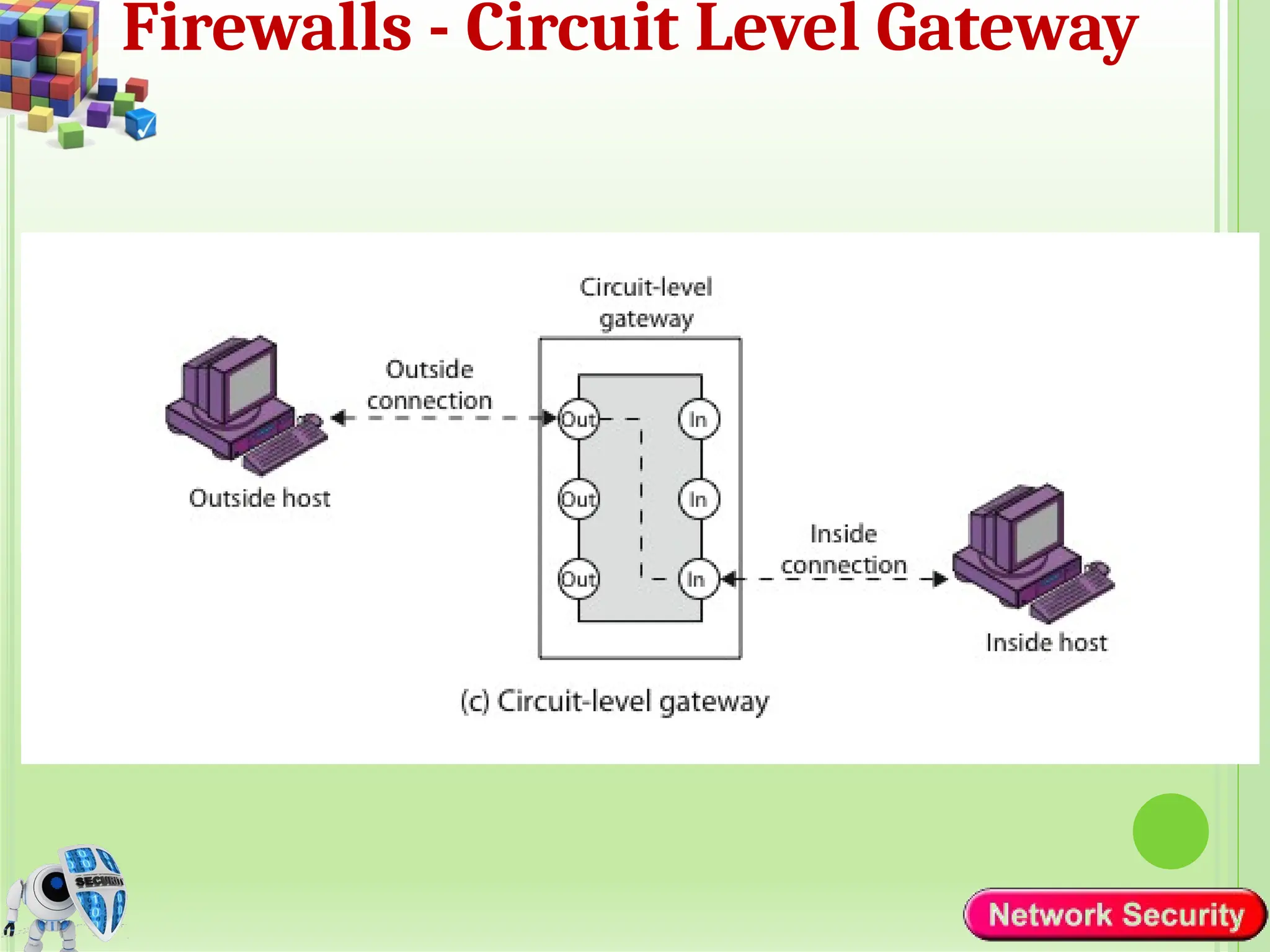
Firewalls - Circuit Level Gateway
TYPES OF FIREWALL
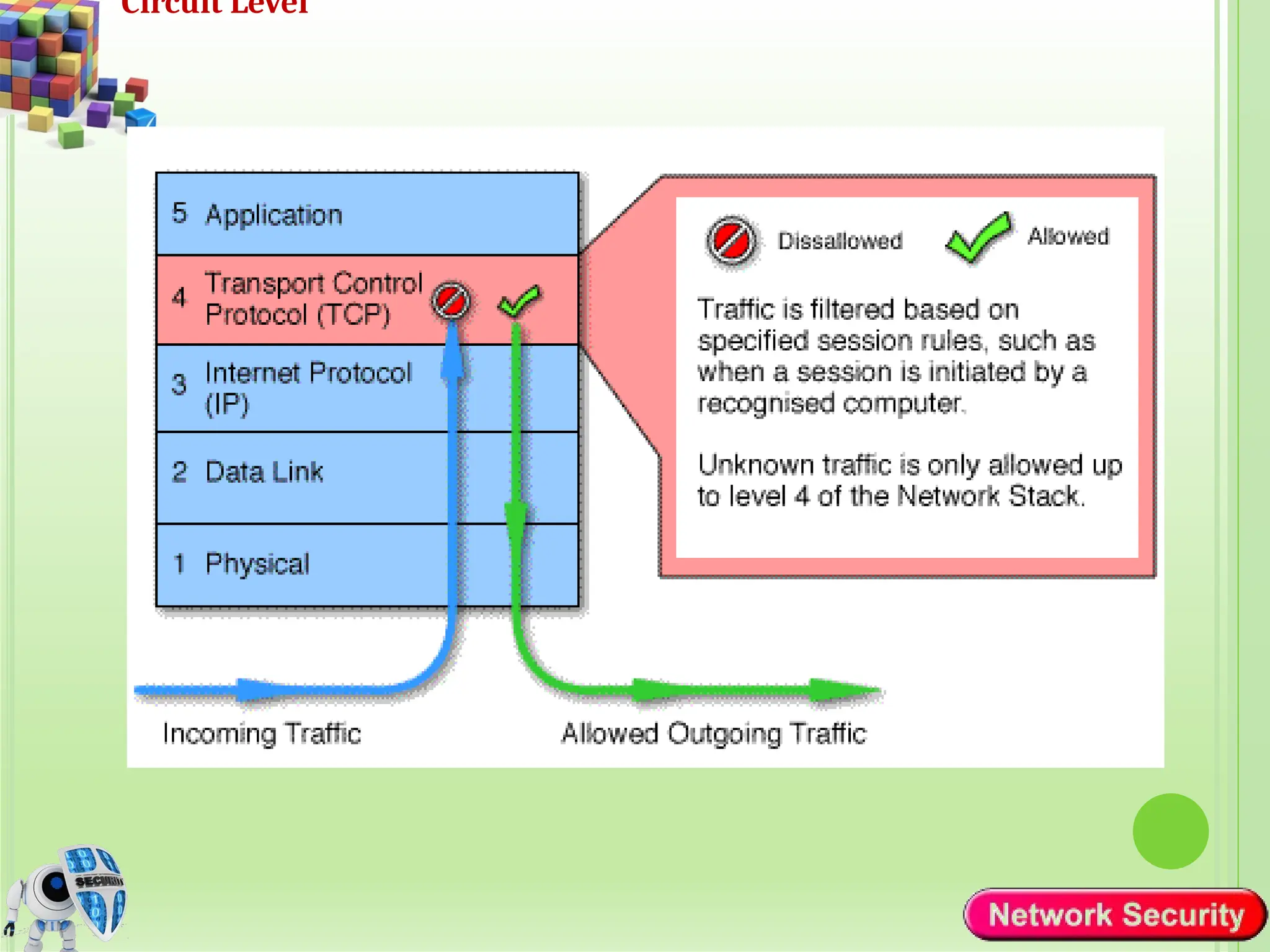
Circuit-level gateways
 Circuit level gateways work at the session layer of the OSI
model, or the TCP layer of TCP/IP.
 Monitor TCP handshaking between packets to determine
whether a requested session is legitimate.
 Unlike other types of firewalls that inspect individual packets
or application-layer data, circuit-level gateways focus on the
establishment and management of network connections.
Slide
12
Circuit Level
TYPES OF FIREWALL
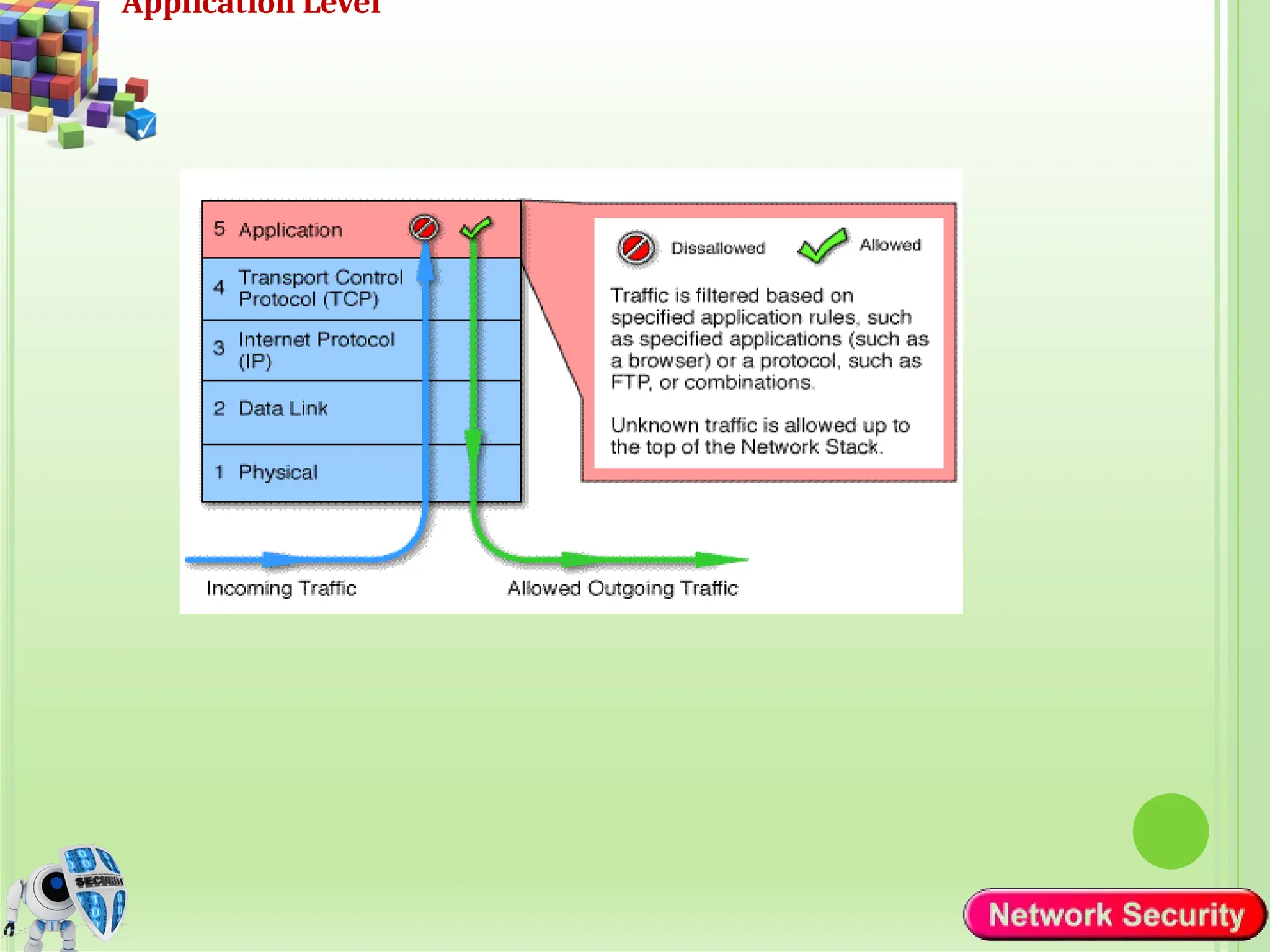
Application-level Firewalls/gateways ( Proxy Server)
 can inspect and filter the packets on any OSI layer, up to the
application layer.
 It has the ability to block specific content, also recognize
when certain application and protocols (like HTTP, FTP) are
being misused.
 Service specific ( http, e-mail content,…)
 Higher security than packet filters
 Easy to log and audit all incoming traffic
Slide
14
Application Level
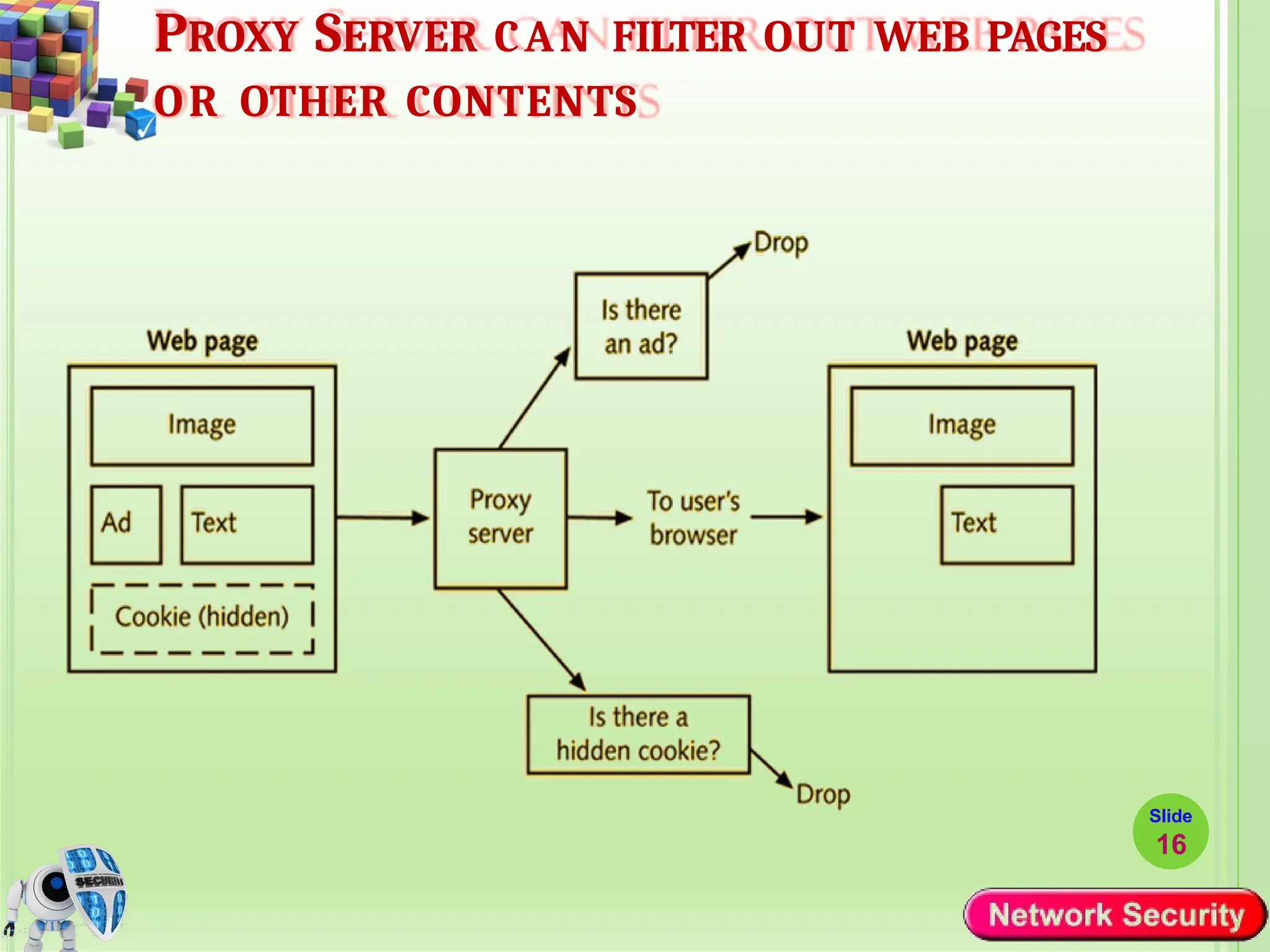
PROXY SERVER CAN FILTER OUT WEB PAGES
OR OTHER CONTENTS
Slide
16
TYPES OF FIREWALL
Stateful Packet Inspection Firewall
 Stateful inspection firewalls combine packet filtering with session
tracking capabilities.
 They keep track of the state of network connections and allow or
block packets based on the context of the entire session.
 Stateful firewalls can verify that incoming packets belong to an
established session and enforce more granular access control
based on the state of the connection.
⚫ Such a Firewall uses a packet’s TCP flag and sequence/ack
numbers to determine whether it is part of an existing,
authorized flow
⚫ It participate in establishment of an authorized connection
 If it is part of an existing connection, the packet is permitted, else
dropped Slide
17
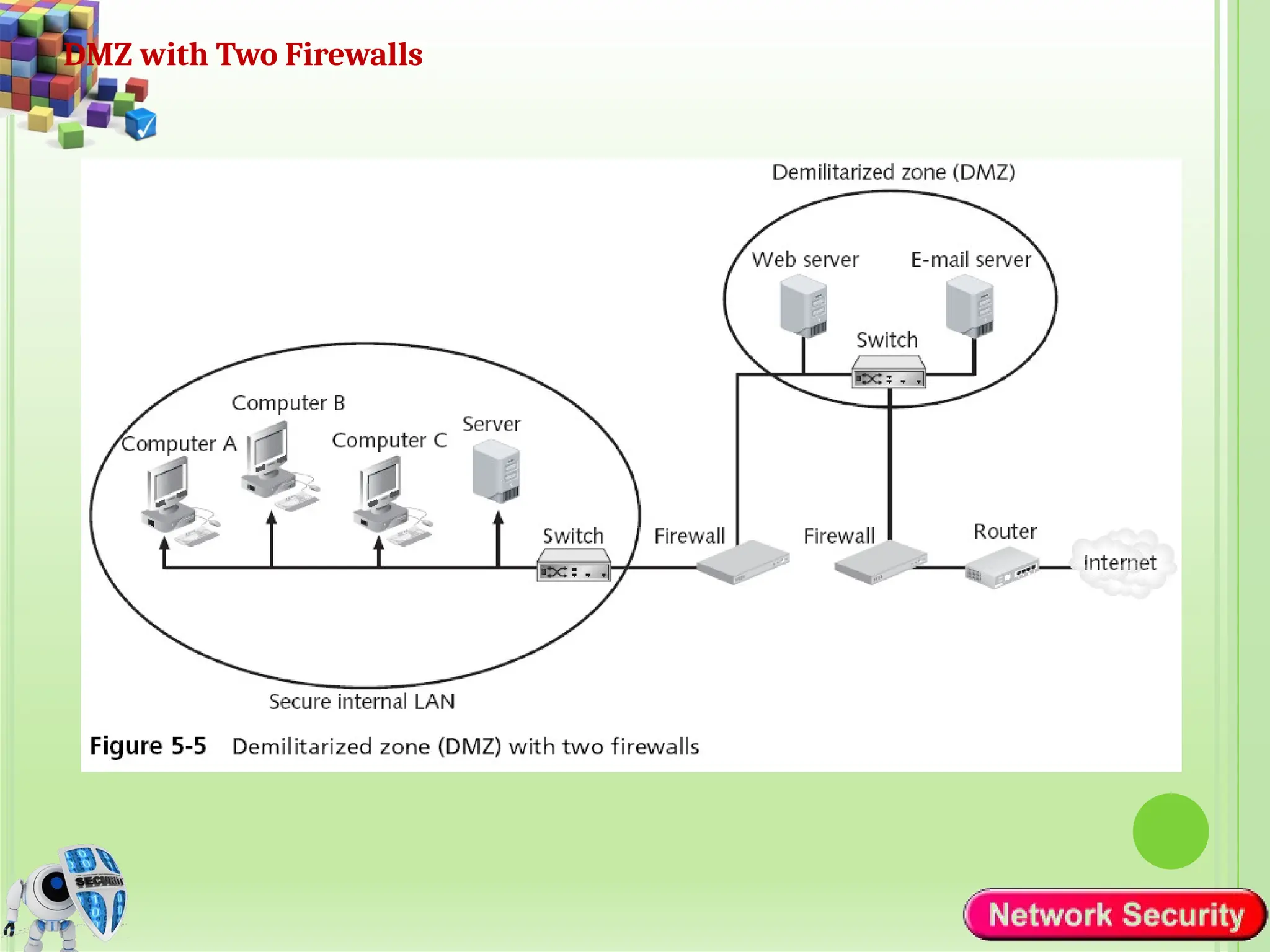
Demilitarized Zone (DMZ)
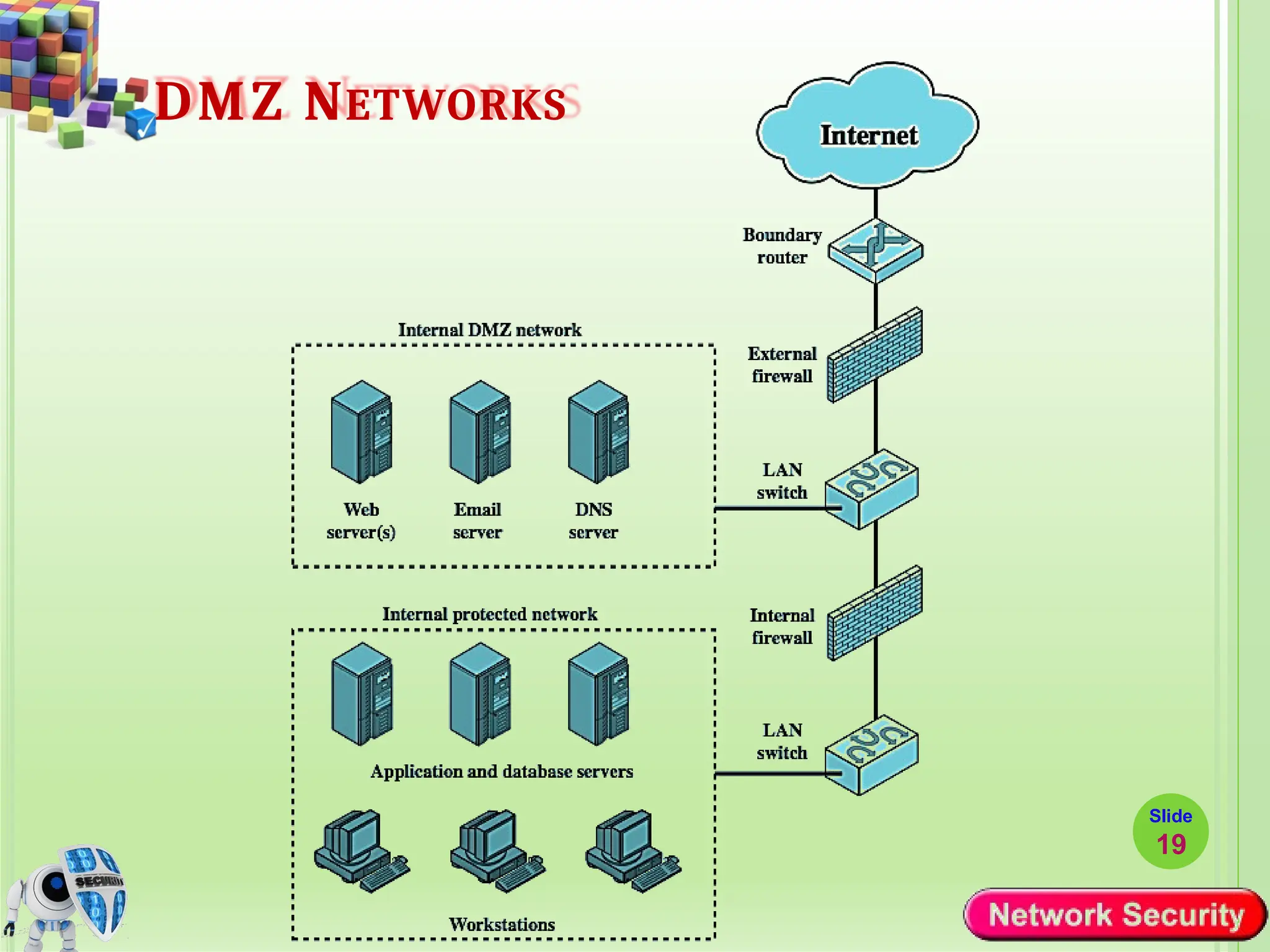
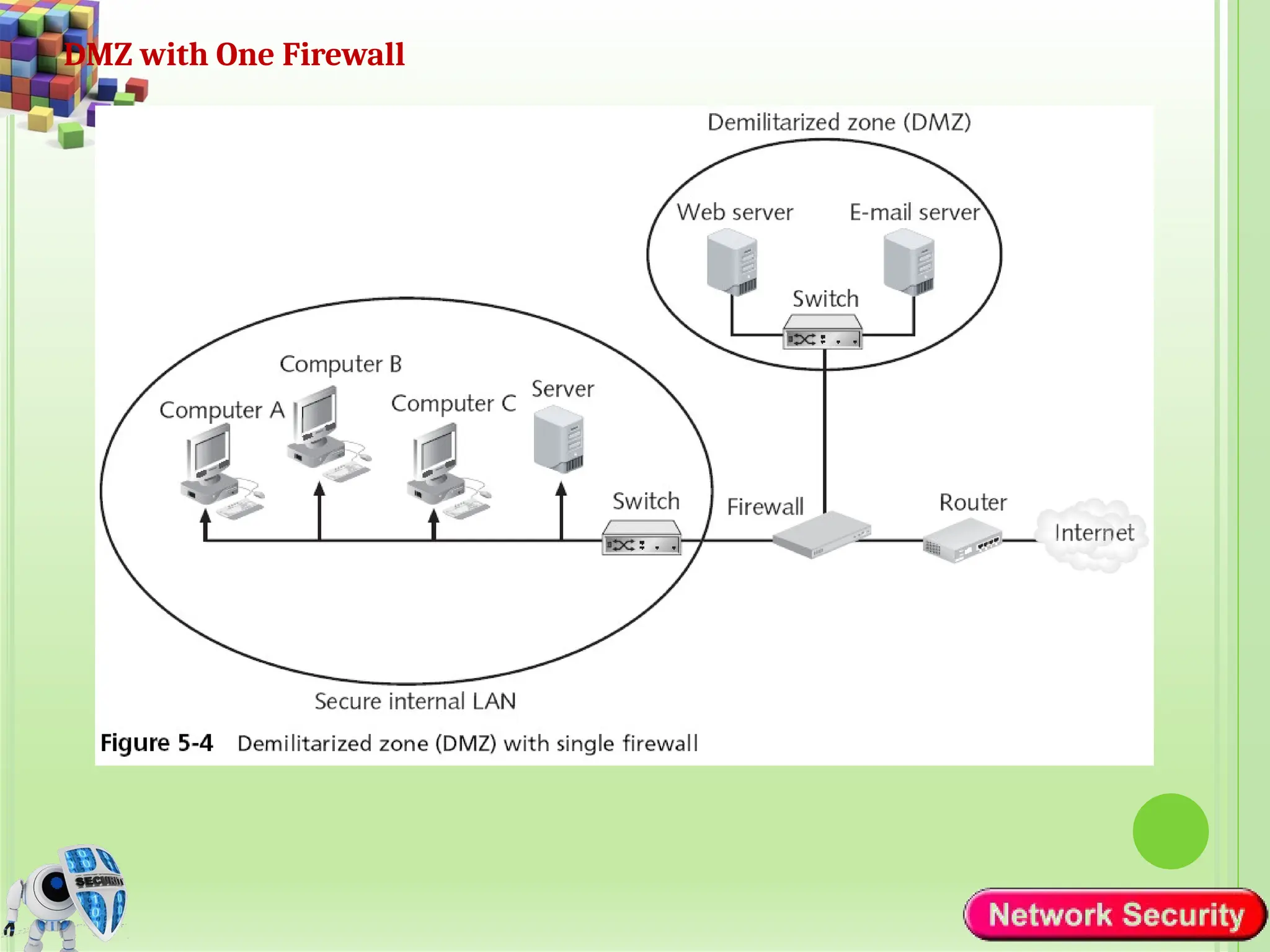
 Is a network architecture concept that provides a secure, isolated area
between an organization's internal trusted network and an untrusted
external network, typically the Internet.
 A separate network that sits outside the secure network perimeter.
 Outside users can access the DMZ but cannot enter the secure
network.
 The purpose of a DMZ is to create a buffer zone that segregates
publicly accessible services from internal resources, enhancing network
security and reducing the risk of unauthorized access to sensitive data.
DMZ NETWORKS
Slide
19
DMZ with One Firewall
DMZ with Two Firewalls
Intrusion Detection System
• It is better to prevent attack than to detect it after it succeeds
• Unfortunately, not all attacks can be prevented
• Some attackers become intruders — succeed in breaking defenses
• Intrusion prevention — first line of defense
• Intrusion detection — second line of defense
• Intrusion detection system (IDS) - a device (typically a seprate
computer) monitoring system activities to detect malicious /
suspicious events
• IDSs attempt to detect
• Outsiders breaking into a system
• OR
• Insiders (legitimate users) attempting illegitimate actions
• Accidentally OR deliberately
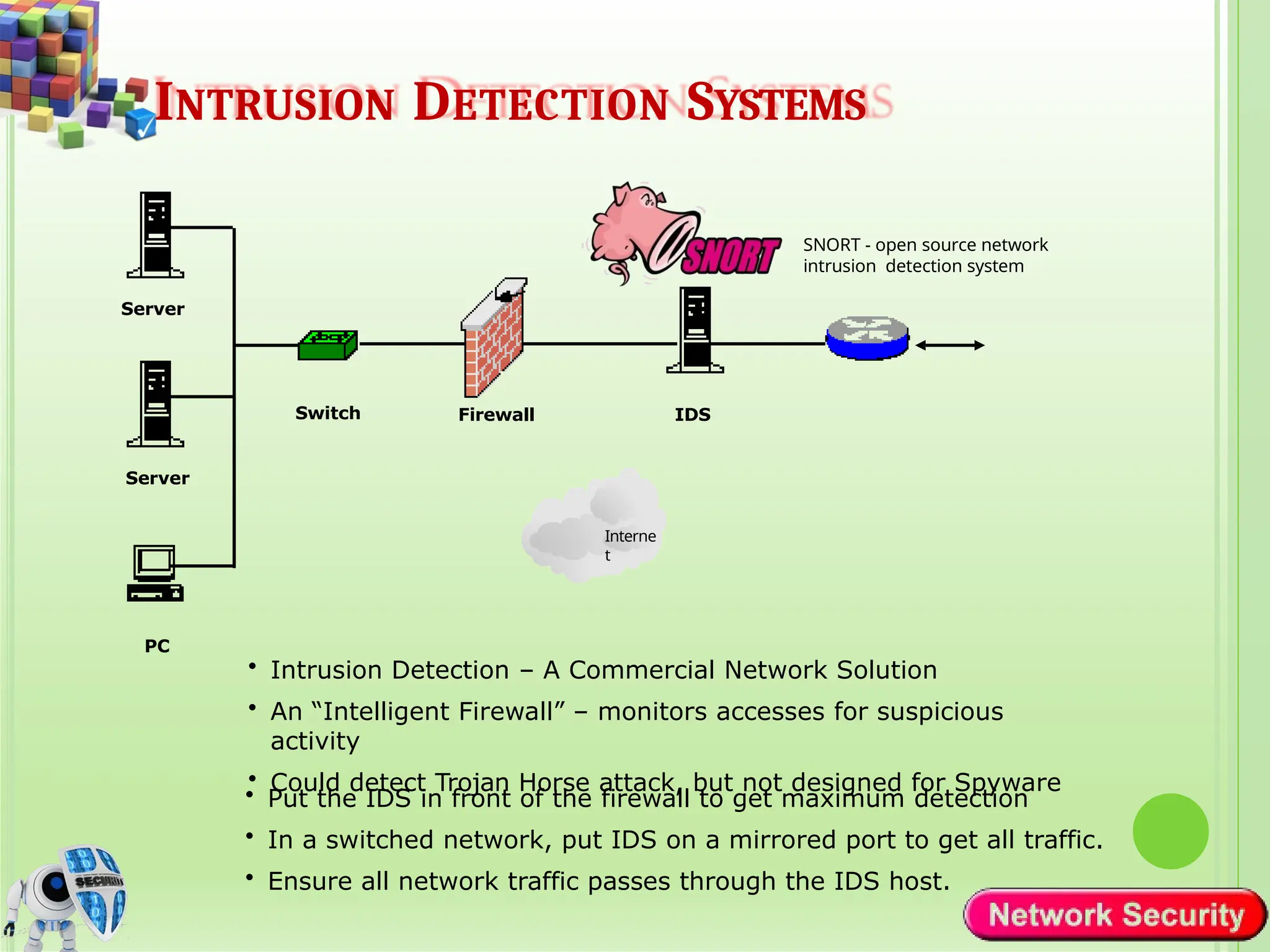
INTRUSION DETECTION SYSTEMS
• Intrusion Detection – A Commercial Network Solution
• An “Intelligent Firewall” – monitors accesses for suspicious
activity
• Could detect Trojan Horse attack, but not designed for Spyware
• Put the IDS in front of the firewall to get maximum detection
• In a switched network, put IDS on a mirrored port to get all traffic.
• Ensure all network traffic passes through the IDS host.
PC
Server
Interne
t
Server
IDS
Firewall
Switch
SNORT - open source network
intrusion detection system
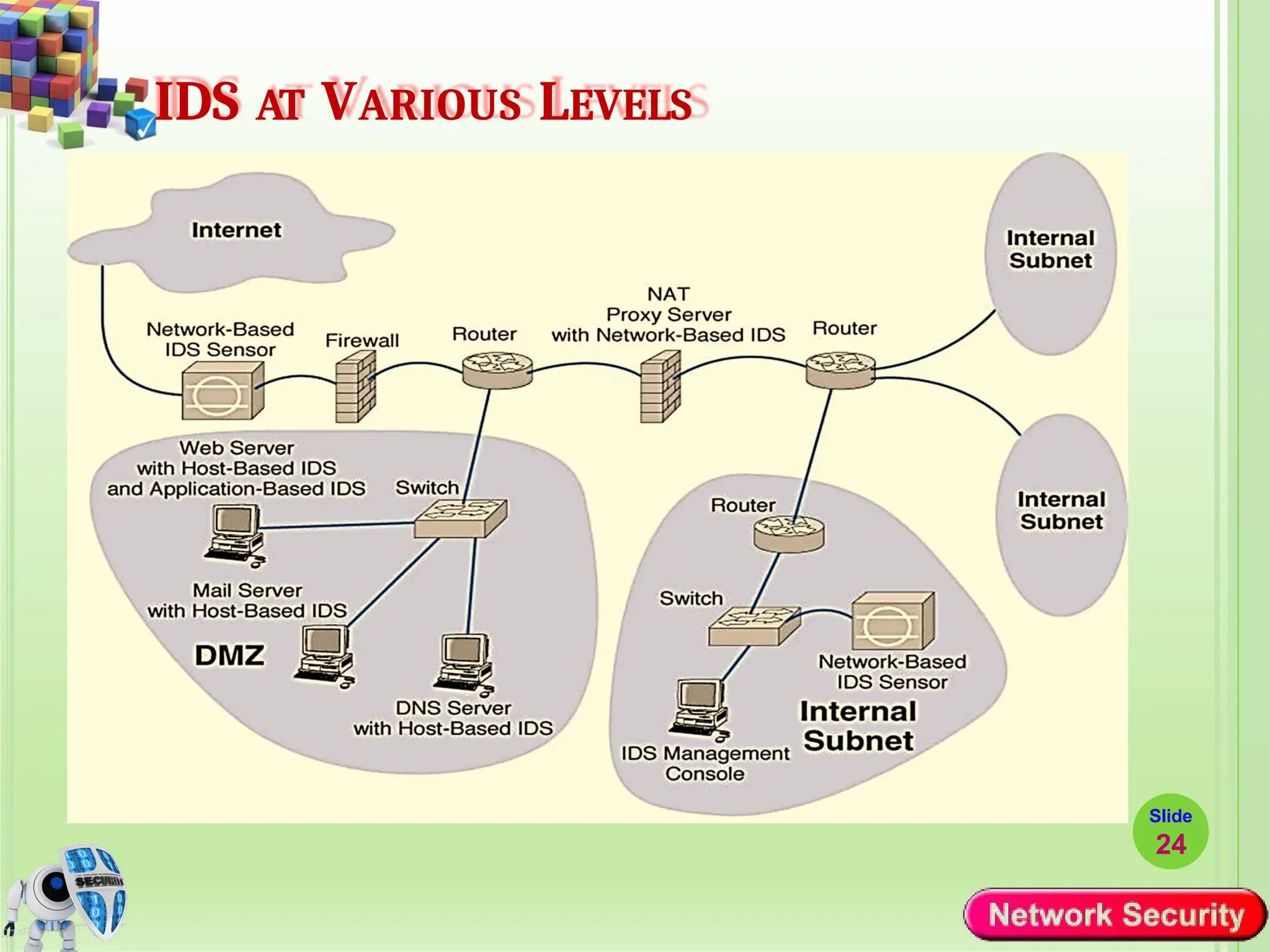
IDS AT VARIOUS LEVELS
Slide
24
25
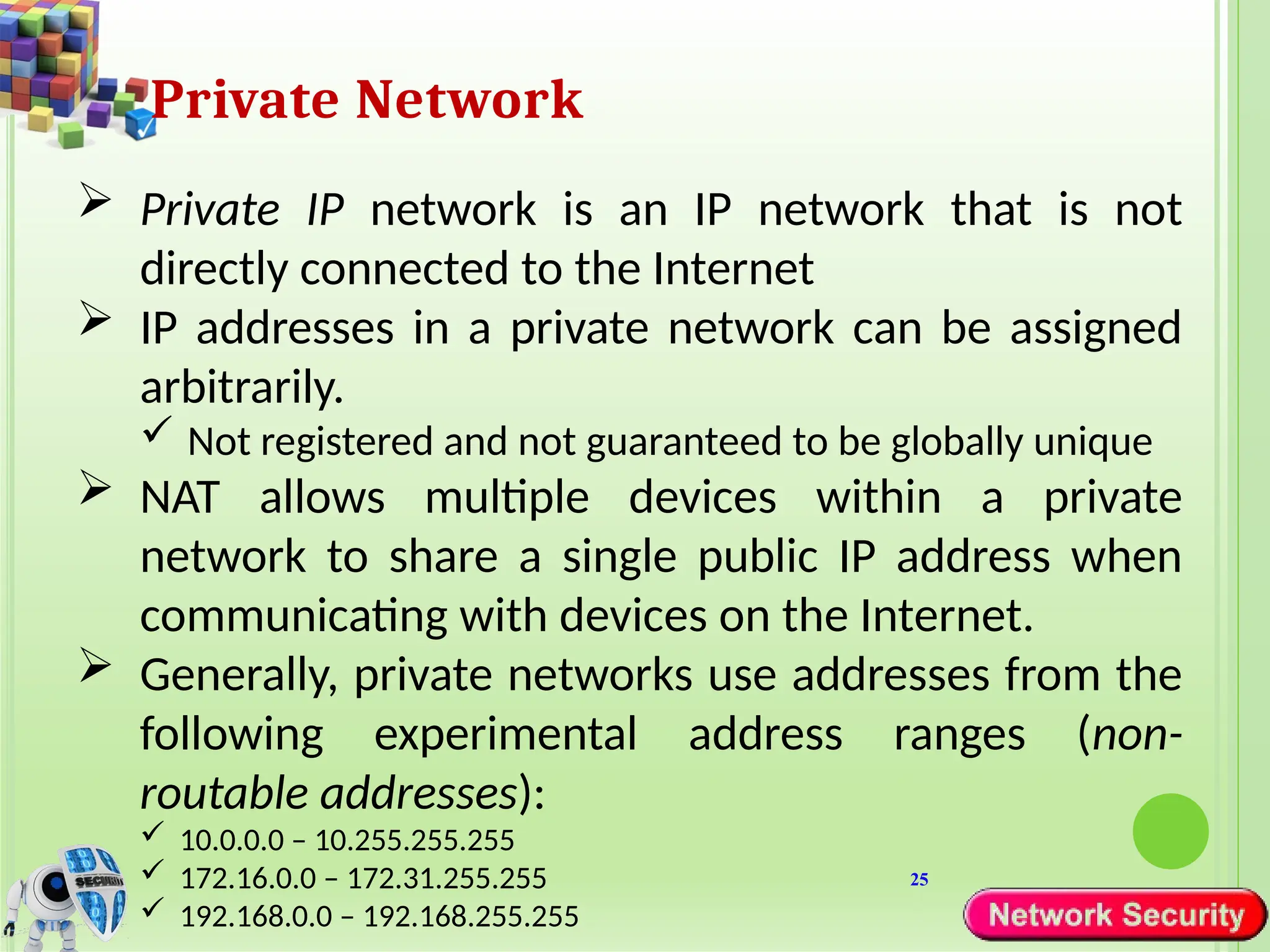
Private Network
 Private IP network is an IP network that is not
directly connected to the Internet
 IP addresses in a private network can be assigned
arbitrarily.
 Not registered and not guaranteed to be globally unique
 NAT allows multiple devices within a private
network to share a single public IP address when
communicating with devices on the Internet.
 Generally, private networks use addresses from the
following experimental address ranges (non-
routable addresses):
 10.0.0.0 – 10.255.255.255
 172.16.0.0 – 172.31.255.255
 192.168.0.0 – 192.168.255.255
26
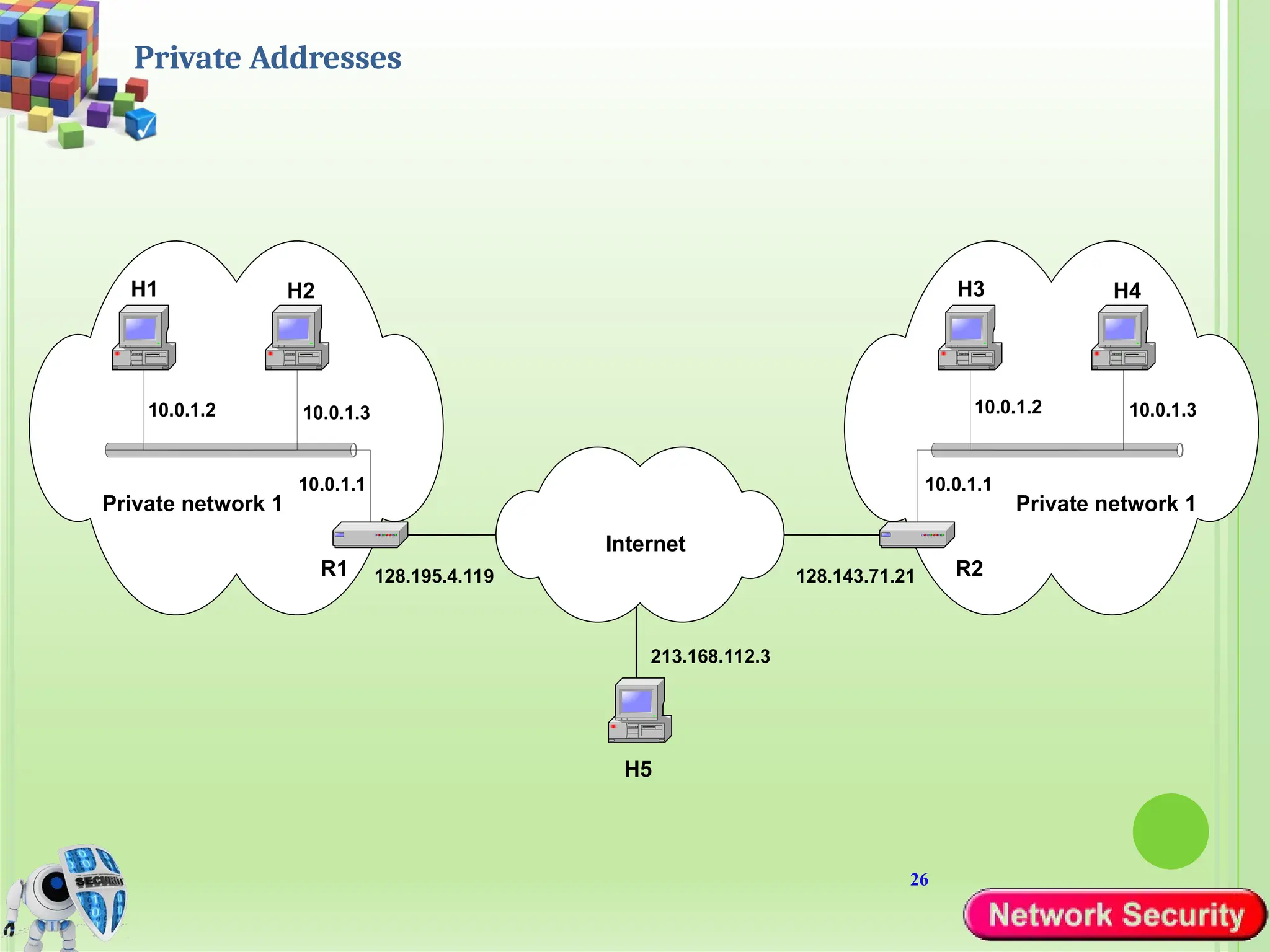
Private Addresses
H1
R1
H2
10.0.1.3
10.0.1.1
10.0.1.2
H3
R2
H4
10.0.1.3
10.0.1.2
Private network 1
Internet
H5
10.0.1.1
Private network 1
213.168.112.3
128.195.4.119 128.143.71.21
27
Network Address Translation (NAT)
 NAT is a router function where IP addresses
(and possibly port numbers) of IP datagrams
are replaced at the boundary of a private
network
 NAT is a method that enables hosts on private
networks to communicate with hosts on the
Internet
 NAT is run on routers that connect private
networks to the public Internet, to replace the
IP address-port pair of an IP packet with
another IP address-port pair.
28
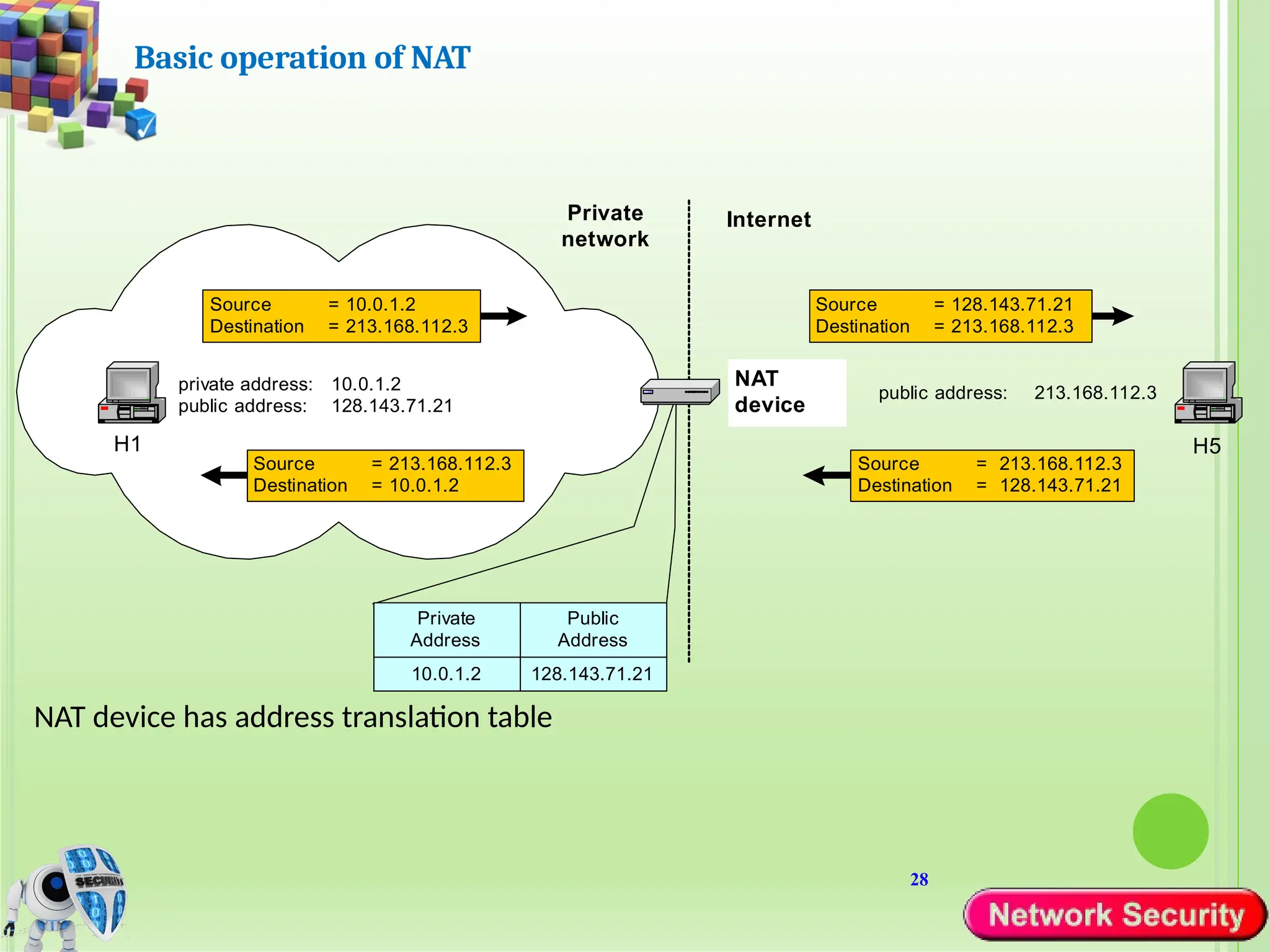
Basic operation of NAT
NAT device has address translation table
H1
private address: 10.0.1.2
public address: 128.143.71.21
H5
Private
network
Internet
Source = 10.0.1.2
Destination = 213.168.112.3
Source = 128.143.71.21
Destination = 213.168.112.3
public address: 213.168.112.3
NAT
device
Source = 213.168.112.3
Destination = 128.143.71.21
Source = 213.168.112.3
Destination = 10.0.1.2
Private
Address
Public
Address
10.0.1.2 128.143.71.21
29
NAPT
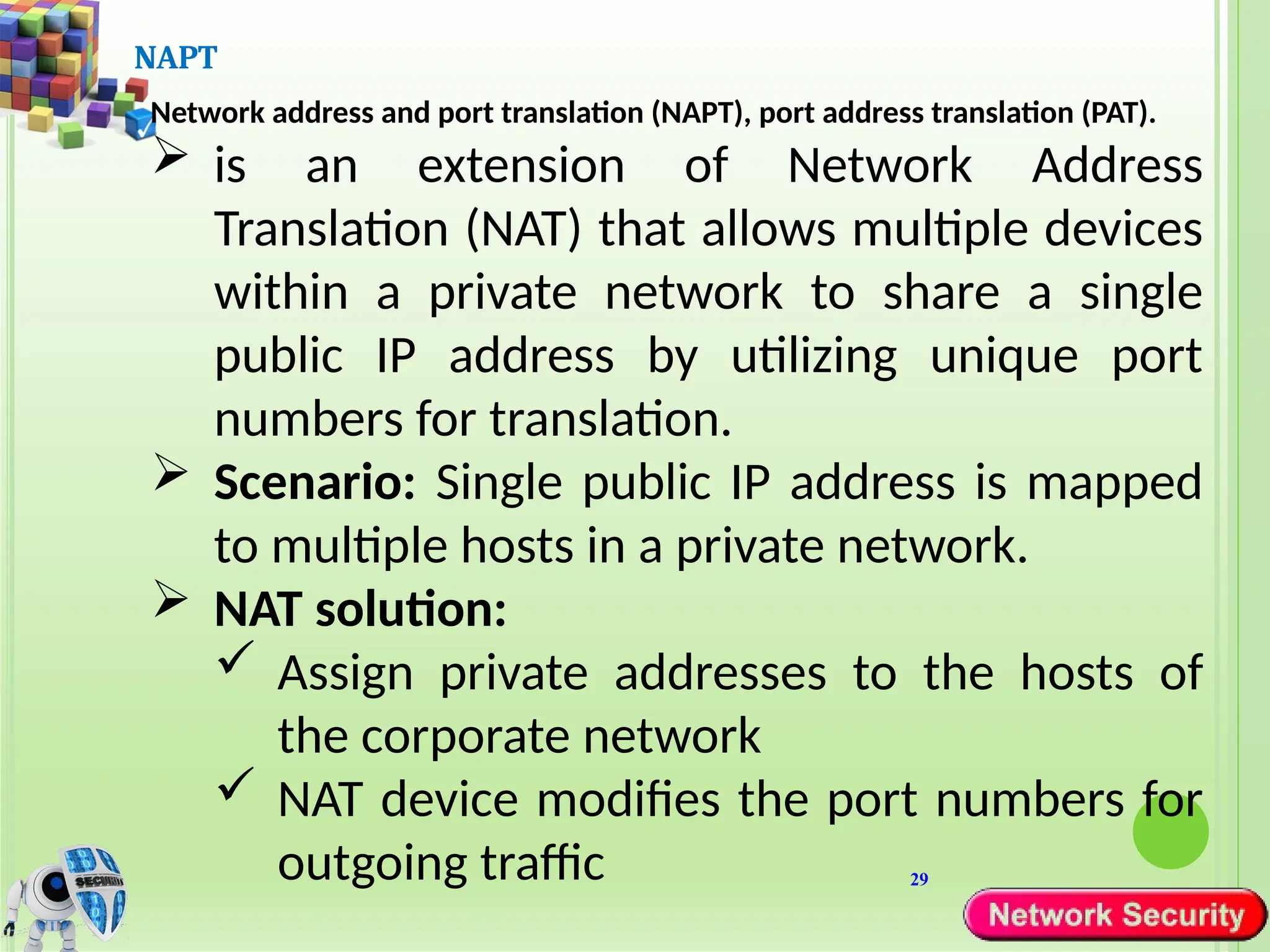
Network address and port translation (NAPT), port address translation (PAT).
 is an extension of Network Address
Translation (NAT) that allows multiple devices
within a private network to share a single
public IP address by utilizing unique port
numbers for translation.
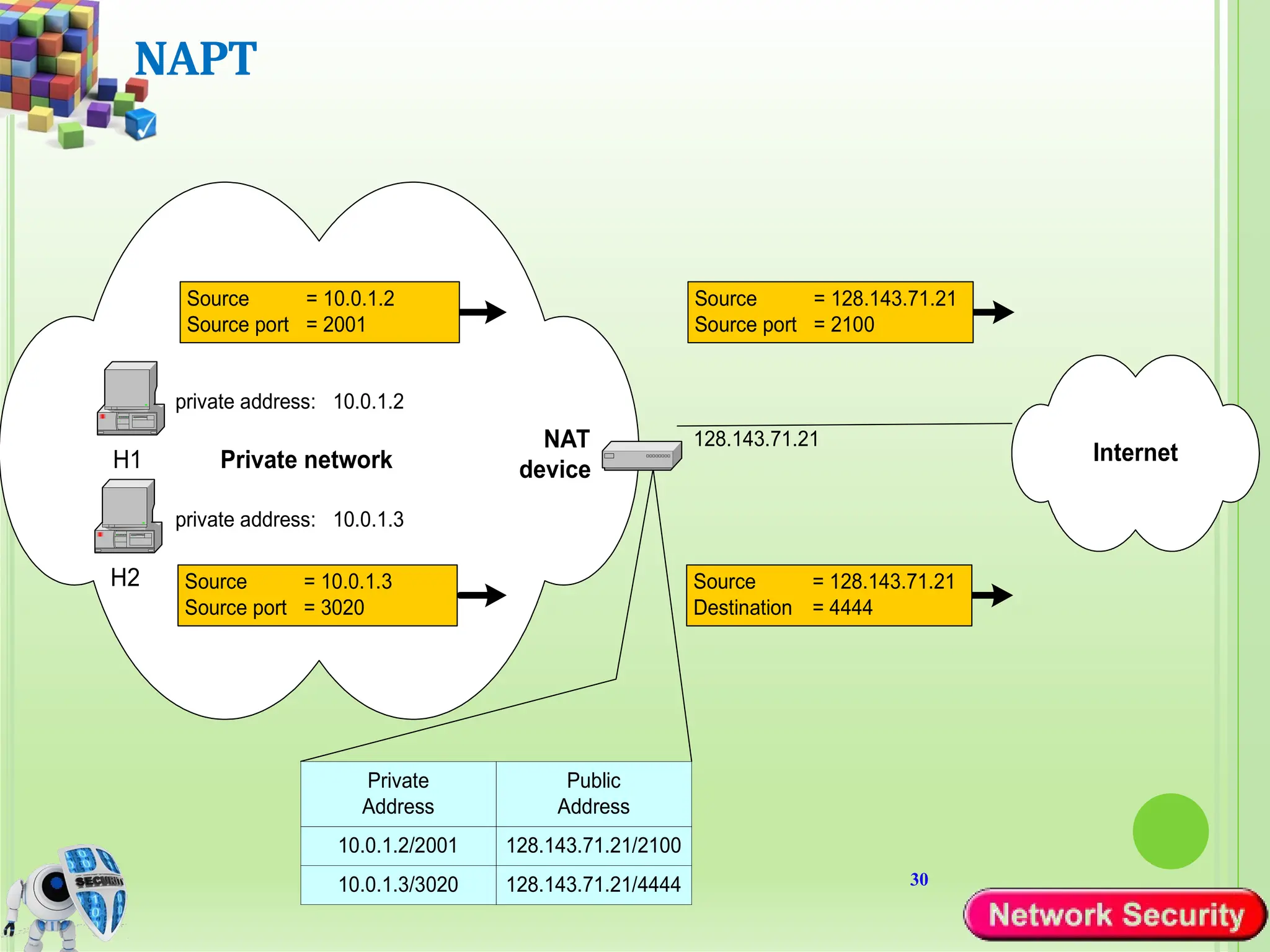
 Scenario: Single public IP address is mapped
to multiple hosts in a private network.
 NAT solution:
 Assign private addresses to the hosts of
the corporate network
 NAT device modifies the port numbers for
outgoing traffic
30
NAPT
H1
private address: 10.0.1.2
Private network
Source = 10.0.1.2
Source port = 2001
Source = 128.143.71.21
Source port = 2100
NAT
device
Private
Address
Public
Address
10.0.1.2/2001 128.143.71.21/2100
10.0.1.3/3020 128.143.71.21/4444
H2
private address: 10.0.1.3
Source = 10.0.1.3
Source port = 3020
Internet
Source = 128.143.71.21
Destination = 4444
128.143.71.21
31
Load balancing of servers
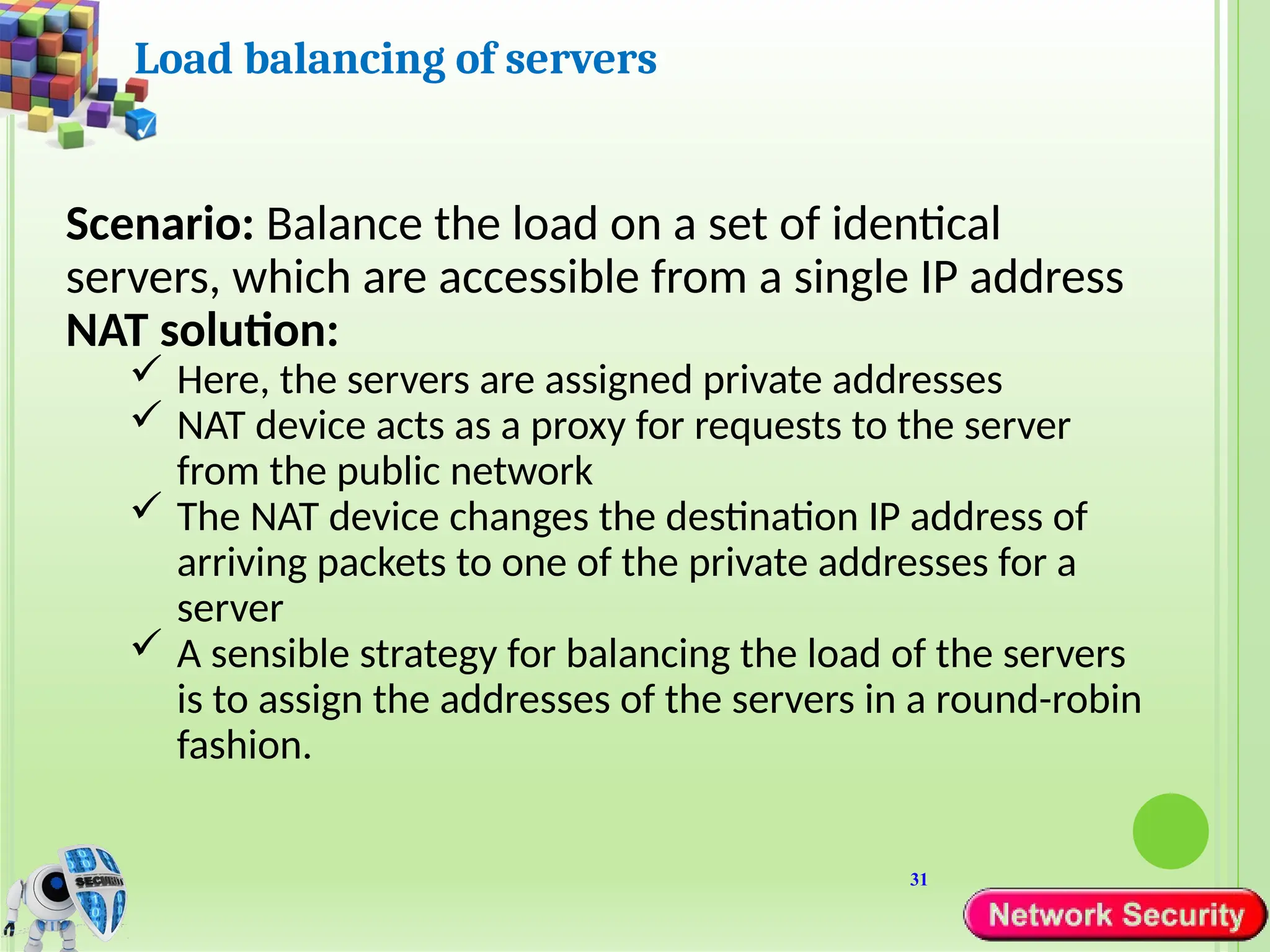
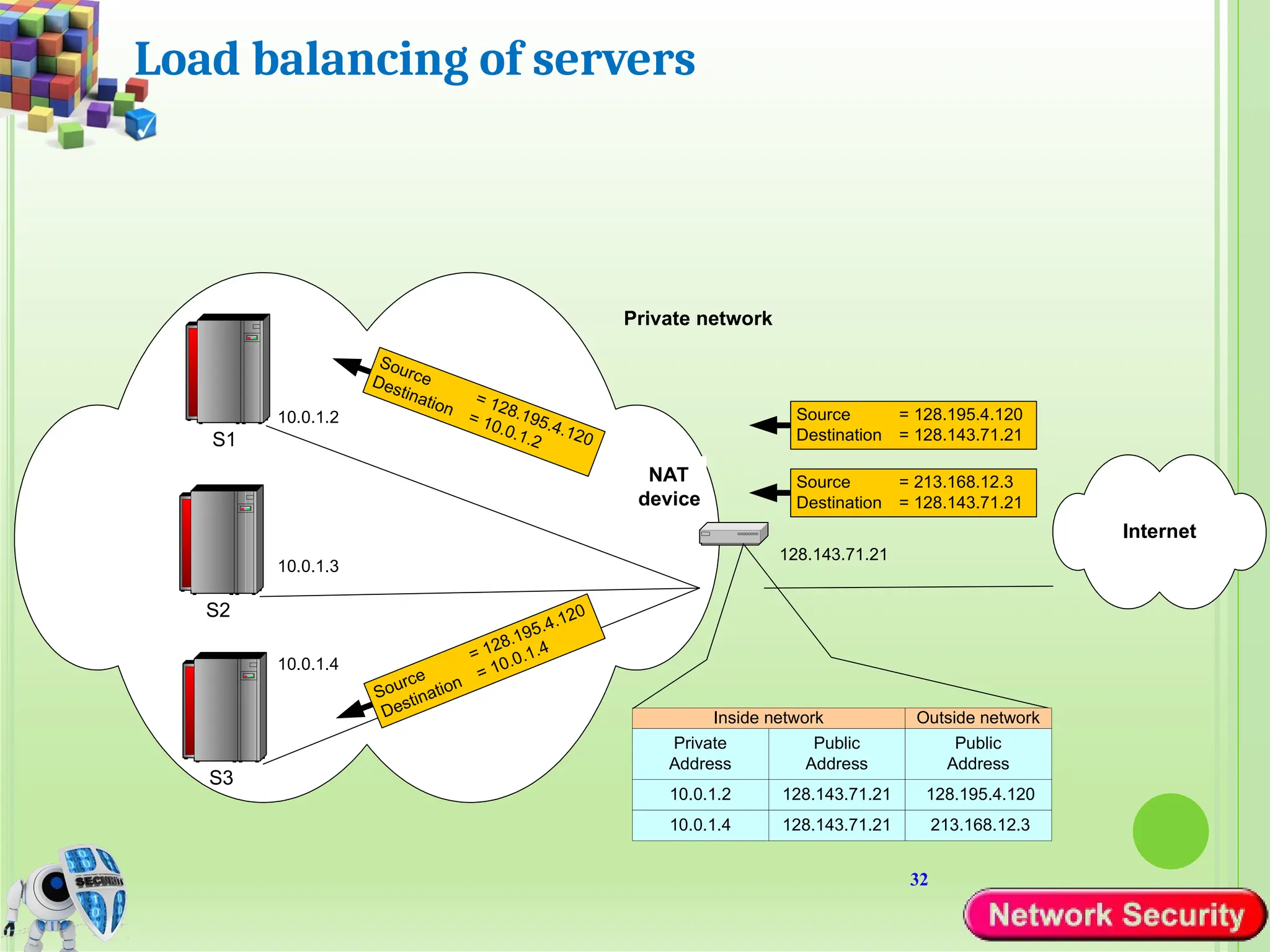
Scenario: Balance the load on a set of identical
servers, which are accessible from a single IP address
NAT solution:
 Here, the servers are assigned private addresses
 NAT device acts as a proxy for requests to the server
from the public network
 The NAT device changes the destination IP address of
arriving packets to one of the private addresses for a
server
 A sensible strategy for balancing the load of the servers
is to assign the addresses of the servers in a round-robin
fashion.
32
Load balancing of servers
Private network
Source = 213.168.12.3
Destination = 128.143.71.21
NAT
device
Private
Address
Public
Address
10.0.1.2 128.143.71.21
Inside network
10.0.1.4 128.143.71.21
Internet
128.143.71.21
S1
S2
S3
10.0.1.4
10.0.1.3
10.0.1.2
Public
Address
128.195.4.120
Outside network
213.168.12.3
Source = 128.195.4.120
Destination = 128.143.71.21
33
Concerns about NAT
Performance:
Modifying the IP header by changing the IP address
requires that NAT boxes recalculate the IP header
checksum
Modifying port number requires that NAT boxes
recalculate TCP checksum
Fragmentation
Care must be taken that a datagram that is fragmented
before it reaches the NAT device, is not assigned a
different IP address or different port numbers for each of
the fragments.
34
Concerns about NAT
End-to-end connectivity:
NAT destroys universal end-to-end reachability of
hosts on the Internet.
A host in the public Internet often cannot initiate
communication to a host in a private network.
The problem is worse, when two hosts that are in a
private network need to communicate with each
other.
35
Concerns about NAT
IP address in application data:
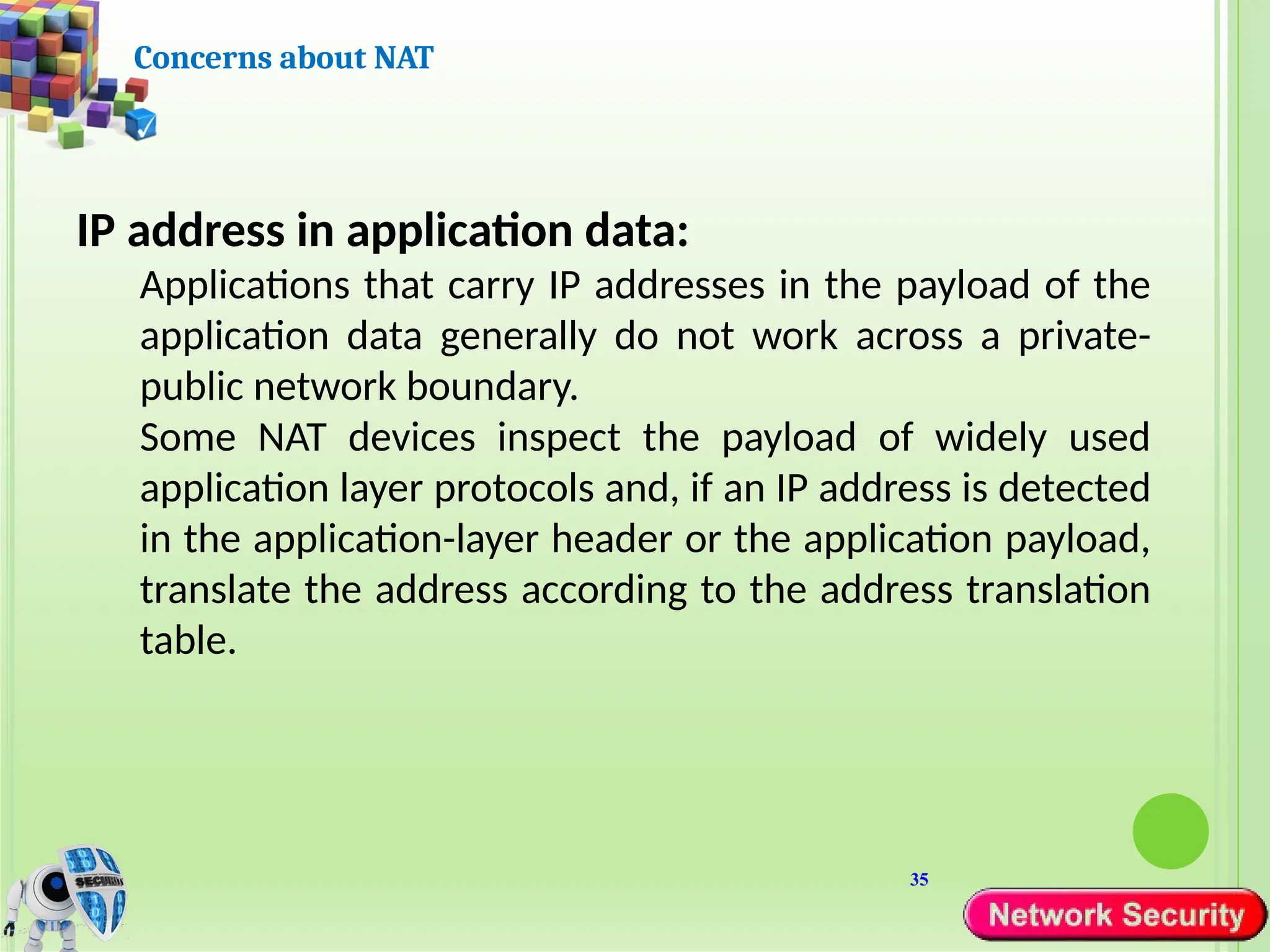
Applications that carry IP addresses in the payload of the
application data generally do not work across a private-
public network boundary.
Some NAT devices inspect the payload of widely used
application layer protocols and, if an IP address is detected
in the application-layer header or the application payload,
translate the address according to the address translation
table.
36
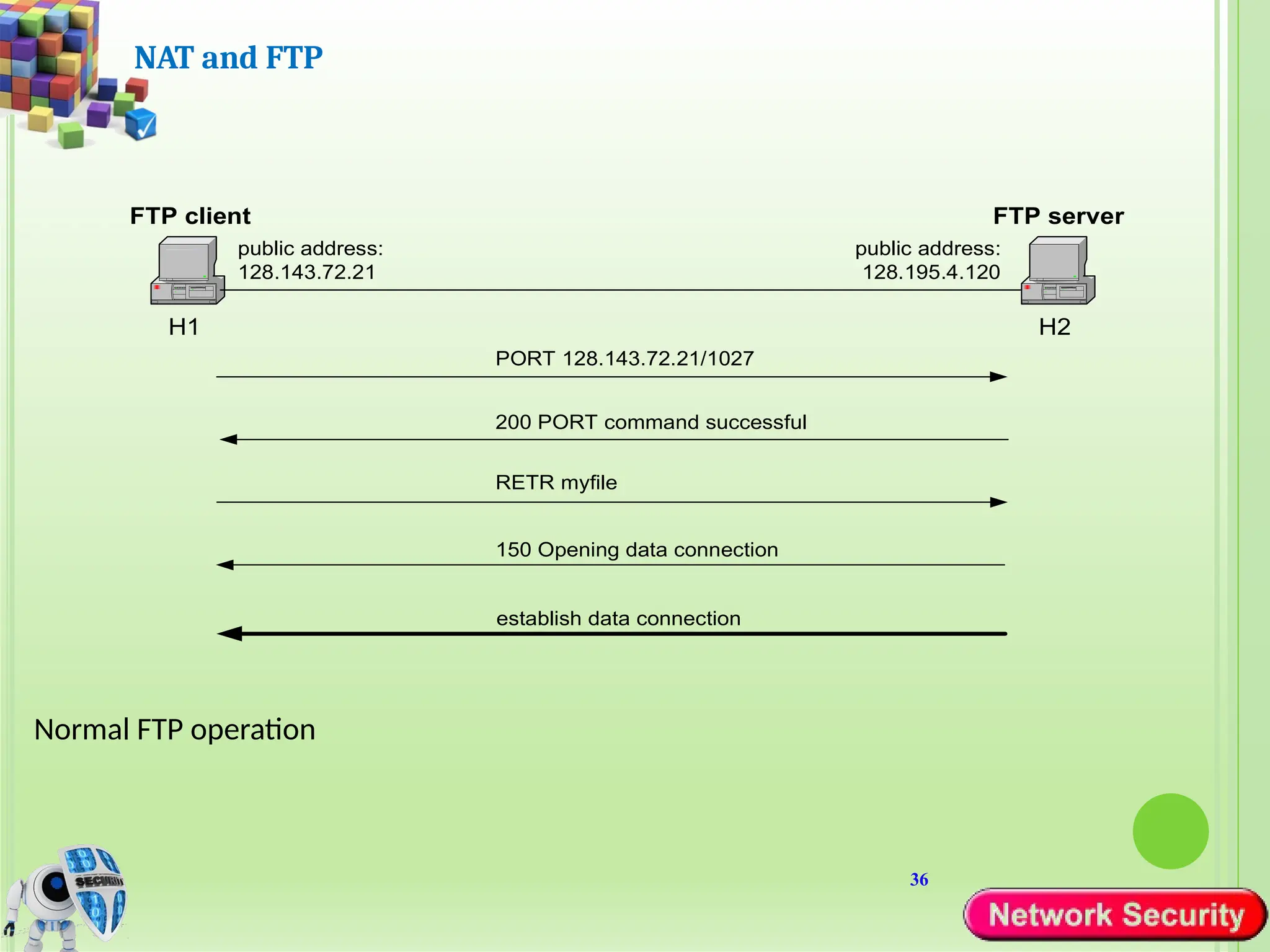
NAT and FTP
H1 H2
public address:
128.143.72.21
FTP client FTP server
PORT 128.143.72.21/1027
200 PORT command successful
public address:
128.195.4.120
RETR myfile
150 Opening data connection
establish data connection
Normal FTP operation
37
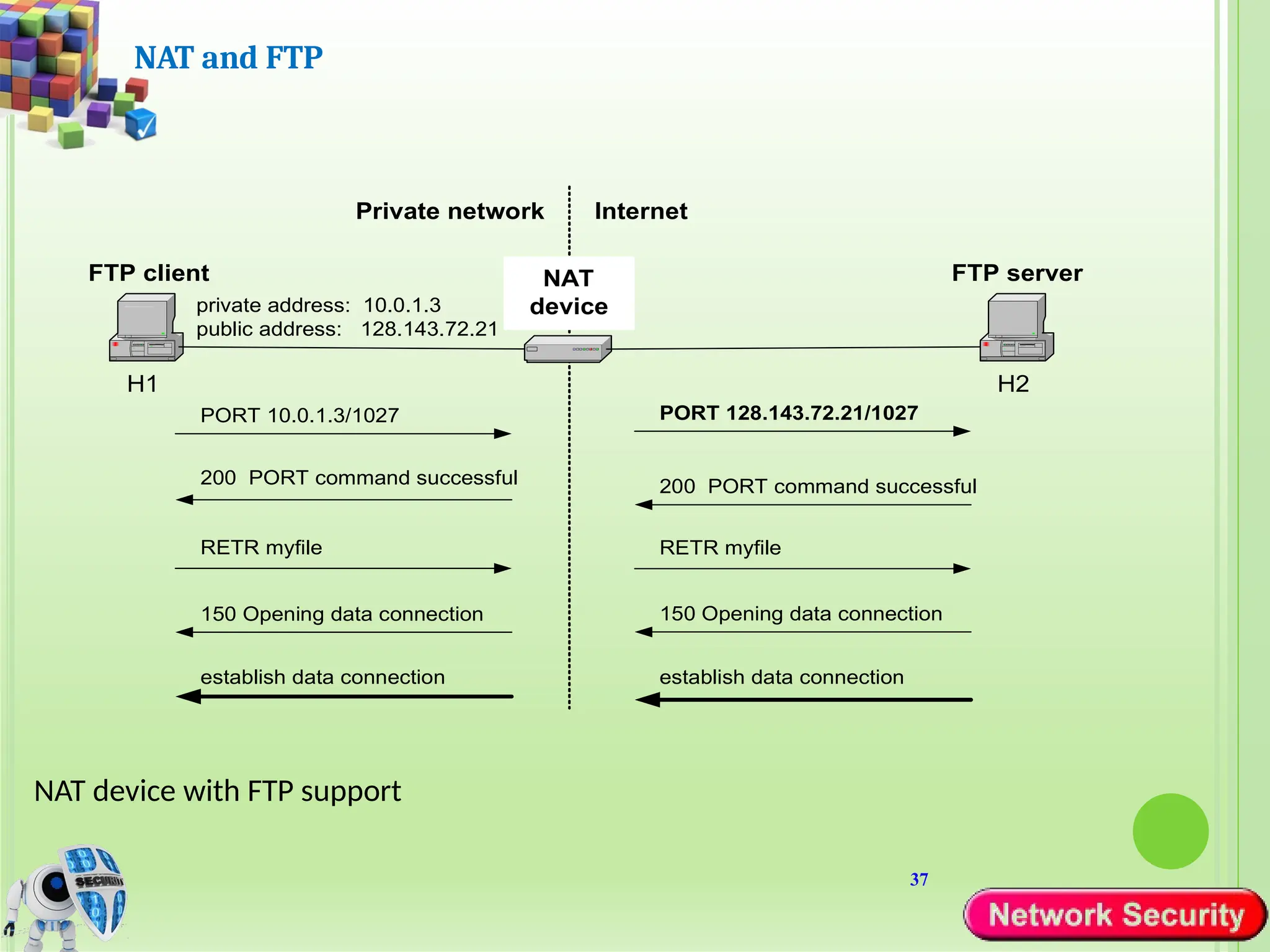
NAT and FTP
NAT device with FTP support
H1
Private network
NAT
device
H2
private address: 10.0.1.3
public address: 128.143.72.21
Internet
FTP client FTP server
PORT 10.0.1.3/1027 PORT 128.143.72.21/1027
200 PORT command successful
RETR myfile
establish data connection
RETR myfile
150 Opening data connection
establish data connection
Impact of network architecture on
security
• Security principles for good analysis, design,
implementation, and maintenance apply to
networks
• Architecture can improve security by:
• Segmentation
• Redundancy
• Single points of failure
1) Segmentation
• Architecture should use segmentation to limit scope of damage
caused by network penetration by:
• Reducing number of threats
• Limiting amount of damage caused by single exploit
• Enforces least privilege and encapsulation
• component segmentation
• Placing different components of e-commerce system on
different hosts
• Esp. put on separate host most vulnerable system
components
• E.g., separate host for web server (w/ public access)
• Exploit of one host does not disable entire system
2) Redundancy
• Architecture should use redundancy to prevent losing
availability due to exploit/failure of a single network entity
• Example: having a redundant web server (WS) in a company
• Types of redundancy include:
• Cold spare – e.g., when WS fails, replace it manually with
spare WS
• Warm spare – e.g., failover mode = redundant WSs
periodically check each other
• Hot spare – e.g., 3 WSs configured to perform majority
voting
3) Single points of failure (SPF)
• Architecture should eliminate SPFs to prevent losing availability
due to exploit/failure of a single network entity
• Using redundancy is a special case of avoiding SPFs
• Network designers must analyze network to eliminate all SPFs
• Example of avoiding SPF (without using redundancy)
• Distribute 20 pieces of database on 20 different hosts (so
called partitioned database)
• Even if one host fails, 95% of database contents
(19/20=95%) still available
• Elimination of SPFs (whether using redundancy or not) adds
cost
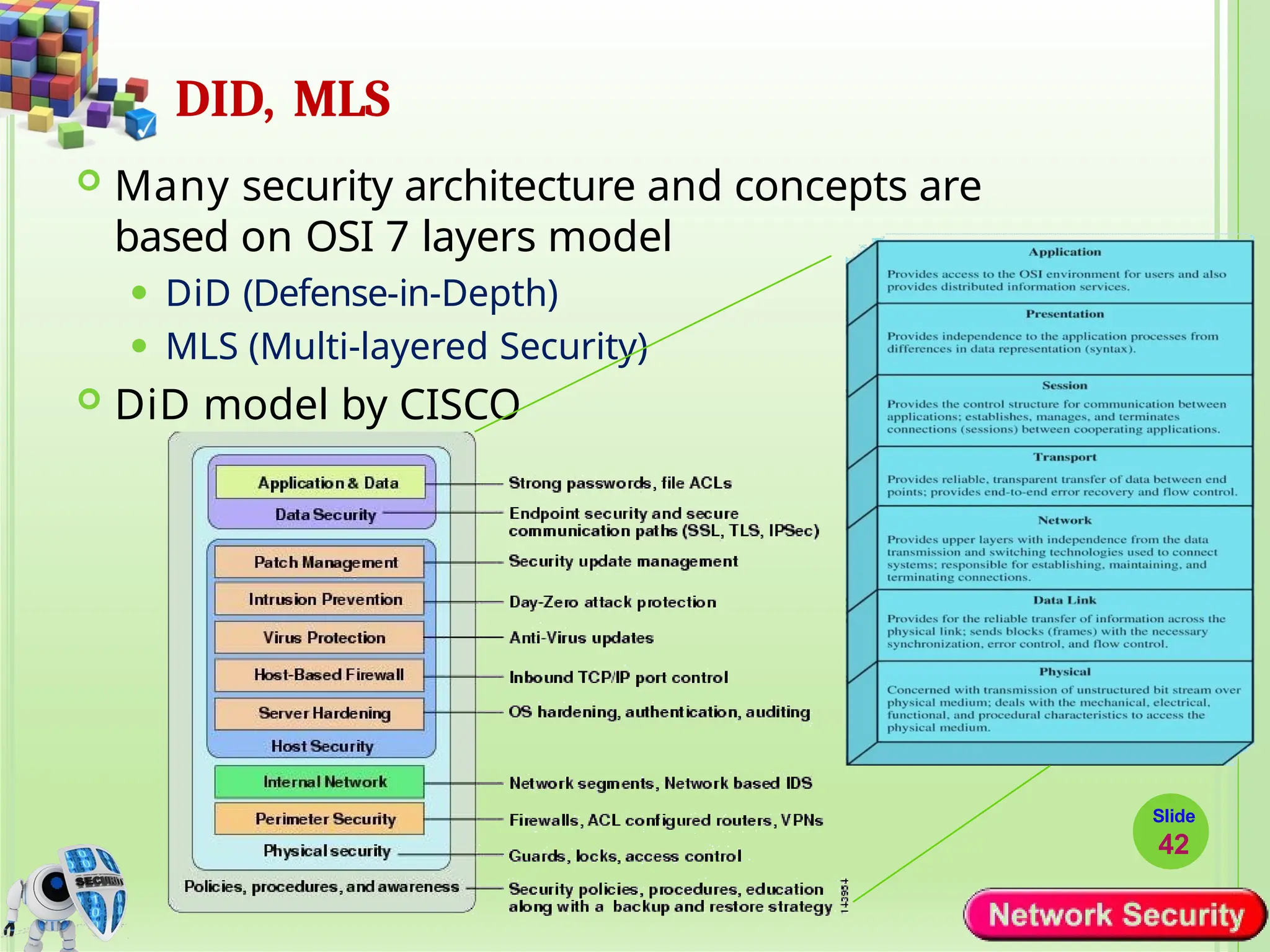
DID, MLS
 Many security architecture and concepts are
based on OSI 7 layers model
⚫ DiD (Defense-in-Depth)
⚫ MLS (Multi-layered Security)
 DiD model by CISCO
Slide
42
…DID, MLS
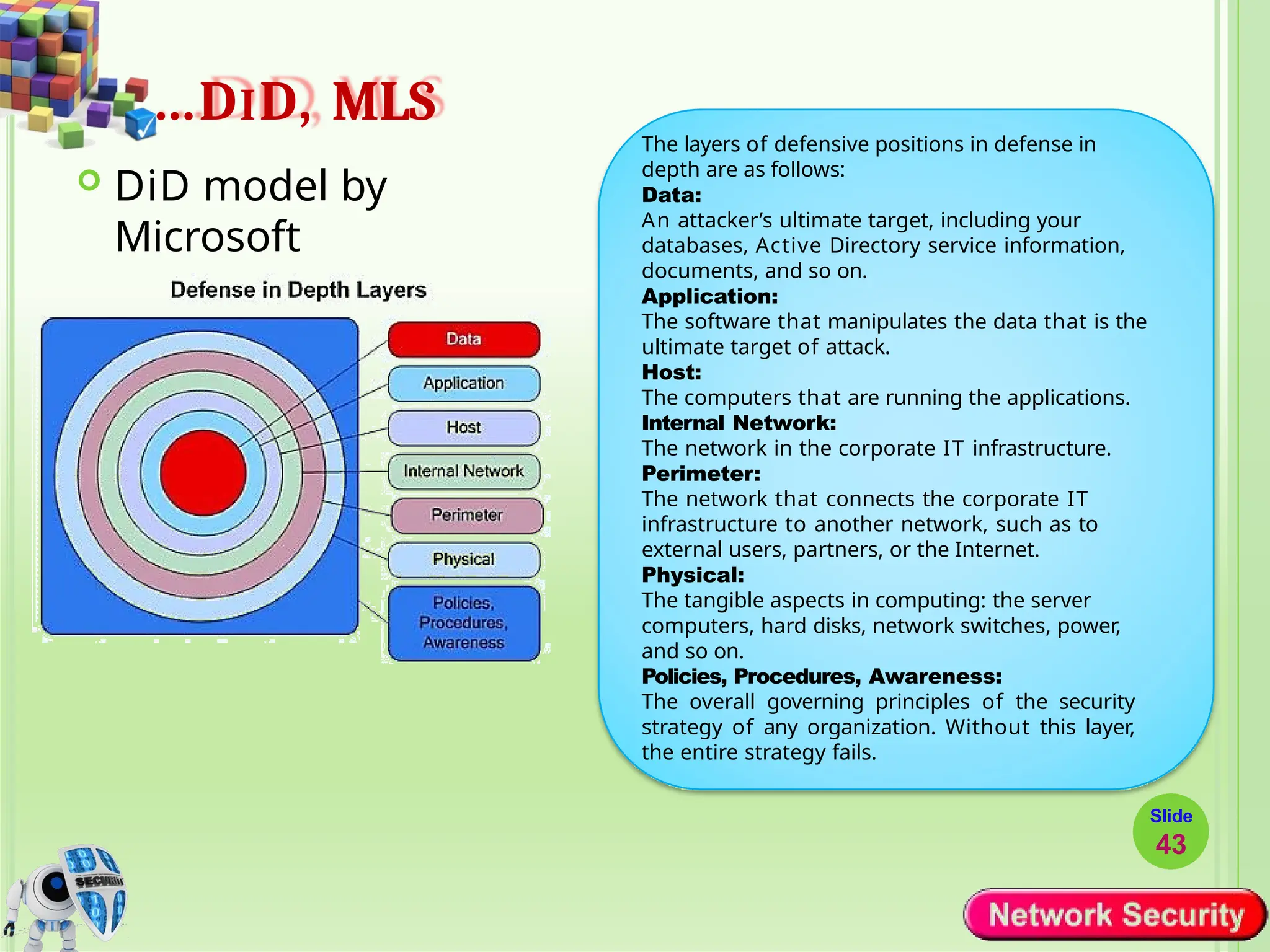
 DiD model by
Microsoft
The layers of defensive positions in defense in
depth are as follows:
Data:
An attacker’s ultimate target, including your
databases, Active Directory service information,
documents, and so on.
Application:
The software that manipulates the data that is the
ultimate target of attack.
Host:
The computers that are running the applications.
Internal Network:
The network in the corporate IT infrastructure.
Perimeter:
The network that connects the corporate IT
infrastructure to another network, such as to
external users, partners, or the Internet.
Physical:
The tangible aspects in computing: the server
computers, hard disks, network switches, power,
and so on.
Policies, Procedures, Awareness:
The overall governing principles of the security
strategy of any organization. Without this layer,
the entire strategy fails.
Slide
43
… DID, MLS
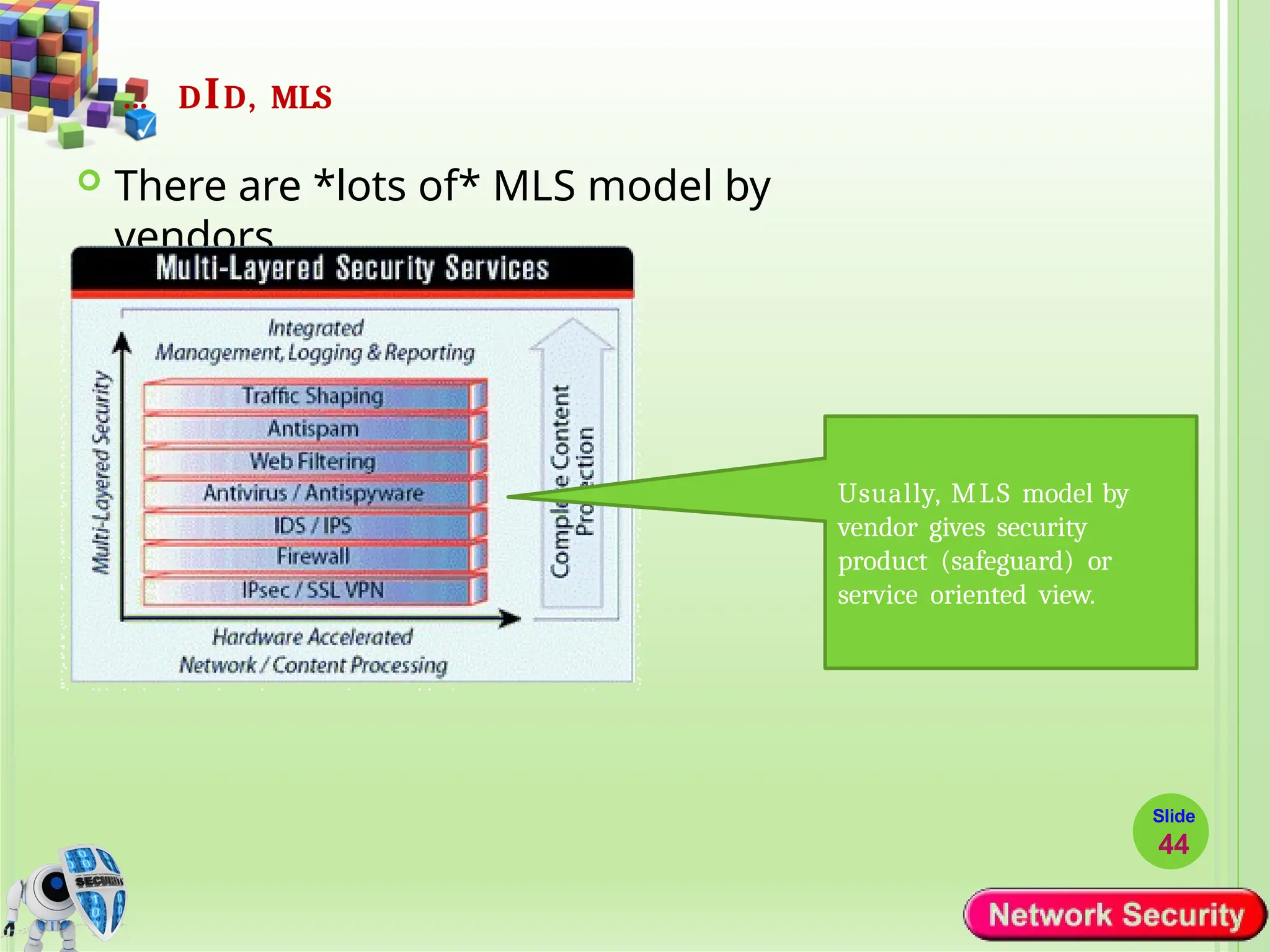
 There are *lots of* MLS model by
vendors
Usually, MLS model by
vendor gives security
product (safeguard) or
service oriented view.
Slide
44
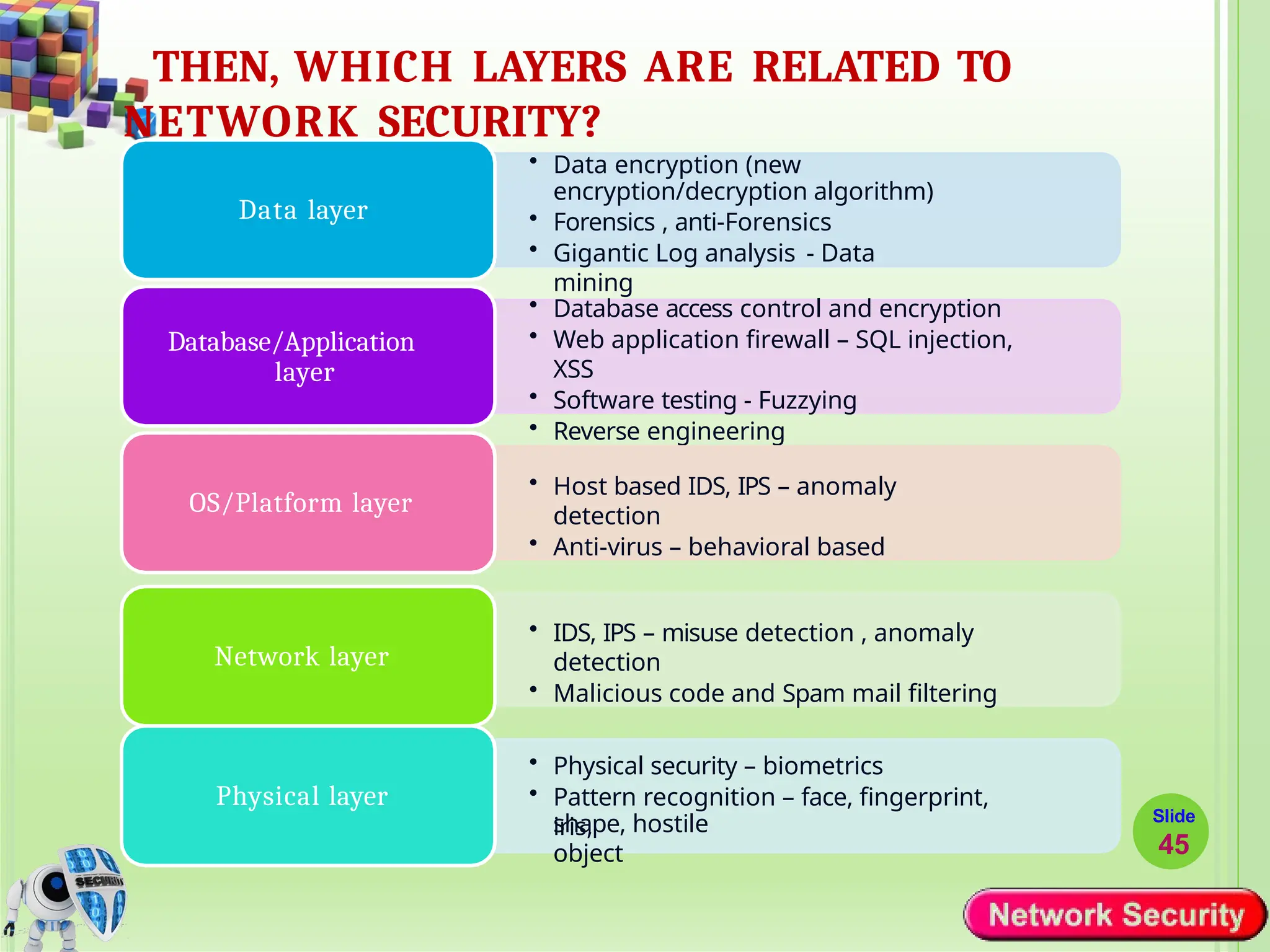
THEN, WHICH LAYERS ARE RELATED TO
NETWORK SECURITY?
• Data encryption (new
encryption/decryption algorithm)
• Forensics , anti-Forensics
• Gigantic Log analysis - Data
mining
Data layer
• Database access control and encryption
• Web application firewall – SQL injection,
XSS
• Software testing - Fuzzying
• Reverse engineering
Database/Application
layer
• Host based IDS, IPS – anomaly
detection
• Anti-virus – behavioral based
OS/Platform layer
• IDS, IPS – misuse detection , anomaly
detection
• Malicious code and Spam mail filtering
Network layer
• Physical security – biometrics
• Pattern recognition – face, fingerprint,
iris,
Physical layer
Slide
45
shape, hostile
object
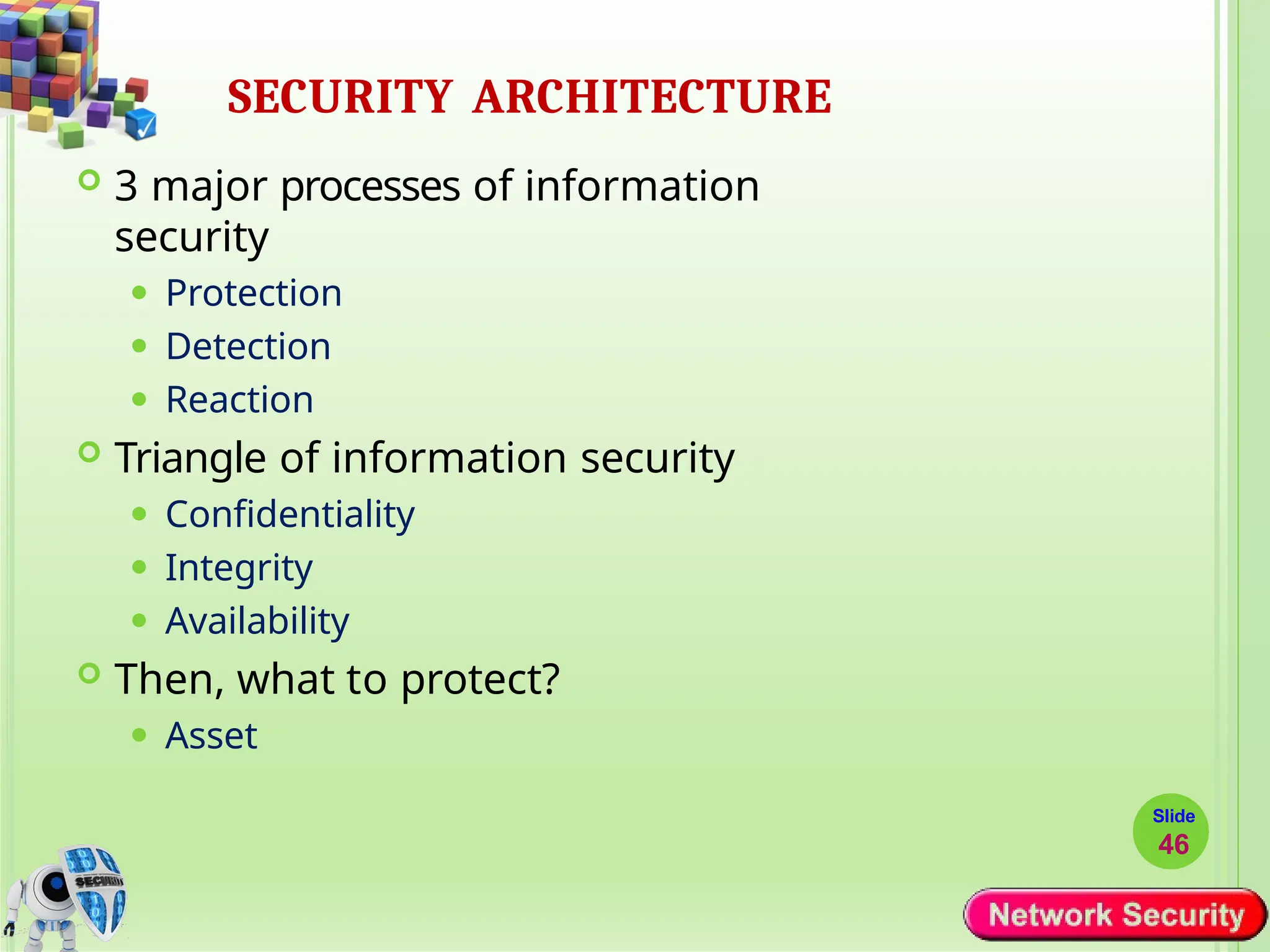
SECURITY ARCHITECTURE
Slide
46
 3 major processes of information
security
⚫ Protection
⚫ Detection
⚫ Reaction
 Triangle of information security
⚫ Confidentiality
⚫ Integrity
⚫ Availability
 Then, what to protect?
⚫ Asset
ASSET, THREAT, RISK, VULNERABILITY AND
SAFEGUARD
Slide
47
 Asset
 Threat
 Risk
 Vulnerabilit
y
 Safeguard
 Relation?
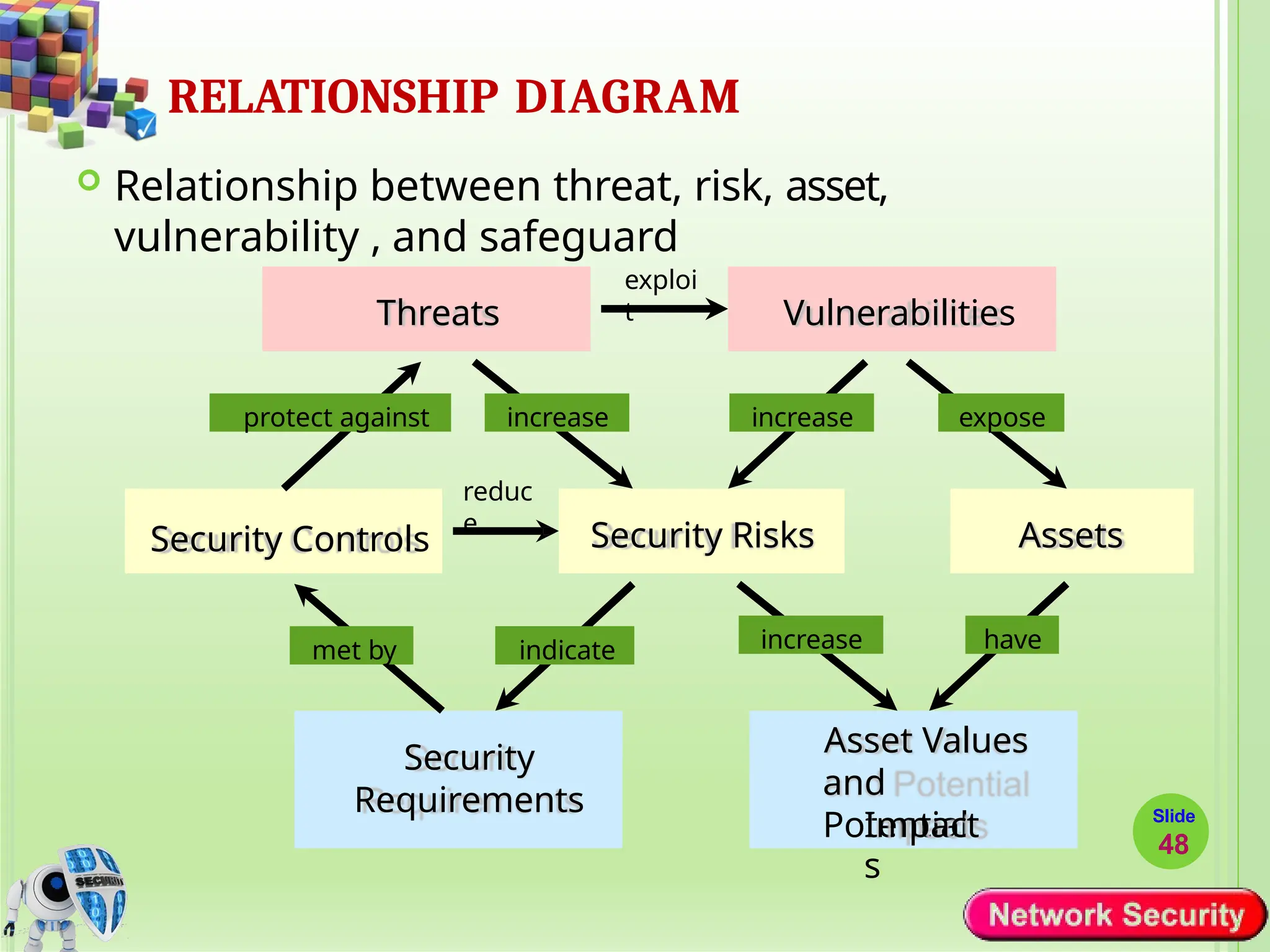
RELATIONSHIP DIAGRAM
 Relationship between threat, risk, asset,
vulnerability , and safeguard
Threats Vulnerabilities
Security Controls Security Risks Assets
Security
Requirements
Asset Values
and
Potential
exploi
t
expose
increase
increase
increase have
protect against
met by indicate
reduc
e
Impact
s
Slide
48
LABASSIGNMENT1:
Configure NAT and PAT in Packet Tracer.
Slide
49

Chapter_1_Introduction to Network Security-1.pptx

  • 1.
    Network security toolsand devices Slide 1
  • 2.
    Contd.. Slide 2  Network securitytools and devices play a crucial role in safeguarding computer networks from unauthorized access, data breaches, and other security threats.  These tools and devices are designed to:  Monitor,  Detect,  Prevent, and  Respond to various types of network attacks and vulnerabilities.
  • 3.
    Firewall Slide 3  Firewalls areone of the fundamental network security devices.  They act as a barrier between internal networks and external networks, such as the Internet.  Active content filtering technologies  Firewalls examine incoming and outgoing network traffic based on predefined security rules and policies.  They can block malicious traffic, unauthorized access attempts, and prevent certain types of attacks, such as distributed denial-of-service (DDoS) attacks.  Firewalls operate on number of layers
  • 4.
    8: Network Security8-4 Firewalls  isolates organization’s internal net from larger Internet, allowing some packets to pass, blocking others.  Is a Mechanism which filter out unwanted access attempts. firewall administered network public Internet firewall
  • 5.
    FIREWALL  Objectives: ⚫Protect localSystems ⚫Protect secured and controlled access to the Internet ⚫Provide restricted and controlled access from the Internet to the local servers  Design Goals: ⚫ All traffic flowing from inside to outside and vice versa should flow through the firewall ⚫ Only authorized traffic will be allowed to pass through the firewall. ⚫ The firewall itself is immune to penetration. Slide 5
  • 6.
    8: Network Security8-6 Firewalls: Why prevent denial of service attacks:  SYN flooding: attacker establishes many bogus TCP connections, no resources left for “real” connections. prevent illegal modification/access of internal data.  e.g., attacker replaces CIA’s homepage with something else allow only authorized access to inside network (set of authenticated users/hosts)
  • 7.
    TYPES OF FIREWALL Packetfilters  Work at the network level of the OSI model  Each packet is compared to a set of criteria before it is forwarded.  Checks Packet header Use IP address and Port Combination to setup rules ( to allow or not allow) Can use normal Packet Filtering Routers—Just manipulate the routing table. Attacks that can be made on packet filtering routers.  IP Address Spoofing ( Because there is lack of authentication)  Source Routing Attacks  Tiny fragment attacks Slide 7
  • 8.
  • 9.
  • 10.
    TYPES OF FIREWALL Packet filtering firewall maintains a filtering table that decides whether the packet will be forwarded or discarded. Slide 10  Incoming packets from network 192.168.21.0 are blocked.  Incoming packets destined for the internal TELNET server (port 23) are blocked.  Incoming packets destined for host 192.168.21.3 are blocked.  All well-known services to the network 192.168.21.0 are allowed.
  • 11.
    Firewalls - CircuitLevel Gateway
  • 12.
    TYPES OF FIREWALL Circuit-levelgateways  Circuit level gateways work at the session layer of the OSI model, or the TCP layer of TCP/IP.  Monitor TCP handshaking between packets to determine whether a requested session is legitimate.  Unlike other types of firewalls that inspect individual packets or application-layer data, circuit-level gateways focus on the establishment and management of network connections. Slide 12
  • 13.
  • 14.
    TYPES OF FIREWALL Application-levelFirewalls/gateways ( Proxy Server)  can inspect and filter the packets on any OSI layer, up to the application layer.  It has the ability to block specific content, also recognize when certain application and protocols (like HTTP, FTP) are being misused.  Service specific ( http, e-mail content,…)  Higher security than packet filters  Easy to log and audit all incoming traffic Slide 14
  • 15.
  • 16.
    PROXY SERVER CANFILTER OUT WEB PAGES OR OTHER CONTENTS Slide 16
  • 17.
    TYPES OF FIREWALL StatefulPacket Inspection Firewall  Stateful inspection firewalls combine packet filtering with session tracking capabilities.  They keep track of the state of network connections and allow or block packets based on the context of the entire session.  Stateful firewalls can verify that incoming packets belong to an established session and enforce more granular access control based on the state of the connection. ⚫ Such a Firewall uses a packet’s TCP flag and sequence/ack numbers to determine whether it is part of an existing, authorized flow ⚫ It participate in establishment of an authorized connection  If it is part of an existing connection, the packet is permitted, else dropped Slide 17
  • 18.
    Demilitarized Zone (DMZ) Is a network architecture concept that provides a secure, isolated area between an organization's internal trusted network and an untrusted external network, typically the Internet.  A separate network that sits outside the secure network perimeter.  Outside users can access the DMZ but cannot enter the secure network.  The purpose of a DMZ is to create a buffer zone that segregates publicly accessible services from internal resources, enhancing network security and reducing the risk of unauthorized access to sensitive data.
  • 19.
  • 20.
    DMZ with OneFirewall
  • 21.
    DMZ with TwoFirewalls
  • 22.
    Intrusion Detection System •It is better to prevent attack than to detect it after it succeeds • Unfortunately, not all attacks can be prevented • Some attackers become intruders — succeed in breaking defenses • Intrusion prevention — first line of defense • Intrusion detection — second line of defense • Intrusion detection system (IDS) - a device (typically a seprate computer) monitoring system activities to detect malicious / suspicious events • IDSs attempt to detect • Outsiders breaking into a system • OR • Insiders (legitimate users) attempting illegitimate actions • Accidentally OR deliberately
  • 23.
    INTRUSION DETECTION SYSTEMS •Intrusion Detection – A Commercial Network Solution • An “Intelligent Firewall” – monitors accesses for suspicious activity • Could detect Trojan Horse attack, but not designed for Spyware • Put the IDS in front of the firewall to get maximum detection • In a switched network, put IDS on a mirrored port to get all traffic. • Ensure all network traffic passes through the IDS host. PC Server Interne t Server IDS Firewall Switch SNORT - open source network intrusion detection system
  • 24.
    IDS AT VARIOUSLEVELS Slide 24
  • 25.
    25 Private Network  PrivateIP network is an IP network that is not directly connected to the Internet  IP addresses in a private network can be assigned arbitrarily.  Not registered and not guaranteed to be globally unique  NAT allows multiple devices within a private network to share a single public IP address when communicating with devices on the Internet.  Generally, private networks use addresses from the following experimental address ranges (non- routable addresses):  10.0.0.0 – 10.255.255.255  172.16.0.0 – 172.31.255.255  192.168.0.0 – 192.168.255.255
  • 26.
    26 Private Addresses H1 R1 H2 10.0.1.3 10.0.1.1 10.0.1.2 H3 R2 H4 10.0.1.3 10.0.1.2 Private network1 Internet H5 10.0.1.1 Private network 1 213.168.112.3 128.195.4.119 128.143.71.21
  • 27.
    27 Network Address Translation(NAT)  NAT is a router function where IP addresses (and possibly port numbers) of IP datagrams are replaced at the boundary of a private network  NAT is a method that enables hosts on private networks to communicate with hosts on the Internet  NAT is run on routers that connect private networks to the public Internet, to replace the IP address-port pair of an IP packet with another IP address-port pair.
  • 28.
    28 Basic operation ofNAT NAT device has address translation table H1 private address: 10.0.1.2 public address: 128.143.71.21 H5 Private network Internet Source = 10.0.1.2 Destination = 213.168.112.3 Source = 128.143.71.21 Destination = 213.168.112.3 public address: 213.168.112.3 NAT device Source = 213.168.112.3 Destination = 128.143.71.21 Source = 213.168.112.3 Destination = 10.0.1.2 Private Address Public Address 10.0.1.2 128.143.71.21
  • 29.
    29 NAPT Network address andport translation (NAPT), port address translation (PAT).  is an extension of Network Address Translation (NAT) that allows multiple devices within a private network to share a single public IP address by utilizing unique port numbers for translation.  Scenario: Single public IP address is mapped to multiple hosts in a private network.  NAT solution:  Assign private addresses to the hosts of the corporate network  NAT device modifies the port numbers for outgoing traffic
  • 30.
    30 NAPT H1 private address: 10.0.1.2 Privatenetwork Source = 10.0.1.2 Source port = 2001 Source = 128.143.71.21 Source port = 2100 NAT device Private Address Public Address 10.0.1.2/2001 128.143.71.21/2100 10.0.1.3/3020 128.143.71.21/4444 H2 private address: 10.0.1.3 Source = 10.0.1.3 Source port = 3020 Internet Source = 128.143.71.21 Destination = 4444 128.143.71.21
  • 31.
    31 Load balancing ofservers Scenario: Balance the load on a set of identical servers, which are accessible from a single IP address NAT solution:  Here, the servers are assigned private addresses  NAT device acts as a proxy for requests to the server from the public network  The NAT device changes the destination IP address of arriving packets to one of the private addresses for a server  A sensible strategy for balancing the load of the servers is to assign the addresses of the servers in a round-robin fashion.
  • 32.
    32 Load balancing ofservers Private network Source = 213.168.12.3 Destination = 128.143.71.21 NAT device Private Address Public Address 10.0.1.2 128.143.71.21 Inside network 10.0.1.4 128.143.71.21 Internet 128.143.71.21 S1 S2 S3 10.0.1.4 10.0.1.3 10.0.1.2 Public Address 128.195.4.120 Outside network 213.168.12.3 Source = 128.195.4.120 Destination = 128.143.71.21
  • 33.
    33 Concerns about NAT Performance: Modifyingthe IP header by changing the IP address requires that NAT boxes recalculate the IP header checksum Modifying port number requires that NAT boxes recalculate TCP checksum Fragmentation Care must be taken that a datagram that is fragmented before it reaches the NAT device, is not assigned a different IP address or different port numbers for each of the fragments.
  • 34.
    34 Concerns about NAT End-to-endconnectivity: NAT destroys universal end-to-end reachability of hosts on the Internet. A host in the public Internet often cannot initiate communication to a host in a private network. The problem is worse, when two hosts that are in a private network need to communicate with each other.
  • 35.
    35 Concerns about NAT IPaddress in application data: Applications that carry IP addresses in the payload of the application data generally do not work across a private- public network boundary. Some NAT devices inspect the payload of widely used application layer protocols and, if an IP address is detected in the application-layer header or the application payload, translate the address according to the address translation table.
  • 36.
    36 NAT and FTP H1H2 public address: 128.143.72.21 FTP client FTP server PORT 128.143.72.21/1027 200 PORT command successful public address: 128.195.4.120 RETR myfile 150 Opening data connection establish data connection Normal FTP operation
  • 37.
    37 NAT and FTP NATdevice with FTP support H1 Private network NAT device H2 private address: 10.0.1.3 public address: 128.143.72.21 Internet FTP client FTP server PORT 10.0.1.3/1027 PORT 128.143.72.21/1027 200 PORT command successful 200 PORT command successful RETR myfile establish data connection RETR myfile 150 Opening data connection 150 Opening data connection establish data connection
  • 38.
    Impact of networkarchitecture on security • Security principles for good analysis, design, implementation, and maintenance apply to networks • Architecture can improve security by: • Segmentation • Redundancy • Single points of failure
  • 39.
    1) Segmentation • Architectureshould use segmentation to limit scope of damage caused by network penetration by: • Reducing number of threats • Limiting amount of damage caused by single exploit • Enforces least privilege and encapsulation • component segmentation • Placing different components of e-commerce system on different hosts • Esp. put on separate host most vulnerable system components • E.g., separate host for web server (w/ public access) • Exploit of one host does not disable entire system
  • 40.
    2) Redundancy • Architectureshould use redundancy to prevent losing availability due to exploit/failure of a single network entity • Example: having a redundant web server (WS) in a company • Types of redundancy include: • Cold spare – e.g., when WS fails, replace it manually with spare WS • Warm spare – e.g., failover mode = redundant WSs periodically check each other • Hot spare – e.g., 3 WSs configured to perform majority voting
  • 41.
    3) Single pointsof failure (SPF) • Architecture should eliminate SPFs to prevent losing availability due to exploit/failure of a single network entity • Using redundancy is a special case of avoiding SPFs • Network designers must analyze network to eliminate all SPFs • Example of avoiding SPF (without using redundancy) • Distribute 20 pieces of database on 20 different hosts (so called partitioned database) • Even if one host fails, 95% of database contents (19/20=95%) still available • Elimination of SPFs (whether using redundancy or not) adds cost
  • 42.
    DID, MLS  Manysecurity architecture and concepts are based on OSI 7 layers model ⚫ DiD (Defense-in-Depth) ⚫ MLS (Multi-layered Security)  DiD model by CISCO Slide 42
  • 43.
    …DID, MLS  DiDmodel by Microsoft The layers of defensive positions in defense in depth are as follows: Data: An attacker’s ultimate target, including your databases, Active Directory service information, documents, and so on. Application: The software that manipulates the data that is the ultimate target of attack. Host: The computers that are running the applications. Internal Network: The network in the corporate IT infrastructure. Perimeter: The network that connects the corporate IT infrastructure to another network, such as to external users, partners, or the Internet. Physical: The tangible aspects in computing: the server computers, hard disks, network switches, power, and so on. Policies, Procedures, Awareness: The overall governing principles of the security strategy of any organization. Without this layer, the entire strategy fails. Slide 43
  • 44.
    … DID, MLS There are *lots of* MLS model by vendors Usually, MLS model by vendor gives security product (safeguard) or service oriented view. Slide 44
  • 45.
    THEN, WHICH LAYERSARE RELATED TO NETWORK SECURITY? • Data encryption (new encryption/decryption algorithm) • Forensics , anti-Forensics • Gigantic Log analysis - Data mining Data layer • Database access control and encryption • Web application firewall – SQL injection, XSS • Software testing - Fuzzying • Reverse engineering Database/Application layer • Host based IDS, IPS – anomaly detection • Anti-virus – behavioral based OS/Platform layer • IDS, IPS – misuse detection , anomaly detection • Malicious code and Spam mail filtering Network layer • Physical security – biometrics • Pattern recognition – face, fingerprint, iris, Physical layer Slide 45 shape, hostile object
  • 46.
    SECURITY ARCHITECTURE Slide 46  3major processes of information security ⚫ Protection ⚫ Detection ⚫ Reaction  Triangle of information security ⚫ Confidentiality ⚫ Integrity ⚫ Availability  Then, what to protect? ⚫ Asset
  • 47.
    ASSET, THREAT, RISK,VULNERABILITY AND SAFEGUARD Slide 47  Asset  Threat  Risk  Vulnerabilit y  Safeguard  Relation?
  • 48.
    RELATIONSHIP DIAGRAM  Relationshipbetween threat, risk, asset, vulnerability , and safeguard Threats Vulnerabilities Security Controls Security Risks Assets Security Requirements Asset Values and Potential exploi t expose increase increase increase have protect against met by indicate reduc e Impact s Slide 48
  • 49.
    LABASSIGNMENT1: Configure NAT andPAT in Packet Tracer. Slide 49