Chapter no. 6
Fundamentals of Multimedia
Communication
Contents:
 Introduction to multimedia
 Elements of multimedia system
 Need of multimedia
 Multimedia information representation
 Multimedia applications :
 Audio applications
 Video applications,
 Interpersonal communications,
 Interactive applications over internet,
 Entertainment applications.
Introduction to multimedia
 Derived from the word “Multi” and “Media”
Multi - Many, Multiple,
Media - Distribution tool & information presentation
e.g. text, graphic, voice, images, music and etc.
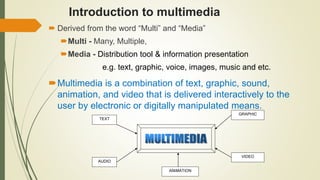
Multimedia is a combination of text, graphic, sound,
animation, and video that is delivered interactively to the
user by electronic or digitally manipulated means.
TEXT
AUDIO
GRAPHIC
VIDEO
ANIMATION
5 Elements of Multimedia
TEXT
TEXT
AUDIO
GRAPHIC
VIDEO
ANIMATION
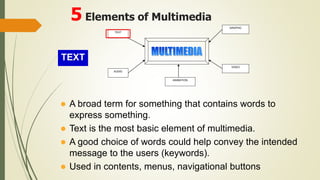
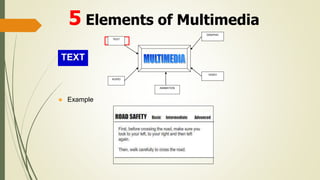
 A broad term for something that contains words to
express something.
 Text is the most basic element of multimedia.
 A good choice of words could help convey the intended
message to the users (keywords).
 Used in contents, menus, navigational buttons
TEXT
 Example
5 Elements of Multimedia
TEXT
AUDIO
GRAPHIC
VIDEO
ANIMATION
GRAPHIC
TEXT
AUDIO
GRAPHIC
VIDEO
ANIMATION
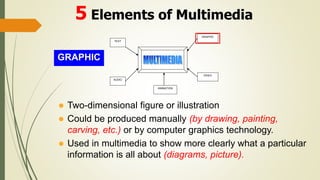
 Two-dimensional figure or illustration
 Could be produced manually (by drawing, painting,
carving, etc.) or by computer graphics technology.
 Used in multimedia to show more clearly what a particular
information is all about (diagrams, picture).
5 Elements of Multimedia
GRAPHIC
TEXT
AUDIO
GRAPHIC
VIDEO
ANIMATION
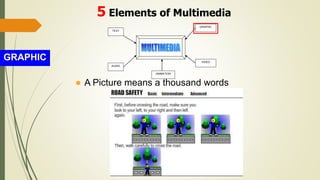
 A Picture means a thousand words
5 Elements of Multimedia
AUDIO
TEXT
AUDIO
GRAPHIC
VIDEO
ANIMATION
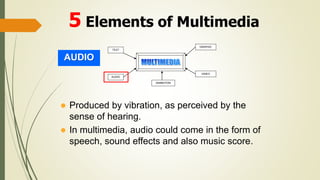
 Produced by vibration, as perceived by the
sense of hearing.
 In multimedia, audio could come in the form of
speech, sound effects and also music score.
5 Elements of Multimedia
AUDIO
TEXT
AUDIO
GRAPHIC
VIDEO
ANIMATION
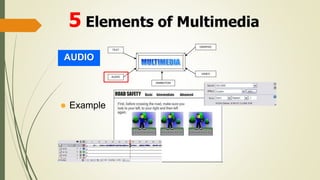
 Example
5 Elements of Multimedia
ANIMATION
TEXT
AUDIO
GRAPHIC
VIDEO
ANIMATION
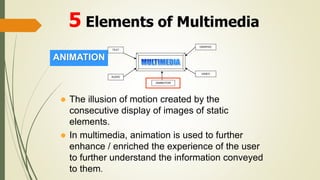
 The illusion of motion created by the
consecutive display of images of static
elements.
 In multimedia, animation is used to further
enhance / enriched the experience of the user
to further understand the information conveyed
to them.
5 Elements of Multimedia
ANIMATION
TEXT
AUDIO
GRAPHIC
VIDEO
ANIMATION
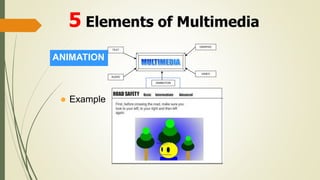
 Example
5 Elements of Multimedia
VIDEO
TEXT
AUDIO
GRAPHIC
VIDEO
ANIMATION
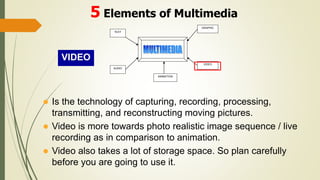
 Is the technology of capturing, recording, processing,
transmitting, and reconstructing moving pictures.
 Video is more towards photo realistic image sequence / live
recording as in comparison to animation.
 Video also takes a lot of storage space. So plan carefully
before you are going to use it.
5 Elements of Multimedia
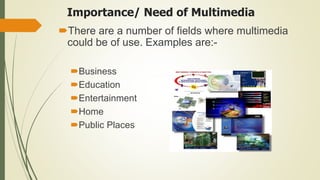
Importance/ Need of Multimedia
There are a number of fields where multimedia
could be of use. Examples are:-
Business
Education
Entertainment
Home
Public Places
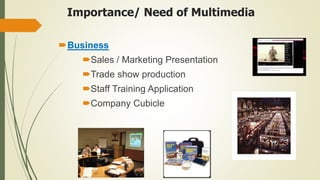
Importance/ Need of Multimedia
Business
Sales / Marketing Presentation
Trade show production
Staff Training Application
Company Cubicle
Education
Courseware / Simulations
E-Learning / Distance Learning
Information Searching
Importance/ Need of Multimedia
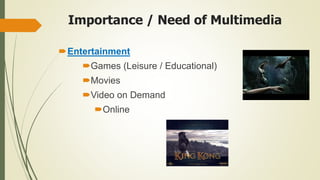
Importance / Need of Multimedia
Entertainment
Games (Leisure / Educational)
Movies
Video on Demand
Online
Importance / Need of Multimedia
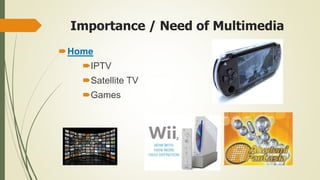
Home
IPTV
Satellite TV
Games
Importance / Need of Multimedia
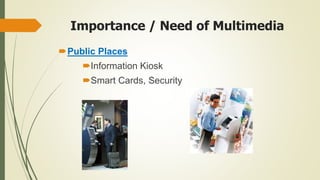
Public Places
Information Kiosk
Smart Cards, Security
Applications of Multimedia
 Audio Application
 Audio password/command operated devices
 Mobile phone customer care voice based services
 Google map navigation
Etc..
 Video Application
 Remote control guide for DTH
 Instructions given in airplane to passenger about safety
Etc..
Applications of Multimedia
Interpersonal communications
 May involve speech, text, image or Video
 In several cases single type of medium is involved while in others
two or more media types are integrated together.
1. Speech only
2. Image only
3. Text only
4. Text and images
5. Speech and video
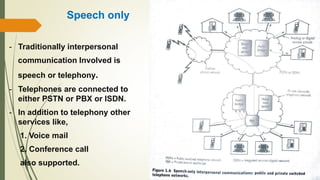
Speech only
- Traditionally interpersonal
communication Involved is
speech or telephony.
- Telephones are connected to
either PSTN or PBX or ISDN.
- In addition to telephony other
services like,
1. Voice mail
2. Conference call
also supported.
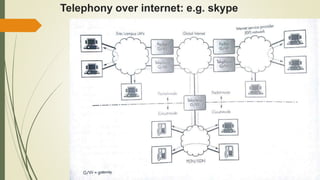
Telephony over internet: e.g. skype
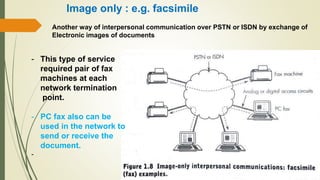
Image only : e.g. facsimile
Another way of interpersonal communication over PSTN or ISDN by exchange of
Electronic images of documents
- This type of service
required pair of fax
machines at each
network termination
point.
- PC fax also can be
used in the network to
send or receive the
document.
-
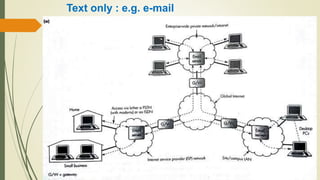
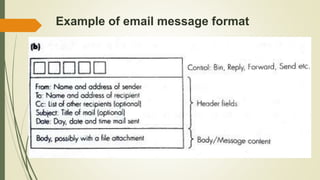
Text only : e.g. e-mail
Example of email message format
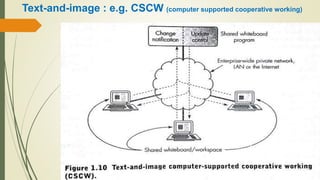
Text-and-image : e.g. CSCW (computer supported cooperative working)
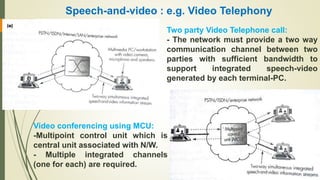
Speech-and-video : e.g. Video Telephony
Two party Video Telephone call:
- The network must provide a two way
communication channel between two
parties with sufficient bandwidth to
support integrated speech-video
generated by each terminal-PC.
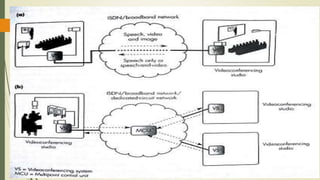
Video conferencing using MCU:
-Multipoint control unit which is
central unit associated with N/W.
- Multiple integrated channels
(one for each) are required.
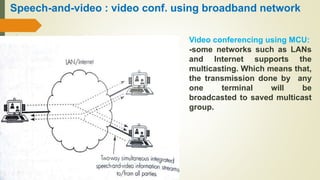
Speech-and-video : video conf. using broadband network
Video conferencing using MCU:
-some networks such as LANs
and Internet supports the
multicasting. Which means that,
the transmission done by any
one terminal will be
broadcasted to saved multicast
group.
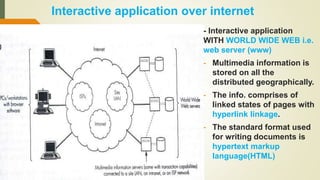
Interactive application over internet
- Interactive application
WITH WORLD WIDE WEB i.e.
web server (www)
- Multimedia information is
stored on all the
distributed geographically.
- The info. comprises of
linked states of pages with
hyperlink linkage.
- The standard format used
for writing documents is
hypertext markup
language(HTML)
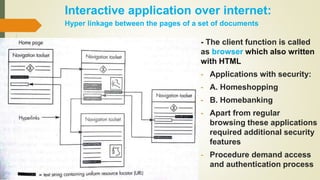
Interactive application over internet:
Hyper linkage between the pages of a set of documents
- The client function is called
as browser which also written
with HTML
- Applications with security:
- A. Homeshopping
- B. Homebanking
- Apart from regular
browsing these applications
required additional security
features
- Procedure demand access
and authentication process
Entertainment Applications:
 Two types of entertainment
applications:
a.) Movie on Demand (MOD)
b.) Interactive Television
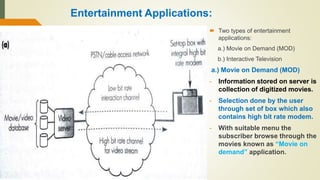
a.) Movie on Demand (MOD)
- Information stored on server is
collection of digitized movies.
- Selection done by the user
through set of box which also
contains high bit rate modem.
- With suitable menu the
subscriber browse through the
movies known as “Movie on
demand” application.
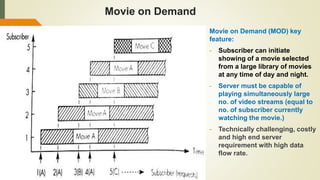
Movie on Demand
Movie on Demand (MOD) key
feature:
- Subscriber can initiate
showing of a movie selected
from a large library of movies
at any time of day and night.
- Server must be capable of
playing simultaneously large
no. of video streams (equal to
no. of subscriber currently
watching the movie.)
- Technically challenging, costly
and high end server
requirement with high data
flow rate.
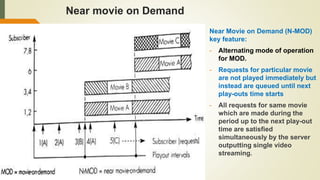
Near movie on Demand
Near Movie on Demand (N-MOD)
key feature:
- Alternating mode of operation
for MOD.
- Requests for particular movie
are not played immediately but
instead are queued until next
play-outs time starts
- All requests for same movie
which are made during the
period up to the next play-out
time are satisfied
simultaneously by the server
outputting single video
streaming.
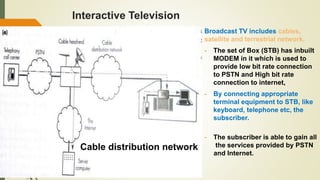
Interactive Television
Broadcast TV includes cables,
satellite and terrestrial network.
- The set of Box (STB) has inbuilt
MODEM in it which is used to
provide low bit rate connection
to PSTN and High bit rate
connection to internet,
- By connecting appropriate
terminal equipment to STB, like
keyboard, telephone etc, the
subscriber.
- The subscriber is able to gain all
the services provided by PSTN
and Internet.
Cable distribution network
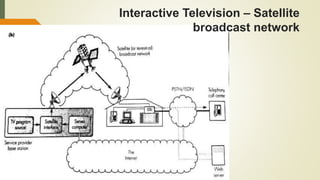
Interactive Television – Satellite
broadcast network

chapter No. 6 Multimedia presentation .pptx

  • 1.
    Chapter no. 6 Fundamentalsof Multimedia Communication
  • 2.
    Contents:  Introduction tomultimedia  Elements of multimedia system  Need of multimedia  Multimedia information representation  Multimedia applications :  Audio applications  Video applications,  Interpersonal communications,  Interactive applications over internet,  Entertainment applications.
  • 3.
    Introduction to multimedia Derived from the word “Multi” and “Media” Multi - Many, Multiple, Media - Distribution tool & information presentation e.g. text, graphic, voice, images, music and etc. Multimedia is a combination of text, graphic, sound, animation, and video that is delivered interactively to the user by electronic or digitally manipulated means. TEXT AUDIO GRAPHIC VIDEO ANIMATION
  • 4.
    5 Elements ofMultimedia TEXT TEXT AUDIO GRAPHIC VIDEO ANIMATION  A broad term for something that contains words to express something.  Text is the most basic element of multimedia.  A good choice of words could help convey the intended message to the users (keywords).  Used in contents, menus, navigational buttons
  • 5.
    TEXT  Example 5 Elementsof Multimedia TEXT AUDIO GRAPHIC VIDEO ANIMATION
  • 6.
    GRAPHIC TEXT AUDIO GRAPHIC VIDEO ANIMATION  Two-dimensional figureor illustration  Could be produced manually (by drawing, painting, carving, etc.) or by computer graphics technology.  Used in multimedia to show more clearly what a particular information is all about (diagrams, picture). 5 Elements of Multimedia
  • 7.
    GRAPHIC TEXT AUDIO GRAPHIC VIDEO ANIMATION  A Picturemeans a thousand words 5 Elements of Multimedia
  • 8.
    AUDIO TEXT AUDIO GRAPHIC VIDEO ANIMATION  Produced byvibration, as perceived by the sense of hearing.  In multimedia, audio could come in the form of speech, sound effects and also music score. 5 Elements of Multimedia
  • 9.
  • 10.
    ANIMATION TEXT AUDIO GRAPHIC VIDEO ANIMATION  The illusionof motion created by the consecutive display of images of static elements.  In multimedia, animation is used to further enhance / enriched the experience of the user to further understand the information conveyed to them. 5 Elements of Multimedia
  • 11.
  • 12.
    VIDEO TEXT AUDIO GRAPHIC VIDEO ANIMATION  Is thetechnology of capturing, recording, processing, transmitting, and reconstructing moving pictures.  Video is more towards photo realistic image sequence / live recording as in comparison to animation.  Video also takes a lot of storage space. So plan carefully before you are going to use it. 5 Elements of Multimedia
  • 13.
    Importance/ Need ofMultimedia There are a number of fields where multimedia could be of use. Examples are:- Business Education Entertainment Home Public Places
  • 14.
    Importance/ Need ofMultimedia Business Sales / Marketing Presentation Trade show production Staff Training Application Company Cubicle
  • 15.
    Education Courseware / Simulations E-Learning/ Distance Learning Information Searching Importance/ Need of Multimedia
  • 16.
    Importance / Needof Multimedia Entertainment Games (Leisure / Educational) Movies Video on Demand Online
  • 17.
    Importance / Needof Multimedia Home IPTV Satellite TV Games
  • 18.
    Importance / Needof Multimedia Public Places Information Kiosk Smart Cards, Security
  • 19.
    Applications of Multimedia Audio Application  Audio password/command operated devices  Mobile phone customer care voice based services  Google map navigation Etc..  Video Application  Remote control guide for DTH  Instructions given in airplane to passenger about safety Etc..
  • 20.
    Applications of Multimedia Interpersonalcommunications  May involve speech, text, image or Video  In several cases single type of medium is involved while in others two or more media types are integrated together. 1. Speech only 2. Image only 3. Text only 4. Text and images 5. Speech and video
  • 21.
    Speech only - Traditionallyinterpersonal communication Involved is speech or telephony. - Telephones are connected to either PSTN or PBX or ISDN. - In addition to telephony other services like, 1. Voice mail 2. Conference call also supported.
  • 22.
  • 23.
    Image only :e.g. facsimile Another way of interpersonal communication over PSTN or ISDN by exchange of Electronic images of documents - This type of service required pair of fax machines at each network termination point. - PC fax also can be used in the network to send or receive the document. -
  • 24.
    Text only :e.g. e-mail
  • 25.
    Example of emailmessage format
  • 26.
    Text-and-image : e.g.CSCW (computer supported cooperative working)
  • 27.
    Speech-and-video : e.g.Video Telephony Two party Video Telephone call: - The network must provide a two way communication channel between two parties with sufficient bandwidth to support integrated speech-video generated by each terminal-PC. Video conferencing using MCU: -Multipoint control unit which is central unit associated with N/W. - Multiple integrated channels (one for each) are required.
  • 28.
    Speech-and-video : videoconf. using broadband network Video conferencing using MCU: -some networks such as LANs and Internet supports the multicasting. Which means that, the transmission done by any one terminal will be broadcasted to saved multicast group.
  • 30.
    Interactive application overinternet - Interactive application WITH WORLD WIDE WEB i.e. web server (www) - Multimedia information is stored on all the distributed geographically. - The info. comprises of linked states of pages with hyperlink linkage. - The standard format used for writing documents is hypertext markup language(HTML)
  • 31.
    Interactive application overinternet: Hyper linkage between the pages of a set of documents - The client function is called as browser which also written with HTML - Applications with security: - A. Homeshopping - B. Homebanking - Apart from regular browsing these applications required additional security features - Procedure demand access and authentication process
  • 32.
    Entertainment Applications:  Twotypes of entertainment applications: a.) Movie on Demand (MOD) b.) Interactive Television a.) Movie on Demand (MOD) - Information stored on server is collection of digitized movies. - Selection done by the user through set of box which also contains high bit rate modem. - With suitable menu the subscriber browse through the movies known as “Movie on demand” application.
  • 33.
    Movie on Demand Movieon Demand (MOD) key feature: - Subscriber can initiate showing of a movie selected from a large library of movies at any time of day and night. - Server must be capable of playing simultaneously large no. of video streams (equal to no. of subscriber currently watching the movie.) - Technically challenging, costly and high end server requirement with high data flow rate.
  • 34.
    Near movie onDemand Near Movie on Demand (N-MOD) key feature: - Alternating mode of operation for MOD. - Requests for particular movie are not played immediately but instead are queued until next play-outs time starts - All requests for same movie which are made during the period up to the next play-out time are satisfied simultaneously by the server outputting single video streaming.
  • 35.
    Interactive Television Broadcast TVincludes cables, satellite and terrestrial network. - The set of Box (STB) has inbuilt MODEM in it which is used to provide low bit rate connection to PSTN and High bit rate connection to internet, - By connecting appropriate terminal equipment to STB, like keyboard, telephone etc, the subscriber. - The subscriber is able to gain all the services provided by PSTN and Internet. Cable distribution network
  • 36.
    Interactive Television –Satellite broadcast network