Chapter 2
The Origins of Software
Modern Systems Analysis
and Design
2
Learning Objectives
 Explain outsourcing.
 Describe six different sources of
software.
 Discuss how to evaluate off-the-shelf
software.
 Explain reuse and its role in software
development.
3
Introduction
 There are various sources of software for
organizations.
 There are criteria to evaluate software
from different sources.
4
Systems Acquisition: Outsourcing
 Outsourcing: Turning over
responsibility of some or all of an
organization's information systems
applications and operations to an
outside firm
5
Systems Acquisition: Outsourcing
(Cont.)
 Outsourcing Examples
A company that runs payroll applications
for clients
A company that runs your applications
at your site
6
Outsourcing (Cont.)
 Reasons to outsource
 Cost-effective
 Take advantage of economies of scale
 Free up internal resources
 Reduce time to market
 Increase process efficiencies
 System development is a non-core activity for the
organization
7
Sources of Software
 Information technology services firm
 Packaged software producers
 Enterprise-wide solutions
 Application service providers (ASPs)
 Open source software
 In-house developers
8
Sources of Software (Cont.)
FIGURE 2-1
Sources of Application Software
9
Information Technology (IT)
Services Firms
 Help companies develop custom
information systems for internal use.
 Develop, host, and run applications for
customers.
 Provide other services.
10
Packaged Software Producers
 Serve many market segments.
 Provide software ranging from broad-
based packages (i.e. general ledger)
to niche packages (i.e. day care
management).
11
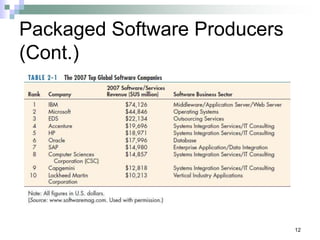
Packaged Software Producers
(Cont.)
 Software runs on all size computers, from
microcomputers to large mainframes.
 Prepackaged software is off-the-shelf,
turnkey software (i.e. not customizable).
 Off-the-shelf software at best meets 70
percent of organizations’ needs.
Packaged Software Producers
(Cont.)
12
13
Enterprise Solutions Software
 Enterprise Resource Planning (ERP) systems
integrate individual traditional business functions
into modules enabling a single seamless
transaction to cut across functional boundaries.
 SAP AG is the leading vendor of ERP systems.
14
Enterprise Solutions Software (Cont.)
Figure 2-3 SAP’s Business ByDesign, a product designed for medium sized companies.
(Source: www.sap.com/usa/solutions/Sme/Businessbydesign/Flash/bsm/A1S.html)
15
Open Source Software
 Freely available including source code
 Developed by a community of interested
people
 Performs the same functions as
commercial software
 Examples: Linux, mySQL, Firefox
16
In-House Development
 If sufficient system development expertise with
the chosen platform exists in-house, then some
or all of the system can be developed by the
organization’s own staff.
 Hybrid solutions involving some purchased and
some in-house components are common.
Sources of Software
Components
17
18
Selecting Off-the-Shelf Software
 Cost: comparing the cost of
developing the same system in-house
with the cost of purchasing or
licensing the software package
19
 Functionality: the tasks that the
software can perform and the
mandatory, essential, and desired
system features
Selecting Off-the-Shelf Software
20
Selecting Off-the-Shelf Software
 Vendor support: whether or how
much support the vendor can
provide and at what cost
21
 Viability of vendor: can the
software adapt to changes in
systems software and hardware
Selecting Off-the-Shelf Software
22
Selecting Off-the-Shelf Software
 Flexibility: how easy it is to
customize the software
 Documentation: is the user’s manual
and technical documentation
understandable and up-to-date
23
Selecting Off-the-Shelf Software
 Response time: how long it takes the
software package to respond to the
user’s requests in an interactive
session
 Ease of installation: a measure of
the difficulty of loading the software
and making it operational
24
Validating Purchased Software
Information
 Use a variety of information sources:
Collect information from vendor
Software documentation
Technical marketing literature
25
Request For Proposal (RFP)
 Request for proposal (RFP) is a
document provided to vendors to ask
them to propose hardware and
system software that will meet the
requirements of a new system.
26
Request For Proposal (RFP)
(Cont.)
 Sometimes called a Request For
Quote (RFQ)
 Use a variety of information sources
 Based on vendor bids, analyst selects
best candidates.
27
Information Sources For RFP
 Vendor’s proposal
 Running software through a series of tests
 Feedback from other users of the vendor’s
product
 Independent software testing services
 Articles in trade publications
28
Reuse
 The use of previously written software
resources, especially objects and
components, in new applications
 Commonly applied to two different
development technologies:
Object-oriented development
Component-based development
29
Reuse (Cont.)
 Object-oriented development
Object class encapsulates data and behavior
of common organizational entities (e.g.
employees)
 Component-based development
Components can be as small as objects or as
large as pieces of software that handle single
business functions.
30
Reuse (Cont.)
 Object-oriented development
reuse is the use of object classes
in more than one application (e.g.
Employee).
31
Reuse (Cont.)
 Component-based development
reuse is the assembly of an
application from many different
components at many different
levels of complexity and size (e.g.
Currency conversion).
32
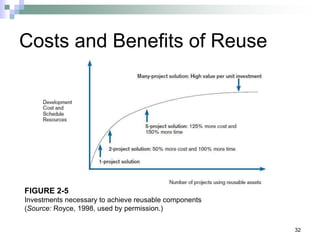
Costs and Benefits of Reuse
FIGURE 2-5
Investments necessary to achieve reusable components
(Source: Royce, 1998, used by permission.)
33
Approaches to Reuse
 Ad-hoc: individuals are free to find or
develop reusable assets on their own.
 Facilitated: developers are encouraged to
practice reuse.
34
Approaches to Reuse (Cont.)
 Managed: the development, sharing, and
adoption of reusable assets is mandated.
 Designed: assets mandated for reuse as
they are being designed for specific
applications.
Approaches to Reuse (Cont.)
35
36
Summary
 In this chapter you learned how to:
 Explain outsourcing.
 Describe six different sources of software.
 Discuss how to evaluate off-the-shelf
software.
 Explain reuse and its role in software
development.

Chapter 2(1) system development life .ppt

  • 1.
    Chapter 2 The Originsof Software Modern Systems Analysis and Design
  • 2.
    2 Learning Objectives  Explainoutsourcing.  Describe six different sources of software.  Discuss how to evaluate off-the-shelf software.  Explain reuse and its role in software development.
  • 3.
    3 Introduction  There arevarious sources of software for organizations.  There are criteria to evaluate software from different sources.
  • 4.
    4 Systems Acquisition: Outsourcing Outsourcing: Turning over responsibility of some or all of an organization's information systems applications and operations to an outside firm
  • 5.
    5 Systems Acquisition: Outsourcing (Cont.) Outsourcing Examples A company that runs payroll applications for clients A company that runs your applications at your site
  • 6.
    6 Outsourcing (Cont.)  Reasonsto outsource  Cost-effective  Take advantage of economies of scale  Free up internal resources  Reduce time to market  Increase process efficiencies  System development is a non-core activity for the organization
  • 7.
    7 Sources of Software Information technology services firm  Packaged software producers  Enterprise-wide solutions  Application service providers (ASPs)  Open source software  In-house developers
  • 8.
    8 Sources of Software(Cont.) FIGURE 2-1 Sources of Application Software
  • 9.
    9 Information Technology (IT) ServicesFirms  Help companies develop custom information systems for internal use.  Develop, host, and run applications for customers.  Provide other services.
  • 10.
    10 Packaged Software Producers Serve many market segments.  Provide software ranging from broad- based packages (i.e. general ledger) to niche packages (i.e. day care management).
  • 11.
    11 Packaged Software Producers (Cont.) Software runs on all size computers, from microcomputers to large mainframes.  Prepackaged software is off-the-shelf, turnkey software (i.e. not customizable).  Off-the-shelf software at best meets 70 percent of organizations’ needs.
  • 12.
  • 13.
    13 Enterprise Solutions Software Enterprise Resource Planning (ERP) systems integrate individual traditional business functions into modules enabling a single seamless transaction to cut across functional boundaries.  SAP AG is the leading vendor of ERP systems.
  • 14.
    14 Enterprise Solutions Software(Cont.) Figure 2-3 SAP’s Business ByDesign, a product designed for medium sized companies. (Source: www.sap.com/usa/solutions/Sme/Businessbydesign/Flash/bsm/A1S.html)
  • 15.
    15 Open Source Software Freely available including source code  Developed by a community of interested people  Performs the same functions as commercial software  Examples: Linux, mySQL, Firefox
  • 16.
    16 In-House Development  Ifsufficient system development expertise with the chosen platform exists in-house, then some or all of the system can be developed by the organization’s own staff.  Hybrid solutions involving some purchased and some in-house components are common.
  • 17.
  • 18.
    18 Selecting Off-the-Shelf Software Cost: comparing the cost of developing the same system in-house with the cost of purchasing or licensing the software package
  • 19.
    19  Functionality: thetasks that the software can perform and the mandatory, essential, and desired system features Selecting Off-the-Shelf Software
  • 20.
    20 Selecting Off-the-Shelf Software Vendor support: whether or how much support the vendor can provide and at what cost
  • 21.
    21  Viability ofvendor: can the software adapt to changes in systems software and hardware Selecting Off-the-Shelf Software
  • 22.
    22 Selecting Off-the-Shelf Software Flexibility: how easy it is to customize the software  Documentation: is the user’s manual and technical documentation understandable and up-to-date
  • 23.
    23 Selecting Off-the-Shelf Software Response time: how long it takes the software package to respond to the user’s requests in an interactive session  Ease of installation: a measure of the difficulty of loading the software and making it operational
  • 24.
    24 Validating Purchased Software Information Use a variety of information sources: Collect information from vendor Software documentation Technical marketing literature
  • 25.
    25 Request For Proposal(RFP)  Request for proposal (RFP) is a document provided to vendors to ask them to propose hardware and system software that will meet the requirements of a new system.
  • 26.
    26 Request For Proposal(RFP) (Cont.)  Sometimes called a Request For Quote (RFQ)  Use a variety of information sources  Based on vendor bids, analyst selects best candidates.
  • 27.
    27 Information Sources ForRFP  Vendor’s proposal  Running software through a series of tests  Feedback from other users of the vendor’s product  Independent software testing services  Articles in trade publications
  • 28.
    28 Reuse  The useof previously written software resources, especially objects and components, in new applications  Commonly applied to two different development technologies: Object-oriented development Component-based development
  • 29.
    29 Reuse (Cont.)  Object-orienteddevelopment Object class encapsulates data and behavior of common organizational entities (e.g. employees)  Component-based development Components can be as small as objects or as large as pieces of software that handle single business functions.
  • 30.
    30 Reuse (Cont.)  Object-orienteddevelopment reuse is the use of object classes in more than one application (e.g. Employee).
  • 31.
    31 Reuse (Cont.)  Component-baseddevelopment reuse is the assembly of an application from many different components at many different levels of complexity and size (e.g. Currency conversion).
  • 32.
    32 Costs and Benefitsof Reuse FIGURE 2-5 Investments necessary to achieve reusable components (Source: Royce, 1998, used by permission.)
  • 33.
    33 Approaches to Reuse Ad-hoc: individuals are free to find or develop reusable assets on their own.  Facilitated: developers are encouraged to practice reuse.
  • 34.
    34 Approaches to Reuse(Cont.)  Managed: the development, sharing, and adoption of reusable assets is mandated.  Designed: assets mandated for reuse as they are being designed for specific applications.
  • 35.
  • 36.
    36 Summary  In thischapter you learned how to:  Explain outsourcing.  Describe six different sources of software.  Discuss how to evaluate off-the-shelf software.  Explain reuse and its role in software development.