Interview
Questions
C# .NET & ASP .NET
Polymorphism
 Polymorphism means one interface and many forms.
Polymorphism is a characteristics of being able to assign a
different meaning or usage to something in different
contexts specifically to allow an entity such as a variable, a
function or an object to have more than one form.
 There are two types of polymorphism
 Compile Time – function or operator overloading
 Runtime – inheritance or virtual functions. EXAMPLE - Overriding
Abstract method
 It doesn’t provide the implementation
and forces the derived class to override
the method.
Virtual Method
 It has implementation and provide the
derived class with the option to override it.
Object
 Object is anything that is identifiable as single
material item.
 Object is an instance of a class, it contains real
values instead of variables. For example, lets
create an instance of class Emp called “Siva”.
 Emp Siva = New Emp();
 Now we can access all methods in the class “Emp” via object “Siva” as shown below.
 Siva.setName(“Hi”);
Class
 It is the generic definition of what an object is a template.
 They keyword class in c# indicates that we are going to
define a new class (type of object)
 class is the generic definition of what an object is.
 A Class describes all the attributes of object, as well as the
methods that implements the behavior of member object.
 That means, class is a template of an object. Easy way to
understand a class is to look at an example .
Static method
 It is possible to declare a method as static
provided that they don’t attempt to
access any instance data or other
instance methods.
Inheritance
 It provides a convenient way to reuse
existing fully tested code in different
context thereby saving lot of coding.
 Inheritance of classes in C# is always
implementation Inheritance.
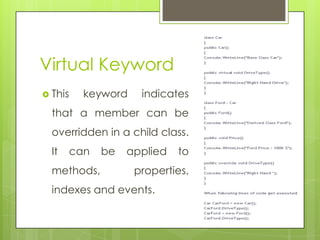
Virtual Keyword
 This keyword indicates
that a member can be
overridden in a child class.
It can be applied to
methods, properties,
indexes and events.
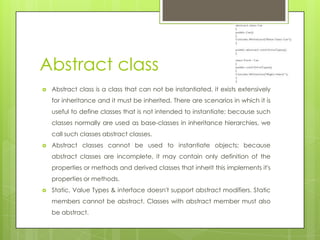
Abstract class
 Abstract class is a class that can not be instantiated, it exists extensively
for inheritance and it must be inherited. There are scenarios in which it is
useful to define classes that is not intended to instantiate; because such
classes normally are used as base-classes in inheritance hierarchies, we
call such classes abstract classes.
 Abstract classes cannot be used to instantiate objects; because
abstract classes are incomplete, it may contain only definition of the
properties or methods and derived classes that inherit this implements it's
properties or methods.
 Static, Value Types & interface doesn't support abstract modifiers. Static
members cannot be abstract. Classes with abstract member must also
be abstract.
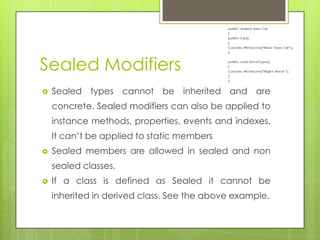
Sealed Modifiers
 Sealed types cannot be inherited and are
concrete. Sealed modifiers can also be applied to
instance methods, properties, events and indexes.
It can’t be applied to static members
 Sealed members are allowed in sealed and non
sealed classes.
 If a class is defined as Sealed it cannot be
inherited in derived class. See the above example.
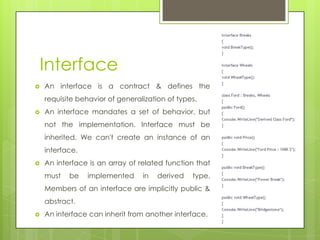
Interface
 An interface is a contract & defines the
requisite behavior of generalization of types.
 An interface mandates a set of behavior, but
not the implementation. Interface must be
inherited. We can't create an instance of an
interface.
 An interface is an array of related function that
must be implemented in derived type.
Members of an interface are implicitly public &
abstract.
 An interface can inherit from another interface.
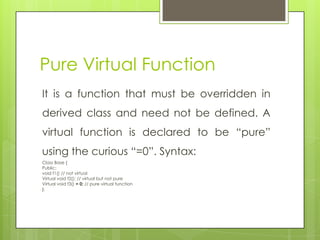
Pure Virtual Function
It is a function that must be overridden in
derived class and need not be defined. A
virtual function is declared to be “pure”
using the curious “=0”. Syntax:
Class Base {
Public:
void f1() // not virtual
Virtual void f2(); // virtual but not pure
Virtual void f3() = 0; // pure virtual function
};
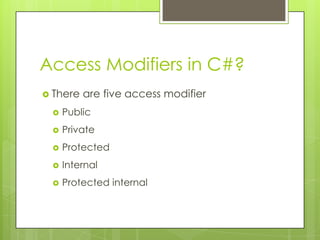
Access Modifiers in C#?
 There are five access modifier
 Public
 Private
 Protected
 Internal
 Protected internal
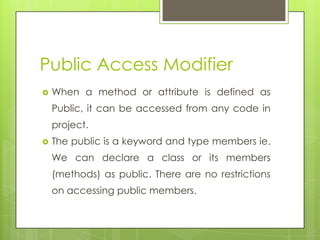
Public Access Modifier
 When a method or attribute is defined as
Public, it can be accessed from any code in
project.
 The public is a keyword and type members ie.
We can declare a class or its members
(methods) as public. There are no restrictions
on accessing public members.
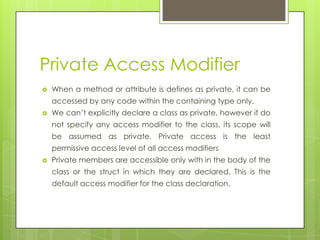
Private Access Modifier
 When a method or attribute is defines as private, it can be
accessed by any code within the containing type only.
 We can’t explicitly declare a class as private, however if do
not specify any access modifier to the class, its scope will
be assumed as private. Private access is the least
permissive access level of all access modifiers
 Private members are accessible only with in the body of the
class or the struct in which they are declared. This is the
default access modifier for the class declaration.
Protected Access Modifier
 When an attribute and methods are defined
as protected, it can be accessed by any
method in inherited classes & any method
within the same class. The protected access
modifier can’t be applied to class and
interfaces. Methods and fields in a interface
can’t be declared protected.
Internal Access Modifier
 If an attribute or method is defined as
Internal , Access is restricted to classes
within the current project assembly.
Protected Internal Access
Modifier
 If an attribute or method is defined as
Protected Internal , Access is restricted to
classes within the current project
assembly and types derived from the
containing class.
References types in C#
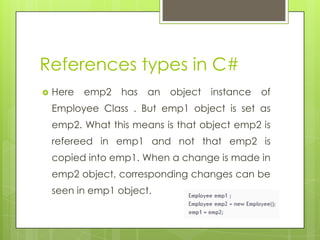
 Here emp2 has an object instance of
Employee Class . But emp1 object is set as
emp2. What this means is that object emp2 is
refereed in emp1 and not that emp2 is
copied into emp1. When a change is made in
emp2 object, corresponding changes can be
seen in emp1 object.
Overloading in C#?
 When methods are created with same name
, but with different signature its called
overloading.
 We have types of overloading in C#:
 Constructor
 Function or method
 Operator
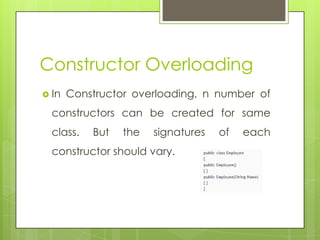
Constructor Overloading
 In Constructor overloading, n number of
constructors can be created for same
class. But the signatures of each
constructor should vary.
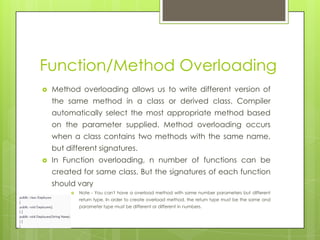
Function/Method Overloading
 Method overloading allows us to write different version of
the same method in a class or derived class. Compiler
automatically select the most appropriate method based
on the parameter supplied. Method overloading occurs
when a class contains two methods with the same name,
but different signatures.
 In Function overloading, n number of functions can be
created for same class. But the signatures of each function
should vary
 Note - You can't have a overload method with same number parameters but different
return type. In order to create overload method, the return type must be the same and
parameter type must be different or different in numbers.
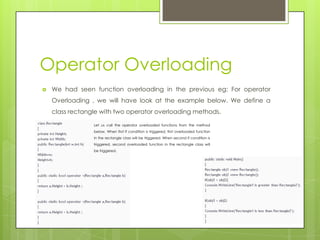
Operator Overloading
 We had seen function overloading in the previous eg: For operator
Overloading , we will have look at the example below. We define a
class rectangle with two operator overloading methods.
Let us call the operator overloaded functions from the method
below. When first if condition is triggered, first overloaded function
in the rectangle class will be triggered. When second if condition is
triggered, second overloaded function in the rectangle class will
be triggered.
Method Overriding
 Method overriding is a feature that allows to
invoke methods that have the same
signatures and that belong to different classes
in the same hierarchy of inheritance using the
base class reference. In C# it is done using
keywords, virtual and overrides.
Encapsulation
 Data encapsulation is defined as the process
of data hiding the important fields from the
end user.
 Data Hiding is nothing but restricting outside
access of a class members using access
modifiers such as private , protected and
internal etc.,
What is an Array?
 An array is a collection of related instance
either value or reference types. Array posses
an immutable structure in which the number
of dimensions and size of the array are fixed
at instantiation. C# supports,
 Single Dimension – it is sometimes called vector array consists of single row.
 Multi Dimension Array – are rectangular and consists of rows and columns.
 Jagged array – also consists of rows and columns but irregular shaped like row1 has
3 column and row 2 has 5 column.
Array List
 ArrayList is a dynamic
array. Elements can be
added and removed
from an array list at the
runtime. In this
elements are not
automatically sorted.
 The bit array collection
is a composite of bit
values. It stores 1 or 0
where 1 is true and 0 is
false. This collection
provides an efficient
means of storing and
retrieving bit values.
Bit Array
Hash Table
 A hashTable is a collection of key value
pairs. Entries in this are instance of
DictionaryEntry type. It implements
Idictionary, Iserilizable, Ideserializable
callback interface.
Queue
 This is a collection that
abstracts FIFO (First In
First Out) data
structure. The initial
capacity is 32
elements. It is ideal for
messaging
components.
 This is a collection
that abstracts LIFO
(Last In First Out)
data structure in
which initial
capacity is 32.
Stack
Early Binding and late binding
 Calling a non virtual method, decided at
a compile time is known as early binding.
 Calling a virtual method (pure
polymorphism), decided at a runtime is
known as late binding.
SortedList
 This is a collection and it is a combination
of key/value entries and an ArrayList
collection. Where the collection is sorted
by key.
Delegates
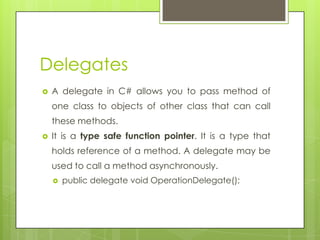
 A delegate in C# allows you to pass method of
one class to objects of other class that can call
these methods.
 It is a type safe function pointer. It is a type that
holds reference of a method. A delegate may be
used to call a method asynchronously.
 public delegate void OperationDelegate();
Delegates
Single
 A delegate is called single cast
delegate if it invokes a single
method. In other words we can
say that singlecast delegates
refer to a single method with
matching signature. Single cast
delegate derive from the
System.Delegate class.
Multicast
 It is a delegate that
holds reference of more
than one method.
Multicast Delegates
must have a return type
of void, else there is a
runtime exception.
SingleCast Delegate
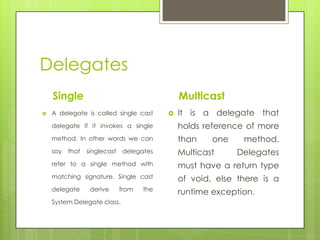
 In the code snippet I have declared a single
delegate which takes two integer type as
arguments and returns an integer as return type.
delegate int mySingleCastDelegate(int iFirstargument, int iSecondArgument);
 At runtime I have created a delegate variable as
singleCastMaxNumberDelegate of type
mySingleCastDelegate. Using the delegate
variable, I can point to any method that has the
matching signature.
 In the example the method myMaxFunction has
the matching signature with the delegate variable.
So using the new keyword I have referenced the
delegate variable to the myMaxFunctionf:
mySingleCastDelegate singleCastMaxNumberDelegate = new
mySingleCastDelegate(clsSingleCastDelegate.myMaxFunction);
 Now I can call the function
myMaxFunction by passing
required parameters
through the delegate.
int iMaxNumberResult = singleCastMaxNumberDelegate(10, 20);
MultiCast Delegate
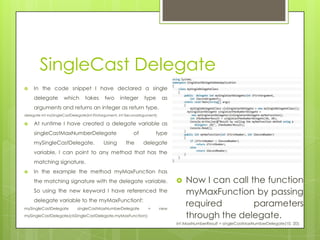
 There are two functions declared, myAddtionfunction and
myMaxFunction. Both of theses functions take two integer
type as parameters and return void. I have created three
delegate variables of type MultiCast Delegate, out of which
myDelegate assigned with null value where as the other two
delegates referenced to each of two functions.
 I have used the Combine method of system.delegate to
combine the two delegate variables.
 System.Delegate provides another method, remove, which
can be used to remove the specific delegate from the list.
Here the remove function is being used to remove the
myMultiCastDelegateMaxNumber function from myDelegate
list
 When we run the above code snipet, then we get the
following result:
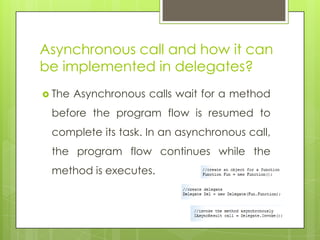
Asynchronous call and how it can
be implemented in delegates?
 The Asynchronous calls wait for a method
before the program flow is resumed to
complete its task. In an asynchronous call,
the program flow continues while the
method is executes.
Reflection
 It is the ability to find the information about types
contained in an assembly at runtime.
 All .NET compilers produce metadata about the
types defined in the modules they produce. This
metadata is packaged along with the module
(modules in turn are packaged together in
assemblies), and can be accessed by a
mechanism called reflection.
Garbage Collection
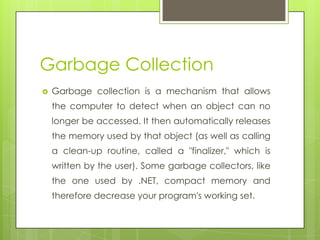
 Garbage collection is a mechanism that allows
the computer to detect when an object can no
longer be accessed. It then automatically releases
the memory used by that object (as well as calling
a clean-up routine, called a "finalizer," which is
written by the user). Some garbage collectors, like
the one used by .NET, compact memory and
therefore decrease your program's working set.
Assembly
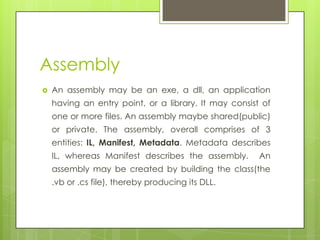
 An assembly may be an exe, a dll, an application
having an entry point, or a library. It may consist of
one or more files. An assembly maybe shared(public)
or private. The assembly, overall comprises of 3
entities: IL, Manifest, Metadata. Metadata describes
IL, whereas Manifest describes the assembly. An
assembly may be created by building the class(the
.vb or .cs file), thereby producing its DLL.
How to Produce Assembly?
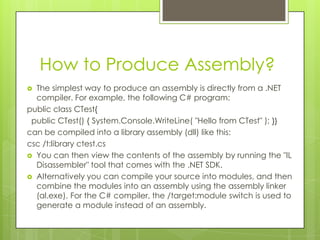
 The simplest way to produce an assembly is directly from a .NET
compiler. For example, the following C# program:
public class CTest{
public CTest() { System.Console.WriteLine( "Hello from CTest" ); }}
can be compiled into a library assembly (dll) like this:
csc /t:library ctest.cs
 You can then view the contents of the assembly by running the "IL
Disassembler" tool that comes with the .NET SDK.
 Alternatively you can compile your source into modules, and then
combine the modules into an assembly using the assembly linker
(al.exe). For the C# compiler, the /target:module switch is used to
generate a module instead of an assembly.
Global Assembly Cache
 A shared assembly has version constraints.
It is stored in the Global Assembly Cache
(GAC).
 GAC is a repository of shared assemblies
maintained by the .NET runtime. The
shared assemblies may be used by many
applications. To make an assembly a
shared assembly, it has to be strongly
named.
Satellite assembly
 When you write a multilingual or multi-
cultural application in .NET, and want to
distribute the core application separately
from the localized modules, the localized
assemblies that modify the core
application are called satellite assemblies.
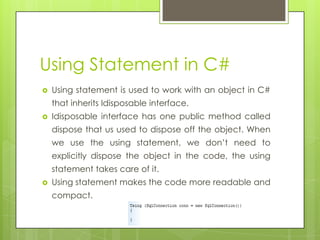
Using Statement in C#
 Using statement is used to work with an object in C#
that inherits Idisposable interface.
 Idisposable interface has one public method called
dispose that us used to dispose off the object. When
we use the using statement, we don’t need to
explicitly dispose the object in the code, the using
statement takes care of it.
 Using statement makes the code more readable and
compact.
C# Preprocessor Directives
#region , #endregion :- Used to mark
sections of code that can be collapsed.
#define , #undef :-Used to define and
undefine conditional compilation symbols.
#if , #elif , #else , #endif :- These are used to
conditionally skip sections of source code.
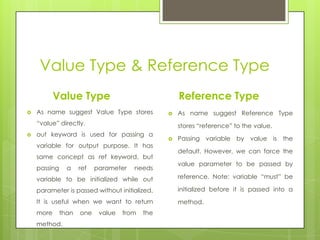
Value Type & Reference Type
Value Type
 As name suggest Value Type stores
“value” directly.
 out keyword is used for passing a
variable for output purpose. It has
same concept as ref keyword, but
passing a ref parameter needs
variable to be initialized while out
parameter is passed without initialized.
It is useful when we want to return
more than one value from the
method.
Reference Type
 As name suggest Reference Type
stores “reference” to the value.
 Passing variable by value is the
default. However, we can force the
value parameter to be passed by
reference. Note: variable “must” be
initialized before it is passed into a
method.
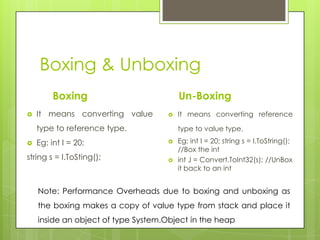
Boxing & Unboxing
Boxing
 It means converting value
type to reference type.
 Eg: int I = 20;
string s = I.ToSting();
Un-Boxing
 It means converting reference
type to value type.
 Eg: int I = 20; string s = I.ToString();
//Box the int
 int J = Convert.ToInt32(s); //UnBox
it back to an int
Note: Performance Overheads due to boxing and unboxing as
the boxing makes a copy of value type from stack and place it
inside an object of type System.Object in the heap
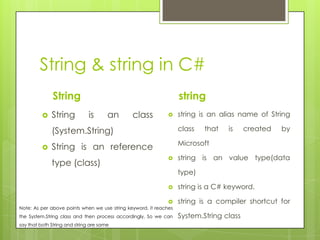
String & string in C#
String
 String is an class
(System.String)
 String is an reference
type (class)
string
 string is an alias name of String
class that is created by
Microsoft
 string is an value type(data
type)
 string is a C# keyword.
 string is a compiler shortcut for
System.String class
Note: As per above points when we use string keyword, it reaches
the System.String class and then process accordingly, So we can
say that both String and string are same
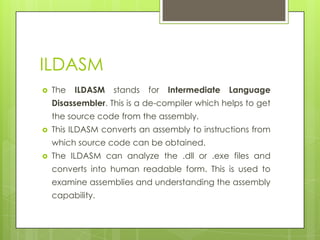
ILDASM
 The ILDASM stands for Intermediate Language
Disassembler. This is a de-compiler which helps to get
the source code from the assembly.
 This ILDASM converts an assembly to instructions from
which source code can be obtained.
 The ILDASM can analyze the .dll or .exe files and
converts into human readable form. This is used to
examine assemblies and understanding the assembly
capability.
Debug.Write & Trace.Write
 The Debug.Write will work while the application is in
both Debug Mode and Release Mode. This is
normally used while you are going to debug a
project. This will not be work when you will define
some debug points to your project.
 But the Trace.write will work while the application is
only in Release Mode. This is used in released version
of an application. This will compiled when you will
define debug points in your project.
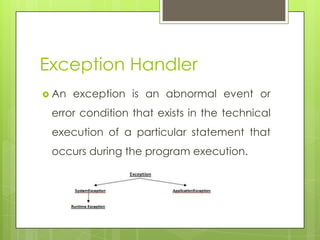
Exception Handler
 An exception is an abnormal event or
error condition that exists in the technical
execution of a particular statement that
occurs during the program execution.
String Vs String Builder
 String – once the string object is created,
its length and content cannot be
modified. It is slower.
 StringBuilder – even after object is
created, it can be able to modify length
and content. It is faster.
Illustrate Server.Transfer &
Response.Redirect?
 Server.Transfer, transfers the control of a web page, posting
a form data, while Response.Redirect simply redirects a
page to another page, it can not post a form data to
another page. Server.Transfer is more efficient over the
Response.Redirect, because Response.Redirect causes a
round trip to server as the page is processed once again
on the client & a request is made to server there after.
 But the browser URL is not changed in case of
Server.Transfer i.e., browser history is not modified in using it.
Illustrate Server.Transfer &
Response.Redirect?
 Server.Transfer, transfers the control of a web page, posting
a form data, while Response.Redirect simply redirects a
page to another page, it can not post a form data to
another page. Server.Transfer is more efficient over the
Response.Redirect, because Response.Redirect causes a
round trip to server as the page is processed once again
on the client & a request is made to server there after.
 But the browser URL is not changed in case of
server.transfer i.e., browser history is not modified in using it.

C# interview

  • 1.
  • 2.
    Polymorphism  Polymorphism meansone interface and many forms. Polymorphism is a characteristics of being able to assign a different meaning or usage to something in different contexts specifically to allow an entity such as a variable, a function or an object to have more than one form.  There are two types of polymorphism  Compile Time – function or operator overloading  Runtime – inheritance or virtual functions. EXAMPLE - Overriding
  • 3.
    Abstract method  Itdoesn’t provide the implementation and forces the derived class to override the method.
  • 4.
    Virtual Method  Ithas implementation and provide the derived class with the option to override it.
  • 5.
    Object  Object isanything that is identifiable as single material item.  Object is an instance of a class, it contains real values instead of variables. For example, lets create an instance of class Emp called “Siva”.  Emp Siva = New Emp();  Now we can access all methods in the class “Emp” via object “Siva” as shown below.  Siva.setName(“Hi”);
  • 6.
    Class  It isthe generic definition of what an object is a template.  They keyword class in c# indicates that we are going to define a new class (type of object)  class is the generic definition of what an object is.  A Class describes all the attributes of object, as well as the methods that implements the behavior of member object.  That means, class is a template of an object. Easy way to understand a class is to look at an example .
  • 7.
    Static method  Itis possible to declare a method as static provided that they don’t attempt to access any instance data or other instance methods.
  • 8.
    Inheritance  It providesa convenient way to reuse existing fully tested code in different context thereby saving lot of coding.  Inheritance of classes in C# is always implementation Inheritance.
  • 9.
    Virtual Keyword  Thiskeyword indicates that a member can be overridden in a child class. It can be applied to methods, properties, indexes and events.
  • 10.
    Abstract class  Abstractclass is a class that can not be instantiated, it exists extensively for inheritance and it must be inherited. There are scenarios in which it is useful to define classes that is not intended to instantiate; because such classes normally are used as base-classes in inheritance hierarchies, we call such classes abstract classes.  Abstract classes cannot be used to instantiate objects; because abstract classes are incomplete, it may contain only definition of the properties or methods and derived classes that inherit this implements it's properties or methods.  Static, Value Types & interface doesn't support abstract modifiers. Static members cannot be abstract. Classes with abstract member must also be abstract.
  • 11.
    Sealed Modifiers  Sealedtypes cannot be inherited and are concrete. Sealed modifiers can also be applied to instance methods, properties, events and indexes. It can’t be applied to static members  Sealed members are allowed in sealed and non sealed classes.  If a class is defined as Sealed it cannot be inherited in derived class. See the above example.
  • 12.
    Interface  An interfaceis a contract & defines the requisite behavior of generalization of types.  An interface mandates a set of behavior, but not the implementation. Interface must be inherited. We can't create an instance of an interface.  An interface is an array of related function that must be implemented in derived type. Members of an interface are implicitly public & abstract.  An interface can inherit from another interface.
  • 13.
    Pure Virtual Function Itis a function that must be overridden in derived class and need not be defined. A virtual function is declared to be “pure” using the curious “=0”. Syntax: Class Base { Public: void f1() // not virtual Virtual void f2(); // virtual but not pure Virtual void f3() = 0; // pure virtual function };
  • 14.
    Access Modifiers inC#?  There are five access modifier  Public  Private  Protected  Internal  Protected internal
  • 15.
    Public Access Modifier When a method or attribute is defined as Public, it can be accessed from any code in project.  The public is a keyword and type members ie. We can declare a class or its members (methods) as public. There are no restrictions on accessing public members.
  • 16.
    Private Access Modifier When a method or attribute is defines as private, it can be accessed by any code within the containing type only.  We can’t explicitly declare a class as private, however if do not specify any access modifier to the class, its scope will be assumed as private. Private access is the least permissive access level of all access modifiers  Private members are accessible only with in the body of the class or the struct in which they are declared. This is the default access modifier for the class declaration.
  • 17.
    Protected Access Modifier When an attribute and methods are defined as protected, it can be accessed by any method in inherited classes & any method within the same class. The protected access modifier can’t be applied to class and interfaces. Methods and fields in a interface can’t be declared protected.
  • 18.
    Internal Access Modifier If an attribute or method is defined as Internal , Access is restricted to classes within the current project assembly.
  • 19.
    Protected Internal Access Modifier If an attribute or method is defined as Protected Internal , Access is restricted to classes within the current project assembly and types derived from the containing class.
  • 20.
    References types inC#  Here emp2 has an object instance of Employee Class . But emp1 object is set as emp2. What this means is that object emp2 is refereed in emp1 and not that emp2 is copied into emp1. When a change is made in emp2 object, corresponding changes can be seen in emp1 object.
  • 21.
    Overloading in C#? When methods are created with same name , but with different signature its called overloading.  We have types of overloading in C#:  Constructor  Function or method  Operator
  • 22.
    Constructor Overloading  InConstructor overloading, n number of constructors can be created for same class. But the signatures of each constructor should vary.
  • 23.
    Function/Method Overloading  Methodoverloading allows us to write different version of the same method in a class or derived class. Compiler automatically select the most appropriate method based on the parameter supplied. Method overloading occurs when a class contains two methods with the same name, but different signatures.  In Function overloading, n number of functions can be created for same class. But the signatures of each function should vary  Note - You can't have a overload method with same number parameters but different return type. In order to create overload method, the return type must be the same and parameter type must be different or different in numbers.
  • 24.
    Operator Overloading  Wehad seen function overloading in the previous eg: For operator Overloading , we will have look at the example below. We define a class rectangle with two operator overloading methods. Let us call the operator overloaded functions from the method below. When first if condition is triggered, first overloaded function in the rectangle class will be triggered. When second if condition is triggered, second overloaded function in the rectangle class will be triggered.
  • 25.
    Method Overriding  Methodoverriding is a feature that allows to invoke methods that have the same signatures and that belong to different classes in the same hierarchy of inheritance using the base class reference. In C# it is done using keywords, virtual and overrides.
  • 26.
    Encapsulation  Data encapsulationis defined as the process of data hiding the important fields from the end user.  Data Hiding is nothing but restricting outside access of a class members using access modifiers such as private , protected and internal etc.,
  • 27.
    What is anArray?  An array is a collection of related instance either value or reference types. Array posses an immutable structure in which the number of dimensions and size of the array are fixed at instantiation. C# supports,  Single Dimension – it is sometimes called vector array consists of single row.  Multi Dimension Array – are rectangular and consists of rows and columns.  Jagged array – also consists of rows and columns but irregular shaped like row1 has 3 column and row 2 has 5 column.
  • 28.
    Array List  ArrayListis a dynamic array. Elements can be added and removed from an array list at the runtime. In this elements are not automatically sorted.  The bit array collection is a composite of bit values. It stores 1 or 0 where 1 is true and 0 is false. This collection provides an efficient means of storing and retrieving bit values. Bit Array
  • 29.
    Hash Table  AhashTable is a collection of key value pairs. Entries in this are instance of DictionaryEntry type. It implements Idictionary, Iserilizable, Ideserializable callback interface.
  • 30.
    Queue  This isa collection that abstracts FIFO (First In First Out) data structure. The initial capacity is 32 elements. It is ideal for messaging components.  This is a collection that abstracts LIFO (Last In First Out) data structure in which initial capacity is 32. Stack
  • 31.
    Early Binding andlate binding  Calling a non virtual method, decided at a compile time is known as early binding.  Calling a virtual method (pure polymorphism), decided at a runtime is known as late binding.
  • 32.
    SortedList  This isa collection and it is a combination of key/value entries and an ArrayList collection. Where the collection is sorted by key.
  • 33.
    Delegates  A delegatein C# allows you to pass method of one class to objects of other class that can call these methods.  It is a type safe function pointer. It is a type that holds reference of a method. A delegate may be used to call a method asynchronously.  public delegate void OperationDelegate();
  • 34.
    Delegates Single  A delegateis called single cast delegate if it invokes a single method. In other words we can say that singlecast delegates refer to a single method with matching signature. Single cast delegate derive from the System.Delegate class. Multicast  It is a delegate that holds reference of more than one method. Multicast Delegates must have a return type of void, else there is a runtime exception.
  • 35.
    SingleCast Delegate  Inthe code snippet I have declared a single delegate which takes two integer type as arguments and returns an integer as return type. delegate int mySingleCastDelegate(int iFirstargument, int iSecondArgument);  At runtime I have created a delegate variable as singleCastMaxNumberDelegate of type mySingleCastDelegate. Using the delegate variable, I can point to any method that has the matching signature.  In the example the method myMaxFunction has the matching signature with the delegate variable. So using the new keyword I have referenced the delegate variable to the myMaxFunctionf: mySingleCastDelegate singleCastMaxNumberDelegate = new mySingleCastDelegate(clsSingleCastDelegate.myMaxFunction);  Now I can call the function myMaxFunction by passing required parameters through the delegate. int iMaxNumberResult = singleCastMaxNumberDelegate(10, 20);
  • 36.
    MultiCast Delegate  Thereare two functions declared, myAddtionfunction and myMaxFunction. Both of theses functions take two integer type as parameters and return void. I have created three delegate variables of type MultiCast Delegate, out of which myDelegate assigned with null value where as the other two delegates referenced to each of two functions.  I have used the Combine method of system.delegate to combine the two delegate variables.  System.Delegate provides another method, remove, which can be used to remove the specific delegate from the list. Here the remove function is being used to remove the myMultiCastDelegateMaxNumber function from myDelegate list  When we run the above code snipet, then we get the following result:
  • 37.
    Asynchronous call andhow it can be implemented in delegates?  The Asynchronous calls wait for a method before the program flow is resumed to complete its task. In an asynchronous call, the program flow continues while the method is executes.
  • 38.
    Reflection  It isthe ability to find the information about types contained in an assembly at runtime.  All .NET compilers produce metadata about the types defined in the modules they produce. This metadata is packaged along with the module (modules in turn are packaged together in assemblies), and can be accessed by a mechanism called reflection.
  • 39.
    Garbage Collection  Garbagecollection is a mechanism that allows the computer to detect when an object can no longer be accessed. It then automatically releases the memory used by that object (as well as calling a clean-up routine, called a "finalizer," which is written by the user). Some garbage collectors, like the one used by .NET, compact memory and therefore decrease your program's working set.
  • 40.
    Assembly  An assemblymay be an exe, a dll, an application having an entry point, or a library. It may consist of one or more files. An assembly maybe shared(public) or private. The assembly, overall comprises of 3 entities: IL, Manifest, Metadata. Metadata describes IL, whereas Manifest describes the assembly. An assembly may be created by building the class(the .vb or .cs file), thereby producing its DLL.
  • 41.
    How to ProduceAssembly?  The simplest way to produce an assembly is directly from a .NET compiler. For example, the following C# program: public class CTest{ public CTest() { System.Console.WriteLine( "Hello from CTest" ); }} can be compiled into a library assembly (dll) like this: csc /t:library ctest.cs  You can then view the contents of the assembly by running the "IL Disassembler" tool that comes with the .NET SDK.  Alternatively you can compile your source into modules, and then combine the modules into an assembly using the assembly linker (al.exe). For the C# compiler, the /target:module switch is used to generate a module instead of an assembly.
  • 42.
    Global Assembly Cache A shared assembly has version constraints. It is stored in the Global Assembly Cache (GAC).  GAC is a repository of shared assemblies maintained by the .NET runtime. The shared assemblies may be used by many applications. To make an assembly a shared assembly, it has to be strongly named.
  • 43.
    Satellite assembly  Whenyou write a multilingual or multi- cultural application in .NET, and want to distribute the core application separately from the localized modules, the localized assemblies that modify the core application are called satellite assemblies.
  • 44.
    Using Statement inC#  Using statement is used to work with an object in C# that inherits Idisposable interface.  Idisposable interface has one public method called dispose that us used to dispose off the object. When we use the using statement, we don’t need to explicitly dispose the object in the code, the using statement takes care of it.  Using statement makes the code more readable and compact.
  • 45.
    C# Preprocessor Directives #region, #endregion :- Used to mark sections of code that can be collapsed. #define , #undef :-Used to define and undefine conditional compilation symbols. #if , #elif , #else , #endif :- These are used to conditionally skip sections of source code.
  • 46.
    Value Type &Reference Type Value Type  As name suggest Value Type stores “value” directly.  out keyword is used for passing a variable for output purpose. It has same concept as ref keyword, but passing a ref parameter needs variable to be initialized while out parameter is passed without initialized. It is useful when we want to return more than one value from the method. Reference Type  As name suggest Reference Type stores “reference” to the value.  Passing variable by value is the default. However, we can force the value parameter to be passed by reference. Note: variable “must” be initialized before it is passed into a method.
  • 47.
    Boxing & Unboxing Boxing It means converting value type to reference type.  Eg: int I = 20; string s = I.ToSting(); Un-Boxing  It means converting reference type to value type.  Eg: int I = 20; string s = I.ToString(); //Box the int  int J = Convert.ToInt32(s); //UnBox it back to an int Note: Performance Overheads due to boxing and unboxing as the boxing makes a copy of value type from stack and place it inside an object of type System.Object in the heap
  • 48.
    String & stringin C# String  String is an class (System.String)  String is an reference type (class) string  string is an alias name of String class that is created by Microsoft  string is an value type(data type)  string is a C# keyword.  string is a compiler shortcut for System.String class Note: As per above points when we use string keyword, it reaches the System.String class and then process accordingly, So we can say that both String and string are same
  • 49.
    ILDASM  The ILDASMstands for Intermediate Language Disassembler. This is a de-compiler which helps to get the source code from the assembly.  This ILDASM converts an assembly to instructions from which source code can be obtained.  The ILDASM can analyze the .dll or .exe files and converts into human readable form. This is used to examine assemblies and understanding the assembly capability.
  • 50.
    Debug.Write & Trace.Write The Debug.Write will work while the application is in both Debug Mode and Release Mode. This is normally used while you are going to debug a project. This will not be work when you will define some debug points to your project.  But the Trace.write will work while the application is only in Release Mode. This is used in released version of an application. This will compiled when you will define debug points in your project.
  • 51.
    Exception Handler  Anexception is an abnormal event or error condition that exists in the technical execution of a particular statement that occurs during the program execution.
  • 52.
    String Vs StringBuilder  String – once the string object is created, its length and content cannot be modified. It is slower.  StringBuilder – even after object is created, it can be able to modify length and content. It is faster.
  • 53.
    Illustrate Server.Transfer & Response.Redirect? Server.Transfer, transfers the control of a web page, posting a form data, while Response.Redirect simply redirects a page to another page, it can not post a form data to another page. Server.Transfer is more efficient over the Response.Redirect, because Response.Redirect causes a round trip to server as the page is processed once again on the client & a request is made to server there after.  But the browser URL is not changed in case of Server.Transfer i.e., browser history is not modified in using it.
  • 54.
    Illustrate Server.Transfer & Response.Redirect? Server.Transfer, transfers the control of a web page, posting a form data, while Response.Redirect simply redirects a page to another page, it can not post a form data to another page. Server.Transfer is more efficient over the Response.Redirect, because Response.Redirect causes a round trip to server as the page is processed once again on the client & a request is made to server there after.  But the browser URL is not changed in case of server.transfer i.e., browser history is not modified in using it.