Copyright ©2009 by K. Plantenberg
Restricted use only
Chapter 15
Creating Isometric Pictorials in AutoCAD
Topics
Copyright ©2009 by K. Plantenberg
Restricted use only
Isometric Pictorial: Topics
Summary
15.1) Isometric Snap
15.2) Isocircles
Copyright ©2009 by K. Plantenberg
Restricted use only
Creating Isometric
Pictorials in AutoCAD
Summary
Copyright ©2009 by K. Plantenberg
Restricted use only
Summary
 What will we learn in Chapter 15?
→ How to use the isometric grid/snap and
isocircles to create an isometric pictorial.
 Key points
→ The isometric snap option allows you to
create a grid that aligns itself with the
isometric pictorial axes.
Copyright ©2009 by K. Plantenberg
Restricted use only
Creating Isometric
Pictorials in AutoCAD
15.1) Isometric Snap
Copyright ©2009 by K. Plantenberg
Restricted use only
Isometric Snap
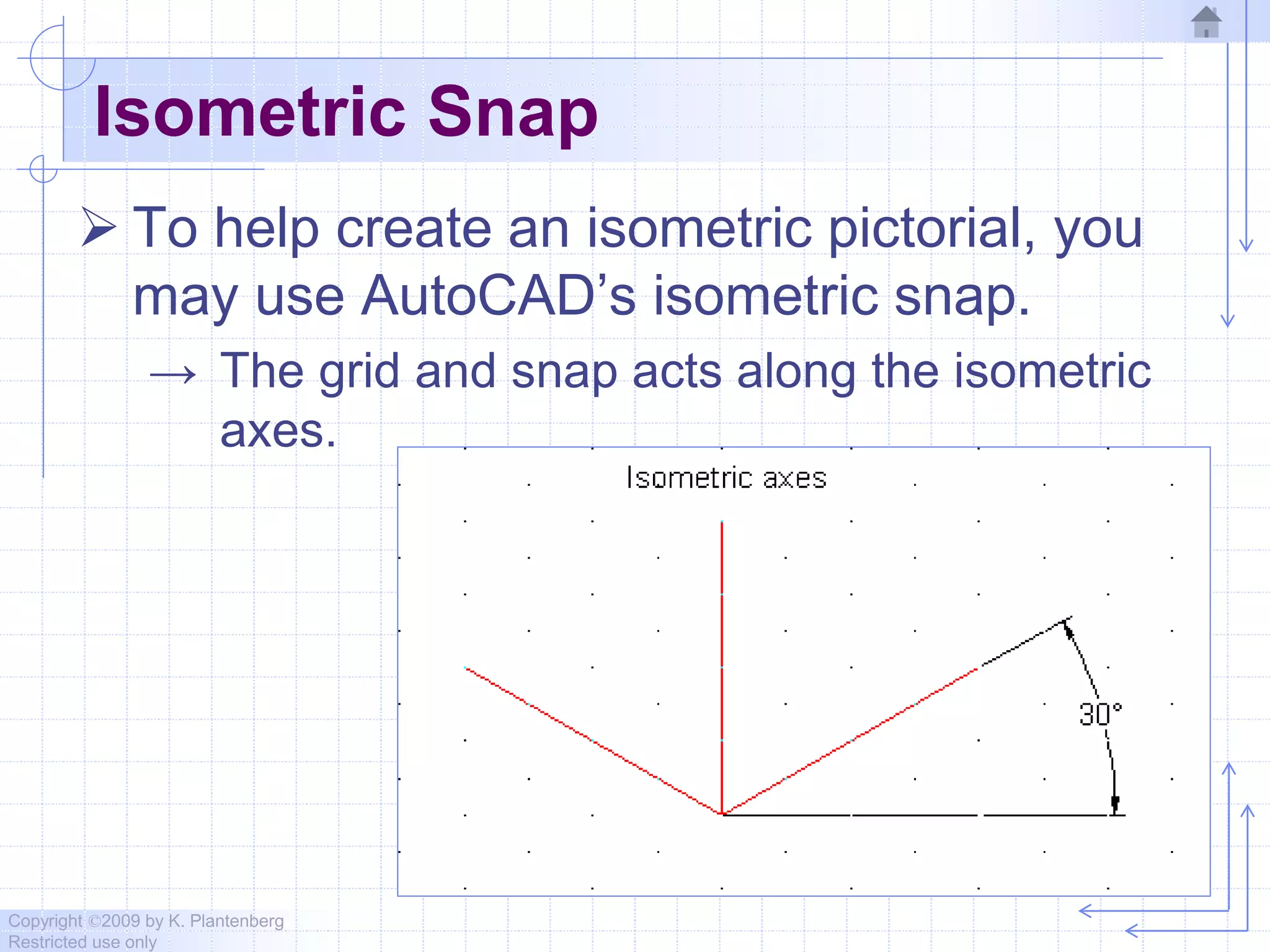
 To help create an isometric pictorial, you
may use AutoCAD’s isometric snap.
→ The grid and snap acts along the isometric
axes.
Copyright ©2009 by K. Plantenberg
Restricted use only
Creating Isometric
Pictorials in AutoCAD
15.2) Isocircles
Copyright ©2009 by K. Plantenberg
Restricted use only
Isocircles
 In an isometric pictorial, circular features
are represented by ellipses (or
isocircles).
Copyright ©2009 by K. Plantenberg
Restricted use only
Isocircles
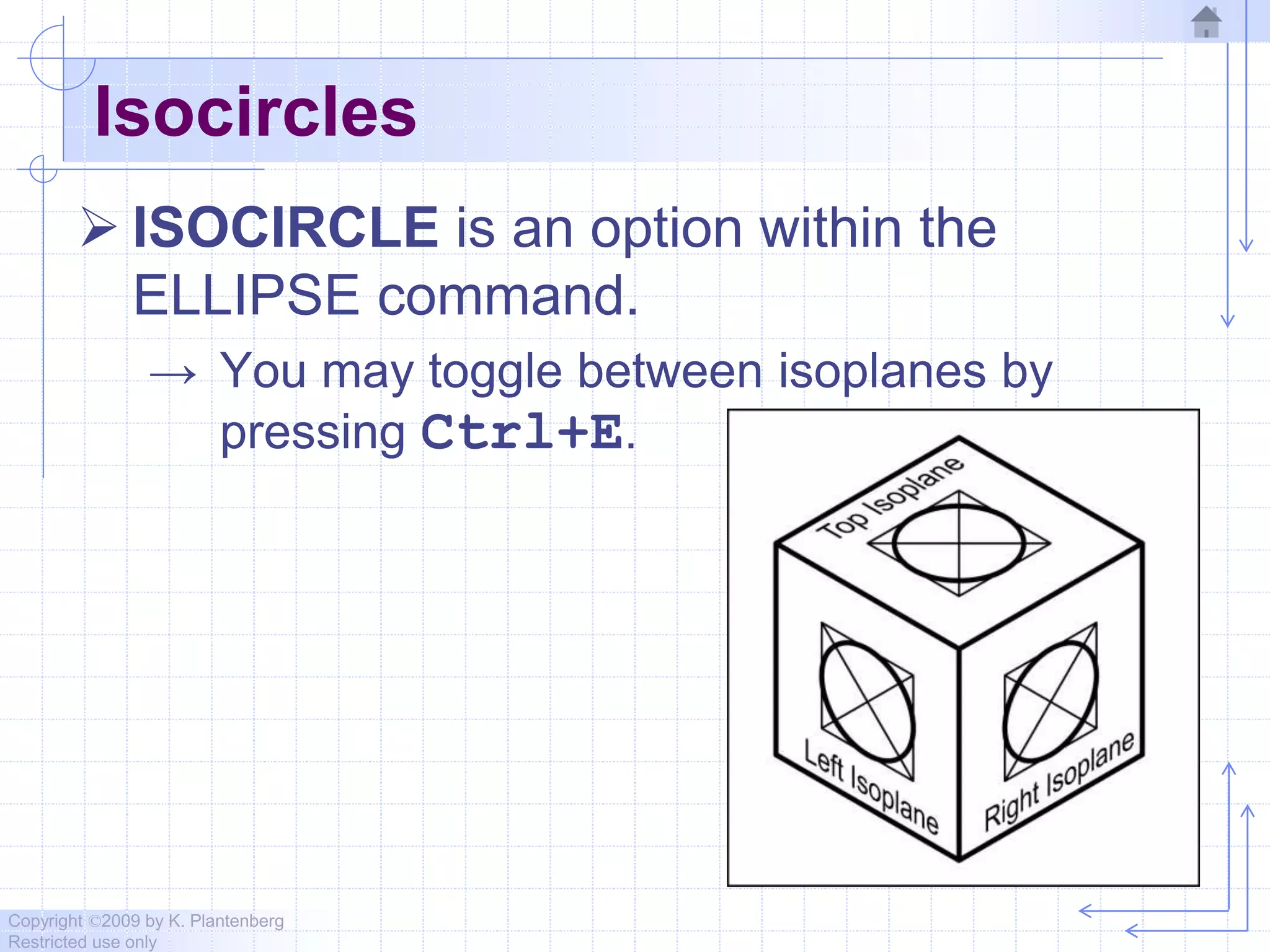
 ISOCIRCLE is an option within the
ELLIPSE command.
→ You may toggle between isoplanes by
pressing Ctrl+E.
Copyright ©2009 by K. Plantenberg
Restricted use only
Isometric Pictorials
 Creating an isometric pictorial.
Live Demonstration
Copyright ©2009 by K. Plantenberg
Restricted use only
Creating Isometric
Pictorials in AutoCAD
End

Chapter 15 isometric pictorials in auto cad 2010

  • 1.
    Copyright ©2009 byK. Plantenberg Restricted use only Chapter 15 Creating Isometric Pictorials in AutoCAD Topics
  • 2.
    Copyright ©2009 byK. Plantenberg Restricted use only Isometric Pictorial: Topics Summary 15.1) Isometric Snap 15.2) Isocircles
  • 3.
    Copyright ©2009 byK. Plantenberg Restricted use only Creating Isometric Pictorials in AutoCAD Summary
  • 4.
    Copyright ©2009 byK. Plantenberg Restricted use only Summary  What will we learn in Chapter 15? → How to use the isometric grid/snap and isocircles to create an isometric pictorial.  Key points → The isometric snap option allows you to create a grid that aligns itself with the isometric pictorial axes.
  • 5.
    Copyright ©2009 byK. Plantenberg Restricted use only Creating Isometric Pictorials in AutoCAD 15.1) Isometric Snap
  • 6.
    Copyright ©2009 byK. Plantenberg Restricted use only Isometric Snap  To help create an isometric pictorial, you may use AutoCAD’s isometric snap. → The grid and snap acts along the isometric axes.
  • 7.
    Copyright ©2009 byK. Plantenberg Restricted use only Creating Isometric Pictorials in AutoCAD 15.2) Isocircles
  • 8.
    Copyright ©2009 byK. Plantenberg Restricted use only Isocircles  In an isometric pictorial, circular features are represented by ellipses (or isocircles).
  • 9.
    Copyright ©2009 byK. Plantenberg Restricted use only Isocircles  ISOCIRCLE is an option within the ELLIPSE command. → You may toggle between isoplanes by pressing Ctrl+E.
  • 10.
    Copyright ©2009 byK. Plantenberg Restricted use only Isometric Pictorials  Creating an isometric pictorial. Live Demonstration
  • 11.
    Copyright ©2009 byK. Plantenberg Restricted use only Creating Isometric Pictorials in AutoCAD End