SCHOOL OF INFORMATICS
Department of Information Technology
Course: Network Device & Configuration
By
Alemayehu Dereje
alem20@gmail.com
1
2
Network device and configuration
Course Objectives
After completion of this course student will be able to:
Basics of network devices
Advanced knowledge on network device configuration
Create and configure VLANs
Store and retrieve network events
Configure router
Configure and manage switch
Implement and configure network protocols
3
Course Content
Chapter 1 Overview to network devices
Chapter 2 Basics of Switch and Router
Chapter 3 Switch and VLAN Configuration
Chapter 4. Routers
Assessment Method
⸙Mid-Term Test………...30%
⸙LAB/Project …………..20%
⸙Final Exam……………50%
Summary for basics
- Cable Configuration:
1.Straight Through
2.Crossover
3.Rollover.
- IP v4 Vs IP v6
- Subneting
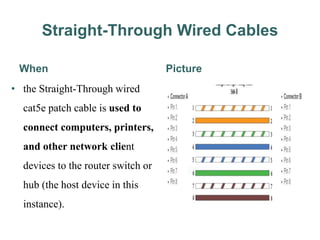
Straight-Through Wired Cables
When
• the Straight-Through wired
cat5e patch cable is used to
connect computers, printers,
and other network client
devices to the router switch or
hub (the host device in this
instance).
Picture
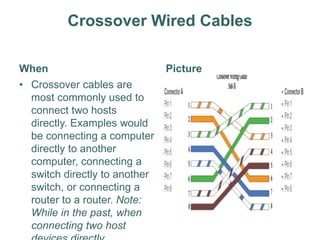
Crossover Wired Cables
When
• Crossover cables are
most commonly used to
connect two hosts
directly. Examples would
be connecting a computer
directly to another
computer, connecting a
switch directly to another
switch, or connecting a
router to a router. Note:
While in the past, when
connecting two host
Picture
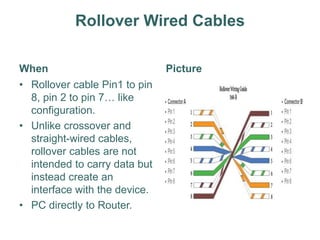
Rollover Wired Cables
When
• Rollover cable Pin1 to pin
8, pin 2 to pin 7… like
configuration.
• Unlike crossover and
straight-wired cables,
rollover cables are not
intended to carry data but
instead create an
interface with the device.
• PC directly to Router.
Picture
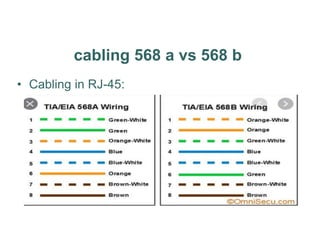
cabling 568 a vs 568 b
• Cabling in RJ-45:
IP V4 vs IP V6
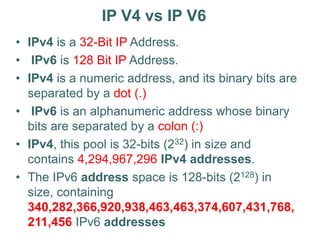
• IPv4 is a 32-Bit IP Address.
• IPv6 is 128 Bit IP Address.
• IPv4 is a numeric address, and its binary bits are
separated by a dot (.)
• IPv6 is an alphanumeric address whose binary
bits are separated by a colon (:)
• IPv4, this pool is 32-bits (232) in size and
contains 4,294,967,296 IPv4 addresses.
• The IPv6 address space is 128-bits (2128) in
size, containing
340,282,366,920,938,463,463,374,607,431,768,
211,456 IPv6 addresses
IP V4
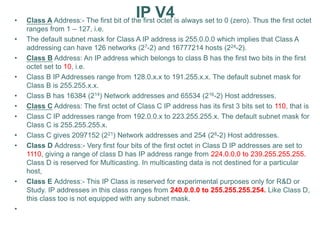
• Class A Address:- The first bit of the first octet is always set to 0 (zero). Thus the first octet
ranges from 1 – 127, i.e.
• The default subnet mask for Class A IP address is 255.0.0.0 which implies that Class A
addressing can have 126 networks (27-2) and 16777214 hosts (224-2).
• Class B Address: An IP address which belongs to class B has the first two bits in the first
octet set to 10, i.e.
• Class B IP Addresses range from 128.0.x.x to 191.255.x.x. The default subnet mask for
Class B is 255.255.x.x.
• Class B has 16384 (214) Network addresses and 65534 (216-2) Host addresses.
• Class C Address: The first octet of Class C IP address has its first 3 bits set to 110, that is
• Class C IP addresses range from 192.0.0.x to 223.255.255.x. The default subnet mask for
Class C is 255.255.255.x.
• Class C gives 2097152 (221) Network addresses and 254 (28-2) Host addresses.
• Class D Address:- Very first four bits of the first octet in Class D IP addresses are set to
1110, giving a range of class D has IP address range from 224.0.0.0 to 239.255.255.255.
Class D is reserved for Multicasting. In multicasting data is not destined for a particular
host,
• Class E Address:- This IP Class is reserved for experimental purposes only for R&D or
Study. IP addresses in this class ranges from 240.0.0.0 to 255.255.255.254. Like Class D,
this class too is not equipped with any subnet mask.
•
3. Switch:
A network switch or switching hub is a computer networking device
that connects network segments.
The term commonly refers to a network bridge that processes and
routes data at the data link layer (layer 2) of the OSI model.
Switches that additionally process data at the network layer (layer 3
and above) are often referred to as Layer 3 switches or multilayer
switches.
11
Switch Overview
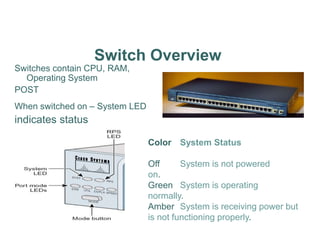
Switches contain CPU, RAM,
Operating System
POST
When switched on – System LED
indicates status
Color System Status
Off System is not powered
on.
Green System is operating
normally.
Amber System is receiving power but
is not functioning properly.
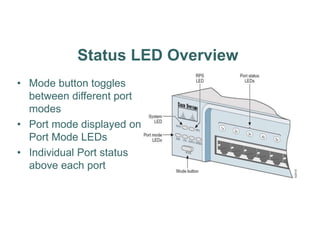
Status LED Overview
• Mode button toggles
between different port
modes
• Port mode displayed on
Port Mode LEDs
• Individual Port status
above each port
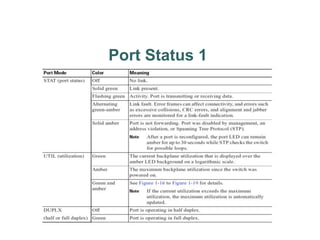
Port Status 1
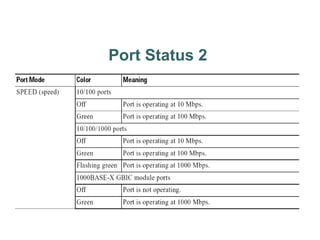
Port Status 2
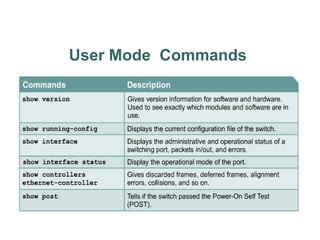
User Mode Commands
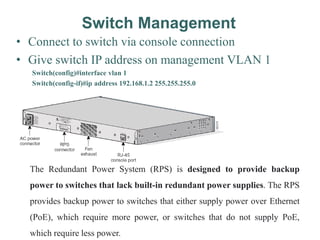
Switch Management
• Connect to switch via console connection
• Give switch IP address on management VLAN 1
Switch(config)#interface vlan 1
Switch(config-if)#ip address 192.168.1.2 255.255.255.0
The Redundant Power System (RPS) is designed to provide backup
power to switches that lack built-in redundant power supplies. The RPS
provides backup power to switches that either supply power over Ethernet
(PoE), which require more power, or switches that do not supply PoE,
which require less power.
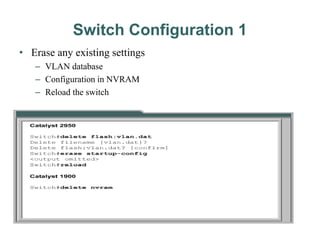
Switch Configuration 1
• Erase any existing settings
– VLAN database
– Configuration in NVRAM
– Reload the switch
Switches
• Contain:
–CPU
–RAM
–Operating System
Catalyst IOS Intro
• User EXEC mode and Privileged EXEC mode.
– enable command.
• IOS based switch is just like the router IOS.
– configure command – go to global config mode.
– copy running-config startup-config– to save config to NVRAM.
– show startup-config
• Host Name configuration -1-255 characters
– hostname [name] eg. hostname S1
• Comment to help identify the interface.
– description [description-string] - interface config. mode
– Use quotes when using spaces in string.
• IOS-based: same as on a router.
– access help by entering ?
Default Configuration
• When powered up without configuration, the
default name is Switch.
• No passwords have been configured.
• All switch ports are part of VLAN 1
• Switch has no IP address
• Show version shows the IOS version and the
configuration register.
Actual Configuration
• First,
– Remove any VLAN info (delete flash: vlan.dat)
– Erase startup
– Reload
• Follow router configuration method to configure hostname, line passwords,
set a default gateway, etc.
• Set IP address for management VLAN1 for telnet access.
• Fast Ethernet ports default to auto-speed and auto-duplex, or they can be set
manually.
• Management of a switch can also be done using a GUI interface as long as
HTTP service is turned on.
Remote Access to Switch
• To telnet, ping, or globally manage the switch:
– Enter an IP address and management VLAN.
• Configuration
– interface vlan 1
– ip address [address][mask]
– ip default-gateway [address]
– Verify with show ip interface
IT_Switch# conf t
IT_Switch(config)#interface vlan 1
IT_Switch(config-if)#ip address 192.168.1.2 255.255.255.0
IT_Switch(config-if)#ip default-gateway 192.168.1.1
IT_Switch#show ip interface
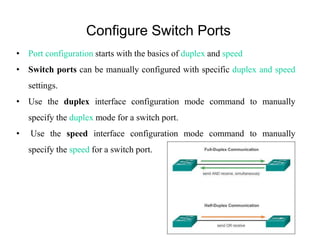
Configure Switch Ports
• Port configuration starts with the basics of duplex and speed
• Switch ports can be manually configured with specific duplex and speed
settings.
• Use the duplex interface configuration mode command to manually
specify the duplex mode for a switch port.
• Use the speed interface configuration mode command to manually
specify the speed for a switch port.
IT_Switch>enable
IT_Switch#configure terminal
IT_Switch(config)#int fa 0/1
IT_Switch(config-if)#duplex full
IT_Switch(config-if)#
%LINK-3-UPDOWN: Interface FastEthernet0/1, changed state to down
%LINEPROTO-5-UPDOWN: Line protocol on Interface FastEthernet0/1, changed state to
down
IT_Switch(config-if)#speed 100
IT_Switch(config-if)#end
IT_Switch#
%SYS-5-CONFIG_I: Configured from console by console
IT_Switch#copy running-config startup-config
Destination filename [startup-config]?
Building configuration...
Backup on TFTP Server
• IOS-based commands:
– copy run tftp – to save config file to tftp
server.
– copy tftp run – to download config from tftp
server to active config and to NVRAM.
TFTP Server
What Is The TFTP Server?
TFTP stands for a Trivial File Transfer Protocol that is uniquely developed
to simplify the sophisticated way of the file transfer. Or you can say that the
TFTP server is a simply designed protocol that works on User Datagram
Protocol.
 Full-duplex communication improves the performance of a switched LAN.
 Full-duplex communication increases effective bandwidth by allowing both ends of a
connection to transmit and receive data simultaneously.
 This is also known as bidirectional communication.
 Unlike full-duplex communication, half-duplex communication is unidirectional.
 Sending and receiving data does not occur at the same time.
 Half-duplex communication creates performance issues because data can flow in only
one direction at a time, often resulting in collisions.
 Half-duplex connections are typically seen in older hardware, such as hubs
 Most Ethernet and Fast Ethernet NICs sold today offer full-duplex capability.
 Gigabit Ethernet and 10Gb NICs require full-duplex connections to operate.
 Full-duplex connections require a switch that supports full-duplex configuration, or a
direct connection using an Ethernet cable between two devices.
 Full-duplex offers 100 percent efficiency in both directions (transmitting and
receiving). This results in a 200 percent potential use of the stated bandwidth
VLAN Basic Concepts
What is VLAN
 VLAN is a logical grouping of networking devices.
 When we create VLAN, we actually break large broadcast domain in smaller
broadcast domains.
 Consider VLAN as a subnet.
 Same as two different subnets cannot communicate with each other without
router, different VLANs also requires router to communicate.
Advantage of VLAN
VLAN provides following advantages:-
 Solve broadcast problem
 Reduce the size of broadcast domains
 Allow us to add additional layer of security
 Make device management easier
 Allow us to implement the logical grouping of devices by function instead of
location
VLAN Examples
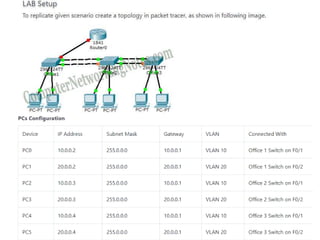
•Our company has three offices. All offices are connected with back links.
•Company has three departments Development, Production and Administration.
•Development department has six computers.
•Production department has three computers.
•Administration department also has three computers.
•Each office has two PCs from development department and one from both production
and administration department.
•Administration and production department have sensitive information and need to
be separate from development department.
•With default configuration, all computers share same broadcast domain.
•Development department can access the administration or production department
resources.
•With VLAN we could create logical boundaries over the physical network.
Assume that we created three VLANs for our network and
assigned them to the related computers.
VLAN Admin for Administration department
VLAN Dev for Development department
VLAN Pro for Production department
VLAN Membership
VLAN membership can be assigned to a device by one of two
methods
1.Static
2.Dynamic
Static
 Assigning VLANs statically is the most common and secure method. It is pretty
easy to set up and supervise. In this method we manually assign VLAN to
switch port. VLANs configured in this way are usually known as port-based
VLANs.
 Static method is the most secure method also. As any switch port that we have
assigned a VLAN will keep this association always unless we manually change
it.
Dynamic
 VLANs are assigned to port automatically depending on the connected device.
 In this method we have configure one switch from network as a server.
 Server contains device specific information like MAC address, IP address etc.
 This information is mapped with VLAN.
 Switch acting as server is known as VMPS (VLAN Membership Policy
Server).
 Only high end switch can configured as VMPS.
 Low end switch works as client and retrieve VLAN information from VMPS.
 Dynamic VLANs supports plug and play movability.
 For example if we move a PC from one port to another port, new switch port
will automatically be configured to the VLAN which the user belongs.
 In static method we have to do this process manually.
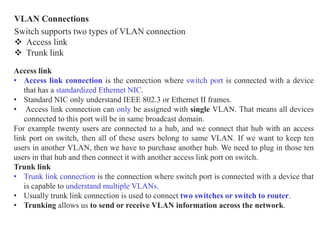
VLAN Connections
Switch supports two types of VLAN connection
 Access link
 Trunk link
Access link
• Access link connection is the connection where switch port is connected with a device
that has a standardized Ethernet NIC.
• Standard NIC only understand IEEE 802.3 or Ethernet II frames.
• Access link connection can only be assigned with single VLAN. That means all devices
connected to this port will be in same broadcast domain.
For example twenty users are connected to a hub, and we connect that hub with an access
link port on switch, then all of these users belong to same VLAN. If we want to keep ten
users in another VLAN, then we have to purchase another hub. We need to plug in those ten
users in that hub and then connect it with another access link port on switch.
Trunk link
• Trunk link connection is the connection where switch port is connected with a device that
is capable to understand multiple VLANs.
• Usually trunk link connection is used to connect two switches or switch to router.
• Trunking allows us to send or receive VLAN information across the network.
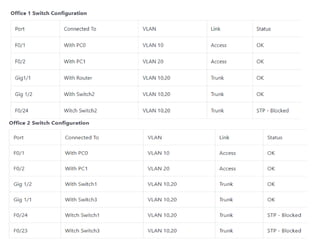
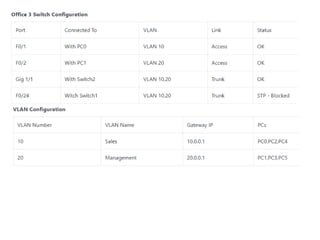
In practice lab network Office1 Switch is configured as VTP Server(VLAN Trunking
Protocol). Office2 and Office3 switches are configured as VTP clients. We only need
to create VLANs in VTP Server. VTP Server will propagate this information to all VTP
clients automatically.
vlan vlan number command is used to create the VLAN.
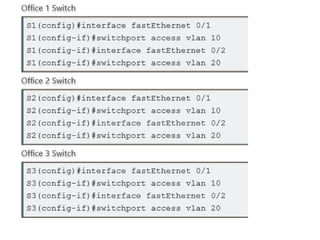
Assigning VLAN Membership
VLAN can be assigned statically or dynamically. We will also use static method to assign
VLAN membership. switchport access vlan [vlan number ] command is used to assign VLAN
to the interface. Following commands will assign VLANs to the interfaces.
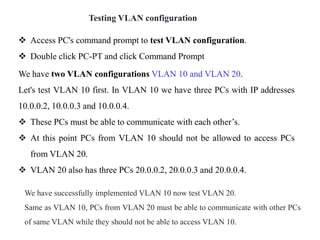
Testing VLAN configuration
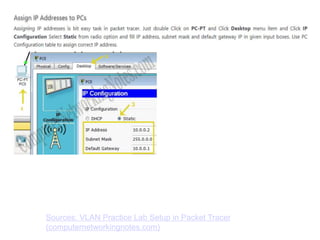
 Access PC's command prompt to test VLAN configuration.
 Double click PC-PT and click Command Prompt
We have two VLAN configurations VLAN 10 and VLAN 20.
Let's test VLAN 10 first. In VLAN 10 we have three PCs with IP addresses
10.0.0.2, 10.0.0.3 and 10.0.0.4.
 These PCs must be able to communicate with each other’s.
 At this point PCs from VLAN 10 should not be allowed to access PCs
from VLAN 20.
 VLAN 20 also has three PCs 20.0.0.2, 20.0.0.3 and 20.0.0.4.
We have successfully implemented VLAN 10 now test VLAN 20.
Same as VLAN 10, PCs from VLAN 20 must be able to communicate with other PCs
of same VLAN while they should not be able to access VLAN 10.
Sources: VLAN Practice Lab Setup in Packet Tracer
(computernetworkingnotes.com)

Chapter 1 Switch Network Device (1).ppt

  • 1.
    SCHOOL OF INFORMATICS Departmentof Information Technology Course: Network Device & Configuration By Alemayehu Dereje alem20@gmail.com 1
  • 2.
    2 Network device andconfiguration Course Objectives After completion of this course student will be able to: Basics of network devices Advanced knowledge on network device configuration Create and configure VLANs Store and retrieve network events Configure router Configure and manage switch Implement and configure network protocols
  • 3.
    3 Course Content Chapter 1Overview to network devices Chapter 2 Basics of Switch and Router Chapter 3 Switch and VLAN Configuration Chapter 4. Routers Assessment Method ⸙Mid-Term Test………...30% ⸙LAB/Project …………..20% ⸙Final Exam……………50%
  • 4.
    Summary for basics -Cable Configuration: 1.Straight Through 2.Crossover 3.Rollover. - IP v4 Vs IP v6 - Subneting
  • 5.
    Straight-Through Wired Cables When •the Straight-Through wired cat5e patch cable is used to connect computers, printers, and other network client devices to the router switch or hub (the host device in this instance). Picture
  • 6.
    Crossover Wired Cables When •Crossover cables are most commonly used to connect two hosts directly. Examples would be connecting a computer directly to another computer, connecting a switch directly to another switch, or connecting a router to a router. Note: While in the past, when connecting two host Picture
  • 7.
    Rollover Wired Cables When •Rollover cable Pin1 to pin 8, pin 2 to pin 7… like configuration. • Unlike crossover and straight-wired cables, rollover cables are not intended to carry data but instead create an interface with the device. • PC directly to Router. Picture
  • 8.
    cabling 568 avs 568 b • Cabling in RJ-45:
  • 9.
    IP V4 vsIP V6 • IPv4 is a 32-Bit IP Address. • IPv6 is 128 Bit IP Address. • IPv4 is a numeric address, and its binary bits are separated by a dot (.) • IPv6 is an alphanumeric address whose binary bits are separated by a colon (:) • IPv4, this pool is 32-bits (232) in size and contains 4,294,967,296 IPv4 addresses. • The IPv6 address space is 128-bits (2128) in size, containing 340,282,366,920,938,463,463,374,607,431,768, 211,456 IPv6 addresses
  • 10.
    IP V4 • ClassA Address:- The first bit of the first octet is always set to 0 (zero). Thus the first octet ranges from 1 – 127, i.e. • The default subnet mask for Class A IP address is 255.0.0.0 which implies that Class A addressing can have 126 networks (27-2) and 16777214 hosts (224-2). • Class B Address: An IP address which belongs to class B has the first two bits in the first octet set to 10, i.e. • Class B IP Addresses range from 128.0.x.x to 191.255.x.x. The default subnet mask for Class B is 255.255.x.x. • Class B has 16384 (214) Network addresses and 65534 (216-2) Host addresses. • Class C Address: The first octet of Class C IP address has its first 3 bits set to 110, that is • Class C IP addresses range from 192.0.0.x to 223.255.255.x. The default subnet mask for Class C is 255.255.255.x. • Class C gives 2097152 (221) Network addresses and 254 (28-2) Host addresses. • Class D Address:- Very first four bits of the first octet in Class D IP addresses are set to 1110, giving a range of class D has IP address range from 224.0.0.0 to 239.255.255.255. Class D is reserved for Multicasting. In multicasting data is not destined for a particular host, • Class E Address:- This IP Class is reserved for experimental purposes only for R&D or Study. IP addresses in this class ranges from 240.0.0.0 to 255.255.255.254. Like Class D, this class too is not equipped with any subnet mask. •
  • 11.
    3. Switch: A networkswitch or switching hub is a computer networking device that connects network segments. The term commonly refers to a network bridge that processes and routes data at the data link layer (layer 2) of the OSI model. Switches that additionally process data at the network layer (layer 3 and above) are often referred to as Layer 3 switches or multilayer switches. 11
  • 12.
    Switch Overview Switches containCPU, RAM, Operating System POST When switched on – System LED indicates status Color System Status Off System is not powered on. Green System is operating normally. Amber System is receiving power but is not functioning properly.
  • 13.
    Status LED Overview •Mode button toggles between different port modes • Port mode displayed on Port Mode LEDs • Individual Port status above each port
  • 14.
  • 15.
  • 16.
  • 17.
    Switch Management • Connectto switch via console connection • Give switch IP address on management VLAN 1 Switch(config)#interface vlan 1 Switch(config-if)#ip address 192.168.1.2 255.255.255.0 The Redundant Power System (RPS) is designed to provide backup power to switches that lack built-in redundant power supplies. The RPS provides backup power to switches that either supply power over Ethernet (PoE), which require more power, or switches that do not supply PoE, which require less power.
  • 18.
    Switch Configuration 1 •Erase any existing settings – VLAN database – Configuration in NVRAM – Reload the switch
  • 19.
  • 20.
    Catalyst IOS Intro •User EXEC mode and Privileged EXEC mode. – enable command. • IOS based switch is just like the router IOS. – configure command – go to global config mode. – copy running-config startup-config– to save config to NVRAM. – show startup-config • Host Name configuration -1-255 characters – hostname [name] eg. hostname S1 • Comment to help identify the interface. – description [description-string] - interface config. mode – Use quotes when using spaces in string. • IOS-based: same as on a router. – access help by entering ?
  • 21.
    Default Configuration • Whenpowered up without configuration, the default name is Switch. • No passwords have been configured. • All switch ports are part of VLAN 1 • Switch has no IP address • Show version shows the IOS version and the configuration register.
  • 22.
    Actual Configuration • First, –Remove any VLAN info (delete flash: vlan.dat) – Erase startup – Reload • Follow router configuration method to configure hostname, line passwords, set a default gateway, etc. • Set IP address for management VLAN1 for telnet access. • Fast Ethernet ports default to auto-speed and auto-duplex, or they can be set manually. • Management of a switch can also be done using a GUI interface as long as HTTP service is turned on.
  • 23.
    Remote Access toSwitch • To telnet, ping, or globally manage the switch: – Enter an IP address and management VLAN. • Configuration – interface vlan 1 – ip address [address][mask] – ip default-gateway [address] – Verify with show ip interface IT_Switch# conf t IT_Switch(config)#interface vlan 1 IT_Switch(config-if)#ip address 192.168.1.2 255.255.255.0 IT_Switch(config-if)#ip default-gateway 192.168.1.1 IT_Switch#show ip interface
  • 24.
    Configure Switch Ports •Port configuration starts with the basics of duplex and speed • Switch ports can be manually configured with specific duplex and speed settings. • Use the duplex interface configuration mode command to manually specify the duplex mode for a switch port. • Use the speed interface configuration mode command to manually specify the speed for a switch port.
  • 25.
    IT_Switch>enable IT_Switch#configure terminal IT_Switch(config)#int fa0/1 IT_Switch(config-if)#duplex full IT_Switch(config-if)# %LINK-3-UPDOWN: Interface FastEthernet0/1, changed state to down %LINEPROTO-5-UPDOWN: Line protocol on Interface FastEthernet0/1, changed state to down IT_Switch(config-if)#speed 100 IT_Switch(config-if)#end IT_Switch# %SYS-5-CONFIG_I: Configured from console by console IT_Switch#copy running-config startup-config Destination filename [startup-config]? Building configuration...
  • 26.
    Backup on TFTPServer • IOS-based commands: – copy run tftp – to save config file to tftp server. – copy tftp run – to download config from tftp server to active config and to NVRAM. TFTP Server What Is The TFTP Server? TFTP stands for a Trivial File Transfer Protocol that is uniquely developed to simplify the sophisticated way of the file transfer. Or you can say that the TFTP server is a simply designed protocol that works on User Datagram Protocol.
  • 27.
     Full-duplex communicationimproves the performance of a switched LAN.  Full-duplex communication increases effective bandwidth by allowing both ends of a connection to transmit and receive data simultaneously.  This is also known as bidirectional communication.  Unlike full-duplex communication, half-duplex communication is unidirectional.  Sending and receiving data does not occur at the same time.  Half-duplex communication creates performance issues because data can flow in only one direction at a time, often resulting in collisions.  Half-duplex connections are typically seen in older hardware, such as hubs  Most Ethernet and Fast Ethernet NICs sold today offer full-duplex capability.  Gigabit Ethernet and 10Gb NICs require full-duplex connections to operate.  Full-duplex connections require a switch that supports full-duplex configuration, or a direct connection using an Ethernet cable between two devices.  Full-duplex offers 100 percent efficiency in both directions (transmitting and receiving). This results in a 200 percent potential use of the stated bandwidth
  • 28.
    VLAN Basic Concepts Whatis VLAN  VLAN is a logical grouping of networking devices.  When we create VLAN, we actually break large broadcast domain in smaller broadcast domains.  Consider VLAN as a subnet.  Same as two different subnets cannot communicate with each other without router, different VLANs also requires router to communicate. Advantage of VLAN VLAN provides following advantages:-  Solve broadcast problem  Reduce the size of broadcast domains  Allow us to add additional layer of security  Make device management easier  Allow us to implement the logical grouping of devices by function instead of location
  • 29.
    VLAN Examples •Our companyhas three offices. All offices are connected with back links. •Company has three departments Development, Production and Administration. •Development department has six computers. •Production department has three computers. •Administration department also has three computers. •Each office has two PCs from development department and one from both production and administration department. •Administration and production department have sensitive information and need to be separate from development department. •With default configuration, all computers share same broadcast domain. •Development department can access the administration or production department resources. •With VLAN we could create logical boundaries over the physical network.
  • 30.
    Assume that wecreated three VLANs for our network and assigned them to the related computers. VLAN Admin for Administration department VLAN Dev for Development department VLAN Pro for Production department VLAN Membership VLAN membership can be assigned to a device by one of two methods 1.Static 2.Dynamic
  • 31.
    Static  Assigning VLANsstatically is the most common and secure method. It is pretty easy to set up and supervise. In this method we manually assign VLAN to switch port. VLANs configured in this way are usually known as port-based VLANs.  Static method is the most secure method also. As any switch port that we have assigned a VLAN will keep this association always unless we manually change it. Dynamic  VLANs are assigned to port automatically depending on the connected device.  In this method we have configure one switch from network as a server.  Server contains device specific information like MAC address, IP address etc.  This information is mapped with VLAN.  Switch acting as server is known as VMPS (VLAN Membership Policy Server).  Only high end switch can configured as VMPS.  Low end switch works as client and retrieve VLAN information from VMPS.  Dynamic VLANs supports plug and play movability.  For example if we move a PC from one port to another port, new switch port will automatically be configured to the VLAN which the user belongs.  In static method we have to do this process manually.
  • 32.
    VLAN Connections Switch supportstwo types of VLAN connection  Access link  Trunk link Access link • Access link connection is the connection where switch port is connected with a device that has a standardized Ethernet NIC. • Standard NIC only understand IEEE 802.3 or Ethernet II frames. • Access link connection can only be assigned with single VLAN. That means all devices connected to this port will be in same broadcast domain. For example twenty users are connected to a hub, and we connect that hub with an access link port on switch, then all of these users belong to same VLAN. If we want to keep ten users in another VLAN, then we have to purchase another hub. We need to plug in those ten users in that hub and then connect it with another access link port on switch. Trunk link • Trunk link connection is the connection where switch port is connected with a device that is capable to understand multiple VLANs. • Usually trunk link connection is used to connect two switches or switch to router. • Trunking allows us to send or receive VLAN information across the network.
  • 33.
    In practice labnetwork Office1 Switch is configured as VTP Server(VLAN Trunking Protocol). Office2 and Office3 switches are configured as VTP clients. We only need to create VLANs in VTP Server. VTP Server will propagate this information to all VTP clients automatically. vlan vlan number command is used to create the VLAN. Assigning VLAN Membership VLAN can be assigned statically or dynamically. We will also use static method to assign VLAN membership. switchport access vlan [vlan number ] command is used to assign VLAN to the interface. Following commands will assign VLANs to the interfaces.
  • 35.
    Testing VLAN configuration Access PC's command prompt to test VLAN configuration.  Double click PC-PT and click Command Prompt We have two VLAN configurations VLAN 10 and VLAN 20. Let's test VLAN 10 first. In VLAN 10 we have three PCs with IP addresses 10.0.0.2, 10.0.0.3 and 10.0.0.4.  These PCs must be able to communicate with each other’s.  At this point PCs from VLAN 10 should not be allowed to access PCs from VLAN 20.  VLAN 20 also has three PCs 20.0.0.2, 20.0.0.3 and 20.0.0.4. We have successfully implemented VLAN 10 now test VLAN 20. Same as VLAN 10, PCs from VLAN 20 must be able to communicate with other PCs of same VLAN while they should not be able to access VLAN 10.
  • 39.
    Sources: VLAN PracticeLab Setup in Packet Tracer (computernetworkingnotes.com)