UNIVERSITY INSTITUTE OFENGINEERING
DEPARTMENT OF ENGINEERING FOUNDATIONS
BE CSE(Specializations)
2ND
SEMESTER
PROGRAMMING PRACTICE
(25CSP-105)
Unit No. 1 Chapter No. 1.1 Lecture No. 2
Topic : STL
Faculty Name and E-Code Designation
Dr. Divya Gupta (E12879) Associate Professor (CSE)
Academic Session 2025-26
EVEN Semester Jan-Jun 2026
2.
2
PROGRAMMING
PRACTICE
Course Objectives
Thecourse aims to provide a strong foundation in object-
oriented problem-solving using the C++ programming
language.
It enhances students' programming skills by introducing
advanced concepts like classes, inheritance, polymorphism,
and exception handling, along with logical and algorithmic
thinking.
By mastering C++ and STL concepts, students will be able to
design and implement efficient, modular solutions to real-
world problems and competitive programming challenges.
To prepare students for competitive coding contests enabling
them to solve problems ranging from basic to highly complex
problems on various coding platforms.
3.
3
CO
Number
Course Outcome
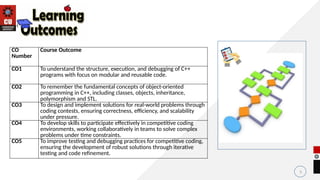
CO1 Tounderstand the structure, execution, and debugging of C++
programs with focus on modular and reusable code.
CO2 To remember the fundamental concepts of object-oriented
programming in C++, including classes, objects, inheritance,
polymorphism and STL.
CO3 To design and implement solutions for real-world problems through
coding contests, ensuring correctness, efficiency, and scalability
under pressure.
CO4 To develop skills to participate effectively in competitive coding
environments, working collaboratively in teams to solve complex
problems under time constraints.
CO5 To improve testing and debugging practices for competitive coding,
ensuring the development of robust solutions through iterative
testing and code refinement.
Course Outcomes
4.
4
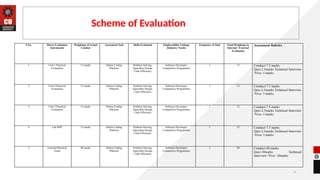
Scheme of Evaluation
SNo. Direct Evaluation
Instruments
Weightage of Actual
Conduct
Assessment Tool Skills Evaluated Employability Linkage
(Industry Needs)
Frequency of Task Final Weightage in
Internal / External
Evaluation
Assessment Rubrics
1 Unit-1 Practical
Evaluation
15 marks Online Coding
Platform
Problem Solving,
Algorithm Design,
Code Efficiency
Software Developer,
Competitive Programmer
1 15 Conduct-7.5 marks
Quiz-2.5marks Technical Interview
/Viva- 5 marks
2 Unit-2 Practical
Evaluation
15 marks Online Coding
Platform
Problem Solving,
Algorithm Design,
Code Efficiency
Software Developer,
Competitive Programmer
1 15 Conduct-7.5 marks
Quiz-2.5marks Technical Interview
/Viva- 5 marks
3 Unit-3 Practical
Evaluation
15 marks Online Coding
Platform
Problem Solving,
Algorithm Design,
Code Efficiency
Software Developer,
Competitive Programmer
1 15 Conduct-7.5 marks
Quiz-2.5marks Technical Interview
/Viva- 5 marks
4 Lab MST 15 marks Online Coding
Platform
Problem Solving,
Algorithm Design,
Code Efficiency
Software Developer,
Competitive Programmer
1 15 Conduct-7.5 marks
Quiz-2.5marks Technical Interview
/Viva- 5 marks
5 External Practical
Exam
40 marks Online Coding
Platform
Problem Solving,
Algorithm Design,
Code Efficiency
Software Developer,
Competitive Programmer
1 40 Conduct-20 marks
Quiz-10marks Technical
Interview /Viva- 10marks
5.
5
Recap of PreviousLecture
• we had discussed about C++ programming language.
• we had learnt about difference between Procedure-Oriented and
Object-Oriented Programming
• we had discussed on simplest and clean C++ code.
7
Why Do WeNeed STL? (Importance of STL)
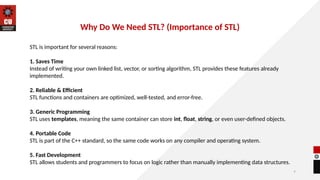
STL is important for several reasons:
1. Saves Time
Instead of writing your own linked list, vector, or sorting algorithm, STL provides these features already
implemented.
2. Reliable & Efficient
STL functions and containers are optimized, well-tested, and error-free.
3. Generic Programming
STL uses templates, meaning the same container can store int, float, string, or even user-defined objects.
4. Portable Code
STL is part of the C++ standard, so the same code works on any compiler and operating system.
5. Fast Development
STL allows students and programmers to focus on logic rather than manually implementing data structures.
8.
5
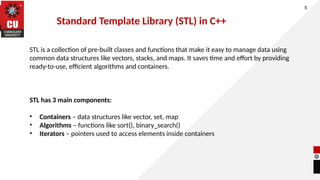
STL is acollection of pre-built classes and functions that make it easy to manage data using
common data structures like vectors, stacks, and maps. It saves time and effort by providing
ready-to-use, efficient algorithms and containers.
STL has 3 main components:
• Containers – data structures like vector, set, map
• Algorithms – functions like sort(), binary_search()
• Iterators – pointers used to access elements inside containers
Standard Template Library (STL) in C++
9.
Containers
6
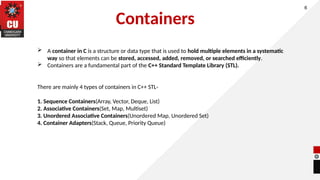
A containerin C is a structure or data type that is used to hold multiple elements in a systematic
way so that elements can be stored, accessed, added, removed, or searched efficiently.
Containers are a fundamental part of the C++ Standard Template Library (STL).
There are mainly 4 types of containers in C++ STL-
1. Sequence Containers(Array, Vector, Deque, List)
2. Associative Containers(Set, Map, Multiset)
3. Unordered Associative Containers(Unordered Map, Unordered Set)
4. Container Adapters(Stack, Queue, Priority Queue)
10.
VECTOR in C++(STL)
6
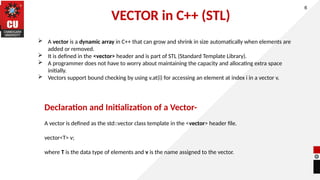
A vector is a dynamic array in C++ that can grow and shrink in size automatically when elements are
added or removed.
It is defined in the <vector> header and is part of STL (Standard Template Library).
A programmer does not have to worry about maintaining the capacity and allocating extra space
initially.
Vectors support bound checking by using v.at(i) for accessing an element at index i in a vector v.
Declaration and Initialization of a Vector-
A vector is defined as the std::vector class template in the <vector> header file.
vector<T> v;
where T is the data type of elements and v is the name assigned to the vector.
11.
Common Functions inVector
6
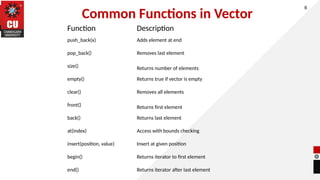
Function Description
push_back(x) Adds element at end
pop_back() Removes last element
size() Returns number of elements
empty() Returns true if vector is empty
clear() Removes all elements
front() Returns first element
back() Returns last element
at(index) Access with bounds checking
insert(position, value) Insert at given position
begin() Returns iterator to first element
end() Returns iterator after last element
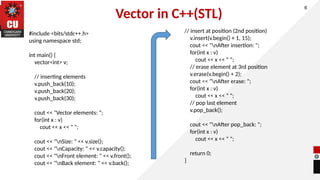
12.
Vector in C++(STL)
6
#include<bits/stdc++.h>
using namespace std;
int main() {
vector<int> v;
// inserting elements
v.push_back(10);
v.push_back(20);
v.push_back(30);
cout << "Vector elements: ";
for(int x : v)
cout << x << " ";
cout << "nSize: " << v.size();
cout << "nCapacity: " << v.capacity();
cout << "nFront element: " << v.front();
cout << "nBack element: " << v.back();
// insert at position (2nd position)
v.insert(v.begin() + 1, 15);
cout << "nAfter insertion: ";
for(int x : v)
cout << x << " ";
// erase element at 3rd position
v.erase(v.begin() + 2);
cout << "nAfter erase: ";
for(int x : v)
cout << x << " ";
// pop last element
v.pop_back();
cout << "nAfter pop_back: ";
for(int x : v)
cout << x << " ";
return 0;
}
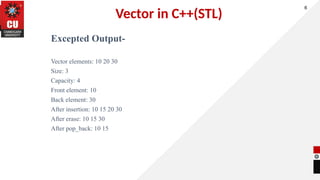
13.
Vector in C++(STL)
ExceptedOutput-
Vector elements: 10 20 30
Size: 3
Capacity: 4
Front element: 10
Back element: 30
After insertion: 10 15 20 30
After erase: 10 15 30
After pop_back: 10 15
6
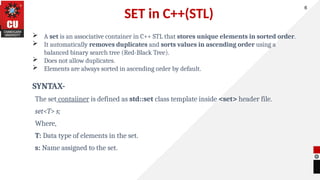
14.
SET in C++(STL)
A set is an associative container in C++ STL that stores unique elements in sorted order.
It automatically removes duplicates and sorts values in ascending order using a
balanced binary search tree (Red-Black Tree).
Does not allow duplicates.
Elements are always sorted in ascending order by default.
SYNTAX-
The set contaiiner is defined as std::set class template inside <set> header file.
set<T> s;
Where,
T: Data type of elements in the set.
s: Name assigned to the set.
6
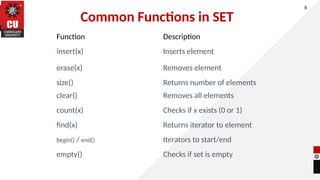
15.
Common Functions inSET
6
Function Description
insert(x) Inserts element
erase(x) Removes element
size() Returns number of elements
clear() Removes all elements
count(x) Checks if x exists (0 or 1)
find(x) Returns iterator to element
begin() / end() Iterators to start/end
empty() Checks if set is empty
16.
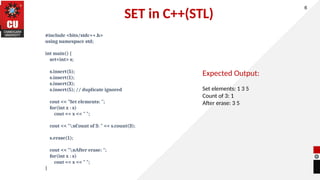
SET in C++(STL)
#include<bits/stdc++.h>
using namespace std;
int main() {
set<int> s;
s.insert(5);
s.insert(1);
s.insert(3);
s.insert(5); // duplicate ignored
cout << "Set elements: ";
for(int x : s)
cout << x << " ";
cout << "nCount of 3: " << s.count(3);
s.erase(1);
cout << "nAfter erase: ";
for(int x : s)
cout << x << " ";
}
6
Expected Output:
Set elements: 1 3 5
Count of 3: 1
After erase: 3 5
17.
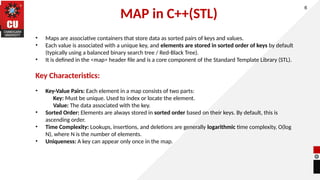
MAP in C++(STL)
6
•Maps are associative containers that store data as sorted pairs of keys and values.
• Each value is associated with a unique key, and elements are stored in sorted order of keys by default
(typically using a balanced binary search tree / Red-Black Tree).
• It is defined in the <map> header file and is a core component of the Standard Template Library (STL).
Key Characteristics:
• Key-Value Pairs: Each element in a map consists of two parts:
Key: Must be unique. Used to index or locate the element.
Value: The data associated with the key.
• Sorted Order: Elements are always stored in sorted order based on their keys. By default, this is
ascending order.
• Time Complexity: Lookups, insertions, and deletions are generally logarithmic time complexity, O(log
N), where N is the number of elements.
• Uniqueness: A key can appear only once in the map.
18.
MAP in C++(STL)
6
SYNTAX:
#include<map>
map<KeyType, ValueType> variable_name;
where,
key_type: Data type of key.
value_type: Data type of value.
variable_name: Name assigned to map.
EXAMPLE:
map<string, int> marks;
marks["Alice"] = 90;
marks["Bob"] = 85;
Operation Description
insert({key,
value})
Insert element
m[key] Access or insert with
default value
find(key) Search for a key
erase(key) Remove element
size() Number of elements
clear() Remove all elements
19.
MAP in C++(STL)
6
#include<iostream>
#include <map>
using namespace std;
int main() {
map<string, int> marks;
// Insert values
marks.insert({"Amit", 85});
marks.insert({"Priya", 92});
// Insert using [] operator
marks["Rahul"] = 78;
marks["Neha"] = 88;
// Update a student's marks
marks["Rahul"] = 82; // updating value
// Search for a student
string name = "Priya";
auto it = marks.find(name);
if (it != marks.end()) {
cout << name << "'s marks: " << it->second << endl;
} else {
cout << name << " not found!" << endl;
}
// Delete a student record
marks.erase("Amit");
// Display total number of students
cout << "nTotal Students = " << marks.size() << endl;
cout << "nStudent Marks List: " << endl;
for (auto p : marks) {
cout << p.first << " : " << p.second << endl;
}
marks.clear(); // Clear all records
cout << "nAll records deleted! Size now: " <<
marks.size() << endl;
return 0;
}
20.
MAP in C++(STL)
6
ExpectedOutput:
Priya's marks: 92
Total Students = 3
Student Marks List:
Neha : 88
Priya : 92
Rahul : 82
All records deleted! Size now: 0
21.
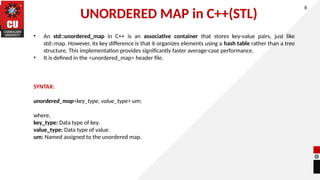
UNORDERED MAP inC++(STL)
6
• An std::unordered_map in C++ is an associative container that stores key-value pairs, just like
std::map. However, its key difference is that it organizes elements using a hash table rather than a tree
structure. This implementation provides significantly faster average-case performance.
• It is defined in the <unordered_map> header file.
SYNTAX:
unordered_map<key_type, value_type> um;
where,
key_type: Data type of key.
value_type: Data type of value.
um: Named assigned to the unordered map.
22.
UNORDERED MAP inC++(STL)
6
Function Description
insert({key, value}) Insert element
mp[key] = value Insert or Update
find(key) Searches and returns iterator
erase(key) Deletes element
size() Returns total number of
elements
clear() Removes all
empty() Checks if map is empty
count(key) Returns 1 if exists else 0
Iteration Loop using auto iterator
UNORDERED MAP inC++(STL)
6
EXPECTED OUTPUT:
Priya's marks: 92
All Student Marks:
Rahul : 82
Priya : 92
Amit : 85
Size now = 2
25.
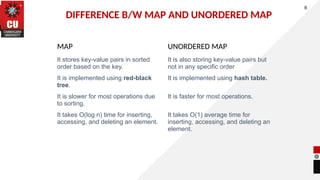
DIFFERENCE B/W MAPAND UNORDERED MAP
6
MAP UNORDERED MAP
It stores key-value pairs in sorted
order based on the key.
It is also storing key-value pairs but
not in any specific order
It is implemented using red-black
tree.
It is implemented using hash table.
It is slower for most operations due
to sorting.
It is faster for most operations.
It takes O(log n) time for inserting,
accessing, and deleting an element.
It takes O(1) average time for
inserting, accessing, and deleting an
element.
26.
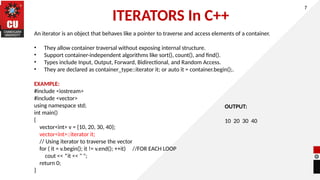
ITERATORS In C++
Aniterator is an object that behaves like a pointer to traverse and access elements of a container.
• They allow container traversal without exposing internal structure.
• Support container-independent algorithms like sort(), count(), and find().
• Types include Input, Output, Forward, Bidirectional, and Random Access.
• They are declared as container_type::iterator it; or auto it = container.begin();.
EXAMPLE:
#include <iostream>
#include <vector>
using namespace std;
int main()
{
vector<int> v = {10, 20, 30, 40};
vector<int>::iterator it;
// Using iterator to traverse the vector
for ( it = v.begin(); it != v.end(); ++it) //FOR EACH LOOP
cout << *it << " ";
return 0;
}
7
OUTPUT:
10 20 30 40
27.
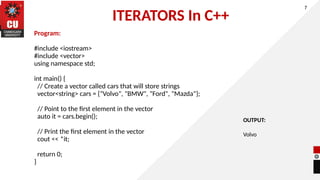
ITERATORS In C++
Program:
#include<iostream>
#include <vector>
using namespace std;
int main() {
// Create a vector called cars that will store strings
vector<string> cars = {"Volvo", "BMW", "Ford", "Mazda"};
// Point to the first element in the vector
auto it = cars.begin();
// Print the first element in the vector
cout << *it;
return 0;
}
7
OUTPUT:
Volvo
28.
28
Summary
In this lecturewe have
discussed about importance
of STL.
we have learnt about
different STL Components.
In addition, we have
discussed on variety of
sequence and associative
containers.
29.
29
Next Lecture
• Specifyinga class
• Creating Objects
• Accessing the class members
• Applications of Classes and Objects
• Features of OOPS
30.
30
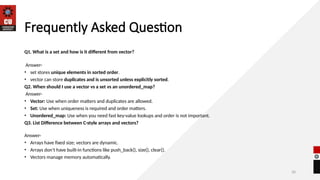
Frequently Asked Question
Q1.What is a set and how is it different from vector?
Answer-
• set stores unique elements in sorted order.
• vector can store duplicates and is unsorted unless explicitly sorted.
Q2. When should I use a vector vs a set vs an unordered_map?
Answer-
• Vector: Use when order matters and duplicates are allowed.
• Set: Use when uniqueness is required and order matters.
• Unordered_map: Use when you need fast key-value lookups and order is not important.
Q3. List Difference between C-style arrays and vectors?
Answer-
• Arrays have fixed size; vectors are dynamic.
• Arrays don’t have built-in functions like push_back(), size(), clear().
• Vectors manage memory automatically.
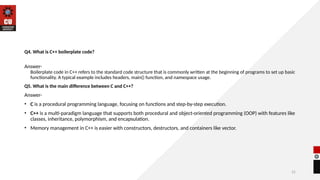
31.
31
Q4. What isC++ boilerplate code?
Answer-
Boilerplate code in C++ refers to the standard code structure that is commonly written at the beginning of programs to set up basic
functionality. A typical example includes headers, main() function, and namespace usage.
Q5. What is the main difference between C and C++?
Answer-
• C is a procedural programming language, focusing on functions and step-by-step execution.
• C++ is a multi-paradigm language that supports both procedural and object-oriented programming (OOP) with features like
classes, inheritance, polymorphism, and encapsulation.
• Memory management in C++ is easier with constructors, destructors, and containers like vector.
32.
32
Assessment Questions
Q1. Whichof the following is a C++ feature and not present in C?
a) Functions
b) Classes
c) Loops
d) Arrays
Q2. What type of STL container would you use for fast key-based access?
a) vector
b) set
c) unordered_map
d) list
Q3. Identify the correct way to declare a vector of integers:
a) vector<int> v;
b) vector v<int>;
c) vector<int> v[10];
d) int vector v;
33.
33
REFERENCES
TEXTBOOKS/ REFERENCE BOOKS
TEXTBOOKS
•T1:Object-Oriented Programming with C++ by E. Balagurusamy, McGraw Hill Education, 8th
Edition, 2020.
• T2:Let Us C++ by Yashavant Kanetkar, BPB Publications, 5th Edition, 2020.
• T3: Programming in C++ by Ashok N. Kamthane, Pearson Education, 2nd Edition, 2012.
• T4:C++ Primer by Stanley B. Lippman, Josée Lajoie, and Barbara E. Moo, Addison-Wesley, 5th
Edition, 2012.
• T5: The C++ Standard Library: A Tutorial and Reference by Nicolai M. Josuttis, Addison-Wesley,
2nd Edition, 2012.
REFERENCE BOOKS
• R1: The C++ Programming Language by Bjarne Stroustrup, Addison-Wesley, 4th Edition, 2013.
• R2:Effective C++ by Scott Meyers, Addison-Wesley, 3rd Edition, 2005.
• R3:STL Sourcebook: A Guide to C++ Standard Template Library by P.J. Plauger, Prentice Hall, 1st
Edition, 2000.
• R4:C++ Templates: The Complete Guide by David Vandevoorde and Nicolai M. Josuttis,
Addison-Wesley, 2nd Edition, 2017.
#6 Computer in the diagram is 3rd generation computer. The period of third generation was from 1965-1971. The computers of third generation used Integrated Circuits (ICs) in place of transistors. A single IC has many transistors, resistors, and capacitors along with the associated circuitry. The main features of third generation are −
IC used
More reliable in comparison to previous two generations
Smaller size
Generated less heat
Faster
Lesser maintenance
Costly
AC required
Consumed lesser electricity
Supported high-level language




![MAP in C++(STL)
6
SYNTAX:
#include <map>
map<KeyType, ValueType> variable_name;
where,
key_type: Data type of key.
value_type: Data type of value.
variable_name: Name assigned to map.
EXAMPLE:
map<string, int> marks;
marks["Alice"] = 90;
marks["Bob"] = 85;
Operation Description
insert({key,
value})
Insert element
m[key] Access or insert with
default value
find(key) Search for a key
erase(key) Remove element
size() Number of elements
clear() Remove all elements](https://image.slidesharecdn.com/chapter1-260206152828-9ad2bf9a/85/chapter-1-1-STLlllllllllllllllllll-pptx-18-320.jpg)
![MAP in C++(STL)
6
#include <iostream>
#include <map>
using namespace std;
int main() {
map<string, int> marks;
// Insert values
marks.insert({"Amit", 85});
marks.insert({"Priya", 92});
// Insert using [] operator
marks["Rahul"] = 78;
marks["Neha"] = 88;
// Update a student's marks
marks["Rahul"] = 82; // updating value
// Search for a student
string name = "Priya";
auto it = marks.find(name);
if (it != marks.end()) {
cout << name << "'s marks: " << it->second << endl;
} else {
cout << name << " not found!" << endl;
}
// Delete a student record
marks.erase("Amit");
// Display total number of students
cout << "nTotal Students = " << marks.size() << endl;
cout << "nStudent Marks List: " << endl;
for (auto p : marks) {
cout << p.first << " : " << p.second << endl;
}
marks.clear(); // Clear all records
cout << "nAll records deleted! Size now: " <<
marks.size() << endl;
return 0;
}](https://image.slidesharecdn.com/chapter1-260206152828-9ad2bf9a/85/chapter-1-1-STLlllllllllllllllllll-pptx-19-320.jpg)

![UNORDERED MAP in C++(STL)
6
Function Description
insert({key, value}) Insert element
mp[key] = value Insert or Update
find(key) Searches and returns iterator
erase(key) Deletes element
size() Returns total number of
elements
clear() Removes all
empty() Checks if map is empty
count(key) Returns 1 if exists else 0
Iteration Loop using auto iterator](https://image.slidesharecdn.com/chapter1-260206152828-9ad2bf9a/85/chapter-1-1-STLlllllllllllllllllll-pptx-22-320.jpg)
![UNORDERED MAP in C++(STL)
6
#include <iostream>
#include <unordered_map>
using namespace std;
int main() {
unordered_map<string, int> marks;
// Insert values
marks["Amit"] = 85;
marks["Priya"] = 92;
marks.insert({"Rahul", 78});
// Update value
marks["Rahul"] = 82;
// Search
string name = "Priya";
if (marks.find(name) != marks.end()) {
cout << name << "'s marks: " << marks[name] << endl;
} else {
cout << name << " not found!" << endl;
}
// Iterate
cout << "nAll Student Marks:" << endl;
for (auto p : marks) {
cout << p.first << " : " << p.second << endl;
}
// Delete
marks.erase("Amit");
cout << "nSize now = " << marks.size() << endl;
return 0;
}](https://image.slidesharecdn.com/chapter1-260206152828-9ad2bf9a/85/chapter-1-1-STLlllllllllllllllllll-pptx-23-320.jpg)

![32
Assessment Questions
Q1. Which of the following is a C++ feature and not present in C?
a) Functions
b) Classes
c) Loops
d) Arrays
Q2. What type of STL container would you use for fast key-based access?
a) vector
b) set
c) unordered_map
d) list
Q3. Identify the correct way to declare a vector of integers:
a) vector<int> v;
b) vector v<int>;
c) vector<int> v[10];
d) int vector v;](https://image.slidesharecdn.com/chapter1-260206152828-9ad2bf9a/85/chapter-1-1-STLlllllllllllllllllll-pptx-32-320.jpg)






![oops_final_ppt[1].pptx](https://cdn.slidesharecdn.com/ss_thumbnails/oopsfinalppt1-230501164230-34a8f22e-thumbnail.jpg?width=640&height=640&fit=bounds)


