Networking Programming
2

Overview Networking Basic

Overview Client-Server Model

Explain about URL, URN and URI

Explain about WebRequest and WebResponse class

Explain about HttpClient class

Explain about Domain Name System (DNS)

Overview TCP Services: TcpListener, TcpClient and Socket class

Demo WebRequest and HttpClient with .NET application

Demo TcpListener and TcpClient with .NET application

Explain and demo about UDP service with .NET application
09/18/2025
Objectives
09/18/2025 3
Why Should We Study This Lecture?

Nowadays, distributed applications are popular. People need large
applications, running based on a computer network (local area networks-LANs-
or wide area network-WAN), including many sites working concurrently. Do you
want to create such applications?

How do we develop network applications by .NET?
Networking Basics
09/18/2025 5

Platform: Hardware + Operating system

Client: an application running in a computer (such as browser) can receive data
from another (server)

Server: an application running in a computer (such as IIS- Windows Internet
Information Service, Kestrel, Nginx) can supply data to others (clients)

IP address (Internet Protocol): unsigned integer helps identifying a network
element(computer, router,…)

IPv4: 4-byte IP address, such as 192.143.5.1

IPv6: 16-byte IP address

Port: unsigned 2-byte integer helps operating system differentiating a network
communicating process
Some Definitions Related to Networking
09/18/2025 6
Some Definitions Related to Networking

Protocol: Rules for packaging data of a network communication because client
and server can be working in different platform. Two common basic protocols
are TCP and UDP

TCP: (Transmission Control Protocol) is a connection-based protocol (only one
connecting line only) that provides a reliable flow of data between two
computers based on the acknowledge mechanism

UDP: (User Datagram Protocol) is a protocol that sends independent packets of
data, called datagrams, from one computer to another with no guarantees about
arrival (many connecting lines can be used, acknowledge mechanism is not
used). Many firewalls and routers have been configured not to allow UDP
packets. Ask our system administrator if UDP is permitted
09/18/2025 7
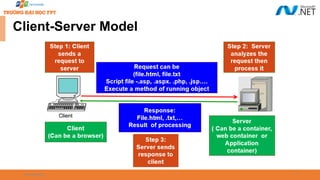
Client-Server Model
09/18/2025 8
Client-Server Model

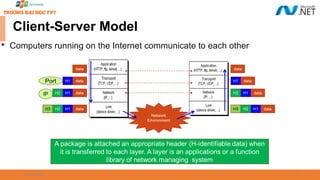
Computers running on the Internet communicate to each other
09/18/2025 9

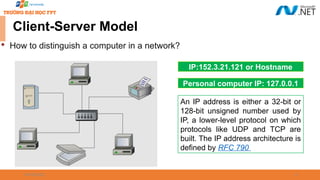
How to distinguish a computer in a network?
Client-Server Model
IP:152.3.21.121 or Hostname
Personal computer IP: 127.0.0.1
An IP address is either a 32-bit or
128-bit unsigned number used by
IP, a lower-level protocol on which
protocols like UDP and TCP are
built. The IP address architecture is
defined by RFC 790
09/18/2025 10

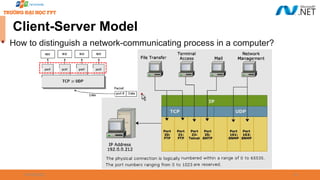
How to distinguish a network-communicating process in a computer?
Client-Server Model
09/18/2025 11

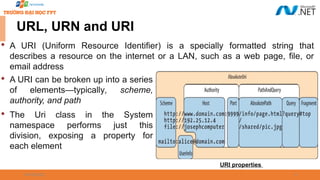
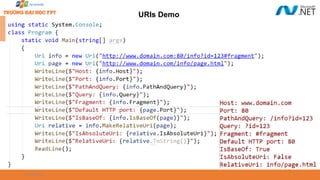
A URI (Uniform Resource Identifier) is a specially formatted string that
describes a resource on the internet or a LAN, such as a web page, file, or
email address

A URI can be broken up into a series
of elements—typically, scheme,
authority, and path

The Uri class in the System
namespace performs just this
division, exposing a property for
each element
URI properties
URL, URN and URI
09/18/2025 12
URL, URN and URI

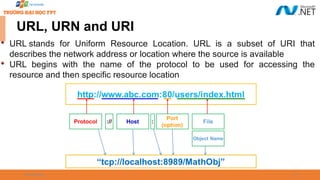
URL stands for Uniform Resource Location. URL is a subset of URI that
describes the network address or location where the source is available

URL begins with the name of the protocol to be used for accessing the
resource and then specific resource location
09/18/2025 13

URLs build on the Domain Name Service (DNS) to address hosts symbolically
and use a file-path like syntax to identify specific resources at a given host. For
this reason, mapping URLs to physical resources is straightforward and is
implemented by various Web browsers

URN stands for Uniform Resource Name. It is a URI that uses a URN scheme
 “urn” scheme: It is followed by a namespace identifier, followed by a colon, followed by
namespace specific string. For example : urn:isbn:0451450523
 URN does not imply the availability of the identified resource.URNs are location-
independent resource identifiers and are designed to make it easy to map other
namespaces into URN space
URL, URN and URI
09/18/2025 14
URIs Demo
Networking Programming in .NET
09/18/2025 16
Understanding System.Net.* Namespaces

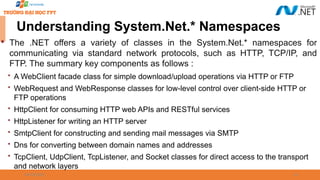
The .NET offers a variety of classes in the System.Net.* namespaces for
communicating via standard network protocols, such as HTTP, TCP/IP, and
FTP. The summary key components as follows :
 A WebClient facade class for simple download/upload operations via HTTP or FTP
 WebRequest and WebResponse classes for low-level control over client-side HTTP or
FTP operations
 HttpClient for consuming HTTP web APIs and RESTful services
 HttpListener for writing an HTTP server
 SmtpClient for constructing and sending mail messages via SMTP
 Dns for converting between domain names and addresses
 TcpClient, UdpClient, TcpListener, and Socket classes for direct access to the transport
and network layers
09/18/2025 17
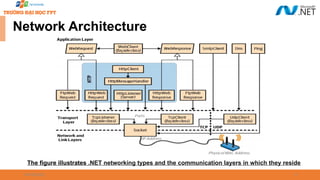
Network Architecture
The figure illustrates .NET networking types and the communication layers in which they reside
09/18/2025 18
Understanding WebRequest Class

WebRequest and WebResponse are common base classes for managing both
HTTP and FTP client-side activity as well as the “file:” protocol. They
encapsulate the request/response model that these protocols all share: the
client makes a request, and then awaits a response from a server

WebRequest is the abstract base class for .NET's request/response model for
accessing data from the Internet

An application that uses the request/response model can request data from the
Internet in a protocol-agnostic manner, in which the application works with
instances of the WebRequest class while protocol-specific descendant classes
carry out the details of the request
09/18/2025 19
Understanding WebRequest Class
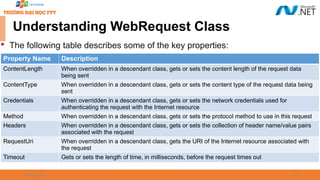
Property Name Description
ContentLength When overridden in a descendant class, gets or sets the content length of the request data
being sent
ContentType When overridden in a descendant class, gets or sets the content type of the request data being
sent
Credentials When overridden in a descendant class, gets or sets the network credentials used for
authenticating the request with the Internet resource
Method When overridden in a descendant class, gets or sets the protocol method to use in this request
Headers When overridden in a descendant class, gets or sets the collection of header name/value pairs
associated with the request
RequestUri When overridden in a descendant class, gets the URI of the Internet resource associated with
the request
Timeout Gets or sets the length of time, in milliseconds, before the request times out

The following table describes some of the key properties:
09/18/2025 20
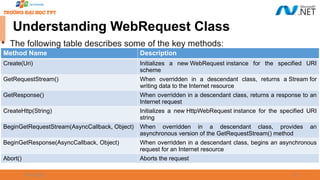
Understanding WebRequest Class
Method Name Description
Create(Uri) Initializes a new WebRequest instance for the specified URI
scheme
GetRequestStream() When overridden in a descendant class, returns a Stream for
writing data to the Internet resource
GetResponse() When overridden in a descendant class, returns a response to an
Internet request
CreateHttp(String) Initializes a new HttpWebRequest instance for the specified URI
string
BeginGetRequestStream(AsyncCallback, Object) When overridden in a descendant class, provides an
asynchronous version of the GetRequestStream() method
BeginGetResponse(AsyncCallback, Object) When overridden in a descendant class, begins an asynchronous
request for an Internet resource
Abort() Aborts the request

The following table describes some of the key methods:
09/18/2025 21
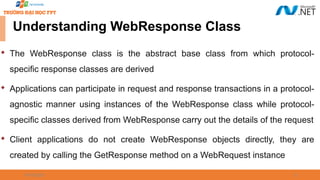
Understanding WebResponse Class

The WebResponse class is the abstract base class from which protocol-
specific response classes are derived

Applications can participate in request and response transactions in a protocol-
agnostic manner using instances of the WebResponse class while protocol-
specific classes derived from WebResponse carry out the details of the request

Client applications do not create WebResponse objects directly, they are
created by calling the GetResponse method on a WebRequest instance
09/18/2025 22
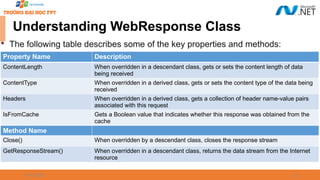
Understanding WebResponse Class
Property Name Description
ContentLength When overridden in a descendant class, gets or sets the content length of data
being received
ContentType When overridden in a derived class, gets or sets the content type of the data being
received
Headers When overridden in a derived class, gets a collection of header name-value pairs
associated with this request
IsFromCache Gets a Boolean value that indicates whether this response was obtained from the
cache
Method Name
Close() When overridden by a descendant class, closes the response stream
GetResponseStream() When overridden in a descendant class, returns the data stream from the Internet
resource

The following table describes some of the key properties and methods:
09/18/2025 23
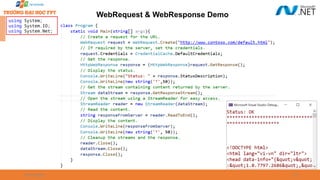
WebRequest & WebResponse Demo
using System;
using System.IO;
using System.Net;
09/18/2025 24
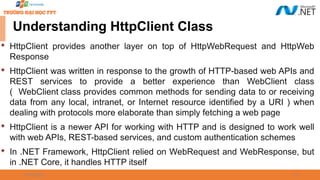
Understanding HttpClient Class

HttpClient provides another layer on top of HttpWebRequest and HttpWeb
Response

HttpClient was written in response to the growth of HTTP-based web APIs and
REST services to provide a better experience than WebClient class
( WebClient class provides common methods for sending data to or receiving
data from any local, intranet, or Internet resource identified by a URI ) when
dealing with protocols more elaborate than simply fetching a web page

HttpClient is a newer API for working with HTTP and is designed to work well
with web APIs, REST-based services, and custom authentication schemes

In .NET Framework, HttpClient relied on WebRequest and WebResponse, but
in .NET Core, it handles HTTP itself
09/18/2025 25
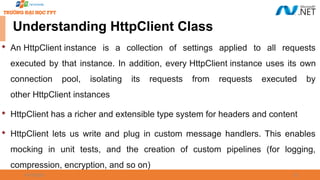
Understanding HttpClient Class

An HttpClient instance is a collection of settings applied to all requests
executed by that instance. In addition, every HttpClient instance uses its own
connection pool, isolating its requests from requests executed by
other HttpClient instances

HttpClient has a richer and extensible type system for headers and content

HttpClient lets us write and plug in custom message handlers. This enables
mocking in unit tests, and the creation of custom pipelines (for logging,
compression, encryption, and so on)
09/18/2025 26
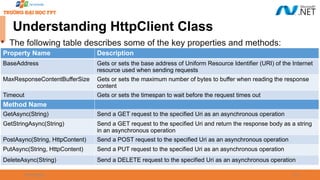
Understanding HttpClient Class
Property Name Description
BaseAddress Gets or sets the base address of Uniform Resource Identifier (URI) of the Internet
resource used when sending requests
MaxResponseContentBufferSize Gets or sets the maximum number of bytes to buffer when reading the response
content
Timeout Gets or sets the timespan to wait before the request times out
Method Name
GetAsync(String) Send a GET request to the specified Uri as an asynchronous operation
GetStringAsync(String) Send a GET request to the specified Uri and return the response body as a string
in an asynchronous operation
PostAsync(String, HttpContent) Send a POST request to the specified Uri as an asynchronous operation
PutAsync(String, HttpContent) Send a PUT request to the specified Uri as an asynchronous operation
DeleteAsync(String) Send a DELETE request to the specified Uri as an asynchronous operation

The following table describes some of the key properties and methods:
09/18/2025 27
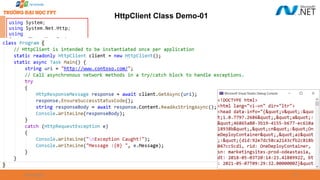
HttpClient Class Demo-01
using System;
using System.Net.Http;
using
System.Threading.Tasks;
09/18/2025 28
HttpClient Class Demo-02
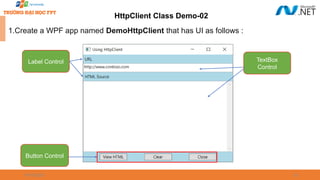
1.Create a WPF app named DemoHttpClient that has UI as follows :
TextBox
Control
Label Control
Button Control
09/18/2025 29
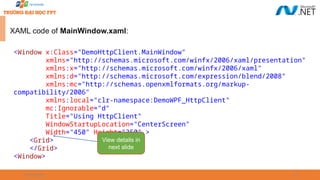
XAML code of MainWindow.xaml:
<Window x:Class="DemoHttpClient.MainWindow"
xmlns="http://schemas.microsoft.com/winfx/2006/xaml/presentation"
xmlns:x="http://schemas.microsoft.com/winfx/2006/xaml"
xmlns:d="http://schemas.microsoft.com/expression/blend/2008"
xmlns:mc="http://schemas.openxmlformats.org/markup-
compatibility/2006"
xmlns:local="clr-namespace:DemoWPF_HttpClient"
mc:Ignorable="d"
Title="Using HttpClient"
WindowStartupLocation="CenterScreen"
Width="450" Height="350" >
<Grid>
</Grid>
<Window>
View details in
next slide
09/18/2025 30
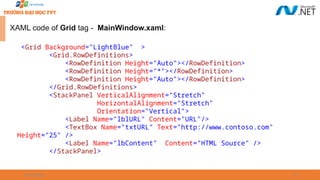
XAML code of Grid tag - MainWindow.xaml:
<Grid Background="LightBlue" >
<Grid.RowDefinitions>
<RowDefinition Height="Auto"></RowDefinition>
<RowDefinition Height="*"></RowDefinition>
<RowDefinition Height="Auto"></RowDefinition>
</Grid.RowDefinitions>
<StackPanel VerticalAlignment="Stretch"
HorizontalAlignment="Stretch"
Orientation="Vertical">
<Label Name="lblURL" Content="URL"/>
<TextBox Name="txtURL" Text="http://www.contoso.com"
Height="25" />
<Label Name="lbContent" Content="HTML Source" />
</StackPanel>
09/18/2025 31
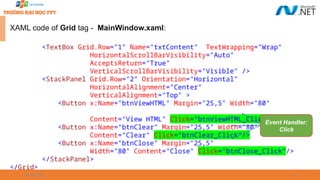
XAML code of Grid tag - MainWindow.xaml:
<TextBox Grid.Row="1" Name="txtContent" TextWrapping="Wrap"
HorizontalScrollBarVisibility="Auto"
AcceptsReturn="True"
VerticalScrollBarVisibility="Visible" />
<StackPanel Grid.Row="2" Orientation="Horizontal"
HorizontalAlignment="Center"
VerticalAlignment="Top" >
<Button x:Name="btnViewHTML" Margin="25,5" Width="80"
Content="View HTML" Click="btnViewHTML_Click" />
<Button x:Name="btnClear" Margin="25,5" Width="80"
Content="Clear" Click="btnClear_Click"/>
<Button x:Name="btnClose" Margin="25,5"
Width="80" Content="Close" Click="btnClose_Click"/>
</StackPanel>
</Grid>
Event Handler:
Click
09/18/2025 32
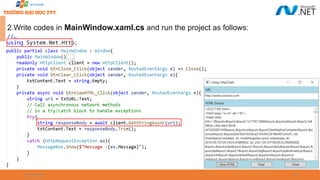
2.Write codes in MainWindow.xaml.cs and run the project as follows:
//…
using System.Net.Http;
09/18/2025 33
Understanding Domain Name System (DNS)

Domain Name System (DNS) is the process , which converts Internet address
in mnemonic form into the equivalent number IP address

DNS can also be considered as an database that is present on various
computers and has names and IP address of various hosts on the internet

The DNS consists of three components:
 The first is a “Name Space” that establishes the syntactical rules for creating and
structuring legal DNS names
 The second is a “Globally Distributed Database” implemented on a network of “Name
Servers”
 The third is "Resolver" software, which understands how to formulate a DNS query and
is built into practically every Internet-capable application
09/18/2025 34
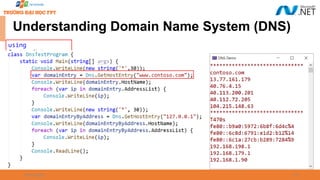
using
System.Net;
Understanding Domain Name System (DNS)
09/18/2025 35
The System.Net.Sockets Namespace

Provides a managed implementation of the Windows Sockets (Winsock)
interface for developers who need to tightly control access to the network
Class Name Description
Socket Implements the Berkeley sockets interface
TcpClient Provides client connections for TCP network services
TcpListener Listens for connections from TCP network clients
UdpClient Provides User Datagram Protocol (UDP) network services
NetworkStream Provides the underlying stream of data for network access
SocketAsyncEventArgs Represents an asynchronous socket operation
SocketException The exception that is thrown when a socket error occurs
SocketTaskExtensions This class contains extension methods to the Socket class

The following table describes some of the key classes:
09/18/2025 36
Working TCP Services

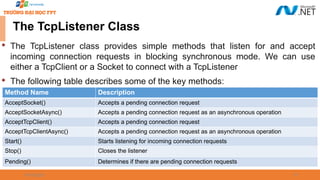
The Tranmission Control Protocol (TCP) services contain classes and methods
for connecting and sending data between two points or more points. A point
consists of both an IP (Internet Protocol) and port number

The TcpClient and TcpListener classes create the TCP connections on the
internet and contain methods and properties for connecting, sending and
receiving stream data over the network
09/18/2025 37
The TcpListener Class

The TcpListener class provides simple methods that listen for and accept
incoming connection requests in blocking synchronous mode. We can use
either a TcpClient or a Socket to connect with a TcpListener

The following table describes some of the key methods:
Method Name Description
AcceptSocket() Accepts a pending connection request
AcceptSocketAsync() Accepts a pending connection request as an asynchronous operation
AcceptTcpClient() Accepts a pending connection request
AcceptTcpClientAsync() Accepts a pending connection request as an asynchronous operation
Start() Starts listening for incoming connection requests
Stop() Closes the listener
Pending() Determines if there are pending connection requests
09/18/2025 38
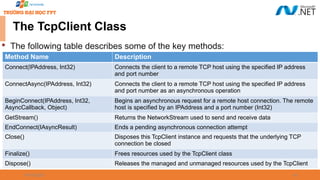
The TcpClient Class

The TcpClient class provides simple methods for connecting, sending, and
receiving stream data over a network in synchronous blocking mode

In order for TcpClient to connect and exchange data, a TcpListener or Socket
created with the TCP ProtocolType must be listening for incoming connection
requests. We can connect to this listener in one of the following two ways:
 Create a TcpClient and call one of the three available Connect methods
 Create a TcpClient using the host name and port number of the remote host. This
constructor will automatically attempt a connection
09/18/2025 39
The TcpClient Class

The following table describes some of the key properties:
Property Name Description
Active Gets or sets a value that indicates whether a connection has been made
Available Gets the amount of data that has been received from the network and is available to be read
Client Gets or sets the underlying Socket
Connected Gets a value indicating whether the underlying Socket for a TcpClient is connected to a remote
host
ReceiveBufferSize Gets or sets the size of the receive buffer
ReceiveTimeout Gets or sets the amount of time a TcpClient will wait to receive data once a read operation is
initiated
SendBufferSize Gets or sets the size of the send buffer
SendTimeout Gets or sets the amount of time a TcpClient will wait for a send operation to complete
successfully
ReceiveBufferSize Gets or sets the size of the receive buffer
09/18/2025 40
The TcpClient Class

The following table describes some of the key methods:
Method Name Description
Connect(IPAddress, Int32) Connects the client to a remote TCP host using the specified IP address
and port number
ConnectAsync(IPAddress, Int32) Connects the client to a remote TCP host using the specified IP address
and port number as an asynchronous operation
BeginConnect(IPAddress, Int32,
AsyncCallback, Object)
Begins an asynchronous request for a remote host connection. The remote
host is specified by an IPAddress and a port number (Int32)
GetStream() Returns the NetworkStream used to send and receive data
EndConnect(IAsyncResult) Ends a pending asynchronous connection attempt
Close() Disposes this TcpClient instance and requests that the underlying TCP
connection be closed
Finalize() Frees resources used by the TcpClient class
Dispose() Releases the managed and unmanaged resources used by the TcpClient
09/18/2025 41
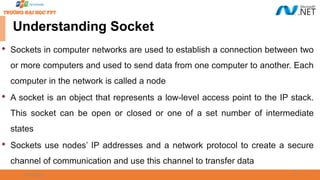

Sockets in computer networks are used to establish a connection between two
or more computers and used to send data from one computer to another. Each
computer in the network is called a node

A socket is an object that represents a low-level access point to the IP stack.
This socket can be open or closed or one of a set number of intermediate
states

Sockets use nodes’ IP addresses and a network protocol to create a secure
channel of communication and use this channel to transfer data
Understanding Socket
09/18/2025 42
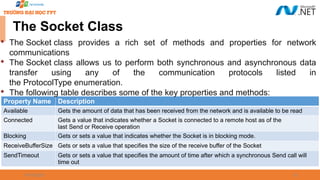
The Socket Class
Property Name Description
Available Gets the amount of data that has been received from the network and is available to be read
Connected Gets a value that indicates whether a Socket is connected to a remote host as of the
last Send or Receive operation
Blocking Gets or sets a value that indicates whether the Socket is in blocking mode.
ReceiveBufferSize Gets or sets a value that specifies the size of the receive buffer of the Socket
SendTimeout Gets or sets a value that specifies the amount of time after which a synchronous Send call will
time out

The Socket class provides a rich set of methods and properties for network
communications

The Socket class allows us to perform both synchronous and asynchronous data
transfer using any of the communication protocols listed in
the ProtocolType enumeration.

The following table describes some of the key properties and methods:
09/18/2025 43
The Socket Class
Method Name Description
Accept() Creates a new Socket for a newly created connection
Connect(IPAddress, Int32)
Establishes a connection to a remote host. The host is specified by an IP address
and a port number
Listen() Places a Socket in a listening state
SendFile(String)
Sends the file fileName to a connected Socket object with the
UseDefaultWorkerThread transmit flag
Send(Byte[]) Sends data to a connected Socket
Receive(Byte[]) Receives data from a bound Socket into a receive buffer
Close() Closes the Socket connection and releases all associated resources
Property Name Description
ReceiveTimeout Gets or sets a value that specifies the amount of time after which a synchronous Receive call
will time out
SendBufferSize Gets or sets a value that specifies the size of the send buffer of the Socket
Using TCP Services Demonstration
09/18/2025 45
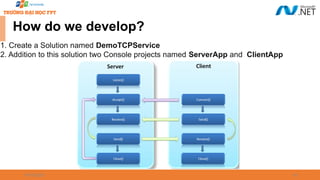
How do we develop?
1. Create a Solution named DemoTCPService
2. Addition to this solution two Console projects named ServerApp and ClientApp
09/18/2025 46
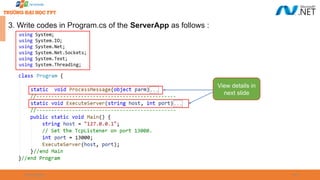
3. Write codes in Program.cs of the ServerApp as follows :
View details in
next slide
09/18/2025 47
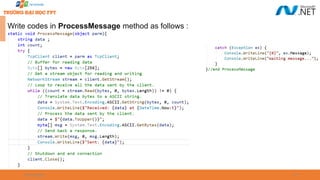
Write codes in ProcessMessage method as follows :
09/18/2025 48
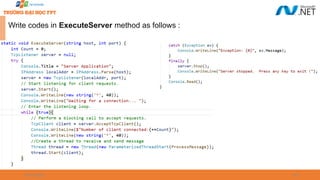
Write codes in ExecuteServer method as follows :
09/18/2025 49
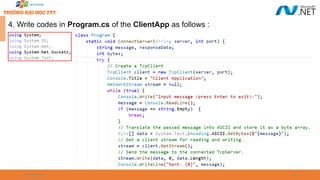
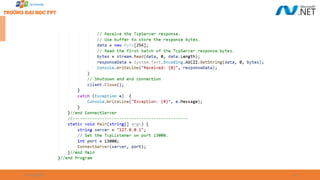
4. Write codes in Program.cs of the ClientApp as follows :
09/18/2025 50
09/18/2025 51
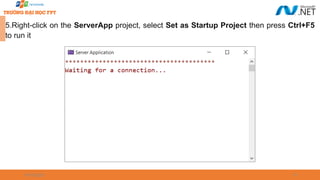
5.Right-click on the ServerApp project, select Set as Startup Project then press Ctrl+F5
to run it
09/18/2025 52
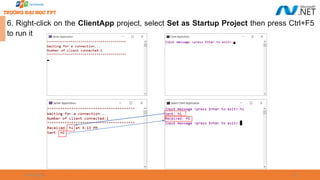
6. Right-click on the ClientApp project, select Set as Startup Project then press Ctrl+F5
to run it
09/18/2025 53
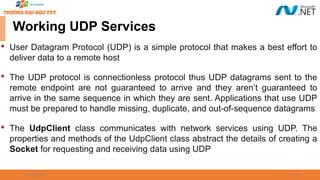
Working UDP Services

User Datagram Protocol (UDP) is a simple protocol that makes a best effort to
deliver data to a remote host

The UDP protocol is connectionless protocol thus UDP datagrams sent to the
remote endpoint are not guaranteed to arrive and they aren’t guaranteed to
arrive in the same sequence in which they are sent. Applications that use UDP
must be prepared to handle missing, duplicate, and out-of-sequence datagrams

The UdpClient class communicates with network services using UDP. The
properties and methods of the UdpClient class abstract the details of creating a
Socket for requesting and receiving data using UDP
09/18/2025 54
UdpClient Class

The following table describes some of the key properties and methods:
Property Name Description
Active Gets or sets a value indicating whether a default remote host has been established
Available Gets the amount of data received from the network that is available to read
Client Gets or sets the underlying network Socket
Method Name Description
Connect(String, Int32) Establishes a default remote host using the specified host name and port number
Close() Closes the UDP connection
Send(Byte[], Int32) Sends a UDP datagram to a remote host
Receive(IPEndPoint) Returns a UDP datagram that was sent by a remote host
JoinMulticastGroup(Int32,
IPAddress)
Adds a UdpClient to a multicast group
Dispose() Releases the managed and unmanaged resources used by the UdpClient
Using UDP Services Demonstration
09/18/2025 56
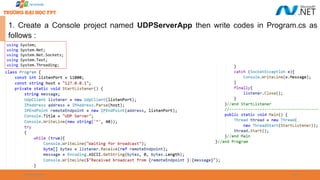
1. Create a Console project named UDPServerApp then write codes in Program.cs as
follows :
09/18/2025 57
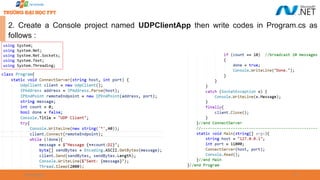
2. Create a Console project named UDPClientApp then write codes in Program.cs as
follows :
09/18/2025 58
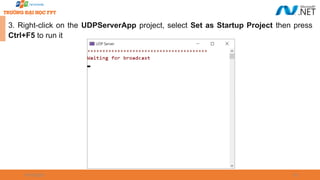
3. Right-click on the UDPServerApp project, select Set as Startup Project then press
Ctrl+F5 to run it
09/18/2025 59
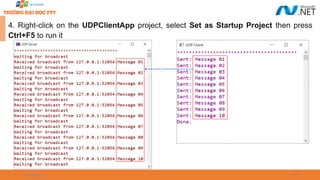
4. Right-click on the UDPClientApp project, select Set as Startup Project then press
Ctrl+F5 to run it
Summary

Concepts were introduced:
 Overview Networking Basic
 Overview Client-Server Model
 Explain about URL, URN and URI
 Explain about WebRequest and WebResponse class
 Explain about HttpClient class
 Explain about Domain Name System (DNS)
 Explain about UDP service
 Overview TCP Services: TcpListener, TcpClient and Socket class
 Demo WebRequest and HttpClient with .NET application
 Demo TcpListener and TcpClient with .NET application
 Demo UDP service with .NET application
60

Chapter 01 - Networking Programming.pptx

  • 1.
  • 2.
    2  Overview Networking Basic  OverviewClient-Server Model  Explain about URL, URN and URI  Explain about WebRequest and WebResponse class  Explain about HttpClient class  Explain about Domain Name System (DNS)  Overview TCP Services: TcpListener, TcpClient and Socket class  Demo WebRequest and HttpClient with .NET application  Demo TcpListener and TcpClient with .NET application  Explain and demo about UDP service with .NET application 09/18/2025 Objectives
  • 3.
    09/18/2025 3 Why ShouldWe Study This Lecture?  Nowadays, distributed applications are popular. People need large applications, running based on a computer network (local area networks-LANs- or wide area network-WAN), including many sites working concurrently. Do you want to create such applications?  How do we develop network applications by .NET?
  • 4.
  • 5.
    09/18/2025 5  Platform: Hardware+ Operating system  Client: an application running in a computer (such as browser) can receive data from another (server)  Server: an application running in a computer (such as IIS- Windows Internet Information Service, Kestrel, Nginx) can supply data to others (clients)  IP address (Internet Protocol): unsigned integer helps identifying a network element(computer, router,…)  IPv4: 4-byte IP address, such as 192.143.5.1  IPv6: 16-byte IP address  Port: unsigned 2-byte integer helps operating system differentiating a network communicating process Some Definitions Related to Networking
  • 6.
    09/18/2025 6 Some DefinitionsRelated to Networking  Protocol: Rules for packaging data of a network communication because client and server can be working in different platform. Two common basic protocols are TCP and UDP  TCP: (Transmission Control Protocol) is a connection-based protocol (only one connecting line only) that provides a reliable flow of data between two computers based on the acknowledge mechanism  UDP: (User Datagram Protocol) is a protocol that sends independent packets of data, called datagrams, from one computer to another with no guarantees about arrival (many connecting lines can be used, acknowledge mechanism is not used). Many firewalls and routers have been configured not to allow UDP packets. Ask our system administrator if UDP is permitted
  • 7.
  • 8.
    09/18/2025 8 Client-Server Model  Computersrunning on the Internet communicate to each other
  • 9.
    09/18/2025 9  How todistinguish a computer in a network? Client-Server Model IP:152.3.21.121 or Hostname Personal computer IP: 127.0.0.1 An IP address is either a 32-bit or 128-bit unsigned number used by IP, a lower-level protocol on which protocols like UDP and TCP are built. The IP address architecture is defined by RFC 790
  • 10.
    09/18/2025 10  How todistinguish a network-communicating process in a computer? Client-Server Model
  • 11.
    09/18/2025 11  A URI(Uniform Resource Identifier) is a specially formatted string that describes a resource on the internet or a LAN, such as a web page, file, or email address  A URI can be broken up into a series of elements—typically, scheme, authority, and path  The Uri class in the System namespace performs just this division, exposing a property for each element URI properties URL, URN and URI
  • 12.
    09/18/2025 12 URL, URNand URI  URL stands for Uniform Resource Location. URL is a subset of URI that describes the network address or location where the source is available  URL begins with the name of the protocol to be used for accessing the resource and then specific resource location
  • 13.
    09/18/2025 13  URLs buildon the Domain Name Service (DNS) to address hosts symbolically and use a file-path like syntax to identify specific resources at a given host. For this reason, mapping URLs to physical resources is straightforward and is implemented by various Web browsers  URN stands for Uniform Resource Name. It is a URI that uses a URN scheme  “urn” scheme: It is followed by a namespace identifier, followed by a colon, followed by namespace specific string. For example : urn:isbn:0451450523  URN does not imply the availability of the identified resource.URNs are location- independent resource identifiers and are designed to make it easy to map other namespaces into URN space URL, URN and URI
  • 14.
  • 15.
  • 16.
    09/18/2025 16 Understanding System.Net.*Namespaces  The .NET offers a variety of classes in the System.Net.* namespaces for communicating via standard network protocols, such as HTTP, TCP/IP, and FTP. The summary key components as follows :  A WebClient facade class for simple download/upload operations via HTTP or FTP  WebRequest and WebResponse classes for low-level control over client-side HTTP or FTP operations  HttpClient for consuming HTTP web APIs and RESTful services  HttpListener for writing an HTTP server  SmtpClient for constructing and sending mail messages via SMTP  Dns for converting between domain names and addresses  TcpClient, UdpClient, TcpListener, and Socket classes for direct access to the transport and network layers
  • 17.
    09/18/2025 17 Network Architecture Thefigure illustrates .NET networking types and the communication layers in which they reside
  • 18.
    09/18/2025 18 Understanding WebRequestClass  WebRequest and WebResponse are common base classes for managing both HTTP and FTP client-side activity as well as the “file:” protocol. They encapsulate the request/response model that these protocols all share: the client makes a request, and then awaits a response from a server  WebRequest is the abstract base class for .NET's request/response model for accessing data from the Internet  An application that uses the request/response model can request data from the Internet in a protocol-agnostic manner, in which the application works with instances of the WebRequest class while protocol-specific descendant classes carry out the details of the request
  • 19.
    09/18/2025 19 Understanding WebRequestClass Property Name Description ContentLength When overridden in a descendant class, gets or sets the content length of the request data being sent ContentType When overridden in a descendant class, gets or sets the content type of the request data being sent Credentials When overridden in a descendant class, gets or sets the network credentials used for authenticating the request with the Internet resource Method When overridden in a descendant class, gets or sets the protocol method to use in this request Headers When overridden in a descendant class, gets or sets the collection of header name/value pairs associated with the request RequestUri When overridden in a descendant class, gets the URI of the Internet resource associated with the request Timeout Gets or sets the length of time, in milliseconds, before the request times out  The following table describes some of the key properties:
  • 20.
    09/18/2025 20 Understanding WebRequestClass Method Name Description Create(Uri) Initializes a new WebRequest instance for the specified URI scheme GetRequestStream() When overridden in a descendant class, returns a Stream for writing data to the Internet resource GetResponse() When overridden in a descendant class, returns a response to an Internet request CreateHttp(String) Initializes a new HttpWebRequest instance for the specified URI string BeginGetRequestStream(AsyncCallback, Object) When overridden in a descendant class, provides an asynchronous version of the GetRequestStream() method BeginGetResponse(AsyncCallback, Object) When overridden in a descendant class, begins an asynchronous request for an Internet resource Abort() Aborts the request  The following table describes some of the key methods:
  • 21.
    09/18/2025 21 Understanding WebResponseClass  The WebResponse class is the abstract base class from which protocol- specific response classes are derived  Applications can participate in request and response transactions in a protocol- agnostic manner using instances of the WebResponse class while protocol- specific classes derived from WebResponse carry out the details of the request  Client applications do not create WebResponse objects directly, they are created by calling the GetResponse method on a WebRequest instance
  • 22.
    09/18/2025 22 Understanding WebResponseClass Property Name Description ContentLength When overridden in a descendant class, gets or sets the content length of data being received ContentType When overridden in a derived class, gets or sets the content type of the data being received Headers When overridden in a derived class, gets a collection of header name-value pairs associated with this request IsFromCache Gets a Boolean value that indicates whether this response was obtained from the cache Method Name Close() When overridden by a descendant class, closes the response stream GetResponseStream() When overridden in a descendant class, returns the data stream from the Internet resource  The following table describes some of the key properties and methods:
  • 23.
    09/18/2025 23 WebRequest &WebResponse Demo using System; using System.IO; using System.Net;
  • 24.
    09/18/2025 24 Understanding HttpClientClass  HttpClient provides another layer on top of HttpWebRequest and HttpWeb Response  HttpClient was written in response to the growth of HTTP-based web APIs and REST services to provide a better experience than WebClient class ( WebClient class provides common methods for sending data to or receiving data from any local, intranet, or Internet resource identified by a URI ) when dealing with protocols more elaborate than simply fetching a web page  HttpClient is a newer API for working with HTTP and is designed to work well with web APIs, REST-based services, and custom authentication schemes  In .NET Framework, HttpClient relied on WebRequest and WebResponse, but in .NET Core, it handles HTTP itself
  • 25.
    09/18/2025 25 Understanding HttpClientClass  An HttpClient instance is a collection of settings applied to all requests executed by that instance. In addition, every HttpClient instance uses its own connection pool, isolating its requests from requests executed by other HttpClient instances  HttpClient has a richer and extensible type system for headers and content  HttpClient lets us write and plug in custom message handlers. This enables mocking in unit tests, and the creation of custom pipelines (for logging, compression, encryption, and so on)
  • 26.
    09/18/2025 26 Understanding HttpClientClass Property Name Description BaseAddress Gets or sets the base address of Uniform Resource Identifier (URI) of the Internet resource used when sending requests MaxResponseContentBufferSize Gets or sets the maximum number of bytes to buffer when reading the response content Timeout Gets or sets the timespan to wait before the request times out Method Name GetAsync(String) Send a GET request to the specified Uri as an asynchronous operation GetStringAsync(String) Send a GET request to the specified Uri and return the response body as a string in an asynchronous operation PostAsync(String, HttpContent) Send a POST request to the specified Uri as an asynchronous operation PutAsync(String, HttpContent) Send a PUT request to the specified Uri as an asynchronous operation DeleteAsync(String) Send a DELETE request to the specified Uri as an asynchronous operation  The following table describes some of the key properties and methods:
  • 27.
    09/18/2025 27 HttpClient ClassDemo-01 using System; using System.Net.Http; using System.Threading.Tasks;
  • 28.
    09/18/2025 28 HttpClient ClassDemo-02 1.Create a WPF app named DemoHttpClient that has UI as follows : TextBox Control Label Control Button Control
  • 29.
    09/18/2025 29 XAML codeof MainWindow.xaml: <Window x:Class="DemoHttpClient.MainWindow" xmlns="http://schemas.microsoft.com/winfx/2006/xaml/presentation" xmlns:x="http://schemas.microsoft.com/winfx/2006/xaml" xmlns:d="http://schemas.microsoft.com/expression/blend/2008" xmlns:mc="http://schemas.openxmlformats.org/markup- compatibility/2006" xmlns:local="clr-namespace:DemoWPF_HttpClient" mc:Ignorable="d" Title="Using HttpClient" WindowStartupLocation="CenterScreen" Width="450" Height="350" > <Grid> </Grid> <Window> View details in next slide
  • 30.
    09/18/2025 30 XAML codeof Grid tag - MainWindow.xaml: <Grid Background="LightBlue" > <Grid.RowDefinitions> <RowDefinition Height="Auto"></RowDefinition> <RowDefinition Height="*"></RowDefinition> <RowDefinition Height="Auto"></RowDefinition> </Grid.RowDefinitions> <StackPanel VerticalAlignment="Stretch" HorizontalAlignment="Stretch" Orientation="Vertical"> <Label Name="lblURL" Content="URL"/> <TextBox Name="txtURL" Text="http://www.contoso.com" Height="25" /> <Label Name="lbContent" Content="HTML Source" /> </StackPanel>
  • 31.
    09/18/2025 31 XAML codeof Grid tag - MainWindow.xaml: <TextBox Grid.Row="1" Name="txtContent" TextWrapping="Wrap" HorizontalScrollBarVisibility="Auto" AcceptsReturn="True" VerticalScrollBarVisibility="Visible" /> <StackPanel Grid.Row="2" Orientation="Horizontal" HorizontalAlignment="Center" VerticalAlignment="Top" > <Button x:Name="btnViewHTML" Margin="25,5" Width="80" Content="View HTML" Click="btnViewHTML_Click" /> <Button x:Name="btnClear" Margin="25,5" Width="80" Content="Clear" Click="btnClear_Click"/> <Button x:Name="btnClose" Margin="25,5" Width="80" Content="Close" Click="btnClose_Click"/> </StackPanel> </Grid> Event Handler: Click
  • 32.
    09/18/2025 32 2.Write codesin MainWindow.xaml.cs and run the project as follows: //… using System.Net.Http;
  • 33.
    09/18/2025 33 Understanding DomainName System (DNS)  Domain Name System (DNS) is the process , which converts Internet address in mnemonic form into the equivalent number IP address  DNS can also be considered as an database that is present on various computers and has names and IP address of various hosts on the internet  The DNS consists of three components:  The first is a “Name Space” that establishes the syntactical rules for creating and structuring legal DNS names  The second is a “Globally Distributed Database” implemented on a network of “Name Servers”  The third is "Resolver" software, which understands how to formulate a DNS query and is built into practically every Internet-capable application
  • 34.
  • 35.
    09/18/2025 35 The System.Net.SocketsNamespace  Provides a managed implementation of the Windows Sockets (Winsock) interface for developers who need to tightly control access to the network Class Name Description Socket Implements the Berkeley sockets interface TcpClient Provides client connections for TCP network services TcpListener Listens for connections from TCP network clients UdpClient Provides User Datagram Protocol (UDP) network services NetworkStream Provides the underlying stream of data for network access SocketAsyncEventArgs Represents an asynchronous socket operation SocketException The exception that is thrown when a socket error occurs SocketTaskExtensions This class contains extension methods to the Socket class  The following table describes some of the key classes:
  • 36.
    09/18/2025 36 Working TCPServices  The Tranmission Control Protocol (TCP) services contain classes and methods for connecting and sending data between two points or more points. A point consists of both an IP (Internet Protocol) and port number  The TcpClient and TcpListener classes create the TCP connections on the internet and contain methods and properties for connecting, sending and receiving stream data over the network
  • 37.
    09/18/2025 37 The TcpListenerClass  The TcpListener class provides simple methods that listen for and accept incoming connection requests in blocking synchronous mode. We can use either a TcpClient or a Socket to connect with a TcpListener  The following table describes some of the key methods: Method Name Description AcceptSocket() Accepts a pending connection request AcceptSocketAsync() Accepts a pending connection request as an asynchronous operation AcceptTcpClient() Accepts a pending connection request AcceptTcpClientAsync() Accepts a pending connection request as an asynchronous operation Start() Starts listening for incoming connection requests Stop() Closes the listener Pending() Determines if there are pending connection requests
  • 38.
    09/18/2025 38 The TcpClientClass  The TcpClient class provides simple methods for connecting, sending, and receiving stream data over a network in synchronous blocking mode  In order for TcpClient to connect and exchange data, a TcpListener or Socket created with the TCP ProtocolType must be listening for incoming connection requests. We can connect to this listener in one of the following two ways:  Create a TcpClient and call one of the three available Connect methods  Create a TcpClient using the host name and port number of the remote host. This constructor will automatically attempt a connection
  • 39.
    09/18/2025 39 The TcpClientClass  The following table describes some of the key properties: Property Name Description Active Gets or sets a value that indicates whether a connection has been made Available Gets the amount of data that has been received from the network and is available to be read Client Gets or sets the underlying Socket Connected Gets a value indicating whether the underlying Socket for a TcpClient is connected to a remote host ReceiveBufferSize Gets or sets the size of the receive buffer ReceiveTimeout Gets or sets the amount of time a TcpClient will wait to receive data once a read operation is initiated SendBufferSize Gets or sets the size of the send buffer SendTimeout Gets or sets the amount of time a TcpClient will wait for a send operation to complete successfully ReceiveBufferSize Gets or sets the size of the receive buffer
  • 40.
    09/18/2025 40 The TcpClientClass  The following table describes some of the key methods: Method Name Description Connect(IPAddress, Int32) Connects the client to a remote TCP host using the specified IP address and port number ConnectAsync(IPAddress, Int32) Connects the client to a remote TCP host using the specified IP address and port number as an asynchronous operation BeginConnect(IPAddress, Int32, AsyncCallback, Object) Begins an asynchronous request for a remote host connection. The remote host is specified by an IPAddress and a port number (Int32) GetStream() Returns the NetworkStream used to send and receive data EndConnect(IAsyncResult) Ends a pending asynchronous connection attempt Close() Disposes this TcpClient instance and requests that the underlying TCP connection be closed Finalize() Frees resources used by the TcpClient class Dispose() Releases the managed and unmanaged resources used by the TcpClient
  • 41.
    09/18/2025 41  Sockets incomputer networks are used to establish a connection between two or more computers and used to send data from one computer to another. Each computer in the network is called a node  A socket is an object that represents a low-level access point to the IP stack. This socket can be open or closed or one of a set number of intermediate states  Sockets use nodes’ IP addresses and a network protocol to create a secure channel of communication and use this channel to transfer data Understanding Socket
  • 42.
    09/18/2025 42 The SocketClass Property Name Description Available Gets the amount of data that has been received from the network and is available to be read Connected Gets a value that indicates whether a Socket is connected to a remote host as of the last Send or Receive operation Blocking Gets or sets a value that indicates whether the Socket is in blocking mode. ReceiveBufferSize Gets or sets a value that specifies the size of the receive buffer of the Socket SendTimeout Gets or sets a value that specifies the amount of time after which a synchronous Send call will time out  The Socket class provides a rich set of methods and properties for network communications  The Socket class allows us to perform both synchronous and asynchronous data transfer using any of the communication protocols listed in the ProtocolType enumeration.  The following table describes some of the key properties and methods:
  • 43.
    09/18/2025 43 The SocketClass Method Name Description Accept() Creates a new Socket for a newly created connection Connect(IPAddress, Int32) Establishes a connection to a remote host. The host is specified by an IP address and a port number Listen() Places a Socket in a listening state SendFile(String) Sends the file fileName to a connected Socket object with the UseDefaultWorkerThread transmit flag Send(Byte[]) Sends data to a connected Socket Receive(Byte[]) Receives data from a bound Socket into a receive buffer Close() Closes the Socket connection and releases all associated resources Property Name Description ReceiveTimeout Gets or sets a value that specifies the amount of time after which a synchronous Receive call will time out SendBufferSize Gets or sets a value that specifies the size of the send buffer of the Socket
  • 44.
    Using TCP ServicesDemonstration
  • 45.
    09/18/2025 45 How dowe develop? 1. Create a Solution named DemoTCPService 2. Addition to this solution two Console projects named ServerApp and ClientApp
  • 46.
    09/18/2025 46 3. Writecodes in Program.cs of the ServerApp as follows : View details in next slide
  • 47.
    09/18/2025 47 Write codesin ProcessMessage method as follows :
  • 48.
    09/18/2025 48 Write codesin ExecuteServer method as follows :
  • 49.
    09/18/2025 49 4. Writecodes in Program.cs of the ClientApp as follows :
  • 50.
  • 51.
    09/18/2025 51 5.Right-click onthe ServerApp project, select Set as Startup Project then press Ctrl+F5 to run it
  • 52.
    09/18/2025 52 6. Right-clickon the ClientApp project, select Set as Startup Project then press Ctrl+F5 to run it
  • 53.
    09/18/2025 53 Working UDPServices  User Datagram Protocol (UDP) is a simple protocol that makes a best effort to deliver data to a remote host  The UDP protocol is connectionless protocol thus UDP datagrams sent to the remote endpoint are not guaranteed to arrive and they aren’t guaranteed to arrive in the same sequence in which they are sent. Applications that use UDP must be prepared to handle missing, duplicate, and out-of-sequence datagrams  The UdpClient class communicates with network services using UDP. The properties and methods of the UdpClient class abstract the details of creating a Socket for requesting and receiving data using UDP
  • 54.
    09/18/2025 54 UdpClient Class  Thefollowing table describes some of the key properties and methods: Property Name Description Active Gets or sets a value indicating whether a default remote host has been established Available Gets the amount of data received from the network that is available to read Client Gets or sets the underlying network Socket Method Name Description Connect(String, Int32) Establishes a default remote host using the specified host name and port number Close() Closes the UDP connection Send(Byte[], Int32) Sends a UDP datagram to a remote host Receive(IPEndPoint) Returns a UDP datagram that was sent by a remote host JoinMulticastGroup(Int32, IPAddress) Adds a UdpClient to a multicast group Dispose() Releases the managed and unmanaged resources used by the UdpClient
  • 55.
    Using UDP ServicesDemonstration
  • 56.
    09/18/2025 56 1. Createa Console project named UDPServerApp then write codes in Program.cs as follows :
  • 57.
    09/18/2025 57 2. Createa Console project named UDPClientApp then write codes in Program.cs as follows :
  • 58.
    09/18/2025 58 3. Right-clickon the UDPServerApp project, select Set as Startup Project then press Ctrl+F5 to run it
  • 59.
    09/18/2025 59 4. Right-clickon the UDPClientApp project, select Set as Startup Project then press Ctrl+F5 to run it
  • 60.
    Summary  Concepts were introduced: Overview Networking Basic  Overview Client-Server Model  Explain about URL, URN and URI  Explain about WebRequest and WebResponse class  Explain about HttpClient class  Explain about Domain Name System (DNS)  Explain about UDP service  Overview TCP Services: TcpListener, TcpClient and Socket class  Demo WebRequest and HttpClient with .NET application  Demo TcpListener and TcpClient with .NET application  Demo UDP service with .NET application 60