1. Try towrite a description of
this object.
2. Test your written description
by having someone attempt
to make a sketch from your
description.
Effectiveness of Graphics Language
The word languages are inadequate for describing the
size
size, shape
shape and features
features completely as well as
concisely.
You can easily understand that …
5.
Graphic language in“engineering application” use
l
lines
ines to represent the surfaces
surfaces, edges
edges and contours
contours
of objects.
A drawing can be done using freehand
freehand, instruments
instruments
or computer
computer methods.
Composition of Graphic Language
The language is known as “drawing
drawing” or “drafting
drafting” .
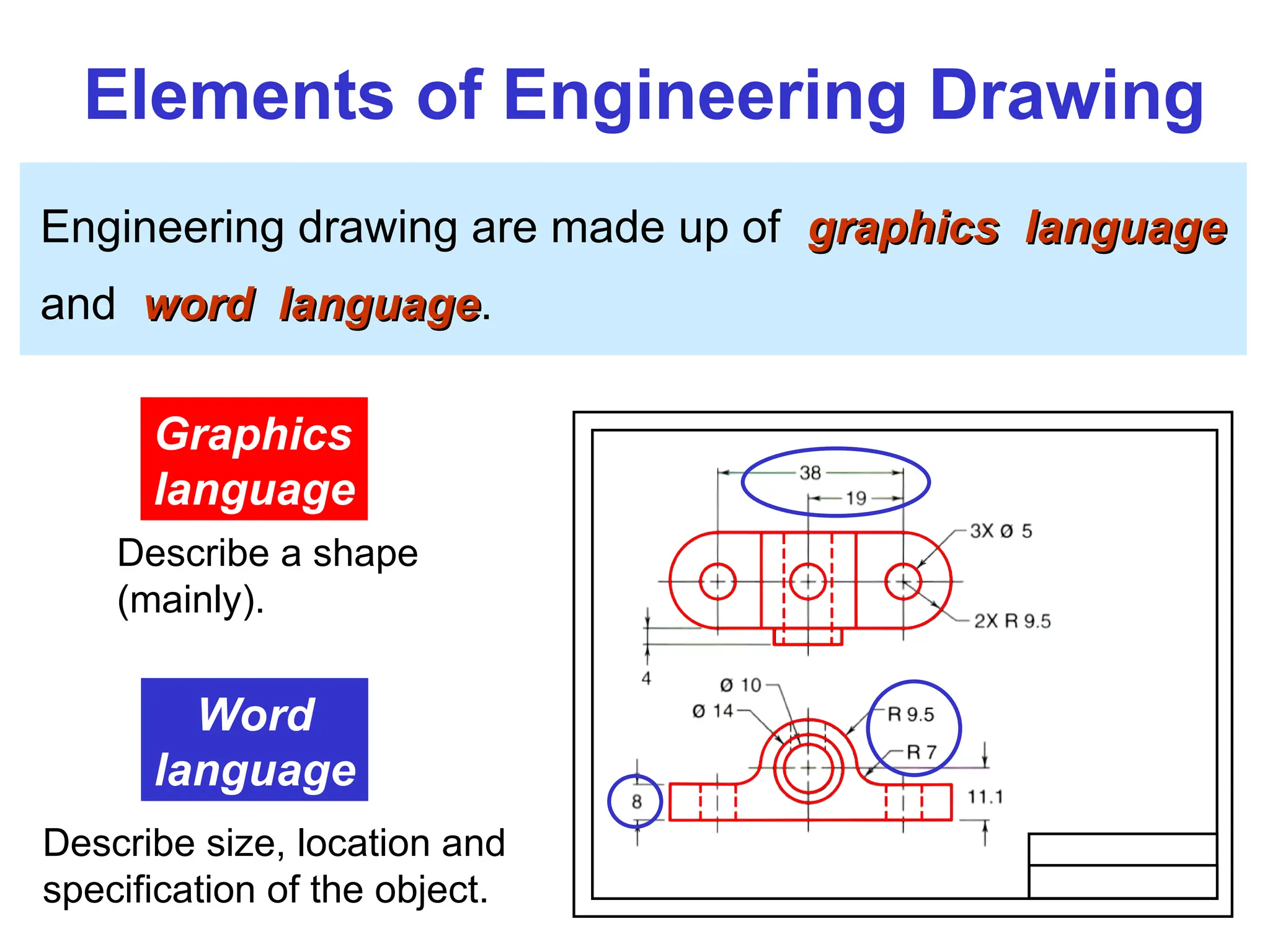
Elements of EngineeringDrawing
Engineering drawing are made up of graphics language
graphics language
and word language
word language.
Graphics
language
Describe a shape
(mainly).
Word
language
Describe size, location and
specification of the object.
11.
Basic Knowledge forDrafting
Graphics
language
Word
language
Line
types
Geometric
construction Lettering
Projection
method
PROJECTION THEORY
The projectiontheory is based on two variables:
1) Line of sight
2) Plane of projection (image plane or picture plane)
The projection theory is used to graphically represent
3-D objects on 2-D media (paper, computer screen).
15.
Line of sight
Lineof sight is an imaginary ray of light between an
observer’s eye and an object.
Line of sight
Parallel projection
Parallel projection
Line of sight
Perspective projection
Perspective projection
There are 2 types of LOS : parallel converge
and
16.
Plane of projection
Planeof projection is an imaginary flat plane which
the image is created.
The image is produced by connecting the points where
the LOS pierce the projection plane.
Parallel projection
Parallel projection Perspective projection
Perspective projection
Plane of projection Plane of projection
17.
Disadvantage of
Perspective Projection
Perspectiveprojection is not
not
used by engineer for manu-
facturing of parts, because
1) It is difficult to create.
2) It does not reveal exact
shape and size.
Width is distorted
5
Orthographic projection
Orthographic projectionis a parallel projection technique
in which the parallel lines of sight are perpendicular to the
projection plane
MEANING
Object views from top
Projection plane
1
2
3
4
5
1 2 3 4
20.
ORTHOGRAPHIC VIEW
Orthographic view
Orthographicview depends on relative position of the object
to the line of sight.
Two dimensions of an
object is shown.
Three dimensions of an object is shown.
Rotate
Tilt
More than one view is needed
to represent the object.
Multiview drawing
Multiview drawing
Axonometric drawing
Axonometric drawing
21.
Orthographic projection techniquecan produce either
1.
1. Multiview drawing
Multiview drawing
that each view show an object in two dimensions.
2.
2. Axonometric drawing
Axonometric drawing
that show all three dimensions of an object in one view.
Both drawing types are used in technical drawing for
communication.
NOTES
ORTHOGRAPHIC VIEW
22.
Axonometric (Isometric) Drawing
Easyto understand
Right angle becomes obtuse angle.
Circular hole
becomes ellipse.
Distortions of shape and size in isometric drawing
Advantage
Advantage
Disadvantage
Disadvantage Shape and angle distortion
Example
23.
Multiview Drawing
It representsaccurate shape and size.
Advantage
Advantage
Disadvantage
Disadvantage Require practice in writing and reading.
Multiviews drawing (2-view drawing)
Example
Introduction
Standards
Standards are setof rules that govern how technical
drawings are represented.
Drawing standards are used so that drawings convey
the same meaning to everyone who reads them.
26.
ISO International StandardsOrganization
Standard Code
ANSI American National Standard Institute
USA
JIS Japanese Industrial Standard
Japan
BS British Standard
UK
AS Australian Standard
Australia
Deutsches Institut für Normung
DIN
Germany
Country Code Full name
มอก.
สำนักงานมาตรฐานผลิตภัณฑ์อุตสาหกร
Thailand
27.
Partial List ofDrawing Standards
JIS Z 8311 Sizes and Format of Drawings
Sizes and Format of Drawings
JIS Z 8312 Line Conventions
Line Conventions
JIS Z 8313 Lettering
Lettering
JIS Z 8314 Scales
Scales
JIS Z 8315 Projection methods
JIS Z 8316 Presentation of Views and Sections
JIS Z 8317 Dimensioning
Code number Contents
28.
Drawing Sheet
Trimmed paperof
a size A0 ~ A4.
Standard sheet size
(JIS)
A4 210 x 297
A3 297 x 420
A2 420 x 594
A1 594 x 841
A0 841 x 1189
A4
A3
A2
A1
A0
(Dimensions in millimeters)
29.
Drawing space Drawing
space
Titleblock
d
d
c
c
c
Border
lines
1. Type X (A0~A4) 2. Type Y (A4 only)
Orientation of drawing sheet
Title block
Sheet size c (min) d (min)
A4 10 25
A3 10 25
A2 10 25
A1 20 25
A0 20 25
30.
DRN. BY DEPA.
IDNO DATE
CHD. BY SEC. DR. NO
TITLE Title or Full Name of the Drawing
Angle of Projection
SCALE 1:1 ALL DIEMENSION ARE IN mm
31.
Drawing Scales
Scale
Scale isthe ratio of the linear dimension of an element
of an object shown in the drawing to the real linear
dimension of the same element of the object.
Size in drawing Actual size
Length, size
:
32.
Drawing Scales
Designation ofa scale consists of the word “SCALE”
followed by the indication of its ratio, as follow
SCALE 1:1 for full size
SCALE X:1 for enlargement
enlargement scales (X > 1)
SCALE 1:X for reduction
reduction scales (X > 1)
Dimension numbers shown in the drawing are correspond
to “true size” of the object and they are independent of
the scale used in creating that drawing.
33.
Basic Line Types
Typesof Lines Appearance
Name according
to application
Continuous thick line Visible line
Continuous thin line Dimension line
Extension line
Leader line
Dash thick line Hidden line
Chain thin line Center line
NOTE : We will learn other types of line in later chapters.
34.
Visible lines
Visible linesrepresent features that can be seen in the
current view
Meaning of Lines
Hidden lines
Hidden lines represent features that can not be seen in
the current view
Center line
Center line represents symmetry, path of motion, centers
of circles, axis of axisymmetrical parts
Dimension and Extension lines
Dimension and Extension lines indicate the sizes and
location of features on a drawing