

Chapter 0
Introduction to Video Editing
By Naod Ephrem
Topics
 Video production
 Key Roles in Video Production
 Video editing
 Why should we conduct video editing?
 Types of video editing
 Production Styles
 Editing Techniques
 Video Editing Components
 Video editing workflow
 Video editing software
Introduction to Video Editing 2
Video production
• Is the process of creating video content from start to
finish.
• It involves several key stages, each crucial to
producing a high-quality video.
• the main phases involved in video production are:-
– Pre-Production
– Production
– Post-Production
– Distribution
Introduction to Video Editing 3
Pre-Production
Planning and Preparation:
 Concept Development
 Scriptwriting
 Budgeting
 Scheduling
 Casting
 Location Scouting
 Equipment and Crew
Introduction to Video Editing 4
Production
Filming and Recording:
 Setup
 Directing
 Cinematography
 Sound Recording
Introduction to Video Editing 5
Post-Production
Editing and Refining:
 Video Editing
 Sound Editing
 Color Correction and
Grading:
 Visual Effects (VFX)
 Final Review
Introduction to Video Editing 6
Distribution
Publishing and Sharing:
 Exporting
 Marketing
 Analytics
Introduction to Video Editing 7
Key Roles in Video Production
Director
– Oversees the creative vision and direction of the video.
Producer
– Manages the logistical aspects of the production, including
budgeting and scheduling.
Camera Operator
– Handles the camera and captures the footage.
Editor
– Assembles and refines the footage during post-production.
Sound Engineer:
– Manages audio recording and editing.
Production Designer:
– Creates and arranges the visual elements of the set and props.
Introduction to Video Editing 8
What is video editing?
• Technically this isn't video editing, it's film
editing.
• It was the first way to edit moving pictures.
• It forms the basis of all video editing.
Introduction to Video Editing 9
video editing cont’d…
• Video editing is about choosing,
coordinating, and repairing (cut, trim, etc)
shots. Then, the shots are combined and
edited (adding special effects, music, etc) to
build a narrative (story).
Introduction to Video Editing 10
Why should
we conduct
video
editing?
Introduction to Video Editing
11
To remove unwanted shots
To choose the best shots
To produce a flow/narrative
To add special effects, graphics, music, etc.
To come up with a better "style" and
"mood“
Tells a coherent story or communicates an
idea effectively.
Types of video editing
• Linear
• Non-linear
• Live Editing
Introduction to Video Editing 12
Types of video editing cont’d…
• Linear Editing
– A traditional method where footage is edited in a
sequential, linear fashion.
– Edits are made in a specific order, and changes are
applied directly to the sequence of clips..
– Each edit affects the subsequent content, so re-
editing often requires starting from the beginning
– inflexible and time-consuming
– Harder to rearrange or insert new material without
affecting the entire sequence.
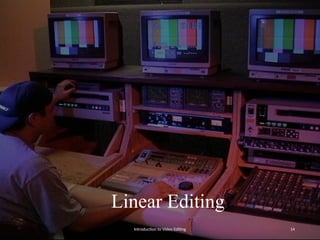
– Examples: Traditional tape-based editing systems
and early digital editing setups.
Introduction to Video Editing 13
Linear Editing
Introduction to Video Editing 14
Types of video editing cont’d…
• Non-Linear Editing (NLE)
– A modern approach that allows editors to access and
manipulate any part of the footage at any time without
affecting the rest of the sequence.
– This is made possible by digital technology.
– Clips can be rearranged, trimmed, or replaced freely.
– provides flexibility, as edits can be made without altering the
original footage or sequence.
– offers a more dynamic and efficient editing process
– Editors can quickly access any part of the project
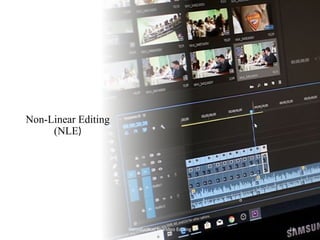
– Examples: Popular NLE software includes Adobe Premiere
Pro, Final Cut Pro, Avid Media Composer, and DaVinci
Resolve.
Introduction to Video Editing 15
Non-Linear Editing
(NLE)
Introduction to Video Editing 16
Types of video editing cont’d…
• Live Editing
– involves editing video content in real-time as it is being
recorded or broadcast.
– commonly used in live television production, streaming
events, and live performances.
– Editors or directors make decisions about which video feeds,
graphics, and audio to include in the final broadcast while the
event is happening.
– The editing process happens in real time, with minimal post-
production adjustments.
– It's essential for situations where timely delivery of content is
critical.
– Examples: Live television broadcasts, sports events, news
coverage, and live-streamed concerts.
Introduction to Video Editing 17
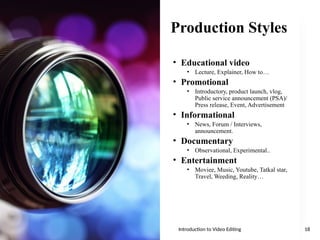
Production Styles
• Educational video
• Lecture, Explainer, How to…
• Promotional
• Introductory, product launch, vlog,
Public service announcement (PSA)/
Press release, Event, Advertisement
• Informational
• News, Forum / Interviews,
announcement.
• Documentary
• Observational, Experimental..
• Entertainment
• Moviee, Music, Youtube, Tatkal star,
Travel, Weeding, Reality…
Introduction to Video Editing 18
Editing Techniques
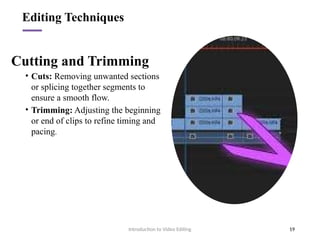
Cutting and Trimming
• Cuts: Removing unwanted sections
or splicing together segments to
ensure a smooth flow.
• Trimming: Adjusting the beginning
or end of clips to refine timing and
pacing.
Introduction to Video Editing 19
Editing Techniques
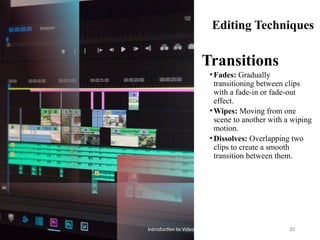
Transitions
•Fades: Gradually
transitioning between clips
with a fade-in or fade-out
effect.
•Wipes: Moving from one
scene to another with a wiping
motion.
•Dissolves: Overlapping two
clips to create a smooth
transition between them.
Introduction to Video Editing 20
Editing Techniques cont’d…
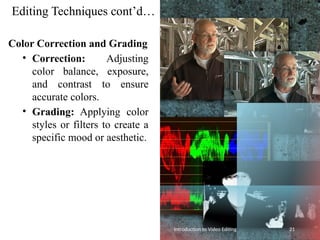
Color Correction and Grading
• Correction: Adjusting
color balance, exposure,
and contrast to ensure
accurate colors.
• Grading: Applying color
styles or filters to create a
specific mood or aesthetic.
Introduction to Video Editing 21
Editing Techniques
cont’d…
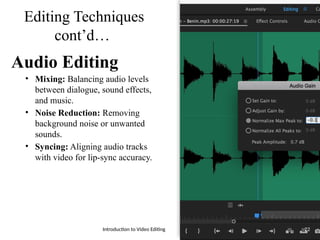
Audio Editing
• Mixing: Balancing audio levels
between dialogue, sound effects,
and music.
• Noise Reduction: Removing
background noise or unwanted
sounds.
• Syncing: Aligning audio tracks
with video for lip-sync accuracy.
Introduction to Video Editing 22
Editing Techniques cont’d…
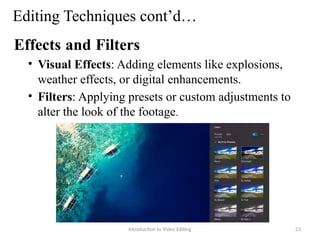
Effects and Filters
• Visual Effects: Adding elements like explosions,
weather effects, or digital enhancements.
• Filters: Applying presets or custom adjustments to
alter the look of the footage.
Introduction to Video Editing 23
Editing Techniques cont’d…
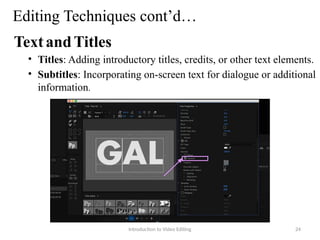
TextandTitles
• Titles: Adding introductory titles, credits, or other text elements.
• Subtitles: Incorporating on-screen text for dialogue or additional
information.
Introduction to Video Editing 24
Editing Techniques cont’d…
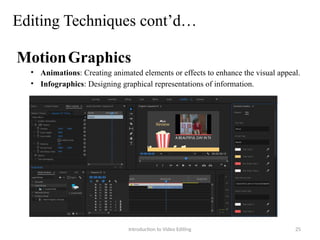
MotionGraphics
• Animations: Creating animated elements or effects to enhance the visual appeal.
• Infographics: Designing graphical representations of information.
Introduction to Video Editing 25
Editing Techniques cont’d…
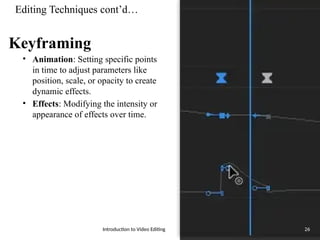
Keyframing
• Animation: Setting specific points
in time to adjust parameters like
position, scale, or opacity to create
dynamic effects.
• Effects: Modifying the intensity or
appearance of effects over time.
Introduction to Video Editing 26
Editing Techniques cont’d…
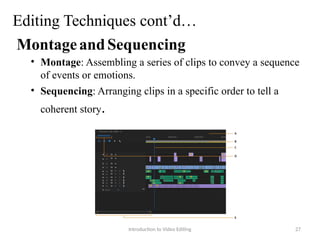
MontageandSequencing
• Montage: Assembling a series of clips to convey a sequence
of events or emotions.
• Sequencing: Arranging clips in a specific order to tell a
coherent story.
Introduction to Video Editing 27
Editing Techniques cont’d…
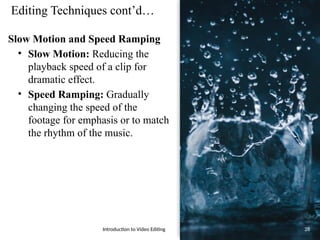
Slow Motion and Speed Ramping
• Slow Motion: Reducing the
playback speed of a clip for
dramatic effect.
• Speed Ramping: Gradually
changing the speed of the
footage for emphasis or to match
the rhythm of the music.
Introduction to Video Editing 28
Editing Techniques cont’d…
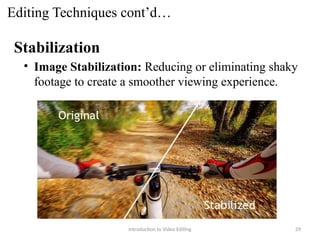
Stabilization
• Image Stabilization: Reducing or eliminating shaky
footage to create a smoother viewing experience.
Introduction to Video Editing 29
Editing Techniques cont’d…
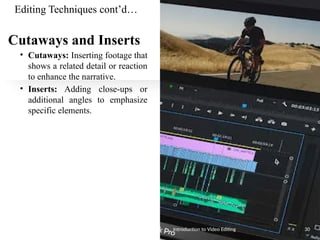
Cutaways and Inserts
• Cutaways: Inserting footage that
shows a related detail or reaction
to enhance the narrative.
• Inserts: Adding close-ups or
additional angles to emphasize
specific elements.
Introduction to Video Editing 30
Editing Techniques cont’d…
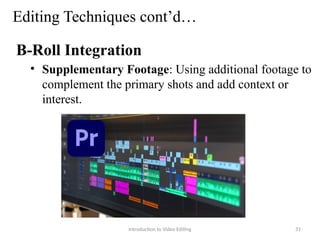
B-Roll Integration
• Supplementary Footage: Using additional footage to
complement the primary shots and add context or
interest.
Introduction to Video Editing 31
Editing Techniques cont’d…
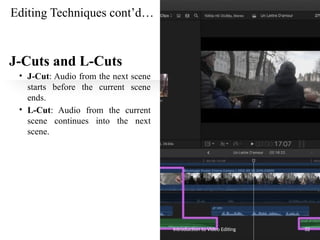
J-Cuts and L-Cuts
• J-Cut: Audio from the next scene
starts before the current scene
ends.
• L-Cut: Audio from the current
scene continues into the next
scene.
Introduction to Video Editing 32
Editing Techniques cont’d…
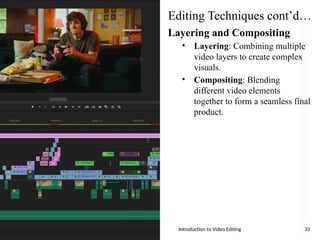
Layering and Compositing
• Layering: Combining multiple
video layers to create complex
visuals.
• Compositing: Blending
different video elements
together to form a seamless final
product.
Introduction to Video Editing 33
Video Editing
Components
Footage:
– Raw video files captured from cameras or
other recording devices.
Timeline:
– The interface where you arrange and edit
your clips. It usually includes tracks for
video, audio, and effects.
CutsandTransitions:
– Techniques used to move from one clip to
another, including straight cuts, fades, and
dissolves.
EffectsandFilters:
– Tools used to enhance or alter the
appearance of your footage, such as color
correction, slow motion, or special effects.
Audio:
– Background music, voiceovers, and sound
effects that complement the visual
elements. Introduction to Video Editing 34
Video editing workflow
Import Footage:
– Bring all your raw video files into your editing
software.
Arrange Clips on the Timeline:
– Place your footage in the correct order and
trim or cut as needed.
Apply Cuts and Transitions:
– Use cuts and transitions to ensure smooth
scene changes and maintain the flow of your
video.
Enhance with Effects and Filters:
– Apply visual effects and filters to improve the
appearance or style of your footage.
Edit and Sync Audio:
– Add and adjust background music, voiceovers,
and sound effects to complement your visuals.
Review and Refine:
– Play back your video to make any final
adjustments, Choose the appropriate format
and settings, and Sharing
Introduction to Video Editing 35
Video editing
software
• iMovie (Mac)
• Windows Movie Maker (PC)
• DaVinci Resolve
• Final Cut Pro (Mac)
• Adobe Premiere
• Adobe Final Cut
• Avid Media Composer
Introduction to Video Editing 36
Q & A
Introduction to Video Editing 37
Thank You!
Introduction to Video Editing 38

Chapter 0 Introduction to Video Editing.pptx

  • 1.
    Chapter 0 Introduction toVideo Editing By Naod Ephrem
  • 2.
    Topics  Video production Key Roles in Video Production  Video editing  Why should we conduct video editing?  Types of video editing  Production Styles  Editing Techniques  Video Editing Components  Video editing workflow  Video editing software Introduction to Video Editing 2
  • 3.
    Video production • Isthe process of creating video content from start to finish. • It involves several key stages, each crucial to producing a high-quality video. • the main phases involved in video production are:- – Pre-Production – Production – Post-Production – Distribution Introduction to Video Editing 3
  • 4.
    Pre-Production Planning and Preparation: Concept Development  Scriptwriting  Budgeting  Scheduling  Casting  Location Scouting  Equipment and Crew Introduction to Video Editing 4
  • 5.
    Production Filming and Recording: Setup  Directing  Cinematography  Sound Recording Introduction to Video Editing 5
  • 6.
    Post-Production Editing and Refining: Video Editing  Sound Editing  Color Correction and Grading:  Visual Effects (VFX)  Final Review Introduction to Video Editing 6
  • 7.
    Distribution Publishing and Sharing: Exporting  Marketing  Analytics Introduction to Video Editing 7
  • 8.
    Key Roles inVideo Production Director – Oversees the creative vision and direction of the video. Producer – Manages the logistical aspects of the production, including budgeting and scheduling. Camera Operator – Handles the camera and captures the footage. Editor – Assembles and refines the footage during post-production. Sound Engineer: – Manages audio recording and editing. Production Designer: – Creates and arranges the visual elements of the set and props. Introduction to Video Editing 8
  • 9.
    What is videoediting? • Technically this isn't video editing, it's film editing. • It was the first way to edit moving pictures. • It forms the basis of all video editing. Introduction to Video Editing 9
  • 10.
    video editing cont’d… •Video editing is about choosing, coordinating, and repairing (cut, trim, etc) shots. Then, the shots are combined and edited (adding special effects, music, etc) to build a narrative (story). Introduction to Video Editing 10
  • 11.
    Why should we conduct video editing? Introductionto Video Editing 11 To remove unwanted shots To choose the best shots To produce a flow/narrative To add special effects, graphics, music, etc. To come up with a better "style" and "mood“ Tells a coherent story or communicates an idea effectively.
  • 12.
    Types of videoediting • Linear • Non-linear • Live Editing Introduction to Video Editing 12
  • 13.
    Types of videoediting cont’d… • Linear Editing – A traditional method where footage is edited in a sequential, linear fashion. – Edits are made in a specific order, and changes are applied directly to the sequence of clips.. – Each edit affects the subsequent content, so re- editing often requires starting from the beginning – inflexible and time-consuming – Harder to rearrange or insert new material without affecting the entire sequence. – Examples: Traditional tape-based editing systems and early digital editing setups. Introduction to Video Editing 13
  • 14.
  • 15.
    Types of videoediting cont’d… • Non-Linear Editing (NLE) – A modern approach that allows editors to access and manipulate any part of the footage at any time without affecting the rest of the sequence. – This is made possible by digital technology. – Clips can be rearranged, trimmed, or replaced freely. – provides flexibility, as edits can be made without altering the original footage or sequence. – offers a more dynamic and efficient editing process – Editors can quickly access any part of the project – Examples: Popular NLE software includes Adobe Premiere Pro, Final Cut Pro, Avid Media Composer, and DaVinci Resolve. Introduction to Video Editing 15
  • 16.
  • 17.
    Types of videoediting cont’d… • Live Editing – involves editing video content in real-time as it is being recorded or broadcast. – commonly used in live television production, streaming events, and live performances. – Editors or directors make decisions about which video feeds, graphics, and audio to include in the final broadcast while the event is happening. – The editing process happens in real time, with minimal post- production adjustments. – It's essential for situations where timely delivery of content is critical. – Examples: Live television broadcasts, sports events, news coverage, and live-streamed concerts. Introduction to Video Editing 17
  • 18.
    Production Styles • Educationalvideo • Lecture, Explainer, How to… • Promotional • Introductory, product launch, vlog, Public service announcement (PSA)/ Press release, Event, Advertisement • Informational • News, Forum / Interviews, announcement. • Documentary • Observational, Experimental.. • Entertainment • Moviee, Music, Youtube, Tatkal star, Travel, Weeding, Reality… Introduction to Video Editing 18
  • 19.
    Editing Techniques Cutting andTrimming • Cuts: Removing unwanted sections or splicing together segments to ensure a smooth flow. • Trimming: Adjusting the beginning or end of clips to refine timing and pacing. Introduction to Video Editing 19
  • 20.
    Editing Techniques Transitions •Fades: Gradually transitioningbetween clips with a fade-in or fade-out effect. •Wipes: Moving from one scene to another with a wiping motion. •Dissolves: Overlapping two clips to create a smooth transition between them. Introduction to Video Editing 20
  • 21.
    Editing Techniques cont’d… ColorCorrection and Grading • Correction: Adjusting color balance, exposure, and contrast to ensure accurate colors. • Grading: Applying color styles or filters to create a specific mood or aesthetic. Introduction to Video Editing 21
  • 22.
    Editing Techniques cont’d… Audio Editing •Mixing: Balancing audio levels between dialogue, sound effects, and music. • Noise Reduction: Removing background noise or unwanted sounds. • Syncing: Aligning audio tracks with video for lip-sync accuracy. Introduction to Video Editing 22
  • 23.
    Editing Techniques cont’d… Effectsand Filters • Visual Effects: Adding elements like explosions, weather effects, or digital enhancements. • Filters: Applying presets or custom adjustments to alter the look of the footage. Introduction to Video Editing 23
  • 24.
    Editing Techniques cont’d… TextandTitles •Titles: Adding introductory titles, credits, or other text elements. • Subtitles: Incorporating on-screen text for dialogue or additional information. Introduction to Video Editing 24
  • 25.
    Editing Techniques cont’d… MotionGraphics •Animations: Creating animated elements or effects to enhance the visual appeal. • Infographics: Designing graphical representations of information. Introduction to Video Editing 25
  • 26.
    Editing Techniques cont’d… Keyframing •Animation: Setting specific points in time to adjust parameters like position, scale, or opacity to create dynamic effects. • Effects: Modifying the intensity or appearance of effects over time. Introduction to Video Editing 26
  • 27.
    Editing Techniques cont’d… MontageandSequencing •Montage: Assembling a series of clips to convey a sequence of events or emotions. • Sequencing: Arranging clips in a specific order to tell a coherent story. Introduction to Video Editing 27
  • 28.
    Editing Techniques cont’d… SlowMotion and Speed Ramping • Slow Motion: Reducing the playback speed of a clip for dramatic effect. • Speed Ramping: Gradually changing the speed of the footage for emphasis or to match the rhythm of the music. Introduction to Video Editing 28
  • 29.
    Editing Techniques cont’d… Stabilization •Image Stabilization: Reducing or eliminating shaky footage to create a smoother viewing experience. Introduction to Video Editing 29
  • 30.
    Editing Techniques cont’d… Cutawaysand Inserts • Cutaways: Inserting footage that shows a related detail or reaction to enhance the narrative. • Inserts: Adding close-ups or additional angles to emphasize specific elements. Introduction to Video Editing 30
  • 31.
    Editing Techniques cont’d… B-RollIntegration • Supplementary Footage: Using additional footage to complement the primary shots and add context or interest. Introduction to Video Editing 31
  • 32.
    Editing Techniques cont’d… J-Cutsand L-Cuts • J-Cut: Audio from the next scene starts before the current scene ends. • L-Cut: Audio from the current scene continues into the next scene. Introduction to Video Editing 32
  • 33.
    Editing Techniques cont’d… Layeringand Compositing • Layering: Combining multiple video layers to create complex visuals. • Compositing: Blending different video elements together to form a seamless final product. Introduction to Video Editing 33
  • 34.
    Video Editing Components Footage: – Rawvideo files captured from cameras or other recording devices. Timeline: – The interface where you arrange and edit your clips. It usually includes tracks for video, audio, and effects. CutsandTransitions: – Techniques used to move from one clip to another, including straight cuts, fades, and dissolves. EffectsandFilters: – Tools used to enhance or alter the appearance of your footage, such as color correction, slow motion, or special effects. Audio: – Background music, voiceovers, and sound effects that complement the visual elements. Introduction to Video Editing 34
  • 35.
    Video editing workflow ImportFootage: – Bring all your raw video files into your editing software. Arrange Clips on the Timeline: – Place your footage in the correct order and trim or cut as needed. Apply Cuts and Transitions: – Use cuts and transitions to ensure smooth scene changes and maintain the flow of your video. Enhance with Effects and Filters: – Apply visual effects and filters to improve the appearance or style of your footage. Edit and Sync Audio: – Add and adjust background music, voiceovers, and sound effects to complement your visuals. Review and Refine: – Play back your video to make any final adjustments, Choose the appropriate format and settings, and Sharing Introduction to Video Editing 35
  • 36.
    Video editing software • iMovie(Mac) • Windows Movie Maker (PC) • DaVinci Resolve • Final Cut Pro (Mac) • Adobe Premiere • Adobe Final Cut • Avid Media Composer Introduction to Video Editing 36
  • 37.
    Q & A Introductionto Video Editing 37
  • 38.

Editor's Notes

  • #3 1. Pre-Production Planning and Preparation: Concept Development: Defining the video's purpose, message, and target audience. Scriptwriting: Creating a detailed script or storyboard to outline the narrative, dialogue, and visual elements. Budgeting: Estimating and managing the costs associated with the production. Scheduling: Organizing the timeline for each phase of production, including shooting dates and post-production deadlines. Casting: Selecting actors, presenters, or other on-screen talent. Location Scouting: Choosing and securing locations where the video will be filmed. Equipment and Crew: Assembling the necessary gear (cameras, lighting, sound) and hiring a crew (director, camera operators, etc.). 2. Production Filming and Recording: Setup: Arranging the set, setting up equipment, and preparing for the shoot. Directing: Guiding the actors and crew to achieve the desired performance and visual style. Cinematography: Capturing the video footage using various camera techniques and angles. Sound Recording: Capturing dialogue, sound effects, and ambient noise. 3. Post-Production Editing and Refining: Video Editing: Cutting and assembling the footage into a cohesive sequence, adding transitions, and ensuring continuity. Sound Editing: Enhancing audio by adding music, sound effects, and adjusting levels. Color Correction and Grading: Adjusting the color and tone of the footage to enhance the visual appeal. Visual Effects (VFX): Adding special effects or graphics if needed. Final Review: Reviewing the edited video for quality and making any necessary adjustments. 4. Distribution Publishing and Sharing: Exporting: Rendering the final video in the appropriate format and resolution for its intended platform (e.g., YouTube, social media, TV). Marketing: Promoting the video to reach the target audience, which may include creating trailers, social media posts, or press releases. Analyti
  • #5 Concept Development: Defining the video's purpose, message, and target audience. Scriptwriting: Creating a detailed script or storyboard to outline the narrative, dialogue, and visual elements. Budgeting: Estimating and managing the costs associated with the production. Scheduling: Organizing the timeline for each phase of production, including shooting dates and post-production deadlines. Casting: Selecting actors, presenters, or other on-screen talent. Location Scouting: Choosing and securing locations where the video will be filmed. Equipment and Crew: Assembling the necessary gear (cameras, lighting, sound) and hiring a crew (director, camera operators, etc.).
  • #6 Concept Development: Defining the video's purpose, message, and target audience. Scriptwriting: Creating a detailed script or storyboard to outline the narrative, dialogue, and visual elements. Budgeting: Estimating and managing the costs associated with the production. Scheduling: Organizing the timeline for each phase of production, including shooting dates and post-production deadlines. Casting: Selecting actors, presenters, or other on-screen talent. Location Scouting: Choosing and securing locations where the video will be filmed. Equipment and Crew: Assembling the necessary gear (cameras, lighting, sound) and hiring a crew (director, camera operators, etc.).
  • #7 Concept Development: Defining the video's purpose, message, and target audience. Scriptwriting: Creating a detailed script or storyboard to outline the narrative, dialogue, and visual elements. Budgeting: Estimating and managing the costs associated with the production. Scheduling: Organizing the timeline for each phase of production, including shooting dates and post-production deadlines. Casting: Selecting actors, presenters, or other on-screen talent. Location Scouting: Choosing and securing locations where the video will be filmed. Equipment and Crew: Assembling the necessary gear (cameras, lighting, sound) and hiring a crew (director, camera operators, etc.).
  • #18 Educational Video: Aimed at teaching or informing viewers about a specific subject. Examples include tutorials, lectures, and how-to guides. Commercial / Advertisement: Designed to promote a product, service, or brand. These often include catchy visuals and messages to drive consumer interest and sales. Corporate Video: Used by businesses to communicate internally or externally. This could include company profiles, training videos, or updates to stakeholders. Documentary: Focuses on real-life events, people, or issues. Documentaries aim to inform and engage viewers with factual content and often include interviews and research. Forum / Interviews: Feature discussions, Q&A sessions, or conversations with experts or notable individuals. These videos often delve into specific topics or current events. Instructional Video: Provides step-by-step guidance on performing tasks or understanding concepts. Common in training and educational contexts, they often include demonstrations and explanations. Music Video: Accompanies a music track and visually interprets the song. Music videos can vary from narrative storytelling to abstract visuals and choreography. Public Service Announcement (PSA): Intended to inform or educate the public on important issues or behaviors. PSAs often address health, safety, or social issues and aim to drive positive change.
  • #35  Footage: Raw video files captured from cameras or other recording devices. Timeline: The interface where you arrange and edit your clips. It usually includes tracks for video, audio, and effects. Cuts and Transitions: Techniques used to move from one clip to another, including straight cuts, fades, and dissolves. Effects and Filters: Tools used to enhance or alter the appearance of your footage, such as color correction, slow motion, or special effects. Audio: Background music, voiceovers, and sound effects that complement the visual elements.